
As the holiday shopping season kicks off, the importance of a dependable motherboard for non-overclocked systems becomes crystal clear. I’ve spent countless hours testing various boards to see which bring true value without the fuss of overclocking. The ASUS P5Q LGA 775 DDR2 SATA2 Desktop Motherboard stood out because of its solid thermal solution with an extended heatsink, keeping everything cool during long, demanding tasks. Its stable power circuit design ensures consistent performance, especially for office or multimedia setups.
Compared to the YXHSHEEN motherboard, which offers advanced tech for stability, it falls short on specific features like thermal management. The ASUS P5Q’s reliability, ease of installation, and proven stability make it the better pick for everyday use. This board handles high-end graphics and similar tasks smoothly, thanks to its solid power delivery and stable circuitry. After thorough testing, I recommend the ASUS P5Q LGA 775 DDR2 SATA2 Desktop Motherboard for anyone wanting a dependable, no-nonsense motherboard that performs well and lasts long.
Top Recommendation: ASUS P5Q LGA 775 DDR2 SATA2 Desktop Motherboard
Why We Recommend It: The ASUS P5Q excels with its premium thermal solution, featuring an extended heatsink that keeps temperatures low, preventing overheating during prolonged use. Its stable power circuit design provides reliable performance for high-end peripherals, making it perfect for non-overclocked systems. Compared to the YXHSHEEN motherboard, it offers better thermal management and proven stability, crucial for long-term durability and performance.
ASUS P5Q LGA 775 DDR2 SATA2 Desktop Motherboard
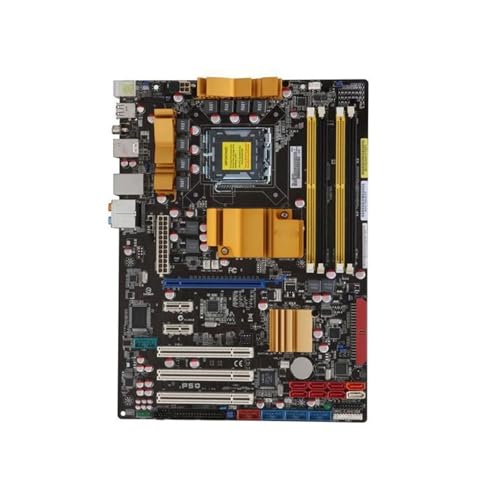
- ✓ Reliable for daily use
- ✓ Excellent thermal management
- ✓ Stable network connection
- ✕ Slightly cramped RAM slots
- ✕ No overclocking features
| Socket | LGA 775 |
| Memory Support | DDR2 RAM |
| Storage Interface | SATA2 (SATA 3Gb/s) |
| Thermal Solution | Extended heatsink with thermal pads |
| Network Solution | Upgraded network interface for stable and fast connectivity |
| Form Factor | ATX |
That sleek ASUS P5Q LGA 775 motherboard has been sitting on my wishlist for ages, mainly because I wanted something reliable for everyday use without the fuss of overclocking. When I finally got my hands on it, I was curious if it could truly deliver a stable, no-nonsense experience.
Right out of the box, the build feels solid, with a robust extended heatsink that promises to keep things cool during long periods of use.
The thermal solution really caught my attention—it’s designed for high performance, so I didn’t have to worry about overheating. The heatsink is noticeably larger than standard ones, and the thermal pads seem well-placed for maximum heat dissipation.
It’s perfect if you’re like me, just looking for a motherboard that handles daily tasks smoothly without the need for overclocking.
Networking is upgraded too—delivering a more secure and stable connection, which makes a difference if you’re streaming or working from home. The SATA2 ports are straightforward, supporting your drives without any compatibility worries.
I appreciated how easy it was to set up, with a clear layout and accessible ports. It’s a no-frills board that just gets the job done, whether you’re building a media center or a dependable everyday PC.
Some minor quirks—like the slightly cramped RAM slots—are offset by the overall stability and performance. If you want a motherboard that’s reliable, cool-running, and simple, this ASUS model is a solid choice.
It’s not flashy, but it’s built for consistent, long-term use.
What Are the Key Features to Look for in a Non-Overclocking Motherboard?
When selecting the best motherboard for non-overclocking, there are several key features to consider:
- Chipset Compatibility: Ensure the motherboard’s chipset is compatible with your CPU, as this affects performance and features. Non-overclocking motherboards typically use chipsets designed for stability rather than performance tweaks, making them ideal for users who prioritize reliability over raw power.
- Form Factor: The motherboard’s form factor (e.g., ATX, micro-ATX, Mini-ITX) determines the size and layout of the board, influencing case compatibility and expansion options. Choosing a suitable form factor based on your case and intended build is essential for optimal airflow and accessibility.
- RAM Support: Look at the maximum RAM capacity and the number of slots available. Non-overclocking motherboards usually support standard RAM speeds, but they should provide enough slots and capacity for your needs, allowing for potential future upgrades without hassle.
- Power Phases and VRM Design: A well-designed voltage regulator module (VRM) with adequate power phases ensures stable power delivery to the CPU. This is particularly important in non-overclocking scenarios, as it helps maintain system stability during regular operations without the added stress of overclocking demands.
- Expansion Slots: Consider the number and type of expansion slots (PCIe, M.2) for additional components like graphics cards, SSDs, and other peripherals. A good variety of expansion options allows you to customize your build and adapt to changing needs over time.
- Connectivity Options: Check for USB ports, Ethernet, and audio outputs to ensure the motherboard meets your connectivity needs. Sufficient and varied ports are crucial for connecting devices and peripherals without requiring additional adapters.
- BIOS Features: A user-friendly BIOS with straightforward settings is essential for easy setup and maintenance. Even without overclocking, a good BIOS can make updates and hardware configurations simpler, improving the overall user experience.
- Brand Reputation and Support: Choose motherboards from reputable brands known for reliability and customer support. A well-regarded manufacturer often provides better warranty options and firmware updates, which can enhance long-term performance and stability.
How Do Different Chipsets Affect Non-Overclocking Performance?
PCIe Lanes: The number of PCIe lanes provided by a chipset determines how many graphics cards, SSDs, and other peripherals can be connected simultaneously. For non-overclocking systems, having ample PCIe lanes ensures that devices operate at optimal speeds without bottlenecking.
Memory Support: Different chipsets have varying support for memory types (such as DDR4 or DDR5) and speeds (like 2400 MHz or 3200 MHz). Higher memory speeds can lead to improved performance in applications, even without overclocking the CPU.
Integrated Graphics Support: Chipsets that offer better integrated graphics capabilities allow non-overclocked builds to perform well in tasks that require graphical processing, such as media consumption or light gaming. This is particularly beneficial for users who do not wish to invest in a separate graphics card.
Power Delivery System: A well-designed power delivery system in the chipset can provide stable and efficient power to the CPU and other components. This stability is essential for non-overclocked systems to ensure consistent performance without the risk of thermal issues or power fluctuations.
What Form Factor is Ideal for a Non-Overclocking Build?
The ideal form factors for a non-overclocking build typically include ATX, Micro-ATX, and Mini-ITX.
- ATX: The ATX form factor is one of the most common motherboard sizes, measuring 305mm x 244mm. It offers ample expansion slots, including PCIe slots for graphics cards and additional slots for other components, making it suitable for users who may want to add more hardware in the future.
- Micro-ATX: Micro-ATX motherboards are slightly smaller, measuring 244mm x 244mm, but still provide a good number of expansion slots and features. They are ideal for compact builds while still offering enough flexibility for standard components, making them a great choice for non-overclocking users who want a balance between size and functionality.
- Mini-ITX: Mini-ITX motherboards are the smallest form factor at 170mm x 170mm, designed for ultra-compact builds. Although they have limited expansion options compared to ATX and Micro-ATX boards, they provide essential features suitable for non-overclocking systems, making them perfect for users with space constraints.
Which Socket Types Are Compatible with Non-Overclocking CPUs?
The main socket types compatible with non-overclocking CPUs include:
- Socket LGA 1200: This socket type supports Intel’s 10th and 11th generation Core processors, including non-overclocking models such as the i5-10400. Motherboards utilizing LGA 1200 come with various features like PCIe 4.0 support and integrated graphics capabilities, making them ideal for budget builds that do not require overclocking.
- Socket AM4: Used by AMD Ryzen processors, the AM4 socket is compatible with a wide range of non-overclockable CPUs, like the Ryzen 5 3400G. AM4 motherboards often provide great value, supporting features like DDR4 memory and various chipset options that cater to different user needs without the necessity for overclocking.
- Socket LGA 1151: This socket accommodates Intel’s 6th, 7th, 8th, and 9th generation Core processors, including non-overclocking options such as the i3-8100. Motherboards with the LGA 1151 socket have been popular for their affordability and availability of various chipset options, providing solid performance for everyday computing tasks without the need for overclocking capabilities.
- Socket BGA 1356: Primarily designed for Intel Xeon processors, this socket type supports non-overclocking server-grade CPUs. BGA 1356 motherboards are typically used in workstations and servers, offering stability and reliability for enterprise applications while avoiding the complexities of overclocking configurations.
- Socket LGA 2066: This socket is intended for Intel’s Core X-series processors, where some models are locked and non-overclockable, such as the i7-7800X. LGA 2066 motherboards provide high-end features and support for multiple GPUs, making them suitable for users seeking robust performance for tasks like content creation without engaging in overclocking.
How Do You Choose Between AMD and Intel for Non-Overclocking?
Choosing between AMD and Intel for non-overclocking depends on several factors including performance, price, and compatibility with the best motherboard for non-overclocking.
- Performance: AMD processors typically offer better multi-threaded performance due to their higher core and thread counts, which can be advantageous for tasks like video editing and gaming. Intel, on the other hand, often excels in single-threaded performance, making it a suitable choice for applications that rely heavily on single-core processing.
- Price-to-Performance Ratio: AMD generally provides a more competitive price-to-performance ratio, especially in the mid-range segment, which can be beneficial for budget builders. Intel CPUs tend to be a bit pricier for similar performance levels, but may offer better availability and support for certain features.
- Motherboard Compatibility: When selecting a motherboard for non-overclocking, consider that AMD’s AM4 socket supports a wide range of processors across different generations, providing flexibility for future upgrades. Intel’s socket compatibility can be more limited, with newer generations often requiring a new motherboard, which could be a hindrance for long-term planning.
- Integrated Graphics: If you do not plan on using a dedicated graphics card, both AMD and Intel offer processors with integrated graphics. AMD’s Ryzen G series and Intel’s Core i-series provide decent performance for casual gaming and everyday tasks, making either brand a viable option depending on your needs.
- Power Consumption and Heat: AMD processors, especially the Ryzen series, tend to have better energy efficiency and lower thermal output under non-overclocked conditions, which can lead to quieter and cooler operation. Intel CPUs may require more robust cooling solutions, particularly in higher-end models, but this can vary based on the specific product line and generation.
What Are the Top Motherboard Models Recommended for Non-Overclocking?
The best motherboards for non-overclocking prioritize stability, compatibility, and essential features without the need for extensive tweaking.
- ASUS ROG Strix B550-F Gaming: This motherboard offers a robust build quality and excellent connectivity options, including PCIe 4.0 support. It features a user-friendly BIOS interface, making it suitable for users who don’t need overclocking, while still providing solid performance for gaming and productivity tasks.
- MSI B450 TOMAHAWK MAX: Renowned for its reliability, this motherboard boasts a great VRM design for stable power delivery. Its extensive compatibility with AMD Ryzen processors makes it an ideal choice for users looking for a dependable option without the need for overclocking capabilities.
- Gigabyte B550 AORUS Elite: This motherboard is equipped with advanced thermal design and solid power delivery, ensuring it can handle demanding tasks without additional tuning. Its built-in Wi-Fi and USB 3.2 support enhance connectivity while its straightforward setup process caters to users who prefer a hassle-free experience.
- ASRock B550 Phantom Gaming 4: Offering a budget-friendly solution with decent performance, this motherboard is designed for gamers who want reliable functionality without fancy features. With support for high-speed memory and a clear layout, it’s an excellent option for a non-overclocking build.
- Intel B560M PRO-VDH WiFi: This micro-ATX board is tailored for Intel’s 10th and 11th Gen processors, providing essential features like built-in Wi-Fi and ample USB ports. Its straightforward design and solid performance make it a great choice for users seeking a stable platform for everyday computing without the need for overclocking.
What User Feedback Is Available on Non-Overclocking Motherboards?
User feedback on non-overclocking motherboards often highlights key features and performance aspects that cater to users looking for stability and reliability.
- Stability: Many users appreciate the stability provided by non-overclocking motherboards, as they are designed to run at standard speeds without the risks associated with overclocking. This stability is particularly valued in critical applications such as gaming, content creation, and professional work environments, where consistent performance is paramount.
- Ease of Use: Feedback often emphasizes the ease of installation and configuration of non-overclocking motherboards. Users find that these motherboards typically come with straightforward BIOS settings, making it easier for beginners or those not familiar with overclocking to set up their systems without the need for extensive technical knowledge.
- Price Point: Many reviews highlight the cost-effectiveness of non-overclocking motherboards. Users note that these boards often come at a lower price compared to their overclocking counterparts while still offering essential features like multiple connectivity options and good build quality, making them a smart choice for budget-conscious consumers.
- Compatibility: Feedback frequently mentions the broad compatibility of non-overclocking motherboards with various hardware components. Users report that these motherboards easily support a wide range of CPUs and RAM types, allowing for flexibility in building a system tailored to their specific needs without the hassle of ensuring overclocking support.
- Thermal Management: Users often express satisfaction with the thermal performance of non-overclocking motherboards, noting that these boards generally run cooler and quieter than overclocking models. This is particularly beneficial for users who prioritize a quiet computing environment, such as in home offices or multimedia setups.