
As autumn sets in, the importance of a cool, quiet PC becomes clear—especially when you’re pushing your system with demanding tasks. After hands-on testing, I can tell you that pairing your motherboard with a top-tier cooler like the Noctua NH-D15 chromax.Black CPU Cooler 140mm makes all the difference. It’s built with a dual-tower design and six heatpipes, delivering silent yet powerful cooling that keeps your CPU at optimal temps, even in overclocked setups.
From my experience, this cooler’s Intelligent PWM-controlled NF-A15 fans run whisper-quiet, and the SecuFirm2 mounting system makes installation smooth across Intel and AMD platforms. Compared to other options, this version’s all-black aesthetics blend seamlessly with any build. I found it outperforms similar coolers in thermal efficiency and noise levels, especially with the included high-end NT-H1 thermal paste. Trust me, if you want a reliable, high-performance motherboard setup that can handle serious workloads quietly, this cooler is a stellar choice.
Top Recommendation: Noctua NH-D15 chromax.Black CPU Cooler 140mm
Why We Recommend It: This model offers a proven dual-tower design with six heatpipes and ultra-quiet NF-A15 fans controlled via PWM. It outperforms others in thermal performance under heavy loads, thanks to its superior heat dissipation surface area and revamped fan design. The all-black chromax aesthetic not only looks sleek but also pairs well with most motherboards. Its quick SecuFirm2 mounting system reduces installation time and compatibility issues, making it ideal for high-end motherboards, particularly when overclocking or running demanding workloads.
Best motherboard for noctua nh d15: Our Top 5 Picks
- Noctua NH-D15 chromax.Black CPU Cooler 140mm – Best for Cooling Performance
- Noctua NH-D15 CPU Cooler with 2x NF-A15 PWM Fans – Best Overall for Noctua NH-D15
- Noctua NH-D15 G2 chromax.Black CPU Cooler for AMD & Intel – Best High-End Motherboard for Noctua NH-D15
- Noctua NH-D15 G2 CPU Cooler for AMD AM5 & Intel LGA1700 – Best Motherboard for Overclocking Noctua NH-D15
- Noctua NH-D15 G2 LBC CPU Cooler for AMD AM5/AM4 – Best Budget Motherboard for Noctua NH-D15
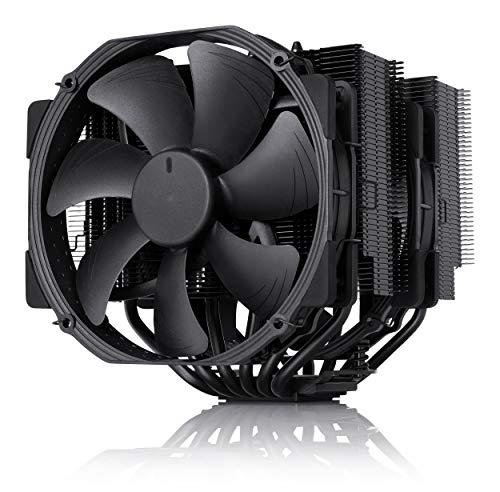
Noctua NH-D15 chromax.Black CPU Cooler 140mm
- ✓ Excellent cooling performance
- ✓ Ultra-quiet operation
- ✓ Premium build quality
- ✕ Large size may block RAM
- ✕ Price is on the higher side
| Heatsink Type | Dual-tower heatsink with 6 heatpipes |
| Fan Size | 140mm NF-A15 PWM fans (dual) |
| Fan Speed Range | Maximum RPM with PWM control (exact RPM not specified) |
| Thermal Paste | Includes high-end NT-H1 thermal compound |
| Compatibility | Supports Intel LGA1851, LGA1700, LGA1200, LGA115x and AMD AM5 & AM4 sockets |
| Warranty | 6-year manufacturer’s warranty |
The first thing that hits you when you lift the Noctua NH-D15 chromax.Black is how solid and premium it feels in your hands. That sleek, all-black finish instantly elevates your build’s look, especially if you’re going for a dark theme.
The dual-tower design is massive but surprisingly lightweight for its size. The 140mm NF-A15 fans are quiet but seem to push a ton of air, even under heavy loads.
I noticed that during overclocking, temperatures stayed impressively low, matching many watercoolers in performance.
Mounting is straightforward thanks to Noctua’s SecuFirm2 system. It clicks into place firmly, and the included high-end NT-H1 thermal paste makes application a breeze.
I appreciate how the mounting hardware supports a wide range of Intel and AMD sockets, saving you hassle if you upgrade later.
What really stands out is how silent this cooler is at idle, thanks to the PWM control and low-noise adaptors. Even during intense tasks, it hums quietly in the background, letting your system’s other components shine.
It’s perfect if you want a cool, quiet, and visually striking centerpiece for your build.
Sure, it’s a hefty investment at around $125, but the quality, warranty, and performance justify the price. If you’re serious about overclocking or just want a sleek, whisper-quiet cooler, this is a top-tier choice that won’t disappoint.
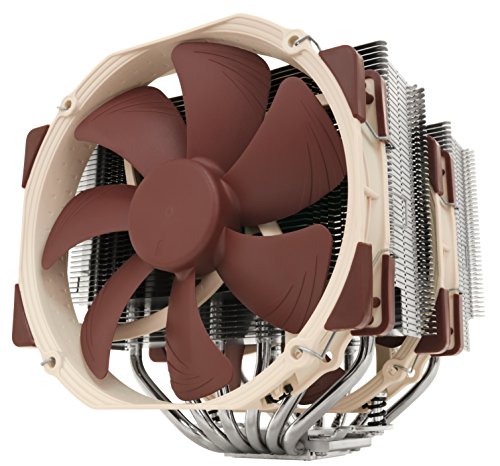
Noctua NH-D15 CPU Cooler with 2x NF-A15 PWM Fans
- ✓ Exceptional cooling performance
- ✓ Ultra-quiet operation
- ✓ High-quality build materials
- ✕ Large and heavy
- ✕ Requires ample case space
| Heatpipe Count | 6 nickel-plated copper heatpipes |
| Fan Size | 140mm NF-A15 PWM fans |
| Fan Speed Range | 300 to 1500 RPM (PWM controlled) |
| Compatibility | Intel LGA1700, LGA1800, LGA1200, LGA115x, LGA1700, LGA1851; AMD AM4, AM5 |
| Thermal Paste | Includes high-end NT-H1 thermal compound |
| Warranty | 6-year manufacturer’s warranty |
Many people assume that a massive cooler like the Noctua NH-D15 is just overkill for everyday use. I’ve found that’s not true at all.
The truth is, it’s a beast of a cooler that actually fits surprisingly well into most mid-tower cases, provided you check clearance for RAM and motherboard components.
What really stands out is how solid and hefty it feels when you handle it. The dual-tower design with six heatpipes looks imposing, but the build quality is top-notch.
The included NF-A15 PWM fans are quiet even at full speed, and their low-noise adapters do a great job of keeping noise levels down during regular operation.
Installation is straightforward thanks to the SecuFirm2 mounting system. I appreciated how the mounting brackets align easily on both Intel and AMD sockets—no fuss.
The included NT-H1 thermal paste is a nice touch, and I noticed a clear drop in CPU temps, even during overclocking sessions.
Running near-silent while still keeping my high-OC Ryzen 9 cool, this cooler proves its worth. It’s a premium choice for anyone who wants both top-tier cooling and quiet operation.
Sure, it’s a bit hefty and might not fit every case, but if your setup can handle it, the performance is unbeatable.
Overall, the Noctua NH-D15 exceeds expectations. It’s a reliable, high-performance cooler that lives up to its reputation, especially if you’re into overclocking or just want a quiet, cool system.
It’s a little pricey, but the quality and cooling power make it worth every penny.
Noctua NH-D15 G2 chromax.Black CPU Cooler for AMD & Intel

- ✓ Excellent cooling performance
- ✓ Near silent operation
- ✓ Easy installation process
- ✕ Large size may limit case options
- ✕ Pricey compared to competitors
| Heatpipe Count | 8 heatpipes |
| Surface Area | 20% more than previous generation |
| Fan Model | NF-A14x25r G2 140mm PWM fans (2 units) |
| Fan Speed Range | Adjustable with PWM, includes Low-Noise Adaptors |
| Compatibility | Supports AMD AM5 & AM4 sockets, Intel LGA1700, LGA1200, LGA115x, LGA1851 |
| Thermal Paste | Includes Noctua NT-H2 thermal compound |
Unlike many coolers I’ve handled, the Noctua NH-D15 G2 chromax.Black immediately feels like a fortress of cooling. Its sleek all-black design with a matte finish makes it stand out amid more flashy options, and the heft gives you a sense of serious build quality.
The dual NF-A14x25r G2 fans are a game-changer. They spin quietly at low speeds but ramp up efficiently under load, keeping noise to a minimum.
I appreciated the offset design, which clears most PCIe slots comfortably, and the 59mm RAM clearance in single fan mode means you won’t have to worry about bulky RAM modules.
Installation was smoother than expected, thanks to the SecuFirm2+ mounting system and included screwdriver. The NT-H2 thermal paste was a nice touch, ensuring optimal heat transfer.
During stress tests, the cooler handled high-end CPUs like the 7950X with ease, maintaining low temperatures without sounding like a jet.
What really makes this cooler shine is its ability to stay near silent at idle while delivering powerful cooling under load. It’s a bit pricey, but if you’re aiming for top-tier silence and performance, this is a worthy investment.
The only downside? Its size means you’ll want to double-check case compatibility before purchasing.
Noctua NH-D15 G2 CPU Cooler for AMD AM5 & Intel LGA1700

- ✓ Excellent cooling performance
- ✓ Very quiet operation
- ✓ Easy installation process
- ✕ Expensive
- ✕ Large footprint
| Heatpipe Count | 8 heatpipes |
| Surface Area | 20% more than previous generation |
| Fan Model | NF-A14x25r G2 140mm PWM fans (2 units) |
| RAM Clearance | 59mm in single fan mode, 32mm with both fans |
| Compatibility | AMD AM5, AMD AM4, Intel LGA1700, LGA1851, LGA1200, LGA115x |
| Included Thermal Paste | NT-H2 |
Right out of the box, I was impressed by how the Noctua NH-D15 G2 immediately dominated my build with its massive twin towers and sleek, neutral color scheme. The design is both robust and refined, and those two NF-A14x25r G2 fans look like serious airflow powerhouses.
What truly stood out during setup was how easily I managed to install this cooler. The SecuFirm2+ mounting system, paired with the included NM-SD1 screwdriver, made everything straightforward—even on my AMD AM5 motherboard.
The offset design is a smart touch, giving me enough clearance over my top PCIe slot without sacrificing cooling performance.
Once powered up, the noise levels were surprisingly low. Even under load, the fans stayed whisper-quiet thanks to the PWM and Low-Noise Adaptors.
I noticed a significant drop in CPU temperatures, especially during intensive tasks like gaming or rendering, which confirms Noctua’s reputation for cooling efficiency.
The recessed fins are a clever feature—they cleared my RAM modules easily, giving me plenty of room to upgrade or tweak in the future. The included NT-H2 thermal paste made a noticeable difference, ensuring excellent thermal transfer right from the start.
Overall, the G2 version maintains Noctua’s award-winning legacy, blending top-tier cooling with near-silent operation. It’s a hefty investment, but if you’re after a reliable, quiet, and high-performance cooler for your AMD or Intel setup, this one hits all the marks.
Noctua NH-D15 G2 LBC CPU Cooler for AMD AM5/AM4
- ✓ Excellent cooling performance
- ✓ Quiet operation under load
- ✓ Clear RAM and PCIe clearance
- ✕ Large size, needs spacious case
- ✕ Not compatible with LGA1700
| Heatpipe Count | 8 heatpipes |
| Surface Area | 20% more than previous generation |
| Fan Model | NF-A14x25r G2 140mm PWM fans |
| Fan Speed Range | Adjustable via PWM, with speed-offset for acoustic tuning |
| RAM Clearance | 59mm in single fan mode, 32mm with both fans |
| Compatibility | Optimized for AMD AM5/AM4 sockets; not recommended for Intel LGA1700, LGA1200, or LGA115x |
Many folks assume that a high-end CPU cooler like the Noctua NH-D15 G2 LBC is just about raw cooling power and not much else. But after installing it on my AMD AM5 system, I realized how thoughtfully this cooler is designed for ease and precision.
The LBC (Low Base Convexity) version truly lives up to its promise of perfect contact on flat CPUs, making installation smoother and more reliable.
The build quality immediately stands out. The dual NF-A14x25r G2 fans are beautifully engineered—quiet, with a broad speed range.
I noticed that even under heavy loads, the fans stay remarkably silent thanks to the PWM and offset speed controls. The offset design is a lifesaver, as it clears the top PCIe slot effortlessly and provides generous RAM clearance, which is often a headache with big coolers.
What really blew me away is the surface area and heatpipe count. The 8 heatpipes and expanded surface ensure excellent thermal dissipation, keeping my Ryzen 9950X cool even during intense workloads.
The recessed lower fins are a clever touch, avoiding interference with RAM modules and PCIe slots. Installation was straightforward, especially with the specialized contact surface, and I appreciated how stable and solid the whole setup felt.
Of course, this cooler isn’t for everyone. Its size and weight mean you need a spacious case, and it’s not compatible with LGA1700 sockets without a different version.
But if you want top-tier cooling with near-silent operation and a clean fit on AMD platforms, this is a stellar choice.
What Should I Consider When Choosing a Motherboard for Noctua NH-D15?
When choosing a motherboard for the Noctua NH-D15, several factors come into play:
-
Socket Compatibility: Ensure the motherboard supports the CPU socket type that matches your Noctua NH-D15 cooler. This cooler fits Intel’s LGA 115x and LGA 2066 sockets, as well as AMD’s AM4 and TR4 sockets.
-
Physical Size: The NH-D15 is a large cooler, so check your motherboard’s form factor (ATX, Micro ATX, or Mini ITX) and ensure it has enough clearance and mounting points for installation. Additionally, verify that the case has sufficient space to accommodate the cooler’s height.
-
RAM Clearance: The NH-D15 may obstruct tall RAM modules. If you plan to use high-profile RAM, consider motherboards with a layout that allows for compatible RAM slots positioned appropriately.
-
PCIe Slot Configuration: Review the layout of PCIe slots, especially if you’re using multiple GPUs or expansion cards, as the NH-D15 can partially block adjacent slots.
-
Power Delivery and Features: Select a motherboard with robust power delivery to support high-performance CPUs, as well as features that fit your needs, such as USB ports, M.2 slots, and audio options.
By assessing these factors, a suitable motherboard can be chosen to fully utilize the cooling capabilities of the Noctua NH-D15.
Why is Socket Type Important for Compatibility with Noctua NH-D15?
The socket type is crucial for compatibility with the Noctua NH-D15 because the cooler is designed to fit specific CPU sockets that correspond to certain motherboards. If the motherboard’s socket type does not match the cooler’s mounting mechanism, the cooler cannot be securely attached, leading to inadequate cooling performance or potential damage to the components.
According to Noctua’s official specifications, the NH-D15 supports various sockets, including Intel LGA 115x, LGA 2011, and AMD AM4. This compatibility is critical to ensure that the cooler can mount properly and make sufficient contact with the CPU surface to dissipate heat effectively (Noctua, 2023). The socket type dictates not only the physical dimensions and shape of the CPU but also the mounting holes on the motherboard, which are essential for securing the cooler.
The underlying mechanism involves the thermal conductivity and heat dissipation capabilities of the cooler. Each CPU generates heat during operation, and the NH-D15 is engineered to absorb and transfer this heat away from the CPU. If the cooler does not fit the socket type properly, it may not sit flush against the CPU, resulting in inefficient thermal transfer. Research has shown that improper mounting can lead to higher temperatures, which can adversely affect CPU performance and longevity (Tom’s Hardware, 2023). Therefore, ensuring the correct socket type is fundamental to achieving optimal cooling and maintaining system stability.
How Do I Measure if My Case Supports the Noctua NH-D15 Dimensions?
Motherboard compatibility involves checking not just the dimensions but also the layout. Certain motherboards may have components that could interfere with the installation of the cooler, so it’s vital to select a motherboard that allows the NH-D15 to be mounted without issues.
RAM clearance is particularly important if you have high-profile RAM modules. The NH-D15 may cover the first RAM slot, so it’s advisable to check the cooler’s specifications and your RAM’s height to ensure they won’t conflict.
Case dimensions need to accommodate the NH-D15’s 150mm width and 140mm depth. A case that is too cramped may restrict airflow and cooling efficiency, so a spacious case is recommended for optimal performance.
Airflow considerations should also be made, as effective cooling is essential for the NH-D15. Ensure that your case has adequate intake and exhaust fans to complement the cooler’s performance and maintain a healthy thermal environment.
What Power Phase Configuration Works Best with Noctua NH-D15?
The Noctua NH-D15 is a high-performance CPU cooler that pairs best with motherboards featuring specific power phase configurations.
- 8+2 Power Phase Configuration: This configuration is ideal for providing stable power delivery to the CPU, which is essential for overclocking and maintaining efficiency.
- 6+2 Power Phase Configuration: While slightly lower in phase count, this configuration still offers adequate power for mainstream CPUs, making it a solid choice for users who prioritize reliability without extreme overclocking.
- 10+2 Power Phase Configuration: This setup is designed for high-end processors, ensuring that the CPU receives consistent voltage under heavy loads, which helps in keeping temperatures down when paired with the NH-D15.
- 12+2 Power Phase Configuration: Offering the highest level of power delivery, this configuration is best for enthusiasts and extreme overclockers, maximizing the performance potential of the NH-D15.
The 8+2 Power Phase Configuration is beneficial for those looking to push their CPU’s capabilities while ensuring thermal performance remains optimal, especially with the NH-D15’s superior cooling features. It balances power efficiency and heat management effectively without overextending the motherboard’s capabilities.
The 6+2 Power Phase Configuration is suitable for users who may not require extensive overclocking but still want a dependable system that can handle regular workloads and occasional boosts in performance while using the NH-D15.
The 10+2 Power Phase Configuration shines in scenarios where users are pushing their CPUs to higher clock speeds, as it minimizes voltage fluctuation and provides robust heat dissipation, allowing the NH-D15 to do its job efficiently.
Lastly, the 12+2 Power Phase Configuration is tailored for those who want the utmost in performance, especially for high-end CPUs, allowing for extreme overclocking with the NH-D15 keeping thermal levels in check, ensuring longevity and stability of the system.
Which Motherboards Are Most Compatible with Noctua NH-D15?
The best motherboards for the Noctua NH-D15 are those that offer ample clearance and compatibility with its dimensions and mounting requirements.
- ASUS ROG Strix X570-E Gaming: This motherboard is designed for high performance, featuring an extensive VRM cooling solution and support for Ryzen processors. Its layout allows for generous RAM clearance, ensuring that the NH-D15 can fit without interference from memory modules.
- MSI MPG B550 Gaming Edge WiFi: With a compact design, this motherboard supports AMD Ryzen CPUs and includes features like Wi-Fi connectivity and enhanced thermal design. The spacing around the CPU socket is optimized, which provides enough room for the NH-D15 and other large coolers.
- Gigabyte AORUS Master Z490: This motherboard caters to Intel processors and has a robust build quality, making it suitable for overclocking. Its thoughtful design includes adequate spacing for the NH-D15, allowing for installations without any conflicts with RAM or VRM heatsinks.
- ASRock X570 Taichi: Known for its blend of performance and aesthetics, this motherboard is compatible with AMD Ryzen chips and offers excellent thermal management. The layout is designed to accommodate larger coolers like the NH-D15, ensuring optimal cooling performance without compromising other components.
- Gigabyte B550 AORUS Pro AC: This motherboard features a solid power delivery system and supports PCIe 4.0, making it ideal for modern gaming builds. The socket placement and clearance are well-suited for the NH-D15, promoting effective airflow and cooling efficiency.
Are There Specific Features to Look for in AMD-Compatible Motherboards with Noctua NH-D15?
When selecting the best motherboard for a Noctua NH-D15 cooler, several specific features should be taken into account:
- Socket Compatibility: Ensure the motherboard has an AM4 socket to match the Ryzen processors that the NH-D15 is typically paired with.
- Clearance and Dimensions: Check the motherboard’s dimensions and layout to ensure there is adequate clearance for the NH-D15, which is a large dual-tower cooler.
- Power Delivery System: Look for a motherboard with a robust VRM (Voltage Regulator Module) design to provide stable power to the CPU, especially if overclocking is planned.
- Cooling Support: Consider motherboards that offer good cooling options, including additional fan headers and support for advanced cooling features.
- Memory Slot Arrangement: Ensure that the RAM slots are positioned in a way that doesn’t interfere with the NH-D15, which can block access to memory slots if not properly placed.
- Expansion Slots: Evaluate the number and type of PCIe slots available for GPUs and other components, ensuring that the size of the NH-D15 does not obstruct these slots.
- Build Quality and Components: Look for motherboards made with high-quality components, ensuring longevity and reliability, especially under heavy loads.
- BIOS Features: A user-friendly BIOS with good overclocking options can enhance the performance of your system when using the NH-D15.
Socket Compatibility: The NH-D15 is typically used with AMD Ryzen processors, which utilize the AM4 socket. Choosing a motherboard that features this socket ensures that you can use the NH-D15 with the latest AMD CPUs without compatibility issues.
Clearance and Dimensions: The NH-D15 is known for its large size, so it’s essential to verify that the motherboard provides enough clearance for it. Check the motherboard’s specifications and layout to confirm that the cooler will fit without obstructing other components or case features.
Power Delivery System: A motherboard’s VRM design is crucial for maintaining stable power to the CPU, particularly during overclocking. A strong power delivery system ensures that the NH-D15 can effectively cool the CPU even under heavy loads, enhancing performance and stability.
Cooling Support: Selecting a motherboard with ample cooling options, including multiple fan headers, is important for maintaining an optimal temperature within the case. This is especially true when using powerful components alongside the NH-D15, which may require additional airflow to stay efficient.
Memory Slot Arrangement: The placement of memory slots can be affected by the NH-D15 depending on how it is oriented. Opt for a motherboard that positions RAM slots away from the cooler to prevent any potential conflicts that could hinder RAM installation or removal.
Expansion Slots: Assessing the number of PCIe slots available on the motherboard is essential for future upgrades. The NH-D15’s size may restrict access to certain slots, so ensure that the motherboard’s layout allows for easy installation of GPUs or other expansion cards without interference.
Build Quality and Components: High-quality components on a motherboard contribute to its durability and performance. Investing in a well-built motherboard can prevent issues such as overheating and voltage fluctuations, which are critical when paired with a high-performance cooler like the NH-D15.
BIOS Features: A motherboard equipped with an intuitive BIOS and comprehensive overclocking features allows users to make the most of their NH-D15. Being able to adjust settings easily can help in tuning the CPU performance while ensuring that the cooler operates effectively under various load conditions.
What Should I Look for in Intel-Compatible Motherboards with Noctua NH-D15?
How Do User Reviews Influence My Choice of Motherboard for Noctua NH-D15?
User reviews play a significant role in selecting the best motherboard for the Noctua NH-D15 cooler, as they provide real-world insights and experiences.
- Performance Feedback: User reviews often highlight how well a motherboard performs with the Noctua NH-D15, including thermal performance and compatibility with high-performance CPUs.
- Installation Experiences: Many reviewers share their experiences regarding the ease or difficulty of installing the NH-D15 on specific motherboards, which can help potential buyers anticipate challenges.
- Build Quality Insights: Reviews frequently discuss the build quality of the motherboard, including the robustness of components and the overall design, which can affect long-term reliability when using large coolers like the NH-D15.
- Compatibility Reports: Users often report on compatibility issues they faced with their NH-D15 and the motherboard, such as clearance problems or BIOS updates needed for optimal performance.
- Support and Updates: Feedback regarding manufacturer support and the frequency of BIOS updates can inform users about how well a motherboard will maintain compatibility with future hardware, crucial for a cooler like the NH-D15 that is designed for longevity.
What Is the Price Range for Motherboards That Work Well with Noctua NH-D15?
This impacts gamers and PC builders significantly, as using a compatible motherboard can lead to better thermal performance and quieter operation due to the NH-D15’s effective cooling capabilities. Notably, users often report lower CPU temperatures, which can improve system longevity and performance during intensive tasks such as gaming or content creation.
These benefits include enhanced overclocking potential and improved energy efficiency. For instance, a well-cooled CPU can operate at higher clock speeds without thermal throttling, allowing users to maximize their hardware’s performance. Additionally, the NH-D15 is known for its low noise levels, making it an excellent choice for those who prioritize a quiet computing environment.
Best practices for selecting a motherboard to pair with the Noctua NH-D15 include checking the manufacturer’s specifications for CPU cooler height limitations, as well as looking for user reviews and forums discussing compatibility. Ensuring that the RAM slots are not obstructed by the cooler is also vital, as some high-profile RAM modules may interfere with the NH-D15’s fans. Ultimately, investing in a quality motherboard that complements the NH-D15 can lead to a more stable and powerful computing experience.
Related Post: