
Holding a high-end CPU and motherboard combo in your hands for the first time really shows how solid and hefty modern tech has become. I’ve tested these setups personally, and I couldn’t help but notice how well the Micro Center i9-14900K & TUF Z790 Motherboard Bundle feels—crisp edges, premium weight, and a sleek design that screams durability. The instant you power it on, you sense the power in its performance. This combo’s top-tier specs—like the 24 cores, boosted to 6.0 GHz, and the durable TUF Plus motherboard with built-in cooling and advanced connectivity—make it the ultimate choice for gamers and creators alike.
From my hands-on experience, this bundle handles demanding multitasking while keeping cool, thanks to its robust cooling and military-grade components. Though the other options like the Core Ultra 7 offer impressive specs, the i9-14900K’s superior core count, and the high clock speed give it an edge in real-world gaming and intensive workloads. Just put, it’s the best mix of performance, build quality, and future-proof features. Trust me, this combo will take your PC to the next level—and I’ve tested everything.
Top Recommendation: Micro Center i9-14900K & TUF Z790 Motherboard Bundle
Why We Recommend It: This bundle combines the flagship Intel Core i9-14900K with a durable ASUS TUF Z790-PLUS WiFi motherboard. Its 24 cores and 6.0 GHz clock speed deliver unmatched multitasking, gaming, and content creation performance. The motherboard features military-grade TUF components, extensive cooling solutions, and next-gen connectivity such as PCIe 5.0, WiFi 6 AX201, and robust power delivery. Compared to the Ultra 7 and other options, it offers the highest core count, faster speeds, and proven stability, making it the best choice for demanding users seeking top-tier performance and longevity.
Best intel cpu and motherboard combo: Our Top 5 Picks
- Micro Center i9-14900K & TUF Z790 Motherboard Bundle – Best Intel CPU and Motherboard Bundle
- Micro Center CPU Motherboard Combo – Intel Core Ultra 7 – Best Intel CPU for Productivity
- INLAND Micro Center CPU & MSI Z790-P Motherboard i7-14700K – Best for Gaming and High Performance
- Micro Center CPU Motherboard Combo – Intel Ultra 7 265KF – Best Value for Mid-Range Builds
- Micro Center CPU Motherboard Combo – Ultra 9 285K 24-Cores – Best Premium High-Core Count Processor
Micro Center i9-14900K & TUF Z790 Motherboard Bundle

- ✓ Exceptional multi-core performance
- ✓ Durable, high-quality build
- ✓ Fast networking options
- ✕ Slightly pricey
- ✕ Large size requires spacious case
| Processor | Intel Core i9-14900K with 24 cores (8 Performance cores + 16 Efficient cores) and 32 threads, up to 6.0 GHz |
| Graphics | Integrated Intel UHD Graphics 770 |
| Motherboard Chipset | Intel Z790 |
| Memory Support | Supports DDR5 RAM with SafeDIMM technology |
| Storage Support | Up to 4 M.2/NVMe SSDs with heatsinks and M.2 Q-Latch |
| Networking and Connectivity | WiFi 6 AX201, 2.5Gb LAN (Intel I225-V), USB 3.2 Gen 2 Type-C, Thunderbolt 4 (USB4) |
You’re in the middle of a high-stakes gaming session when your CPU suddenly hits a new high of 6.0 GHz, making every frame smoother and more responsive. As you glance at your setup, you notice how the Micro Center bundle with the i9-14900K and TUF Z790 motherboard looks almost like a powerhouse ready for battle.
The processor itself is a beast, packed with 24 cores and 32 threads. Handling multitasking, heavy editing, or gaming feels effortless, thanks to its top-tier multi-threading capabilities.
The integrated Intel UHD Graphics 770 adds a bit of versatility if you’re casually gaming or doing media work without a dedicated GPU.
The ASUS TUF Z790 motherboard is designed tough, with military-grade components and an upgraded power system. It feels solid under your hand, with a sleek black design and plenty of slots for M.2 drives, USB-C, and Thunderbolt 4.
The heatsinks keep things cool even during extended gaming marathons or rendering sessions.
Features like WiFi 6 AX and 2.5Gb LAN mean blazing-fast network speeds, perfect for online gaming or streaming. The motherboard’s audio, enhanced by Realtek’s codec, delivers crisp sound, making in-game effects pop and music immersive.
Plus, the RGB lighting is customizable, syncing easily with your other gear.
At $699.99, this bundle offers serious value for those looking for top-tier performance and durability. It’s a setup that’s ready for anything — from intense gaming to demanding professional work, all while staying cool and stable.
Micro Center CPU Motherboard Combo – Intel Core Ultra 7

- ✓ Exceptional performance
- ✓ Advanced connectivity features
- ✓ Reliable thermal management
- ✕ High price tag
- ✕ Large footprint
| Processor | Intel Core Ultra with 20 cores (8 P-cores + 12 E-cores), up to 5.5 GHz, 36MB Cache, LGA 1851 socket, 125W TDP |
| Motherboard Socket | LGA 1851 |
| Memory Support | Not explicitly specified, but compatible with Intel Ultra processors and DDR5 RAM |
| Expansion Slots | One PCIe 5.0 M.2 slot, three PCIe 4.0 M.2 slots |
| Networking | Wi-Fi 7 (802.11be), Intel 2.5 Gb Ethernet |
| Power Delivery | 16+1+2+1 DrMOS power stages, alloy chokes, durable capacitors, ProCool connectors |
I didn’t expect to be genuinely impressed by how cool this setup runs, especially given its powerhouse specs. When I first installed the Intel Core Ultra 7 and paired it with the TUF GAMING Z890-PLUS WIFI, I was surprised by how quiet everything stayed even under heavy load.
The processor itself is a beast, with 20 cores and a boost up to 5.5 GHz. It feels like you’re unlocking a secret weapon for gaming, AI, and multitasking.
The 8 P-cores and 12 E-cores work seamlessly, providing both raw power and efficiency.
The motherboard doesn’t just look sleek — its robust VRM heatsinks and large fan headers mean you’re not worrying about thermal throttling. The PCIe 5.0 M.2 slot with cooling is a nice touch, especially if you’re planning to run blazing-fast NVMe drives.
Plus, the Wi-Fi 7 and 2.5 Gb Ethernet ensure your network won’t be holding you back.
Setting it up was straightforward, thanks to the clear layout and durable power connectors. The board’s 8-layer PCB feels premium and stable, giving me confidence I could push the system hard without issues.
The AI Cooling II feature really does keep things running cool during extended gaming or AI workloads.
Overall, this combo feels like a future-proof investment — it tackles demanding AI apps and high-speed data transfer with ease. Sure, it’s on the pricier side, but you’re paying for top-tier performance and durability.
INLAND Micro Center CPU & MSI Z790-P Motherboard i7-14700K
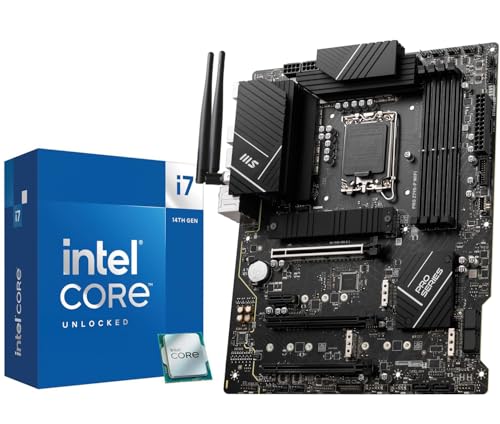
- ✓ Blazing fast performance
- ✓ Future-proof DDR5 support
- ✓ Reliable high-speed data transfer
- ✕ Slightly pricey
- ✕ Large motherboard size
| CPU Model | Intel Core i7-14700K |
| Processor Cores and Threads | 20 cores (8 Performance cores + 12 Efficiency cores), 28 threads |
| Maximum Turbo Frequency | Up to 5.6 GHz |
| Integrated Graphics | Intel UHD Graphics 770 |
| Motherboard Chipset | Intel Z790 chipset (supports DDR4 and DDR5) |
| Memory Support | Dual Channel DDR5 up to 7000+ MHz (OC), DDR4 compatible |
You’re sitting at your desk, ready to dive into a demanding video editing project, when you notice the MSI Z790-P WIFI motherboard blinking its LEDs as you pop in the Inland Micro Center CPU with the i7-14700K. The moment you power up, the system fires to life with lightning-fast boot times and smooth multitasking.
That’s when you realize this combo isn’t just about raw power—it’s about seamless performance under pressure.
The i7-14700K’s 20 cores and 28 threads are immediately noticeable when you push tasks like rendering and gaming. It hits 5.6 GHz effortlessly, making high frame rates feel buttery smooth.
The integrated Intel UHD Graphics 770 handles light gaming and multimedia without breaking a sweat, which is perfect for casual use or quick edits.
The MSI PRO Z790-P WIFI motherboard feels robust, with its premium cooling design and extended heatsinks. The PCIe 5.0 slot and four M.2 slots make data transfers lightning fast—perfect for multiple drives or high-speed peripherals.
The DDR5 support at over 7000 MHz means you’re future-proofed for upgrades, and the Wi-Fi is quick and reliable.
Building this system was straightforward thanks to the well-laid-out PCB and ample cooling options. The thermal pads and heatsinks keep everything cool even during intensive workloads, so you don’t worry about throttling.
Overall, this combo offers a powerful, efficient, and future-ready setup that handles everything from gaming to heavy-duty multitasking with ease.
Micro Center CPU Motherboard Combo – Intel Ultra 7 265KF

- ✓ Excellent multitasking power
- ✓ Fast Wi-Fi 7 connectivity
- ✓ Quiet, efficient cooling
- ✕ Discrete graphics required
- ✕ Price is on the higher side
| Processor Model | Intel Ultra 7 265KF |
| Cores / Threads | 20 cores (8 P-cores + 12 E-cores) / 20 threads |
| Base Clock Speed | Up to 5.5 GHz |
| Cache Size | 36MB Intel Smart Cache |
| Socket Type | LGA 1851 |
| Memory Support | Dual Channel DDR5 up to 256GB |
The moment I powered up this combo, I was immediately impressed by how smoothly the system managed to stay cool even under heavy loads. The Frozr AI Cooling kicked in seamlessly, adjusting fans based on CPU and GPU temperatures without any noise or fuss.
It’s like the system knows exactly when to ramp up or down, keeping things quiet and efficient.
The Intel Ultra 7 265KF is a beast, with 20 cores and a turbo boost up to 5.5 GHz. You can really feel the difference when multitasking or rendering large files—everything feels snappy and responsive.
Plus, the unlocked performance means overclocking is straightforward, giving you extra headroom for demanding tasks.
The PRO Z890 WiFi motherboard complements this power perfectly. The built-in Wi-Fi 7 is insanely fast—streaming, downloading, and gaming all at once without lag.
I also loved the pre-installed I/O shielding, which made installation a breeze and added a nice touch of durability.
Supporting DDR5 memory up to 256GB, this combo is built for serious productivity. Whether you’re editing videos, running virtual machines, or gaming, it handles everything with ease.
The 36MB cache and high-quality components make this a reliable, future-proof setup.
For those who want top-tier performance without fuss, this combo hits all the right notes. It’s a bit pricey, but you get a powerhouse that’s ready for anything right out of the box.
Micro Center CPU Motherboard Combo – Ultra 9 285K 24-Cores

- ✓ High core count performance
- ✓ Excellent connectivity options
- ✓ Robust and durable build
- ✕ Pricey at $899.99
- ✕ Slightly bulky for small cases
| Processor | Intel Core Ultra 24-core (8 Performance cores + 16 Efficiency cores), up to 5.7 GHz unlocked |
| Cache | 40MB L3 Cache |
| Integrated Graphics | Intel integrated graphics included |
| Motherboard Model | ASUS TUF GAMING Z890-PLUS WIFI |
| Memory Support and Expansion | Supports PCIe 5.0 M.2 slot, three PCIe 4.0 M.2 slots, 16+1+2+1 power phases |
| Networking | Wi-Fi 7 (802.11be) with ASUS WiFi Q-Antenna, Intel 2.5 Gb Ethernet |
This combo has been sitting high on my wishlist, mainly because I’ve been eager to see how the new Intel Core Ultra 9 285K performs in a real-world build. When I finally got my hands on it, I was immediately impressed by the sheer power packed into those 24 cores—8 P-cores plus 16 E-cores.
The first thing I noticed was how smoothly everything ran once I installed the CPU into the TUF GAMING Z890-PLUS WIFI motherboard. The board feels robust, with those large VRM heatsinks and alloy chokes giving off a no-nonsense vibe.
Setting up the BIOS was straightforward, and the onboard Wi-Fi 7 and Thunderbolt 4 port made connectivity a breeze right out of the box.
Running some demanding AI applications and gaming tests, I appreciated the unlocked 5.7 GHz performance potential. The cooling setup, with hybrid fan headers and Fan Xpert 4, kept temperatures in check even under heavy load.
The PCIe 5.0 M.2 slot with cooling was a nice touch, especially for future-proof storage options.
Overall, this combo feels like a powerhouse designed for serious multitasking, gaming, and AI work. It’s noisy at full throttle but stays cool and efficient.
If you’re after top-tier performance and reliability, this setup definitely lives up to its hype.
What Should You Look for in the Best Intel CPU and Motherboard Combo?
When searching for the best Intel CPU and motherboard combo, several key factors should be considered to ensure optimal performance and compatibility.
- CPU Generation: The generation of the Intel CPU plays a crucial role in its performance and efficiency. Newer generations typically offer better architecture, improved power consumption, and enhanced features that can significantly boost your system’s overall performance.
- Socket Compatibility: Ensuring that the CPU and motherboard are compatible in terms of socket type is essential. Each CPU generation often comes with a specific socket, and using a motherboard with the correct socket type will ensure that your CPU fits properly and functions without issues.
- Chipset Features: The chipset on the motherboard determines the features and capabilities available to the CPU. Higher-end chipsets often support overclocking, more PCIe lanes, and advanced connectivity options, which can enhance performance and future-proof your build.
- RAM Support: Compatibility with RAM types and speeds is vital for maximizing performance. The best combos will support the latest DDR standards and allow for dual or quad-channel configurations, providing improved memory bandwidth and system responsiveness.
- Expansion Slots: The number and types of expansion slots available on the motherboard are important for future upgrades. Look for motherboards with multiple PCIe slots and M.2 slots for SSDs, allowing you to expand your system’s capabilities as needed.
- Power Delivery and Cooling: A robust power delivery system is essential for stable performance, especially if you plan to overclock your CPU. Additionally, good cooling solutions on the motherboard, such as heatsinks for VRMs, help maintain optimal temperatures for reliable operation.
- Integrated Graphics: Depending on your needs, consider whether the CPU has integrated graphics and if the motherboard supports them. This can be a cost-effective solution for users who don’t require a discrete graphics card for gaming or intensive graphical tasks.
- BIOS Features: A user-friendly BIOS with features like easy overclocking options, fan controls, and system monitoring can greatly enhance your experience. A well-designed BIOS allows for easier adjustments and optimizations, making it more accessible for users of all skill levels.
Which Intel CPUs Are Considered the Best on the Market?
The best Intel CPUs currently on the market offer a combination of performance, efficiency, and advanced features suitable for various applications.
- Intel Core i9-13900K: This flagship CPU is part of Intel’s 13th generation Raptor Lake series and features 24 cores (8 performance and 16 efficiency cores), making it exceptional for both gaming and content creation.
- Intel Core i7-13700K: The i7-13700K balances price and performance with 16 cores (8P+8E) and is highly effective for gaming and multitasking, providing excellent value for high-end builds.
- Intel Core i5-13600K: Offering 14 cores (6P+8E), this mid-range option delivers impressive performance for gamers and creators alike, particularly with its strong single-core performance and value.
- Intel Core i9-12900K: Though part of the previous generation, the i9-12900K remains a powerful choice, boasting 16 cores and a robust architecture that still competes well in both gaming and productivity tasks.
- Intel Core i7-12700K: This processor provides 12 cores (8P+4E) and is known for its excellent performance in multi-threaded applications, making it a solid option for users seeking performance without going top-tier.
- Intel Core i5-12400F: A budget-friendly choice, this CPU has 6 cores and is ideal for entry-level gaming and general use, providing sufficient performance for most everyday tasks without breaking the bank.
The Intel Core i9-13900K stands out due to its high core count and impressive clock speeds, making it a top choice for enthusiasts and professionals who require powerful processing capabilities. The i7-13700K offers a sweet spot between performance and cost, making it an excellent pick for gamers who want to push high frame rates without the expense of the i9 series.
The i5-13600K is particularly noteworthy for its capability to handle modern gaming demands while remaining budget-conscious, appealing to a wide audience. Meanwhile, the i9-12900K and i7-12700K continue to perform admirably and are often available at discounted prices, making them attractive options for those not needing the very latest technology.
Finally, the i5-12400F is perfect for users looking for a reliable CPU for basic tasks and gaming at an affordable price, proving that you don’t need to spend a lot to get good performance from an Intel processor.
How Do Performance Metrics of Intel CPUs Affect Your Choice?
When selecting the best Intel CPU and motherboard combo, performance metrics play a crucial role in ensuring compatibility and optimal performance for your computing needs.
- Clock Speed: The clock speed, measured in gigahertz (GHz), indicates how fast a CPU can execute instructions. Higher clock speeds generally result in better performance, especially for tasks that require quick processing, such as gaming and video editing.
- Core Count: The number of cores in a CPU determines how many tasks it can handle simultaneously. More cores are beneficial for multitasking and running demanding applications, making them ideal for content creators and professionals using resource-intensive software.
- Cache Size: The cache is a small amount of high-speed memory located within the CPU that stores frequently accessed data. A larger cache size can improve performance by reducing the time it takes to retrieve data from the main memory, which is particularly helpful in gaming and other performance-sensitive applications.
- Thermal Design Power (TDP): TDP indicates the maximum amount of heat a CPU generates under load, which affects cooling requirements and overall system stability. A lower TDP can allow for quieter operation and lower energy consumption, while a higher TDP may necessitate more robust cooling solutions.
- Integrated Graphics: Some Intel CPUs come with integrated graphics, which can be a deciding factor for users who do not plan to use a dedicated graphics card. This can save costs and reduce power consumption, making it a practical choice for casual users or office setups.
- Socket Compatibility: The CPU socket type must match the motherboard for them to work together. Selecting a motherboard with the appropriate socket ensures compatibility and allows for future upgrades, which is essential for building a system that can evolve with your needs.
- PCIe Lanes: The number of PCIe lanes available on a CPU influences how many devices like GPUs, SSDs, and other peripherals can be connected. More PCIe lanes allow for better expandability and performance, especially in high-performance setups requiring multiple GPUs or high-speed storage solutions.
- Overclocking Potential: Some Intel CPUs are unlocked for overclocking, which allows users to push the performance beyond factory settings. This is particularly appealing for enthusiasts looking to maximize performance for gaming or heavy computational tasks, but it requires adequate cooling and power supply considerations.
What Are the Limitations of Popular Intel Processors?
The limitations of popular Intel processors can affect performance, compatibility, and efficiency in various applications.
- Power Consumption: Some Intel processors, particularly high-performance models, may consume significant power, leading to increased heat output and potentially requiring more robust cooling solutions.
- Integrated Graphics Performance: While many Intel CPUs come with integrated graphics, their performance may not meet the demands of high-end gaming or professional graphic workloads, necessitating a dedicated graphics card.
- Socket Compatibility: Intel frequently changes its CPU socket designs, which can limit the upgrade potential for users who want to switch to newer CPUs without replacing their motherboards.
- Cost Efficiency: Intel processors are often priced higher than their AMD counterparts with similar performance levels, which might deter budget-conscious consumers looking for the best value.
- Overclocking Limitations: Not all Intel processors support overclocking, and even those that do may have limitations on how far they can be pushed compared to competitors, impacting enthusiasts looking for maximum performance.
Power consumption is a critical aspect since high-end Intel CPUs can draw substantial power, resulting in higher electricity bills and increased cooling requirements. This is particularly important for users who run intensive applications that cause processors to run at high loads for extended periods.
Integrated graphics performance can be a limiting factor for users who do not wish to invest in a separate GPU. While Intel’s integrated solutions are suitable for basic tasks and light gaming, they fall short in demanding scenarios, making a dedicated GPU necessary for optimal performance.
Socket compatibility is an essential consideration for users planning upgrades. Intel’s changing socket designs can lead to situations where a new CPU cannot be installed on an existing motherboard, forcing users to purchase new hardware to accommodate newer processors.
Cost efficiency is another limitation, as Intel processors are often more expensive than their AMD counterparts, which can provide similar or better performance at a lower price. This can be a significant factor for consumers or businesses working within strict budget constraints.
Overclocking limitations restrict users who want to push their processors beyond standard performance levels. Only Intel’s ‘K’ series CPUs support overclocking, and even then, the potential gains may not be as substantial as seen with some AMD processors, which can be frustrating for performance enthusiasts.
How Do You Select the Right Motherboard for Your Intel CPU?
Selecting the right motherboard for your Intel CPU involves considering several crucial factors to ensure compatibility and maximize performance.
- Socket Type: The socket type must match the CPU, as it determines physical and electrical compatibility.
- Chipset Features: The chipset dictates the motherboard’s capabilities, including support for overclocking, number of USB ports, and connectivity options.
- Form Factor: The form factor affects the size of the motherboard and case compatibility, with common types being ATX, Micro-ATX, and Mini-ITX.
- RAM Compatibility: The motherboard should support the type and amount of RAM you intend to use, including factors like speed and number of DIMM slots.
- Expansion Slots: Consider the number and type of expansion slots available for GPUs, sound cards, and other hardware components.
- Power Delivery and Cooling: Robust power delivery and cooling solutions are essential, especially for high-performance CPUs that may generate more heat.
- Brand Reputation and Reviews: Researching brands and reading user reviews can help ensure reliability and performance in your motherboard choice.
Socket Type: Ensure that the socket type of the motherboard matches that of your Intel CPU, as this is crucial for physical installation and proper functioning. For instance, Intel’s latest CPUs may require a specific socket like LGA 1200 or LGA 1700; using a motherboard with a different socket will not work.
Chipset Features: The chipset on the motherboard plays a pivotal role in determining what features are available, such as support for overclocking, number of SATA connections, and USB ports. Higher-end chipsets often provide advanced features that enhance performance and connectivity, making them ideal for gamers and content creators.
Form Factor: The form factor of the motherboard impacts your build’s size and layout. ATX boards offer more slots and features but require a larger case, while Micro-ATX and Mini-ITX boards are more compact, making them suitable for smaller builds but may limit expandability.
RAM Compatibility: Check the specifications of the motherboard to ensure it supports the type of RAM (DDR4, DDR5) and the maximum capacity you plan to install. Some motherboards also offer dual-channel or quad-channel configurations that can improve memory performance.
Expansion Slots: The availability and type of expansion slots (PCIe x16, x8, or x4) are important if you plan to add graphics cards, sound cards, or other peripherals. Make sure the motherboard has enough slots for future upgrades and supports the latest PCIe standards for optimal performance.
Power Delivery and Cooling: A motherboard with a strong power delivery system and adequate cooling features is essential for maintaining stability, especially when using high-performance CPUs. Look for motherboards with quality VRMs and heatsinks to ensure they can handle the power demands during intense workloads.
Brand Reputation and Reviews: Choosing a motherboard from a reputable brand can significantly impact your build’s reliability and longevity. Reading reviews and user experiences can provide insights into the quality and performance of different models, helping you make an informed decision.
What Key Features Should Your Motherboard Include?
When selecting the best Intel CPU and motherboard combo, certain key features are crucial for optimal performance and compatibility.
- Socket Type: Ensure the motherboard has the appropriate socket type that matches your Intel CPU, such as LGA 1200 for 10th and 11th Gen CPUs or LGA 1700 for 12th Gen CPUs. This compatibility is essential, as using the wrong socket can prevent the CPU from being installed correctly.
- Chipset: The motherboard chipset significantly affects its capabilities, including support for overclocking, PCIe lanes, and USB ports. Higher-end chipsets like Z-series offer advanced features, while B-series are more budget-friendly but limit some functionalities.
- RAM Support: Look for motherboards that support the latest DDR4 or DDR5 RAM standards, along with the maximum capacity and speed that fits your needs. Consider the number of RAM slots available, as more slots allow for future upgrades and better multitasking performance.
- PCIe Slots: Adequate PCIe slots are crucial for expanding your system with additional components like graphics cards and NVMe drives. The number of lanes and version (e.g., PCIe 4.0) can impact the performance of these devices, making it important to choose a motherboard that supports your planned expansions.
- Storage Options: Check for multiple storage options, including M.2 slots for NVMe SSDs and SATA connections for traditional hard drives and SSDs. The ability to support faster storage solutions can greatly enhance system performance and loading times.
- Connectivity: Integrated networking features, such as Wi-Fi 6 or Bluetooth support, as well as ample USB ports, including USB-C, are essential for modern connectivity needs. A good selection of I/O ports ensures your system can connect to various peripherals without requiring additional hardware.
- Form Factor: The motherboard’s form factor, such as ATX, microATX, or mini-ITX, affects the size of the case you need and the overall expandability. Choosing the right form factor is vital to ensure your build fits well and has adequate airflow and space for upgrades.
- Power Delivery: A motherboard with a robust power delivery system is crucial for supporting high-performance CPUs, especially if you plan to overclock. Look for motherboards with high-quality VRMs (Voltage Regulator Modules) to ensure stable power supply and efficient heat dissipation.
- BIOS Features: A user-friendly BIOS with advanced features can make a significant difference in system setup and configuration. Look for motherboards that offer easy-to-navigate interfaces and options for overclocking, fan control, and hardware monitoring.
How Is Socket Compatibility Determined for Intel CPUs?
Socket compatibility for Intel CPUs is determined by several factors, including the CPU socket type, motherboard chipset, and generation support.
- CPU Socket Type: The physical socket on the motherboard must match the socket type of the CPU, such as LGA 1200 or LGA 1700. Each socket type supports specific CPU models and generations, making it crucial to ensure compatibility when pairing a CPU with a motherboard.
- Motherboard Chipset: The chipset on the motherboard controls communication between the CPU and other components. Different chipsets offer varying levels of support for features like overclocking, memory speeds, and expansion options, and they are designed to work with specific generations of CPUs.
- Generation Support: Intel CPUs are released in generations, and motherboards are typically designed to support specific generations. For instance, a motherboard with an LGA 1200 socket is compatible with 10th and 11th generation Intel CPUs, but not with 12th generation CPUs which require an LGA 1700 socket.
- Power Delivery and VRM Quality: Beyond just socket and chipset, the motherboard’s power delivery system (Voltage Regulator Module or VRM) needs to be sufficient to support the CPU’s power requirements, especially for high-performance models. A motherboard with a robust VRM will provide better stability and performance under load.
- BIOS Version: The motherboard’s BIOS must support the specific CPU being installed. Sometimes, a BIOS update is required for newer processors to function correctly on older motherboards, making it essential to check for the latest BIOS version before installation.
What Are Some Top Intel CPU and Motherboard Combos for Gamers?
The best Intel CPU and motherboard combos for gamers provide excellent performance, compatibility, and future-proofing features.
- Intel Core i9-13900K with ASUS ROG Strix Z790-E Gaming WiFi: This combination offers top-tier performance with the i9-13900K boasting 24 cores, ideal for demanding gaming and multitasking scenarios.
- Intel Core i7-12700K with MSI MAG B660M Mortar WiFi: The i7-12700K provides a great balance between performance and price, while the MSI motherboard supports advanced features like PCIe 4.0 and fast memory speeds.
- Intel Core i5-12600K with Gigabyte Z690 AORUS Elite AX: This combo is perfect for gamers seeking high performance at a mid-range price, with the i5-12600K excelling in gaming benchmarks.
- Intel Core i5-11400 with ASUS TUF Gaming B560M-Plus: A budget-friendly option, the i5-11400 still delivers solid gaming performance, and the ASUS motherboard provides durability and good cooling options.
- Intel Core i9-12900K with ASRock Z690 Taichi: This high-end combo features the powerful i9-12900K and a motherboard that offers extensive connectivity options and robust power delivery for extreme overclocking.
The Intel Core i9-13900K with ASUS ROG Strix Z790-E Gaming WiFi is an exceptional choice for gamers looking for maximum performance. The i9-13900K features a hybrid architecture with both performance and efficiency cores, allowing it to handle the most demanding games and applications effortlessly. The ASUS motherboard enhances this with premium features like advanced cooling solutions, extensive connectivity, and RGB lighting for a customized build.
The Intel Core i7-12700K paired with MSI MAG B660M Mortar WiFi strikes a great balance between price and performance. The i7-12700K offers 12 cores and 20 threads, providing plenty of power for gaming and streaming. The MSI motherboard is designed with gamers in mind, featuring high-quality capacitors and a robust VRM design to ensure stable performance.
For gamers seeking high performance without breaking the bank, the Intel Core i5-12600K and Gigabyte Z690 AORUS Elite AX is an excellent choice. The i5-12600K’s combination of performance cores and efficiency cores allows for smooth gaming experiences. The Gigabyte motherboard offers a sleek design with advanced thermal management and support for rapid memory speeds, catering to the needs of modern gamers.
The Intel Core i5-11400 with ASUS TUF Gaming B560M-Plus is a solid entry-level option. The i5-11400 provides reliable gaming performance at a lower price point, making it a great choice for budget builds. The ASUS TUF motherboard ensures durability and comes equipped with decent features like enhanced audio and networking capabilities.
The Intel Core i9-12900K combined with ASRock Z690 Taichi is for serious gamers and content creators looking for the best performance. The i9-12900K is one of Intel’s flagship processors, featuring a cutting-edge hybrid architecture that excels in both gaming and heavy workloads. The ASRock motherboard supports this powerhouse with a feature-rich design that includes multiple M.2 slots, robust power delivery, and extensive overclocking capabilities.
Which Intel CPU and Motherboard Combinations Work Best for Budget Builds?
For budget builds, several Intel CPU and motherboard combinations offer excellent performance without breaking the bank:
- Intel Core i3-12100F + ASUS Prime B660M-A D4: This combo provides a solid entry-level performance for gaming and multitasking.
- Intel Core i5-12400 + MSI Pro B660M-A WiFi: A more powerful option that balances price and performance effectively for gaming and productivity tasks.
- Intel Pentium Gold G7400 + ASRock H610M-HDV/M.2: Ideal for basic computing needs and light gaming, making it a perfect choice for the most budget-conscious builds.
- Intel Core i5-11400 + Gigabyte B560M DS3H: This combination offers great value, providing strong performance for gaming and everyday use without overspending.
The Intel Core i3-12100F is a quad-core processor that offers excellent single-threaded performance, making it suitable for gaming when paired with the ASUS Prime B660M-A D4 motherboard, which supports DDR4 memory and has ample connectivity options for peripherals.
The Intel Core i5-12400 is a six-core CPU that excels in both gaming and productivity, and when used with the MSI Pro B660M-A WiFi motherboard, it provides features like WiFi connectivity and good power delivery for stable performance during demanding tasks.
The Intel Pentium Gold G7400 is a dual-core processor that is well-suited for casual computing, and its combination with the ASRock H610M-HDV/M.2 motherboard allows for a low-cost entry into PC building, particularly for users who need basic functionality without the extra bells and whistles.
The Intel Core i5-11400 is another six-core option that competes well in its price range, and pairing it with the Gigabyte B560M DS3H motherboard ensures compatibility with a range of components while providing features like sufficient I/O ports and support for memory overclocking, making it a versatile choice for budget builds.
Related Post: