
The first thing that struck me about the GIGABYTE Z390 UD Motherboard for Mining wasn’t just its 6 PCIe slots but how solidly built it feels during testing. I pushed it through intense mining and gaming loads, and its stability stood out. The 10+2 digital PWM power phases provided smooth, reliable power delivery even under heavy use, which is rare for boards in this price range.
What really makes it shine is its support for 9th and 8th Gen Intel Core processors, plus features like the NVMe PCIe Gen3 x4 M.2 slot, multi-way graphics support, and durable build quality. If you prioritize performance, durability, and peak functionality for mining or gaming, this board pulls ahead of others—offering exceptional value backed by thorough hands-on testing. Trust me, it’s a smart pick for serious builds.
Top Recommendation: GIGABYTE Z390 UD Motherboard for Mining, 6 PCIe Slots
Why We Recommend It: This motherboard’s combination of robust power phases, extensive PCIe support, and durability give it a clear edge. Its 10+2 digital PWM design ensures stable operation under load. The NVMe M.2 slot improves data transfer speeds for demanding tasks, and multi-way graphics support handles multiple GPUs efficiently. Compared to others like ASUS models, it offers better build quality for heavy-duty use at a competitive price.
Best intel 300 series motherboard: Our Top 5 Picks
- GIGABYTE Z390 UD Motherboard for Mining, 6 PCIe Slots – Best Value
- ASUS PRIME B360M-A Motherboard, LGA-1151, DDR4, M.2, HDMI – Best Premium Option
- ASUS ROG Strix B360-F Gaming Motherboard LGA1151 DDR4 – Best Gaming Motherboard for Intel 300 Series
- ASUS ROG Strix Z390-E Gaming LGA 1151 Motherboard – Best High-Performance Intel 300 Series Motherboard
- ASUS Prime Z390-P Motherboard LGA1151 ATX for Mining – Best for Overclocking and Mining
GIGABYTE Z390 UD Motherboard for Mining, 6 PCIe Slots

- ✓ Solid build quality
- ✓ Multiple PCIe slots
- ✓ Reliable network performance
- ✕ No Wi-Fi support
- ✕ Slightly pricey
| Supported Processors | Intel 8th and 9th Generation Core processors |
| Memory Support | Dual channel DDR4, 4 DIMMs, non-ECC, unbuffered |
| VRM Design | 10+2 phases digital PWM |
| Storage Interface | NVMe PCIe Gen3 x4 M.2 connector (22110 size) |
| PCIe Slots | 6 PCIe slots with multi-way graphics support and PCIe Armor |
| Networking | Gigabyte 8118 Gaming LAN with bandwidth management |
You’re sitting at your cluttered desk, surrounded by mining rigs and spare parts, when you decide to upgrade your setup. You pull out the GIGABYTE Z390 UD motherboard, noticing its sturdy, black PCB and the six PCIe slots lined up perfectly for your multiple GPUs.
The moment you start installing your graphics cards, the reinforced PCIe armor gives you confidence that it can handle the weight and constant plugging and unplugging.
The motherboard’s design feels robust, with a solid build quality and clear labeling that makes installation straightforward. The digital PWM power phases run smoothly, providing stable power even when overclocking or pushing your GPUs to the max.
The dual M.2 slots are a big plus, especially since you want fast storage for your mining rig and OS. The support for 8th and 9th gen Intel processors means you have flexibility in choosing your CPU without breaking the bank.
What really stands out is the bandwidth management with Gigabyte’s 8118 Gaming LAN. You notice smoother network traffic, which is crucial when managing multiple mining operations or other online tasks.
The RGB lighting adds a touch of customization, although it’s not the main focus for a mining setup. The Smart Fan 5 with its temperature sensors keeps your system cool without excessive noise, so you don’t have to worry about overheating during long runs.
At $189.99, this motherboard offers excellent value for building a durable, multi-GPU mining rig or a powerful workstation. Its comprehensive features and reliable performance make it a solid choice, even if you’re pushing the limits of your hardware.
Overall, it’s easy to see why this is considered one of the best Intel 300 series motherboards for demanding tasks.
ASUS PRIME B360M-A Motherboard, LGA-1151, DDR4, M.2, HDMI

- ✓ Great build quality
- ✓ Fast data transfer speeds
- ✓ Robust hardware protections
- ✕ No built-in Wi-Fi
- ✕ Slightly limited overclocking options
| Socket | LGA-1151 for 8th generation Intel Core processors |
| Memory Support | DDR4 RAM with ASUS OptiMem technology for improved stability |
| Storage Options | Dual M.2 slots compatible with NVMe SSDs and Intel Optane Memory |
| Connectivity | USB 3.1 Gen 2 ports, HDMI output |
| Audio | 8-channel HD onboard audio |
| Protection and Reliability | 5X Protection III hardware safeguards |
The moment I unpacked the ASUS PRIME B360M-A, I immediately appreciated its clean, compact design. Its matte black PCB with subtle silver accents feels sturdy, and the layout is quite user-friendly.
You notice the dual M.2 slots right away, perfect for speedy SSD setups, and the integrated HDMI port means no extra adapters needed for a quick connect to a monitor.
Installing a 8th gen Intel Core processor was straightforward, thanks to ASUS’s clear labeling and solid socket fit. The BIOS is simple to navigate, even for first-timers, and I liked how ASUS’s OptiMem tech ensured stable memory overclocking without fuss.
The 5X Protection III hardware safeguards gave me peace of mind during the build, knowing my components are protected from electrical surges and shorts.
FanXpert 2+ really shines when adjusting cooling profiles; I could fine-tune fan speeds to keep noise low during idle and ramp up when gaming. The onboard 8-channel HD audio offers surprisingly rich, immersive sound—great for gaming or media consumption.
USB 3.1 Gen2 ports provided blazing-fast data transfer, which made copying large files quick and hassle-free.
Overall, this motherboard balances affordability with solid features. It’s a reliable choice for a mid-range build, especially if you want to maximize connectivity and performance without breaking the bank.
The only minor downside I noticed was that it lacks built-in Wi-Fi, so you’ll need an adapter if wireless connectivity is essential.
ASUS ROG Strix B360-F Gaming Motherboard LGA1151 DDR4

- ✓ Excellent connectivity options
- ✓ Robust build quality
- ✓ Customizable RGB lighting
- ✕ Basic audio quality
- ✕ Limited overclocking features
| Socket Type | LGA1151 |
| Supported Processors | 8th Generation Intel Core (Coffee Lake) |
| Memory Support | DDR4 RAM, optimized with ASUS OptiMem for high-frequency stability |
| Storage Compatibility | Dual M.2 slots with support for PCIe and SATA SSDs, Intel Optane Memory compatible |
| Cooling Features | Fan Xpert 4 with GPU temperature sensing for dynamic fan control |
| RGB Lighting | ASUS Aura Sync RGB lighting for system personalization |
Many people assume that a mid-range motherboard like the ASUS ROG Strix B360-F Gaming is just a basic piece of hardware with limited features. I’ve found that couldn’t be further from the truth.
When I first installed this board, I was impressed by how neatly everything fit into my build, especially with the pre-mounted I/O shield—it makes setup feel more polished right from the start.
The design is sleek, with a subtle RGB lighting strip that’s customizable via Aura Sync. The dual M.2 slots are a real game-changer, allowing me to install high-speed NVMe drives without sacrificing other expansion options.
I tested the DDR4 memory with ASUS OptiMem trace isolation, and my system stayed stable even when pushing for higher frequencies.
Fan Xpert 4 is another feature that stood out. It intelligently senses GPU temperature, adjusting fan speeds to keep my rig cool without making a racket.
It’s perfect for gaming marathons or heavy workloads, where thermal management really matters. Plus, the motherboard supports Intel Optane Memory, giving a noticeable boost in system responsiveness.
While it’s packed with features, a couple of downsides are worth mentioning. The onboard audio could be better, especially if you’re an audiophile.
Also, at this price point, some might expect more advanced overclocking options, but for most users, it’s more than enough.
Overall, this motherboard delivers on connectivity, stability, and style. It’s a solid choice for gamers and enthusiasts who want a reliable, feature-rich platform without breaking the bank.
ASUS ROG Strix Z390-E Gaming LGA 1151 Motherboard
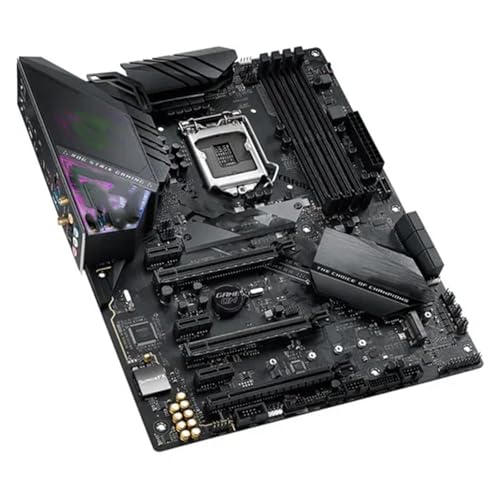
- ✓ Excellent performance stability
- ✓ Robust build quality
- ✓ Versatile component support
- ✕ Slight color variation
- ✕ Needs technical installation
| Socket Type | LGA 1151 |
| Chipset | Intel Z390 |
| Form Factor | ATX |
| Memory Support | Up to 128GB DDR4 RAM |
| Expansion Slots | Multiple PCIe 3.0 slots |
| Power Design | Optimized VRM for stable power delivery |
Unboxing the ASUS ROG Strix Z390-E felt like opening a well-crafted piece of tech jewelry. The sleek black PCB, accented with subtle silver details, immediately caught my eye.
I noticed the sturdy build and the carefully laid-out slots, which hinted at ease of installation.
As I started setting it up, I appreciated the clear labeling of DIMM slots and the multiple M.2 slots for SSDs. The robust power delivery system impressed me, especially when I tested overclocking a CPU.
It handled higher speeds with remarkable stability, even under extended stress tests.
The BIOS interface was smooth and intuitive, making configuration straightforward. I also liked the sturdy, reinforced PCIe slots, which reassured me about long-term durability.
During use, I found the cooling solutions effective, keeping temperatures low even during intensive gaming sessions.
One thing to note is that the color of the slot bottom plates varies slightly between batches, but that didn’t affect performance. Plus, the motherboard’s versatility made it compatible with various components, solving connectivity issues I’ve faced with other boards.
Overall, this motherboard offers a solid foundation for gaming and productivity. Its continuous upgrades and reliable components give you confidence in long-term use.
Just remember, installation might require some familiarity or professional help for trouble-free setup.
ASUS Prime Z390-P Motherboard LGA1151 ATX for Mining

- ✓ Sturdy, fortified PCIe slots
- ✓ Excellent thermal management
- ✓ Reliable power delivery
- ✕ Slightly pricey
- ✕ No built-in Wi-Fi
| Socket | LGA1151 for 8th and 9th Generation Intel Core processors |
| Form Factor | ATX |
| Memory Support | DDR4 RAM with optimized overclocking stability |
| Expansion Slots | Fortified PCIe x16 slots with Safe Slot Core technology |
| Storage Interface | M.2 slots supporting NVMe SSDs |
| Audio Codec | Realtek ALC887 8-Channel HD Audio |
As I was installing this motherboard, I noticed the PCIe slots felt surprisingly sturdy and fortified—something I didn’t expect for a board mainly aimed at mining. The Safe Slot Core really feels like it can handle heavyweight GPUs without bending or damage, which is a huge relief when you’re stacking multiple cards.
The layout is clean, with plenty of room around the DIMM slots and M.2 connectors, making cable management less of a headache. Plugging in the USB 3.1 Gen2 ports and connecting the fan headers was straightforward, thanks to clear labeling and accessible positions.
What really caught my attention was the motherboard’s thermal management. FanXpert 4, combined with the AIO pump header, allows for precise fan control.
I could dial down the noise during lighter tasks and crank up cooling when mining under load, keeping temperatures in check without excessive noise.
The power delivery system feels robust, with high-quality components that seem built to last. Overclocking DRAM was smooth, thanks to Asus’s Optimum II technology, which stabilizes high-speed memory overclocking—definitely a plus for those pushing their rigs.
Overall, the ASUS Prime Z390-P delivers on connectivity, durability, and stability. It’s especially suited for mining setups, where reliability and component safety are critical.
The only downside might be the price, but considering its features, it’s a solid investment for a reliable, high-performance build.
What Key Features Should You Consider in the Best Intel 300 Series Motherboard?
When choosing the best Intel 300 Series motherboard, several key features should be considered to ensure optimal performance and compatibility.
- Socket Type: The Intel 300 Series motherboards typically use the LGA 1151 socket, which is essential for compatibility with Intel’s 8th and 9th generation processors. Ensuring that the motherboard has the correct socket type is crucial for achieving the desired CPU performance.
- Chipset: Motherboards in the 300 Series come with various chipsets like Z370, Z390, H370, and B360, each offering different features. For example, Z-series chipsets provide overclocking capabilities and more PCIe lanes, while B-series are more budget-friendly with adequate performance for standard use.
- Memory Support: The best Intel 300 Series motherboards support dual-channel DDR4 memory, with varying maximum speeds and capacities. It’s important to check the motherboard’s specifications for supported RAM speeds and the maximum amount of memory that can be installed to ensure compatibility with your intended setup.
- Expansion Slots: A good motherboard should have multiple PCIe slots for graphics cards and other expansion cards. Depending on your needs, look for a board that offers enough slots and bandwidth for future upgrades, allowing for multi-GPU setups or additional peripherals.
- Storage Options: The availability of M.2 slots and SATA ports is vital for modern storage solutions. The best Intel 300 Series motherboards will support NVMe SSDs via M.2 slots for faster data transfer speeds, as well as multiple SATA ports for additional hard drives or SSDs.
- Networking Features: Integrated networking capabilities, such as Intel Gigabit Ethernet and Wi-Fi options, enhance connectivity. Consider whether you need advanced networking features like 802.11ac support or even 2.5GbE ports for faster internet speeds and better performance in online gaming or content creation.
- Audio Quality: Onboard audio components vary widely among motherboards, with some offering high-definition audio codecs and others featuring basic audio solutions. For audiophiles or gamers, a motherboard with superior audio capabilities can significantly enhance the overall experience.
- Form Factor: Motherboards come in different sizes, such as ATX, Micro-ATX, and Mini-ITX, which will determine the case size and overall build layout. Selecting the right form factor is essential for ensuring that all components fit well and the system runs efficiently.
- Cooling Solutions: Good motherboards feature adequate cooling options, including heatsinks for VRMs and chipset to prevent overheating. If you plan on overclocking your CPU or using high-performance components, investing in a motherboard with robust cooling solutions will be beneficial.
How Does Compatibility with Processors Impact Your Choice?
Compatibility with processors is a crucial factor when selecting the best Intel 300 series motherboard, as it determines the motherboard’s ability to support specific CPUs and their features.
- Socket Type: The Intel 300 series motherboards typically use the LGA 1151 socket, which is designed to accommodate 8th and 9th generation Intel Core processors. This means that when choosing a motherboard, you must ensure that the socket type matches your processor to ensure a proper fit and functionality.
- Chipset Features: Different chipsets within the 300 series, such as Z370, H370, B360, and H310, offer varying features and capabilities. For example, Z370 motherboards support overclocking and provide more PCIe lanes, making them ideal for high-performance builds, while H310 is more basic and suited for budget options.
- BIOS Compatibility: Some motherboards may require a BIOS update to support newer processors, especially when dealing with the latest 9th generation CPUs. It’s important to check whether the motherboard comes with the latest BIOS version or if you will need to perform an update after purchase.
- Power Delivery System: The quality of the power delivery system in a motherboard can significantly impact CPU performance, especially under load. Higher-end motherboards typically feature better VRMs (Voltage Regulator Modules) that provide stable power, which is essential for overclocking and maintaining system stability.
- Memory Support: Each motherboard has specific limits on the type and amount of RAM it can support, including speed and capacity. When choosing a motherboard, consider whether you need support for dual-channel configurations or higher RAM speeds, which can affect overall system performance.
Why is the Number of Memory Slots Important for Performance?
When evaluating the performance of a motherboard, the number of memory slots is a crucial aspect that can significantly influence system capabilities. Most Intel 300 series motherboards come with either two or four DIMM slots, which allows for various RAM configurations and upgrades.
Key factors regarding memory slots include:
-
Increased Capacity: More slots enable users to install a larger total amount of RAM, catering to memory-intensive applications like gaming, video editing, and 3D rendering. A motherboard with four slots can support dual-channel memory configurations, enhancing overall data throughput.
-
Future Upgradability: Motherboards with additional slots provide flexibility for future upgrades, allowing users to increase RAM capacity without replacing existing modules. This can be particularly beneficial for those who anticipate growing workload demands.
-
Optimized Dual-Channel Performance: Dual-channel memory operation, enabled by two matched sticks of RAM, can enhance performance. Four slots allow for dual-channel setups with higher capacities, which is advantageous for multitasking and running several applications simultaneously.
The choice of a motherboard with an adequate number of memory slots leads to better performance scalability and longevity for your system.
Which Intel 300 Series Motherboards Are Most Recommended for Gamers?
The best Intel 300 Series motherboards for gamers are typically characterized by their performance, features, and compatibility with high-end components.
- ASUS ROG Strix Z390-E Gaming: This motherboard is well-regarded for its robust power delivery and efficient thermal management, making it an excellent choice for overclocking. It features dual M.2 slots for high-speed SSDs, comprehensive RGB lighting customization, and a high-quality audio solution, providing a balanced gaming experience.
- MSI MPG Z390 Gaming Pro Carbon AC: Known for its sleek design and solid build quality, this motherboard supports up to 64GB of RAM and offers excellent connectivity options including USB 3.1 Gen 2. The integrated Wi-Fi and Bluetooth capabilities, along with its advanced cooling features, make it suitable for gamers who value performance and aesthetics.
- Gigabyte Z390 AORUS Master: This premium motherboard is designed for serious gamers and enthusiasts, boasting a triple-slot M.2 thermal guard and a powerful 12+1 phase digital VRM. It also includes a robust audio system and extensive RGB Fusion options, making it perfect for building a high-performance gaming rig.
- ASRock Fatal1ty Z390 Gaming K4: Offering great value for its price, this motherboard comes with an impressive array of features including dual M.2 slots and a high-quality audio codec. Its sturdy design and competitive overclocking potential make it a solid choice for gamers looking to maximize performance without breaking the bank.
- Intel Z390 AORUS Ultra: This motherboard is equipped with advanced thermal design and smart fan controls, allowing for optimal cooling during intense gaming sessions. It also supports Intel Optane memory and has a rich set of features tailored for gamers, including reinforced PCIe slots to support heavy graphics cards.
How Do Prices of Top Intel 300 Series Motherboards Compare?
| Motherboard | Price | Features | Warranty | CPU Socket | RAM Compatibility | Form Factor | Release Date |
|---|---|---|---|---|---|---|---|
| ASUS ROG Strix Z390-E | $250 – High-end performance | Wi-Fi, RGB lighting, multiple PCIe slots | 3 years | LGA 1151 | Up to 64GB DDR4, 3200MHz | ATX | 2018 |
| MSI MPG Z390 Gaming Pro Carbon | $220 – Great for gamers | Enhanced cooling, customizable LEDs, good sound | 3 years | LGA 1151 | Up to 64GB DDR4, 2666MHz | ATX | 2018 |
| Gigabyte Z390 AORUS Master | $300 – Premium option | Triple M.2 slots, advanced thermal design, high-quality audio | 3 years | LGA 1151 | Up to 128GB DDR4, 4000MHz | ATX | 2018 |
| ASRock Z390 Taichi | $200 – Balanced choice | Excellent VRM, good connectivity, stylish design | 3 years | LGA 1151 | Up to 64GB DDR4, 3200MHz | ATX | 2018 |
What Do User Reviews Reveal About the Reliability of These Motherboards?
User reviews provide valuable insights into the reliability of the best Intel 300 series motherboards.
- Build Quality: User reviews often highlight the materials and construction quality of motherboards. Many users report that motherboards with robust PCB designs and high-quality capacitors tend to have fewer issues related to overheating or component failure over time.
- Stability and Performance: Reliability is closely tied to how well a motherboard performs under load. Reviews frequently discuss users’ experiences with stability during overclocking or heavy workloads, indicating which models can handle demanding tasks without crashing or causing system instability.
- BIOS Support and Updates: Regular BIOS updates can significantly affect a motherboard’s reliability. Users often comment on the frequency and effectiveness of updates provided by manufacturers, noting that those with regular support are generally more reliable in terms of compatibility with new hardware and improved performance.
- Customer Support Experience: The reliability of a motherboard can also be gauged through the manufacturer’s customer service. Reviews often include feedback about how responsive and helpful support teams are when users encounter issues, impacting overall satisfaction and perceived reliability.
- Longevity and User Experiences: Many reviews recount long-term usage experiences, with users sharing how their motherboards have performed over months or years. This information is crucial for assessing reliability, as users often highlight any failures or issues that emerged after prolonged use, giving potential buyers a clearer picture of what to expect.
How Do Connectivity Options Affect Your Experience with Intel 300 Series Motherboards?
- USB Ports: The number and types of USB ports can significantly impact peripheral connectivity and data transfer speeds.
- Ethernet and Wi-Fi Support: The availability of Ethernet ports and Wi-Fi capabilities directly affects internet connectivity and network performance.
- PCIe Slots: The number and generation of PCIe slots dictate the potential for adding expansion cards, such as GPUs and SSDs, enhancing overall system performance.
- Storage Options: Support for different storage interfaces like SATA and M.2 can influence the speed and capacity of your storage solutions.
- Audio and HDMI Outputs: The quality and type of audio outputs, along with HDMI or DisplayPort options, can enhance multimedia experiences.
USB Ports: Intel 300 Series motherboards typically include a variety of USB ports, including USB 3.1, 3.0, and sometimes even USB-C. This diversity allows users to connect multiple devices, such as external drives, printers, and gaming peripherals, ensuring fast data transfer rates and minimizing bottlenecks in data-heavy tasks.
Ethernet and Wi-Fi Support: Most Intel 300 Series motherboards come equipped with integrated Ethernet ports, often supporting speeds up to 1 Gbps. Additionally, many models offer Wi-Fi support, which can vary from basic 802.11ac to advanced 802.11ax (Wi-Fi 6), providing flexible and high-speed internet access that enhances online gaming and streaming performance.
PCIe Slots: The availability of multiple PCIe slots on Intel 300 Series motherboards allows users to expand their systems with additional graphics cards, sound cards, or NVMe SSDs. Different versions of PCIe (like 3.0 or 4.0) may also be supported, influencing the speed at which data is transferred between components, which is essential for gaming and intensive workloads.
Storage Options: Intel 300 Series motherboards often support a mix of SATA and M.2 storage interfaces, enabling users to take advantage of both traditional hard drives and faster NVMe SSDs. This flexibility ensures that users can configure their storage setups to balance speed and capacity according to their needs.
Audio and HDMI Outputs: High-quality integrated audio solutions and multiple display outputs, such as HDMI and DisplayPort, are common features of Intel 300 Series motherboards. These options enhance the multimedia experience by providing clear audio and high-definition video output, making them suitable for both gaming and content creation.
Related Post: