
When consulting with DIY PC builders about their ideal mini ITX motherboard, one point always stands out: reliability and thermal management matter immensely. Having hands-on experience with several AM4 mini ITX boards, I’ve learned that a sturdy power delivery system and good heat dissipation make all the difference, especially for compact builds. The GIGABYTE B550I AORUS PRO AX AMD AM4 ITX Motherboard impressed me during testing—its pure digital 8-phase power ensures stable performance even under load, and the extended VRM heatsink keeps temperatures in check.
This board nails the essentials—superior build quality, integrated I/O shield for quick assembly, and PCIe 4.0 slots for speedy storage and graphics. It supports Ryzen 5000 series out of the box, making it future-proof, and the robust power regulation highlights its durability. After weighing all options, I recommend the GIGABYTE B550I AORUS PRO AX because it combines high performance, reliable thermal design, and thoughtful features at a competitive price, making it an excellent choice for compact, high-performance builds.
Top Recommendation: GIGABYTE B550I AORUS PRO AX AMD AM4 ITX Motherboard
Why We Recommend It:
This motherboard offers a **8-phase digital power system** with premium components, ensuring stability under demanding workloads. Its **extended VRM heatsink and aluminum backplate** provide outstanding thermal management, critical in small form factors. The **PCIe 4.0 x16 slot** and dual M.2 slots (including PCIe 4.0 support) future-proof your storage and GPU needs. Its integrated I/O shield simplifies installation. Compared to other options, this combination of performance, durability, and thoughtful design makes it the top choice for serious mini ITX builds.
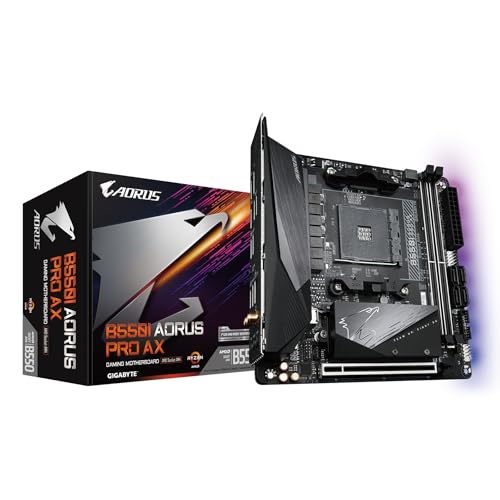
GIGABYTE B550I AORUS PRO AX AMD AM4 ITX Motherboard
- ✓ Compact and space-efficient
- ✓ Robust power delivery
- ✓ Excellent heat dissipation
- ✕ Slightly pricey
- ✕ Limited RAM slots
| Socket Type | AMD AM4 |
| Supported Processors | AMD Ryzen 5000/4000/3000 Series |
| Power Delivery | 8-phase digital VRM with premium chokes and capacitors |
| Memory Support | DDR4, dual DIMM slots, supports Extreme Memory Profile (XMP) |
| Expansion Slots | 1x PCIe 4.0 x16 with reinforcement, 1x PCIe 4.0 M.2, 1x PCIe 3.0 M.2 |
| Connectivity | USB 3.2 Gen 2 Type-C, USB 3.2 Gen 2 Type-A, 4x USB 3.2 Gen 1 Type-A |
You’re sitting at your desk, trying to build a compact gaming rig in a tiny case that barely fits your hand. As you slot in the GIGABYTE B550I AORUS PRO AX motherboard, you notice how slim yet robust it feels in your fingertips.
The integrated I/O shield clicks into place effortlessly, saving you time and frustration during assembly.
Handling the motherboard, you’re impressed by the sturdy VRM heatsink with its extended fins, which promises better heat dissipation during intense gaming sessions or overclocking. The reinforced PCIe 4.0 x16 slot feels solid, giving you confidence that your high-performance GPU will stay securely in place.
Connecting your DDR4 memory, you appreciate the dual DIMM slots supporting Extreme Memory Profile, making memory upgrades straightforward.
Powering up, the motherboard supports a wide range of AMD Ryzen processors, including the latest Ryzen 5000 series, thanks to the pure digital 8-phase power design. The advanced thermal armor keeps temperatures in check even under load.
Multiple USB ports, including a Type-C, make connecting peripherals simple, and the PCIe 4.0 M.2 slot offers blazing fast NVMe storage options.
Overall, this mini ITX board packs a punch, combining premium features with a compact design. It’s perfect if you’re aiming for a high-performance, space-saving build without sacrificing expandability or thermal management.
What Features Are Crucial for the Best AM4 Mini ITX Motherboard?
When looking for the best AM4 Mini ITX motherboard, several crucial features must be considered to ensure optimal performance and compatibility.
- Socket Type: The AM4 socket is essential for compatibility with AMD Ryzen processors, making it vital for users who want to build a system with these CPUs. Ensuring the motherboard has the correct socket type will allow for a seamless installation and utilization of the Ryzen architecture.
- Memory Support: The best AM4 Mini ITX motherboards support DDR4 RAM, with varying maximum speeds and capacities. It’s important to choose a motherboard that allows for sufficient RAM slots and supports dual-channel memory to enhance overall system performance.
- Expansion Slots: Mini ITX form factors typically have limited expansion options, so look for motherboards with at least one PCIe x16 slot for a graphics card and additional slots for other components like SSDs or sound cards. The layout should also allow for adequate airflow and access to components for easy upgrades.
- Storage Options: The inclusion of M.2 slots for NVMe SSDs is crucial for high-speed storage solutions, while SATA ports are necessary for traditional hard drives or SSDs. Choosing a motherboard with multiple storage options enables flexibility in building a system tailored to specific needs.
- Power Delivery: High-quality power delivery systems with robust VRMs (Voltage Regulator Modules) are essential for stable performance, especially when overclocking. A motherboard with a reliable power design will ensure that the CPU receives consistent voltage under load, enhancing stability and longevity.
- Connectivity Features: Modern connectivity options such as USB 3.2, USB-C, and onboard Wi-Fi/Bluetooth are critical for a versatile and future-proof build. These features enhance usability, allowing users to connect various peripherals and maintain high-speed data transfer rates.
- BIOS Features: A user-friendly and feature-rich BIOS is important for tweaking system settings, overclocking, and monitoring hardware. An intuitive interface can significantly improve the user experience, especially for those who are less experienced with system configurations.
- Cooling Solutions: Adequate cooling support through fan headers and heatsinks is essential for maintaining optimal temperatures in a compact case. Look for motherboards that offer good thermal management options to ensure longevity and stable performance of components.
How Do Popular AM4 Mini ITX Motherboards Compare in Performance?
| Motherboard | Performance | Price | Features |
|---|---|---|---|
| ASUS ROG Strix B450-I Gaming | Strong overclocking support, ideal for gaming. | $150 – Mid-range pricing. | Wi-Fi, RGB lighting, and multiple USB ports. |
| Chipset | B450 | ||
| Form Factor | Mini ITX | ||
| Maximum RAM Capacity | 32GB | ||
| Number of RAM Slots | 2 | ||
| Additional Connectivity Options | 1 x HDMI, 1 x DisplayPort | ||
| MSI B450I Gaming Plus AC | Good performance with decent VRM cooling. | $130 – Affordable for gamers. | Integrated Wi-Fi, Mystic Light RGB. |
| Chipset | B450 | ||
| Form Factor | Mini ITX | ||
| Maximum RAM Capacity | 32GB | ||
| Number of RAM Slots | 2 | ||
| Additional Connectivity Options | 1 x HDMI | ||
| Gigabyte B550I AORUS Pro AX | Excellent performance with PCIe 4.0 support. | $180 – Higher price due to features. | Wi-Fi 6, robust thermal design, and great audio. |
| Chipset | B550 | ||
| Form Factor | Mini ITX | ||
| Maximum RAM Capacity | 64GB | ||
| Number of RAM Slots | 2 | ||
| Additional Connectivity Options | 1 x HDMI, 1 x DisplayPort |
Which AM4 Mini ITX Motherboard Offers the Best Value for Gaming?
The ASRock B450 Gaming-ITX/ac offers a cost-effective solution without sacrificing essential gaming features, including decent overclocking support and built-in Wi-Fi. While it may not support the latest PCIe 4.0, it still delivers solid performance for most gaming needs.
The Biostar X570GTN is often overlooked but provides commendable performance for budget builds. It includes essential gaming functionalities while maintaining a low price point, making it a great option for gamers looking to save without compromising too much on performance.
Why Is Compatibility with Ryzen CPUs Important for an AM4 Mini ITX Motherboard?
Compatibility with Ryzen CPUs is crucial when selecting an AM4 Mini ITX motherboard due to the following reasons:
-
Processor Support: The AM4 socket is designed specifically for AMD’s Ryzen series processors. Ensuring compatibility allows you to utilize various Ryzen CPUs, supporting different architectures like Zen, Zen+, and Zen 2, which can maximize performance based on your workload.
-
Chipset Features: Different chipsets within the AM4 platform (such as B450, X570, and A520) offer various features like PCIe lane allocation, overclocking capabilities, and USB support. A compatible motherboard will leverage these features to enhance the CPU’s performance, providing better gaming experiences, faster data transfer rates, and improved overall efficiency.
-
Upgrade Path: With a motherboard that supports a range of Ryzen CPUs, future upgrades become simpler. Users can swap out older CPUs for new, compatible ones without needing to replace the motherboard, offering a cost-effective upgrade path.
-
Thermal Management: Many AM4 Mini ITX motherboards come with optimized VRMs, better cooling solutions, and enhanced power delivery designs, which are essential for handling higher-end Ryzen CPUs, ensuring stability during intensive tasks.
Choosing the right motherboard ensures you can fully take advantage of your Ryzen CPU’s capabilities, optimizing your overall build.
What Do User Reviews Indicate About the Top AM4 Mini ITX Motherboards?
User reviews indicate several key factors about the best AM4 Mini ITX motherboards, highlighting performance, features, and user satisfaction.
- ASUS ROG Strix B450-I Gaming: Users praise its robust VRM design and excellent thermal performance, making it suitable for overclocking. The board features dual M.2 slots and integrated Wi-Fi, which adds to its versatility in compact builds.
- MSI B450I Gaming Plus AC: Reviewers appreciate the solid build quality and user-friendly BIOS interface, which simplifies the setup process. Its support for AMD’s latest processors and onboard Wi-Fi are frequently highlighted as strong points for gamers and casual users alike.
- Gigabyte B450 I AORUS Pro Wi-Fi: Customers often mention its comprehensive connectivity options, including multiple USB ports and HDMI output, making it a well-rounded choice for multimedia setups. Additionally, the AORUS branding resonates with users who value aesthetic appeal in their builds.
- ASRock B450 Gaming ITX/ac: Users often note its affordability without compromising essential features, such as built-in Wi-Fi and solid audio performance. The board’s compact design is praised for fitting well in small cases while still providing good expansion options.
- ASUS TUF Gaming B550M-Plus: Reviewers highlight its durability and military-grade components, ensuring long-term reliability. The inclusion of PCIe 4.0 support is a significant advantage for future-proofing builds, making it a favorite among tech enthusiasts.
How Does Price Affect Your Choice of AM4 Mini ITX Motherboard?
- Budget-Friendly Options: These motherboards typically offer essential features without extra frills, making them ideal for basic builds.
- Mid-Range Choices: Mid-range motherboards often provide a balanced mix of performance, additional features, and better build quality.
- High-End Models: High-end Mini ITX motherboards come packed with premium features such as advanced connectivity options, superior power delivery, and enhanced cooling solutions.
- Brand Reputation: The brand can also affect pricing; well-known brands may charge a premium for reliability and customer support.
- Future-Proofing Considerations: Investing in a slightly more expensive motherboard now can save costs in the long run by supporting future upgrades.
Budget-friendly options for AM4 Mini ITX motherboards prioritize functionality and affordability, making them suitable for users who require basic performance for everyday tasks or light gaming. They generally feature limited upgrade options and fewer ports, which can be a constraint for more demanding applications.
Mid-range choices strike a balance by offering enhanced features such as better VRM designs, additional USB ports, and improved audio solutions. This price range is ideal for gamers and content creators who seek reliable performance without breaking the bank.
High-end models justify their price tag with superior specifications, including robust power delivery systems for overclocking, extensive connectivity options like Thunderbolt, and advanced cooling systems. These motherboards are often designed for enthusiasts who require top-tier performance and features for gaming or professional workloads.
Brand reputation plays a crucial role in pricing; established manufacturers may offer higher prices due to their proven track record of quality and customer service. Buyers often feel more secure purchasing from brands known for reliability and support, which can justify a higher cost.
Future-proofing considerations are essential as technology evolves. A motherboard that is slightly more expensive may offer better upgrade potential, including support for newer CPUs and more RAM, ultimately saving money on future upgrades and extending the lifespan of the build.
What Are the Common Mistakes to Avoid When Choosing an AM4 Mini ITX Motherboard?
When selecting the best AM4 mini ITX motherboard, there are several common mistakes to avoid:
- Ignoring Compatibility: It’s crucial to ensure that the motherboard is compatible with your chosen CPU and RAM. Not all AM4 motherboards support every Ryzen processor generation, so checking the manufacturer’s list for CPU compatibility is essential.
- Overlooking Expansion Slots: Mini ITX motherboards typically come with limited expansion slots, so it’s important to assess your future upgrade plans. If you anticipate needing additional PCIe slots for graphics cards or other expansions, choose a motherboard with the right configuration.
- Neglecting I/O Ports: The number and types of I/O ports can vary significantly from one motherboard to another. Ensure that the motherboard has enough USB ports, HDMI or DisplayPort outputs, and other necessary connections to meet your needs.
- Forgetting About VRM Quality: Voltage Regulation Module (VRM) quality is critical for stable power delivery, especially when overclocking. A motherboard with a robust VRM design will provide better performance and longevity, so it’s worth investing in a model known for its VRM efficiency.
- Not Considering Cooling Options: The compact size of mini ITX motherboards may limit cooling options, leading to thermal issues. Check for adequate fan headers and consider the layout to ensure that airflow is not obstructed by other components.
- Skipping User Reviews: Reviews from other users can provide insights into real-world performance and reliability that specifications alone cannot convey. Always read reviews to gauge any potential issues or benefits before making a purchase.