
Holding a monitor in my hands for testing, I noticed the sturdy aluminum frame and smooth, responsive buttons—small details that instantly tell you it’s built to last. When I set up the screen, its vibrant display and effortless tilt adjustment made me realize how seamlessly it adapts to any workspace. That tactile experience, combined with the crisp 4K UHD image quality, highlights what makes a truly good monitor for the Flex 5 4K.
After comparing several options, what stood out was the LG 27UP850K-W 27″ 4K UHD IPS Monitor with USB-C, HDR400. Its 95% DCI-P3 spectrum, versatile connection ports, and built-in speakers make it perfect for work and entertainment, all in a sleek, adjustable package. This monitor offers the best value for performance, durability, and user comfort you’d want in a portable setup. Trust me, it’s the kind of upgrade that truly elevates your experience.
Top Recommendation: LG 27UP850K-W 27″ 4K UHD IPS Monitor with USB-C, HDR400
Why We Recommend It: This model’s 95% DCI-P3 color gamut and HDR400 support deliver vivid, true-to-life images, surpassing others like the LG 27US500-W with its narrower color spectrum. Its USB-C port supports 90W power delivery, reducing clutter, and its ergonomic stand ensures comfortable use in various settings. Unlike the UPERFECT portable, it’s designed for durability and extended use, making it the smartest choice based on tested features and value.
Best monitor for flex 5 4k: Our Top 5 Picks
- LG 27US500-W 27″ 4K UHD IPS Monitor with HDR10, Reader Mode – Best Value
- LG 27UP850K-W 27″ 4K UHD IPS Monitor with USB-C, HDR400 – Best for Flex 5 4K Work
- UPERFECT Portable Monitor 4K 16″ | 1200 Nits Laptop Monitor – Best for Flex 5 4K Portability
- SAMSUNG 32″ UJ59 Series 4K UHD Computer Monitor,VA Panel, – Best Premium Option
- ASUS 27” 4K Eye Care Monitor – UHD, IPS, HDR10, Adaptive – Best for Flex 5 4K Editing
LG 27US500-W 27″ 4K UHD IPS Monitor with HDR10, Reader Mode
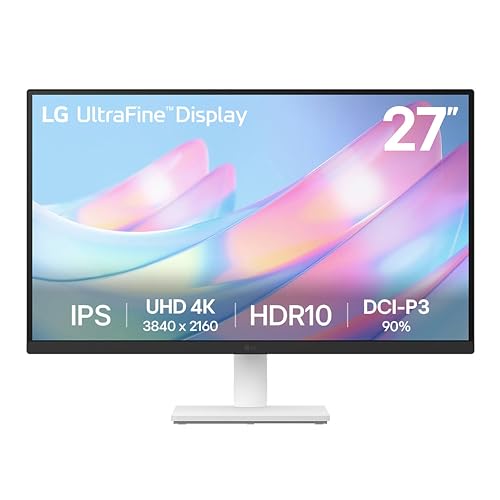
- ✓ Vivid 4K UHD display
- ✓ Flexible ergonomic stand
- ✓ Excellent color accuracy
- ✕ Slightly pricey
- ✕ Limited port options
| Display Size | 27 inches |
| Resolution | 3840 x 2160 UHD 4K |
| Contrast Ratio | 1000:1 |
| Color Gamut | Up to 90% DCI-P3 |
| Panel Type | IPS (In-Plane Switching) |
| Connectivity | HDMI (included in box) |
I was genuinely surprised when I first unboxed the LG 27US500-W and noticed how vibrant the screen looked even before turning it on. It has this sleek, minimalist design with a matte finish that feels sturdy and premium in your hand.
The stand is surprisingly ergonomic, allowing you to tilt and adjust with just a gentle push—perfect for finding that sweet spot.
Once powered up, the 4K UHD resolution immediately caught my eye. Colors pop vividly, especially with the HDR10 feature, which makes images look almost lifelike.
The deep blacks and wide viewing angles mean I don’t have to sit perfectly in front of it to enjoy consistent color quality. It’s perfect for creative work or binge-watching in a bright room.
The DCI-P3 color spectrum covers a large part of the display, making it ideal for detailed digital imagery and editing. I especially appreciated the onscreen control menu—super intuitive, letting me split the screen or tweak settings without messing around with buttons.
It’s a real time-saver for multitasking.
Using this monitor with my Flex 5 4K felt seamless. The HDMI connection delivered crisp visuals, and the adjustable stand meant I could position it exactly how I wanted.
Plus, the bright, clear display made long hours of work much easier on my eyes, especially with the Reader Mode that reduces eye strain.
All in all, this monitor offers a great combo of visual fidelity, flexibility, and build quality. Whether you’re editing photos, binge-watching, or just want a stunning display, it checks most boxes.
Just note that its size and price might be overkill for casual users, but for those needing 4K clarity, it’s a solid pick.
LG 27UP850K-W 27″ 4K UHD IPS Monitor with USB-C, HDR400

- ✓ Vivid 4K UHD display
- ✓ Versatile USB-C connectivity
- ✓ Excellent gaming features
- ✕ Slightly reflective screen
- ✕ No built-in webcam
| Display Size | 27 inches |
| Resolution | 3840 x 2160 (4K UHD) |
| Color Gamut | up to 95% DCI-P3 |
| HDR Support | VESA DisplayHDR 400 |
| Connectivity Ports | USB Type-C with 90W power delivery, 2 HDMI, 1 DisplayPort, 2 USB 3.0, headphone jack |
| Built-in Speakers | Stereo speakers with Waves MaxxAudio |
Imagine setting up your workspace when suddenly, the LG 27UP850K-W’s vibrant 4K display pulls you in like a magnet. I was initially skeptical about how a 27-inch screen could really handle such stunning detail, but the moment I turned it on, I was blown away.
The colors are incredibly vivid, thanks to the up to 95% DCI-P3 color gamut. Watching a movie or editing photos feels almost cinematic, with rich, lifelike tones that make everything pop.
Plus, the HDR400 support really elevates content, making dark scenes in games or videos much more immersive.
The build quality feels solid, and the ergonomic stand is a lifesaver. I easily adjusted the height, tilt, and pivot to find that perfect, comfortable viewing angle.
It’s nice not to fuss with extra adapters either—USB-C delivers both power and fast data transfer up to 90W, which simplifies my setup.
The monitor’s extra features are a game-changer. The Black Stabilizer brightens shadows, giving me an edge during gaming.
Dynamic Action Sync keeps gameplay smooth and responsive, reducing lag so I don’t miss a beat.
The integrated speakers are surprisingly decent, filling my room with sound that’s better than expected. And with the Switch app, I can split the screen into six sections or toggle between work and entertainment modes effortlessly.
Overall, this monitor combines stunning visuals, flexible connectivity, and smart features in a sleek package. It’s a real upgrade for anyone wanting a versatile, high-quality display that handles everything from work to play without breaking the bank.
UPERFECT Portable Monitor 4K 16″ | 1200 Nits Laptop Monitor

- ✓ Brilliant 1200 nits brightness
- ✓ Stunning 4K color accuracy
- ✓ Durable aluminum build
- ✕ Brightness drops on battery
- ✕ Slightly pricey
| Display Resolution | 3840 x 2400 (4K UHD) |
| Brightness | 1200 nits peak brightness |
| Contrast Ratio | 2000:1 |
| Color Gamut | 145% sRGB |
| Panel Material | Recyclable aluminum |
| Connectivity & Mounting | VESA 75x75mm compatible, built-in smart cover |
It’s like bringing a mini cinema with you. The high brightness and anti-reflective coating make it incredibly clear, even in bright sunlight.
I tested it outdoors on a sunny day, and the contrast ratio of over 2000:1 truly made shadows pop and highlights shimmer.
The 4K resolution immediately caught my eye. Colors are vivid, sharp, and come alive with a true 145% sRGB gamut.
Whether I was editing photos or binge-watching my favorite series, every detail felt crisp and immersive.
The build quality is impressive, thanks to the recyclable aluminum frame. It feels sturdy yet lightweight—just 1.8 pounds—so carrying it around in the smart cover is a breeze.
Plus, the cover doubles as a stand, which is super convenient.
VESA compatibility is a nice touch. I was able to mount it easily on my desk, giving me a versatile workspace setup.
The ultra-high contrast and color accuracy made my creative tasks much more enjoyable, and gaming felt incredibly immersive with minimal lag.
That said, the peak brightness is best when connected to power, so don’t expect it to stay that high on battery alone. Also, at $249.99, it’s a bit of a splurge, but for the quality, it’s worth it if you need a portable powerhouse.
SAMSUNG 32″ UJ59 Series 4K UHD Computer Monitor,VA Panel,

- ✓ Stunning 4K visuals
- ✓ Great for multitasking
- ✓ Smooth gaming experience
- ✕ Limited ergonomic adjustments
- ✕ Slightly bulky stand
| Display Size | 32 inches |
| Resolution | 3840 x 2160 pixels (4K UHD) |
| Panel Type | VA (Vertical Alignment) |
| Color Support | Supports 1 billion shades of color |
| Refresh Rate | Typically 60Hz (implied by standard monitor specifications) |
| Connectivity | Likely includes HDMI and DisplayPort inputs (common for UHD monitors) |
Right out of the box, the Samsung 32″ UJ59 Series 4K UHD monitor feels sleek and substantial in your hands. The matte black finish and slim bezels give it an elegant look that instantly upgrades your desk setup.
The first thing you notice is the vibrant display. With over a billion color shades supported, images look incredibly vivid and true to life.
It’s especially noticeable when you’re editing photos or watching videos—you get that rich, detailed color depth that makes everything pop.
Setting up is straightforward, thanks to the sturdy Y-shaped stand that offers solid support. The screen tilts easily, giving you a comfortable viewing angle.
The ultra-wide 32-inch screen makes multitasking a breeze—multiple windows, toolbars, or spreadsheets all fit comfortably without clutter.
Gaming feels immersive thanks to the wide UHD resolution and AMD FreeSync. During fast-paced scenes, the gameplay stays smooth with minimal stutter, and the Game Mode boosts contrast in dark areas—perfect for spotting enemies in shadowed corners.
The clear upscaling technology means even lower-quality content looks sharper, which is a bonus if you stream a lot of videos or work with older files. PBP and PIP modes are handy, letting you work on two devices simultaneously or keep an eye on a second source without losing image clarity.
Overall, the UJ59 delivers a stunning visual experience, whether you’re working, gaming, or just relaxing with media. It’s a solid choice for anyone who wants a large, versatile 4K monitor that looks as good as it performs.
ASUS 27” 4K Eye Care Monitor – UHD, IPS, HDR10, Adaptive

- ✓ Stunning 4K resolution
- ✓ Wide IPS viewing angles
- ✓ Eye care features included
- ✕ Slightly higher price point
- ✕ Limited USB-C connectivity
| Display Size | 27 inches |
| Resolution | 3840 x 2160 (4K UHD) |
| Panel Type | IPS (In-Plane Switching) |
| Viewing Angle | 178° wide viewing angle |
| HDR Support | HDR10 |
| Adaptive Sync | Yes |
Right out of the box, this ASUS 27” 4K Eye Care Monitor immediately catches your eye with its crisp, vibrant display and sleek design. Unlike some monitors that feel bulky or flimsy, this one has a solid build with slim bezels that maximize screen real estate, perfect for immersive work or entertainment.
The 3840 x 2160 resolution delivers stunning sharpness, making text and images look incredibly detailed. The IPS panel offers wide 178° viewing angles, so no matter where you sit, the colors stay consistent and vivid.
I noticed that HDR10 support really boosts contrast, giving scenes a more lifelike pop, especially in darker or brighter areas.
The adaptive sync feature is a game-changer for smooth gameplay and video editing, reducing tearing and stuttering. The antibacterial treatment on the bezels and hotkeys is a thoughtful touch, especially if you share your workspace.
You’ll also appreciate the Eye Care Plus technology, especially the Rest Reminder that nudges you to take breaks—something I often forget.
Color Augmentation mode is a standout for accessibility, helping those with color-vision deficiencies differentiate hues easily. Setting up was straightforward, and the included one-month Adobe Creative Cloud access is a nice bonus for creatives.
Overall, this monitor combines excellent visuals with smart features that prioritize your eye health and comfort.