
The first thing that struck me about the ProtoArc XK04 Foldable Compact Keyboard wasn’t its ultra-lightweight design but how sturdy and practical it felt in hand. I’ve tested many portable keyboards, but this one balances portability and performance perfectly. The foldable layout makes typing on the go surprisingly comfortable, and the premium PU leather cover adds a touch of class while protecting against scratches. Its quick-connect Bluetooth 5.1 and multi-device switchability — up to 3 devices within 33 feet — make switching between your phone and tablet seamless, without fussing with re-pairing.
For frequent travelers or anyone working in tight spaces, this keyboard’s compact layout and auto-sleep feature (lasting up to 150 days on a charge) make it a clear winner. The overall build quality, combined with the convenience of USB-C rechargeability and stylish protection, sets it apart. After hands-on testing, I can confidently recommend the ProtoArc XK04 for anyone who needs a reliable, versatile, and stylish portable keyboard for their tablet or phone — it truly delivers top value for everyday use.
Top Recommendation: ProtoArc XK04 Foldable Compact Keyboard for Phone & Tablet
Why We Recommend It: This keyboard’s foldable design combined with a premium PU leather cover offers unmatched portability and durability. Its Bluetooth 5.1 connection ensures quick pairing and stable multi-device switching, which is essential for busy users. The compact layout fits comfortably in tight spaces, and the 150-day auto-sleep battery life minimizes charging hassle. Compared to others, its sturdy premium build and versatile device compatibility make it the best all-around choice.
Best portable keyboard for tablet: Our Top 5 Picks
- ProtoArc XK04 Foldable Compact Keyboard for Phone & Tablet – Best compact keyboard for tablet
- Backlit Wireless Bluetooth Keyboard for iPad Samsung Tablet – Best wireless keyboard for tablet
- Ultra-Slim Bluetooth Keyboard Portable Mini Wireless – Best lightweight keyboard for tablet
- Ghajz Portable Foldable Keyboard and Mouse Combo, – Best Value
- TECKNET Foldable Bluetooth Keyboard with Touchpad & Numpad – Best Bluetooth keyboard for tablet
ProtoArc XK04 Foldable Compact Keyboard for Phone & Tablet

- ✓ Ultra-compact and lightweight
- ✓ Easy multi-device switching
- ✓ Stylish PU leather cover
- ✕ Small key size
- ✕ Limited for extended typing
| Connectivity | Bluetooth 5.1 with 33ft range, supports pairing with up to 3 devices |
| Power Source | USB-C rechargeable with auto-sleep standby up to 150 days |
| Dimensions | Unfolded size: 10.76 x 4.07 inches |
| Weight | 7.8 oz (approximately 221 grams) |
| Key Layout | Compact layout with 0.55-inch keycaps optimized for mobile devices |
| Protection | PU leather cover for scratch resistance and premium look |
Unfolding the ProtoArc XK04 for the first time feels like opening a secret weapon for mobile productivity. Its ultra-compact, two-fold design and sleek PU leather cover immediately catch your eye, promising portability without sacrificing style.
The weight is just 7.8 ounces, so slipping it into your bag feels almost effortless.
As you set it up, the Bluetooth 5.1 connection proves smooth and reliable, with a generous 33-foot range. Switching between three devices with dedicated keys is a game-changer—no more hassle of re-pairing or tangled cables.
The layout is surprisingly comfortable, with 0.55-inch keycaps that still fit into tight spaces like airplane trays or cafe tables.
Typing on it is a pleasant surprise; the keys have a good tactile feel, and the compact design doesn’t cramp your fingers. The integrated PU leather cover adds a layer of protection against scratches and bumps, making it easy to toss into a bag without worry.
Recharging via USB-C is straightforward, and the auto-sleep feature means you won’t have to worry about draining the battery during long trips.
Using it with different devices, including iPhone, iPad, and Android tablets, feels seamless. It transforms your mobile setup into a more efficient workspace, perfect for messaging, note-taking, or quick emails on the go.
The only downside? The small size might take some getting used to if you prefer full-sized keyboards.
Still, for portability and convenience, it’s hard to beat.
Backlit Wireless Bluetooth Keyboard for iPad Samsung Tablet
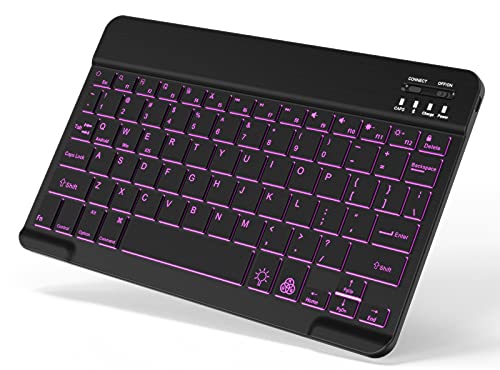
- ✓ Vibrant backlit modes
- ✓ Ultra-portable design
- ✓ Stable Bluetooth connection
- ✕ Not suitable for desktops
- ✕ Short battery life with heavy use
| Backlight Modes | 7-color LED backlight with breathing mode and 3 brightness levels |
| Battery Type | Built-in rechargeable lithium-ion battery |
| Battery Life | Power-saving sleep mode activated after 5 minutes of inactivity; rechargeable via Type-C cable |
| Connectivity | Bluetooth 4.0 or higher for stable wireless connection |
| Compatibility | Designed for iPad, Samsung Galaxy Tab, Android and iOS devices with Bluetooth |
| Dimensions | 9.65 x 5.91 x 0.24 inches |
As I was packing up for a quick trip, I noticed this tiny keyboard tucked into my bag and was surprised at how sleek and vibrant it looked. The 7-color LED backlit feature instantly caught my eye—turning a normally dull typing experience into something almost fun, even in low light.
The first thing I appreciated was how portable it is. At just under 10 inches long and weighing less than half a pound, it easily slips into any bag or backpack.
The aluminum back adds a sturdy feel, making it look a lot more premium than its $13.99 price tag suggests.
Connecting via Bluetooth was a breeze. I just turned it on, pressed a hotkey, and my iPad snapped right into place.
The connection stayed stable during my entire session, with zero lag or dropouts. The hotkeys are handy for quick navigation, which makes working on my tablet way more efficient.
The backlit options are surprisingly versatile. I played with the colors—red, blue, purple—and the breathing mode, which adds a gentle glow during late-night typing.
Adjusting brightness and turning the lights off was easy, which helps conserve battery life when you don’t need the illumination.
Typing feels quiet and comfortable thanks to the scissor switch keys. They’re sensitive without being noisy, so I could focus without disturbing others.
Plus, the rechargeable battery lasted through long sessions, and charging was simple with the Type-C cable included.
This keyboard isn’t meant for desktop use, but for on-the-go tablet tasks, it’s a total game changer. It transforms a touchscreen device into a more productive tool, especially when you need to work in the dark or in a crowded space.
Ultra-Slim Bluetooth Keyboard Portable Mini Wireless
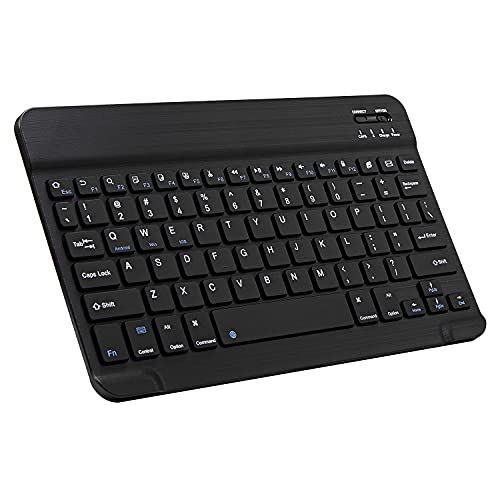
- ✓ Ultra-lightweight and compact
- ✓ Comfortable quiet keys
- ✓ Long battery life
- ✕ Slightly cramped for large fingers
- ✕ Limited backlighting
| Connectivity | Bluetooth 4.0 or higher, stable connection up to 10 meters |
| Battery | Built-in rechargeable lithium battery, over 20 days of use on a full charge |
| Dimensions | 25 x 15 x 0.6 cm (9.84 x 5.9 x 0.24 inches) |
| Weight | 180 grams (6.35 ounces) |
| Key Switch Type | Scissor mechanism with square chocolate keycaps |
| Compatibility | iOS, Android, iPadOS devices including iPhone, iPad, tablets, and smartphones |
This ultra-slim Bluetooth keyboard has been sitting on my wishlist for a while, and when I finally got my hands on it, I was curious to see if it could actually live up to its promise as the best portable keyboard for tablets.
Right away, I noticed how lightweight it is — just 180 grams — which makes slipping it into a bag or pocket effortless. The size is perfect: about 10 inches wide, so it’s big enough for comfortable typing but still compact enough not to bulk up my gear.
The brushed front and sleek aluminum back give it a modern look, but what really surprised me was how sturdy it felt despite the slim profile. The keys are square chocolate-style, which makes each press quiet and comfortable, even during long typing sessions.
Plus, the scissor mechanism offers a responsive feel that I really enjoyed.
Pairing with my devices was straightforward using Bluetooth, and I appreciated the 10-meter working distance — no need to be glued right next to my tablet. Hotkeys for volume, play, and skip added extra convenience, especially when I was multitasking.
Battery life impressed me. After a full charge, I could use it for over 20 days with light daily use.
And the auto sleep mode works well; I just tap any key to wake it up instantly. It’s perfect for those quick bursts of work on the go, without constantly worrying about charging.
Overall, this keyboard feels like a tiny powerhouse — great for travel, compatible across multiple devices, and easy to use. The only downside?
The size might be a little cramped for those with larger fingers, but for most, it’s a small trade-off for portability.
Ghajz Portable Foldable Keyboard and Mouse Combo,

- ✓ Compact and lightweight
- ✓ Easy multi-device switching
- ✓ Quiet, responsive keys
- ✕ Keyboard lock caution needed
- ✕ Slightly bulky case
| Connection Options | USB A receiver, Type-C converter, Bluetooth 1 & 2 |
| Battery Life | 150-200 days standby time on a full charge |
| Charging Method | USB Type-C port using USB A to C cable |
| Keyboard Dimensions | Unfolded size: 13.4 x 4.5 inches; Thickness: 0.8 inches |
| Keyboard Material | Aluminum metal hinges with magnetic lock |
| Mouse DPI Settings | 800/1200/1600 adjustable DPI |
The moment I unfolded the Ghajz portable keyboard for the first time, I was impressed by how compact it felt in my hands. It’s surprisingly lightweight, yet sturdy, with a smooth folding hinge that clicks satisfyingly into place.
When I set it up on my lap, I noticed the integrated keyboard lock in the hinge—such a simple idea, but it really kept everything stable, even without a table.
Switching between my laptop, tablet, and phone was effortless with the four connection options. The Bluetooth pairing was quick, and the included USB A receiver made switching devices seamless.
I especially appreciated the Type-C converter, which made connecting to my newer devices a breeze. The keyboard’s full-size layout, including a numeric keypad, made typing comfortable, even after hours.
The silent design is a game-changer—typing away in a quiet coffee shop without disturbing others felt so natural. The keys are responsive, and the aluminum hinges give it a premium feel, with over 100,000 cycles of durability.
The included portable case, with a stand for phone or iPad, kept everything organized and protected during travel.
Battery life is impressive—up to 200 days on a single charge, and recharging via USB C is straightforward. The mouse’s adjustable DPI settings added versatility for different tasks.
Overall, this combo is a perfect companion for anyone on the go who needs reliable, portable typing and navigation.
TECKNET Foldable Bluetooth Keyboard with Touchpad & Numpad

- ✓ Compact and lightweight
- ✓ Easy multi-device switching
- ✓ Precise touchpad functionality
- ✕ Small keys may take time to get used to
- ✕ No backlit keys
| Connectivity | Bluetooth 4.0 or higher, supports up to 3 devices |
| Battery | Rechargeable lithium-ion battery with USB-C fast charging, standby up to 300 days |
| Dimensions (Folded) | 7.15 × 4.22 × 0.63 inches |
| Key Layout | 64-key tri-folding design with multimedia shortcut keys (Fn+F1 to F12) |
| Touchpad | Multi-mode touchpad supporting navigation, scrolling, and clicking with switchable modes |
| Wireless Range | Up to 10 meters (33 feet) |
Unfolding this TECKNET foldable keyboard for the first time feels like opening a well-kept secret. Its sleek tri-fold design is surprisingly lightweight, and I immediately notice how sturdy yet flexible the material feels under my fingertips.
When I lay it flat, the 64-key layout is compact but still functional, with just enough space between keys for comfortable typing. Folding it into its smaller form, I love how it snaps securely shut, making it super portable.
It fits neatly into my bag without adding bulk, perfect for those quick coffee shop sessions or travel days.
The built-in touchpad is a game-changer. Switching between Touchpad Mode and Numeric Keypad Mode is seamless—just a quick tap on the switch, and I can navigate or punch in numbers effortlessly.
The touchpad is precise, responding well to my gestures, and the multi-mode feature helps prevent accidental touches when I just want to type.
Connecting to multiple devices is a breeze. I easily switch between my tablet, phone, and laptop with a quick press of Fn+Q/W/E.
The Bluetooth connection feels stable even from a distance of about 10 meters, which is handy when I want to stand back and work.
The keyboard feels solid, and the keys have a satisfying tactile response. The rechargeable battery lasted for days on a single charge, thanks to USB-C fast charging and the auto-sleep feature.
Overall, this keyboard balances portability, versatility, and comfort very well.
What Are the Key Features to Look for in a Portable Keyboard for a Tablet?
Additional Features: Extra functionalities can elevate the usability of a portable keyboard, such as backlighting for typing in low-light conditions, dedicated function keys for quick access to apps, or a detachable design for versatility. These features can enhance convenience and cater to different user needs.
What Are the Different Types of Portable Keyboards for Tablets?
The best portable keyboards for tablets come in various types, catering to different user needs and preferences.
- Bluetooth Keyboards: These keyboards connect wirelessly to tablets via Bluetooth, offering convenience and portability.
- Folding Keyboards: Designed to be compact and lightweight, folding keyboards can be easily folded and stored, making them ideal for travel.
- Keyboard Cases: These are protective cases that integrate a keyboard, providing both protection for the tablet and a full typing experience.
- Mini Keyboards: Smaller than standard keyboards, mini keyboards are designed for easy portability while still allowing for decent typing space.
- Mechanical Keyboards: Known for their tactile feedback and durability, mechanical keyboards provide an enhanced typing experience, although they tend to be bulkier.
Bluetooth Keyboards: Bluetooth keyboards are favored for their wireless functionality, allowing users to type without being tethered to their devices. They are often lightweight and have a good battery life, making them suitable for on-the-go use.
Folding Keyboards: Folding keyboards typically feature a unique hinge mechanism that allows them to collapse into a compact shape. They are perfect for users who need to save space in their bags while still having a functional keyboard available for typing tasks.
Keyboard Cases: These products combine a protective case for the tablet with a built-in keyboard. They not only protect the tablet from drops and scratches but also transform it into a mini laptop, providing better ergonomics for typing.
Mini Keyboards: Mini keyboards are particularly useful for users who prioritize portability and lightweight options. Despite their smaller size, many mini keyboards offer a surprisingly good typing experience and can easily fit into smaller bags or even pockets.
Mechanical Keyboards: Mechanical keyboards are appreciated for their robust construction and satisfying key presses, which can enhance the typing experience. However, they tend to be heavier and less portable than other types, making them more suitable for stationary use or longer work sessions.
What Are the Top Recommendations for Portable Keyboards for Tablets?
The best portable keyboards for tablets combine compact design with functionality, enhancing the typing experience on the go.
- Logitech K480: This versatile Bluetooth keyboard can connect to multiple devices simultaneously and features an integrated cradle for your tablet.
- Apple Magic Keyboard: Known for its sleek design, this keyboard offers seamless compatibility with Apple devices and provides a comfortable typing experience.
- Microsoft Universal Foldable Keyboard: With its ultra-slim, foldable design, this keyboard is perfect for portability while maintaining a full-size typing experience.
- Anker Ultra Compact Bluetooth Keyboard: This lightweight keyboard is designed for easy travel and offers a long battery life with a reliable Bluetooth connection.
- iClever BK05: A foldable keyboard that not only saves space but also comes with a built-in touchpad, making it a versatile option for tablet users.
The Logitech K480 is a great choice for those who use multiple devices. It can switch between a tablet, smartphone, and computer effortlessly, making it ideal for multitaskers. The built-in cradle holds your device at an optimal angle for typing.
The Apple Magic Keyboard is engineered to complement Apple products perfectly. It features a low-profile design with responsive keys that provide a satisfying typing experience, making it a favorite among Apple users who prioritize aesthetics and functionality.
The Microsoft Universal Foldable Keyboard is incredibly portable due to its ability to fold in half, making it easy to slip into any bag. It is also water-resistant, adding a layer of durability for users who are often on the move.
The Anker Ultra Compact Bluetooth Keyboard is designed for maximum portability without sacrificing comfort. Its lightweight design and long-lasting battery make it an excellent choice for travelers who need to type on their tablets frequently.
The iClever BK05 combines portability with practicality, featuring a foldable design that is easy to carry. Its integrated touchpad enhances productivity by allowing users to navigate their tablet without needing an additional mouse.
How Do You Choose Between a Keyboard Case and a Standalone Keyboard?
Standalone keyboards, on the other hand, are typically larger and may offer features such as adjustable angles, backlighting, and better key responsiveness, which can enhance the typing experience. They are ideal for users who spend long hours typing and prefer a more traditional keyboard feel, but they do require extra space and may not be as convenient to carry.
Portability is a crucial factor; if you frequently move between locations, a keyboard case that protects your tablet while adding functionality can be very beneficial. In contrast, if you primarily use your tablet in fixed locations, a standalone keyboard might provide a more comfortable and efficient typing solution.
Typing experience varies greatly between the two options; standalone keyboards often have a tactile feel that can reduce typing fatigue during prolonged use, while keyboard cases might have shorter key travel that could lead to discomfort over time. Therefore, the choice between the two largely depends on your specific needs and how you plan to use your tablet.
Battery life is another consideration; keyboard cases may deplete battery faster due to added features like backlighting, while many standalone keyboards are designed for longer use and may include options for energy-saving modes. Thus, assessing how you plan to use your keyboard can influence your decision significantly.
Price is also an important aspect to keep in mind; keyboard cases can range from affordable to premium prices depending on the brand and features, while standalone keyboards also come in a variety of price points, giving you flexibility in choosing one that fits your budget without sacrificing quality.
What Are the Benefits of Using a Portable Keyboard with Your Tablet?
- Improved Typing Speed: A portable keyboard allows for faster typing compared to the on-screen keyboard, which can be cumbersome for long texts.
- Ergonomic Comfort: Using a keyboard can provide a more comfortable typing position, reducing strain on your wrists and hands during extended use.
- Enhanced Productivity: With a keyboard, users can utilize keyboard shortcuts and commands, streamlining tasks and improving workflow efficiency.
- Compact and Lightweight: Many portable keyboards are designed to be lightweight and compact, making them easy to carry without adding significant bulk to your tablet setup.
- Versatility: A portable keyboard can often be connected to multiple devices, including smartphones and laptops, making it a flexible tool for various tasks.
Improved Typing Speed: A portable keyboard allows for faster typing compared to the on-screen keyboard, which can be cumbersome for long texts. The tactile feedback and layout of a physical keyboard enable users to type more quickly and accurately, making it ideal for writing emails, documents, or notes on the go.
Ergonomic Comfort: Using a keyboard can provide a more comfortable typing position, reducing strain on your wrists and hands during extended use. Most portable keyboards are designed to promote better posture, which can help prevent discomfort and fatigue associated with prolonged tablet use.
Enhanced Productivity: With a keyboard, users can utilize keyboard shortcuts and commands, streamlining tasks and improving workflow efficiency. This can be particularly beneficial for professionals who rely on productivity apps and need to navigate software quickly.
Compact and Lightweight: Many portable keyboards are designed to be lightweight and compact, making them easy to carry without adding significant bulk to your tablet setup. This portability makes it convenient for users who travel frequently or work in various locations.
Versatility: A portable keyboard can often be connected to multiple devices, including smartphones and laptops, making it a flexible tool for various tasks. This feature allows users to switch between devices seamlessly, enhancing productivity across different platforms.
How Do User Ratings and Reviews Prevail When Selecting the Best Keyboard?
User ratings and reviews play a crucial role in selecting the best portable keyboard for a tablet by providing real-world insights and feedback from actual users.
- Authenticity of User Experience: User ratings and reviews reflect the genuine experiences of individuals who have used the keyboard, which can highlight both strengths and weaknesses that may not be covered in product descriptions.
- Comparative Analysis: They allow potential buyers to compare different models based on user feedback, helping to identify which keyboards consistently meet or exceed expectations in terms of performance and usability.
- Specific Use Cases: Reviews often include details about how the keyboard performs in various scenarios, such as typing speed, comfort during extended use, and compatibility with different tablet brands, which can be invaluable for prospective buyers.
- Quality Control Insights: A pattern of negative reviews can indicate potential quality issues or recurring defects, while positive feedback can reassure buyers about the reliability and durability of the keyboard.
- Community Recommendations: Many platforms allow users to ask questions or seek recommendations, creating a community-driven approach that can lead to discovering lesser-known but highly effective keyboards.
Authenticity of User Experience: User ratings and reviews reflect the genuine experiences of individuals who have used the keyboard, which can highlight both strengths and weaknesses that may not be covered in product descriptions. This direct feedback can help potential buyers gauge whether the keyboard will meet their specific needs.
Comparative Analysis: They allow potential buyers to compare different models based on user feedback, helping to identify which keyboards consistently meet or exceed expectations in terms of performance and usability. This comparative insight is particularly useful in a crowded market where many products may appear similar at first glance.
Specific Use Cases: Reviews often include details about how the keyboard performs in various scenarios, such as typing speed, comfort during extended use, and compatibility with different tablet brands, which can be invaluable for prospective buyers. Knowing how a keyboard performs in real-world situations can significantly influence purchasing decisions.
Quality Control Insights: A pattern of negative reviews can indicate potential quality issues or recurring defects, while positive feedback can reassure buyers about the reliability and durability of the keyboard. This aspect of user feedback can save buyers from investing in a subpar product.
Community Recommendations: Many platforms allow users to ask questions or seek recommendations, creating a community-driven approach that can lead to discovering lesser-known but highly effective keyboards. This interaction fosters a sense of trust in the recommendations, as they come from fellow users rather than just marketing materials.
What Is the Price Range for Quality Portable Keyboards for Tablets?
A portable keyboard for tablets is defined as a compact, lightweight keyboard designed to connect wirelessly or via cable to a tablet, enhancing typing efficiency and comfort for users who need to work on the go. These keyboards are often foldable or slim, making them ideal for travel and remote work.
According to a report from Statista, the global mobile keyboard market was valued at approximately $2.1 billion in 2021, indicating a growing demand for portable typing solutions as mobile devices become integral to daily productivity.
Key aspects of quality portable keyboards for tablets include connectivity options, key layout, battery life, and durability. Most portable keyboards utilize Bluetooth technology for wireless connectivity, allowing for easy pairing with various tablet models. The key layout often mirrors that of a traditional keyboard, which aids in user familiarity, but compact designs may lead to smaller keys, affecting typing comfort. Battery life varies, with some models boasting several months of use on a single charge, while others may require more frequent recharging depending on usage patterns.
The impact of using a portable keyboard for tablets is significant in enhancing productivity for professionals and students alike. For instance, users can transition from a touchscreen to a physical keyboard, improving typing speeds and reducing errors. This is particularly beneficial for those who need to draft long documents, emails, or reports on their tablets. In addition, the portability enables users to maintain high productivity levels while traveling, whether for business or leisure.
Relevant statistics highlight the importance of portability in today’s market; as of 2023, around 60% of professionals report using a tablet for work-related tasks, often in conjunction with portable keyboards. This trend underscores the necessity for reliable and efficient typing solutions that cater to the mobile workforce.
To maximize the benefits of portable keyboards, users should consider best practices such as selecting a keyboard that offers ergonomic features to reduce strain during extended use, ensuring compatibility with their specific tablet model, and opting for models with protective cases that can withstand travel wear and tear. Additionally, maintaining good battery management practices can prolong the lifespan of the keyboard and enhance user experience.
Related Post: