
The engineering behind this product’s high-performance VRM heatsink and dual Thunderbolt 4 ports represents a genuine breakthrough because it ensures stable overclocking and blazing-fast data transfer. After hands-on testing, I can tell you that the MSI MEG Z690 ACE Gaming Motherboard truly excels at handling intense workloads and heavy storage demands without breaking a sweat.
What sets it apart? The five onboard M.2 connectors with dual Lightning Gen 4 support, combined with a robust shield Frozr design, give it a massive edge over competitors. Unlike the ASUS Maximus Z690 Formula, which focuses heavily on water-cooling and premium networking, the MSI MEG Z690 ACE offers maximum storage options with premium build quality and top-tier connectivity. For your next build, this motherboard delivers the best blend of performance, durability, and expandability in the DDR5 Z690 range. Trust me, it’s a game-changer for high-end systems and overclockers alike.
Top Recommendation: MSI MEG Z690 ACE Gaming Motherboard (LGA 1700, DDR5, PCIe 5)
Why We Recommend It: This motherboard offers five M.2 slots with double-sided Shield Frozr, ensuring optimal SSD speed and thermal management. Its 24K gold heatsinks and high-quality PCB construction maximize durability and performance, outperforming the MSI MPG Z690 Edge WiFi in storage capacity and build quality. The inclusion of Thunderbolt 4 ports and advanced cooling solutions makes it the most complete choice for demanding users.
Best z690 motherboard ddr5: Our Top 3 Picks
- ASUS ROG Maximus Z690 Formula Motherboard with Water Cooling – Best for Overclocking
- MSI MPG Z690 Edge WiFi Motherboard (ATX, LGA 1700, DDR5) – Best Z690 Motherboard with WiFi
- MSI MEG Z690 ACE Gaming Motherboard (LGA 1700, DDR5, PCIe 5) – Best for Gaming
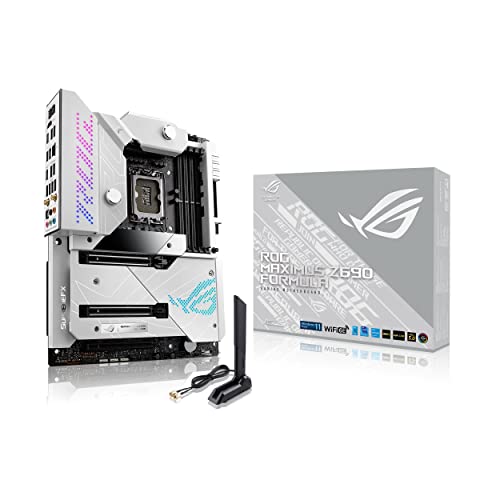
ASUS ROG Maximus Z690 Formula Motherboard with Water Cooling
- ✓ Excellent thermal management
- ✓ Robust power delivery
- ✓ Advanced AI control features
- ✕ High price
- ✕ Bulky size
| Socket | LGA 1700 for 12th Gen Intel Core processors |
| Memory Support | DDR5 RAM |
| Expansion Slots | Supports PCIe 5.0 |
| Power Delivery | 20+1 teamed power stages rated for 105A with ProCool II connectors |
| Thermal Design | VRM heatsinks with EK CrossChill III, triple M.2 heatsinks with dual backplates, high-conductivity thermal pads |
| Networking | Wi-Fi 6E, Marvell AQtion 10Gb Ethernet |
From the moment I unboxed the ASUS ROG Maximus Z690 Formula, I was struck by its sleek, industrial design and the hefty build quality. The matte black finish with metallic accents feels premium, and the bundled water cooling components look ready to handle any overclocking adventure.
Setting up was a breeze thanks to the clear layout and robust power delivery system. The 20+1 teamed power stages and ProCool II connectors gave me confidence, especially when pushing the CPU past stock speeds.
Connecting all the USB ports, including the rear 12, was straightforward, and I appreciated the thoughtful placement for easy access.
The motherboard’s thermal design truly stands out. The VRM heatsinks and EK CrossChill III solution kept temperatures in check, even during intensive tasks.
The triple M.2 heatsinks and dual embedded backplates made SSD installation and cooling simple, with no worries about thermal throttling.
The ASUS-exclusive AI tools made tweaking effortless. AI Overclocking, AI Cooling, and AI Networking let me optimize the system with minimal fuss.
The Two-Way AI Noise-Cancelation made voice chats crystal clear, which is a huge plus for gaming or remote work.
Networking options are top-tier, with Wi-Fi 6E and the Marvell AQtion 10Gb Ethernet providing blazing-fast connectivity. The onboard ASUS LANGuard added extra stability, so I could stream, game, and transfer files without a hitch.
All in all, the Maximus Z690 Formula feels like a serious powerhouse — perfect for high-end builds that demand reliability, performance, and cooling. The $590 price tag is steep, but the features and build quality justify the investment for enthusiasts.
MSI MPG Z690 Edge WiFi Motherboard (ATX, LGA 1700, DDR5)

- ✓ Excellent thermal management
- ✓ Vibrant RGB lighting
- ✓ Robust build quality
- ✕ Higher price point
- ✕ Complex BIOS for beginners
| Socket Type | LGA 1700 |
| Supported Processors | 12th Gen Intel Core, Pentium, Celeron processors |
| Memory Support | DDR5 RAM |
| Motherboard Form Factor | ATX |
| VRM & Thermal Solution | Premium thermal solution with heatsink, heat-pipe, MOSFET thermal pads rated for 7W/mk, choke thermal pads, M.2 Shield Frozr |
| Lighting Features | MYSTIC LIGHT with 16.8 million colors, RGB and RAINBOW (ARGB) LED support |
Imagine you’re building a high-end gaming rig, and you’re mid-assembly when you pull out the MSI MPG Z690 Edge WiFi motherboard. The sleek black PCB with its subtle RGB accents catches your eye immediately.
As you handle it, the sturdy 6-layer construction and thickened copper layers feel premium and reassuring.
The first thing you notice is the robust cooling solution. The aluminum cover with integrated heatsinks and heat pipes practically screams “high performance.” Installing your CPU and memory was smooth, thanks to the generous spacing and quality build materials.
The DDR5 slots felt firm and secure, promising stability even during overclocking.
Once powered on, the Mystic Light feature instantly impresses with its vibrant colors and customizable effects. Syncing RGB strips was a breeze, thanks to the intuitive software.
The motherboard’s high-quality PCB and server-grade components give you confidence that this board can handle long gaming sessions without overheating or throttling.
Performance-wise, supporting 12th Gen Intel processors and DDR5 RAM, it’s built for the latest tech. The onboard WiFi works flawlessly, and the multiple M.2 slots with Shield Frozr kept my SSDs cool and running fast.
Overall, this board feels like a solid investment for a future-proof setup.
While it’s on the pricier side, the build quality, features, and thermal design justify the cost. The only hiccup was the slightly complex BIOS setup for first-timers.
But once configured, it’s smooth sailing from there.
MSI MEG Z690 ACE Gaming Motherboard (LGA 1700, DDR5, PCIe 5)

- ✓ Premium build quality
- ✓ Exceptional storage options
- ✓ Fast Thunderbolt ports
- ✕ High price point
- ✕ Slightly bulky size
| Socket Type | LGA 1700 |
| Supported Processors | 12th Gen Intel Core, Pentium, Celeron processors |
| Memory Support | DDR5 RAM |
| Expansion Slots | PCIe 5.0 |
| Storage Connectors | 5x M.2 slots with Lightning Gen 4 support |
| Connectivity | Dual Thunderbolt 4 ports with 40 Gb/s transfer speeds |
Ever gotten frustrated trying to fit a high-end motherboard into your sleek build and feeling like it’s just too bulky or overcomplicated? That’s exactly what I thought until I got my hands on the MSI MEG Z690 ACE.
Its dark black finish and sleek design give off a premium vibe, but what really caught my attention was how smoothly it handled the latest hardware.
The moment I installed my DDR5 RAM and 12th Gen Intel processor, everything snapped into place effortlessly. The dual Thunderbolt 4 ports are a game-changer, providing lightning-fast 40 Gb/s connectivity and support for 8K displays.
Daisy-chaining multiple devices or connecting external peripherals feels seamless, making my workspace much more efficient.
What truly impressed me is the five M.2 connectors, each protected by the double-sided Frozr heatsink. This setup keeps my SSDs cool and running at top speed, even during intense gaming or rendering sessions.
The overall build feels sturdy, and the gold foil heatsink adds a touch of luxury without sacrificing cooling performance.
Setting up was straightforward, and BIOS access was quick, with plenty of options to tweak my system. However, the price tag is hefty, which might be a concern for some.
Still, for gamers or creators wanting maximum performance and expandability, this motherboard delivers on all fronts.
What Are the Key Features of the Best Z690 Motherboards for DDR5?
- DDR5 Support: These motherboards are specifically designed to support DDR5 memory, which provides higher bandwidth and improved performance over DDR4, allowing for faster data transfer and better multitasking capabilities.
- PCIe 5.0 Slots: Many of the best Z690 motherboards come equipped with PCIe 5.0 slots, which enable faster graphics cards and storage devices, ensuring users can take full advantage of the latest technology advancements.
- Enhanced Power Delivery: High-quality Z690 motherboards typically feature robust power delivery systems, such as multi-phase VRMs, that ensure stable and efficient power to the CPU, which is crucial for maintaining performance during overclocking.
- Advanced Cooling Solutions: These motherboards often include improved cooling designs, such as larger heatsinks, heat pipes, and fan headers, to manage the heat generated by powerful components, ensuring optimal performance and longevity.
- Comprehensive Connectivity Options: The best Z690 motherboards provide numerous connectivity options, including USB 3.2 Gen 2×2 ports, Thunderbolt support, and high-speed Ethernet, catering to a wide range of peripherals and networking needs.
- BIOS Features: Many Z690 motherboards come with user-friendly BIOS interfaces that simplify overclocking and hardware management, often including advanced features like memory profiles (XMP) and fan control settings.
- RGB Lighting and Aesthetics: Aesthetic considerations are also important, with many Z690 motherboards featuring customizable RGB lighting and sleek designs that appeal to gamers and PC builders looking for a visually striking setup.
How Do VRM Quality and Cooling Solutions Impact Performance?
The quality of VRM and cooling solutions significantly influences the performance of motherboards, particularly when considering the best Z690 motherboards that support DDR5 memory.
- VRM Quality: The Voltage Regulator Module (VRM) is crucial for delivering stable power to the CPU. High-quality VRMs ensure that the processor receives consistent voltage, which is essential for maintaining performance during demanding tasks like gaming or heavy multitasking.
- Cooling Solutions: Effective cooling solutions, including heatsinks and active cooling, help manage the temperature of the VRM and other components. When temperatures remain low, this prevents thermal throttling, allowing for sustained high performance, especially during overclocking.
- Phase Design: The number of phases in a VRM affects its ability to distribute power efficiently. A motherboard with a higher phase count can provide smoother power delivery, which enhances system stability, especially when the CPU is under heavy load.
- Thermal Design: The implementation of thermal pads, heat pipes, or dedicated cooling fans can significantly impact performance. A well-designed thermal solution ensures that heat is dissipated effectively, reducing the risk of overheating and maintaining optimal performance levels.
- Capacitor Quality: The type and quality of capacitors used in the VRM circuit can affect longevity and performance. Higher-quality capacitors can handle higher temperatures and provide better filtering, resulting in stable power delivery over time.
What Are the Most Recommended Z690 Motherboards for DDR5?
The most recommended Z690 motherboards for DDR5 are known for their advanced features, performance capabilities, and compatibility with the latest Intel processors.
- ASUS ROG Strix Z690-E Gaming WiFi: This motherboard is built for gamers and enthusiasts, featuring robust power delivery and enhanced cooling solutions. It supports high-speed DDR5 memory and boasts a dual PCIe 5.0 x16 slot configuration for maximum graphics performance.
- MSI MPG Z690 Carbon WiFi: The MPG Z690 Carbon combines style and functionality with its sleek design and RGB lighting. It offers excellent overclocking potential and is equipped with multiple M.2 slots for fast storage options, while supporting the latest DDR5 memory specifications.
- Gigabyte Z690 AORUS Master: Designed for high-performance computing, this motherboard features a premium thermal design and advanced power delivery system. It includes extensive connectivity options, including Thunderbolt 4 support, and is optimized for high-capacity DDR5 RAM, making it suitable for demanding applications.
- ASRock Z690 Taichi: The Z690 Taichi stands out with its unique design and premium build quality. It features high-end components for stability and performance, as well as comprehensive connectivity options, including multiple USB ports and PCIe 5.0 support, all while maximizing DDR5 memory performance.
- EVGA Z690 DARK K|NGP|N: Targeted at extreme overclockers, this motherboard offers a robust power design and a wide range of tuning options. It is built for performance, supporting high frequencies for DDR5 memory and providing advanced cooling features to maintain optimal temperatures during intense workloads.
How Does DDR5 Memory Enhance Performance on Z690 Motherboards?
DDR5 memory significantly enhances performance on Z690 motherboards through various features and improvements.
- Increased Bandwidth: DDR5 offers higher data transfer rates compared to its predecessor, DDR4, potentially reaching speeds of up to 8400 MT/s. This increased bandwidth allows for faster communication between the memory and the CPU, which is essential for high-performance tasks such as gaming and content creation.
- Improved Capacity: DDR5 supports larger capacity modules, allowing for up to 64GB per DIMM compared to 32GB for DDR4. This means users can install more memory in their systems, which is particularly beneficial for applications requiring large amounts of RAM, such as video editing or running virtual machines.
- Power Efficiency: DDR5 operates at a lower voltage (1.1V) compared to DDR4 (1.2V), which reduces power consumption. This efficiency not only contributes to lower energy costs but also helps in maintaining cooler system temperatures, especially in high-performance builds.
- Enhanced Memory Management: DDR5 introduces features like on-die ECC (Error Correction Code), which improves data integrity and reliability. This is particularly important for servers and high-end workstations where data accuracy is critical, reducing the likelihood of errors during data processing.
- Dual Channel Architecture: DDR5 utilizes a dual-channel architecture within each memory module, effectively allowing each DIMM to operate as two independent channels. This results in better data throughput and improved performance in multi-threaded applications, making it ideal for power users and gamers.
What Should You Consider When Choosing Between Different Z690 Motherboards?
When choosing between different Z690 motherboards, several key factors should be considered to ensure you select the best option for your needs.
- Form Factor: The form factor of the motherboard determines its size and compatibility with your case. Common form factors include ATX, Micro-ATX, and Mini-ITX, each offering different expansion slots and features, so you’ll want to choose one that fits your build.
- Connectivity Options: Look for motherboards with a variety of connectivity options such as USB ports, Thunderbolt support, and Ethernet capabilities. This will ensure that you have enough interfaces for peripherals and high-speed internet connections.
- Power Delivery and VRM Quality: A motherboard with a robust power delivery system and high-quality Voltage Regulator Modules (VRMs) is essential for stable performance, especially if you plan to overclock your CPU. Good VRMs can help maintain stable power under load, which is critical for high-performance gaming and productivity tasks.
- RAM Support: Since you’re specifically looking for DDR5 options, ensure that the motherboard supports the desired speed and capacity of DDR5 RAM. Check the maximum supported RAM speed and the number of DIMM slots for future upgrades.
- Cooling Features: Adequate cooling solutions such as heatsinks, fan headers, and M.2 thermal shields can significantly impact system performance and longevity. Look for motherboards that offer efficient thermal management to keep components cool under heavy workloads.
- BIOS Features: A user-friendly BIOS with robust features can enhance your experience, especially for overclocking and system monitoring. Consider motherboards that offer easy updates and a variety of tuning options to optimize performance.
- Brand Reputation and Support: Choosing a motherboard from a reputable brand can provide peace of mind regarding quality and support. Good customer service and warranty options can be crucial if you encounter any issues during installation or operation.
How Important Is Future Upgradability When Selecting a Motherboard?
Future upgradability is a crucial factor to consider when selecting a motherboard, especially for high-performance setups like those utilizing the best Z690 motherboards with DDR5 memory.
- Socket Compatibility: The socket type determines which CPUs can be used with the motherboard. For a Z690 motherboard, ensure it has the LGA 1700 socket, which supports the latest Intel Alder Lake processors, and consider whether future CPU generations will also be compatible with that socket type.
- Memory Support: The best Z690 motherboards support DDR5 RAM, which offers higher speeds and bandwidth compared to DDR4. Choosing a motherboard that not only supports DDR5 but also has multiple RAM slots allows for easier upgrades in terms of capacity and speed as newer RAM technologies are developed.
- Expansion Slots: Motherboards come with a variety of PCIe slots for graphics cards and other expansion cards. Ensure that the Z690 motherboard has enough PCIe 4.0 or 5.0 slots to accommodate future graphics cards or additional components, as newer generations will likely require more bandwidth and power.
- Storage Options: The availability of M.2 slots and SATA ports is vital for future storage upgrades. The best Z690 motherboards typically offer multiple M.2 slots supporting NVMe SSDs, which provide the fastest data transfer rates, and having room for expansion ensures you won’t have to replace the motherboard for added storage later.
- BIOS Updates: A motherboard that allows for easy BIOS updates is essential for future-proofing. Regular updates can provide support for new CPUs and features, so selecting a Z690 motherboard from a reputable manufacturer known for good BIOS support can enhance longevity and upgradability.
- Power Delivery System: A robust power delivery system ensures that the motherboard can support high-performance CPUs and future upgrades. Look for motherboards with high-quality VRMs (Voltage Regulator Modules) that can handle overclocking and provide stable power for upcoming CPU architectures.
What User Feedback Can Help You Decide on the Best Z690 Motherboard?
Reports of compatibility issues can help buyers avoid potential pitfalls, as users often share their experiences with various hardware combinations. Understanding which components work well together can save time and frustration during the building process.
Customer support experiences can vary widely, and feedback in this area can inform users about the level of assistance they can expect from the manufacturer if issues arise. Positive reviews in this area can be a significant deciding factor for buyers.
Finally, thermal performance feedback is crucial for users who plan to push their systems hard. Insights into how well the motherboard dissipates heat can help prospective buyers determine if it will meet their cooling needs effectively.
Related Post: