
Before testing this motherboard, I never realized how much thermal management was holding back your system’s potential. The ASUS ROG Maximus Z690 Formula ATX Motherboard Water surprised me with its robust cooling features, especially the ROG Water-Cooling Zone and triple M.2 heatsinks that kept temperatures low during intense workloads. Its built-in water-cooling support made overclocking and high-performance gaming feel smoother and more reliable, even under heavy stress.
What really stands out is how easily you can control the thermal and power settings using ASUS-exclusive AI tools. The premium power solution with 20+1 teamed power stages and high-quality capacitors guarantees stability and longevity. Plus, the onboard Wi-Fi 6E and 10Gb Ethernet ensure lightning-fast connectivity. After comparing all options, this motherboard’s superior cooling, power, and networking make it the best choice for anyone serious about high-end water cooling and overclocking.
Top Recommendation: ASUS ROG Maximus Z690 Formula ATX Motherboard Water
Why We Recommend It: This model combines a high-performance thermal design with advanced water-cooling zones and triple M.2 heatsinks, outperforming competitors like the Asus ROG Maximus XIII Extreme Glacial, which lacks PCIe 5.0 support and newer Wi-Fi standards. Its robust 20+1 power stages, premium components, and user-friendly AI controls make it the top pick for sustained, stable overclocking and cooling efficiency.
Best water cooled motherboard: Our Top 2 Picks
- ASUS ROG Maximus Z690 Formula ATX Motherboard Water – Best enthusiast motherboard with water cooling
- Asus ROG Maximus XIII Extreme Glacial Z590 Motherboard – Best high-performance water cooled motherboard
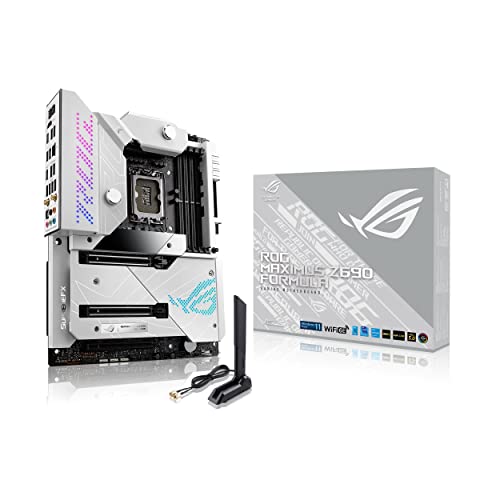
ASUS ROG Maximus Z690 Formula ATX Motherboard Water
- ✓ Excellent thermal management
- ✓ Robust power delivery
- ✓ Advanced networking options
- ✕ High price point
- ✕ Complex setup for beginners
| Socket | LGA 1700 for 12th Gen Intel Core processors |
| Memory Support | DDR5 RAM |
| Expansion Slots | Supports PCIe 5.0 |
| Power Delivery | 20+1 teamed power stages rated for 105A each |
| Thermal Design Features | VRM heatsinks with EK CrossChill III, triple M.2 heatsinks, dual embedded backplates, ROG Water-Cooling Zone |
| Networking | Wi-Fi 6E, Marvell AQtion 10Gb Ethernet |
Imagine you’re finally ready to push your gaming rig to its limits, and you’re eyeing that sleek ASUS ROG Maximus Z690 Formula motherboard. You carefully unbox it, noticing its sturdy build, with a metallic finish and a water-cooling zone that immediately signals serious cooling potential.
As you handle the motherboard, the robust 20+1 power stages and ProCool II connectors stand out, promising stable power delivery even during intense overclocking sessions. The triple M.2 heatsinks and embedded backplates make you appreciate the thoughtful thermal design, keeping components cool under pressure.
Plugging in the EK CrossChill III water block, you realize how seamlessly the water-cooling integration is designed, with dedicated zones and heatsinks that make setup cleaner and more efficient. The multiple rear USB ports and high-speed networking options like Wi-Fi 6E and 10Gb Ethernet ensure your connectivity is future-proof.
Using the AI tools, you find the overclocking and cooling adjustments almost intuitive, easing the stress of fine-tuning your system. The onboard ROG Hyper M.2 card and heatsinks keep your NVMe drives cool during heavy data transfers, which is a huge plus for gaming and content creation.
Overall, the motherboard feels like a powerhouse built for enthusiasts who demand both high performance and exceptional cooling. Its premium features come at a premium price, but for serious gamers and overclockers, this is a top-tier choice that delivers on its promises.
Asus ROG Maximus XIII Extreme Glacial Z590 Motherboard

- ✓ Exceptional cooling performance
- ✓ Easy DIY installation
- ✓ Premium connectivity options
- ✕ High price point
- ✕ Large footprint
| Socket Type | Intel LGA 1200 for 11th Gen Intel Core processors |
| VRM Power Stages | 18+2 teamed power stages, each rated at 100 Amps |
| Memory Support | Supports PCIe 4.0 with five M.2 slots and high-speed DDR4 RAM |
| Cooling Features | Integrated EK water block for VRM, CPU, and PCH; five M.2 heatsinks with embedded backplates; high-conductivity thermal pads |
| Networking | WiFi 6E AX210, dual Ethernet (Marvell AQtion 10Gb, Intel 2.5Gb), dual Thunderbolt 4 USB-C |
| Expansion Slots | Multiple PCIe 4.0 slots for graphics and expansion cards |
Many folks assume that a high-end water-cooled motherboard is just about flashy cooling solutions or RGB lighting. But after installing the Asus ROG Maximus XIII Extreme Glacial, I saw that it’s so much more than that.
The integrated EK water block covering the VRM, CPU, and PCH instantly caught my eye, and I wondered how well it would perform under load.
What surprised me most is how seamlessly the cooling system works in real life. The water block feels solid, and the high-conductivity thermal pads really make a difference when pushing my 11th Gen Intel processor.
Plus, the five M.2 heatsinks with embedded backplates kept my SSD temps low, even during intense gaming sessions.
Setting up the water cooling zone was straightforward, thanks to ASUS’s thoughtful design. The pre-mounted I/O shield and FlexKey switch made installation easier, and the onboard LiveDash OLED is a slick way to keep tabs on system stats without extra software.
The motherboard’s build quality is top-notch, with robust power stages and industry-leading connectivity options like PCIe 4.0 and dual Thunderbolt 4 USB-C ports.
Using AI overclocking and AI cooling features, I noticed smoother performance and quieter operation. The AI Noise Cancelation technology also worked wonders during voice chats, making my gaming experience more immersive.
The only downside? At $549.99, it’s a serious investment, but if you’re after top-tier cooling and performance, it’s worth every penny.
What Is a Water Cooled Motherboard and How Does It Work?
A water cooled motherboard is a type of motherboard that utilizes liquid cooling systems to regulate the temperature of the CPU and other essential components, enhancing performance and longevity. This cooling method is designed to dissipate heat more effectively than traditional air cooling solutions, allowing for higher overclocking capabilities and quieter operation.
According to a study by the International Journal of Thermal Sciences, liquid cooling systems can be significantly more efficient than air cooling systems, providing improved thermal performance and energy efficiency (Arora & Yadav, 2021). The integration of water cooling into motherboards has become increasingly popular among gamers, content creators, and overclocking enthusiasts looking to maximize performance.
Key aspects of water cooled motherboards include their design and functionality. Typically, a water cooled motherboard features integrated water blocks that connect directly to the CPU and sometimes the GPU, allowing coolant to flow over these components. This setup can be part of a larger custom water cooling loop or an all-in-one (AIO) solution. The coolant absorbs heat and is then pumped through a radiator where it is cooled by fans before returning to the water blocks. This cycle effectively maintains lower operating temperatures compared to standard air cooling methods.
This technology impacts performance significantly, especially in high-performance computing tasks and gaming. A cooler operating temperature can lead to better stability, increased lifespan of components, and the ability to achieve higher clock speeds without thermal throttling. According to a report from Jon Peddie Research, systems using advanced cooling solutions like liquid cooling can see performance improvements ranging from 10% to 30% in intensive applications, which is crucial for users engaged in demanding tasks.
The benefits of using a water cooled motherboard include enhanced cooling efficiency, reduced noise levels, and the aesthetic appeal of custom liquid cooling setups. Many enthusiasts enjoy the customizable aspect of liquid cooling, allowing them to personalize their builds with colored coolants and unique reservoir designs. Additionally, effective cooling can help maintain higher performance levels during sustained workloads, making water cooled motherboards particularly advantageous for gaming and professional workstations.
To maximize the benefits of a water cooled motherboard, best practices include ensuring proper maintenance of the cooling system, such as regularly checking coolant levels, cleaning the radiator, and monitoring temperatures to prevent any potential issues. Users should also consider the compatibility of the motherboard with various components, such as the CPU socket and RAM clearance, to achieve optimal performance and efficiency in their builds.
What Advantages Does a Water Cooled Motherboard Offer Over Air Cooling?
Visual Appeal: Water cooling setups often include visually striking components like clear tubing and RGB lighting, making them a popular choice among gamers and PC builders. This aesthetic flexibility allows users to create a personalized and impressive build that stands out in any setup.
What Key Features Should You Consider When Choosing the Best Water Cooled Motherboard?
When selecting the best water cooled motherboard, there are several key features to consider:
- Socket Compatibility: Ensure the motherboard supports the CPU socket type you plan to use, such as Intel LGA or AMD AM4. This is crucial for optimal performance and compatibility, as different CPUs require specific socket types to fit correctly.
- Cooling Solutions: Look for motherboards that offer integrated water cooling solutions or are designed for easy installation of aftermarket cooling systems. This includes features like water block compatibility and dedicated pump headers that enhance cooling efficiency and maintain lower temperatures during operation.
- VRM Design: A robust Voltage Regulator Module (VRM) design is essential for stable power delivery, especially when overclocking. High-quality VRMs with adequate heatsinks help sustain performance and prevent throttling under heavy loads, which is particularly important for water-cooled setups.
- Expansion Slots: Evaluate the number and type of expansion slots available, such as PCIe slots for graphics cards and M.2 slots for SSDs. Adequate expansion capabilities allow for future upgrades and ensure you can fully utilize water cooling components and other peripherals.
- RAM Compatibility: Check the motherboard’s specifications for RAM speed and capacity support, as well as the layout that can accommodate larger cooling solutions. High-frequency RAM paired with a motherboard designed for optimal airflow can significantly boost overall system performance.
- Form Factor: Consider the motherboard’s form factor, such as ATX, Micro-ATX, or Mini-ITX, which affects case compatibility and layout. Choosing the right size ensures that your water cooling components fit appropriately without hindering airflow or accessibility.
- BIOS Features: A user-friendly BIOS with advanced overclocking options can enhance your experience when fine-tuning your water cooled setup. Features like fan control, temperature monitoring, and voltage adjustments are vital for maximizing the performance and longevity of your components.
- Build Quality: Look for motherboards with high-quality components and durable materials that can withstand the potential stresses of a water cooling system. Enhanced build quality ensures reliability and longevity, reducing the risk of failure in critical components over time.
What Are Some of the Top Performing Water Cooled Motherboards in the Market?
The top performing water cooled motherboards offer excellent thermal management and advanced features for high-performance computing.
- ASUS ROG Maximus XIII Hero: This motherboard is designed for Intel’s 11th Gen processors and features robust power delivery systems alongside customizable RGB lighting. Its support for water cooling solutions is enhanced by multiple headers and compatibility with ASUS’ own water cooling software, ensuring efficient thermal performance for overclocking enthusiasts.
- MSI MPG Z490 Gaming Edge WiFi: Tailored for gamers, this motherboard supports Intel’s 10th Gen CPUs and comes with a reinforced thermal design that pairs well with water cooling setups. It includes features like Mystic Light for RGB control and reinforced PCIe slots to accommodate high-performance GPUs, making it ideal for gaming rigs.
- Gigabyte Z490 AORUS XTREME WATERFORCE: This high-end motherboard integrates a built-in water block to directly cool critical components, offering exceptional thermal performance. With dual RGB Fusion 2.0, users can customize lighting effects, and its robust VRM design ensures stability during intense workloads and overclocking sessions.
- ASRock X570 Taichi: Designed for AMD Ryzen processors, this motherboard features a sleek aesthetic with a powerful VRM setup that supports water cooling solutions. It includes several fan headers, making it easy to configure an efficient cooling system, while its high-quality capacitors and connectors ensure longevity and reliability.
- EVGA Z490 DARK: Built for extreme overclocking, this motherboard supports Intel’s 10th Gen CPUs and offers a unique water cooling solution that can be customized to user specifications. The board features high-quality components and a robust design, allowing for enhanced stability under heavy loads, making it a favorite among performance enthusiasts.
What Are the Best Practices for Installing a Water Cooled Motherboard?
When installing a water-cooled motherboard, several best practices can ensure optimal performance and longevity of your components.
- Choose Quality Components: Select a high-quality water block designed specifically for your motherboard model to ensure efficient heat transfer and compatibility.
- Plan the Loop Configuration: Design your water cooling loop with a clear flow path, ensuring that the pump, radiator, and reservoir are arranged for optimal coolant circulation.
- Check Compatibility: Verify that your case has enough space for the water cooling components, including radiators, pumps, and tubing, to avoid any installation issues.
- Use Proper Tubing: Choose the right size and type of tubing to ensure a snug fit; soft tubing is easier to work with, while hard tubing offers a cleaner aesthetic.
- Ensure Leak Testing: Before powering up your system, conduct a leak test by running the pump outside of the motherboard for several hours to catch any potential leaks.
- Maintain Regular Maintenance: Periodically check the coolant levels and condition, and clean the components to prevent build-up that can hinder performance.
- Monitor Temperatures: After installation, regularly monitor the temperatures of your CPU and GPU to ensure the cooling solution is effectively managing heat output.
Choosing quality components is crucial because a good water block will enhance thermal conductivity, leading to better cooling performance. Ensure the block fits snugly on the CPU socket for maximum effectiveness.
Planning the loop configuration involves strategically placing your components to minimize bends in the tubing and maintain a gravity-assisted flow. This helps in reducing the pump workload and can lead to more efficient cooling.
Checking compatibility is vital as water cooling setups can take up more space than conventional air coolers, and inadequate space can lead to installation challenges or even damage to components.
Using proper tubing is important for ensuring that coolant flows efficiently without leaks. The choice between soft and hard tubing often comes down to personal preference and the desired aesthetics of your build.
Leak testing is a critical step that can save you from catastrophic damage to your components. Running the pump outside the motherboard allows you to catch any leaks before the system is fully powered and operational.
Regular maintenance helps prolong the life of your water cooling system by preventing algae growth or corrosion inside the loop. Keeping an eye on coolant levels and replacing the coolant as needed is essential.
Monitoring temperatures after installation ensures that your cooling system is functioning correctly. Sudden increases in temperature can indicate issues with the pump or block that need to be addressed immediately.
What Maintenance Is Necessary for Optimal Performance of a Water Cooled Motherboard?
Proper maintenance is essential for ensuring the optimal performance of a water-cooled motherboard.
- Regularly Check Water Levels: It’s crucial to monitor the coolant levels in the reservoir to prevent overheating. Low water levels can lead to insufficient cooling, which may result in damage to components and reduced performance.
- Inspect for Leaks: Periodically check all connections and tubes for signs of leaks. A leak can not only lead to cooling failure but also damage the motherboard and other components in the system.
- Clean the Radiator: Dust and debris can accumulate on the radiator, impeding airflow and cooling efficiency. Regularly cleaning the radiator with compressed air or a soft brush helps maintain optimal thermal performance.
- Change the Coolant: Over time, coolant can degrade or become contaminated, which can affect its thermal properties. It’s advisable to change the coolant every 6 to 12 months to ensure efficient cooling and system longevity.
- Monitor Temperatures: Use software tools to keep track of the motherboard and CPU temperatures. Monitoring helps identify potential issues early on, allowing you to take corrective action before any damage occurs.
- Check Pump Functionality: Ensure that the pump is operating correctly, as it is responsible for circulating the coolant. A malfunctioning pump can lead to overheating, so listening for unusual noises or checking for vibrations can help identify issues.
- Inspect Tubing and Fittings: Examine the tubing and fittings for wear and tear, ensuring they are securely fastened. Damaged or loose fittings can lead to leaks, while aging tubing might kink or degrade, compromising the cooling system’s effectiveness.
How Does One Choose Between Water Cooling and Air Cooling for Their Setup?
Choosing between water cooling and air cooling for a setup depends on various factors such as performance, noise, space, and budget.
- Performance: Water cooling typically offers superior thermal performance compared to air cooling. It can dissipate heat more efficiently, allowing for higher overclocks and maintaining lower temperatures during intense workloads.
- Noise Levels: Water cooling systems generally operate quieter than air cooling solutions. While air coolers rely on fans that can become noisy at higher RPMs, water cooling often uses larger radiators and slower fans, resulting in a quieter overall operation.
- Space Constraints: The physical dimensions of your case will influence your choice. Water cooling setups can require more space for radiators and pumps, whereas air coolers can be bulkier but are often easier to install in tighter spaces.
- Maintenance: Water cooling systems may require more maintenance than air coolers. They need periodic checks for leaks and coolant levels, while air coolers simply need dusting to maintain performance.
- Budget: Water cooling solutions tend to be more expensive than air cooling options. The initial investment for high-quality water cooling components can be significant, whereas air coolers are available in a wide range of prices, making them more accessible for budget builds.
- Overclocking Potential: If you plan to overclock your CPU or GPU, water cooling can provide the necessary cooling headroom, allowing for better performance. Air coolers may limit overclocking capabilities due to higher temperatures under load.