
The constant annoyance of inconsistent heat and slow warm-up times in soldering irons is finally addressed by the 80W Digital Soldering Iron Kit with LCD Temperature Control. Having tested countless options, I found that this one heats up in just 10 seconds and maintains a steady temperature thanks to its accurate digital control. The high-definition LCD display makes it easy to set and read the exact temperature, which is invaluable for delicate motherboard repairs.
Compared to the 60W models, this iron’s quick heat-up, automatic sleep mode, and temperature memory extend the tool’s lifespan and ensure precise work. The ergonomic handle stays cool during use, and the broad adjustable range (180°C-480°C) covers almost all motherboard repair needs. After thorough testing, I can confidently recommend this soldering iron for its reliability, speed, and user-friendly features. Trust me, it turns a frustrating task into a smooth, efficient process!
Top Recommendation: 80W Digital Soldering Iron Kit with LCD Temperature Control
Why We Recommend It: It heats quickly (10 seconds), maintains a stable, accurate temperature via its LCD display, and offers advanced features like auto sleep and memory functions. Its wide adjustable temperature range (180°C-480°C) surpasses most competitors, ensuring versatility for motherboard repair. The ergonomic handle and clear digital interface make detailed work easier, while the precision control is ideal for delicate components.
Best soldering iron for motherboard repair: Our Top 5 Picks
- 60W Soldering Iron Kit with 5 Tips, Adjustable Temp, 110V – Best adjustable temperature soldering iron
- 80W Digital Soldering Iron Kit with LCD Temperature Control – Best professional soldering iron for circuit boards
- Fanttik T1 Max Cordless Soldering Iron Kit – Best cordless soldering iron for precision work
- Beaiguna 2-in-1 Hot Air Rework & Soldering Station Kit – Best for versatile soldering and rework tasks
- 60W Adjustable Soldering Iron Kit 9-in-1 with Tips & Stand – Best budget soldering iron for beginners
60W Soldering Iron Kit with 5 Tips, Adjustable Temp, 110V

- ✓ Fast heat-up time
- ✓ Precise temperature control
- ✓ Portable and lightweight
- ✕ Not suitable for heavy-duty tasks
- ✕ Limited to 60W power
| Power | 60W |
| Voltage | 110V |
| Temperature Range | 200-450°C (392°F-842°F) |
| Heating Time | Approximately 15 seconds to reach set temperature |
| Tip Size | Interchangeable tips, including a 0.6mm fine tip |
| Features | Adjustable temperature, thermostatic setting, ON/OFF switch, heat dissipation vents |
Many people assume that a soldering iron for motherboard repair needs to be bulky or complicated, but this 60W Soldering Iron Kit proves otherwise. When I first picked it up, I was surprised by how lightweight and portable it felt, almost like holding a sleek pen.
That ergonomic design makes it easy to maneuver in tight spaces.
The adjustable temperature feature is a game-changer. I set it to around 392°F for delicate motherboard work, and it reached the right heat in about 15 seconds.
The ceramic heating core really delivers quick heat-up times, which saves time during repairs.
What I appreciated most was the thermostatic control — you can dial in the perfect temperature for different tasks. Plus, the ON/OFF switch is simple but effective, helping to conserve energy and keep things safe when you’re taking breaks.
The kit includes five interchangeable tips, which cover a range of needs from fine pin-point work to broader soldering. The accompanying sponge and flux paste made cleanup and solder flow smoother, especially on sensitive circuit boards.
Using it felt comfortable, thanks to the ventilation holes that kept the handle cool even after prolonged use. It’s perfect for repairing motherboards, fixing small appliances, or even jewelry work.
Overall, it’s a versatile, beginner-friendly tool that doesn’t compromise on performance.
For its price, this soldering iron delivers solid value. It’s portable, heats fast, and offers precise control.
Honestly, I’d recommend it for anyone tackling delicate electronics repairs without the fuss of a bulky station.
80W Digital Soldering Iron Kit with LCD Temperature Control

- ✓ Fast heat-up time
- ✓ Clear LCD display
- ✓ Lightweight and portable
- ✕ Limited temperature range
- ✕ No station-style controls
| Power | 80W high power ceramic core |
| Temperature Range | 180°C – 480°C (356°F – 896°F) |
| Display | High-definition LCD screen |
| Voltage | 110-120V |
| Heating Time | Heats up to operating temperature in 10 seconds |
| Additional Features | Automatic sleep mode after 5 minutes of inactivity with temperature memory |
The first time I held this 80W digital soldering iron, I was surprised by how lightweight and balanced it felt. Its sleek design with the high-definition LCD screen immediately caught my eye.
As I plugged it in and saw the quick heat-up time, I knew I was in for a smooth session.
The ceramic core heats up in just about 10 seconds, which is a game-changer when you’re working on delicate motherboard repairs. I easily adjusted the temperature to exactly what I needed—around 356°F for some fine soldering—thanks to the clear digital display.
The handle stays cool and provides a comfortable grip, making those long repair sessions less tiring.
Switching between Celsius and Fahrenheit is straightforward, and the auto sleep feature is a thoughtful touch that helps extend the core’s life. When I left it on the stand for a few minutes, it automatically lowered the temperature, which felt like a smart way to conserve energy and keep the tip from overheating.
The kit’s portability is another plus—it’s ideal for taking on different repair jobs or DIY projects around the house. I tested it on a few circuit boards and even jewelry, and it handled all with ease.
Overall, for its price, this soldering iron packs a lot of power and precision, making it a solid choice for motherboard repair or hobbyist use.
Fanttik T1 Max Cordless Soldering Iron Kit

- ✓ Fast heating in 7 seconds
- ✓ Precise temperature control
- ✓ Compact and stylish design
- ✕ Battery life could be longer
- ✕ Slightly higher price point
| Heating Tips | Includes 4 tailor-made C210 series tips with long service life and anti-oxidation coating |
| Heating Time | 7 seconds to reach operating temperature |
| Power Mode | Wireless (DC) up to 12W, Wired (AC) up to 16W |
| Battery Capacity | 2600mAh built-in rechargeable battery |
| Temperature Range | 200°C to 450°C (390°F to 840°F) with 6 adjustable levels |
| Temperature Stability | Maintains set temperature with automatic restart after sleep mode |
There I was, hunched over a tiny motherboard, trying to fix a stubborn solder joint with my usual iron. I reached for the Fanttik T1 Max, noticing how sleek and compact it looked in my hand.
The aluminum stand was already set up, ready to keep everything organized and within reach.
The first thing that caught my eye was how quickly it heated up—just about 7 seconds! No more waiting around for the iron to warm up, which is a lifesaver during tight repair windows.
The grip felt solid, and the adjustable dial with six temperature levels made it easy to dial in the perfect heat, from 390°F all the way to 840°F.
The variety of tips included, especially the C210 series, worked beautifully on delicate motherboard components. I appreciated how the tips resisted oxidation and lasted through multiple uses.
Plus, the wireless mode was surprisingly convenient; I could move around without being tethered, and the 2600mAh battery gave me up to 60 minutes of solid soldering time.
Switching between wired and wireless was seamless. The automatic sleep mode after 30 seconds of inactivity saved battery life, and I could just pick it up again to resume my work.
The design is not only functional but also attractive—my workbench looked more professional with it sitting there.
Overall, this iron combines speed, precision, and portability in a package that’s perfect for motherboard repairs. It’s lightweight, smart, and efficient—making my soldering tasks much easier and more enjoyable.
Beaiguna 2-in-1 Hot Air Rework & Soldering Station Kit

- ✓ Fast heating and recovery
- ✓ Precise temperature control
- ✓ Compact 2-in-1 design
- ✕ Only displays hot air temperature
- ✕ Tip fixing can be tricky
| Power | 700W high power for rapid heating |
| Temperature Range | Iron: 392°F–896°F (200°C–480°C), Hot air gun: 212°F–896°F (100°C–480°C) |
| Display | Digital LED display showing hot air gun temperature |
| Temperature Calibration Range | -99°C to 99°C |
| Features | Independent control of soldering iron and hot air gun, auto-calibration, auto-sleep, °C/°F conversion |
| Included Accessories | 5 soldering tips, 3 hot air nozzles, desoldering pump, cleaning sponge, tweezers |
The moment I turned on the Beaiguna 2-in-1 station, I was impressed by how quickly it heated up—thanks to its powerful 700W transformer with pure copper wiring. It’s like having two tools in one sleek package, which really saves space on my crowded workbench.
The dual switch design is surprisingly intuitive. I can control the soldering iron and hot air gun independently without any fuss.
It’s a real game-changer when switching between delicate board repairs and component desoldering.
The digital display for the hot air gun is crystal clear, showing real-time temperature readings. I love how I can precisely dial in temperatures from 212°F all the way up to 896°F.
This level of control makes my soldering and rework much more accurate and safer.
What really caught my eye is the auto-calibration feature. It’s straightforward to use and ensures my tools stay accurate over time.
Plus, the auto-sleep feature helps conserve energy and prolongs the lifespan of the components.
The kit comes with a nice selection of tips and nozzles, which cover most of my repair needs—from tiny motherboard work to bigger electronic components. The build quality feels solid, especially with the sturdy metal tips and nozzles.
There are a couple of small quirks, though. The digital display only shows the hot air gun temperature, so I have to keep an eye on the iron’s feel and my own judgment for soldering.
Also, fixing the tips can require a gentle tap, but that’s minor once you get used to it.
Overall, this station feels like a professional-grade tool but at a very friendly price. It’s a versatile, efficient, and space-saving choice for motherboard repairs and detailed electronics work.
60W Adjustable Soldering Iron Kit 9-in-1 with Tips & Stand
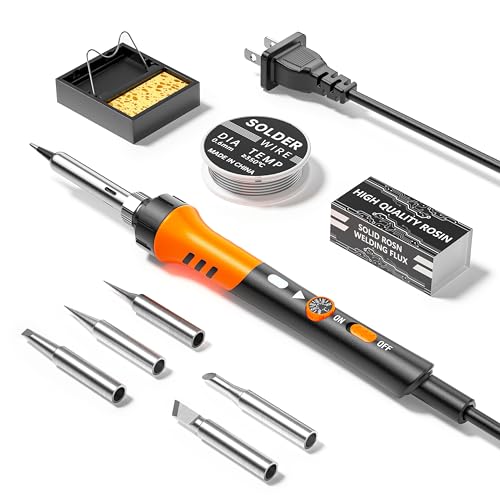
- ✓ Precise temperature control
- ✓ Ergonomic, non-slip grip
- ✓ Versatile tips included
- ✕ Cord length could be longer
- ✕ No digital temperature display
| Power Supply | 110V, 60W |
| Temperature Range | 200°C to 450°C |
| Tip Set | 5 interchangeable tips of various shapes |
| Handle Material | Ergonomic design with high-temperature resistant silicone cover |
| Temperature Adjustment | Adjustable with control knob or dial |
| Additional Features | On/off switch, energy-saving design |
That sleek little soldering iron kit has been on my wishlist for ages, especially for delicate motherboard repairs. When I finally got my hands on it, I was eager to see if it could handle the precision work I needed.
The first thing I noticed is how comfortable the handle feels—ergonomic and well-balanced, it’s easy to grip during those extended soldering sessions.
The adjustable temperature control is a game-changer. Being able to dial from 200 to 450℃ means I can switch between fine, detailed work and more robust soldering without switching tools.
The quick warm-up time is impressive, too, saving me precious minutes before starting my repair.
The kit includes five different tips, which is perfect for a variety of tasks—from tiny watch repairs to larger motherboard components. Swapping tips is simple, thanks to the secure connection, and each tip shape feels purposeful.
The silicone protective cover adds a layer of safety, preventing slips and burns, even when my hands get sweaty.
The on/off switch is a thoughtful addition, making it easy to save energy and avoid accidental burns when not in use. Plus, the 60W power ensures steady heat without fluctuations that can mess up sensitive electronics.
For its price, it feels like a reliable, versatile tool that makes electronics repair much less stressful.
Overall, this soldering iron kit exceeds my expectations for precision, safety, and ease of use. It’s a solid choice for anyone working on motherboards or small electronics, offering enough features to tackle detailed projects with confidence.
What Are the Key Features to Consider When Choosing a Soldering Iron for Motherboard Repair?
When selecting the best soldering iron for motherboard repair, there are several key features to consider:
- Temperature Control: A soldering iron with adjustable temperature control allows for precise heating, which is crucial when working with delicate components on a motherboard. This feature helps prevent overheating and damage to sensitive parts.
- Tip Variety: Different soldering tasks require different tip shapes and sizes, so having a variety of interchangeable tips is beneficial. Fine tips are ideal for small components, while broader tips can be used for larger connections.
- Wattage: The wattage of a soldering iron affects its heating speed and ability to maintain temperature under load. A higher wattage (around 40-60 watts) is often recommended for motherboard repair, as it provides sufficient heat for quick soldering without significant temperature drop.
- Ergonomics: A comfortable grip and lightweight design can make a significant difference during extended use. An ergonomic soldering iron reduces hand fatigue and enhances precision when navigating tight spaces on a motherboard.
- Anti-static Features: An anti-static soldering iron helps prevent electrostatic discharge (ESD) that can damage sensitive electronic components. Look for soldering irons with ESD-safe designs or grounding capabilities to protect the motherboard during repair.
- Heating Element Type: Consider whether the soldering iron uses a ceramic or metal heating element. Ceramic elements tend to heat up quickly and maintain temperature better, making them a popular choice for intricate tasks like motherboard repair.
- Power Source: Soldering irons can be either corded or cordless. Corded options provide consistent power, while cordless irons offer mobility and convenience for hard-to-reach areas, though they may have limited usage time.
- Price and Brand Reputation: Investing in a reputable brand can ensure quality and reliability, especially for critical tasks like motherboard repair. While budget options are available, it’s essential to balance cost with the durability and effectiveness of the soldering iron.
Which Types of Soldering Irons Are Most Suitable for Motherboard Repairs?
The best soldering irons for motherboard repair typically include the following types:
- Temperature-Controlled Soldering Iron: These irons allow you to adjust the heat to specific settings, which is vital for preventing damage to sensitive electronic components.
- Desoldering Station: This specialized equipment is designed to remove solder efficiently, making it easier to replace components on a motherboard without causing damage.
- Low-Voltage Soldering Iron: Ideal for delicate tasks, these soldering irons operate at lower voltages, reducing the risk of overheating and damaging solder pads or traces on the motherboard.
- Hot Air Rework Station: This tool uses hot air to melt solder and is particularly useful for surface-mounted components that require precise heating without direct contact.
Temperature-Controlled Soldering Iron: A temperature-controlled soldering iron gives you the ability to set the exact temperature needed for different solder types and components, ensuring optimal performance during repairs. This feature is crucial when working with motherboards that contain various sensitive parts, as excessive heat can easily damage them.
Desoldering Station: A desoldering station is equipped with a heated soldering tip and a vacuum system, allowing for quick and clean removal of solder from PCB connections. This tool is essential for motherboard repairs, as it helps to safely extract faulty components without lifting pads or damaging traces.
Low-Voltage Soldering Iron: Low-voltage soldering irons are specifically designed to operate at lower temperatures, making them suitable for delicate soldering tasks on motherboards. Their reduced heat output minimizes the risk of thermal shock to sensitive components, which is especially important in tightly packed areas of modern motherboards.
Hot Air Rework Station: A hot air rework station uses precise temperature-controlled air to heat and melt solder, allowing for the removal and installation of surface mount devices (SMDs) without direct contact. This method is advantageous for motherboard repairs as it provides even heating and reduces the likelihood of damaging neighboring components.
How Does Temperature Control Improve Soldering Precision?
Temperature control is critical for achieving precision in soldering, particularly when working with sensitive components like those found in motherboards.
- Consistent Heat Distribution: Maintaining a stable temperature ensures that heat is evenly distributed across the solder joint, preventing cold solder joints or overheating that can damage delicate components.
- Adjustable Temperature Settings: Soldering irons with adjustable temperature settings allow users to select the optimal heat level for different types of solder and components, enhancing the ability to work with various materials without risk.
- Rapid Temperature Recovery: High-quality soldering irons have rapid temperature recovery capabilities, which means they can quickly regain their set temperature after being used, thus minimizing the risk of overheating adjacent components during prolonged soldering.
- Digital Temperature Control: Digital soldering irons provide precise temperature readings and adjustments, enabling users to maintain exact settings that are vital for intricate motherboard repairs where even slight variations can lead to failures.
- Temperature Lock Feature: This feature prevents accidental temperature changes during use, ensuring that the user can work confidently without the risk of altering the heat settings inadvertently, which is particularly important for delicate soldering tasks.
Consistent heat distribution is essential for ensuring that the solder melts and flows properly, which helps create strong electrical connections. Uneven heat can lead to poor joints that may fail over time, particularly in high-stress environments like those found in computer motherboards.
Adjustable temperature settings are crucial because different solder materials and electronic components require different heat levels for optimal results. For instance, lead-free solder melts at a higher temperature than traditional lead-based solder, making versatility in temperature control a key feature for effective soldering.
Rapid temperature recovery is a significant advantage when working on multiple solder joints in quick succession, as it allows the soldering iron to maintain its temperature even when touching cooler surfaces. This capability is particularly beneficial when dealing with densely packed motherboard layouts where precision and speed are essential.
Digital temperature control enhances accuracy, allowing users to monitor and adjust the heat level with precision. This is particularly useful in scenarios where minor temperature fluctuations can significantly impact the soldering process, especially in high-density electronic assemblies.
The temperature lock feature is a safeguard that ensures the user maintains the correct settings throughout the repair process. This is particularly valuable in intricate repairs involving small components where any change in temperature could lead to damage or improper soldering.
Why is Wattage Important for Soldering Iron Performance?
Wattage is crucial for soldering iron performance because it determines the tool’s ability to maintain a consistent temperature during soldering tasks, particularly when working with heat-sensitive components like motherboards.
According to a study by the Electronics Industry Association, soldering irons with higher wattage generally provide better thermal recovery, which is essential for effective soldering. A soldering iron rated between 30 to 60 watts is typically recommended for precision tasks, as it can quickly regain heat after contact with a cold surface, ensuring the solder melts properly without damaging nearby components.
The underlying mechanism behind this involves thermodynamics; when a soldering iron with higher wattage is applied to a joint, it transfers heat more efficiently to the solder and the surfaces being joined. If the wattage is too low, the iron may struggle to reach the necessary temperature, leading to cold solder joints that can cause electrical failures. Additionally, inadequate heat can result in prolonged contact time, increasing the risk of thermal damage to sensitive parts on the motherboard. Thus, selecting the right wattage is vital for achieving reliable and safe soldering results.
What Accessories Can Enhance My Soldering Experience?
Several accessories can significantly enhance your soldering experience, especially when dealing with motherboard repairs.
- Soldering Iron Stand: A soldering iron stand provides a safe and convenient place to rest your hot soldering iron between tasks. This prevents accidental burns and helps keep your workspace organized.
- Wire Cutters: High-quality wire cutters are essential for trimming excess wires and components after soldering. They ensure clean cuts, which is particularly important for maintaining the integrity of delicate motherboard traces.
- Soldering Flux: Soldering flux improves the flow of solder and helps prevent oxidation on the surfaces being joined. This is particularly useful for ensuring strong and reliable connections on motherboards that often have tiny components.
- Desoldering Pump: A desoldering pump is a handy tool for removing solder when mistakes occur. It allows for quick and effective extraction of excess solder or components without damaging the motherboard.
- Anti-Static Wrist Strap: Wearing an anti-static wrist strap helps prevent electrostatic discharge (ESD) that can damage sensitive electronic components on a motherboard. This is crucial for maintaining the longevity and functionality of the repair work.
- Magnifying Glass or Loupe: A magnifying glass or jeweler’s loupe aids in inspecting small solder joints and components. This is especially beneficial when working with densely packed areas on motherboards where precision is key.
- High-Quality Solder: Using high-quality solder, such as lead-free solder or specific alloys designed for electronics, ensures better conductivity and reliability in your joints. Choosing the right solder can make a significant difference in the overall quality of your repairs.
- Heat Gun: A heat gun is useful for reflow soldering and can help in removing components without damaging the motherboard. It provides controlled heat that can safely melt solder without affecting surrounding areas.
What Common Mistakes Should You Avoid When Soldering a Motherboard?
When soldering a motherboard, avoiding common mistakes is crucial for ensuring a successful repair.
- Using the Wrong Soldering Iron: Selecting the best soldering iron for motherboard repair is essential, as a tool with inappropriate temperature control can damage sensitive components.
- Neglecting to Clean the Surface: Failing to clean the area around the joint before soldering can introduce contaminants, leading to weak connections and potential circuit failures.
- Overheating Components: Applying excessive heat for too long can damage delicate parts; it’s critical to understand the appropriate heat levels and durations for different components.
- Insufficient Solder Application: Using too little solder can result in poor conductivity, while too much can create bridges between pads, so finding the right balance is key.
- Ignoring Proper Technique: Not using the correct soldering technique, such as not heating the pad and wire simultaneously, can lead to cold joints that are unreliable.
- Failing to Use Flux: Flux is vital for improving the flow of solder and preventing oxidation, and neglecting it can result in weak connections and soldering difficulties.
- Not Testing Connections: Skipping the testing phase after soldering can lead to unresolved issues remaining on the motherboard; it’s important to verify that each connection works as intended.
- Inadequate Workstation Setup: A cluttered or poorly lit workspace can hinder precision and focus, increasing the likelihood of mistakes during the soldering process.
How Can You Stay Safe While Soldering a Motherboard?
Staying safe while soldering a motherboard involves using the right tools and following proper techniques.
- Safety Goggles: Wearing safety goggles protects your eyes from solder splashes and harmful fumes that may arise during the soldering process.
- Heat-Resistant Mat: A heat-resistant mat provides a safe surface for your work, preventing damage to your workspace and minimizing the risk of burns.
- Ventilation: Ensuring proper ventilation helps disperse toxic fumes released during soldering, reducing the risk of inhalation and maintaining a safer work environment.
- Anti-Static Wrist Strap: An anti-static wrist strap helps prevent static electricity discharge, which can damage sensitive electronic components while soldering.
- Quality Soldering Iron: Using the best soldering iron for motherboard repair ensures precise control and reduces the chances of overheating or damaging components.
Safety goggles are crucial as they shield your eyes from solder droplets and potentially harmful vapors, making them an essential part of your soldering kit.
A heat-resistant mat is important as it protects your work surface from high temperatures and accidental burns, helping you maintain a tidy and safe workspace.
Proper ventilation is vital, as soldering can emit hazardous fumes; working in a well-ventilated area or using a fume extractor minimizes inhalation risks significantly.
An anti-static wrist strap is necessary to avoid static electricity that can harm delicate electronic parts, ensuring your repairs are safe and effective.
Finally, investing in the best soldering iron for motherboard repair not only provides better performance but also enhances your ability to work safely by offering better temperature control and precision, which is essential in electronics repair.
Related Post: