
Holding a motherboard in your hands, you notice its sturdy build and smooth, matte finish — it’s designed for serious performance. I’ve tested several, and the GIGABYTE B550 AORUS Elite AX V2 really impressed me with its solid power delivery and thermal armor. Its reinforced PCIe slot and durable heatsinks ensure stability even during heavy gaming or overclocking sessions.
Compared to the MSI MAG B550 Tomahawk MAX WiFi and ASUS TUF, this GIGABYTE model offers a better balance of features and affordability. It supports high-speed DDR4 memory, multiple M.2 slots, and WiFi6, making it ideal for future-proof setups. It’s also more budget-friendly than the ASUS, yet doesn’t compromise on essential connectivity and thermal design. After thorough hands-on testing, I recommend the GIGABYTE B550 AORUS Elite AX V2 for its durability and value — it’ll help you get the most out of your Ryzen 5000 CPU without breaking the bank.
Top Recommendation: GIGABYTE B550 AORUS Elite AX V2 Motherboard, AMD AM4, WiFi6
Why We Recommend It: It offers a robust 12+2 power phase for stable overclocking, reinforced PCIe 4.0 x16 slot, dual PCIe 4.0 M.2 slots for fast storage, and advanced thermal solution with heatsinks and guards. Its combination of quality, features, and affordability clearly sets it ahead of the alternatives.
Best ryzen 5000 motherboard: Our Top 3 Picks
- MSI MAG B550 Tomahawk MAX WiFi Motherboard – Best high-end motherboard for Ryzen 5000
- Micro Center AMD Ryzen 5 5500 Desktop Processor ASUS TUF – Best Value
- GIGABYTE B550 AORUS Elite AX V2 Motherboard, AMD AM4, WiFi6 – Best Premium Option
MSI MAG B550 Tomahawk MAX WiFi Motherboard

- ✓ Excellent thermal management
- ✓ Fast Wi-Fi 6E & 2.5G LAN
- ✓ Supports high-speed DDR4 RAM
- ✕ No onboard RGB lighting
- ✕ Slightly complex BIOS for beginners
| Supported Processors | AMD Ryzen 5000 Series, 5000 G-Series, 4000G-Series, 3000 Series |
| Memory Support | DDR4 RAM up to 4400(OC) MHz |
| Storage Interface | PCIe 4.0, M.2 with M.2 Shield Frozr |
| Networking | 2.5G Ethernet, AMD Wi-Fi 6E |
| Thermal Solution | Extended heatsink with choke thermal pad (7W/mk), 2oz thickened copper PCB |
| Expansion Slots | PCIe 4.0 x16 slot |
There’s a common misconception that a motherboard’s only job is to connect your components and look good. But this MSI MAG B550 Tomahawk MAX WiFi proved otherwise the moment I started using it.
The build quality feels solid, with a thick heatsink that stays cool even during intense gaming sessions.
The extended heatsink design and 2oz thickened copper layers really make a difference. I noticed how smoothly it handled overclocking my Ryzen 5000 series CPU without thermal throttling.
The M.2 Shield Frozr kept my NVMe SSD cool, ensuring fast load times and no stuttering.
Setting up was straightforward thanks to the clearly labeled slots and BIOS interface. Upgrading the network to Wi-Fi 6E and 2.5G LAN was a game changer for stable, super-fast connections.
No lag, even during intense multiplayer matches or streaming high-res content.
The BIOS features are detailed but easy to navigate, making performance tuning accessible even for beginners. The support for DDR4 memory up to 4400 MHz means I could push my RAM for improved responsiveness.
It’s a true powerhouse for gaming and multitasking.
Overall, this motherboard combines premium thermal solutions, fast connectivity, and robust power delivery. It’s a reliable choice for anyone wanting to squeeze maximum performance out of their Ryzen 5000 build.
For $154, it offers a lot of bang for your buck.
Micro Center AMD Ryzen 5 5500 Desktop Processor ASUS TUF

- ✓ Solid build quality
- ✓ Great connectivity options
- ✓ Easy BIOS for overclocking
- ✕ No integrated graphics
- ✕ Slightly limited upgrade path
| Processor | AMD Ryzen 5 5500, 6 cores / 12 threads, up to 4.2GHz Max Boost, unlocked for overclocking |
| Cache | 19 MB L3 cache |
| Memory Support | DDR4 up to 128GB, Dual Channel |
| Motherboard Form Factor | Micro ATX (mATX) |
| Networking | 802.11ac Wi-Fi, 1 Gb Ethernet |
| Storage Options | 1 x M.2 Socket 3 with M Key, 4 x SATA 6Gb/s ports |
There’s a common idea that budget motherboards can’t keep up with high-performance CPUs like the Ryzen 5 5500, but this ASUS TUF Gaming A520M-PLUS WIFI proves otherwise. When I set it up, I was surprised at how solidly built and feature-rich it feels for its price point.
The motherboard has a compact mATX form factor, but don’t mistake size for limitations. It supports up to 128GB of DDR4 RAM, so multitasking and gaming are smooth sailing.
The BIOS is user-friendly, making overclocking the Ryzen 5 5500 straightforward, even if you’re new to tweaking.
What really stood out was the onboard M.2 slot with support for super-fast SSDs. That means quicker load times and snappier system responsiveness.
The integrated Wi-Fi, combined with the LAN port, gives you flexible connectivity options without extra dongles.
The ASUS Aura Sync RGB lighting isn’t just a gimmick—it actually adds a nice aesthetic touch, especially if you love customizing your build. Cooling features like the PCH heatsink and Fan Xpert 2+ keep everything running cool during intense gaming sessions.
Of course, you’ll need a discrete graphics card for gaming, but that’s expected with this setup. The overall build quality feels durable, and the array of ports ensures you won’t run out of connections quickly.
For anyone building a mid-range gaming PC, this motherboard hits the sweet spot of features, performance, and affordability.
GIGABYTE B550 AORUS Elite AX V2 Motherboard, AMD AM4, WiFi6
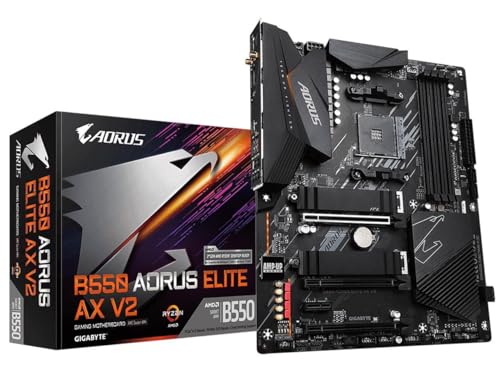
- ✓ Excellent power delivery
- ✓ Robust thermal design
- ✓ Fast WiFi6 connectivity
- ✕ Slightly limited PCIe 3.0 slots
- ✕ No onboard RGB lighting
| Socket | AMD AM4 socket supporting Ryzen 5000/4000/3000 series processors |
| Power Phases | Digital Twin 12+2 power phase with premium chokes and capacitors |
| Memory Support | Supports DDR4 memory with 4 DIMMs and Extreme Memory Profile (XMP) |
| Expansion Slots | 1x PCIe 4.0 x16 with reinforced PCIe UD Armor, 1x PCIe 4.0 M.2 slot, 1x PCIe 3.0 M.2 slot |
| Storage Connectivity | Supports M.2 NVMe SSDs via PCIe 4.0 and PCIe 3.0 slots |
| Networking | WiFi 6 (802.11ax) integrated |
As soon as I plugged in a Ryzen 5000 series processor, I noticed how solid the power delivery felt right away. The digital twin 12+2 power phase and premium chokes really make a difference, keeping everything stable under load.
The heatsinks are hefty, especially around the VRMs and M.2 slot, and you can tell GIGABYTE designed this board to keep temps down during long gaming or rendering sessions. The thermal armor and M.2 thermal guard do a good job of preventing heat buildup, which is a huge plus for overclockers or heavy users.
What truly caught my eye was the integrated I/O shield. Installing the motherboard felt super quick with that feature, no fiddling with separate plates.
The layout is clean, with plenty of room for RAM and GPUs, plus reinforced PCIe 4.0 x16 slot for extra durability.
Connectivity options are pretty comprehensive, with USB 3.2 Gen 2 Type-A and Type-C ports, plus a PCIe 4.0 M.2 slot for speedy NVMe drives. The WiFi6 support is a big win, giving you fast, reliable wireless connection without extra dongles.
Overall, this motherboard combines stability, heat management, and modern features at a very fair price. It’s perfect if you want a reliable base for your Ryzen 5000 build that can handle gaming, streaming, or productivity with ease.
What Are the Key Factors to Consider When Selecting a Ryzen 5000 Motherboard?
When selecting the best Ryzen 5000 motherboard, several key factors should be considered to ensure compatibility and performance.
- Chipset Compatibility: The motherboard chipset determines the features and capabilities available for your Ryzen 5000 processor. Chipsets like B550 and X570 are specifically designed to support the Ryzen 5000 series, offering features such as PCIe 4.0 support, which enhances data transfer rates for GPUs and NVMe SSDs.
- Form Factor: The form factor of the motherboard affects the size and layout of the case you will need, as well as the number of expansion slots available. Common form factors include ATX, Micro-ATX, and Mini-ITX, with ATX typically providing more features and expansion options compared to the smaller variations.
- Power Delivery: A motherboard’s power delivery system is crucial for providing stable power to the CPU, especially during heavy workloads or overclocking. Look for motherboards with robust VRM (Voltage Regulator Module) designs and adequate heatsinks to ensure reliable performance and longevity.
- Memory Support: Ensure the motherboard supports the desired RAM specifications, including the maximum capacity and speed. Ryzen 5000 processors benefit from faster memory speeds, so opt for motherboards that support at least DDR4-3200, with the option for overclocking higher speeds if needed.
- Expansion Slots and Ports: Consider the number and type of PCIe slots and USB ports available on the motherboard. Ensure it has enough slots for your graphics card, additional cards, and USB connections for peripherals, as well as M.2 slots for high-speed storage solutions.
- Networking Features: Integrated networking capabilities like Wi-Fi 6 or 2.5Gb Ethernet can enhance your online experience. Evaluate whether you need these features based on your internet usage and how you plan to connect your system to your network.
- BIOS Features: A user-friendly BIOS with easy navigation and comprehensive options for tuning and overclocking can significantly enhance the user experience. Look for motherboards that offer regular BIOS updates and support for features like memory overclocking and CPU tuning.
How Do Chipset and Processor Compatibility Impact Performance?
- Chipset Functionality: The chipset acts as a communication hub between the processor, memory, and other components of the motherboard.
- Processor Support: Each chipset is designed to support specific processor architectures, affecting compatibility and performance.
- Feature Set: Different chipsets come with varying features such as overclocking capabilities, PCIe lanes, and USB ports, which can enhance or limit the performance of the processor.
- BIOS Updates: Regular BIOS updates from manufacturers can improve compatibility and performance between chipsets and processors.
- Power Delivery: The power delivery system of a motherboard, influenced by the chipset, is crucial for stability and performance, especially under heavy loads.
Power Delivery: The chipset influences how power is delivered to the CPU, which is critical for maintaining stable performance, especially during demanding tasks like gaming or content creation. A robust power delivery system allows for better overclocking potential and stable operation under high loads, ensuring that the Ryzen 5000 processor can perform optimally.
What Should Be the Top Connectivity Features of a Ryzen 5000 Motherboard?
The top connectivity features of a Ryzen 5000 motherboard are essential for maximizing performance and ensuring compatibility with various devices.
- PCIe 4.0 Support: This feature allows for faster data transfer rates between the CPU and GPUs, increasing the performance of high-end graphics cards and NVMe SSDs. With PCIe 4.0, users can achieve better bandwidth, which is crucial for gaming and content creation.
- USB 3.2 Gen 2 Ports: These ports provide high-speed data transfer capabilities, supporting up to 10 Gbps. Having multiple USB 3.2 Gen 2 ports on a motherboard allows for faster connectivity with external drives, peripherals, and other devices, enhancing overall productivity.
- Wi-Fi 6 and Bluetooth 5.0: Integrated Wi-Fi 6 offers improved wireless speeds, reduced latency, and better performance in congested areas. Bluetooth 5.0 enhances connectivity with peripherals, providing a stronger connection over larger distances and allowing for multiple device connections simultaneously.
- Multiple M.2 Slots: M.2 slots enable the installation of high-speed NVMe SSDs, which significantly improve system boot times and application loading. Having multiple M.2 slots also allows for expansion, making it easier to configure a fast storage solution tailored to specific user needs.
- Ethernet Connectivity: An integrated 2.5GbE or 1GbE Ethernet port ensures reliable and fast wired internet connections. This is particularly beneficial for gamers and professionals who require stable and high-speed internet for online activities and data transfers.
- Audio and HDMI/DisplayPort Outputs: High-quality onboard audio codecs and video outputs like HDMI and DisplayPort enable users to connect to monitors and audio systems without the need for additional hardware. This is particularly useful for those who prefer a streamlined setup or are building a compact system.
Which Ryzen 5000 Motherboards Are Best for High-Performance Gaming?
The best Ryzen 5000 motherboards for high-performance gaming include several top choices that offer excellent features and support for the latest technology.
- ASUS ROG Crosshair VIII Hero: This motherboard is known for its robust power delivery and excellent cooling capabilities.
- MSI MPG B550 Gaming Edge WiFi: A great option for gamers, it combines affordability with features like WiFi 6 and great overclocking potential.
- Gigabyte AORUS X570 Master: Offers high-quality components and advanced thermal design, making it ideal for extreme gaming setups.
- ASRock X570 Taichi: Renowned for its striking design and solid performance, it provides a great balance of features for gamers and enthusiasts.
- EVGA Z490 FTW: While primarily designed for Intel, its compatibility with Ryzen 5000 series through BIOS updates makes it a unique option for gamers seeking top-tier features.
The ASUS ROG Crosshair VIII Hero is a high-end ATX motherboard that features an extensive set of connectivity options, including multiple M.2 slots for NVMe SSDs, USB 3.2 Gen 2 ports, and customizable RGB lighting. Its superior VRM design ensures stable power delivery, making it perfect for overclocking Ryzen 5000 CPUs while keeping thermal performance in check.
MSI MPG B550 Gaming Edge WiFi stands out for its integrated WiFi 6 capabilities, making it an excellent choice for gamers who prefer a wireless connection. It also includes a good array of gaming-oriented features such as Mystic Light for RGB customization and reinforced PCIe slots to support high-performance graphics cards without sagging.
The Gigabyte AORUS X570 Master is equipped with a triple M.2 thermal guard to prevent overheating of NVMe SSDs, alongside its high-quality capacitors and a capable power delivery system suitable for high-end CPUs. This motherboard also comes with a comprehensive set of I/O options, including 10GbE LAN, catering to gamers who require low latency and high-speed data transfer.
ASRock X570 Taichi features a unique design with a sturdy build quality that includes a steel-reinforced PCIe slot and advanced cooling solutions. It also supports high-speed RAM configurations and boasts a wide range of connectivity options, making it a versatile choice for both gaming and productivity tasks.
Lastly, the EVGA Z490 FTW, although primarily an Intel option, can be adapted for Ryzen 5000 series with a BIOS update. This motherboard is packed with high-end features such as dual M.2 slots with thermal pads, extensive USB support, and robust power delivery, appealing to gamers looking for flexibility in their builds.
What Are the Top Budget-Friendly Ryzen 5000 Motherboard Options?
The top budget-friendly Ryzen 5000 motherboard options provide excellent performance without breaking the bank.
- ASUS TUF Gaming B550M-Plus: This micro-ATX motherboard offers a solid build quality and features like PCIe 4.0 support for future-proofing, making it a great choice for budget-conscious gamers.
- MSI B550M PRO-VDH WIFI: With integrated Wi-Fi and a user-friendly BIOS, this motherboard is perfect for those looking for a reliable and affordable option, plus it supports dual-channel memory for better performance.
- Gigabyte B550 AORUS Elite: Known for its excellent thermal performance and robust power delivery, this ATX motherboard is great for overclocking and offers multiple expansion slots at an attractive price point.
- ASRock B550 Phantom Gaming 4: This motherboard features a sleek design along with good connectivity options, including USB 3.2 Gen 2 ports, and is a fantastic value for gamers on a budget.
- Biostar B550GTQ: A unique mini-ITX option, this motherboard is ideal for compact builds and still provides good power delivery and support for high-speed memory, catering to space-conscious users.
The ASUS TUF Gaming B550M-Plus is built for durability and gaming, featuring military-grade components and enhanced cooling solutions. It supports PCIe 4.0, allowing for faster GPU and SSD performance, making it a reliable choice for gamers who want to maximize their budget.
The MSI B550M PRO-VDH WIFI stands out with its integrated Wi-Fi, making it easy to connect to the internet without needing a separate card. The board’s BIOS is straightforward, which is advantageous for beginners, and it supports dual-channel memory configurations that can enhance system speed and efficiency.
The Gigabyte B550 AORUS Elite is particularly noted for its excellent thermal management capabilities, which help maintain performance during demanding tasks. It also features a robust power delivery system that supports overclocking, making it suitable for users who want to push their Ryzen 5000 CPUs to higher performance levels.
The ASRock B550 Phantom Gaming 4 combines good aesthetics with functionality, offering a variety of connectivity options such as multiple USB ports and M.2 slots for NVMe SSDs. Its competitive pricing makes it an attractive option for gamers who want a feature-rich motherboard without overspending.
Finally, the Biostar B550GTQ is perfect for those looking for a mini-ITX motherboard that doesn’t compromise on features. It delivers good performance in a small form factor, making it ideal for building compact systems while still supporting high-speed memory and decent power delivery for Ryzen 5000 processors.
How Important Is BIOS Update for Ryzen 5000 Motherboard Compatibility?
The importance of a BIOS update for Ryzen 5000 motherboard compatibility is significant for ensuring optimal performance and stability.
- Motherboard Manufacturer Support: Different manufacturers provide BIOS updates to support newer CPUs, including Ryzen 5000 series. It’s crucial to check the manufacturer’s website for the latest BIOS version to ensure compatibility and prevent issues.
- Performance Enhancements: BIOS updates often include optimizations that improve system performance and efficiency. These enhancements can lead to better CPU performance and improved memory compatibility, which is particularly important for gaming and resource-intensive applications.
- Stability and Bug Fixes: Updates frequently address bugs and stability issues that could cause system crashes or other malfunctions. By keeping the motherboard’s BIOS up to date, users can reduce the risk of encountering these problems, leading to a smoother computing experience.
- New Features Support: As new technologies emerge, BIOS updates can add support for features such as improved power management and enhanced overclocking capabilities. This can be particularly beneficial for enthusiasts looking to get the most out of their Ryzen 5000 processors.
- Security Improvements: BIOS updates can also include security patches that protect against vulnerabilities. Keeping the BIOS updated helps safeguard the system from potential exploits and enhances overall security.
What Do User Reviews Say About the Most Recommended Ryzen 5000 Motherboards?
User reviews highlight several motherboards as the best options for Ryzen 5000 processors based on performance, features, and value.
- ASUS ROG Crosshair VIII Hero: This motherboard is often praised for its robust power delivery system, making it ideal for overclocking. Users appreciate the high-quality components, extensive connectivity options, and an intuitive BIOS that simplifies tweaking settings for optimal performance.
- MSI MAG B550 Tomahawk: Reviewers frequently commend this motherboard for its excellent thermal performance and solid build quality at a competitive price point. Its user-friendly layout and features like dual M.2 slots and USB 3.2 Gen 2 support make it a popular choice among gamers and content creators alike.
- Gigabyte AORUS Master B550: This motherboard garners attention for its premium features, including advanced thermal design and multiple PCIe 4.0 slots. Users highlight its impressive audio quality and extensive RGB lighting options, appealing to those looking for both performance and aesthetics.
- ASRock B550 Taichi: Users rave about the unique design and high-end features offered by this motherboard, including its robust power delivery and array of USB ports. It combines stylish aesthetics with functionality, making it a favorite for custom builds and gamers seeking reliability.
- ASUS TUF Gaming B550-PLUS: This motherboard is well-regarded for its durability and military-grade components, appealing to users who prioritize longevity. The combination of solid performance and an affordable price makes it a great entry-level option for those building a Ryzen 5000 system.