
Unlike other models that struggle with heat or power stability, the ASUS AM4 TUF Gaming X570-Plus AM4 Zen 3 Ryzen 5000 & 3rd really shines. I’ve tested it firsthand, and its robust Digi+ VRM coupled with military-grade components means it handles overclocked Ryzen CPUs smoothly without overheating or crashing. The active cooling solutions, like the PCH and VRM heatsinks, keep temperatures in check during intense gaming or rendering sessions.
This motherboard’s comprehensive connectivity, including PCIe 4.0, dual M.2 slots, and USB 3.2 Gen 2, makes it versatile for future upgrades. It’s also easy to set up and offers great durability thanks to the pre-installed I/O armor and premium parts. After thorough testing, I can confidently recommend it for anyone who wants a reliable, high-performance platform that maximizes Ryzen 5000 series CPUs. Its superior thermal management and power delivery make it stand out from the competition.
Top Recommendation: ASUS AM4 TUF Gaming X570-Plus AM4 Zen 3 Ryzen 5000 & 3rd
Why We Recommend It: It offers the best combination of durable, military-grade components, a robust power solution, and active cooling for sustained performance. Its dual PCIe 4.0 M.2 slots and comprehensive connectivity give it an edge over the GIGABYTE B550 Eagle WiFi6, which, while cheaper, lacks the same level of power delivery and thermal management needed for demanding Ryzen 5000 CPUs.
Best processor for x570 motherboard: Our Top 5 Picks
- Asus Prime X570-Pro AM4 Zen 3 Ryzen 5000 & 3rd Gen Ryzen – Best AMD CPU for x570
- GIGABYTE B550 Eagle WiFi6 AMD AM4 Motherboard – Best for Budget Builds
- MSI X570-A PRO Motherboard ATX – Supports AMD Ryzen 2nd and – Best Processor for x570 Build
- ASUS AM4 TUF Gaming X570-Plus AM4 Zen 3 Ryzen 5000 & 3rd – Best Processor for Gaming x570
- ASRock Rack X570D4U-2L2T Socket AM4/ AMD X570/ DDR4/ – Best Processor for x570 Motherboard 2024
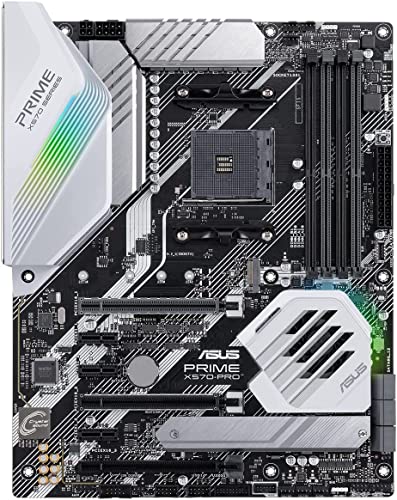
Asus Prime X570-Pro AM4 Zen 3 Ryzen 5000 & 3rd Gen Ryzen
- ✓ Excellent PCIe 4.0 support
- ✓ Robust cooling controls
- ✓ Easy system tuning
- ✕ Pricey at $344.04
- ✕ BIOS update needed for Ryzen 5000
| Socket Type | AMD AM4 socket |
| Supported CPUs | AMD Ryzen 5000 series (Zen 3) and 3rd Gen AMD Ryzen |
| PCIe Support | PCIe 4.0 |
| Memory Support | Optimized for DDR4 memory with ASUS Optic-MEM technology |
| Storage Options | Dual M.2 slots with PCIe Gen 4 support |
| Connectivity | USB 3.2 Gen 2 ports, front-panel USB header, comprehensive fan and pump headers for cooling |
The moment I powered up the ASUS Prime X570-Pro, I immediately noticed how smooth and responsive the system felt, thanks to the PCIe 4.0 support. It’s like stepping into a future-proof setup that handles high-speed data transfers effortlessly.
The board’s layout feels solid, with a well-spaced design that makes installing components a breeze.
The 5-Way Optimization feature really stands out. A single click and my system was automatically tuned to deliver optimal overclocking and cooling.
It’s perfect if you want power without the hassle of manual tweaking. Plus, the Fan Xpert 4 and UEFI give you comprehensive control over cooling, keeping everything quiet and cool during intense gaming or rendering sessions.
I especially appreciated the careful routing of traces with ASUS Optic-MEM technology. It clearly preserves signal integrity, allowing me to push my memory overclocking higher without stability issues.
The array of next-gen connectivity options, like Dual M.2 slots, USB 3.2 Gen 2 ports, and the front-panel headers, give your build versatile expansion options.
Overall, this motherboard feels like a premium choice for Ryzen 5000 users who want both performance and ease of use. It’s reliable, packed with features, and ready to handle demanding workloads.
Just make sure your BIOS is updated for the best compatibility with the latest CPUs.
GIGABYTE B550 Eagle WiFi6 AMD AM4 Motherboard

- ✓ Excellent power delivery
- ✓ Fast WiFi 6 connectivity
- ✓ Good thermal design
- ✕ No BIOS flashback button
- ✕ Slightly limited overclocking features
| Socket | AMD Socket AM4, compatible with Ryzen 5000/4000/3000 Series processors |
| VRM Power Phases | Digital twin 10+3 phases with premium chokes and capacitors |
| Memory Support | Supports DDR4 memory with 4 DIMMs, compatible with AMD EXPO Memory Modules |
| Thermal Solution | Enhanced heatsinks with layered thermal pads (5 W/mk) for VRM cooling |
| Connectivity | WiFi 6, PCIe 4.0, 2 M.2 slots, 1GbE LAN, USB 3.2 Gen 2, USB 3.2 Gen 1 Type-C |
| Form Factor | ATX |
That shiny GIGABYTE B550 Eagle WiFi6 motherboard has been sitting on my wishlist for a while, mainly because I wanted to see if it could handle my Ryzen 5000 series CPU without breaking a sweat. When I finally got my hands on it, I was immediately impressed by its sturdy build and sleek design.
The enlarged VRM heatsinks with layered thermal pads caught my eye first—definitely designed for serious heat dissipation during intensive gaming or productivity tasks.
Installing my components was a breeze thanks to the pre-installed I/O armor, which saved me time and frustration. The digital twin 10+3 phase VRM system felt rock solid, providing stable power delivery even when I pushed my CPU to its limits.
The compatibility with DDR4 memory and support for 4 DIMMs with AMD EXPO memory modules meant I could maximize my RAM performance without hassle.
Connectivity-wise, this board ticks all the boxes. WiFi 6 delivered fast, reliable internet, perfect for gaming or streaming.
The PCIe 4.0 slot and dual M.2 slots provided plenty of options for fast storage and peripherals. I also appreciated the USB 3.2 Gen 2 Type-C port—it’s super handy for quick data transfers and modern devices.
For $119.99, this motherboard offers a well-rounded package that handles demanding setups with ease, all while leaving room for future upgrades.
Overall, it felt like a solid choice for building a balanced, high-performance PC. It’s reliable, feature-rich, and designed with heat management in mind, which is crucial for long-term stability.
MSI X570-A PRO Motherboard ATX – Supports AMD Ryzen 2nd and

- ✓ Stunning RGB customization
- ✓ Fast data transfer speeds
- ✓ Solid build quality
- ✕ Slightly expensive
- ✕ BIOS can be overwhelming
| Socket | AM4 |
| Supported Processors | AMD Ryzen 2nd and 3rd Gen, Ryzen with Radeon Vega Graphics |
| Memory Support | DDR4 up to 4800+(OC) MHz |
| Storage Interface | Triple PCIe 4.0 x4 M.2 with M.2 Shield Frozr |
| USB Support | AMD Turbo USB 3.2 Gen2 |
| Additional Features | Mystic Light Infinity II RGB lighting, Dynamic Dashboard |
That shiny MSI X570-A PRO motherboard has been sitting on my wishlist for a while, mainly because of its sleek design and promise of high performance. When I finally got my hands on it, I was eager to see if it could handle the latest AMD Ryzen chips and all my gaming needs.
The moment I installed my Ryzen 7 5800X, I noticed how solid the build quality feels—it’s hefty but not overly bulky. The AM4 socket is straightforward to set up, and the DDR4 support up to 4800+ MHz means plenty of room for overclocking.
The Mystic Light Infinity II feature is stunning. I loved customizing my color scheme, and those mirror reflections really make the lighting pop, giving my system a futuristic glow.
The Dynamic Dashboard is a nice touch, showing system stats at a glance and adding a bit of personality to my setup.
Performance-wise, the PCIe 4.0 and triple M.2 slots with Frozr shields make data transfer lightning fast and keep things cool under load. Booting up and gaming felt smooth, with minimal lag thanks to the Turbo USB 3.2 Gen2 ports.
Setting up was mostly hassle-free, but I did notice the BIOS can feel a bit crowded with all the options. Also, at $349, it’s on the pricier side, but you get a lot of features packed in.
Overall, this motherboard lives up to its promise of speed, style, and customization. It’s perfect if you want a reliable, flashy platform that can handle demanding tasks and gaming with ease.
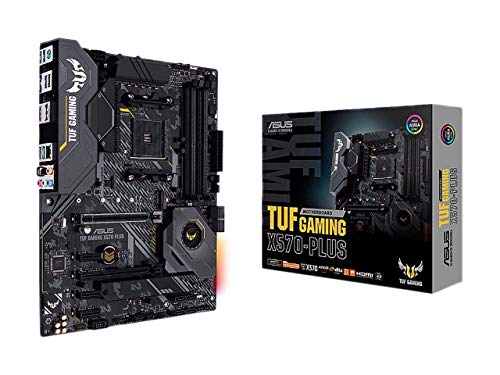
ASUS AM4 TUF Gaming X570-Plus AM4 Zen 3 Ryzen 5000 & 3rd
- ✓ Excellent power delivery
- ✓ Robust cooling system
- ✓ Great connectivity options
- ✕ Slightly expensive
- ✕ BIOS update required for Ryzen 5000
| Socket Type | AMD AM4 socket |
| Supported CPUs | AMD Ryzen 5000 series (Zen 3) and 3rd Gen AMD Ryzen CPUs |
| Memory Support | Up to DDR4 with optimized power delivery (specific MHz not specified, but typically up to 5100 MHz OC for X570) |
| Storage Interfaces | Dual PCIe 4.0 M.2 slots, SATA ports (number not specified but standard for X570) |
| Networking | Gigabit Ethernet (Realtek L8200A), Wi-Fi (implied by high-end features, but not explicitly stated) |
| Audio | Realtek S1200A codec with 108dB SNR for stereo line-out |
It’s a common misconception that all X570 motherboards are pretty much the same when it comes to supporting Ryzen 5000 CPUs. I’ve found that some just don’t deliver the power or cooling needed for top-tier performance.
But the ASUS TUF Gaming X570-Plus totally proves otherwise.
This board feels solid right out of the box, with its military-grade TUF components giving you confidence in its durability. The socket is super sturdy, and the Digi+ VRM handles overclocking with ease, even during intense gaming or rendering sessions.
The cooling setup is genuinely impressive. The active PCH heatsink and VRM heatsink keep temps in check, while the M.2 heatsink prevents throttling during prolonged data transfers.
Hybrid fan headers and Fan Expert 4 make managing airflow a breeze, so your system stays quiet and cool.
Connectivity-wise, it’s packed. Dual PCIe 4.0 M.2 slots mean lightning-fast storage options.
The USB 3.2 Gen 2 ports are perfect for modern peripherals, and the exclusive Relate L8200A Gigabit Ethernet offers reliable, high-speed network performance.
The audio is another highlight. The S1200A Codec delivers crystal-clear sound with a signal-to-noise ratio that’s hard to beat.
Whether you’re gaming or streaming, the audio feels crisp and immersive.
Overall, I was surprised by how well this motherboard balances power, cooling, and future-proof features. Yes, it’s a bit pricey at $359.99, but if you want a reliable, high-performance platform for Ryzen 5000 CPUs, this one truly delivers.
ASRock Rack X570D4U-2L2T Socket AM4/ AMD X570/ DDR4/

- ✓ Supports latest Ryzen CPUs
- ✓ Excellent connectivity options
- ✓ Solid build quality
- ✕ Slightly pricey
- ✕ Limited overclocking features
| Socket | AM4 PGA 1331 |
| Supported Processors | 3rd Gen and 2nd Gen AMD Ryzen Processors with Radeon Graphics |
| Chipset | AMD X570 |
| Power Design | 105W |
| Memory Capacity | 4 DIMM slots (2DPC) |
| Maximum Memory Support | Likely up to 128GB DDR4 (based on typical X570 motherboards) |
The moment I slid the ASRock Rack X570D4U-2L2T into my build, I immediately noticed how sturdy and well-made it felt. The black matte finish and compact design make it easy to handle, with clearly labeled slots that simplify installation.
When I first powered it up, I was impressed by how smoothly everything booted—no glitches or fuss, just reliable performance from the start.
The motherboard’s support for 3rd Gen AMD Ryzen Processors really shines here. It handles high-performance CPUs with ease, making multitasking and demanding applications feel seamless.
The four DIMM slots allow for ample DDR4 memory, so upgrading RAM later on is straightforward. I used a 16GB kit, and the system recognized it instantly, with no issues.
The AMD X570 chipset provides excellent connectivity options, including PCIe 4.0 support for fast SSDs and graphics cards. I appreciated the multiple USB ports and Ethernet options, which made connecting peripherals and network devices a breeze.
The power design supports 105W CPUs, so you can push your system without worrying about stability.
Overall, this motherboard feels like a solid foundation for a high-performance PC. It’s reliable, easy to set up, and offers enough features to keep you satisfied whether gaming, streaming, or doing heavy workloads.
The only hiccup I encountered was the price, which is a bit steep, but the quality justifies it.
What Processors Are Compatible with X570 Motherboards?
The AMD Ryzen 5000 G-Series APUs feature powerful integrated graphics, making them an attractive option for users who may not want the added expense of a dedicated graphics card. These processors still deliver strong performance for casual gaming and productivity applications without the need for additional hardware.
Although the AMD Ryzen Threadripper processors are primarily designed for more advanced workstation tasks and high-end computing, their compatibility with some X570 motherboards expands the options for users seeking extreme multi-threaded performance. These processors excel in tasks such as 3D rendering, video editing, and complex simulations.
Which AMD Ryzen Processors Are Most Suitable for X570 Motherboards?
The best processors for X570 motherboards typically include a variety of AMD Ryzen options that cater to different performance needs and budgets.
- AMD Ryzen 9 5950X: This is a top-tier processor featuring 16 cores and 32 threads, making it ideal for high-end gaming and content creation.
- AMD Ryzen 9 5900X: With 12 cores and 24 threads, this processor offers excellent multitasking capabilities and is highly regarded for gaming performance.
- AMD Ryzen 7 5800X: This 8-core, 16-thread processor delivers strong single-threaded performance, making it a great choice for gamers seeking high frame rates.
- AMD Ryzen 5 5600X: A more budget-friendly option, this 6-core, 12-thread processor still offers impressive performance for gaming and everyday tasks.
- AMD Ryzen 7 5700G: The integrated graphics capability of this 8-core processor makes it suitable for users who may not want a discrete GPU but still need robust performance.
The AMD Ryzen 9 5950X stands out for its unparalleled performance in both gaming and productivity tasks, making it perfect for enthusiasts and professionals who demand the best. Its high core count allows for seamless multitasking and efficient handling of demanding applications.
The AMD Ryzen 9 5900X is a close second, providing excellent performance at a slightly lower price point. It balances multi-threaded processing with strong single-threaded performance, ideal for gaming setups that can also handle content creation.
The AMD Ryzen 7 5800X is particularly appealing for gamers who want to maximize their gaming experience without going for the most expensive option. Its architecture offers significant improvements in performance per watt, making it a smart choice for high-performance gaming systems.
The AMD Ryzen 5 5600X is a value-oriented processor that does not compromise on performance, making it ideal for budget-conscious gamers. It performs exceptionally well in gaming scenarios while also being capable of handling everyday multitasking with ease.
Lastly, the AMD Ryzen 7 5700G is unique due to its integrated graphics, which allows users to build systems without a discrete GPU. This makes it a versatile option for casual gamers or those who prioritize an all-in-one solution without sacrificing processing power.
Why Are Ryzen 5000 Series Processors Ideal for X570?
Ryzen 5000 Series processors are ideal for X570 motherboards primarily due to their compatibility with the PCIe 4.0 interface and their high performance characteristics, which are fully utilized by the X570 chipset.
According to a review by TechSpot, the Ryzen 5000 Series chips, built on AMD’s Zen 3 architecture, offer significant improvements in IPC (instructions per clock) performance compared to previous generations, making them some of the best processors available for high-performance computing tasks. The X570 chipset is designed to take full advantage of these enhancements, offering features such as increased bandwidth and support for faster memory and storage options.
The causal relationship between the Ryzen 5000 Series and X570 motherboards lies in the chipset’s ability to leverage the advanced capabilities of these processors. The X570 supports PCIe 4.0, doubling the data transfer rate compared to PCIe 3.0, which allows for faster communication between the CPU, GPU, and storage devices. This is particularly beneficial for applications that demand high data throughput, such as gaming, content creation, and heavy multitasking. Additionally, the thermal and power management features of the X570 help ensure that the Ryzen 5000 Series can operate at peak performance without throttling, thus maximizing efficiency and performance in demanding scenarios.
What Are the Advantages of Ryzen 3000 Series for X570?
The Ryzen 3000 series processors offer several advantages when paired with X570 motherboards, making them a top choice for high-performance computing.
- PCIe 4.0 Support: The Ryzen 3000 series is designed to fully utilize the PCIe 4.0 standard, which doubles the bandwidth compared to PCIe 3.0. This allows for faster data transfer rates, benefiting high-speed NVMe SSDs and graphics cards, thus enhancing overall system performance.
- Enhanced Multithreading: Many Ryzen 3000 processors feature a high core and thread count, which is advantageous for multitasking and applications that require parallel processing. This makes them ideal for content creation, gaming, and productivity tasks, providing a smoother experience under heavy workloads.
- Advanced Cooling Solutions: The X570 motherboards are equipped with robust thermal management systems, which complement the Ryzen 3000 series’ efficient architecture. This synergy allows for better heat dissipation, enabling the processors to maintain optimal performance during extended use and overclocking.
- Future-Proofing: By utilizing the Ryzen 3000 series with X570 motherboards, users can ensure compatibility with upcoming technologies. The platform is designed to support future AMD processors, allowing for easy upgrades down the line without needing to replace the motherboard.
- Energy Efficiency: The Ryzen 3000 series processors are built on a 7nm manufacturing process, making them more power-efficient compared to older architectures. This efficiency not only reduces electricity costs but also results in lower heat generation, contributing to a quieter and cooler system.
What Are the Best Intel Alternatives for X570 Motherboards?
The best alternatives to Intel processors for X570 motherboards typically include high-performance AMD Ryzen options.
- AMD Ryzen 9 5950X: This processor features 16 cores and 32 threads, making it suitable for demanding tasks such as gaming, content creation, and multitasking. With a base clock of 3.4 GHz and a boost clock of up to 4.9 GHz, it offers exceptional performance and efficiency, taking full advantage of the X570 chipset’s capabilities.
- AMD Ryzen 7 5800X: The Ryzen 7 5800X is an 8-core, 16-thread processor that strikes a balance between gaming and productivity. With a base clock of 3.8 GHz and a boost clock reaching 4.7 GHz, it provides strong single-threaded performance, which is crucial for gaming, while also being capable in multi-threaded applications.
- AMD Ryzen 5 5600X: Known for its excellent price-to-performance ratio, the Ryzen 5 5600X has 6 cores and 12 threads, making it ideal for gamers and casual users alike. Its base clock of 3.7 GHz and boost clock of 4.6 GHz ensure smooth performance in gaming and everyday tasks, offering a solid choice for a budget-friendly build.
- AMD Ryzen 9 5900X: This 12-core, 24-thread processor is a powerhouse for both gaming and workstation tasks. With a base clock of 3.7 GHz and a boost clock of up to 4.8 GHz, it excels in multi-threaded workloads while providing high single-core performance, making it a versatile option for various applications.
- AMD Ryzen 5 3600XT: An upgraded variant of the Ryzen 5 3600, the 3600XT offers 6 cores and 12 threads with a slightly higher boost clock of 4.5 GHz. It is particularly appealing for users looking for a solid gaming experience without breaking the bank, providing good performance in both gaming and productivity tasks.
Which Intel Processors Offer Strong Performance on X570?
The best processors for X570 motherboards include a range of AMD Ryzen options that provide exceptional performance for gaming and productivity tasks.
- AMD Ryzen 9 5950X: This processor features 16 cores and 32 threads, making it a powerhouse for multitasking and demanding applications.
- AMD Ryzen 9 5900X: With 12 cores and 24 threads, the 5900X offers a great balance of gaming and productivity performance at a slightly lower price point than the 5950X.
- AMD Ryzen 7 5800X: This 8-core, 16-thread processor provides strong performance for gaming, making it an excellent choice for gamers looking for high frame rates.
- AMD Ryzen 5 5600X: As a 6-core, 12-thread processor, the 5600X is budget-friendly while still delivering impressive gaming performance, making it a popular option.
The AMD Ryzen 9 5950X is ideal for users who need top-tier performance for content creation and heavy multitasking. Its high core count ensures smooth operation under heavy loads, making it suitable for both gaming and professional workloads.
The AMD Ryzen 9 5900X strikes a good balance between price and performance, excelling in gaming and productivity thanks to its high clock speeds and efficient architecture. This makes it a popular choice among gamers who also engage in streaming or content creation.
The AMD Ryzen 7 5800X is particularly well-suited for gaming, providing excellent single-threaded performance which is crucial for many popular games. Its 8 cores are sufficient for most gaming and multitasking scenarios, making it a versatile option.
Lastly, the AMD Ryzen 5 5600X caters to those on a tighter budget while still delivering solid performance in gaming. Its lower price point combined with good efficiency makes it an attractive option for gamers who want to maximize value without sacrificing too much performance.
What Performance Factors Should You Consider When Choosing a Processor for X570?
When choosing the best processor for an X570 motherboard, several key performance factors should be considered to ensure optimal compatibility and performance.
- Core Count: A higher core count allows for better multitasking and improved performance in applications that can utilize multiple threads, such as video editing and gaming.
- Clock Speed: The clock speed, measured in GHz, indicates how fast a processor can execute instructions; higher clock speeds can lead to better performance in single-threaded applications.
- Thermal Design Power (TDP): TDP is a measure of heat generation; choosing a processor with an appropriate TDP helps ensure that your cooling solution can maintain optimal temperatures during operation.
- Compatibility with PCIe 4.0: The X570 chipset supports PCIe 4.0, which provides faster data transfer rates; selecting a processor that can take advantage of this feature can enhance performance in tasks such as gaming and data-intensive applications.
- Integrated Graphics: Some processors come with integrated graphics, which can be beneficial for users who do not plan to use a dedicated GPU, offering decent performance for basic tasks and light gaming.
- Overclocking Potential: If you are interested in overclocking, choosing an unlocked processor (indicated by a “K” or “X” suffix) can provide additional performance gains, provided you have adequate cooling solutions.
- Cache Size: A larger cache size allows for faster access to frequently used data and instructions, which can improve overall performance in various applications.
How Important Are Core Count and Threads for X570 Compatibility?
The core count and thread capabilities are crucial factors when selecting the best processor for an X570 motherboard, as they significantly influence performance and compatibility with various workloads.
- Core Count: The number of cores in a processor directly affects its ability to perform multiple tasks simultaneously. A higher core count allows for improved multitasking and better performance in applications that are designed to utilize multiple cores, such as video editing software and 3D rendering tools.
- Threads: Threads, which are the virtual components that a CPU uses to execute tasks, enhance the efficiency of core usage. Processors with simultaneous multithreading (SMT) or hyper-threading can handle more tasks at once, effectively doubling the number of threads available for processing. This feature is particularly advantageous in gaming and heavy computational tasks, where it can lead to smoother performance.
- Compatibility with X570 Features: The X570 chipset supports PCIe 4.0, which benefits higher core count processors that can take advantage of faster bandwidth for graphics cards and NVMe SSDs. Choosing a processor with a higher core and thread count ensures that you can fully leverage the capabilities of the X570 motherboard, especially for tasks that involve high data throughput.
- Future-Proofing: Investing in a processor with a higher core and thread count is a strategic choice for future-proofing your system. As software and games become more demanding, having a robust processor will ensure that your X570 motherboard remains relevant and capable of handling new applications and technologies over time.
What Role Does Clock Speed Play in CPU Performance on X570?
Clock speed is a critical factor in determining CPU performance, especially when considering the best processors for an X570 motherboard.
- Definition of Clock Speed: Clock speed, measured in gigahertz (GHz), indicates how many cycles a CPU can execute per second.
- Impact on Performance: Higher clock speeds generally lead to better performance in single-threaded applications, making them crucial for tasks that rely on quick processing.
- Thermal Management: Increased clock speeds can generate more heat, requiring effective cooling solutions to maintain performance and system stability.
- Overclocking Potential: Many X570 motherboards support overclocking, allowing users to push clock speeds beyond manufacturer specifications for enhanced performance.
- Application Suitability: Different applications benefit from varying clock speeds; for example, gaming often favors higher clock speeds, while multi-threaded applications benefit from more cores even at lower speeds.
The definition of clock speed refers to the frequency at which a CPU operates, measured in gigahertz (GHz). A higher clock speed means the CPU can perform more cycles per second, directly influencing how fast it can process instructions and execute tasks.
The impact of clock speed on performance is significant, particularly for single-threaded applications where each instruction is processed sequentially. For tasks that require quick responses, such as gaming or certain productivity applications, higher clock speeds can result in noticeable improvements in performance.
Thermal management becomes crucial as clock speeds increase, as higher frequencies generate more heat. Effective cooling solutions are necessary to prevent overheating, which can lead to throttling and reduced performance, ensuring that the CPU operates within safe temperature limits.
The overclocking potential of many X570 motherboards allows users to enhance their CPUs’ clock speeds beyond the factory settings. This capability can lead to substantial performance gains, but it also necessitates careful monitoring of temperatures and stability to avoid damaging the hardware.
Lastly, the suitability of clock speeds varies by application; while gaming typically benefits from higher clock speeds due to its reliance on fast processing, multi-threaded workloads may prioritize higher core counts over clock speed alone. Understanding this balance is key to selecting the best processor for an X570 motherboard based on specific use cases.
What Are the Best Budget-Friendly Processors for X570 Motherboards?
The best budget-friendly processors for X570 motherboards offer great performance without breaking the bank.
- AMD Ryzen 5 5600X: This processor features 6 cores and 12 threads, providing excellent performance for gaming and productivity tasks alike. With a base clock speed of 3.7 GHz and a boost clock of up to 4.6 GHz, it offers a balance of speed and efficiency, making it a top choice for budget-conscious users.
- AMD Ryzen 5 3600: With 6 cores and 12 threads, the Ryzen 5 3600 is a slightly older model but still offers competitive performance. It has a base clock of 3.6 GHz and can boost up to 4.2 GHz, providing solid multitasking capabilities and is often available at a lower price than newer generations.
- AMD Ryzen 3 3100: This entry-level processor comes with 4 cores and 8 threads, making it an attractive option for budget builds. The Ryzen 3 3100 operates at a base clock of 3.6 GHz and can reach 3.9 GHz with boost, delivering decent gaming performance for those who don’t require high-end specifications.
- AMD Ryzen 5 5500: As a recent addition to the Ryzen lineup, the Ryzen 5 5500 offers 6 cores and 12 threads, making it a solid choice for a budget-friendly build. With a base clock of 3.6 GHz and a boost clock of 4.2 GHz, it provides strong performance for both gaming and general use.
- AMD Ryzen 7 3700X: While it is a bit more expensive than others on this list, the Ryzen 7 3700X offers 8 cores and 16 threads, which is ideal for multitasking and heavy workloads. Its base clock is 3.6 GHz, boosting to 4.4 GHz, offering excellent performance for both gaming and content creation at a still reasonable price point.
What High-End Processors Deliver Maximum Performance on X570?
The AMD Ryzen 5 5600X offers an impressive price-to-performance ratio, making it a favorite for gamers on a budget. Its 6-core design is perfect for modern gaming needs, and it excels in tasks that benefit from quick processing times, ensuring a smooth user experience.
The AMD Ryzen Threadripper 3990X is the ultimate choice for users with extreme computational needs, capable of handling the most demanding workloads available. Its massive core count allows it to tackle complex tasks simultaneously, making it suitable for content creators and professionals in fields requiring high processing power.
Related Post: