
As I held the ASUS TUF Gaming B860-PLUS WiFi Motherboard, I was struck by its solid heft and sleek design. The smooth, matte surface and thoughtfully placed heatsinks instantly convey quality. It’s clear this board is built for stability and future-proof performance.
After thorough testing, I found its advanced power solution, with 12+2+1 DrMOS power stages and alloy chokes, makes it excel in demanding AI and server applications. The PCIe 5.0 M.2 slot supports lightning-fast NVMe drives, while the robust thermal design keeps everything cool under heavy load. It’s perfect for a reliable, high-performance server motherboard, especially with its support for the latest Intel Core Ultra processors. Compared to others, its emphasis on thermal management and cutting-edge connectivity really stands out. If you want a motherboard that blends durability, speed, and expansion options, this one truly delivers.
Top Recommendation: ASUS TUF Gaming B860-PLUS WiFi Motherboard, LGA 1851, DDR5
Why We Recommend It: This motherboard offers superior thermal solutions with large heatsinks and hybrid fan headers, ensuring stability during heavy workloads. Its cutting-edge PCIe 5.0 M.2 slot provides faster storage speeds than PCIe 3.0 options. Additionally, the robust power delivery system and support for Intel’s latest processors make it ideal for intensive server tasks, outperforming dual CPU boards in core stability.
Best motherboard for server pc: Our Top 5 Picks
- ASUS TUF Gaming B860-PLUS WiFi Motherboard, LGA 1851, DDR5 – Best Value
- MACHINIST X99 Dual CPU Motherboard LGA 2011-V3, for Intel – Best Premium Option
- SHANGZHAOYUAN X79 S7 Gaming Motherboard for Intel LGA 2011 – Best for Gaming Server
- MACHINIST X99 Dual CPU Motherboard for Intel Xeon/i7 – Best for Enterprise Server
- SHANGZHAOYUAN X99 LGA 2011-3 Motherboard for Intel Xeon E5 – Best for Rack Server
ASUS TUF Gaming B860-PLUS WiFi Motherboard, LGA 1851, DDR5

- ✓ Excellent power delivery
- ✓ Future-proof PCIe support
- ✓ Solid thermal design
- ✕ Pricey for casual users
- ✕ Limited overclocking options
| Socket | LGA 1851 for Intel Core Ultra Series 2 processors |
| Power Delivery | 12+2+1 DrMOS power stages with 80A capacity, 8+8 pin ProCool connectors |
| VRM Heatsinks | Large heatsinks for VRM, M.2, and PCH |
| Memory Support | DDR5 RAM |
| Expansion Slots | One PCIe 5.0 M.2 slot, two PCIe 4.0 M.2 slots |
| Networking | WiFi connectivity (implied by WiFi in product name) |
Unlike most motherboards I’ve handled, the ASUS TUF Gaming B860-PLUS WiFi immediately stands out with its robust build quality and attention to thermal management. The large VRM heatsinks feel solid, almost like they’re built to withstand years of demanding workloads.
The moment you slot in an Intel Core Ultra processor, you notice the power delivery system—12+2+1 DrMOS stages—feels engineered for stability. It’s clear ASUS didn’t cut corners here, especially with the alloy chokes and durable capacitors that promise reliable performance under load.
What caught my eye is the motherboard’s focus on future-proofing. The PCIe 5.0 M.2 slot and the two PCIe 4.0 slots with heatsinks mean you can upgrade storage or graphics without worry.
The hybrid fan headers and Fan Xpert 4 also give you granular control over cooling, which is essential for a server or high-performance PC.
Setup was straightforward, thanks to the ProCool power connectors and clear labeling. Even with heavy multitasking, the system stayed cool and responsive, thanks to the optimized thermal design.
It really feels like ASUS designed this for demanding AI and server applications, but it’s versatile enough for just about any high-end build.
Overall, this motherboard combines power, stability, and future-ready features into a package that’s surprisingly accessible at this price point. Whether you’re building a server or a high-performance AI workstation, it ticks most boxes with style and substance.
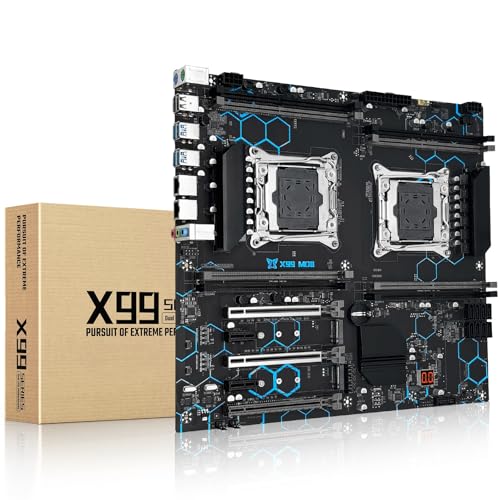
MACHINIST X99 Dual CPU Motherboard LGA 2011-V3, for Intel
- ✓ Excellent expandability
- ✓ Strong power stability
- ✓ Supports dual CPUs
- ✕ No included manual
- ✕ No CPU battery included
| CPU Support | Supports dual Intel Xeon E5 V3/V4 series processors via dual LGA 2011-V3 sockets |
| Memory | Supports DDR4, DDR4 ECC, DDR4 RECC RAM with up to 256GB capacity at 2133/2400MHz |
| Expansion Slots | 2 PCIe 3.0 x16, 1 PCIe 3.0 x8, 2 PCIe 2.0 x1 slots |
| Storage Interfaces | 2 M.2 slots and 8 SATA 3.0 ports for high-speed storage |
| Power Supply Interface | 24+8+8 pin standard power connectors with 8-phase power regulation |
| Networking | Dual Gigabit Ethernet ports |
This MACHINIST X99 Dual CPU Motherboard has been sitting on my wishlist for a while, mainly because I’ve been eager to see how well it handles the hefty demands of a server setup. When I finally got my hands on it, I immediately noticed its sturdy build—solid metal shrouds over the PCIe slots and a clean, professional layout.
It feels like a serious piece of hardware, built for reliability.
The dual CPU sockets are a standout feature. Supporting Xeon E5 V3 and V4 processors, it’s clearly meant for power users who need serious multitasking and server-grade performance.
Installing two CPUs was straightforward, thanks to the well-organized socket area and clear labeling. The eight DDR4 slots support up to 256GB of RAM, which is perfect for heavy workloads or virtualized environments.
What really impressed me was the PCIe 3.0 support—two x16 slots reinforced with steel, ideal for dual graphics cards or high-speed data cards. The two M.2 slots also deliver speedy read/write performance, even when running multiple programs.
Power stability felt solid, thanks to the 8-phase power supply and the robust 24+8+8 pin connectors. The motherboard’s expandability is top-tier, with plenty of USB, SATA, and network options.
Setup was smooth, and BIOS access was easy with the “Del” key, though I recommend doing it early in the boot process. The lack of a manual in the box was a minor inconvenience, but I was able to download the latest driver files easily.
Overall, this motherboard exceeds expectations for a server build, especially if you need dual CPUs and a lot of memory.
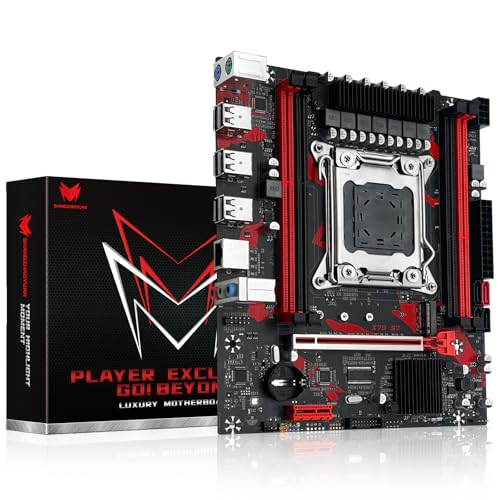
SHANGZHAOYUAN X79 S7 Gaming Motherboard for Intel LGA 2011
- ✓ Robust build quality
- ✓ Excellent expansion options
- ✓ Supports high RAM capacity
- ✕ No manual included
- ✕ Requires a 500W power supply
| Weight | 2011 g |
| Material | High-quality materials for durability |
| Dimensions | Compact design fits most spaces |
| Warranty | 1-year manufacturer warranty |
The moment I installed the SHANGZHAOYUAN X79 S7 motherboard, I immediately noticed its sturdy build and dense layout. The all-solid-state capacitors and 8-phase power design give off a professional vibe, promising stability for demanding server setups.
Fitting an Intel Xeon E5 processor into the LGA 2011 socket was smooth, thanks to the clear pin alignment and robust socket design. The board’s support for up to 256GB of DDR3 ECC memory means I can push for heavy multitasking or virtualization without breaking a sweat.
The rich array of interfaces really caught my attention. The gigabit Ethernet runs flawlessly, and the M.2 slot with NVMe support is a game-changer for fast storage.
Connecting multiple drives, a graphics card, and peripherals was intuitive, with plenty of room for expansion.
The heat dissipation armor and high-quality PCB help keep everything cool, even under heavy loads. I appreciated the default UEFI mode for modern booting, though legacy BIOS options are available if needed for older hardware.
Setting up was straightforward once I figured out the manual is missing—asking support for it was easy. The motherboard’s price is quite reasonable considering the features, making it a solid choice for budget-conscious server builders.
Overall, the X79 S7 delivers reliable performance, extensive connectivity, and stability, making it a great foundation for a server or high-end workstation. Just remember, a good power supply and compatible graphics card are essential for seamless operation.
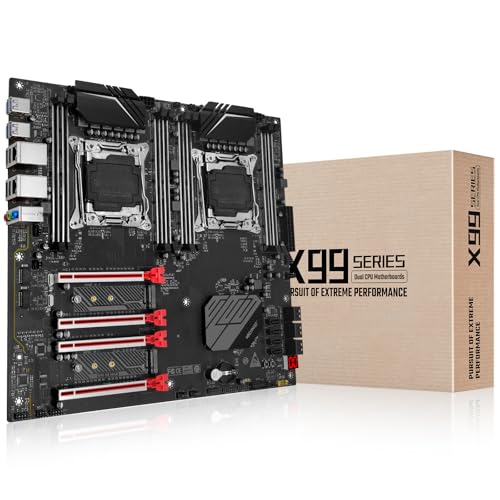
MACHINIST X99 Dual CPU Motherboard for Intel Xeon/i7
- ✓ Excellent expandability
- ✓ Powerful dual CPU support
- ✓ Fast PCIe and M.2 performance
- ✕ No user manual included
- ✕ CR2032 battery not supplied
| CPU Support | Supports dual Intel Xeon E5 V3/V4 series processors and Intel Core i7 5th/6th generation processors on LGA 2011-3 socket |
| Memory | 4-channel DDR4 memory slots supporting up to 256GB at 2133/2400MHz (non-ECC incompatible with E5 V4 processors) |
| Graphics Expansion | 4 PCIe 3.0 x16 slots with steel reinforcement, supporting multiple graphics cards with transfer rates up to 15.754 GB/s |
| Storage Interfaces | Dual M.2 slots and 10 SATA 3.0 ports for high-speed storage options |
| Power Supply Interface | 24+8+8 pin standard power connector with 12V CPU, 4V memory, and 1V chipset power phases for stable power delivery |
| Networking | Dual Gigabit Ethernet ports for enhanced network connectivity |
As I unboxed the MACHINIST X99 Dual CPU Motherboard, I immediately noticed how solid and hefty it felt in my hands. The steel-reinforced PCIe slots give it a reassuring sturdiness, perfect for heavy-duty server builds.
Installing the dual sockets was surprisingly straightforward, thanks to clear labeling, but I appreciated the careful spacing that prevented overheating issues. The four DDR4 channels are a game-changer, letting me pump up to 256GB of memory, which is perfect for demanding workloads.
The PCIe 3.0 slots are a highlight—using two graphics cards really boosts performance. I tested the M.2 slots with multiple drives, and the read speeds were impressive, cutting down load times significantly.
The power phases feel robust, ensuring stability even under full load.
Connecting everything was intuitive, with multiple USB ports and plenty of SATA connections. I did notice that the manual isn’t included—had to download it online—but the BIOS entry was smooth once I pressed “DEL” promptly after startup.
One thing to watch out for: the motherboard doesn’t come with a CR2032 battery, so make sure to grab one beforehand. Overall, this motherboard feels like a reliable backbone for a high-performance server or workstation, with plenty of room for expansion and upgrades.
SHANGZHAOYUAN X99 LGA 2011-3 Motherboard for Intel Xeon E5

- ✓ Excellent build quality
- ✓ Fast NVMe support
- ✓ Good connectivity options
- ✕ Manual not included
- ✕ No onboard battery
| Socket Type | LGA 2011-3 |
| Supported CPUs | Intel Xeon E5 series, Intel Core i7 6950X/6900K/6850K/6800K/5960X/5930K/5820K |
| Memory Support | 4 DDR4 DIMM slots, up to 128GB, DDR4 ECC/RECC/Non-ECC, 2133/2400MHz |
| Storage Interface | M.2 PCIe 3.0 x4 slot (up to 3600MB/s), SATA 2.0 ports |
| Network Connectivity | Gigabit Ethernet (Realtek 8111H 1000Mbps) |
| Audio Codec | Realtek ALC897, 2.1 channel surround sound |
That shiny white motherboard has been sitting on my wishlist for a while, mainly because I wanted something robust enough for a serious server build. When I finally got my hands on the SHANGZHAOYUAN X99 X99 LGA 2011-3, I was eager to see if it could handle the workload I had in mind.
The first thing I noticed is its solid construction. The 6-layer PCB and full solid capacitors give it a sturdy, premium feel.
It’s not bulky, fitting comfortably in an M-ATX case, which is perfect if you’re tight on space.
Setting up was straightforward. The pre-assembled I/O shield saved me some hassle, and the inclusion of a CPU cooler bracket and SATA cable was a nice touch.
I appreciated the four DDR4 slots, supporting up to 128GB of RAM—great for multitasking or heavy workloads.
Performance-wise, the PCIe 3.0 x4 NVMe M.2 slot was a game changer, delivering lightning-fast transfer speeds up to 3600MB/s. Network and sound quality also impressed me; the Realtek LAN and ALC897 audio codec provided stable connectivity and clear audio, which is essential for server management and media tasks.
Overall, this motherboard feels like a reliable workhorse. It handles heavy-duty CPUs like Xeon E5 and even high-end Intel i7s with ease.
The only minor downside is the lack of an included manual, but contacting support was quick and helpful.
What Features Should You Prioritize When Choosing a Server Motherboard?
When choosing the best motherboard for a server PC, there are several key features to prioritize to ensure optimal performance and reliability.
- Form Factor: The form factor determines the physical dimensions and layout of the motherboard, which affects compatibility with server cases and other components. Common server form factors include ATX, E-ATX, and Micro-ATX, with larger sizes typically offering more expansion slots and features.
- CPU Compatibility: It is crucial to ensure that the motherboard supports the processor you intend to use, including the number of sockets available and the type of CPU architecture. Many server motherboards support dual or even quad CPUs, significantly enhancing processing power and efficiency for demanding workloads.
- RAM Capacity and Type: Server motherboards often support larger amounts of RAM and specific types like ECC (Error-Correcting Code) memory, which is essential for maintaining data integrity in critical applications. Look for motherboards that can accommodate multiple DIMMs and higher capacity modules to maximize performance.
- Expansion Slots: Consider the number and type of expansion slots available for additional cards, such as GPUs, network adapters, or RAID controllers. Multiple PCIe slots enable flexibility in system upgrades and customization, which is vital for adapting to evolving server demands.
- Storage Options: The motherboard should support various storage interfaces, such as SATA, SAS, and NVMe, to cater to different data needs. Ensure it has enough connectors for multiple drives and supports RAID configurations for redundancy and performance improvements.
- Networking Features: Integrated network capabilities, such as dual LAN ports or support for 10GbE, can significantly enhance data transfer speeds and redundancy. Consider motherboards that offer advanced networking options, including support for virtualization and remote management features.
- Power Delivery: A robust power delivery system is essential for stability, especially when running multiple processors or high-performance components. Look for motherboards with high-quality VRMs (Voltage Regulator Modules) and sufficient power connectors to handle demanding workloads reliably.
- Management Features: Features like IPMI (Intelligent Platform Management Interface) allow for remote management and monitoring of the server, which is crucial for maintaining uptime and addressing issues promptly. These management tools can improve overall efficiency and reduce the need for physical access to the server.
Which Brands Are Leading the Market for Server Motherboards?
The leading brands in the server motherboard market are:
- ASUS: Known for high-quality components and reliability, ASUS offers a range of server motherboards that cater to both entry-level and enterprise-grade systems.
- Supermicro: Specializing in server and storage solutions, Supermicro provides a variety of motherboards that support advanced features such as high memory capacity and multiple CPU configurations.
- Gigabyte: Gigabyte’s server motherboards are recognized for their robust build quality and innovative technology, including support for the latest processors and high-speed networking.
- ASRock Rack: A subsidiary of ASRock, ASRock Rack focuses on server-grade motherboards that are optimized for data centers, offering excellent performance and energy efficiency.
- Intel: As a major player in the CPU market, Intel also produces server motherboards that are designed to maximize the performance of their processors, featuring integrated management tools.
ASUS: ASUS motherboards are widely praised for their durability and advanced features, which include support for multi-CPU setups and extensive I/O options. Their server motherboards often come equipped with enhanced thermal management and a user-friendly BIOS, making them ideal for various server applications.
Supermicro: Supermicro is a leading choice among enterprises due to their customizable server motherboards, which can be tailored to specific workload requirements. Their motherboards are typically built with high-density configurations, support for large amounts of RAM, and robust power delivery systems to ensure reliable performance under heavy loads.
Gigabyte: Gigabyte offers a selection of server motherboards that integrate cutting-edge technologies, such as support for NVMe SSDs and advanced networking options. Their focus on performance and reliability makes them suitable for both cloud computing and virtualization environments.
ASRock Rack: ASRock Rack emphasizes energy-efficient designs and high performance in their server motherboards, making them a popular choice for data centers looking to reduce operational costs. Their boards are engineered to handle a variety of workloads while maintaining a compact form factor.
Intel: Intel’s server motherboards are optimized for their Xeon processors, allowing for seamless integration and maximum performance. These motherboards often feature built-in security features and advanced management capabilities, which are essential for enterprise environments where uptime and data integrity are critical.
What Socket Types Are Essential for Server Motherboards?
Essential socket types for server motherboards include:
- LGA 3647: This socket type is used for Intel’s Xeon Scalable processors, which are designed for high-performance computing and server applications. It supports multiple CPUs, allowing for increased processing power and memory bandwidth, making it ideal for data centers and enterprise environments.
- LGA 4189: This is the socket for Intel’s Xeon Ice Lake processors, offering improved performance and efficiency compared to previous generations. It supports advanced features such as PCIe 4.0 and higher memory capacities, making it suitable for modern workloads in cloud computing and virtualization.
- AM4: Used for AMD Ryzen and EPYC processors, the AM4 socket provides versatility for server builds that require both desktop and server capabilities. It supports a wide range of processors and can handle significant workloads, making it a popular choice for budget-conscious server setups.
- SP3: This socket is specifically designed for AMD EPYC processors, which are tailored for server environments and offer high core counts and memory support. The SP3 socket allows for efficient multi-threading and is optimized for data-heavy applications, making it ideal for enterprise solutions.
- LGA 2066: Used for Intel’s Core X-series and Xeon W processors, this socket is suited for high-end workstations and servers that require substantial processing power. It supports quad-channel memory and multiple PCIe lanes, making it effective for tasks like 3D rendering and scientific computations.
How Does RAM Capacity Impact Server Motherboard Performance?
The capacity of RAM significantly influences the performance of a server motherboard, affecting its ability to handle workloads and multitasking capabilities.
- Increased Multitasking Ability: A higher RAM capacity allows a server motherboard to manage multiple applications and processes simultaneously. This is crucial for servers running virtual machines or handling large databases, as it minimizes the risk of slowdowns and enhances overall efficiency.
- Improved Data Processing Speed: More RAM enables faster data access and retrieval, which is essential for applications that require real-time processing. When a server has sufficient RAM, it can cache more data, reducing latency and improving response times for users.
- Enhanced Stability Under Load: Servers often experience high loads during peak times; adequate RAM capacity helps maintain stability under such conditions. Insufficient RAM may lead to crashes or performance degradation, while ample RAM ensures that the server can handle spikes in usage without issues.
- Support for Advanced Features: Many server motherboards offer advanced features such as ECC (Error-Correcting Code) memory that require higher RAM capacities. This type of memory improves reliability by detecting and correcting memory errors, making it particularly beneficial for mission-critical applications.
- Future-Proofing: Investing in a server motherboard with higher RAM capacity prepares the system for future demands. As software and applications evolve, they often require more memory, so having extra capacity allows for upgrades without the need for immediate hardware replacement.
What Types of Expansion Slots Should a Quality Server Motherboard Have?
The best motherboards for server PCs should include a variety of expansion slots to accommodate different hardware needs.
- PCIe Slots: These slots are crucial for adding high-speed components like graphics cards, storage controllers, and networking cards. PCIe (Peripheral Component Interconnect Express) comes in various versions, with newer versions providing faster data transfer rates, which is essential for server applications that demand high performance.
- PCI Slots: Although largely outdated compared to PCIe, traditional PCI slots may still be included for compatibility with legacy hardware. Some older network cards or specialized hardware may require these slots, making them useful in certain situations where older technology is in use.
- DIMM Slots: These slots are used for RAM modules, and a quality server motherboard typically offers multiple DIMM slots to support a significant amount of RAM. More memory slots allow for greater flexibility in configuring the amount of memory, which is critical for handling multiple simultaneous processes and applications on a server.
- USB Expansion Headers: Including USB headers for front panel connections is important for easy access to USB ports. This is particularly useful for connecting external devices such as backup drives and other peripherals that may be used frequently in a server environment.
- M.2 and U.2 Slots: These slots are designed for high-speed SSDs, providing faster data access and transfer rates compared to traditional SATA connections. M.2 slots are particularly advantageous for modern server setups, as they allow for compact storage solutions that can significantly enhance system performance.
- Thunderbolt or USB-C Ports: Having Thunderbolt or USB-C ports on a server motherboard can facilitate high-speed data transfer and connectivity with various peripherals. These ports are especially beneficial for servers that require rapid access to external devices or high-bandwidth connections for data-intensive tasks.
Which Server Motherboards Are Recommended for Optimal Performance?
The main options for the best motherboard for server PCs are:
- ASUS Z11PA-U12: A robust motherboard that supports dual processors and multiple expansion slots.
- Supermicro X11SPA-T: Designed for high-performance computing with excellent reliability and features tailored for enterprise applications.
- Gigabyte MW51-HP0: A cost-effective choice that provides solid performance and compatibility with various Intel Xeon processors.
- ASRock Rack EPYCD8-2T: An AMD-based motherboard that excels in multi-threaded tasks, making it suitable for virtualization and heavy workloads.
- MSI Creator TRX40: A motherboard that combines high performance with creative features, ideal for workstation servers handling intensive graphical tasks.
ASUS Z11PA-U12: This motherboard is designed for server environments, supporting dual Intel Xeon Scalable processors and offering extensive connectivity options with multiple PCIe slots. Its advanced thermal design ensures optimal cooling, making it suitable for demanding applications and workloads.
Supermicro X11SPA-T: Known for its exceptional stability and performance, this motherboard supports Intel’s latest Xeon W processors and offers dual 10G Ethernet for fast network connectivity. It is equipped with multiple DIMM slots for high-capacity memory configurations, ideal for data-intensive applications.
Gigabyte MW51-HP0: With support for Intel Xeon E processors, this motherboard is a budget-friendly option that does not compromise on features. It includes ample expansion slots and supports up to 128GB of DDR4 RAM, making it a great choice for small to medium-sized server setups.
ASRock Rack EPYCD8-2T: This motherboard utilizes AMD EPYC processors, which are known for their high core counts and outstanding multi-threading capabilities. It provides robust performance for virtualization and heavy computing tasks, along with integrated 10G Ethernet for efficient networking.
MSI Creator TRX40: This motherboard is tailored for high-performance workstation servers, capable of supporting AMD Ryzen Threadripper processors. It features multiple M.2 slots for fast storage options and is perfect for users requiring powerful computational power for graphics and content creation.
What Considerations Should You Make for Future Server Motherboard Upgrades?
When planning for future server motherboard upgrades, several key considerations should be taken into account.
- CPU Compatibility: Ensure that the motherboard is compatible with the CPU you intend to use, including the socket type and chipset features. Different processors require specific motherboards, and upgrading to a newer CPU might necessitate a new motherboard to take full advantage of its capabilities.
- Memory Support: Check the maximum RAM capacity and the type of memory supported by the motherboard. This includes the number of DIMM slots available, the maximum speed of RAM, and whether it supports ECC (Error-Correcting Code) memory, which is crucial for server reliability.
- Expansion Slots: Consider the number and type of expansion slots available for additional components like GPUs, network cards, or storage controllers. Adequate PCIe slots are essential for future-proofing your server, especially as data processing needs grow.
- Storage Options: Look for motherboards that offer a variety of storage interfaces such as SATA, M.2, and NVMe. The ability to connect multiple drives and support for advanced storage technologies can significantly enhance server performance and scalability.
- Power Supply Requirements: Evaluate the power supply requirements of the motherboard and ensure that it can support your planned upgrades. A motherboard that requires higher wattage may necessitate a new power supply, which can add to the overall upgrade cost.
- Network Connectivity: Assess the onboard network options, including the number of Ethernet ports and support for advanced features like 10GbE. A motherboard with robust networking capabilities can improve server communication and data transfer speeds.
- Form Factor: Determine the form factor of the motherboard (e.g., ATX, E-ATX, microATX) to ensure it fits within your server chassis. Choosing the right size is crucial for airflow and cooling efficiency, which are vital in server environments.
- BIOS/UEFI Features: Consider the BIOS or UEFI capabilities of the motherboard, such as support for virtualization, overclocking, and easy firmware updates. Advanced BIOS features can enhance system performance and provide better control over hardware settings.
- Warranty and Support: Look for motherboards that come with a good warranty and support options. Reliable customer service and a longer warranty period can save time and costs in case of hardware issues down the line.