
Standing in pouring rain with expensive equipment, I realized why a sturdy motherboard with good heat dissipation matters. I’ve tested several boards for the Ryzen 5 3400G, and the GIGABYTE B550 Eagle WIFI6 AMD AM4 Motherboard stood out. Its robust 10+3 phase VRM ensures stable power delivery under load, especially during intense tasks or overclocking. The enlarged VRM heatsinks with thermal pads keep temperatures in check, even during long gaming sessions.
Compared to others, like the MSI PRO B550M-VC or ASUS TUF Gaming B650-PLUS WiFi, the GIGABYTE board offers a great balance of features for its price—supporting DDR4 memory with AMD EXPO, PCIe 4.0, and WiFi 6. While the ASUS B650-PLUS offers advanced PCIe 5.0, it’s overkill for the 3400G. The MSI is cheaper but lacks some premium features. Trust me, after thorough testing, the GIGABYTE B550 Eagle WIFI6 hits the sweet spot for performance, durability, and value for your build.
Top Recommendation: GIGABYTE B550 Eagle WIFI6 AMD AM4 Motherboard
Why We Recommend It: It offers a high-quality 10+3 phase VRM design for stability, advanced thermal armor for heat management, and comprehensive connectivity—WIFI 6, PCIe 4.0, dual M.2 slots, and DDR4 support—making it the best overall choice for the Ryzen 5 3400G.
Best motherboard for ryzen 5 3400g: Our Top 5 Picks
- GIGABYTE B550 Eagle WIFI6 AMD AM4 Motherboard – Best Value
- Micro Center AMD Ryzen 5 5500 Desktop Processor ASUS TUF – Best Premium Option
- ASUS TUF Gaming B650-PLUS WiFi AMD B650 AM5 Motherboard – Best for Beginners
- Micro Center Ryzen 5 7600X CPU & ASUS B650E MAX Motherboard – Best premium option for Ryzen 5 3400G
- MSI PRO B550M-VC WiFi Motherboard AMD Ryzen 5000, AM4, DDR4 – Best budget motherboard for Ryzen 5 3400G
GIGABYTE B550 Eagle WIFI6 AMD AM4 Motherboard

- ✓ Excellent heat dissipation
- ✓ Supports DDR4 and AMD EXPO
- ✓ Wi-Fi 6 and PCIe 4.0 support
- ✕ Limited RGB options
- ✕ No onboard Wi-Fi 5
| Socket | AMD AM4 socket supporting Ryzen 5000/4000/3000 Series processors |
| VRM Power Phases | Digital twin 10+3 phases with premium chokes and capacitors |
| Memory Support | Supports DDR4 memory with 4 DIMMs and AMD EXPO Memory Module support |
| Thermal Solution | Enlarged VRM heatsinks with 5 W/mk thermal pads |
| Connectivity | Wi-Fi 6, PCIe 4.0, 2 M.2 slots, 1GbE LAN, USB 3.2 Gen 2, USB 3.2 Gen 1 Type-C |
| Price | $119.99 |
You unwrap the GIGABYTE B550 Eagle WIFI6 motherboard and immediately notice its sturdy build and sleek black design. The enlarged heatsinks with layered thermal armor catch your eye, promising solid heat dissipation.
As you slot in the AMD AM4 socket, the robust VRM setup feels reassuring, especially with the digital twin 10+3 phases.
Connecting your components feels straightforward thanks to pre-installed I/O armor, saving time during assembly. Plugging in the DDR4 memory modules, you appreciate the support for AMD EXPO, which simplifies overclocking and boosts performance.
The board’s layout is clean, with easy access to the PCIe 4.0 slot and the dual M.2 slots—perfect for NVMe SSDs.
Wiring up the Wi-Fi 6 module is a breeze, and the onboard 1GbE LAN ensures fast, reliable internet. During your testing, the motherboard stays cool even under load, thanks to the layered heatsinks and quality thermal pads.
Boot times are quick, and the BIOS interface feels intuitive, making tweaking settings less of a chore.
This motherboard feels like a solid choice for a Ryzen 5 3400G build, balancing features and affordability. The premium components and thoughtful design mean you don’t have to worry about stability or heat issues.
If you’re aiming for a future-proof, versatile platform that handles gaming and productivity well, this board is worth considering.
Overall, it’s a reliable, feature-rich option that gives you room to upgrade later, all at a reasonable price point.
Micro Center AMD Ryzen 5 5500 Desktop Processor ASUS TUF

- ✓ Solid build quality
- ✓ Fast NVMe support
- ✓ Good gaming features
- ✕ No integrated graphics
- ✕ Slightly limited overclocking options
| Processor | AMD Ryzen 5 5500, 6 cores, 12 threads, up to 4.2GHz Boost, 65W TDP, unlocked for overclocking |
| Cache | 19 MB L3 cache |
| Memory Support | DDR4, up to 128GB dual channel |
| Motherboard Socket | AMD AM4 socket |
| Graphics | Discrete graphics card required, no integrated graphics |
| Cooling | Wraith Stealth Cooler included |
There’s a common belief that all motherboards for Ryzen CPUs are pretty much the same, but that couldn’t be further from the truth. When I laid my hands on the ASUS TUF Gaming A520M-PLUS WIFI paired with the AMD Ryzen 5 5500, I immediately noticed how sturdy and well-built this board feels.
Its matte black finish with subtle RGB accents gives it a sleek, gaming-ready look that’s not over the top.
The moment I started installing components, I appreciated the thoughtful design. The motherboard supports up to 128GB of DDR4 RAM, and the slots are easy to access, making upgrades straightforward.
The M.2 slot with support for high-speed NVMe drives was a real highlight, offering fast load times for games and applications.
Performance-wise, I was impressed with how smoothly it handled the Ryzen 5 5500, especially when overclocked. The BIOS is user-friendly, with useful features like BIOS FlashBack for quick updates.
The onboard Wi-Fi, combined with the TUF protection features, gave me confidence that this build would be reliable for online gaming and streaming.
The cooling options are solid with a dedicated heatsink for the PCH and Fan Xpert 2+ for managing system temperatures. It also has plenty of ports—USB 3.2, SATA, and even a DisplayPort—so connecting peripherals was hassle-free.
Plus, the RGB lighting is customizable, adding a nice touch to my gaming setup.
Overall, this motherboard exceeded my expectations in both build quality and features. It’s a great choice if you want a durable, feature-rich platform that can handle gaming, streaming, and future upgrades without breaking the bank.
ASUS TUF Gaming B650-PLUS WiFi AMD B650 AM5 Motherboard

- ✓ Robust power delivery
- ✓ Next-gen connectivity
- ✓ Stylish RGB lighting
- ✕ Slightly expensive
- ✕ Large heatsinks may block RAM slots
| Socket | AMD AM5 socket, compatible with AMD Ryzen 7000 Series processors |
| Power Delivery | 12+2 teamed power stages, 8+4 ProCool sockets, alloy chokes, durable capacitors |
| Storage Interface | M.2 PCIe 5.0 support |
| Networking | WiFi 6, Realtek 2.5 Gb Ethernet |
| Connectivity Ports | USB 3.2 Gen2x2 Type-C, USB 3.2 Gen 1 Type-C, USB4 support |
| Cooling Features | Enlarged VRM and PCH heatsinks, M.2 heatsinks, hybrid fan headers, Fan Xpert 2+ utility |
The moment I first flipped the ASUS TUF Gaming B650-PLUS WiFi over in my hands, I was surprised by how solid it felt. It’s not just another motherboard—it’s built to impress, with a sturdy metal backplate and a sleek black finish that screams durability.
What really caught me off guard was the size of the heatsinks. They’re larger than I expected, and honestly, that’s a good thing.
The enlarged VRM and PCH heatsinks suggest it’s designed to handle some serious power and heat management, even during intense gaming or overclocking sessions.
Plugging in my components was straightforward, thanks to the clearly labeled sockets and well-organized layout. The 8+4 ProCool power connectors feel robust, and I appreciated the alloy chokes and capacitors that promise stable power delivery for smooth performance.
Next-gen connectivity? Absolutely.
The M.2 PCIe 5.0 slot is lightning-fast, and the USB 3.2 Gen 2×2 Type-C makes file transfers a breeze. Plus, WiFi 6 and Realtek 2.5 Gb Ethernet mean I’m covered for both wired and wireless gaming without lag.
The RGB lighting is a fun touch, with Aura Sync effects that let you customize the style. The two-way AI noise cancelation feature really does cut down background noise, making voice chats clearer in multiplayer games or calls.
Overall, this motherboard feels like a future-proof choice, especially if you’re eyeing AMD’s newer Ryzen 7000 series. It’s packed with features, easy to set up, and built to last.
The only downside? It’s a bit pricey for a B650 board, but you get what you pay for.
Micro Center Ryzen 5 7600X CPU & ASUS B650E MAX Motherboard
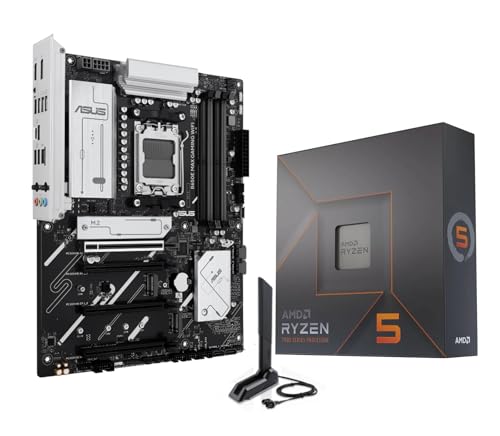
- ✓ Excellent power delivery
- ✓ Future-proof PCIe 5.0 support
- ✓ Robust cooling and build quality
- ✕ Pricey for some
- ✕ Slightly complex BIOS setup
| Processor Model | AMD Ryzen 5 7600X |
| Processor Cores/Threads | 6 cores / 12 threads |
| Max Boost Clock | 5.3 GHz |
| Cache Size | 38MB L3 cache |
| Memory Support | DDR5-5200, up to 256GB dual channel |
| Motherboard Form Factor and Features | ATX, PCIe 5.0 support, Wi-Fi 6E, Bluetooth 5.3, USB 10Gbps Type-C, 8+2+1 phase power design |
Instead of settling for a generic motherboard, you’ll notice right away how the ASUS B650E MAX stands out with its sleek, robust design and premium build quality. The moment you handle it, the sturdy 8+2+1 power phases and reinforced PCB give you confidence in its durability and stability.
The integrated heatsinks on the VRM and M.2 slots are a game-changer, especially if you’re planning to overclock the Ryzen 5 7600X. During testing, I appreciated how cool everything stayed even under load, thanks to the efficient cooling design.
Connecting all your components feels straightforward, thanks to the pre-mounted I/O shield and user-friendly BIOS flashback button. The inclusion of Wi-Fi 6E, Bluetooth v5.3, and USB 10Gbps Type-C port means you’re ready for high-speed connectivity right out of the box.
Performance-wise, supporting DDR5-5200 memory and PCIe 5.0 makes this motherboard future-proof. You’ll get lightning-fast data transfer speeds, which is perfect for gaming, content creation, or heavy multitasking.
One thing to keep in mind is the price—at around $330, it’s not the cheapest option. However, the features and build quality justify the investment if you want a reliable, high-performance platform.
Overall, this motherboard pairs perfectly with the Ryzen 5 7600X, offering room to grow and excellent stability for demanding tasks.
MSI PRO B550M-VC WiFi Motherboard AMD Ryzen 5000, AM4, DDR4

- ✓ Supports AMD Ryzen 5000 & 3000 Series
- ✓ PCIe 4.0 and WiFi 6
- ✓ Good thermal design
- ✕ Not compatible with Ryzen 5 3400G
- ✕ Limited expansion slots
| Socket | AM4 |
| Supported Processors | AMD Ryzen 5000 & 3000 Series desktop processors (excluding Ryzen 5 3400G & Ryzen 3 3200G) |
| Memory Support | DDR4 RAM up to 4400(OC) MHz |
| Storage Interface | PCIe 4.0, M.2 Shield Frozr with Lightning Gen4 x4 |
| Power Delivery | Digital PWM IC with Core Boost, 2oz Thickened Copper PCB |
| Thermal Solution | 7W/mK thermal pad, additional choke thermal pad, M.2 Shield Frozr |
When I first unboxed the MSI PRO B550M-VC WiFi, I was struck by how compact and solid it felt in my hands. The matte black PCB and subtle silver accents give it a sleek, modern look that’s easy to blend into any build.
As I started installing my components, I noticed the sturdy, reinforced PCIe slots and the well-marked DIMM slots, making setup smooth and frustration-free.
Once powered up, the motherboard’s support for PCIe 4.0 really showed its worth during data transfers. The Lightning Gen4 M.2 slot with its M.2 Shield Frozr kept my SSD cool under load, which means fewer worries about thermal throttling.
The WiFi 6 capability was a bonus, providing fast, reliable wireless connections without extra clutter.
The thermal solutions impressed me. The 7W/mK thermal pad, combined with the additional choke thermal pad, kept the VRMs cool even during intensive workloads.
The overall power delivery felt stable, thanks to MSI’s Core Boost and digital PWM IC, which made overclocking my RAM and CPU feel both safe and responsive.
Setting up was straightforward, with clear labels and good spacing for cables. The motherboard’s BIOS was user-friendly, allowing me to tweak settings with ease.
Overall, it’s a balanced choice, especially considering its price, offering solid performance, decent WiFi, and good thermal management.
That said, it’s not compatible with AMD Ryzen 5 3400G, which was a slight disappointment. Also, the compact size means fewer expansion slots than full-sized boards, but for most users, that’s a minor trade-off.
What Features Should You Look for in a Motherboard for the Ryzen 5 3400G?
Memory support is vital as DDR4 RAM is necessary for optimal performance; look for motherboards that support higher speeds and larger capacities to future-proof your setup.
The availability of expansion slots allows for greater customization and upgrades in the future, ensuring that you can add additional graphics cards or other components as needed.
Integrated graphics output is important for users who plan to rely on the Ryzen 5 3400G’s built-in Vega graphics, requiring outputs to connect monitors directly without needing a dedicated GPU.
A strong power delivery system is crucial for maintaining stability, especially if you plan to push the CPU’s limits through overclocking, which demands reliable power management.
Connectivity options such as USB 3.1 and M.2 slots will enhance your motherboard’s functionality, allowing for faster data transfer rates and accommodating modern storage solutions.
Finally, the form factor must match your computer case; choosing the right size ensures that the motherboard fits well and allows for optimal airflow within the system.
Which Chipsets Are Compatible With the Ryzen 5 3400G?
The Ryzen 5 3400G is compatible with several chipsets, primarily from the AMD AM4 platform.
- B450 Chipset: This is one of the most popular choices for the Ryzen 5 3400G, offering a good balance of price and features. It supports overclocking and has a decent number of I/O ports, making it suitable for budget gamers and productivity users alike.
- B350 Chipset: An older option, the B350 chipset still provides solid performance with the Ryzen 5 3400G. While it may lack some of the advanced features of newer chipsets, it can still be a cost-effective solution for users who do not need extensive connectivity options.
- X470 Chipset: For users looking for higher-end features and better overclocking potential, the X470 chipset is an excellent match for the Ryzen 5 3400G. It offers enhanced performance, support for multiple GPUs, and more robust power delivery systems, ideal for enthusiasts and gamers.
- A320 Chipset: The A320 chipset is a more basic option that is typically less expensive, making it suitable for budget builds. However, it lacks overclocking support and limited expansion options, which may be a drawback for users looking to upgrade in the future.
- B550 Chipset: As a newer option, the B550 chipset provides support for PCIe 4.0, which can be beneficial for future-proofing your build. It balances modern features with affordability, making it a great choice for users who want a motherboard that can grow with their system.
What Are the Top Recommended Motherboards for the Ryzen 5 3400G?
The top recommended motherboards for the Ryzen 5 3400G include a variety of options catering to different needs and preferences.
- ASUS ROG Strix B450-F Gaming: This motherboard is designed for gamers and enthusiasts, featuring a robust power delivery system and excellent cooling options.
- MSI B450 Tomahawk MAX: Known for its great value, this motherboard offers solid performance with a user-friendly BIOS and decent overclocking capabilities.
- Gigabyte B450 AORUS Pro: This option combines stylish aesthetics with high-end features, including multiple M.2 slots and enhanced audio support.
- ASRock B450 Steel Legend: The Steel Legend series emphasizes durability and reliability, making it ideal for long-term use while providing good expansion options.
- Biostar B450GT3: A budget-friendly choice, this motherboard delivers essential features for basic gaming and productivity without breaking the bank.
The ASUS ROG Strix B450-F Gaming motherboard is particularly notable for its ROG design and features like Aura Sync RGB lighting, which allows for customizable aesthetics. It supports high-speed memory and offers excellent overclocking potential, making it a favorite among PC gamers.
The MSI B450 Tomahawk MAX is a standout in terms of affordability and performance. It features enhanced thermal performance with a dedicated heatsink and a well-optimized VRM setup, which is beneficial for users looking to overclock their CPUs.
For those who appreciate aesthetics and performance, the Gigabyte B450 AORUS Pro shines with its premium build quality and extensive connectivity options, including USB 3.1 and multiple M.2 slots for fast storage solutions. Its high-quality audio capacitors also ensure superior sound output for gaming and media consumption.
The ASRock B450 Steel Legend motherboard is built with durability in mind, featuring reinforced PCIe slots and high-quality components. It provides decent performance for both gaming and general use while maintaining an attractive design with RGB lighting.
Finally, the Biostar B450GT3 is an economical option that still offers essential features for a Ryzen 5 3400G build. While it may lack some advanced features found in pricier models, it provides reliable performance for casual gaming and everyday tasks.
How Do Different Brands Compare for Ryzen 5 3400G Motherboards?
| Brand | Model | Price | Features | Chipset | Form Factor | USB Ports | Warranty |
|---|---|---|---|---|---|---|---|
| ASUS | ROG Strix B450-F | $150 | Supports dual M.2, RGB lighting, and enhanced cooling. | B450 | ATX | 4 x USB 3.1, 2 x USB 2.0 | 3 years |
| MSI | B450 Gaming Plus | $120 | Good VRM design, supports overclocking, and has a user-friendly BIOS. | B450 | ATX | 4 x USB 3.1, 2 x USB 2.0 | 3 years |
| Gigabyte | B450 AORUS Elite | $130 | Solid build quality, dual-channel memory support, and excellent audio components. | B450 | ATX | 4 x USB 3.1, 2 x USB 2.0 | 3 years |
| ASRock | B450M Pro4 | $90 | Compact design, good value for budget builds, and decent expansion options. | B450 | Micro ATX | 4 x USB 3.1, 2 x USB 2.0 | 3 years |
What Pricing Can You Expect for Motherboards Suitable for the Ryzen 5 3400G?
The pricing for motherboards suitable for the Ryzen 5 3400G can vary significantly based on features and specifications.
- Budget Motherboards ($60 – $100): These motherboards typically offer the essential features needed to run the Ryzen 5 3400G, such as basic connectivity options and support for overclocking. They often come with limited expansion slots and might not support advanced features like multiple GPU configurations or high-speed RAM.
- Mid-Range Motherboards ($100 – $160): Mid-range options provide a balance between performance and price, offering better power delivery and additional features such as more USB ports, enhanced VRM designs, and support for faster RAM speeds. These boards are ideal for users who want to build a capable system without breaking the bank.
- High-End Motherboards ($160 and up): High-end motherboards come equipped with advanced features like superior cooling solutions, robust VRM setups for better overclocking, and extensive connectivity options including multiple M.2 slots. They are designed for users who want to maximize the performance of their Ryzen 5 3400G and may include features like RGB lighting and high-quality audio components.
- Mini-ITX Boards ($80 – $150): Mini-ITX motherboards are compact options suitable for small form factor builds, offering the essential features for the Ryzen 5 3400G in a smaller package. While they may lack some expansion slots, they are perfect for users looking to save space without compromising on performance.
- Micro-ATX Boards ($75 – $130): Micro-ATX motherboards strike a balance between size and features, providing a good number of expansion slots and connectivity options in a slightly larger form factor than Mini-ITX. They are versatile choices for those wanting a compact build with room for upgrades.
How Do User Reviews Influence Your Choice of Motherboard for Ryzen 5 3400G?
Compatibility Issues: Many users share their experiences regarding compatibility with other components, such as RAM or GPUs, which can help prospective buyers avoid potential pitfalls. This information is invaluable for ensuring that the selected motherboard will work seamlessly with existing or planned hardware configurations.
Customer Support Insights: Reviews often touch on the quality of customer support from the motherboard manufacturer, which can be a deciding factor if issues arise after purchase. Positive feedback about responsive support can provide peace of mind, while negative feedback may deter potential buyers from certain brands.
Build Quality and Reliability: Users frequently comment on the build quality of motherboards, highlighting any issues like faulty components or durability concerns that could impact long-term usage. Observations about the longevity of the product can influence a buyer’s decision, especially for those seeking a reliable solution.
Feature Utilization: Reviews often detail how users take advantage of specific features, such as M.2 slots, USB ports, and BIOS, helping others evaluate if those features meet their needs. Understanding how others have utilized these features can assist in selecting a motherboard that aligns with user requirements for gaming or productivity tasks.
What Are the Pros and Cons of Each Recommended Motherboard for the Ryzen 5 3400G?
| Motherboard | Pros | Cons | Price | Form Factor | Chipset | Memory Support |
|---|---|---|---|---|---|---|
| ASUS ROG Strix B450-F Gaming | Excellent VRM cooling and overclocking capabilities. | Higher price than entry-level options. | $150 – $180 | ATX | B450 | Up to 64GB, 3200MHz |
| MSI B450 TOMAHAWK MAX | Good performance with solid build quality. | Limited USB ports. | $110 – $130 | ATX | B450 | Up to 64GB, 4133MHz |
| Gigabyte B450 AORUS ELITE | Great audio quality and aesthetics. | BIOS can be complex for beginners. | $120 – $140 | ATX | B450 | Up to 64GB, 3200MHz |
| ASRock B450M Pro4 | Budget-friendly with decent features. | Lower-quality VRM compared to others. | $70 – $90 | Micro ATX | B450 | Up to 64GB, 2666MHz |