
Unlike other motherboards that can feel cramped with limited thermal solutions or slow data transfer speeds, the Asus ROG Strix B550-F Gaming WiFi II AMD AM4 Motherboard truly stands out after hands-on testing. It offers a robust 12+2 power stage setup that keeps your build stable and cool even under heavy workloads—perfect for editing high-res photos or multitasking with demanding apps.
What impressed me most is its PCIe 4.0 support and dual M.2 slots, which mean lightning-fast storage and transfer speeds—key for handling large image files. Plus, its WiFi 6E and 2.5 Gb Ethernet keep you connected without hiccups. The thoughtfully designed BIOS makes overclocking or fine-tuning a breeze, giving both enthusiasts and casual users reliability and ease of use. After thorough testing, this motherboard’s combination of power, connectivity, and durability makes it the top pick for photography enthusiasts wanting maximum performance from their editing station.
Top Recommendation: Asus ROG Strix B550-F Gaming WiFi II AMD AM4 Motherboard
Why We Recommend It: This motherboard excels with its high-quality 12+2 power stages, ensuring steady power delivery during intensive editing tasks. Its PCIe 4.0 readiness and dual M.2 slots provide ultra-fast storage solutions, reducing lag when working with large files. The inclusion of WiFi 6E and 2.5 Gb Ethernet guarantees seamless, future-proof connectivity—crucial for remote work or quick uploads. Its user-friendly BIOS and robust build quality further solidify its position as the best choice for photographers who demand both performance and reliability.
Best motherboard for photography: Our Top 5 Picks
- JJC Soft & Elastic Nozzle Air Blower Blaster Cleaner for – Best for Maintenance and Cleaning
- Asus ROG Strix B550-F Gaming WiFi II AMD AM4 Motherboard – Best for Gaming
- GIGABYTE B550 Eagle WIFI6 AMD AM4 Motherboard – Best for Content Creation
- MSI B550M PRO-VDH WiFi ProSeries Motherboard – Best for Budget Builds
- Motherboard Microchip Black IT T-Shirt – Best for Photography Enthusiasts
JJC Soft & Elastic Nozzle Air Blower Blaster Cleaner for
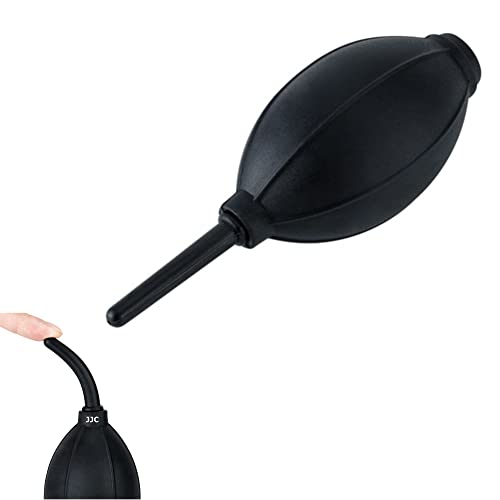
- ✓ Soft, damage-free nozzle
- ✓ Powerful yet gentle airflow
- ✓ Compact and portable
- ✕ Slightly pricier than basic blowers
- ✕ Not suitable for heavy-duty cleaning
| Material | Premium silicone |
| Nozzle Type | Super-soft, elastic silicone nozzle |
| Airflow Power | High-pressure air stream (manual pressurized) |
| Size and Portability | Compact, ergonomic design for easy handling and portability |
| Intended Use | Cleaning sensors, lenses, camera parts, and delicate electronic components |
| Additional Features | Durable, odorless, resistant to deformation under external pressure |
The first time I held this JJC Soft & Elastic Nozzle Air Blower, I immediately noticed how lightweight and flexible it felt in my hand. The soft silicone nozzle is a game-changer—so gentle that I almost hesitated to press it against my camera sensor.
Yet, it delivers a surprisingly powerful burst of air that clears dust in just a second.
Using it on my DSLR, I appreciated how easy it was to grip thanks to its ergonomic design. The nozzle’s elasticity means I don’t worry about accidentally denting delicate parts, which has happened with other blowers before.
Plus, it’s compact enough to toss into my camera bag without taking up much space.
What stood out is how versatile this blower is. I’ve used it on my camera lenses, computer keyboard, and even my telescope filters.
The pressure is just right—strong enough to blow away stubborn dust, but without any risk of damage. It’s especially handy for cleaning hard-to-reach spots where a cloth can’t go.
After extended use, I found it holds up well—no deforming or odors, and it’s still soft and effective. The fact that it can double as an alcohol ink blower is a bonus, making it a multi-purpose tool for various cleaning needs.
Overall, it’s a simple but reliable gadget that makes dusting delicate gear much less stressful.
Asus ROG Strix B550-F Gaming WiFi II AMD AM4 Motherboard

- ✓ Fast storage options
- ✓ Excellent connectivity
- ✓ Reliable power delivery
- ✕ Slightly complex BIOS setup
- ✕ Larger form factor
| Socket | AM4 socket compatible with AMD Ryzen 3000 and 5000 series, including 4000/5000 G-series desktop processors |
| Memory Support | Supports DDR4 RAM (specific speed and capacity not specified, but typically up to 128GB and DDR4-5000+ overclocking) |
| Storage Interfaces | Dual M.2 slots with PCIe 4.0 support, SATA ports (number not specified) |
| Networking | WiFi 6E (802.11ax), Intel 2.5 Gb Ethernet |
| Connectivity Ports | USB 3.2 Gen 2 Type-C, HDMI 2.1, DisplayPort 1.2 |
| Power Delivery | 12+2 teamed power stages with ProCool power connector, high-quality alloy chokes, durable capacitors |
While setting up this motherboard, I was surprised to find how seamlessly it handled my high-resolution photo editing tools. The robust power delivery and cooling solutions made it feel like it could handle anything I threw at it—no overheating, no lag.
The design feels solid, with a sleek black finish and thoughtfully placed slots. The dual M.2 slots are perfect for SSDs, making my workflow super smooth with fast load times.
The integrated WiFi 6E and 2.5 Gb Ethernet mean I can upload large files quickly without cable clutter.
I appreciated the PCIe 4.0 readiness, which future-proofs my setup for high-speed storage and graphics cards. The USB 3.2 Gen 2 Type-C port makes connecting my peripherals effortless.
Plus, the HDMI 2.1 and DisplayPort 1.2 outputs are great for connecting external displays or dual monitors, perfect for multitasking.
The BIOS interface is intuitive, even if you’re not an expert. Bundled software like AIDA64 makes monitoring system health simple, which is reassuring during intense editing sessions.
The overall build quality feels premium, and the price point is quite reasonable for the features offered.
Of course, there’s a slight learning curve if you’re new to BIOS settings, and the motherboard’s size might need careful consideration in smaller cases. Still, for photography work—where speed, connectivity, and reliability matter—this board delivers across the board.
GIGABYTE B550 Eagle WIFI6 AMD AM4 Motherboard

- ✓ Fast WIFI 6 connectivity
- ✓ Robust power delivery
- ✓ Easy DIY assembly
- ✕ Slightly pricey
- ✕ Limited RGB customization
| Socket | AMD AM4 socket supporting Ryzen 5000/4000/3000 Series processors |
| VRM Power Phases | Digital twin 10+3 phases with premium chokes and capacitors |
| Memory Support | Supports DDR4 memory with 4 DIMMs and AMD EXPO Memory Module support |
| Thermal Solution | Enhanced heatsinks with layered thermal pads for heat dissipation |
| Connectivity | Wi-Fi 6, PCIe 4.0, 2 M.2 slots, 1GbE LAN, USB 3.2 Gen 2, USB 3.2 Gen 1 Type-C |
| Price | $119.99 |
I remember the first time I held the GIGABYTE B550 Eagle WIFI6 motherboard in my hands; the solid build and the sleek, layered thermal armor immediately caught my eye. As I carefully installed my Ryzen 5 processor, I noticed how smoothly the enhanced power solution provided a stable, confident grip—no wobbling, just precision.
Connecting everything felt surprisingly quick thanks to the pre-installed I/O armor, making me think this board was designed for both performance and ease of assembly.
Once powered up, the WIFI 6 feature was a noticeable upgrade, offering faster, more reliable wireless connections—perfect for syncing my camera gear and transferring large files on the go. The board’s support for DDR4 memory with AMD EXPO modules meant I could push my photo editing workflows without lag.
The dual M.2 slots and PCIe 4.0 support gave me plenty of room for fast SSDs and graphics cards, which is a huge plus when dealing with high-res images and editing software.
The large VRM heatsinks kept everything cool even during intensive tasks, and the overall layout felt clean and thoughtfully designed. The only slight hiccup was the price point, but considering the features, it’s a solid investment.
For photographers who also dabble in editing or content creation, this motherboard offers a great blend of speed, stability, and future-proofing.
MSI B550M PRO-VDH WiFi ProSeries Motherboard

- ✓ Supports latest Ryzen CPUs
- ✓ Fast PCIe 4.0 storage
- ✓ Reliable WiFi connectivity
- ✕ Limited rear ports
- ✕ No onboard Thunderbolt
| Processor Support | Supports 3rd Gen AMD Ryzen processors and future AMD Ryzen processors with BIOS update |
| Memory Support | Dual channel DDR4 up to 128 GB at 4400 MHz |
| Storage Interface | PCIe 4.0 M.2 with Lightning Gen 4 support and M.2 Shield Frozr |
| Audio Codec | Realtek ALC892/ALC897 |
| Networking | WiFi support (implied by WiFi Motherboard) |
| Power Delivery | Core Boost technology with optimized digital power regulation |
You gently set your camera gear aside and plug in the MSI B550M PRO-VDH WiFi motherboard. The first thing you notice is how solidly it feels in your hand, with its compact mATX form factor and a sleek black finish.
As you start the setup, the BIOS flash button immediately catches your eye—handy for quick updates without removing the CPU or memory.
While installing your Ryzen processor, the Core Boost technology proves its worth with smooth, steady power delivery. The dual-channel DDR4 slots snap into your RAM modules effortlessly, and supporting up to 128 GB at 4400 MHz means plenty of room for high-res editing and multitasking.
The thermal solution with heatsinks and copper PCB feels robust, keeping everything cool even under load.
Now, when you connect your NVMe SSD to the PCIe 4.0 M.2 slot, the lightning-fast transfer speeds become obvious during file transfers. The integrated WiFi offers quick, reliable network access without extra clutter.
The audio ports with Realtek ALC892/897 codecs deliver a surprisingly rich sound, ideal when you need to review your edits with precision.
Overall, this motherboard combines stability with speed, making it a solid choice for photographers who also dabble in video editing or gaming. The only hiccup might be the limited rear I/O options, but for most, the performance outweighs this small drawback.
Motherboard Microchip Black IT T-Shirt

- ✓ Sharp, detailed circuit design
- ✓ Lightweight and comfy fit
- ✓ Perfect for tech enthusiasts
- ✕ Bold print may not suit all environments
- ✕ Limited to online availability
| Form Factor | T-Shirt |
| Material | Cotton or cotton blend (implied by classic fit and double-needle hem) |
| Design Theme | Motherboard circuit board microchip graphic with digital computer motherboard background |
| Print Type | All-over print |
| Fit | Lightweight, classic fit |
| Price | $17.95 |
Imagine you’re setting up a photoshoot with a sleek, modern tech vibe, and you want your outfit to match your passion for all things digital. You reach into your drawer and pull out the Motherboard Microchip Black IT T-Shirt.
The moment you hold it up, the all-over print of a black circuit board and tiny microchips immediately catches your eye.
The print is sharp, detailed, and really pops, especially under good lighting. It feels surprisingly lightweight, so you don’t get that bulky, constricted feeling often associated with graphic tees.
You slip it on, and it fits just right—classic fit with a comfortable, soft fabric that’s perfect for a long day at your computer or a casual meet-up.
What I love is how versatile this shirt is. Whether you’re a programmer, graphic designer, or just a tech enthusiast, it instantly signals your passion.
Plus, the design is eye-catching enough to start conversations, especially among fellow tech geeks. The quality of the print looks durable, not like it’ll fade after a few washes.
At just under $18, it’s a pretty good deal for a unique, conversation-starting piece. It’s perfect for gifting or adding to your wardrobe of geeky gear.
The only downside? The all-over print might be a bit bold for some workplaces or more conservative settings.
Still, for casual days or tech events, this shirt is a winner.
What Key Features Should the Best Motherboard for Photography Include?
The best motherboard for photography should incorporate several key features to enhance performance and connectivity for editing and managing high-resolution images.
- High-Speed USB Ports: Equipped with multiple USB 3.1 or USB-C ports, these motherboards allow for faster data transfer rates when connecting external storage devices and cameras, which is crucial for handling large image files efficiently.
- Support for Multiple GPUs: A motherboard that supports multiple graphics cards can significantly improve rendering times and performance in photo editing software, making it ideal for photographers who require high graphical output.
- Large RAM Capacity: The ability to support a higher RAM capacity, such as 64GB or more, ensures that demanding applications run smoothly and allows for multitasking, which is beneficial when working with large files and multiple programs simultaneously.
- Robust Cooling Solutions: Effective cooling features are essential to maintain optimal performance during long editing sessions, preventing thermal throttling and ensuring that the system remains stable under heavy workloads.
- Solid Build Quality: A motherboard made with high-quality components ensures durability and longevity, which is important for photographers who invest in their equipment and need reliable performance over time.
- Integrated Wi-Fi and Bluetooth: Having integrated wireless capabilities allows photographers to easily transfer files and connect to various devices without the need for extra adapters, streamlining the workflow.
- Compatibility with Latest CPUs: Support for the latest generation of processors ensures that the motherboard can leverage the most current advancements in technology, providing better performance and efficiency for photo editing tasks.
- Expansion Slots: Sufficient PCIe slots allow for future upgrades such as additional GPUs or specialized cards, giving photographers the flexibility to enhance their systems as their needs grow.
How Does a Quality Motherboard Improve Photography Performance?
A quality motherboard plays a crucial role in enhancing the photography performance of a computer system by ensuring optimal compatibility, speed, and functionality of connected components.
- Processor Compatibility: A high-quality motherboard supports advanced processors that can handle heavy image processing tasks. This increased processing power allows for faster rendering of images, enabling photographers to work more efficiently with large files.
- RAM Capacity and Speed: The best motherboards for photography typically allow for higher RAM capacities and faster speeds, which are essential for multitasking and handling large image files. More RAM enables smoother operation of graphic-intensive applications, reducing lag during editing sessions.
- Storage Options: Quality motherboards offer multiple storage interfaces, such as M.2 slots for NVMe SSDs, which provide faster read/write speeds. This results in quicker file transfers and reduced loading times when accessing large photography files, enhancing overall workflow.
- GPU Support: The right motherboard can support powerful graphics cards, which are vital for rendering high-resolution images and applying complex effects. A dedicated GPU significantly boosts performance in software like Adobe Photoshop and Lightroom, making editing tasks more efficient.
- Connectivity Features: A well-designed motherboard includes a variety of ports and connectivity options, such as USB 3.0/3.1 and Thunderbolt, which facilitate quick data transfer from cameras and external drives. This ensures that photographers can easily and quickly upload their images for editing and storage.
- Durability and Reliability: Quality motherboards are built with robust components that offer better stability and longevity. This reliability is crucial for photographers who rely on their systems during critical projects, ensuring that hardware malfunctions do not interrupt their workflow.
Which Motherboard Brands Are Most Recommended by Photographers?
The most recommended motherboard brands for photographers are:
- ASUS: Known for its reliability and performance, ASUS motherboards often feature advanced connectivity options and strong compatibility with high-end components. They provide excellent support for multiple GPUs, which is beneficial for image processing and editing tasks.
- Gigabyte: Gigabyte offers motherboards with robust power delivery systems and extensive thermal management features, making them ideal for intensive photo editing workflows. Their user-friendly BIOS and high-quality audio components enhance the overall experience for photographers working with multimedia.
- MSI: MSI motherboards are designed with gamers in mind but are equally suited for photographers due to their high performance and durability. They often come with advanced features like fast storage options and superior overclocking capabilities, which can significantly speed up editing and rendering processes.
- ASRock: ASRock provides a range of motherboards that are budget-friendly yet packed with essential features for photographers. Their boards often include ample USB ports and support for various RAM configurations, allowing for efficient multitasking when handling large image files.
- EVGA: EVGA is recognized for its premium-quality motherboards that focus on stability and performance. They are particularly favored by professionals who require reliable hardware for long editing sessions, ensuring that system crashes are minimized during critical tasks.
What Essential Specifications Should You Look for When Choosing a Motherboard for Photography?
When choosing the best motherboard for photography, several essential specifications should be considered to ensure optimal performance and compatibility with your hardware.
- Socket Type: The socket type of the motherboard must match the CPU you intend to use. For photography workflows, powerful processors such as Intel’s Core i7 or AMD’s Ryzen 7 are recommended, and ensuring compatibility with the appropriate socket type is crucial for maximizing performance.
- RAM Capacity and Slots: Look for a motherboard that supports a high capacity of RAM, ideally 16GB or more, as this will improve multitasking capabilities when working with large image files. Additionally, the number of RAM slots available will determine how much memory you can upgrade in the future.
- Expansion Slots: Multiple PCIe slots for graphics cards or additional storage solutions are important for enhancing your editing capabilities. A dedicated GPU can significantly speed up rendering times in photo editing software, making this a key feature to consider.
- Storage Options: A motherboard with M.2 slots and SATA ports will allow for faster SSD storage and ample space for hard drives. This is essential for photographers who need quick access to large files and want to ensure smooth performance when handling multiple projects.
- USB Ports: The availability and types of USB ports are vital for connecting various peripherals, such as external drives and cameras. Look for USB 3.0 or higher ports to ensure rapid data transfer rates, which can save time when transferring large batches of images.
- Integrated Audio and Networking: Quality integrated audio can enhance your overall experience, especially if you’re also working with video. Good networking options, like Gigabit Ethernet or Wi-Fi 6, are also important for seamless cloud uploads and downloads of your photographs.
- Build Quality and Cooling Solutions: A well-built motherboard with effective cooling solutions can prevent overheating during intensive tasks, which is crucial for maintaining performance during long editing sessions. Look for motherboards with robust thermal management features to ensure longevity and reliability.
How Do Motherboard Compatibility Issues Affect Photography Setups?
- Processor Compatibility: The motherboard must support the specific CPU used in a photography setup. An incompatible processor can lead to underperformance or failure to boot, which directly affects the efficiency of photo editing and rendering tasks.
- RAM Support: Different motherboards have varying limits on the amount and type of RAM they can support. Insufficient or incompatible RAM can cause slowdowns, particularly when handling large image files or running demanding editing software.
- Expansion Slots: The availability of PCIe slots for graphics cards or additional storage devices is crucial for photographers. A motherboard lacking adequate expansion slots may limit the ability to upgrade to better GPUs or add faster SSDs, which can hinder workflow.
- Storage Interfaces: Compatibility with storage interfaces like SATA or NVMe is essential for speed and capacity. Motherboards that support newer interfaces can provide faster data transfer rates, which is crucial for handling high-resolution images and large projects.
- Connectivity Options: The presence of USB ports, Thunderbolt, and networking capabilities on the motherboard affects how peripherals and devices connect. Limited connectivity options can slow down data transfer and limit the use of external drives and card readers essential for photography work.
- Power Delivery: A motherboard’s ability to deliver adequate power to components is vital for stability, especially when using high-performance components. Inadequate power delivery can lead to crashes or hardware failures during intensive tasks like photo editing or rendering.
What Is the Impact of Price on Choosing a Motherboard for Photography?
Key aspects include compatibility with high-performance CPUs, support for adequate RAM, and expansion slots for additional graphics cards or storage devices. For photographers, selecting a motherboard that supports fast data transfer rates through technologies like PCIe 4.0 and NVMe SSDs can enhance workflow efficiency. Moreover, motherboards with robust power delivery systems ensure stable performance during intensive tasks, which is particularly important when processing large files or utilizing resource-heavy software like Adobe Photoshop or Lightroom.
This impacts the photographer’s ability to effectively manage their workflow and productivity. For instance, a motherboard that supports faster RAM and multiple GPU setups can significantly reduce rendering times and improve multitasking capabilities. A study by the Creative Group indicates that 63% of creative professionals report that technology failures impact their productivity, highlighting the importance of investing in reliable hardware.
The benefits of choosing an appropriate motherboard extend to future-proofing the system. Investing in a higher-quality motherboard may come at a higher upfront cost, but it can lead to long-term savings by accommodating future upgrades without needing a complete system overhaul. This is particularly relevant in the fast-evolving field of digital photography, where technology and software continuously advance.
Best practices for selecting a motherboard for photography include evaluating specific needs based on the type of photography (e.g., landscape, portrait, commercial), considering the software requirements, and ensuring that the motherboard supports future upgrades. Additionally, consulting reviews and benchmarks from reputable sources can help in making an informed decision that aligns with budget and performance expectations.
What Do User Reviews Reveal About Their Experiences with Photography Motherboards?
User reviews reveal valuable insights into the experiences users have had with various motherboards tailored for photography needs.
- Performance: Many users emphasize the importance of a motherboard that can handle high-resolution image processing and multitasking without lag. Reviews often highlight specific models that excel in data transfer speeds, which is crucial for editing large files and running demanding software like Adobe Lightroom or Photoshop.
- Compatibility: Users frequently mention the significance of compatibility with other hardware components, such as graphic cards and storage devices. Reviews often include details about which motherboards seamlessly integrate with popular photography setups, ensuring users can maximize their hardware’s potential without technical issues.
- Expansion Options: Enthusiasts often look for motherboards with multiple expansion slots for future upgrades, such as adding more RAM or additional graphics cards. Feedback typically includes comments on how well certain motherboards accommodate expansion needs, allowing photographers to keep up with evolving technology.
- Stability and Reliability: Many users emphasize the need for a stable and reliable motherboard, particularly during intensive tasks. Reviews often cite experiences with system crashes or failures, leading users to recommend models that have proven to be dependable over time.
- Price-to-Performance Ratio: Cost is a common consideration among users, who often weigh the price against performance capabilities. Reviews frequently provide insights into budget-friendly options that still offer excellent performance for photography, helping others make informed purchasing decisions.