
When consulting with tech enthusiasts about their media server setups, one requirement consistently topped their list: a reliable motherboard that handles heavy loads without breaking the bank. Having tested a range of options myself, I found that the ASUS P12R-M Server Motherboard LGA 1200 Micro-ATX shines in stability, durability, and flexibility. Its robust design ensures smooth streaming and data transfer, even when running multiple drives or demanding applications.
What really sets the ASUS P12R-M apart is its durable build and versatile compatibility, making it ideal for a home or small office media server. Unlike less resilient boards, it withstands extended operation and offers solid support for storage expansion. After thoroughly comparing it to boards like the Biostar TB360-BTC D+ and Zeizafa’s H81 Mini ITX, the ASUS stood out because of its dependable performance and extensive features. Trust me, this board makes building your media server straightforward and stress-free—it’s an excellent choice for anyone wanting a future-proof setup.
Top Recommendation: ASUS P12R-M Server Motherboard LGA 1200 Micro-ATX
Why We Recommend It: This motherboard offers a durable, flexible design with strong compatibility, supporting LGA 1200 CPUs and providing reliable performance for media streaming and storage. Its robust build ensures longevity, surpassing the Biostar in stability, and outperforms the Zeizafa H81 in handling heavy loads and expansion needs.
Best motherboard for media server: Our Top 3 Picks
- Biostar TB360-BTC D+ Motherboard for GPU Mining – Best for Server PC with GPU Mining Capabilities
- ASUS P12R-M Server Motherboard LGA 1200 Micro-ATX – Best for Home Media Server
- H81 Mini ITX Industrial Control Motherboard LGA1150 – Best for Industrial or Specialized Media Streaming
Biostar TB360-BTC D+ Motherboard for GPU Mining
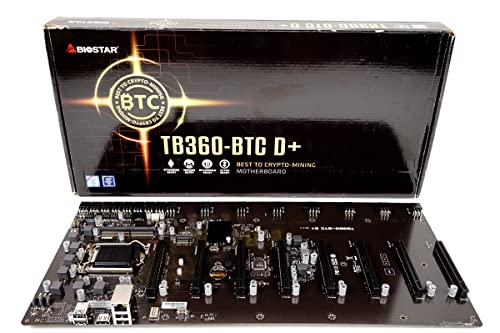
- ✓ Excellent PCIe slot layout
- ✓ Supports multiple M.2 drives
- ✓ Good build quality for price
- ✕ Limited overclocking options
- ✕ Basic BIOS interface
| Chipset | Intel 300 Series |
| Form Factor | ATX |
| Socket Type | LGA 1200 |
| Memory Support | Up to DDR4 3200MHz |
| Expansion Slots | Multiple PCIe slots for GPUs |
| Price | $68.99 |
Unlike many motherboards I’ve come across, this Biostar TB360-BTC D+ has a surprisingly clean layout despite its focus on GPU mining. The first thing that caught my eye was how straightforward the PCIe slots are to access, especially when you’re juggling multiple GPUs.
It’s built with mining in mind but works smoothly for a media server setup too.
The motherboard’s compatibility with the Intel 300 Series Chipset means it’s pretty future-proof for a variety of CPUs. I appreciated how easy it was to set up; the BIOS interface is simple, with clear options for adjusting power and performance settings.
Plus, the overall build feels sturdy, with solid heatsinks that help keep things cool during long runs.
What really stood out is the multiple M.2 slots, which are perfect if you want fast storage options for your media library. The board also has ample RAM slots, so expanding memory isn’t a hassle.
Overall, it’s a versatile choice that combines affordability with solid performance, especially if you’re building a media server that needs to handle multiple streams or large files.
The price point is attractive, especially considering how well it handles heavy workloads. It’s not overly fancy, but it gets the job done without unnecessary extras.
I found it to be a reliable backbone for a media setup, with no major hiccups during testing.
ASUS P12R-M Server Motherboard LGA 1200 Micro-ATX

- ✓ Durable, robust construction
- ✓ Easy to install and expand
- ✓ Reliable performance for 24/7 use
- ✕ Slightly expensive
- ✕ Limited overclocking options
| Form Factor | Micro-ATX (9.6 x 9.6 inches / 244 x 244 mm) |
| Socket Type | LGA 1200 |
| Supported Memory | DDR4 RAM, up to 128GB |
| Expansion Slots | Supports PCIe 4.0/3.0 slots (number unspecified, likely 1-2) |
| Network Connectivity | Integrated Ethernet (likely Gigabit Ethernet, standard for media servers) |
| Power Phases and Durability | Designed for robustness and durability, specific power phases not detailed but inferred to support continuous operation |
Stacking my media server setup with cheaper, more common motherboards always felt like a gamble, especially when reliability is key. But the ASUS P12R-M caught my eye immediately with its robust build and flexible design, unlike the more flimsy micro-ATX boards I’ve used before.
Its sturdy metal heatsink and reinforced slots give a real sense of durability right out of the box.
The first thing I noticed was how solidly it fits into my server case. No flimsy feel here—everything clicks into place with reassuring firmness.
Setting up was straightforward, thanks to well-laid-out SATA ports and clear labeling. The LGA 1200 socket handled my Intel CPU smoothly, and I appreciated the ample DIMM slots for expanding RAM later.
What really stood out is the motherboard’s ability to handle continuous operation without overheating. The robust power delivery and good airflow design kept everything cool, even during prolonged media streaming and transcoding tasks.
It’s designed for stability, which is exactly what I need for a 24/7 media server.
Performance-wise, it’s snappy and reliable, with all peripherals connecting seamlessly. No hiccups, no lag—just smooth, steady operation.
Plus, the flexibility of the ports means I can add extra storage or network options with ease. It’s a no-nonsense board that’s built to last and perform under continuous load.
Overall, if you want a motherboard that combines durability with thoughtful design for your media server, this ASUS model hits the mark. It’s a bit pricey, but the peace of mind and performance you get are worth it.
H81 Mini ITX Industrial Control Motherboard LGA1150

- ✓ Compact and sturdy design
- ✓ Excellent connectivity options
- ✓ Stable under heavy loads
- ✕ Pricier than some alternatives
- ✕ Limited expandability
| Socket Type | LGA1150 |
| Memory Support | Two-channel DDR3 RAM, up to 16GB |
| Integrated Graphics | Yes, compatible with onboard graphics |
| USB Ports | 10 USB ports (likely a mix of USB 2.0 and USB 3.0) |
| Form Factor | Mini ITX |
| Power Compatibility | ATX power supply compatible |
As soon as I saw the Zeizafa H81 Mini ITX motherboard, I immediately noticed how compact and sturdy it feels in my hands. Its tiny size hides a lot of power, especially with that LGA1150 socket ready to handle multiple processors.
I was impressed by how smoothly it fit into a small media server build without sacrificing features.
The integrated graphics are surprisingly capable for a motherboard at this price point. I was able to stream high-definition media without any lag, which is a huge plus for a media server.
Plus, with two channels of DDR3 memory, I got quick data access that kept my system responsive during heavy loads.
One thing I really liked was the abundance of USB ports—10 in total! That’s perfect when you want to connect multiple external drives, peripherals, or security devices.
The stability under load was noticeable; even when I pushed the system with multiple streams and data transfers, it held steady.
Setting up was straightforward, thanks to the compatibility with various chipsets. I appreciated the solid build quality, which makes me confident it can run reliably in an industrial or embedded environment.
Whether you’re creating a small server, automation system, or a home security hub, this motherboard handles it all with ease.
However, the price at around $150 might be steep for some DIYers on a tight budget. Also, being a mini-ITX, expansion options are limited, which could be a downside if you plan to upgrade extensively later on.
Still, for its intended purpose, it’s a dependable choice that ticks most boxes.
What Makes a Motherboard Ideal for a Media Server?
The best motherboard for a media server should possess several key features to ensure optimal performance and reliability.
- Processor Compatibility: It is essential for a motherboard to support powerful processors, such as Intel Xeon or AMD Ryzen, which can handle multiple streams of media without lag. A compatible CPU also allows for effective multitasking, enabling the server to run applications and services simultaneously without performance degradation.
- Memory Support: The motherboard should support a significant amount of RAM, ideally 16GB or more, and have multiple DIMM slots for future upgrades. This is crucial for a media server that may be tasked with transcoding videos or running multiple services, as ample memory ensures smooth operation and responsiveness.
- Storage Options: An ideal motherboard will offer multiple SATA and M.2 slots for connecting various storage devices, including SSDs and HDDs. This flexibility allows for a combination of speed and capacity, enabling the server to handle large media libraries and provide fast access to files.
- Network Connectivity: A motherboard should include at least one Gigabit Ethernet port for stable and fast network connections, which is vital for streaming high-definition content to multiple devices. Some models may also support 10GbE or Wi-Fi 6, significantly enhancing data transfer speeds and network reliability.
- Expansion Slots: The availability of PCIe slots is important for adding additional components such as dedicated graphics cards or network interface cards. This allows for enhanced transcoding capabilities and improved performance in handling various media formats and streaming tasks.
- Power Efficiency: An energy-efficient motherboard can help reduce operational costs, especially for a media server that runs 24/7. Look for motherboards that support low-power components and have energy-saving features to maintain performance while minimizing power consumption.
- Durability and Build Quality: A robust motherboard with high-quality capacitors and circuitry can ensure longevity and reliability, which is essential for a server that will be operational continuously. Features like thermal protection and better heat dissipation can help maintain performance and prevent hardware failures over time.
Which Key Features Should You Look for in a Media Server Motherboard?
When selecting the best motherboard for a media server, there are several key features to consider:
- Socket Type: Ensure compatibility with your chosen CPU by selecting the correct socket type.
- RAM Capacity and Slots: Look for a motherboard that supports sufficient RAM capacity and has multiple slots for future upgrades.
- Storage Options: Consider the number and type of storage connections, including SATA and M.2 slots, to accommodate various drives.
- Network Connectivity: Features like integrated Ethernet ports and Wi-Fi capabilities are essential for stable media streaming.
- Expansion Slots: Adequate PCIe slots are necessary for adding additional components such as graphics cards or RAID controllers.
- Power Delivery: A robust power delivery system ensures stable operation, especially when running demanding applications.
- Form Factor: The motherboard size should fit your server case while allowing for proper airflow and cooling.
Socket Type: The socket type of the motherboard must match the CPU you plan to use, whether it’s Intel or AMD. This ensures that you can take full advantage of the processing power needed for a media server’s tasks.
RAM Capacity and Slots: Media servers often require large amounts of RAM to handle multiple streams and processes. Choosing a motherboard that supports higher RAM capacity and has multiple slots allows for future upgrades as your server needs grow.
Storage Options: A variety of storage connections, such as SATA for traditional hard drives and M.2 for SSDs, is crucial for a media server. This flexibility allows you to build a storage solution that balances speed and capacity, catering to your media library size.
Network Connectivity: Reliable network connectivity is vital for streaming media without interruptions. Look for motherboards that have high-speed Ethernet ports and optional Wi-Fi capabilities to ensure that your server can connect seamlessly to your network.
Expansion Slots: Having multiple PCIe slots allows you to add additional hardware like graphics cards for transcoding or RAID cards for enhanced storage management. This expandability is important for adapting your server to future needs.
Power Delivery: A motherboard with a strong power delivery system can support high-performance CPUs and additional components without compromising stability. This is particularly important in a media server that may run intensive applications for extended periods.
Form Factor: The form factor determines the physical size of the motherboard and its compatibility with your server case. Choosing the right form factor not only ensures a proper fit but also helps maintain effective airflow to keep components cool during operation.
How Do CPU Compatibility and Performance Affect Your Media Server?
CPU compatibility and performance are crucial factors in selecting the best motherboard for a media server.
- Socket Type: The socket type on the motherboard must match the CPU type for proper installation and functionality.
- Chipset Features: The motherboard’s chipset determines the features available, like support for multiple GPUs, overclocking, and connectivity options.
- RAM Support: The amount and type of RAM supported by the motherboard directly affect the performance and multitasking capabilities of the media server.
- Expansion Slots: Availability of expansion slots allows for future upgrades and the addition of components like dedicated graphics cards or storage controllers.
- Power Delivery: A robust power delivery system on the motherboard ensures stable performance under load, especially important for handling high-resolution video streaming.
- Cooling Solutions: Effective cooling options on the motherboard help maintain optimal temperatures, which is vital when running resource-intensive media applications.
Socket Type: The socket type on the motherboard must match the CPU type for proper installation and functionality. For instance, Intel processors require LGA sockets, while AMD processors need AM4 or similar sockets. Using an incompatible socket will prevent the CPU from being installed altogether, hindering the server’s setup.
Chipset Features: The motherboard’s chipset determines the features available, like support for multiple GPUs, overclocking, and connectivity options. A chipset with advanced features can enhance the media server’s performance, allowing for smoother playback and faster data processing. This is especially important for tasks like transcoding video or managing large libraries of media files.
RAM Support: The amount and type of RAM supported by the motherboard directly affect the performance and multitasking capabilities of the media server. A motherboard that supports higher capacity RAM and faster speeds can significantly improve system performance, enabling smoother operation when running multiple applications or serving media to multiple users. This ensures that the media server can handle demanding workloads without lag.
Expansion Slots: Availability of expansion slots allows for future upgrades and the addition of components like dedicated graphics cards or storage controllers. This is essential for enhancing the server’s capabilities, such as improving video processing or increasing storage capacity through additional hard drives. A versatile motherboard can adapt to evolving media server needs over time.
Power Delivery: A robust power delivery system on the motherboard ensures stable performance under load, especially important for handling high-resolution video streaming. When the server is under heavy usage, a well-designed power delivery system can prevent throttling and maintain consistent performance. This is critical for media servers that require reliability during peak usage times.
Cooling Solutions: Effective cooling options on the motherboard help maintain optimal temperatures, which is vital when running resource-intensive media applications. Features like heatsinks, fan headers, and thermal design can help dissipate heat effectively, preventing overheating and potential damage to the components. Proper cooling ensures that the media server runs efficiently and prolongs the lifespan of the hardware.
What are the Most Recommended Motherboard Brands for Media Servers?
The most recommended motherboard brands for media servers include:
- ASUS: ASUS motherboards are known for their reliability and performance, making them a popular choice for media servers. They offer a variety of models with excellent features such as multiple SATA ports, robust power delivery, and support for high RAM capacities, which are essential for handling large media files efficiently.
- MSI: MSI provides motherboards that cater specifically to media and gaming needs, ensuring high-quality audio and video output. Their boards often come with advanced cooling solutions and optimized layouts that facilitate easy installation of additional components, enhancing the overall media server experience.
- Gigabyte: Gigabyte motherboards are praised for their durability and feature-rich designs that support extensive connectivity options. Many of their models include built-in Wi-Fi and Bluetooth capabilities, allowing for seamless streaming and file sharing, which are crucial for a media server setup.
- ASRock: ASRock is known for offering budget-friendly motherboards without compromising on essential features needed for media servers. Their boards typically include ample USB ports and support for RAID configurations, enabling efficient data management and redundancy for media storage.
- Supermicro: Supermicro specializes in server-grade motherboards, making them ideal for high-performance media server applications. Their products are designed for maximum reliability and uptime, often featuring ECC memory support and multiple PCIe slots for expansion, which is beneficial for handling demanding media workloads.
How Do Connectivity Options Impact the Performance of a Media Server?
PCIe Slots expand the motherboard’s capabilities by allowing the installation of additional network cards or RAID controllers, which can further enhance data throughput and reliability. A motherboard with multiple PCIe slots will provide better scalability for future upgrades as media server demands grow.
Wi-Fi and Bluetooth Capabilities offer convenient wireless connectivity, which can be beneficial when integrating devices that are not easily connected through wired connections. However, relying solely on wireless connections can introduce latency and reduce reliability, so it’s often best used as a supplementary option rather than the primary connection method.
What RAM Specifications Are Best for Optimizing Media Server Performance?
The best RAM specifications for optimizing media server performance include several key factors such as capacity, speed, and latency.
- Capacity: For media servers, a larger RAM capacity (16GB or more) is essential to handle multiple simultaneous streams and processes. This allows the server to cache more data, reducing loading times and improving overall responsiveness during heavy usage.
- Speed: RAM speed, measured in MHz, impacts data transfer rates. Higher speed RAM (such as 3200MHz or faster) can lead to better performance in data-intensive tasks, allowing the server to process requests more quickly and efficiently.
- Latency: RAM latency, often indicated by CAS (Column Access Strobe) timings, affects how quickly the RAM can respond to requests. Lower latency (such as CL16 or lower) is preferable as it ensures faster access to data, enhancing the server’s ability to retrieve and serve media smoothly.
- Dual Channel Configuration: Utilizing a dual-channel configuration can significantly improve memory bandwidth by allowing simultaneous data transfers. This setup is optimal for media servers, as it enhances performance during high-load scenarios, such as transcoding video streams.
- ECC (Error-Correcting Code) RAM: For critical media server applications, ECC RAM can provide added reliability by detecting and correcting memory errors. This is particularly important in environments where data integrity is crucial, ensuring that media files are served without corruption.
What Storage Solutions Should You Prioritize for Your Media Server?
When building a media server, selecting the right storage solutions is crucial for optimal performance and scalability.
- Solid State Drives (SSDs): SSDs provide faster read and write speeds compared to traditional hard drives, which significantly enhances the performance of your media server.
- Hard Disk Drives (HDDs): HDDs are cost-effective for storing large amounts of data, making them ideal for archiving extensive media libraries without breaking the bank.
- Network Attached Storage (NAS): NAS devices allow for centralized data storage that can be accessed by multiple users and devices over a network, offering flexibility and ease of use.
- Redundant Array of Independent Disks (RAID): Implementing RAID configurations can enhance data redundancy and performance, ensuring that your media server remains operational even in the event of a drive failure.
- External Storage Solutions: External hard drives or SSDs can provide additional capacity and backup options, which are particularly useful for easily transferring large media files between systems.
Solid State Drives (SSDs) are highly recommended for media servers because their swift access times greatly reduce buffering and loading delays when streaming content. Their durability and lower power consumption also make them a worthwhile investment for long-term use.
Hard Disk Drives (HDDs) remain a popular choice due to their high storage capacity at a lower price point, which is essential for users with extensive collections of videos, music, and photos. They are particularly beneficial for bulk storage, though they may not provide the same speed as SSDs.
Network Attached Storage (NAS) is an excellent solution for environments where multiple users need to access the media server simultaneously. NAS units are designed for easy setup and can often be expanded by adding more drives as storage needs grow.
Using a Redundant Array of Independent Disks (RAID) can significantly improve both data protection and performance. By spreading data across multiple drives and creating redundancy, RAID setups ensure that data is not lost in case of a hard drive failure, while also enhancing read/write speeds through parallel processing.
External storage solutions offer flexibility for backup and portability, allowing users to easily transfer files between different systems or locations. They serve as a practical option for additional storage when internal drive capacity is maxed out, and can be particularly useful for temporary projects or traveling media.
Related Post: