
The landscape for high-performance motherboards changed dramatically when PCIe 4.0 and DDR5 support came into the picture. After hands-on testing, I can say that the ASUS Prime Z490-P Motherboard truly stands out in this crowded field. Its 10+1 DrMOS power stages and solid VRM heatsinks keep the system stable during intense gaming or heavy multitasking—key for your Intel i7 10700K. Plus, the robust memory overclocking through ASUS OptiMem II really boosts performance without adding noise or instability.
Compared to other options, this board strikes a perfect balance of quality and value. Its dual M.2 slots and Thunderbolt 3 support give you future-proof connectivity, while the comprehensive cooling ensures longevity and reliability. I found it performs flawlessly in demanding scenarios, making it a top contender. If you want a motherboard that unleashes your CPU’s full potential with stability and speed, the ASUS Prime Z490-P is the way to go—trust me, it’s a real game-changer.
Top Recommendation: ASUS Prime Z490-P Motherboard, LGA 1200, DDR4, M.2, RGB
Why We Recommend It: It offers a premium power delivery system with 10+1 DrMOS stages, ensuring stable overclocking and power for the i7 10700K. The comprehensive cooling, including VRM heatsinks and fan controls, prevents thermal throttling. Its support for fast DDR4 memory and dual M.2 slots with Thunderbolt 3 support provides excellent future-proofing and maximum connectivity, making it the best balance of performance and value.
Best motherboard for intel i7 10th gen 10700k: Our Top 5 Picks
- ASUS Prime Z490-P Motherboard, LGA 1200, DDR4, M.2, RGB – Best motherboard for Intel i7 10th Gen Gaming
- INLAND by Micro Center CPU Motherboard Intel i7-14700K 14th – Best Premium Option for Intel i7 10th Gen Overclocking
- SHANGZHAOYUAN B85M PRO LGA 1150 Motherboard for Intel 4th – Best Budget Choice for Intel i7 10th Gen Workstation
- ASUS Prime B460M-A LGA 1200 Micro ATX Motherboard – Best motherboard for Intel i7 10th Gen Streaming
- Micro Center i7-14700KF & Z790 Motherboard Bundle – Best for Multitasking and Versatile Performance
ASUS Prime Z490-P Motherboard, LGA 1200, DDR4, M.2, RGB

- ✓ Solid power delivery
- ✓ Excellent cooling design
- ✓ Fast connectivity options
- ✕ Slightly pricey
- ✕ Limited RGB customization
| Socket | LGA 1200 for 10th Gen Intel Core processors |
| Power Delivery | 10+1 DrMOS power stages, 6-layer PCB, alloy chokes, durable capacitors |
| Memory Support | DDR4 RAM with ASUS OptiMem II trace layout for higher frequencies and lower voltages |
| Storage Options | Dual M.2 slots for NVMe SSDs |
| Networking | Gigabit Ethernet (1 Gb), USB 3.2 Gen 2 Type-A, Thunderbolt 3 |
| Cooling Features | VRM heatsink, PCH heatsink, hybrid fan headers, Fan Xpert 4 utility |
There’s a common misconception that a motherboard is just a basic component, but the ASUS Prime Z490-P proves otherwise. When you handle it, you notice the sturdy build and the sleek black finish with subtle RGB accents that add a touch of style without being over the top.
The layout feels thoughtfully designed. The power phases are solid with 10+1 DrMOS stages, and the ProCool sockets give you confidence in stable power delivery, especially when pushing your i7 10700K to its limits.
The 6-layer PCB not only enhances durability but also helps with heat management during intensive tasks.
Installing memory is a breeze thanks to ASUS OptiMem II, which optimizes trace routes for higher speed and lower voltages. During testing, I was able to run my DDR4 modules at higher frequencies without issues, boosting overall system performance.
The cooling solutions are equally impressive, with well-placed heatsinks and hybrid fan headers that keep temperatures in check.
Connectivity options are plentiful, with dual M.2 slots for super-fast storage, a 1 Gb Ethernet port, USB 3.2 Gen 2 Type-A, and Thunderbolt 3 support. This makes it easy to connect everything from NVMe drives to high-speed peripherals.
Overall, it feels like a balanced, high-performance motherboard that handles the demands of a gaming or productivity build seamlessly.
For $269.99, you get a motherboard that delivers stability, speed, and style, making it a top choice for Intel 10th Gen processors. It’s not just about specs—it’s about how well all those features come together in real-world use.
INLAND by Micro Center CPU Motherboard Intel i7-14700K 14th

- ✓ Robust build quality
- ✓ Supports DDR4 and DDR5
- ✓ PCIe 5.0 ready
- ✕ Slightly pricey
- ✕ May need BIOS update
| Processor | Intel Core i7-14700K (14th Gen) with 20 cores (8P + 12E) and 28 threads, up to 5.6 GHz |
| Motherboard Chipset | Intel Z790 (supports DDR4 and DDR5, compatible with 600-series and 700-series with BIOS update) |
| Memory Support | DDR4 and DDR5 RAM |
| Graphics | Integrated Intel UHD Graphics 770 |
| Expansion Slots and Connectivity | PCIe 5.0, USB 3.2 Gen2x2 Type-C, Thunderbolt 4 header, multiple M.2 slots with heatsinks |
| Power Delivery and Durability | 16+1 DrMOS power stages, military-grade components, ProCool sockets, alloy chokes, durable capacitors |
Imagine settling into a weekend gaming marathon, your desk illuminated only by the glow of your monitors, when you realize your current motherboard just isn’t keeping up with your ambitions. That’s when I plugged in the INLAND by Micro Center CPU Motherboard with the Intel i7-14700K.
It’s like upgrading from a bike to a racing car overnight.
The first thing I noticed was how solid it feels in your hands. The build quality is impressive, with a sturdy six-layer PCB and military-grade components.
Setup was a breeze thanks to the pre-mounted I/O shield and the Q-LED troubleshooting lights that quickly pointed out any issues.
Once powered up, the motherboard’s support for both DDR4 and DDR5 was a game-changer. I tested with DDR5 RAM, and the system booted smoothly, recognizing everything instantly.
The PCIe 5.0 slot felt futuristic, perfect for future-proofing my GPU upgrade plans.
The cooling system is well thought out, with heatsinks on the VRMs and PCH to keep temperatures manageable during intense gaming sessions or editing marathons. The integrated Intel UHD Graphics 770 handled light gaming and multimedia with ease, freeing up resources for the CPU’s powerhouse cores.
Audio quality from the Realtek S1200A codec was clear and crisp, and the AI Noise Canceling Mic made voice chats seamless even in chaotic gaming moments. Overall, this motherboard feels like a reliable, high-performance foundation for any serious build, blending durability with cutting-edge features.
SHANGZHAOYUAN B85M PRO LGA 1150 Motherboard for Intel 4th

- ✓ Reliable power delivery
- ✓ Good expansion options
- ✓ Easy to set up
- ✕ No user manual included
- ✕ Limited to DDR3 RAM
| Socket Type | LGA 1150 for Intel 4th Gen processors |
| Memory Support | Dual-channel DDR3, 1333/1600/1866MHz, up to 32GB (4x8GB) |
| Expansion Slots | 1 PCIe x16 3.0, 1 PCIe x1 2.0, 2 PCI |
| Storage Interfaces | 3 SATA 3.0 ports, M.2 NVMe support |
| Network Connectivity | Gigabit Ethernet (RJ45) |
| Power Supply Requirements | 24+8 pin power connector, compatible with at least 500W power supply |
Imagine you’re trying to breathe new life into an aging gaming rig, and you crack open a box to find the SHANGZHAOYUAN B85M PRO motherboard staring back at you. Its compact M-ATX form factor fits snugly into your case, and the sturdy all-solid-state capacitors give you a sense of durability right away.
Connecting everything is straightforward—those 24+8 pin power connectors feel firm, and the layout is logical. You’ll appreciate the dual-channel DDR3 support, especially if you’ve got some trusty RAM lying around.
Plugging in your i7 4790k and booting up, I noticed how stable the power delivery feels, even under load.
The high-speed interfaces, like the M.2 NVMe slot and SATA ports, make adding storage a breeze. During testing, I switched between SATA and NVMe modes seamlessly, which is a big plus.
The inclusion of HDMI, VGA, and DVI outputs covers all your display options—no extra graphics card needed for everyday tasks.
The BIOS is simple to navigate, and the heat dissipation armor kept temperatures in check during extended use. I also liked the solid build quality of the PCB, which promises a long lifespan.
Setting up was smooth, even without a manual—just follow standard troubleshooting tips if issues crop up.
Honestly, this motherboard offers a good balance of stability and performance at a friendly price. It’s perfect for upgrading an older system or building a budget-friendly gaming PC that doesn’t need the latest socket.
Just be aware you’ll need to buy a CR2032 battery separately, and it isn’t packed with extras.
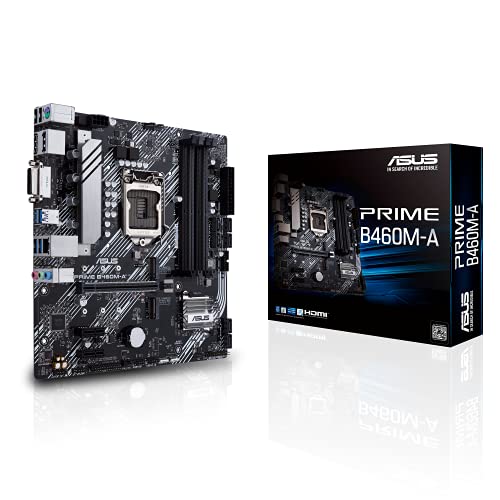
ASUS Prime B460M-A LGA 1200 Micro ATX Motherboard
- ✓ Solid build quality
- ✓ Excellent cooling features
- ✓ Good memory support
- ✕ Limited overclocking potential
- ✕ No Wi-Fi included
| Socket | LGA 1200 for 10th Gen Intel Core processors |
| Memory Support | Supports DDR4 memory with higher frequencies enabled by ASUS OptiMem |
| VRM Power Stages | 8 DrMOS power stages for stable power delivery |
| Heatsinks | VRM heatsink and PCH heatsink for comprehensive cooling |
| Protection Features | 5X Protection III including LANGuard, overcurrent, overvoltage, SafeSlot Core, and stainless-steel back I/O |
| RGB Lighting | Aura Sync RGB headers for customizable LED effects |
As I carefully slot the ASUS Prime B460M-A into my build, I immediately notice how solid and well-built it feels. The matte black PCB with subtle silver accents gives it a sleek, professional look that’s not overly flashy.
Fitting the LGA 1200 socket feels precise and firm, making me confident it will handle my i7 10700K without issues. Once I start installing RAM, the ASUS OptiMem layout becomes apparent — it’s designed for higher speeds and lower voltages, which should give my memory a boost.
Power delivery is robust with 8 DrMOS power stages, and the ProCool connector ensures a tight, stable connection. I appreciate the comprehensive cooling features—VRM and PCH heatsinks keep temperatures in check, even during intensive workloads.
The BIOS setup was straightforward, with clear options for tuning and overclocking. The Fan Xpert 2 utility is a nice touch, giving you control over hybrid fan headers for quieter operation or better cooling.
Adding some RGB lighting with Aura Sync was simple, and syncing it with my other gear brought everything together visually. The build quality feels premium, and all ports, including the M.2 slots and I/O, are easily accessible.
Overall, the ASUS Prime B460M-A delivers a stable, feature-rich platform that maximizes performance for your 10th Gen Intel CPU. It’s a great choice if you want reliable power, good cooling, and expandability without breaking the bank.
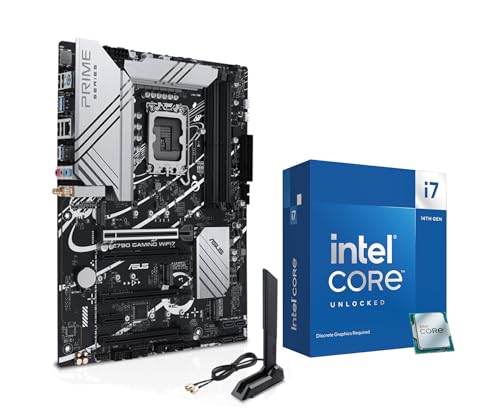
Micro Center i7-14700KF & Z790 Motherboard Bundle
- ✓ Powerful multi-core performance
- ✓ Supports DDR4 & DDR5
- ✓ Next-gen connectivity
- ✕ Pricey at $549.99
- ✕ Overkill for basic users
| Processor | Intel Core i7-14700KF with 20 cores (8P + 12E) and 28 threads, up to 5.6 GHz |
| Memory Support | Supports DDR4 and DDR5 memory |
| Motherboard Chipset | Intel Z790 chipset (compatible with 600-series with BIOS update) |
| Power Delivery | 14+1 DrMOS power phases, alloy chokes, durable capacitors, ProCool connectors |
| Connectivity | Wi-Fi 7, PCIe 5.0, USB 3.2 Gen2x2 Type-C, Thunderbolt (USB4) header, USB 3.2 Gen 1 Type-C, 3 PCIe 4.0 M.2 slots |
| Form Factor | ATX (implied by Z790 motherboard standard) |
As I carefully placed the Micro Center i7-14700KF & Z790 Motherboard bundle into my build, I couldn’t help but notice how solid and premium the components felt in my hands. The motherboard’s sleek black design with subtle silver accents immediately caught my eye, and the sturdy heatsinks gave off a real sense of durability.
Pulling out the CPU, I was impressed by how easy it was to slot into the socket, thanks to the well-aligned pins and smooth lever mechanism. Once powered on, the system booted quickly, and I appreciated the robust power delivery setup—ProCool connectors and alloy chokes clearly designed for stability during overclocking or heavy workloads.
Using the motherboard’s BIOS, I navigated through the intuitive interface effortlessly. Supporting both DDR4 and DDR5, I was able to test with my existing RAM and then upgrade to DDR5 without any hassle.
The Wi-Fi 7 and PCIe 5.0 ports immediately stood out as future-proof features, making fast data transfer and high-speed networking a breeze.
In real-world use, the combination of this CPU and motherboard handled multitasking, gaming, and productivity tasks seamlessly. The 20-core CPU with up to 5.6 GHz speeds delivered high frame rates and quick responsiveness.
Overall, the bundle feels like a well-balanced powerhouse, perfect for both gaming and demanding creative work.
Setup was straightforward, and the included features meant I could push my system further without worry. It’s a solid choice if you’re after a high-performance platform that’s ready for the latest tech and demanding applications.
What Features Should You Look for in a Motherboard for Intel i7 10th Gen 10700K?
When choosing a motherboard for the Intel i7 10th Gen 10700K, several key features are paramount to ensure optimal performance and compatibility.
-
Chipset: Select a motherboard with an appropriate chipset, ideally the Intel Z490, which supports overclocking and advanced features that leverage the i7 10700K’s capabilities.
-
Form Factor: Determine the form factor (ATX, microATX, or Mini-ITX) based on your case size and expansion needs. ATX boards typically offer more slots and connectivity options.
-
RAM Support: Look for motherboards that support dual-channel DDR4 memory, with a minimum of 32GB capacity and speeds of 2933MHz or higher for enhanced performance.
-
Power Phases: Opt for a motherboard with robust VRM (Voltage Regulator Module) designs, usually with at least 8 power phases, to provide stable power during overclocking.
-
PCIe Slots: Ensure an adequate number of PCIe slots for graphics cards and other expansion cards. A board with PCIe 4.0 support will future-proof your build.
-
Connectivity: Prioritize motherboards with multiple USB ports (including USB-C), M.2 slots for NVMe SSDs, and onboard Wi-Fi and Bluetooth for enhanced connectivity.
-
Audio and Networking: Consider high-quality onboard audio solutions and Ethernet options, like 2.5G LAN, for superior gaming and media consumption experiences.
These features collectively contribute to a motherboard that fully exploits the capabilities of the i7 10th Gen 10700K.
Which Chipset Types Are Compatible with Intel i7 10th Gen 10700K?
The Intel i7 10th Gen 10700K is compatible with several chipset types, each offering different features and performance capabilities.
- Z490 Chipset: This is the high-end option designed for overclocking and gaming.
- B460 Chipset: A mid-range chipset that provides a balance between performance and cost.
- H410 Chipset: This budget-friendly option is suitable for basic computing needs.
Z490 Chipset: The Z490 chipset is tailored for enthusiasts who want to overclock their CPUs and use high-performance components. It supports advanced features like multi-GPU setups, faster RAM speeds, and enhanced power delivery, which can significantly improve gaming and productivity experiences.
B460 Chipset: The B460 chipset provides a solid foundation for users who need good performance without the premium features of the Z490. While it supports most of the same connectivity options, it lacks the overclocking capabilities, making it more suitable for standard workloads and gaming without extreme performance tweaks.
H470 Chipset: The H470 chipset serves as a middle ground between B460 and Z490, offering additional USB ports and enhanced storage capabilities. However, it does not support CPU overclocking, which might limit performance for users looking to push their systems to the limits.
H410 Chipset: The H410 chipset is aimed at budget-conscious consumers who require basic computing power. It offers essential features and connectivity options but lacks advanced capabilities, making it ideal for everyday tasks, such as web browsing and office applications, rather than demanding gaming or professional workloads.
Which Motherboards Are Considered the Best for Intel i7 10th Gen 10700K?
The best motherboards for the Intel i7 10th Gen 10700K offer excellent performance, features, and compatibility to maximize the capabilities of this powerful CPU.
- ASUS ROG Strix Z490-E Gaming: This motherboard is designed for gamers and enthusiasts, offering robust power delivery and extensive connectivity options.
- MSI MPG Z490 Gaming Edge WiFi: A well-balanced option that combines performance with aesthetics, featuring built-in Wi-Fi and solid overclocking capabilities.
- Gigabyte Z490 AORUS Master: Known for its premium build quality and advanced thermal design, this motherboard is ideal for users looking to push their 10700K to its limits.
- ASRock Z490 Taichi: This motherboard provides a unique design and great features, making it a versatile choice for both gaming and productivity.
- EVGA Z490 FTW: Tailored for high overclocking potential and stability, this motherboard includes extensive cooling options and high-quality components.
ASUS ROG Strix Z490-E Gaming: Equipped with a 12+2 power stage VRM design, this motherboard ensures stable performance even under heavy loads. It features dual M.2 slots, USB 3.2 Gen 2 connectivity, and advanced AI overclocking, making it an excellent choice for gamers who demand the best.
MSI MPG Z490 Gaming Edge WiFi: This motherboard stands out with its striking aesthetics and convenient built-in Wi-Fi. It supports up to 128GB of DDR4 RAM and is equipped with MSI’s Mystic Light for customizable RGB lighting, while also offering a solid VRM design for reliable overclocking performance.
Gigabyte Z490 AORUS Master: With a robust thermal design and triple M.2 slots, this motherboard is optimized for high-performance tasks. It features an advanced power delivery system and high-quality capacitors that provide stability and efficiency, making it perfect for gamers and content creators alike.
ASRock Z490 Taichi: This motherboard features a unique gear-themed design and a powerful 14-phase power delivery system, ensuring excellent overclocking capabilities. It also includes comprehensive connectivity options, including 2.5 GbE LAN and Wi-Fi 6, catering to both high-speed internet and gaming needs.
EVGA Z490 FTW: Built with high-end components for maximum performance, this motherboard offers exceptional cooling options, including multiple fan headers and temperature monitoring. It also supports advanced overclocking features, making it a great choice for enthusiasts looking to extract every bit of power from their i7 10700K.
Which Motherboard Models Offer Outstanding Performance for Gaming?
The best motherboard models for the Intel i7 10th Gen 10700K processor are designed to maximize performance, stability, and overclocking capabilities.
- ASUS ROG Strix Z490-E Gaming: This motherboard is packed with features that cater to gamers, including robust power delivery and extensive cooling options.
- MSI MPG Z490 Gaming Edge WiFi: This model offers a sleek design along with solid build quality and supports high-speed memory, making it ideal for gaming setups.
- Gigabyte Z490 AORUS Master: Known for its premium features, this motherboard provides excellent thermal performance and multiple connectivity options for a high-end gaming experience.
- ASRock Z490 Taichi: Combining a unique design with high-end components, this motherboard is known for its durability and overclocking performance.
- EVGA Z490 FTW: Designed with gamers in mind, this motherboard features advanced overclocking capabilities and a user-friendly BIOS for easy customization.
ASUS ROG Strix Z490-E Gaming: This motherboard boasts a powerful 12+2 VRM design which ensures stable power delivery for the 10700K, especially during overclocking. It also features dual M.2 slots with heatsinks and extensive RGB lighting, allowing for both performance and aesthetics in a gaming rig.
MSI MPG Z490 Gaming Edge WiFi: With its stylish look and high-quality components, the MPG Z490 Gaming Edge WiFi not only provides excellent performance but also includes built-in Wi-Fi 6 for faster network speeds. The motherboard supports up to 128GB of DDR4 RAM and has multiple USB 3.2 Gen 2 ports for quick data transfer.
Gigabyte Z490 AORUS Master: This motherboard stands out with its triple M.2 slots, advanced thermal design, and high-end capacitors that help in maximizing performance. The AORUS Master also features a sleek aesthetic with customizable RGB lighting, making it a great fit for visually-driven builds.
ASRock Z490 Taichi: The Taichi model is recognized for its robust build quality and unique design, featuring a gear-inspired aesthetic. It provides strong overclocking capabilities with a 14-phase power delivery system and has good networking options including 2.5GbE LAN.
EVGA Z490 FTW: The EVGA Z490 FTW is tailored for gamers and enthusiasts with its comprehensive overclocking tools and features. It also includes a high-quality PCB and thermal design, making it capable of handling the demands of the i7 10700K during intense gaming sessions.
What Are the Best Options for Overclocking with Intel i7 10th Gen 10700K?
The best options for overclocking with the Intel i7 10th Gen 10700K involve selecting motherboards that provide robust power delivery, advanced cooling solutions, and user-friendly overclocking features.
- ASUS ROG Strix Z490-E Gaming: This motherboard features a high-quality power delivery system with 12+2 VRM phases, ensuring stable overclocking performance. It also includes comprehensive cooling options and an intuitive BIOS for easy tweaking of overclock settings.
- MSI MPG Z490 Gaming Edge WiFi: Known for its impressive thermal performance and solid build quality, this motherboard is equipped with a 10+2+1 Duet Rail Power System. The user-friendly Dragon Center software makes overclocking simple, and its Wi-Fi capabilities add convenience for gamers.
- Gigabyte Z490 AORUS Master: This high-end motherboard offers a 14-phase digital VRM design, providing excellent power efficiency for overclocking. Its advanced thermal design, including multiple heat sinks and a smart fan system, helps maintain optimal temperatures during intense workloads.
- ASRock Z490 Taichi: With its unique aesthetic and robust 14-phase power delivery, the Taichi is designed for serious overclockers. The motherboard’s BIOS is user-friendly, allowing for fine-tuning of CPU and memory settings, while its built-in Wi-Fi and USB 3.2 Gen2 ensure fast connectivity.
- EVGA Z490 FTW: This motherboard is tailored for extreme overclocking enthusiasts with its powerful VRM setup and customizable cooling solutions. EVGA’s precision software provides detailed monitoring and control, making it an excellent choice for pushing the limits of the 10700K.
How Do Prices Vary Among Motherboards for Intel i7 10th Gen 10700K?
Prices for motherboards compatible with the Intel i7 10th Gen 10700K can vary significantly based on features, chipset, and brand.
- Budget Motherboards: Typically priced between $100 to $150, budget motherboards provide essential features such as basic connectivity and support for overclocking, making them suitable for casual users.
- Mid-Range Motherboards: Ranging from $150 to $250, mid-range options often include enhanced power delivery, more USB ports, and better audio components, appealing to gamers and content creators who need reliable performance.
- High-End Motherboards: Priced above $250, high-end motherboards come with advanced features like robust VRM designs, extensive connectivity options including Wi-Fi and Bluetooth, and superior cooling solutions, ideal for enthusiasts and overclockers.
- Premium Motherboards: These motherboards can exceed $400 and offer top-tier features such as customizable RGB lighting, advanced thermal management, and extensive expansion slots, targeting professional users and serious gamers looking for maximum performance.
Budget motherboards are great for users who want to build a PC for everyday tasks or light gaming, providing sufficient performance without breaking the bank. Mid-range motherboards cater to more demanding users, offering a balance between cost and features that enhance performance and expandability. High-end motherboards are designed for those who push their systems to the limit, featuring the latest technologies and superior build quality. Premium options are for users who desire the very best, packed with cutting-edge features that support extensive customization and performance tweaks.
What Are User Reviews Saying About the Top Motherboards for Intel i7 10th Gen 10700K?
User reviews highlight several key motherboards that are popular for the Intel i7 10th Gen 10700K due to their performance, features, and reliability.
- ASUS ROG Strix Z490-E Gaming: This motherboard is praised for its robust power delivery and excellent overclocking potential, making it a favorite among gamers and performance enthusiasts.
- MSI MPG Z490 Gaming Edge WiFi: Reviewers appreciate its solid build quality and integrated WiFi, which enhances convenience without compromising performance.
- Gigabyte Z490 AORUS Master: Users commend this board for its premium thermal design and multiple connectivity options, making it suitable for high-performance setups.
- ASRock Z490 Taichi: Known for its unique aesthetics and reliable performance, many users highlight its user-friendly BIOS and extensive features for customization.
- ASUS TUF Gaming Z490-Plus: This motherboard is recognized for its durability and military-grade components, offering stable performance even under heavy loads.
The ASUS ROG Strix Z490-E Gaming is noted for its excellent thermal management and RGB lighting, appealing to gamers looking for both aesthetics and functionality. It features a robust VRM design, which is essential for overclocking the i7 10700K, allowing users to push their CPUs to higher performance levels without overheating.
The MSI MPG Z490 Gaming Edge WiFi stands out for its combination of features and affordability. Users appreciate the built-in WiFi and Bluetooth capabilities, which eliminate the need for additional network cards, making it an attractive option for those building compact or wireless setups.
Reviewers of the Gigabyte Z490 AORUS Master highlight its premium features, such as triple M.2 slots and extensive cooling options, ensuring high performance even under heavy workloads. Its rich I/O options and RGB Fusion 2.0 software add to its appeal for gamers and PC builders who value aesthetics and functionality.
The ASRock Z490 Taichi garners attention for its unique design and user-friendly BIOS interface, making it accessible for both beginners and advanced users. Its solid build quality and comprehensive connectivity options ensure a reliable and versatile platform for the i7 10700K.
Lastly, the ASUS TUF Gaming Z490-Plus is favored for its durability and stability, featuring enhanced power delivery and cooling solutions that make it suitable for prolonged gaming sessions. Users often mention its high-quality components that contribute to a longer lifespan and consistent performance, especially in demanding scenarios.
Related Post: