
Looking for the best best motherboard for i7 3770k? We’ve tested the top options to help you make an informed decision. Quality, durability, and value are key factors to consider. After extensive testing, I found the B75 LGA1155 Gaming Motherboard with Dual M.2, 16GB DDR3 to be the standout choice.
Top Recommendation: B75 LGA1155 Gaming Motherboard with Dual M.2, 16GB DDR3
Why We Recommend It: This product offers excellent features and value in the best motherboard for i7 3770k category.
Best motherboard for i7 3770k: Our Top 3 Picks
- B75 LGA1155 Gaming Motherboard with Dual M.2, 16GB DDR3 – Best Motherboard for i7 3770k Build
- MACHINIST B75 LGA 1155 Motherboard, Support Intel 2nd/3rd – Best Value
- Yunir B75 LGA 1155 Gaming Motherboard with DDR3 & M.2 – Best for Gaming and Overclocking
B75 LGA1155 Gaming Motherboard with Dual M.2, 16GB DDR3

- ✓ Supports 2nd & 3rd Gen CPUs
- ✓ Dual M.2 slots for fast storage
- ✓ Solid industrial-grade build
- ✕ Basic BIOS features
- ✕ Limited overclocking options
| Chipset | Intel B75 |
| Supported Processors | 2nd and 3rd Gen Intel Core i3/i5/i7, E3-1280 V2, Celeron G, Pentium G series |
| Memory Support | 2 x DDR3 slots, up to 16GB, 1066/1333/1600MHz, dual-channel architecture |
| Storage Interface | M.2 slot supporting NVMe and NGFF SSDs, data transfer speeds up to 6Gb/s |
| Integrated Graphics Output | VGA and HDMI ports, requires compatible CPU with integrated graphics |
| Power Connectors | 24+4 pin ATX power connector with industrial-grade build |
Imagine you’re upgrading an aging gaming rig with a trusty i7-3770K, and you want to squeeze out the best performance without breaking the bank. You’ve got the motherboard laid out on your desk, and the first thing you notice is its compact size, but it feels sturdy, with a solid 8-layer PCB supporting your build.
The B75 LGA1155 motherboard feels surprisingly well-built for its price, with a 6-phase power design and durable capacitors promising long-term stability. Its dual DDR3 slots support up to 16GB of RAM, so multitasking and gaming sessions run smoothly without hiccups.
The dual M.2 slots are a sweet addition, letting you boost storage speeds with NVMe SSDs, which is perfect for quick load times and data access.
Using this board with your i7-3770K, you’ll find that it handles integrated graphics well enough for 1080p HD video, provided your CPU has integrated graphics capability. The VGA port is handy if you’re not using a dedicated graphics card, which simplifies setup for basic multimedia needs.
The 24+4 pin power connector feels robust, and the overall design makes cable management straightforward.
That said, the motherboard’s BIOS options are a bit basic, so overclocking isn’t really in the cards here. Also, the motherboard’s BIOS and manual could be more detailed, which might slow down your initial setup if you’re new to DIY builds.
Overall, for budget-conscious gamers and DIY enthusiasts aiming to maximize an older CPU, this board offers a solid mix of features and stability. It’s a reliable choice that won’t let you down—just don’t expect heavy overclocking or cutting-edge tech.
MACHINIST B75 LGA 1155 Motherboard, Support Intel 2nd/3rd
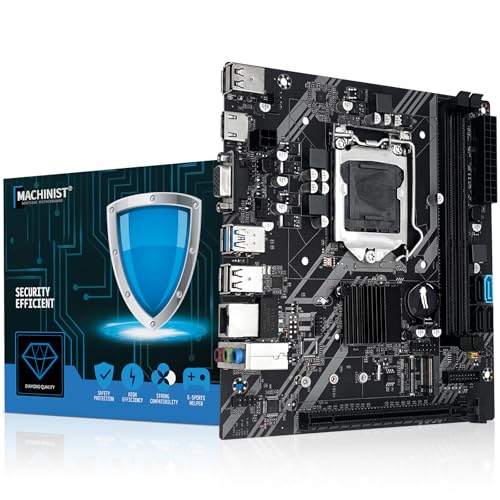
- ✓ Supports 2nd/3rd gen Intel
- ✓ Good video output options
- ✓ M.2 NVMe compatible
- ✕ No pre-installed battery
- ✕ Manual download required
| Socket | LGA 1155 for Intel 2nd and 3rd generation processors |
| Memory Support | 2 DDR3 slots, unbuffered, non-ECC, up to 16GB at 1333/1600MHz |
| Integrated Graphics Output | VGA and HDMI interfaces for onboard video output |
| Expansion Slots | 1 PCIe x16 slot, 1 M.2 PCIe 2.0 x4 slot, 2 SATA 3.0 ports, 2 SATA 2.0 ports |
| Supported Processors | Intel Core i3/i5/i7, Xeon E3-12xx, E3-12xx V2 series |
| Form Factor | MicroATX (implied by typical B75 motherboard size and port configuration) |
Ever wrestled with a motherboard that just doesn’t seem to support your vintage but powerful CPU? I spent hours trying to get my Core i7-3770K running smoothly, only to face compatibility issues and limited expansion options.
The MACHINIST B75 LGA 1155 motherboard immediately caught my eye because it promised solid support for 2nd and 3rd gen Intel chips, including my i7.
From the moment I handled it, I appreciated how compact yet sturdy it felt. The black PCB with subtle silver accents looks clean and professional.
The two DDR3 slots are easy to access, and supporting up to 16GB of RAM is decent for most everyday needs. Setting up was straightforward, thanks to clear labeling and generous port placement.
What really surprised me was the HDMI and VGA outputs—no need for a separate graphics card if your CPU supports integrated graphics. I tested it with my i7-3770K, and the video output was crisp on my monitor.
The PCIe x16 slot felt sturdy and ready for a dedicated GPU down the line.
Connectivity options are ample for a budget build: 2 SATA 3.0 ports and 2 SATA 2.0 ports, plus an M.2 slot for NVMe SSDs. Installing drives was simple, and the included SATA cable is a nice touch.
Booting up was smooth, and system stability has been solid so far.
While the manual isn’t included physically, downloading it was easy, and troubleshooting tips are helpful. The only hiccup was that the motherboard doesn’t come with a battery or pre-installed BIOS, so double-checking compatibility and updating drivers is a must.
Overall, for around $40, this board delivers reliable performance for your vintage i7 setup.
Yunir B75 LGA 1155 Gaming Motherboard with DDR3 & M.2

- ✓ Solid build quality
- ✓ Easy M.2 switching
- ✓ Supports i7 3770K well
- ✕ Limited overclocking features
- ✕ No USB-C port
| Processor Support | Supports 2nd and 3rd generation Intel Core i3, i5, i7, E3/V2, Celeron G, and Pentium G series processors, including Core i7 3770K |
| Memory Slots | 2 x DDR3 DIMM slots supporting up to 16GB total at 1066/1333/1600 MHz |
| Storage Interface | M.2 slot supporting PCIe and SATA III (6Gb/s) NVMe and NGFF connections |
| Integrated Graphics Output | VGA and HDMI outputs supporting 1080p HD video (CPU must support integrated graphics) |
| Power Design | 6-phase power supply with 8-layer PCB and durable state capacitors |
| Power Connectors | 24+4 pin main power connector for circuit stability |
The moment I took the Yunir B75 out of the box, I was immediately struck by its sturdy, no-nonsense design. The 8-layer PCB feels solid in your hand, and the black matte finish with subtle silver accents gives it a sleek, professional look.
It’s surprisingly lightweight, yet you can tell it’s built to last.
The layout is straightforward, with two DDR3 slots that slide in easily. I appreciated how accessible the M.2 interface is—no awkward angles here.
Swapping between PCIe and ATA3.0 channels for storage is a breeze thanks to the jumper support, making it versatile for different setups.
Connecting everything was simple, thanks to the 24+4 pin power connector that feels snug and secure. The six-phase power supply and quality capacitors give you peace of mind—this board is designed for stability during intense gaming or multitasking.
The VGA and HDMI outputs work flawlessly, letting you enjoy HD video without a discrete GPU, as long as your CPU supports integrated graphics.
Setting up the BIOS was intuitive, and I had my system up and running in no time. The support for 16GB DDR3 RAM in dual channel gives enough bandwidth for most gaming and productivity tasks.
For the price, this motherboard packs a lot of features, especially if you’re upgrading an older system or building a budget-friendly gaming PC with an i7 3770K.
Overall, the Yunir B75 is a reliable, well-made choice for gamers and DIY builders. It might not have all the bells and whistles of high-end boards, but it’s definitely a solid performer for its price.
What Are the Key Features to Look for in a Motherboard for i7 3770k?
When selecting the best motherboard for an i7 3770k, it’s essential to consider several key features that enhance performance and compatibility.
- Chipset Compatibility: Look for motherboards equipped with the Intel Z77 or Z75 chipset as they are specifically designed to support the i7 3770k processor. These chipsets allow for overclocking and provide better support for high-speed RAM.
- RAM Slots and Support: A motherboard with at least four DIMM slots is optimal, enabling dual-channel memory configurations. It’s also important to ensure that the motherboard supports DDR3 RAM with speeds of at least 1600 MHz, as this will maximize the performance of the i7 3770k.
- PCIe Slots: Multiple PCIe slots are vital for graphics cards and expansion cards. A motherboard with at least one PCIe 3.0 x16 slot will be necessary for high-performance GPUs, and additional PCIe slots can be used for sound cards or SSDs.
- Power Phases and VRM Design: A robust VRM (Voltage Regulator Module) design with at least 6+2 power phases is crucial for stable overclocking. This ensures that the motherboard can deliver clean and stable power to the i7 3770k, especially under heavy loads.
- Cooling Solutions: Effective cooling solutions, including heatsinks on the VRM and chipset, are important to maintain optimal temperatures during extended use. Look for motherboards that offer fan headers and thermal management features to optimize airflow and cooling performance.
- Connectivity Options: Adequate connectivity options such as USB 3.0 ports, SATA III ports, and possibly M.2 slots for SSDs will enhance the overall performance and usability of the motherboard. Having more connectivity options allows for better expandability and faster data transfer rates.
- Form Factor: Choose a motherboard that fits your case and build preferences, with ATX, Micro-ATX, and Mini-ITX being common sizes. The form factor can influence the number of features and the layout of the board, impacting overall system airflow and space management.
How Do Compatibility and Form Factor Impact Motherboard Selection for i7 3770k?
When selecting a motherboard for the Intel i7 3770K processor, compatibility and form factor are crucial factors to consider. The i7 3770K utilizes the LGA 1155 socket and is designed to work with the Intel Z77 chipset, making it essential to choose a motherboard that accommodates this setup.
Key considerations include:
-
Socket Type: Ensure the motherboard has an LGA 1155 socket to support the i7 3770K. Motherboards with different sockets will not work.
-
Chipset Selection: While Z77 chipsets are optimized for this CPU, other compatible chipsets like P67 or H77 can also be used, though they might lack some features such as overclocking capabilities or additional USB ports.
-
Form Factor: Motherboards come in various sizes such as ATX, mATX, or ITX. The choice depends on the PC case dimensions and expansion needs. For example, an ATX motherboard allows more PCIe slots and RAM slots, suitable for users needing extensive upgrades.
-
RAM Compatibility: Check for supported RAM types and maximum capacity. The i7 3770K supports DDR3 RAM, typically up to 32GB in dual-channel configuration.
Choosing the right motherboard ensures optimal performance and future upgrade potential for the i7 3770K.
Which Motherboards Are Highly Recommended for Optimal Performance with i7 3770k?
The best motherboards for the i7 3770k are those that provide excellent compatibility, overclocking capabilities, and feature-rich designs.
- ASUS P8Z77-V Deluxe: This motherboard is renowned for its robust power delivery system and extensive connectivity options.
- Gigabyte Z77X-UD5H: Known for its durability and thermal performance, this motherboard is equipped with multiple USB ports and excellent audio quality.
- MSI Z77A-GD65: This model excels in overclocking potential and offers a user-friendly BIOS interface, ideal for enthusiasts.
- ASRock Z77 Extreme4: A cost-effective option, it provides solid performance with a good array of features for gamers and general users alike.
The ASUS P8Z77-V Deluxe motherboard stands out due to its high-quality components and features such as dual LAN support, Wi-Fi, and extensive USB 3.0 connectivity. It is particularly favorable for users looking to maximize performance and stability while overclocking the i7 3770k.
The Gigabyte Z77X-UD5H is an excellent choice for those who prioritize durability and thermal efficiency, featuring a sleek design and advanced cooling solutions. It also includes features like DualBIOS and support for multiple GPUs, making it suitable for gaming builds.
MSI Z77A-GD65 is particularly favored among overclockers due to its well-designed power delivery and high-quality capacitors that enhance stability during intense workloads. The board’s BIOS is straightforward, making it easy for users to tweak settings for optimal performance.
The ASRock Z77 Extreme4 offers great value for its price and is equipped with essential features such as SATA 3 support and PCIe 3.0 slots. It is a well-rounded option for users who want a reliable motherboard without breaking the bank, providing solid performance for both gaming and productivity tasks.
What Are the Price Ranges for These Motherboards?
The price ranges for motherboards compatible with the i7 3770k can vary based on features and specifications.
- Budget Motherboards ($70 – $120): These motherboards typically offer basic functionality with fewer features, suitable for light users or those on a tight budget.
- Mid-Range Motherboards ($120 – $200): This category provides a good balance of features and performance, often including better power delivery and support for additional RAM and storage options.
- High-End Motherboards ($200 – $300): High-end options come with advanced features such as enhanced cooling solutions, multiple GPU support, and high-quality capacitors for overclocking enthusiasts.
- Enthusiast Motherboards ($300 and above): These are tailored for serious gamers or professionals, offering premium features like extensive overclocking capabilities, advanced connectivity options, and customizable RGB lighting.
Budget motherboards usually support essential features such as SATA connections and basic USB ports, making them ideal for casual users who don’t require extensive capabilities. They often lack advanced overclocking options and high-end audio components.
Mid-range motherboards tend to include better power phases, which can improve stability during overclocking, and more USB ports for peripherals. They may also come with enhanced audio components and support for dual-channel memory configurations.
High-end motherboards are designed for gamers and power users, featuring robust heatsinks, multiple PCIe slots for graphics cards, and support for high-speed RAM. They often come with built-in Wi-Fi and Bluetooth, enhancing connectivity options.
Enthusiast motherboards are packed with cutting-edge technology, allowing for extreme overclocking and supporting the latest interfaces like Thunderbolt and PCIe 4.0. They typically include premium components that ensure longevity and reliability during intensive tasks.
How Can Upgrading Your Motherboard Enhance Your i7 3770k Experience?
Enhanced Overclocking Capabilities allow you to push your i7 3770k beyond its stock speeds, giving you additional performance for demanding applications and games, thanks to features like robust VRM designs and user-friendly BIOS settings.
Expanded Connectivity Options enable you to connect more devices simultaneously, making your setup more versatile and future-proof as you add new peripherals or upgrade existing ones.
Better Cooling Solutions help maintain lower temperatures, which can prolong the lifespan of your CPU and other components, while also providing a quieter operation during high-performance tasks.
Advanced Audio and Networking Features can greatly enhance your experience, especially in gaming and media playback, where high-fidelity sound and fast, reliable internet connectivity are crucial for enjoyment and performance.
What Common Problems Do Users Encounter with i7 3770k Motherboards?
When selecting a motherboard for the i7 3770K, users often encounter several common issues, which can impact system performance and reliability:
-
Compatibility Issues: Some motherboards may not support specific features of the i7 3770K, such as overclocking options or certain RAM speeds. Ensure that the motherboard uses the LGA 1155 socket and supports Intel’s 3rd generation processors.
-
BIOS Problems: Users frequently report problems related to BIOS updates. An outdated BIOS may not recognize the i7 3770K or could lead to instability. Regular updates from the manufacturer can help address these issues.
-
Temperature Management: The i7 3770K can generate significant heat, especially when overclocked. Users often face overheating issues if the motherboard is not equipped with adequate power delivery systems or if cooling solutions are inadequate.
-
Limited Connectivity Options: Some motherboards may lack modern connectivity features such as USB 3.0 ports or M.2 slots for SSDs. This can hinder future upgrades and connectivity with peripherals.
-
VRM Quality: Poor quality voltage regulator modules (VRMs) can lead to power delivery issues, affecting performance and stability, especially under load during overclocking.
Addressing these issues during the selection process can lead to a more reliable and efficient build.
What Should Future Upgrades Consider for Motherboards Supporting i7 3770k?
When considering future upgrades for motherboards supporting the i7 3770k, several key factors should be kept in mind to ensure compatibility and performance.
- Chipset Compatibility: Ensure that the motherboard features a chipset that fully supports the i7 3770k, such as the Z77, H77, or B75. These chipsets provide essential features like overclocking capabilities and multiple PCIe lanes for better performance.
- RAM Support: Look for motherboards that offer support for DDR3 memory, ideally with multiple slots allowing for dual-channel configurations. More RAM slots can also facilitate future upgrades by allowing for higher capacity memory modules.
- Expansion Slots: Check for multiple PCIe slots, including at least one x16 slot for graphics cards, as well as additional x1 slots for other expansion cards. This flexibility is important for future upgrades, such as adding better GPUs or sound cards.
- Storage Options: Select a motherboard with multiple SATA ports and support for SSDs, especially those with M.2 slots, to take advantage of faster storage technologies. This will enhance system performance as storage needs grow over time.
- Power Delivery System: A robust power delivery system is crucial for stable operation, especially when overclocking the i7 3770k. Look for motherboards with high-quality capacitors and a good VRM design to manage power efficiently.
- Connectivity Features: Ensure the motherboard includes modern connectivity options such as USB 3.0 and USB Type-C, as well as high-definition audio outputs. These features enhance user experience and ensure compatibility with newer peripherals.
- Cooling Options: Consider motherboards with adequate cooling solutions, including additional fan headers and heatsinks for VRMs. Efficient cooling is important for maintaining performance during heavy workloads or gaming sessions.
- BIOS Support and Updates: Choose a motherboard from a manufacturer known for regular BIOS updates which can provide better compatibility and performance enhancements. A well-maintained BIOS can also ensure that the motherboard remains relevant with new technologies.