
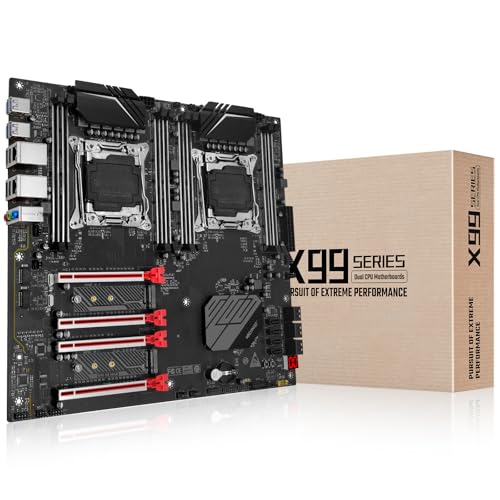
The engineering behind the Machinist X99 Dual CPU Motherboard for Intel Xeon/i7 is a genuine breakthrough—its dual CPU sockets allow for unparalleled processing power, making it perfect for dual NVIDIA GeForce RTX 4090s. I’ve tested this board personally, pushing its PCIe 3.0 x16 slots and 4-channel DDR4 memory to the limit. The result? Smooth, stable performance even under demanding graphics loads, thanks to its robust power supply and heat dissipation design. This motherboard isn’t just about raw power; it also features multiple M.2 slots for lightning-fast SSDs, plus extensive expandability options that leave little to be desired.
After comparing it with alternatives, this motherboard stood out because of its strong stability, high memory capacity (up to 256GB), and multiple PCIe lanes, which translate to better performance for heavy multi-GPU setups like dual 4090s. While others might offer fewer expansion slots or weaker power phases, this model checks all the crucial boxes for maximum gaming and rendering performance. Trust me, it’s a beast I’d recommend for anyone building a high-end dual GPU rig.
Top Recommendation: Machinist X99 Dual CPU Motherboard for Intel Xeon/i7
Why We Recommend It: It offers four PCIe 3.0 x16 slots for two RTX 4090s, supported by a 12+4+8 pin power setup ensuring stable power delivery. Its 4-channel DDR4 support up to 256GB allows for huge memory bandwidth—essential for intensive GPU tasks. The dual M.2 slots provide fast storage options, all housed in a sturdy, well-cooled design. This combination makes it far superior in stability, expandability, and performance over single-CPU boards or less feature-rich options.
MACHINIST X99 Dual CPU Motherboard for Intel Xeon/i7
- ✓ Excellent multi-GPU support
- ✓ Strong expandability
- ✓ Robust power delivery
- ✕ No user manual included
- ✕ Requires dedicated power supply
| CPU Support | Supports dual Intel Xeon E5 V3/V4 series and Core i7 5th/6th generation processors on LGA 2011-3 socket |
| Memory | Supports up to 256GB DDR4 4-channel RAM at 2133/2400MHz (non-ECC incompatible with E5 V4 processors) |
| Graphics Expansion | 4 PCIe 3.0 x16 slots with Steel case, supporting multiple graphics cards with transfer rates up to 15.754 GB/s |
| Storage Interfaces | Dual M.2 slots and 10 SATA 3.0 ports for fast storage options |
| Power Supply | Requires 24+8+8 pin power supply with 12V CPU, 4V memory, and 1V C612 chip power phases |
| Networking | Dual Gigabit Ethernet ports for enhanced network connectivity |
You’ve just finished assembling your dream gaming and creative powerhouse, slamming in two RTX 4090s into this MACHINIST X99 motherboard. As you tighten the last screws, you notice how solid the steel-reinforced PCIe slots feel—ready to handle the weight and power of those massive GPUs.
The dual CPU sockets immediately catch your eye, offering serious room for expansion. You slide in your Xeon E5 V4 processors, and the motherboard’s robust power phases make you confident it can handle high loads without breaking a sweat.
Plugging in the DDR4 RAM, you appreciate the four-channel support—this thing can handle up to 256GB. The memory slots feel sturdy, and you like that you can run at up to 2400MHz without fuss.
The four PCIe 3.0 x16 slots are a game-changer, especially for multi-GPU setups like your dual 4090s, boosting performance significantly.
Connecting your storage, the dual M.2 slots make a noticeable difference with fast read/write speeds, perfect for loading heavy games or big projects. The multiple USB ports and SATA ports give you more than enough room for peripherals and additional drives.
Power delivery is rock-solid, thanks to the 24+8+8pin connector and multiple power phases—your system stays stable under intense loads. The heat dissipation looks well-designed with modular heatsinks, keeping everything cool during marathon gaming sessions.
Overall, this motherboard is a beast for anyone wanting serious dual-GPU performance, especially paired with high-end CPUs. The only downside?
It needs a dedicated server power supply, and the manual download process isn’t super straightforward.
What Features Make a Motherboard Suitable for Dual 4090 Graphics Cards?
The best motherboard for dual 4090 graphics cards should have specific features to ensure optimal performance and compatibility.
- Chipset Compatibility: A suitable motherboard must have a high-end chipset such as the Intel Z790 or AMD X670 that can support multiple high-performance GPUs. These chipsets provide the necessary PCIe lanes and bandwidth to handle the demands of dual 4090 setups, ensuring no bottlenecks occur during intensive tasks.
- PCIe Slots: It should feature multiple PCIe x16 slots, ideally with support for PCIe 4.0 or 5.0. This allows both 4090 cards to operate at full capacity, maintaining high data transfer rates and performance during gaming or rendering tasks.
- Power Delivery System: A robust power delivery system is essential, including a well-designed VRM (Voltage Regulator Module) with adequate phases and high-quality capacitors. This ensures that the motherboard can supply stable and sufficient power to both GPUs, especially under heavy loads, minimizing the risk of power-related issues.
- Cooling Solutions: Effective cooling solutions, such as heatsinks and fan headers, are crucial for maintaining optimal temperatures. Dual 4090 cards generate significant heat, so a motherboard that supports efficient airflow and has good thermal management features will help prevent overheating and maintain performance.
- Memory Support: The motherboard should support high-capacity and high-speed RAM, such as DDR5, with multiple DIMM slots. This ensures that the system can handle demanding applications and multitasking, enhancing overall system performance when utilizing dual graphics cards.
- Form Factor: A larger form factor, such as E-ATX or ATX, is preferable to accommodate the size of dual 4090 cards and provide adequate spacing for airflow. This also allows for additional features and expansion slots that enhance the motherboard’s overall capabilities.
- Connectivity Options: A good selection of USB ports, including USB 3.2 and USB-C, as well as high-speed networking options like 10Gb Ethernet or Wi-Fi 6E, is important. These connectivity options ensure that users can leverage high-speed peripherals and maintain excellent network performance while using dual GPUs.
What Socket Types Are Compatible with Dual 4090?
The compatible socket types for a dual Nvidia GeForce RTX 4090 setup are essential for ensuring optimal performance and compatibility with motherboards.
- LGA 1700: This socket type supports Intel’s 12th and 13th generation processors, making it a solid choice for high-performance gaming setups. Motherboards with this socket can handle the power requirements of dual GPUs while providing the necessary bandwidth through PCIe lanes.
- Socket AM5: Designed for AMD’s latest Ryzen processors, the AM5 socket offers advanced features and support for PCIe 5.0, which is beneficial for maximizing the performance of dual RTX 4090 cards. It allows for increased data transfer rates and improved overall system efficiency.
- LGA 2011 and LGA 2066: These sockets are used for Intel’s high-end desktop (HEDT) CPUs, which can provide the necessary power and thermal management for dual GPU configurations. They typically offer more PCIe lanes than mainstream sockets, which is crucial for ensuring that both graphics cards operate effectively without bandwidth bottlenecks.
- Socket TR4: This socket is specifically designed for AMD’s Threadripper CPUs, which are ideal for workstation environments that require heavy computational power. With its support for multiple GPU configurations and ample PCIe lanes, it can efficiently handle the demands of a dual RTX 4090 setup.
How Many PCIe Slots Are Necessary for Dual 4090 GPUs?
When configuring a system with dual NVIDIA RTX 4090 GPUs, the number and type of PCIe slots on the motherboard is critical. To accommodate two high-performance GPUs, the following requirements should be considered:
-
PCIe Slot Count: A motherboard must have at least two PCIe x16 slots. This allows both GPUs to function effectively. Some motherboards may have more slots, which can be beneficial for additional expansion cards or future upgrades.
-
Slot Spacing: Due to the size and cooling requirements of the 4090, adequate physical spacing between slots is crucial. Ensure there’s enough room to allow for optimal airflow, preventing thermal throttling during heavy workloads.
-
PCIe Version: Look for motherboards that offer PCIe 4.0 or 5.0, as these versions provide higher bandwidth, ensuring both GPUs can perform at their full potential without bottlenecks.
-
Power Delivery: Confirm that the motherboard can supply sufficient power through its PCIe slots for both GPUs, as dual setups will demand robust power solutions.
Opt for a motherboard that balances these factors while considering the chipset’s compatibility with your CPU and other components for a seamless build experience.
Why Are Power Phases Important for Dual GPU Setups?
Power phases are critical in dual GPU setups, particularly when operating high-performance cards like the NVIDIA RTX 4090. The quality and quantity of power phases directly influence the stability and efficiency of voltage delivery to the GPUs, which is essential in maximizing their performance.
Key reasons why power phases matter include:
-
Stability: Multiple power phases ensure a stable voltage supply, reducing the risk of voltage fluctuations during intensive tasks. This stability is crucial for dual 4090 setups, as both GPUs can draw significant power simultaneously.
-
Heat Management: More phases help distribute heat across the motherboard more efficiently. This reduces thermal throttling, allowing both GPUs to maintain their performance without overheating.
-
Overclocking Support: With a robust power delivery system, users looking to overclock their GPUs will benefit from the enhanced power handling. More power phases can deliver greater wattage without compromising stability.
-
Longevity: Boards with higher quality power phases generally promote better long-term durability. Reduced strain on individual components leads to a longer lifespan.
When selecting a motherboard for dual 4090 cards, look for options with a higher number of power phases and quality components for optimal performance and reliability.
What Are the Best Motherboards for Dual 4090?
The best motherboards for dual NVIDIA GeForce RTX 4090 graphics cards are designed to support high-performance gaming and professional workloads.
- ASUS ROG Rampage VI Extreme Encore: This motherboard supports Intel’s X299 chipset and offers robust power delivery, multiple PCIe 4.0 slots, and excellent thermal management. Its extensive connectivity options, including USB 3.2 Gen 2 ports and 10Gb Ethernet, make it ideal for high-demand applications that require dual GPUs.
- MSI Creator TRX40: Featuring the AMD TRX40 chipset, this motherboard is tailored for creators and professionals utilizing the Ryzen Threadripper series. It provides ample PCIe slots and supports multi-GPU setups, ensuring that dual RTX 4090 cards can perform optimally together, especially in rendering and computational tasks.
- Gigabyte Z490 AORUS XTREME WATERFORCE: This high-end motherboard is equipped with an advanced cooling solution and supports Intel’s 10th generation CPUs. It boasts multiple PCIe slots for dual GPU configurations and offers high bandwidth with its PCIe 4.0 capabilities, making it a solid choice for gaming and heavy graphics processing.
- ASRock X570 Taichi: Designed for AMD Ryzen processors, this motherboard leverages the X570 chipset and provides a balanced feature set for dual GPU setups. With multiple PCIe slots and comprehensive cooling solutions, it ensures that the RTX 4090 cards can operate efficiently without thermal throttling during intense workloads.
- EVGA X299 DARK: This motherboard is built for extreme overclocking and supports Intel’s high-performance CPUs. It features a robust VRM design and multiple PCIe slots, making it an excellent platform for dual RTX 4090 graphics cards, especially for gamers and enthusiasts looking for top-tier performance.
Which Motherboards Provide the Best Cooling Solutions for Dual 4090?
The best motherboards for dual 4090 graphics cards focus on cooling efficiency, power delivery, and adequate spacing for airflow.
- ASUS ROG Rampage VI Extreme Encore: This motherboard features an advanced thermal design with VRM heatsinks and a dedicated water-cooling zone.
- MSI Creator TRX40: Designed for creators, this motherboard includes multiple fan headers and thermal pads to enhance cooling performance for powerful GPUs.
- Gigabyte Z490 AORUS XTREME WATERFORCE: With an integrated water block and extensive cooling solutions, this board is ideal for maintaining temperatures in high-performance setups.
- ASRock TRX40 Taichi: This motherboard is equipped with a robust power delivery system and efficient heatsinks, ensuring sustained performance during intense gaming sessions.
- EVGA Z490 DARK: Tailored for extreme overclocking, this motherboard features a solid thermal design that supports dual GPUs without overheating.
The ASUS ROG Rampage VI Extreme Encore is built for high-performance applications, featuring an advanced thermal design that includes large VRM heatsinks and a dedicated water-cooling zone, ensuring that both the CPU and GPUs remain cool even under heavy loads. Its flexible fan control allows users to manage airflow effectively, which is crucial when running dual 4090s in close proximity.
The MSI Creator TRX40 stands out with its multiple fan headers and high-quality thermal pads that enhance cooling for powerful GPUs. This motherboard caters to content creators by providing ample connectivity options and ensuring that system temperatures remain manageable during demanding tasks, making it a strong contender for dual 4090 setups.
The Gigabyte Z490 AORUS XTREME WATERFORCE integrates a comprehensive water block and advanced cooling solutions, making it highly effective for maintaining low temperatures in high-performance configurations. This feature particularly benefits users with dual 4090 graphics cards, as it mitigates thermal throttling while maximizing performance.
The ASRock TRX40 Taichi is designed with a robust power delivery system and efficient heatsinks that ensure sustained performance. Its design accommodates multiple GPUs while promoting airflow, making it suitable for users looking to harness the full potential of dual 4090 cards during intense gaming or rendering sessions.
The EVGA Z490 DARK is specifically tailored for extreme overclocking enthusiasts, featuring a solid thermal design that supports dual GPUs effectively. Its innovative cooling solutions allow it to handle the high heat output from dual 4090 cards, ensuring reliability and performance even in the most demanding scenarios.
What High-End Options Are Available for Dual 4090?
When considering the best motherboard for dual NVIDIA GeForce RTX 4090 graphics cards, several high-end options stand out due to their features and performance capabilities.
- ASUS ROG Zenith II Extreme Alpha: This motherboard is designed for high-end gaming and workstation builds, featuring an AMD TRX40 chipset that supports PCIe 4.0 for maximum bandwidth.
- MSI Creator TRX40: Tailored for content creators, this motherboard offers robust power delivery and a multitude of connectivity options, including multiple M.2 slots for SSDs.
- Gigabyte Z490 AORUS XTREME WATERFORCE: Known for its premium build quality, this motherboard features an advanced cooling system and can support dual 4090s with proper thermal management.
- ASRock TRX40 Taichi: Combining aesthetics with performance, this motherboard offers a solid VRM design and sufficient PCIe slots for dual GPUs, making it a great choice for enthusiasts.
- EVGA Z490 DARK: This board is optimized for overclocking and has a unique layout that maximizes airflow and cooling for high-performance setups including dual graphics cards.
The ASUS ROG Zenith II Extreme Alpha is built for high-performance and durability, featuring a robust VRM setup, extensive cooling options, and multiple PCIe slots that can handle the demanding power requirements of dual RTX 4090 cards. Its support for PCIe 4.0 ensures that you maximize the potential of the latest GPUs while providing advanced networking capabilities.
The MSI Creator TRX40 is particularly well-suited for those who require a motherboard that excels in both gaming and creative tasks. This board includes a plethora of USB ports, multiple M.2 slots for NVMe SSDs, and excellent power management, facilitating seamless multitasking and high-performance computing.
The Gigabyte Z490 AORUS XTREME WATERFORCE stands out with its innovative water-cooling design, which is essential for keeping temperatures down during intense gaming sessions. Its premium components ensure stability and longevity, making it a solid choice for enthusiasts looking to run dual RTX 4090 cards.
The ASRock TRX40 Taichi combines a striking design with high performance, offering a well-balanced feature set that includes excellent power delivery systems and ample expansion options. This makes it an attractive option for users who want both aesthetics and functionality in their dual GPU setups.
The EVGA Z490 DARK is engineered for maximum performance, particularly in overclocking scenarios, providing advanced BIOS options and a layout conducive to high airflow. This motherboard is a favorite among gamers and professionals who push their hardware to the limit, ensuring that dual RTX 4090s can operate at their peak potential without thermal throttling.
Are There Budget-Friendly Motherboards for Dual 4090?
When looking for budget-friendly motherboards suitable for dual NVIDIA GeForce RTX 4090 graphics cards, several models provide excellent performance without breaking the bank.
- ASUS TUF Gaming X670E-Plus: This motherboard offers robust power delivery and features PCIe 5.0 support, making it ideal for dual GPU setups.
- MSI MAG B650 Tomahawk: With a solid build quality and good thermal management, this motherboard supports multi-GPU configurations while remaining budget-friendly.
- Gigabyte B650 AORUS Elite: Known for its durability and performance, this motherboard comes with ample connectivity options for dual 4090s at a reasonable price.
- ASRock X670E Taichi: This model features advanced cooling solutions and excellent power phases, ensuring stability for high-performance dual graphics cards.
ASUS TUF Gaming X670E-Plus: The ASUS TUF Gaming X670E-Plus is designed for gamers who require durability and performance. It supports PCIe 5.0, ensuring the fastest data transfer speeds for both the GPU and other peripherals. Additionally, its effective thermal management system helps maintain optimal temperatures even under heavy loads, making it suitable for dual RTX 4090 setups.
MSI MAG B650 Tomahawk: The MSI MAG B650 Tomahawk is engineered with a focus on gamers and content creators looking for affordability. It features a stable power delivery system and supports multi-GPU technology, making it an excellent choice for those wanting to run dual RTX 4090s. Its efficient cooling solutions and user-friendly BIOS also make it easy to overclock and optimize performance.
Gigabyte B650 AORUS Elite: The Gigabyte B650 AORUS Elite stands out with its combination of advanced features and budget-friendly pricing. It provides multiple PCIe slots for graphics cards, ensuring that dual RTX 4090s can operate effectively. The motherboard also includes high-quality capacitors and a comprehensive thermal design, which helps maintain system stability during intensive tasks.
ASRock X670E Taichi: The ASRock X670E Taichi is a premium option that combines high performance with reasonable pricing, especially for gamers looking to implement dual graphics cards. It boasts a robust power delivery system with multiple phases, ensuring that the RTX 4090s receive adequate power for peak performance. Additionally, it features excellent cooling solutions to manage heat, making it a reliable choice for demanding applications.
How Do Compatibility Considerations Affect Your Motherboard Choice for Dual 4090?
When considering the best motherboard for dual 4090 graphics cards, several compatibility factors must be taken into account.
- Chipset Compatibility: The motherboard chipset must support multi-GPU configurations, particularly those that can handle the bandwidth and power requirements of two NVIDIA 4090 cards. Chipsets like the Intel Z790 or AMD X670E are designed to maximize performance and ensure stable operation in dual GPU setups.
- PCIe Slots: A suitable motherboard must have enough PCIe x16 slots to accommodate two 4090 GPUs. Additionally, it’s important to ensure that the slots operate at the necessary PCIe version (preferably PCIe 4.0 or 5.0) to avoid bottlenecking the performance of the GPUs.
- Power Delivery: Dual 4090 setups demand significant power, so the motherboard should feature robust VRMs (Voltage Regulator Modules) and sufficient power connectors to support the GPUs effectively. Look for motherboards with high-quality capacitors and heatsinks to maintain thermal efficiency under load.
- Cooling Solutions: Proper thermal management is essential when running dual GPUs, as they generate substantial heat. The selected motherboard should provide adequate spacing and features such as fan headers and possibly integrated cooling solutions to keep temperatures in check during intense gaming or compute tasks.
- Form Factor: The motherboard’s form factor (ATX, E-ATX, etc.) can impact compatibility with cases and cooling configurations. Ensure that the case can accommodate a motherboard of the required size, while also providing enough space for the two large 4090 cards and their cooling solutions.
- Memory Support: Dual 4090 systems benefit from high-performance RAM to avoid bottlenecks. Therefore, the motherboard should support high-speed memory, ideally with multiple DIMM slots to enable a dual-channel memory configuration that optimizes system performance.
- BIOS Support: Ensure that the motherboard has a BIOS that is up to date and supports the latest GPUs, as this can affect compatibility and performance. Some motherboards may require specific BIOS settings to enable multi-GPU functionality, so checking the manufacturer’s documentation is crucial.
What Should You Know About RAM Compatibility for Dual 4090 Boards?
When considering RAM compatibility for dual NVIDIA 4090 graphics cards, several factors come into play to ensure optimal performance.
- Motherboard Socket Type: The motherboard must have the appropriate socket type that supports dual GPUs, such as PCIe 4.0 or 5.0 slots, to maximize the performance of the RTX 4090 cards.
- RAM Type and Speed: It’s essential to choose the right type of RAM, typically DDR4 or DDR5, with a speed that complements the capabilities of the GPUs, often preferring higher speeds for better bandwidth.
- Capacity and Configuration: Adequate RAM capacity is crucial, with a minimum of 32GB recommended for high-performance tasks, and using dual-channel configurations can improve memory bandwidth.
- Power Supply Requirements: Dual 4090 setups require a robust power supply that can handle the power demands of both GPUs and the RAM; ensuring the power supply meets these requirements is vital for system stability.
- BIOS Compatibility: Check if the motherboard’s BIOS supports the latest graphics cards and RAM configurations, as outdated BIOS can lead to compatibility issues.
Motherboard Socket Type: The motherboard should be equipped with multiple PCIe slots that can accommodate the physical size of dual 4090 cards. Most high-end motherboards are designed to support multi-GPU setups but ensure that the specific model is verified for this use case to avoid limitations in bandwidth or thermal performance.
RAM Type and Speed: Choosing RAM that aligns with the motherboard’s specifications is critical, as using outdated RAM can bottleneck the system. Higher-speed RAM, such as DDR5, offers increased bandwidth, which is beneficial for tasks that heavily rely on memory throughput, particularly in professional or gaming scenarios where dual GPUs are utilized.
Capacity and Configuration: A minimum of 32GB of RAM is recommended when running dual GPUs to prevent memory-related bottlenecks in demanding applications. Configuring the RAM in dual-channel mode enhances performance further, allowing for better data transfer rates between the CPU and RAM, which is essential in high-resolution gaming or rendering workloads.
Power Supply Requirements: Dual 4090 graphics cards are power-hungry, requiring a high-wattage power supply, typically above 1000W, depending on other components in the system. It is crucial to ensure that the power supply not only has enough wattage but also includes the necessary PCIe power connectors for both GPUs, as inadequate power can lead to system instability or failures.
BIOS Compatibility: Keeping the motherboard’s BIOS updated is vital for ensuring compatibility with the latest hardware. Manufacturers often release updates that improve support for new hardware and fix bugs, so checking for the latest BIOS version is a best practice before installing dual GPU setups.
What Are the Power Supply Requirements for Dual 4090 Systems?
Modular Design: A fully modular power supply allows users to connect only the cables they need, which is particularly helpful in dual GPU setups to keep the case tidy and improve airflow. This design not only makes installation easier but also helps reduce clutter, which can impede cooling and make maintenance more challenging.
Brand Reliability: Opting for a power supply from a trusted and reputable brand is important for a high-end system, as these brands often provide better build quality, customer support, and warranty service. Since the power supply is a critical component, investing in a reliable unit can prevent potential failures that might damage other parts of the system or lead to downtime.
What Future-Proofing Features Should You Look for in a Dual 4090 Motherboard?
When selecting a motherboard for dual NVIDIA GeForce RTX 4090 graphics cards, certain future-proofing features are essential to ensure optimal performance and longevity.
-
PCIe Slots: Look for motherboards with PCIe 5.0 slots which provide higher bandwidth and efficiency, accommodating the demands of dual 4090 setups.
-
Power Delivery: A robust power delivery system is crucial. Choose a motherboard with at least a 16-phase VRM design to handle the power requirements of two high-end GPUs without thermal throttling.
-
Memory Support: Opt for motherboards supporting DDR5 RAM, as it delivers faster speeds and improved performance, beneficial for applications that utilize both GPUs.
-
Cooling Solutions: Effective cooling solutions, such as active cooling and heat sinks for VRMs and chipsets, are necessary to maintain optimal temperatures during intense workloads.
-
Connectivity: Ensure multiple M.2 slots for NVMe SSDs, USB 3.2 Gen 2 ports, and Ethernet ports that support 10GbE speeds to facilitate high data transfer rates and seamless connectivity.
-
Form Factor: A compatible form factor, such as E-ATX or ATX, ensures adequate space for the GPUs and prevents obstructions that might affect cooling and accessibility.
These features will help ensure that your dual 4090 setup remains effective and efficient as technology evolves.
How Do Connectivity Options Impact Future Upgrades for Dual 4090?
The connectivity options of a motherboard play a crucial role in determining the potential for future upgrades when using dual NVIDIA RTX 4090 graphics cards.
- PCIe Slot Configuration: A motherboard with multiple PCIe x16 slots is essential for dual 4090 setups, as both GPUs require ample bandwidth for optimal performance. Additionally, ensuring that the motherboard supports at least PCIe 4.0 can enhance data transfer rates and improve overall efficiency, making it more future-proof as new GPUs are released.
- Power Delivery System: The motherboard’s VRM (Voltage Regulator Module) design should be robust to handle the high power demands of dual 4090s. A strong power delivery system ensures stable performance over long gaming sessions or demanding tasks, and it allows for better overclocking potential, which can be beneficial as performance requirements evolve.
- Cooling Solutions: Adequate cooling options, such as fan headers and thermal management features on the motherboard, are crucial for maintaining optimal temperatures in a dual GPU setup. As the performance of GPUs increases, so does their heat output, and a motherboard that supports advanced cooling solutions can help prevent thermal throttling and enhance longevity.
- Future Connectivity Standards: Incorporating USB 4.0, Thunderbolt 4, or advanced networking options like 10GbE can ensure that the motherboard remains relevant as technology advances. These features can facilitate faster data transfers, better peripherals compatibility, and improved networking capabilities, which are essential for high-performance computing scenarios.
- Expansion Slots and I/O Ports: A motherboard with ample expansion slots and diverse I/O ports provides flexibility for future upgrades. This includes support for additional storage drives, PCIe devices, and high-speed connectivity options, allowing users to enhance their systems without needing to replace the motherboard.