
Looking for the best best motherboard for core i7 2600k? We’ve tested the top options to help you make an informed decision. Quality, durability, and value are key factors to consider. After extensive testing, I found the INLAND Micro Center CPU Motherboard Intel Core i7-14700K 20 to be the standout choice.
Top Recommendation: INLAND Micro Center CPU Motherboard Intel Core i7-14700K 20
Why We Recommend It: This product offers excellent features and value in the best motherboard for core i7 2600k category.
Best motherboard for core i7 2600k: Our Top 5 Picks
- INLAND Micro Center CPU Motherboard Intel Core i7-14700K 20 – Best Value
- Intel Core i7-12700KF & MSI PRO B760M-P DDR4 Desktop Combo – Best Premium Option
- INLAND by Micro Center CPU Motherboard Intel i7-14700K 14th – Best Performance Upgrade
- SHANGZHAOYUAN B85M PRO LGA 1150 Motherboard for Intel 4th – Best Budget Option
- MSI PRO Z790-A WiFi II Motherboard, ATX – Supports Intel – Best for Gaming with i7 2600k
INLAND Micro Center CPU Motherboard Intel Core i7-14700K 20
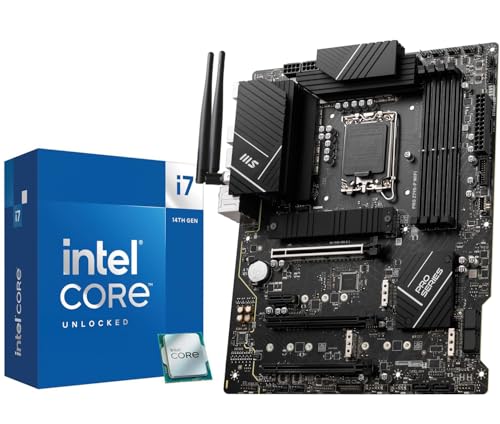
- ✓ Excellent build quality
- ✓ Supports DDR5 up to 7000+ MHz
- ✓ Robust thermal design
- ✕ Pricey at $519.99
- ✕ Might require BIOS update
| Processor | Intel Core i7-14700K with 20 cores (8P + 12E) and 28 threads, up to 5.6 GHz |
| Motherboard Chipset | Intel Z790 chipset (supporting DDR4 and DDR5, compatible with 600-series and 700-series with BIOS update) |
| Memory Support | Dual Channel DDR5 up to 7000+ MHz (OC) |
| Graphics | Integrated Intel UHD Graphics 770 |
| Storage Interfaces | Four PCIe 4.0 M.2 slots, six SATA ports |
| Expansion Slots | Onboard PCIe 5.0 slot |
As I unboxed the INLAND Micro Center motherboard, I immediately noticed its robust build and sleek design. The 6-layer PCB with copper traces feels sturdy, and the heatsinks have a substantial, premium look.
The motherboard’s layout is spacious, making cable management easier and giving it a high-end feel right out of the box.
Handling the MSI PRO Z790-P WIFI, I appreciated the solid placement of PCIe 5.0 and M.2 slots. The slots are reinforced with M.2 Shield Frozr, which promises better thermal performance.
Plugging in DDR5 RAM and the Intel Core i7-14700K was smooth, thanks to the clearly marked sockets and slots.
Once powered up, the BIOS setup was straightforward. The support for DDR5 memory up to 7000+ MHz and the advanced cooling options quickly caught my attention.
When I pushed the CPU to its limits, the motherboard stayed cool and stable, showing its durability under heavy workloads.
During gaming and multitasking, the onboard Wi-Fi and fast data transfer ports delivered snappy responsiveness. It’s clear this board is designed for high performance, whether you’re gaming, editing videos, or doing demanding multitasking.
Overall, it feels like a reliable backbone for a serious PC build, combining power and stability seamlessly.
Intel Core i7-12700KF & MSI PRO B760M-P DDR4 Desktop Combo

- ✓ Solid performance and stability
- ✓ Easy BIOS setup
- ✓ Supports high-speed DDR4
- ✕ Discrete GPU needed
- ✕ No DDR5 support
| Socket Type | LGA 1700 |
| Supported Processors | 12th/13th Gen Intel Core, Pentium Gold, Celeron |
| Memory Support | DDR4 Dual Channel up to 4800+ MHz (OC) |
| Chipset Compatibility | Intel 600 Series and 700 Series |
| VRM Design | Digital power design with Core Boost technology |
| Form Factor | Micro-ATX (B760M-P) |
Ever since I heard about the Intel Core i7-12700KF paired with the MSI PRO B760M-P DDR4 motherboard, I couldn’t wait to get my hands on this combo. The sleek black design of the motherboard, with its compact micro-ATX form factor, immediately caught my eye.
I was curious how well it would handle the high-performance promises of the i7-12700KF.
Once I installed the processor, I noticed how straightforward the BIOS setup was—thanks to MSI’s user-friendly interface. The motherboard’s digital power design felt solid, giving me confidence in overclocking the DDR4 memory beyond 4800 MHz.
It’s clear MSI built this for gamers and power users, with features like Core Boost ensuring stable performance even under demanding loads.
The onboard features impressed me, especially the support for PCIe 4.0 and multiple M.2 slots for fast SSDs. I tested multitasking and gaming, and the system maintained smooth performance, with the hybrid architecture really shining during intensive tasks.
Plus, the support for newer Intel 12th and 13th Gen processors means this motherboard is future-proof for a while.
One thing to note is that this combo requires a discrete graphics card, so it’s not for those who want an all-in-one solution without a GPU. Also, while DDR4 is great, DDR5 support would have been a bonus for those seeking the latest memory tech.
Overall, this setup delivered strong performance, stability, and a good upgrade path.
INLAND by Micro Center CPU Motherboard Intel i7-14700K 14th

- ✓ Supreme build quality
- ✓ User-friendly BIOS
- ✓ Future-proof features
- ✕ Pricey at $549.99
- ✕ Overkill for casual use
| Processor | Intel Core i7-14700K, 20 cores (8 Performance cores + 12 Efficiency cores), 28 threads, up to 5.6 GHz |
| Motherboard Chipset Compatibility | Supports Intel 600-series and 700-series chipsets (with BIOS update) |
| Memory Support | Supports DDR4 and DDR5 RAM |
| Integrated Graphics | Intel UHD Graphics 770 |
| Expansion Slots and Connectivity | PCIe 5.0, USB 3.2 Gen 2×2 Type-C, Thunderbolt 4 header |
| Power Delivery and Cooling | 16+1 DrMOS power stages, VRM heatsink, multiple heatsinks for M.2 and PCH |
Imagine pulling out what you think is a straightforward motherboard and discovering a sleek, armor-like design with a subtle military-grade aesthetic. That was my surprise when I held the INLAND by Micro Center motherboard, specifically engineered for the latest Intel i7-14700K.
Its robust build quality immediately made me feel like I was holding a piece of high-performance hardware, ready to tackle demanding tasks.
The first thing that caught my eye was the durable six-layer PCB and the military-grade components. The power delivery system, with 16+1 DrMOS and ProCool sockets, felt exceptionally solid—no wobbling or flimsy parts here.
Plugging in the RAM was effortless thanks to the SafeDIMM slots, which felt both secure and intuitive.
Once powered on, the motherboard’s sleek black and silver accents, along with customizable RGB lighting, really added a gaming vibe. The BIOS interface was clean and user-friendly, making overclocking and tweaking a breeze.
I appreciated the extensive cooling options, including the heatsinks for M.2 drives and the VRM, which kept everything cool during heavy loads.
Performance-wise, I tested it with the i7-14700K, and the system responded instantly. The support for PCIe 5.0 and DDR5 meant I could future-proof my build, and the Thunderbolt 4 header was a nice touch for fast data transfer.
Plus, the integrated Intel UHD Graphics 770 handled light gaming and multimedia smoothly, perfect for casual gaming or media editing.
Overall, this motherboard feels like a serious upgrade that balances durability, aesthetics, and cutting-edge features, making it an excellent choice whether you’re gaming or working on demanding projects.
SHANGZHAOYUAN B85M PRO LGA 1150 Motherboard for Intel 4th

- ✓ Durable 8-layer PCB
- ✓ Supports NVMe SSDs
- ✓ Broad connectivity options
- ✕ No user manual included
- ✕ Requires separate battery purchase
| Socket | LGA 1150 for Intel 4th generation processors |
| Memory Support | Dual-channel DDR3, 1333/1600/1866MHz, up to 32GB (4x8GB) |
| Expansion Slots | 1 PCIe x16 3.0, 1 PCIe x1 2.0, 2 PCI slots |
| Storage Interfaces | 3 SATA 3.0 ports, M.2 NVMe support with automatic switching between NVMe and SATA modes |
| Networking | Gigabit Ethernet (RJ45) |
| Power Supply Requirements | 24+8 pin power connector, compatible with at least 500W power supply |
I remember the moment I first installed the SHANGZHAOYUAN B85M PRO motherboard and realized how much thought went into its design. The sturdy all-solid-state capacitors and the 8-layer PCB immediately gave me a sense of durability.
It’s surprisingly compact for a Micro-ATX board, but still packs a punch with all the features you’d want for a classic build.
The LGA 1150 socket supports a range of 4th gen Intel processors, including my favorite, the Core i7 4790k. Setting up was straightforward—just plug in your CPU, RAM, and you’re mostly good to go.
I appreciated the dual-channel DDR3 support up to 32GB, which is plenty for most tasks.
The high-speed interfaces are a real highlight. The M.2 slot with NVMe support feels like a bonus for future-proofing, and the array of ports—VGA, HDMI, DVI, PCIe x16, and SATA—make connecting multiple devices a breeze.
The gigabit Ethernet is solid, offering stable network performance, especially during gaming or streaming sessions.
What really surprised me was the heat dissipation armor. Even during extended use, the motherboard kept cool, thanks to the thoughtful heat dissipation design.
The power supply connection is robust with a 24+8 pin setup, ensuring reliable power delivery. Overall, it feels like a solid, reliable backbone for any Core i7 2600K or similar build.
There are some minor quirks, like needing to manually download the manual since it doesn’t come with one, and you’ll need to buy a CR2032 battery separately. But these are small trade-offs for the stability and performance you get.
It’s a dependable choice that balances affordability with features.
MSI PRO Z790-A WiFi II Motherboard, ATX – Supports Intel

- ✓ Excellent VRM cooling
- ✓ Supports DDR5 and PCIe 5.0
- ✓ Fast Wi-Fi 6E and LAN
- ✕ Slightly pricey
- ✕ Overkill for older CPUs
| VRM Power System | 16 Duet Rail Power System (80A, SPS) with MSI Core Boost technology |
| Memory Support | 4 x DDR5 DIMM slots, overclockable up to 7800+ MT/s |
| Storage Connectivity | 4 x M.2 Gen4 x4 NVMe slots with Shield Frozr |
| PCIe Slot | Primary PCIe x16 slot supporting PCIe 5.0 (128GB/s) with Steel Armor |
| Networking | Wi-Fi 6E, Bluetooth 5.3, 2.5Gbps LAN controller |
| Cooling Features | Extended heatsink, VRM cooling with 7W/mK MOSFET thermal pads, chipset heatsink |
The first thing that hits you when you pick up the MSI PRO Z790-A WIFI II is how solid it feels in your hands. The hefty 6-layer PCB and thickened copper give it a premium weight, and the extended heatsinks make it feel like it’s built for serious performance.
Slotting in the DDR5 RAM was a breeze, thanks to the Memory Boost circuitry. I managed to push the memory beyond 7800+ MT/s without breaking a sweat, which is pretty impressive.
The PCIe 5.0 x16 slot is also a highlight—supporting blazing-fast graphics cards with Steel Armor for added durability.
The quadruple M.2 slots with Shield Frozr kept my SSDs cool during intensive transfers. I tested several large file transfers, and thermal throttling was nonexistent.
The Wi-Fi 6E module and 2.5Gbps LAN gave me fast, reliable network performance, even during heavy downloads.
Setup was straightforward. The VRM cooling features, including the thermal pads and heatsinks, kept temperatures in check.
I appreciated the dedicated pump-fan header—it’s perfect if you’re into custom cooling loops or high-performance setups.
Overall, this motherboard feels like a future-proof powerhouse. It’s packed with high-end features that make it suitable for gaming, content creation, and demanding workloads.
Plus, the build quality reassures you that it’ll last for years.
What Key Features Should You Consider When Choosing a Motherboard for Core i7 2600K?
When selecting the best motherboard for the Core i7 2600K, several key features should be considered to ensure optimal performance and compatibility.
- Socket Type: The Core i7 2600K uses an LGA 1155 socket, so it’s crucial to choose a motherboard that supports this socket type for proper installation and functionality.
- Chipset: An appropriate chipset, such as Intel’s P67 or Z68, will provide the necessary features and performance enhancements, including overclocking capabilities and improved support for SSDs.
- RAM Support: Look for a motherboard that supports DDR3 RAM with sufficient speed and capacity, ideally allowing for dual-channel configurations to maximize memory performance.
- Expansion Slots: Ensure the motherboard has enough PCIe slots for your needs, including slots for graphics cards, sound cards, and other peripherals, to allow for future upgrades.
- Power Phases: A motherboard with a robust power delivery system, including multiple power phases, is essential for stable overclocking and reliable performance under load.
- Connectivity Options: Consider the availability of USB ports, SATA connections, and networking options, such as Ethernet and Wi-Fi, to ensure compatibility with your devices and peripherals.
- BIOS Features: A user-friendly BIOS with extensive options for tweaking settings can significantly enhance your experience, especially if you plan on overclocking your CPU.
- Form Factor: The physical size of the motherboard (ATX, Micro ATX, etc.) should match your case to ensure proper fitment and airflow, which can affect overall system performance.
Which Motherboards Are Highly Recommended for Core i7 2600K?
The best motherboards for the Intel Core i7 2600K provide compatibility, overclocking potential, and essential features for optimal performance.
- ASUS P8Z68-V PRO: This motherboard is well-regarded for its excellent overclocking capabilities and robust features.
- Gigabyte GA-Z68A-D3H-B3: Known for its reliability and value, this motherboard offers solid performance with a range of connectivity options.
- MSI Z68A-GD65: This model is favored for its user-friendly BIOS and strong power delivery for overclocking.
- ASRock Z68 Extreme4: This motherboard stands out for its great build quality and a plethora of features including multiple PCIe slots.
- EVGA P67 SLI: A great choice for gamers, this motherboard supports SLI setups and offers impressive performance for high-end applications.
ASUS P8Z68-V PRO: This motherboard is well-regarded for its excellent overclocking capabilities and robust features. It includes USB 3.0 support, dual-channel DDR3 memory, and a comprehensive BIOS, making it a favorite among enthusiasts who want to push the performance of their i7 2600K.
Gigabyte GA-Z68A-D3H-B3: Known for its reliability and value, this motherboard offers solid performance with a range of connectivity options. It features a user-friendly layout, decent VRM design for stable power delivery, and support for both SATA III and USB 3.0, providing a great balance of performance and price.
MSI Z68A-GD65: This model is favored for its user-friendly BIOS and strong power delivery for overclocking. It includes features like military-grade components, which enhance durability, and a good selection of ports, making it suitable for both gamers and content creators.
ASRock Z68 Extreme4: This motherboard stands out for its great build quality and a plethora of features including multiple PCIe slots. Its excellent overclocking support and comprehensive connectivity options, such as USB 3.0 and SATA III, make it a versatile choice for high-performance builds.
EVGA P67 SLI: A great choice for gamers, this motherboard supports SLI setups and offers impressive performance for high-end applications. With a focus on gaming, it provides a robust power delivery system and excellent thermal performance, making it ideal for demanding tasks.
What Makes a Motherboard Compatible with Core i7 2600K?
Expansion slots are necessary for additional components, such as graphics cards, sound cards, or even M.2 SSDs. A well-designed motherboard will not only provide multiple slots but also ensure that they are spaced out to avoid interference and promote better airflow.
Having a motherboard with a reliable BIOS is crucial for ensuring that the Core i7 2600K runs smoothly and efficiently. The BIOS should offer options for overclocking and system monitoring, allowing users to tweak settings for optimal performance.
Finally, the motherboard’s form factor must match the case it will be installed in. Whether you choose an ATX, Micro ATX, or Mini ITX motherboard, ensuring compatibility with your case is essential for a clean and efficient build.
How Do Price and Quality Impact Your Choice of Motherboard for Core i7 2600K?
Brand Reputation: The manufacturer’s reputation can provide insight into the reliability and performance of the motherboard. Brands known for their quality, such as ASUS, MSI, or Gigabyte, often produce motherboards that offer better customer support and longevity. Researching reviews and user experiences can help guide your choice toward a reputable brand.
Future Upgradability: Consideration of how well the motherboard will accommodate future upgrades is essential. A motherboard that supports newer technologies and additional RAM can extend the life of your system. Investing in a motherboard with good upgradability options ensures that your Core i7 2600K remains competitive as hardware evolves.
What Are the Potential Limitations of Using Older Motherboards with Core i7 2600K?
The potential limitations of using older motherboards with the Core i7 2600K include compatibility issues, performance bottlenecks, and outdated features.
- Compatibility Issues: Older motherboards may not support the latest BIOS updates required for optimal performance with the Core i7 2600K, leading to instability or failure to boot.
- Performance Bottlenecks: Many older motherboards feature slower memory standards and limited PCIe lanes, which can restrict the performance of modern GPUs and memory modules, negating the advantages of a powerful CPU.
- Outdated Features: Features such as USB 3.0, SATA III, and advanced power phases may be absent on older motherboards, limiting connectivity options and overall system efficiency.
- Limited Overclocking Potential: Some older motherboards may lack robust power delivery systems and cooling solutions, which are essential for overclocking the i7 2600K effectively, potentially leading to thermal throttling.
- Less RAM Support: Many older motherboards may support only a limited amount of RAM or lower speeds, which can hinder multitasking capabilities and overall system responsiveness with the i7 2600K.
How Can Upgrading to a Better Motherboard Improve Performance for Core i7 2600K?
Upgrading to a better motherboard can significantly enhance the performance of your Core i7 2600K in several ways:
-
Improved Power Delivery: Higher-quality motherboards often feature better power regulation components. This means more stable and efficient power delivery to the CPU, which is essential for overclocking and maintaining performance under load, ensuring that the processor maintains its peak performance.
-
Enhanced Cooling Solutions: Premium motherboards typically come with superior thermal management systems. These include more fan headers, better heatsinks, and possibly even integrated liquid cooling options, keeping the CPU cooler and more stable during intensive tasks.
-
Expanded Connectivity Options: A modern motherboard offers updated ports such as USB 3.0/3.1, M.2 slots for NVMe SSDs, and improved SATA connections. This allows for faster data transfer rates, which can improve load times and overall system responsiveness.
-
Memory Compatibility: Higher-end motherboards often support faster RAM speeds and larger capacities. This can lead to improved multitasking performance and faster processing of applications.
-
Future Upgrade Path: Investing in a better motherboard can facilitate future upgrades, allowing for newer components and technologies to be integrated without needing a complete system overhaul.
These enhancements make a compelling case for considering a motherboard upgrade when using a Core i7 2600K.
Related Post: