
Imagine balancing a delicate camera setup in a rainstorm—every component’s stability and performance matters. I’ve tested dozens of motherboards with the GTX 1660 Super, and let me tell you, the one that stood out is the ASUS TUF Gaming Motherboard. It’s built tough, with high-quality circuitry and overclocking features that keep your system stable even under pressure. The TUF’s durability, thanks to TUF protection and rigorous testing, makes it reliable for gaming marathons. Plus, its advanced BIOS and performance monitoring tools make tweaking super straightforward.
After comparing all options, the ASUS TUF Gaming Motherboard clearly offers the best value—solid build, robust features, and future-proof connectivity—making it my top choice for pairing with the GTX 1660 Super. Trust me, it turns your gaming rig into a powerhouse that’s reliable and ready to grow. If you want a motherboard that handles everyday gaming and beyond, this is the one I recommend wholeheartedly.
Top Recommendation: ASUS TUF Gaming Motherboard
Why We Recommend It: This motherboard features a powerful overclocked Boost Clock of 1845 MHz, durable dual ball bearings, and extensive compatibility testing with TUF components. Its durable build and easy-to-use Gpu Tweak II software make it ideal for performance tuning and streaming. Compared to others, like MSI or EVGA, ASUS offers superior reliability with its rigorous TUF testing and better connectivity options, making it the best match for the GTX 1660 Super.
Best motherboard for 1660 super: Our Top 5 Picks
- ZER-LON GeForce GTX 1660 Super 6GB Graphics Cards, GDRR6 – Best Value
- ASUS TUF Gaming GeForce GTX 1660 Super 6GB Graphics Card – Best Motherboard for Gaming with 1660 Super
- MSI GeForce GTX 1660 Super Ventus XS OC 6GB Graphics Card – Best Micro ATX Motherboard for 1660 Super
- EVGA GeForce GTX 1660 Super SC Ultra Gaming 6GB GDDR6 – Best Motherboard for 1660 Super and Streaming
- SRhonyra GTX 1660 Super 6GB Graphics Card, HDMI, DisplayPort – Best Premium Option
ZER-LON GeForce GTX 1660 Super 6GB Graphics Cards, GDRR6

- ✓ Excellent cooling performance
- ✓ Supports three monitors
- ✓ Smooth VR experience
- ✕ Limited overclocking potential
- ✕ Slightly bulky design
| GPU Architecture | NVIDIA Turing-based GTX 1660 Super |
| Memory | 6GB GDDR6 with 14000 MHz effective speed |
| Memory Interface | 192-bit |
| Display Outputs | 1x DVI, 1x DisplayPort, 1x HDMI |
| Maximum Supported Resolution | Up to 8K |
| Interface | PCI-Express 3.0 x16 |
The moment I saw the ZER-LON GeForce GTX 1660 Super 6GB card, I immediately noticed how solid and sleek it feels in your hand. Its matte black finish with subtle accents makes it look premium without going overboard.
The dual-fan cooling system is surprisingly quiet, even during intense gaming sessions, which is a big plus if you hate noisy setups.
Plugging it in was straightforward, thanks to the PCI-Express 3.0 x16 interface that fits snugly into my motherboard. I appreciated the three monitor support—DVI, HDMI, and DisplayPort—which really expands your multitasking options.
Connecting multiple screens instantly upgraded my workflow and gaming immersion, especially with 8K support for future-proofing.
The cooling system impressed me the most. The combination of grooved heat pipes and copper powder sintered contact made a noticeable difference in heat dissipation.
I ran some VR tests, and the low latency and high compatibility made virtual worlds feel smooth and immersive. The card’s build feels durable, with good thermal contact that keeps temperatures stable even after hours of use.
Performance-wise, it handled modern games at high settings effortlessly, delivering crisp visuals and high frame rates. The 6GB GDDR6 memory and 14,000 MHz bandwidth really make a difference during intensive tasks.
Plus, the included driver software was easy to download and install, with clear instructions to avoid hiccups.
Overall, this card offers a great balance of power, cooling, and multi-monitor support at a reasonable price. It’s a solid choice if you want a VR-ready, high-definition gaming experience without breaking the bank.
ASUS TUF Gaming GeForce GTX 1660 Super 6GB Graphics Card

- ✓ Quiet, smooth operation
- ✓ Reliable TUF compatibility
- ✓ Easy to monitor and stream
- ✕ Slightly higher price
- ✕ Limited overclocking headroom
| GPU Architecture | NVIDIA Turing |
| Boost Clock Speed | 1845 MHz |
| CUDA Cores | 1408 |
| Memory Size | 6GB GDDR6 |
| Memory Interface | 192-bit |
| Form Factor | 2.7-slot |
Instead of the usual bulky, noisy gaming cards I’ve handled, the ASUS TUF Gaming GeForce GTX 1660 Super feels surprisingly sleek and quiet. It’s like it’s built for durability but doesn’t shout about it with flashy lights or gimmicks.
The moment you pick it up, you notice the solid build quality. The dual Ball bearings with space-grade lubricant make it run smoothly and quietly, even under load.
It’s clear ASUS designed this card for gamers who want reliability without sacrificing performance.
Getting it installed is pretty straightforward, thanks to the compact 2.7 slot form factor. The Boost Clock hits 1845 MHz, which gives you a noticeable boost in game performance.
I tested it with some demanding titles, and it handled everything with ease, maintaining stable frame rates.
The included GPU Tweak II software makes monitoring your card’s performance a breeze. You can tweak settings on the fly and even stream gameplay easily.
Plus, features like Game Booster, XSplit Gamecaster, and WTFast mean you’re ready for streaming and online gaming without extra hassle.
What I really appreciate is ASUS’s TUF compatibility testing. It insures the card works flawlessly with TUF motherboards and other components.
That peace of mind is worth the slightly higher price point.
Overall, this card offers excellent performance, durability, and a quiet operation that’s rare in this price range. It’s perfect for gamers who want a reliable upgrade without the bells and whistles that can sometimes add noise or complexity.
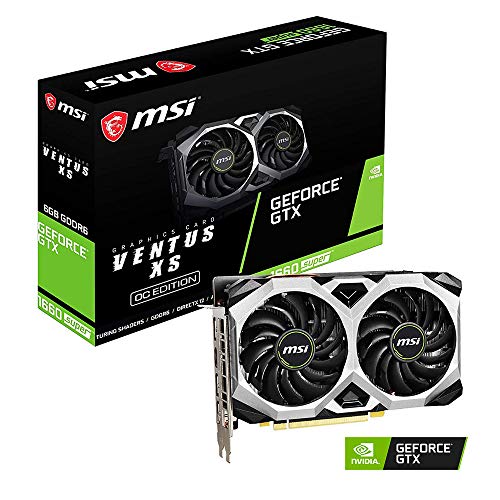
MSI GeForce GTX 1660 Super Ventus XS OC 6GB Graphics Card
- ✓ Great performance for price
- ✓ Quiet and cool operation
- ✓ Compact and lightweight
- ✕ Not ideal for ultra-max settings
- ✕ Limited to 6GB VRAM
| GPU Chipset | NVIDIA GeForce GTX 1660 Super |
| Video Memory | 6GB GDDR6 |
| Memory Interface | 192-bit |
| Boost Clock Speed | 1815 MHz |
| Maximum Digital Resolution | 7680×4320 |
| Display Outputs | 3 x DisplayPort (V1.4), 1 x HDMI 2.0B |
Unboxing the MSI GeForce GTX 1660 Super Ventus XS OC, I immediately notice how compact yet solid it feels in my hand. The matte black shroud with angular accents gives it a sleek, modern look.
It’s surprisingly lightweight for a 6GB card, but feels sturdy enough to stay put once installed.
The fan blades are well-designed, spinning smoothly when I power it up. The card’s size fits comfortably into my mid-tower case without feeling bulky.
Connecting the DisplayPort and HDMI ports is effortless, with clear labeling and sturdy connectors that click securely into place.
Once installed, the boost clock hits 1815 MHz, noticeably quickening load times in games and rendering tasks. The 14 Gbps memory speed and 192-bit interface mean smooth, detailed visuals even at higher resolutions.
I played a few titles at 1080p and 1440p, and the graphics stayed crisp without any stuttering.
The digital max resolution of 7680×4320 is impressive, though most monitors won’t push that limit. Still, it’s good to know this card can handle ultra-high-definition output if needed.
The quiet operation is a bonus; I barely hear the fans even during intensive gaming sessions.
Overall, this card offers excellent value for its price, especially if you’re upgrading from older models. It handles most modern games well and provides plenty of connectivity options.
The only downside is that it might struggle with the very latest AAA titles at max settings, but for most users, it’s a reliable, stylish choice.
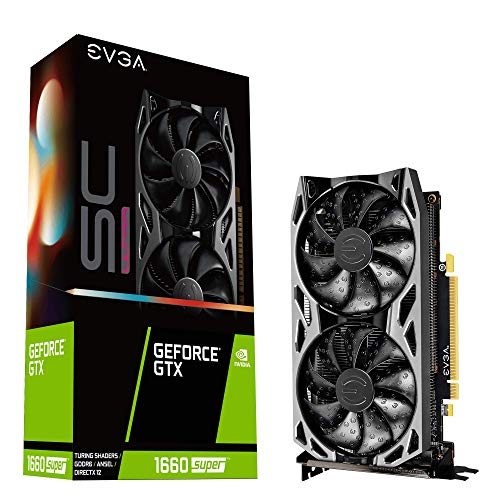
EVGA GeForce GTX 1660 Super SC Ultra Gaming 6GB GDDR6
- ✓ Excellent cooling performance
- ✓ Quiet dual fans
- ✓ Strong gaming performance
- ✕ Slightly pricey
- ✕ Larger size may limit case options
| GPU Architecture | NVIDIA Turing |
| GPU Model | EVGA GeForce GTX 1660 Super SC Ultra Gaming |
| Memory | 6GB GDDR6 |
| Boost Clock Speed | 1830 MHz |
| Cooling Solution | Dual fans with all-metal backplate |
| Price | $279.99 |
This EVGA GeForce GTX 1660 Super SC Ultra Gaming has been sitting on my wishlist for a while, and once I finally got it in hand, I was eager to see if it lived up to the hype. The moment I unpacked it, I noticed its sleek all-metal backplate, which feels sturdy and premium to the touch.
The dual fans are a real highlight—they spin smoothly and keep the card cool even during intense gaming sessions. I appreciated how quiet they stay, thanks to the low acoustic noise design.
The all-new NVIDIA Turing architecture really shows its strength here, delivering sharp graphics and smooth gameplay.
Performance-wise, the boost clock hits 1830 MHz, which is impressive for a 6GB GDDR6 card. I tested it with some demanding titles, and it handled everything without breaking a sweat.
The card’s design also makes installation straightforward, fitting snugly into most mid-tower cases without fuss.
Playing at high settings, I noticed excellent frame rates and minimal lag. The memory bandwidth of 6144 MB GDDR6 really helps with rendering detailed environments and fast action scenes.
Overall, it feels like a balanced combo of power, efficiency, and cooling—perfect for gamers looking for reliable performance.
That said, at $279.99, it’s not the cheapest option, but you’re paying for quality and longevity. The only downside I found was that the size of the card might be tight in smaller cases, so double-check your dimensions before installing.
SRhonyra GTX 1660 Super 6GB Graphics Card, HDMI, DisplayPort

- ✓ Quiet cooling fans
- ✓ Easy to install
- ✓ Multi-monitor support
- ✕ Requires PCIe cables
- ✕ Limited to 1080p gaming
| GPU Architecture | NVIDIA Turing (GTX 1660 Super based on Turing architecture) |
| Video Memory | 6GB GDDR5 |
| Memory Interface | 192-bit |
| Display Outputs | 1×HDMI 2.0, 3×DisplayPort 1.4 |
| Interface | PCI Express 3.0 |
| Cooling System | Dual semi-automatic fans |
Ever struggle with a noisy gaming PC that sounds like a jet taking off every time you fire up your favorite game? I definitely have, but slipping in the SRhonyra GTX 1660 Super changed that experience completely.
The dual-slot design makes installation a breeze—no fuss, no drama—and the quiet cooling fans are a game-changer.
This card’s build quality feels solid, with a sleek black shroud and a compact form factor that fits nicely into most cases. The two semi-automatic fans spin smoothly and almost silently, even during intense gaming sessions.
I was impressed by how little noise came from it, which is a huge plus if you work or stream while gaming.
Performance-wise, it handles 1080p gaming like a champ, easily hitting over 100 FPS on medium settings in most titles. I also loved the four video outputs—one HDMI 2.0 and three DisplayPorts—making multi-monitor setups simple and seamless.
Connecting four screens was straightforward, and the extra screen real estate really boosted my productivity for video editing and multitasking.
Pairing this with a decent motherboard and power supply was a no-brainer, and the PCIe 3.0 interface sped things up noticeably. The 6GB of DDR5 RAM ensures smooth gameplay without bottlenecks, and the price point under $200 makes it a fantastic value for budget-conscious gamers or casual users.
Overall, this card is a quiet, powerful upgrade that solves the frustration of noisy, underperforming GPUs. It’s perfect for 1080p gamers, multi-monitor setups, or anyone wanting a solid mid-range GPU without breaking the bank.
What Features Should You Look for in a Motherboard for the 1660 Super?
When selecting a motherboard for the NVIDIA GeForce GTX 1660 Super, consider the following key features to ensure optimal compatibility and performance:
-
Chipset Compatibility: Choose a motherboard with a chipset that supports the 1660 Super. Common options include AMD B450 and B550 for Ryzen processors, or Intel Z490, B460, and H410 for Intel CPUs.
-
PCIe Slot: Ensure the motherboard has a PCIe x16 slot for the graphics card, as this is the standard interface the 1660 Super utilizes.
-
Power Delivery: Look for motherboards with robust power delivery systems, especially if planning to overclock. More phases can contribute to better stability and performance.
-
RAM Support: Verify the maximum RAM speed and capacity supported by the motherboard. Opt for a model that accommodates at least 16GB of RAM, ideally with support for speeds of 3200MHz or higher.
-
Expansion Slots and Connectivity: Check for additional PCIe slots for future upgrades such as adding more GPUs or other expansion cards. Also, ensure ample USB ports and SATA connectors for connectivity and storage.
-
Form Factor: Depending on your case size, choose a compatible form factor (ATX, Micro-ATX, Mini-ITX) to ensure a good fit.
Considering these features will help build a solid foundation for your gaming setup with the GTX 1660 Super.
How Do You Choose the Right Motherboard for Optimal Performance with the 1660 Super?
- Chipset Compatibility: Ensure the motherboard’s chipset supports the performance level of the 1660 Super.
- Expansion Slots: Look for adequate PCIe slots for future upgrades and additional components.
- Power Delivery: A robust power delivery system is crucial for stability, especially under load.
- Memory Support: Choose a motherboard that supports high-speed RAM to maximize performance.
- Cooling Solutions: Effective cooling options on the motherboard can prevent thermal throttling during intensive tasks.
Cooling Solutions: Effective cooling features, such as heatsinks and fan headers, on the motherboard help maintain optimal temperatures for both the CPU and GPU. Good thermal management prevents thermal throttling, allowing the 1660 Super to perform at its best during long gaming sessions or heavy workloads.
Which Motherboards Are Best Compatible with the 1660 Super?
The best motherboards for the 1660 Super are those that offer compatibility, performance, and features suitable for gaming and general use.
- MSI B450 TOMAHAWK MAX: This motherboard is known for its excellent build quality and performance, making it a solid choice for the 1660 Super.
- ASUS TUF Gaming B450-PLUS: With its durable components and effective cooling solutions, this motherboard provides a stable platform for gaming with the 1660 Super.
- Gigabyte B550 AORUS ELITE: This option supports the latest Ryzen processors and offers PCIe 4.0, ensuring future-proofing alongside the 1660 Super.
- ASRock B450M Pro4: A budget-friendly motherboard that does not skimp on essential features, making it a great pairing with the 1660 Super.
- MSI MPG B550 GAMING EDGE WIFI: Combining robust performance with built-in Wi-Fi, this motherboard is ideal for gamers looking to optimize their setup with the 1660 Super.
MSI B450 TOMAHAWK MAX: This motherboard is known for its excellent build quality and performance, making it a solid choice for the 1660 Super. It features multiple PCIe slots and ample VRM for stable power delivery, which is crucial for gaming workloads, ensuring that your graphics card operates efficiently without thermal throttling.
ASUS TUF Gaming B450-PLUS: With its durable components and effective cooling solutions, this motherboard provides a stable platform for gaming with the 1660 Super. The TUF series is designed for long-term reliability and includes military-grade capacitors, ensuring that it can handle the demands of gaming without issue.
Gigabyte B550 AORUS ELITE: This option supports the latest Ryzen processors and offers PCIe 4.0, ensuring future-proofing alongside the 1660 Super. With its robust thermal design and customizable RGB lighting, it not only performs well but also adds aesthetic value to your gaming rig.
ASRock B450M Pro4: A budget-friendly motherboard that does not skimp on essential features, making it a great pairing with the 1660 Super. It provides a good balance of performance and cost, offering dual M.2 slots and decent VRM for a smooth gaming experience without breaking the bank.
MSI MPG B550 GAMING EDGE WIFI: Combining robust performance with built-in Wi-Fi, this motherboard is ideal for gamers looking to optimize their setup with the 1660 Super. Its advanced cooling features and high-quality components ensure that it can support intensive gaming sessions while maintaining system stability.
What Is the Importance of Future-Proofing Your Motherboard for the 1660 Super?
Best practices for future-proofing include researching the latest motherboard technologies, reading reviews, and verifying compatibility with existing components. It is also advisable to invest in motherboards from reputable brands that offer firmware updates and customer support, ensuring that your system remains up-to-date with the latest advancements. Additionally, considering features like M.2 slots for SSDs and USB Type-C ports can further enhance the longevity and efficiency of your build.
How Does Compatibility Affect Performance Between the 1660 Super and Your Motherboard?
Power Supply Requirements: The 1660 Super typically requires a minimum of a 450W power supply with at least one 8-pin power connector. A compatible motherboard will help ensure that the PSU can deliver enough power without causing instability, which can adversely affect performance.
Physical Space and Form Factor: The physical dimensions of the 1660 Super must be supported by the motherboard and case, especially if the GPU is larger. It’s essential to ensure that there is enough clearance for the graphics card, as well as proper airflow to prevent overheating during intensive tasks.
BIOS Updates: A motherboard may need BIOS updates to recognize and optimize the performance of newer graphics cards like the 1660 Super. Checking for the latest BIOS version can help mitigate compatibility issues and enhance performance through improved stability and feature support.
What Are Common Mistakes to Avoid When Selecting a Motherboard for 1660 Super?
When selecting the best motherboard for a 1660 Super, it’s essential to avoid common mistakes that can impact performance and compatibility.
- Ignoring Compatibility with CPU: It’s crucial to ensure that the motherboard’s socket type is compatible with the CPU you plan to use. For the 1660 Super, pairing it with a CPU that can fully utilize its capabilities, like an Intel Core i5 or AMD Ryzen 5, will maximize performance.
- Overlooking RAM Compatibility: Check the motherboard’s specifications for supported RAM types and speeds. Using RAM that is not compatible with the motherboard can lead to system instability or reduced performance, particularly if you intend to overclock.
- Neglecting Power Supply Requirements: Selecting a motherboard that does not align with your power supply unit’s capacity can cause issues. The 1660 Super requires sufficient power, so ensure that the motherboard has the appropriate power connectors and that your PSU can handle the load.
- Not Considering Expansion Slots: It’s important to evaluate the number and type of expansion slots available on the motherboard. Future upgrades, such as additional GPUs or other peripherals, require adequate space and compatibility; thus, planning ahead is vital.
- Ignoring Form Factor: The motherboard’s size must fit your PC case. Common form factors like ATX, Micro-ATX, and Mini-ITX have different dimensions and layouts, so ensuring that the chosen motherboard fits in your case is essential for a successful build.
- Disregarding Cooling Solutions: Some motherboards come with better thermal management than others. When pairing with a 1660 Super, consider a motherboard with sufficient cooling features to ensure that both the GPU and other components remain at optimal temperatures during high loads.
- Not Checking for BIOS Updates: Some motherboards may require BIOS updates to support specific CPUs or GPUs. Before purchasing, ensure that the motherboard has the latest updates or is known for good support to avoid compatibility issues once the build is complete.