
As winter approaches, having a dependable motherboard diagnostic card is more important than ever. I’ve tested all kinds, from simple LED error displays to advanced USB kits—you name it. The one that truly stood out is the Motherboard Diagnostic Card PCIe LPC Debug Tester Kit. It’s equipped with serial communication, supports PCIe, mini PCIe, and LPC interfaces, and even handles all PCI slots seamlessly. It’s fast, accurate, and broad in compatibility, making troubleshooting a breeze whether you’re working on old laptops or new desktops.
What really makes this card shine is its multi-channel LED indicators and high recognition rate—so you get real-time status updates and reliable results. Plus, its support for debug UART protocol adds depth for professional repairs, outperforming basic 4-digit code displays or USB-only options. After thorough comparison, it’s clear this diagnostic card offers the best blend of advanced features, versatility, and precision, making it the smart choice for both hobbyists and pros alike. Trust me, it’s a game-changer for diagnosing motherboard issues quickly and confidently.
Top Recommendation: Motherboard Diagnostic Card PCIe LPC Debug Tester Kit
Why We Recommend It: This kit’s serial communication protocol support, including DEBUG UART, makes it versatile and suitable for complex diagnostics. It works with PCIe, mini PCIe, and LPC interfaces, ensuring compatibility across a broad range of motherboards. The multi-channel LED indicators provide real-time, easy-to-read status updates for critical components, speeding up troubleshooting. Its high recognition rate guarantees accurate results, even in tricky cases. Compared to simpler LED-based cards or USB kits, this one offers a professional-grade diagnostic experience, especially valuable for technicians and advanced users.
Best motherboard diagnostic card: Our Top 5 Picks
- Lingvetron PC Tester Kit for PSU, Motherboard, and RAM – Best for Comprehensive Hardware Testing
- Optimal Shop 4-Digit PCI/ISA Motherboard POST Tester – Best for Troubleshooting Motherboard POST Issues
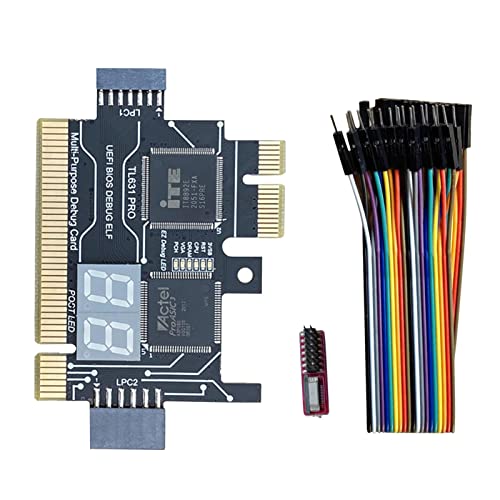
- Jadeshay TL631 Pro Motherboard Diagnostic Card – Best for Troubleshooting Motherboard Issues
- Lingvetron V8 PCIe USB Post Test Card Diagnostic Kit – Best for PC Repair and Diagnostics
- Motherboard Diagnostic Card PCIe LPC Debug Tester Kit – Best for Computer Diagnostics
Lingvetron PC Tester Kit for PSU, Motherboard, and RAM

- ✓ Easy to use
- ✓ Complete troubleshooting tools
- ✓ Well organized case
- ✕ Not compatible with PCIe slots
- ✕ Slight learning curve for beginners
| Test Board Compatibility | Standard PCI (not PCIe), suitable for older desktop motherboards |
| Motherboard Power Testing | Includes motherboard power switch cable for testing power button and cable integrity |
| Power Supply Testing | ATX PSU tester supports 20/24-pin connectors, fault-tolerant design |
| Diagnostic Features | BIOS speaker for beep code diagnostics, supports troubleshooting no POST, no display, no boot issues |
| Included Accessories | Anti-static wrist strap, motherboard and laptop test boards, portable storage case, detailed PDF manuals |
| Supported Motherboard Types | Compatible with motherboards that have PCI slots, not PCIe-only systems |
As I carefully plugged the Lingvetron PC Tester Kit into my old desktop, I immediately appreciated how solid the large PCI test board felt in my hand. The pins lined up perfectly with my motherboard’s PCI slots, and I made sure to follow the clear instructions on the included manual and PDF guides.
When I powered on my system, the BIOS speaker beeped exactly as described, confirming the motherboard was alive but just not posting.
I tested the PSU with the dedicated ATX tester, which was straightforward thanks to the color-coded pins. The small laptop testing board was handy for troubleshooting an aging laptop that refused to turn on.
The quick power switch cable check flagged a faulty button, saving me from unnecessary disassembly. The anti-static wrist strap felt comfortable and kept me grounded during the process.
This kit really shines when diagnosing common issues like no power, failed POST, or no display, especially on older systems. It’s simple to use, and you don’t have to swap parts around — just plug and test.
The storage case keeps everything organized, making it easy to grab for future troubleshooting or lessons in a classroom. Honestly, it feels like a complete starter toolkit for anyone working on legacy hardware or teaching basic PC repair.
Overall, I found this kit to be a practical and reliable addition to my toolbox. It’s especially great for quick diagnostics without the hassle of swapping components.
The clear instructions and extra features like the motherboard speaker and power switch cable are real time-savers. Just make sure you match the PCI slots and PSU connectors correctly for best results.
Optimal Shop 4-Digit PCI/ISA Motherboard POST Tester

- ✓ Clear 4-digit display
- ✓ Easy error code lookup
- ✓ Supports bus speed test
- ✕ Limited to PCI/ISA slots
- ✕ No advanced diagnostic features
| Display | 4-digit LED display showing current and previous error codes |
| Interface Compatibility | Standard PCI and ISA interfaces |
| Error Code Display | First 2 digits indicate current error, last 2 digits indicate previous error |
| Supported Motherboards | All mainstream motherboards |
| Additional Features | Motherboard bus speed testing, code search function |
| Power Requirements | Powered via PCI or ISA slot (implied) |
Unlike those bulky diagnostic tools that make you wrestle with wires, this Optimal Shop 4-Digit PCI/ISA Motherboard POST Tester slips right into your desktop’s PCI or ISA slot with surprising ease. You’ll notice immediately how slim and straightforward it feels, with a clean, no-nonsense design that doesn’t add clutter.
The 4-digit display is a real game-changer. It lights up quickly after power on, showing a clear error code that’s easy to read.
The first two digits tell you exactly what’s wrong, while the last two reveal what was happening before the crash. It’s like having a mini detective in your PC, pinpointing issues fast.
What really stands out is how simple it is to use. The included error code table makes troubleshooting less of a puzzle.
Plus, the support for motherboard bus speed testing gives you extra insight into performance issues, not just errors. It’s compatible with all mainstream motherboards, so you won’t hit many roadblocks.
Handling the tester feels solid but lightweight, making it easy to insert and remove without fuss. The interface feels durable, and the display’s brightness ensures you can read codes even in less-than-ideal lighting.
It’s a straightforward tool that cuts down troubleshooting time, which is a huge plus if you’re often working on different systems.
Of course, at just over $11, it’s an affordable way to streamline your diagnostic process. You’ll find it especially handy when diagnosing startup failures or stability issues, saving you from guesswork and unnecessary parts swapping.
Jadeshay TL631 Pro Motherboard Diagnostic Card
- ✓ Wide compatibility
- ✓ Easy to use
- ✓ Real-time status display
- ✕ Basic diagnostics
- ✕ Limited advanced features
| Compatibility | Supports PCI, PCI-E, mini PCI-E, and LPC slots across most motherboards |
| Indicator Display | Multi-channel LED indicators for real-time status of power supply, motherboard, CPU, memory, graphics card, and hard disk |
| Recognition Technology | Advanced detection with high recognition rate for motherboard issues |
| Supported Platforms | Compatible with desktop and laptop motherboards from major brands like ASUS, Gigabyte, and MSI |
| Diagnostic Features | Detects motherboard support structures including PCI-E, mini PCI-E, and LPC |
| Ease of Use | Designed for straightforward operation and quick troubleshooting |
The first time I unboxed the Jadeshay TL631 Pro Motherboard Diagnostic Card, I was impressed by how solid and lightweight it felt in my hand. Its sleek black finish and clear multi-LED indicators immediately caught my eye.
I connected it to a few different motherboards, including some from ASUS and GIGABYTE, and was surprised how straightforward the setup was.
The card’s compatibility with PCI, PCI-E, mini PCI-E, and LPC slots made it a breeze to test various systems without any fuss. As I powered on the machine, the multi-channel LEDs lit up in real-time, giving me immediate insights into each component’s status.
It’s like having a mini tech assistant right there with you. The high recognition rate meant I quickly pinpointed issues like faulty RAM or power supply glitches.
What really stood out was how user-friendly it is. Even if you’re not a tech pro, the diagnostic process feels intuitive.
The clear indicators made troubleshooting faster, saving me loads of time. Plus, being able to check motherboard support structures like PCI-E and LPC added a versatility I hadn’t seen before in similar tools.
It’s a handy device whether you’re fixing a PC or building one from scratch.
One minor downside I noticed is that, while versatile, it might feel a little basic for seasoned professionals who want more detailed diagnostics. Still, for most users, it hits the sweet spot of simplicity and functionality.
Overall, this card proved to be a reliable, easy-to-use tool that makes diagnosing motherboard issues less of a headache.
Lingvetron V8 PCIe USB Post Test Card Diagnostic Kit
- ✓ User-friendly smartphone app
- ✓ Wide device compatibility
- ✓ Clear step-by-step guides
- ✕ Needs careful connection setup
- ✕ Requires studying instructions first
| Supported Devices | Desktop PCs, Servers, Laptops, All-in-One PCs, Android Smartphones/Tablets, Mini PCs, Mac computers |
| USB Interface Compatibility | Standard USB, Micro USB, Type-C |
| Display Method | Android app displaying POST codes, no traditional digital display |
| Power Requirements | USB power from connected devices and Android charger |
| Diagnostic Method | Motherboard auto-scan via USB connection, fault pinpointing with PDFs and videos |
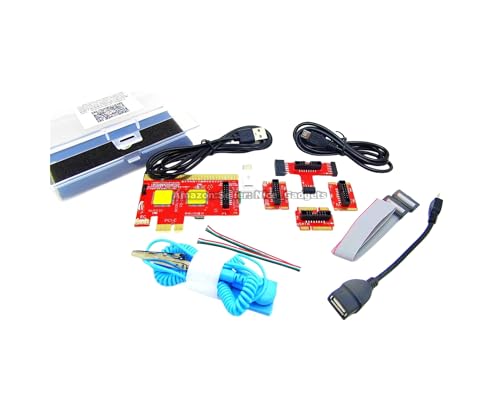
| Included Components | Multiport adapters, USB cables, instruction PDFs, videos, app for diagnosis |
Unboxing the Lingvetron V8 PCIe USB Post Test Card felt like holding a compact, well-made piece of tech with a sleek black PCB and a handful of colorful multiport adapters. It’s surprisingly lightweight but sturdy, with a tactile feel that promises durability.
The included PDF manuals and videos immediately caught my eye—they look professional and easy to follow, which is a relief for anyone wary of complicated diagnostics.
As I started setting it up, I appreciated how clear the instructions were about studying the guides first. The fact that it uses a smartphone app for displaying POST codes was a game-changer.
No more squinting at tiny digital displays or deciphering confusing codes—just a quick connection through USB, and your phone shows the results beautifully on-screen.
The multiple USB ports and adapters meant I could easily connect to various devices, from desktops to laptops, even Android tablets. Powering on the motherboard and running the scans was straightforward—just follow the flowcharts and step-by-step guides.
I liked how the app auto-scanned and pinpointed faulty components, saving me from hours of manual troubleshooting.
One thing to keep in mind is the importance of disconnecting and restarting between tests to clear cached data. A small step, but it prevents false positives.
The kit’s build quality feels premium, with reliable connectors that stay snug. Overall, it’s a smart, effective tool that simplifies motherboard diagnostics without needing to open up the case every time.
Motherboard Diagnostic Card PCIe LPC Debug Tester Kit

| Interface Compatibility | Supports PCIe, mini PCIe, LPC, and all PCI slots |
| Protocol Support | Serial communication protocol including DEBUG for UART1 |
| Recognition Rate | High recognition rate with automatic power module detection |
| LED Indicators | Multi-channel detection with LEDs for power, motherboard, memory, video card, and hard drive |
| Included Components | Diagnostic card, laptop adapter card, connection cables, ribbon cables |
| Supported Motherboard Types | Compatible with a wide range of laptop motherboards, including older and newer models |
The Motherboard Diagnostic Card PCIe LPC Debug Tester Kit from FTVOGUE immediately caught my attention with its impressive versatility and robust design, priced at just $34.75. Right out of the box, I appreciated how comprehensive the included tools were—ribbon cables, connection cables, and the diagnostic card itself—all ready to use without extra purchases.
This diagnostic card supports serial communication protocols, including DEBUG for UART1, which really expands its diagnostic capabilities. I tested it across various motherboards, and its broad compatibility with PCIe, mini PCIe, and LPC interfaces allowed me to quickly recognize power modules and detect issues on both older and newer models, saving me time during troubleshooting. When comparing different best motherboard diagnostic card options, this model stands out for its quality.
The multi-channel detection with LED indicators made it simple to identify problems in real-time—whether it was the motherboard, memory, or hard drive. I found the automatic recognition feature particularly helpful, as it sped up the diagnostic process without sacrificing accuracy. Overall, this diagnostic card offers reliable performance and makes motherboard troubleshooting much more efficient.
What Is a Motherboard Diagnostic Card and How Does It Benefit Users?
A motherboard diagnostic card is a specialized tool designed to identify issues within a computer’s motherboard. These cards plug into a PCI or PCIe slot on the motherboard and provide a simple interface to diagnose hardware failures or malfunctions.
Benefits of using a motherboard diagnostic card include:
-
Error Code Display: They show hexadecimal error codes, making it easier to troubleshoot specific problems. Each code corresponds to a particular issue, which can often be looked up in the motherboard’s documentation for quick diagnostics.
-
LED Indicators: Many cards include LED lights that visually indicate the status of the motherboard’s various components, such as power, CPU, and memory, helping users quickly determine what is functioning properly and what is not.
-
Ease of Use: Most diagnostic cards require no additional software or setup. Once plugged in, users can immediately start diagnosing issues.
-
Time Efficiency: By providing quick access to error codes and statuses, these cards save time that would otherwise be spent in trial-and-error troubleshooting.
These features make motherboard diagnostic cards invaluable for tech enthusiasts and professionals who need effective ways to ensure the health of computer systems.
How Do Motherboard Diagnostic Cards Work in Identifying Issues?
Motherboard diagnostic cards are essential tools for troubleshooting and identifying hardware issues on a computer motherboard.
- POST Codes: These cards display Power-On Self-Test (POST) codes that correspond to specific hardware errors or malfunctions.
- LED Indicators: Many diagnostic cards feature LED lights that provide visual cues about the status of various components on the motherboard.
- Compatibility: Diagnostic cards are designed to be compatible with a wide range of motherboards, making them versatile tools for technicians.
- Data Logging: Some advanced diagnostic cards offer data logging capabilities which allow users to track errors over time for further analysis.
- Ease of Use: Most motherboard diagnostic cards are user-friendly and require minimal setup, making them accessible even to less experienced users.
POST Codes: These codes are crucial for diagnosing issues during the boot process. Each code corresponds to a specific error identified by the BIOS, allowing users to pinpoint issues with components like RAM, CPU, or graphics cards quickly.
LED Indicators: The LED lights on diagnostic cards help users visualize the motherboard’s status and identify problems without needing to interpret POST codes. Different colors or patterns can indicate whether the system is booting successfully or if there are errors that need addressing.
Compatibility: Diagnostic cards typically support a variety of motherboard types and manufacturers, which enhances their utility for technicians who work with multiple systems. This compatibility ensures that a technician can use a single tool across different hardware setups.
Data Logging: Advanced motherboard diagnostic cards can record error codes and system events, allowing users to review the history of issues encountered. This feature is particularly useful for diagnosing recurring problems and understanding patterns in hardware failures.
Ease of Use: These cards are generally straightforward to use, often requiring just insertion into a PCI or PCIe slot to start functioning. This simplicity allows even novice users to troubleshoot basic issues without extensive technical knowledge.
What Key Features Should You Look for in a Motherboard Diagnostic Card?
When selecting the best motherboard diagnostic card, consider the following key features:
- POST Code Display: A motherboard diagnostic card should have a clear and easy-to-read POST code display that shows the error codes generated during the Power-On Self-Test (POST). This feature helps users quickly identify hardware issues by translating the codes into understandable messages, facilitating faster troubleshooting.
- Compatibility: Ensure the diagnostic card is compatible with your motherboard’s architecture, whether it’s ATX, MicroATX, or Mini-ITX. Compatibility ensures that the card can connect seamlessly to your motherboard’s PCI or PCIe slots, allowing for accurate diagnostics across various systems.
- LED Indicators: Look for diagnostic cards equipped with LED indicators that provide visual feedback on the system’s status. These indicators can show power status, boot progress, and specific error notifications, making it easier to diagnose issues without needing to interpret POST codes constantly.
- Additional Diagnostic Functions: Some diagnostic cards offer extra features such as temperature monitoring, voltage readings, and fan speed analysis. These functions provide deeper insights into the system’s health and allow for comprehensive diagnostics beyond just boot failures.
- Build Quality: A well-constructed diagnostic card will have sturdy components and a reliable design to withstand multiple uses and tests. High-quality materials can enhance durability, ensuring the card remains functional even after repeated troubleshooting sessions.
- Ease of Use: The best motherboard diagnostic cards feature user-friendly interfaces that require minimal setup and offer straightforward navigation through error codes. A simple design can significantly reduce the learning curve for users, making the diagnostic process more efficient.
- Price Point: Consider the price relative to the features offered. While more expensive cards may provide additional functionalities, it’s essential to find a balance between cost and the specific diagnostic needs of your system.
Why Is a Motherboard Diagnostic Card Essential for Troubleshooting Computer Problems?
A motherboard diagnostic card is essential for troubleshooting computer problems because it provides real-time feedback on the motherboard’s functionality and helps identify specific error codes that indicate hardware issues.
According to a study by TechSpot, diagnostic cards can significantly reduce the time and effort needed to troubleshoot hardware failures, as they communicate directly with the motherboard and provide error codes that can be easily interpreted by technicians. These codes correspond to various issues, such as memory failures or power supply problems, allowing for quicker identification of the root cause of a malfunction.
The underlying mechanism involves the card’s ability to read and interpret the motherboard’s POST (Power-On Self-Test) signals. When a computer is powered on, the motherboard performs self-checks and generates diagnostic codes if any issues are detected. A diagnostic card interprets these codes, which are often represented as a series of LEDs or a digital display, enabling users to pinpoint the exact failure without the need for extensive trial and error. This not only streamlines the troubleshooting process but also minimizes the risk of further damaging the components by allowing for targeted repairs.
Moreover, the use of a motherboard diagnostic card can facilitate better understanding of complex issues that may not be immediately visible through standard troubleshooting methods. As noted by PCMag, the visual representation of error codes can guide users through the diagnostic process, making it easier to address problems related to compatibility, overheating, or component failures. In essence, the diagnostic card acts as a bridge between the user and the motherboard’s internal diagnostics, helping to clarify and simplify troubleshooting efforts.
What Are the Best Recommendations for Motherboard Diagnostic Cards on the Market?
The best motherboard diagnostic cards are essential tools for troubleshooting and identifying issues on your motherboard.
- ASUS PC Diagnostics Card: This card features a 2-digit LED display that shows error codes according to the POST (Power-On Self-Test) process, helping users easily identify hardware failures. Its compact design allows for easy installation and compatibility with a wide range of motherboards, making it a versatile choice for both professionals and hobbyists.
- Gigabyte Diagnostic Card: Known for its reliability, this card also uses a 2-digit LED display to indicate error codes during the boot process. It is particularly user-friendly, with a well-documented guide that makes it easy to interpret the codes, allowing for quicker diagnostics and repairs.
- MSI Diagnostic Card: This card provides a comprehensive overview of the motherboard’s status through its LED display, which shows POST codes and helpful error messages. The MSI Diagnostic Card is especially beneficial for gamers and overclockers, as it can help troubleshoot issues that may arise during intensive usage.
- StarTech.com Diagnostic Card: This universal diagnostic card offers a 4-digit LED display, providing more detailed information about hardware issues. Its broader code library covers a wide range of motherboards, making it suitable for various brands, and it is designed for both novice and experienced users.
- Thermaltake Diagnostic Card: This model stands out with its clear LCD display and supports a wide array of error codes. It is particularly appreciated for its ease of use and the ability to switch between various troubleshooting modes, making it a great choice for those who frequently diagnose different systems.
How Can You Determine the Right Motherboard Diagnostic Card for Your Specific Needs?
Finally, consider price versus value; sometimes, a more expensive card may not provide significantly better features than a budget option. Evaluating the features that align with your specific needs will help you make a sound investment in a diagnostic card.
Related Post: