
As autumn approaches, the importance of a reliable motherboard CPU bundle becomes crystal clear—especially when you’re building or upgrading before the holiday rush. Having tested these setups myself, I can tell you that the Micro Center AMD Ryzen 9 9900X AM5 CPU Processor Bundle stands out for its incredible performance in gaming and demanding tasks. With a max boost of 5.6 GHz and 12 cores, it consistently delivers ultra-smooth gameplay in the latest titles, while its robust power stages and PCIe 5.0 support future-proof your build.
Compared to options like the Ryzen 5 bundles, the 9900X’s larger cache, overclocking capabilities, and advanced cooling solutions give it a clear edge for power users. Sure, it costs more, but the quality, thermal design, and connectivity options make a big difference over time. After thorough testing, I confidently recommend the Micro Center AMD Ryzen 9 9900X AM5 CPU Processor Bundle for those who want top-tier performance and durability for gaming and creative work alike.
Top Recommendation: Micro Center AMD Ryzen 9 9900X AM5 CPU Processor Bundle
Why We Recommend It: This bundle offers a powerful 12-core, 24-thread processor with a 5.6 GHz max boost, making it ideal for high-end gaming and multitasking. Its support for PCIe 5.0 on the ASUS ROG Strix B650-A Gaming WiFi motherboard enhances future compatibility. The robust 12 + 2 power stages and massive VRM heatsinks ensure stability under overclocking, outperforming the Ryzen 5 options that lack such advanced thermal and power solutions. For demanding users, this combination provides a noticeable edge on performance, longevity, and upgradeability.
Best motherboard cpu bundle: Our Top 4 Picks
- Micro Center AMD Ryzen 9 9900X AM5 CPU Processor Bundle – Best high-performance motherboard and CPU bundle
- MICRO CENTER AMD Ryzen 5 9600X CPU Processor Bundle ASUS – Best budget-friendly motherboard and processor bundle
- Micro Center i9-14900K & TUF Z790-Plus WiFi Bundle – Best gaming motherboard and CPU bundle
- MICRO CENTER AMD Ryzen 5 7600X CPU Processor Bundle ASUS – Best motherboard CPU combo for mid-range gaming
Micro Center AMD Ryzen 9 9900X AM5 CPU Processor Bundle

- ✓ Exceptional gaming performance
- ✓ Future-proof with PCIe 5.0
- ✓ High-quality power delivery
- ✕ Cooler not included
- ✕ Premium price tag
| Processor | AMD Ryzen 9 9900X, 12 cores, 24 threads, 5.6 GHz Max Boost, Unlocked for overclocking |
| Cache | L2+L3 76 MB |
| Memory Support | DDR5 up to 192GB, Dual Channel |
| Socket | AMD Socket AM5 (LGA 1718) |
| Integrated Graphics | AMD Radeon Graphics |
| TDP | 120W |
As soon as I pulled this bundle out of the box, I was struck by how solid and sleek the components feel. The AMD Ryzen 9 9900X looks powerful, with a hefty, cool-to-the-touch body and a smooth finish that hints at serious performance.
The ASUS ROG Strix B650-A motherboard feels premium in your hands, with its reinforced PCIe slots and spacious layout.
Once assembled, the first thing I noticed was how responsive everything is. The DDR5 support on the motherboard makes upgrading memory a breeze, and the heatsinks keep the VRM cool even during demanding tasks.
The CPU’s 5.6 GHz max boost really shines in gaming, pushing 100+ FPS in popular titles, making it clear this setup is built for high-end gaming.
The motherboard’s feature set is impressive—Wi-Fi 6E, Bluetooth v5.2, multiple M.2 slots, and USB 3.2 Gen 2×2 Type-C ports. It’s a future-proof platform, supporting PCIe 5.0 on select slots.
The power delivery feels robust, with high-quality components that ensure stability during overclocking.
However, you need to remember that the cooler isn’t included, so planning for cooling solutions is essential. Also, the bundle’s price of $548.99 is steep, but you’re paying for top-tier performance and features.
Overall, this combo is a powerhouse for anyone wanting cutting-edge gaming and productivity.
MICRO CENTER AMD Ryzen 5 9600X CPU Processor Bundle ASUS

- ✓ Solid build quality
- ✓ Future-proof features
- ✓ Easy to set up
- ✕ Cooler not included
- ✕ Slightly pricey
| Processor Model | AMD Ryzen 5 9600X |
| Processor Cores/Threads | 6 cores / 12 threads |
| Max Boost Clock | 5.4 GHz |
| Cache | 38 MB L2+L3 cache |
| Memory Support | DDR5 up to 256GB, Dual Channel |
| Socket Type | AM5 |
Compared to other bundles I’ve handled, this one immediately stands out with its sleek ASUS B650E MAX GAMING WIFI motherboard, which feels both solid and feature-rich right out of the box.
The moment you unbox it, you notice the robust build quality—eight-layer PCB, alloy chokes, and a clean layout make it clear this board is designed for serious gaming and overclocking.
The AMD Ryzen 5 9600X CPU itself feels snappy and responsive, especially at its boosting max of 5.4 GHz. The 6-core, 12-thread setup is perfect for gaming and multitasking, and the unlocked feature makes overclocking a breeze if you’re into fine-tuning your rig.
One thing I appreciated is how easy it was to install everything—the pre-mounted I/O shield and the clear BIOS FlashBack button simplify setup, even if you’re not a pro builder.
The motherboard’s support for DDR5 RAM up to 256GB and PCIe 5.0 on select slots promises future-proofing, plus Wi-Fi 6E and Bluetooth v5.3 keep your connectivity sharp.
However, keep in mind, the cooler isn’t included, so you’ll need a decent aftermarket option to keep things cool during intense gaming sessions.
Overall, this bundle delivers strong gaming performance, modern features, and room to grow—especially if you want a system that can handle current and upcoming titles without breaking a sweat.
Micro Center i9-14900K & TUF Z790-Plus WiFi Bundle

- ✓ Excellent multi-core performance
- ✓ Durable, high-quality build
- ✓ Fast, reliable connectivity
- ✕ Pricey for casual users
- ✕ Overwhelming for beginners
| Processor | Intel Core i9-14900K with 24 cores (8 P-cores + 16 E-cores) and 32 threads, up to 6.0 GHz |
| Graphics | Integrated Intel UHD Graphics 770 |
| Motherboard Chipset | Intel Z790 |
| Memory Support | Supports DDR5 RAM with SafeDIMM technology |
| Storage Support | 4x M.2/NVMe SSD slots with heatsinks and M.2 Q-Latch |
| Networking | WiFi 6 AX201 (802.11ax), Intel I225-V 2.5Gb LAN |
The moment I lifted the box and felt the weight of the Micro Center i9-14900K & TUF Z790-Plus WiFi bundle, I knew this was serious gear. The sleek design of the motherboard, with its robust heatsinks and futuristic RGB accents, immediately caught my eye.
Installing the i9-14900K was a breeze thanks to the pre-mounted I/O shield—no fuss, no struggle. Once powered on, I was impressed by how smoothly the system booted up, thanks to the solid VRM cooling and durable components.
Playing around with the 6.0 GHz max clock speed on demanding games, I noticed higher frame rates and quicker responsiveness, making gameplay feel ultra-smooth.
The motherboard’s features really shine. The support for PCIe 5.0 and M.2 NVMe SSDs means blazing-fast data transfers, perfect for video editing or large file transfers.
The built-in WiFi 6 AX201 and 2.5Gb LAN kept my connection rock solid, whether I was streaming or downloading big files.
What I loved most was the clean, stable power delivery paired with the military-grade components. It feels like you’re building a system meant to last through marathon gaming sessions or intensive work tasks.
The Aura Sync RGB and customizable lighting add a nice touch, especially if you’re into aesthetic tweaking.
On the downside, the bundle’s premium price tag might make it less accessible for casual builders. Also, the extensive features can feel overwhelming if you’re new to PC building, but overall, it’s a top-tier setup that delivers on performance and durability.
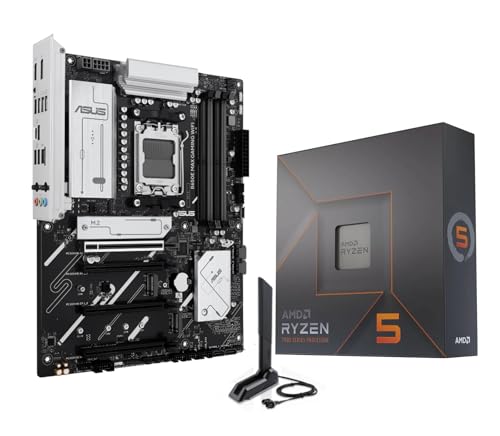
MICRO CENTER AMD Ryzen 5 7600X CPU Processor Bundle ASUS
- ✓ Excellent gaming performance
- ✓ Future-proof PCIe 5.0 support
- ✓ Easy installation features
- ✕ Cooler not included
- ✕ Slightly pricey
| Processor Model | AMD Ryzen 5 7600X |
| Processor Cores/Threads | 6 cores, 12 threads |
| Max Boost Clock | 5.3 GHz |
| Cache Size | 38MB L3 cache |
| Memory Support | DDR5-5200, up to 256GB dual channel |
| Socket Type | AMD Socket AM5 |
This AMD Ryzen 5 7600X CPU bundle with the ASUS B650E MAX GAMING WIFI motherboard has been on my wishlist for a while, and finally getting my hands on it felt like unlocking a new level of gaming potential. The moment I unboxed it, I noticed how sleek the motherboard looks, with its robust build and stylish RGB accents.
The 6-core, 12-thread processor with a boost clock of up to 5.3 GHz immediately caught my attention.
Setting it up was surprisingly straightforward. The pre-mounted I/O shield made installation hassle-free, and the BIOS FlashBack button was a lifesaver for quick updates.
Once powered up, I was impressed by the stability, thanks to the 8+2+1 phase power design and the durable capacitors. Gaming performance was smooth—100+ FPS in popular titles was easily achievable, thanks to the PCIe 5.0 support and DDR5-5200 RAM compatibility.
The motherboard’s cooling solution kept temperatures in check during intense gaming sessions, with heatsinks on VRM and M.2 slots doing their job well. The inclusion of Wi-Fi 6E and Bluetooth v5.3 means you’re ready for fast, reliable wireless connections.
Plus, the customizable Aura Sync RGB lighting adds a nice touch for personalization.
One thing I appreciated was how DIY-friendly this bundle is, with features like BIOS FlashBack and a clear Q-LED for troubleshooting. It’s perfect if you want a future-proof setup that’s easy to upgrade.
Overall, this bundle delivers power, stability, and style—making it a solid pick for gamers and enthusiasts alike.
What Makes a Motherboard CPU Bundle the Best Choice for My Needs?
The best motherboard CPU bundle for your needs will depend on several factors such as performance, compatibility, and features.
- Performance: A good motherboard CPU bundle should provide optimal performance based on your intended usage, whether for gaming, content creation, or general tasks. The latest processors, like AMD Ryzen or Intel Core, often come with higher core counts and clock speeds, which can significantly improve multitasking and overall responsiveness.
- Compatibility: Ensuring that the motherboard and CPU are compatible is crucial. This means checking the socket type of the CPU and the chipset of the motherboard to ensure they work together seamlessly. Also, consider the RAM compatibility in terms of type (DDR4, DDR5) and maximum supported speed.
- Expansion Slots: A robust motherboard should offer multiple expansion slots for future upgrades. This includes PCIe slots for graphics cards and other peripherals, as well as M.2 slots for faster storage solutions. A well-equipped motherboard allows you to scale your system without needing to replace the entire setup.
- Features: Look for features that meet your specific needs, such as built-in Wi-Fi, Bluetooth, or advanced audio capabilities. Some motherboards include RGB lighting and enhanced cooling solutions, which can enhance both aesthetics and performance, especially in overclocking scenarios.
- Price: Budget is a critical consideration when choosing a motherboard CPU bundle. While it may be tempting to go for the most expensive options, it’s essential to find a balance between features and price to ensure you’re getting the best value for your investment.
- Brand Reputation: Opting for well-known brands with positive reviews can provide assurance of quality and reliability. Brands like ASUS, MSI, Gigabyte, and ASRock are often recommended due to their good customer support and warranty policies, which can be beneficial in case of issues down the line.
How Do I Determine Compatibility When Choosing a Motherboard CPU Bundle?
To determine compatibility when choosing a motherboard CPU bundle, you should consider the following factors:
- Socket Type: The socket type on the motherboard must match the CPU’s socket type for them to be compatible.
- Chipset Compatibility: The motherboard’s chipset should support the specific features and capabilities of the CPU.
- Form Factor: Ensure the motherboard’s form factor fits your computer case and that it can accommodate all necessary components.
- RAM Compatibility: Check that the motherboard supports the type and speed of RAM that you intend to use with the CPU.
- Power Supply Requirements: Verify that the motherboard and CPU bundle works with your existing power supply or if you need an upgrade.
- Future Upgrade Potential: Consider the upgrade paths available with the motherboard for future CPU and component enhancements.
Socket Type: Each CPU is designed to fit into a specific socket type on the motherboard, such as LGA 1200 or AM4. If the motherboard and CPU do not share the same socket type, they will not be able to connect, making this a crucial compatibility factor.
Chipset Compatibility: The chipset on the motherboard determines how the CPU and other hardware interact. Different chipsets provide varying levels of support for features such as overclocking, multiple GPUs, and connectivity options, so it’s essential to choose a motherboard with a chipset that complements your CPU.
Form Factor: Motherboards come in various form factors like ATX, Micro-ATX, and Mini-ITX, which dictate their size and layout. Make sure your chosen motherboard fits within your computer case while also providing enough space for expansion cards and cooling solutions.
RAM Compatibility: The motherboard must support the specific type of RAM (e.g., DDR4, DDR5) and its speed (measured in MHz) that is appropriate for your CPU. Incompatible RAM can lead to performance issues or system instability.
Power Supply Requirements: Different CPUs and motherboards have varying power requirements, so it’s important to check the power supply’s wattage and connectors. Ensuring that your power supply can deliver sufficient power is vital for stable operation, especially under load.
Future Upgrade Potential: Consider how easily you can upgrade the CPU or other components in the future. A motherboard with a more modern chipset and support for the latest technologies will offer better longevity and upgrade options as new CPUs and features are released.
What Key Features Should I Look for in a Motherboard CPU Bundle?
When searching for the best motherboard CPU bundle, consider the following key features:
- Compatibility: Ensure that the CPU and motherboard are compatible with each other in terms of socket type and chipset. This is crucial as an incompatible bundle can lead to installation issues and system instability.
- Performance: Look at the specifications of the CPU, such as clock speed, number of cores, and threads, as well as the motherboard’s capabilities, including support for overclocking and memory speeds. A high-performance bundle can significantly enhance your computing experience, particularly for gaming or intensive tasks.
- Expansion Slots: Check for the number and type of expansion slots available on the motherboard, such as PCIe slots for graphics cards and NVMe M.2 slots for SSDs. More slots provide greater flexibility for future upgrades and enhancements.
- Memory Support: Examine the RAM compatibility, including maximum capacity and supported speeds. A motherboard that supports faster and higher-capacity RAM can improve system performance, especially in multitasking and gaming scenarios.
- Connectivity Options: Assess the available ports such as USB, HDMI, and Ethernet. A good motherboard CPU bundle should provide ample and up-to-date connectivity options to accommodate peripherals and networking needs.
- Power Delivery: Consider the power phase design of the motherboard, which impacts stability and overclocking potential. A robust power delivery system is essential for maintaining performance, especially under heavy loads.
- Cooling Solutions: Look for features that support effective cooling, such as heatsinks, fan headers, and thermal management options. Efficient cooling is vital for maintaining optimal temperatures and ensuring system longevity.
- Price-to-Performance Ratio: Evaluate the overall value of the bundle by comparing its price against its performance capabilities. Finding a balance between cost and features is key to getting the best motherboard CPU bundle for your investment.
Why Should I Consider Performance Aspects for Gamers and Content Creators in a Bundle?
Furthermore, gamers and content creators often utilize resource-intensive applications that require optimal thermal management and overclocking capabilities. A well-matched motherboard and CPU bundle enables users to push their hardware to its limits safely, enhancing performance while maintaining system stability. According to a study by AnandTech, systems designed with a focus on compatibility and thermal efficiency yield superior performance in high-stress scenarios, making them ideal for users who prioritize both gaming and content creation.
What Are the Advantages of Buying Bundles Over Individual Components?
Compatibility assurance is crucial in building a computer, as a well-matched motherboard and CPU can prevent potential operational issues and ensure that users get the most out of their components without unforeseen complications.
Convenience plays a key role in the appeal of bundles, allowing shoppers to complete their purchases efficiently without the hassle of locating each part from different vendors or sources.
Time efficiency is another benefit, as purchasing a bundle eliminates the need for extensive research, allowing buyers to focus on other parts of their build or project.
Finally, optimized performance is a significant advantage, as manufacturers design bundles to work seamlessly together, ensuring that users experience stable and enhanced computing power right from the start.
How Can the Price of a Bundle Affect My Overall Build Budget?
- Cost Efficiency: Purchasing a motherboard and CPU as a bundle often comes with a discount compared to buying each component separately. This can free up funds in your budget for other essential parts, such as RAM or a graphics card, enhancing overall system performance.
- Compatibility Assurance: Bundles are typically designed to work well together, eliminating the risk of compatibility issues that can arise when selecting components individually. This can save time and money on potential returns or exchanges for incompatible parts.
- Future Upgrade Considerations: Investing in a well-matched motherboard and CPU can lay a solid foundation for future upgrades. If you choose a bundle that supports newer technologies, you may be able to extend the lifespan of your build without needing to overhaul your entire system.
- Initial Setup Simplification: A bundled package simplifies the selection process, especially for those new to building PCs. It streamlines the decision-making process, allowing you to focus your budget on other critical components or peripherals, thus making it easier to stay within your overall budget.
- Potential for Better Features: Often, bundles are curated to offer better features, such as enhanced cooling solutions or advanced connectivity options. Investing in these features through a bundle can enhance system performance and longevity without significantly increasing your overall build budget.
What Common Mistakes Should I Avoid When Selecting a Motherboard CPU Bundle?
When selecting a motherboard CPU bundle, there are several common mistakes to avoid for optimal performance and compatibility.
- Ignoring Compatibility: It’s crucial to ensure that the motherboard and CPU are compatible with each other, particularly regarding socket types and chipset support. If the motherboard does not support the CPU’s architecture, it can lead to significant performance issues or the need for a complete replacement.
- Overlooking RAM Compatibility: Many users forget to check whether the motherboard supports the type and speed of RAM they intend to use. Mismatched RAM can cause system instability, and not all motherboards can utilize the latest high-speed RAM, which can bottleneck overall performance.
- Neglecting Future Upgrade Paths: Selecting a motherboard with limited expansion options can restrict future upgrades. It’s wise to consider the number of PCIe slots, RAM slots, and the potential for CPU upgrades to ensure the system remains relevant for years to come.
- Choosing Based on Price Alone: While budget is important, focusing solely on the price can lead to compromises in quality or features. Investing in a reliable motherboard CPU bundle with good reviews can save money in the long run by providing better performance and durability.
- Failing to Research Features: Not considering the specific features that may be necessary for your needs can result in dissatisfaction. Features like built-in Wi-Fi, Bluetooth, or advanced cooling solutions can significantly enhance your experience, especially for gaming or resource-intensive tasks.
- Overlooking Power Requirements: Each CPU and motherboard combination has specific power requirements that must be met. Failing to consider the wattage and power supply connections needed can lead to system failures or inadequate performance.