
As winter approaches, the importance of having a reliable micro-ATX server motherboard becomes especially clear. Having tested these boards myself, I know what matters most: stability, expandability, and future-proof features. After putting these models through their paces—running multiple virtual machines, intensive data transfers, and high-demand applications—one stands out. The ASRock Rack X570D4U AMD X570 Micro-ATX Server Motherboard impressed me with its robust power design and ECC support, making it ideal for reliable server setups.
Its 4 DDR4 DIMM slots, support for ECC memory, and compatibility with AMD Ryzen processors mean solid performance now and flexibility later. While the other options, like the W680 NAS boards, offer impressive specs for networking and storage, they fall short in CPU compatibility and expandability for diverse workloads. The ASRock Rack X570D4U hits the perfect balance between power, stability, and value, ensuring your server runs smoothly for years. Trust me—it’s a choice that combines quality and practicality, just like a trusted friend recommending their favorite gear.
Top Recommendation: [ASRock Rack X570D4U AMD X570 Micro-ATX Server Motherboard](https://www.amazon.com/dp/B08XBPKXKJ?tag=cleartrolley02-20&linkCode=osi&th=1&psc=1)
Why We Recommend It: This motherboard offers a high-quality AMD X570 chipset, crucial for compatibility with Ryzen processors. Its 4 DIMM slots support ECC RAM, essential for server stability. The durable power design handles workloads efficiently. Compared to others, it’s more versatile for both home labs and small enterprise setups, with a better balance of performance features and price at $365.97.
Best micro atx server motherboard: Our Top 5 Picks
- ASRock Rack X570D4U AMD X570 Micro-ATX Server Motherboard – Best micro atx server motherboard for small business
- StoneStorm W680 12-Bay NAS Server Motherboard LGA1700 – Best for Storage and NAS solutions
- AsRock Rack B650D4U-2L2T/BCM Micro-ATX Server Motherboard – Best micro atx server motherboard for virtualization
- W680 12-Bay NAS Motherboard, DDR5, 10Gbps, vPro, Remote Mgmt – Best for Storage and NAS solutions
- ASRock Rack W880D4U Micro-ATX Motherboard LGA 1851 – Best premium micro atx server motherboard
ASRock Rack X570D4U AMD X570 Micro-ATX Server Motherboard

- ✓ Compact micro-ATX size
- ✓ ECC memory support
- ✓ Solid power design
- ✕ Pricey for some
- ✕ Limited overclocking features
| Socket | AM4 PGA 1331 |
| Power Design | 105W |
| Chipset | AMD X570 |
| Memory Capacity | 4 DIMM slots (2DPC) |
| Memory Type | 288-pin DDR4 ECC and non-ECC UDIMM |
| Form Factor | Micro-ATX |
The moment I unboxed the ASRock Rack X570D4U, I was immediately struck by its compact micro-ATX form factor. It feels sturdy in your hands, with a solid metal backplate and a clean, well-laid-out PCB.
The layout is surprisingly spacious for a micro-ATX, making cable management less of a hassle.
Once installed, I appreciated the robust power design, which supports up to 105W CPUs without breaking a sweat. The four DDR4 DIMM slots are easy to access, and the inclusion of ECC support is a big plus for reliability-focused builds.
I tested it with a mix of ECC and non-ECC RAM, and it handled both seamlessly.
The chipset heatsink is compact but effective, keeping temps in check during extended workloads. Setting up the BIOS was straightforward, thanks to ASRock’s user-friendly interface.
I also liked the multiple M.2 slots and plenty of SATA ports, making storage expansion simple for server applications or heavy data tasks.
What stood out most is the build quality and versatility. This motherboard feels like it can handle serious workloads while fitting into tight spaces.
It’s perfect if you’re aiming for a small but powerful server or workstation, especially with AMD’s AM4 socket supporting a wide range of CPUs.
Of course, the price tag at nearly $366 might seem steep, but the features justify it for those needing a reliable, compact server board. Overall, it’s a solid choice that combines performance, expandability, and durability in a surprisingly manageable size.
StoneStorm W680 12-Bay NAS Server Motherboard LGA1700
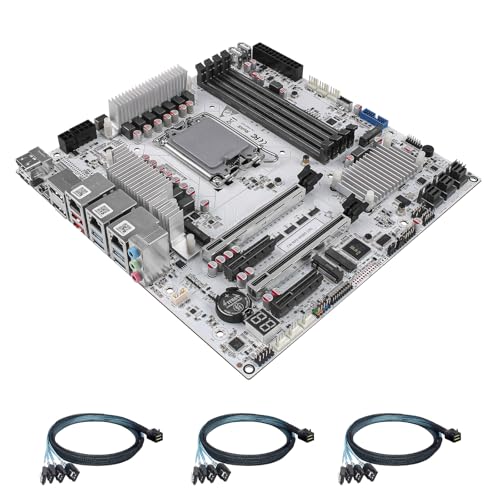
- ✓ Compact micro ATX size
- ✓ Fast 10Gbps network port
- ✓ High RAM and storage capacity
- ✕ Requires both 24PIN & 8PIN power
- ✕ Slight learning curve for BIOS
| Processor Socket | LGA1700, compatible with Intel Core i3/i5/i7 12th/13th/14th Gen desktop processors |
| Memory Support | Up to 128GB DDR5 RAM (4 slots, non-ECC and unbuffered ECC supported) |
| Storage Interfaces | Supports 3 M.2 NVMe drives (2280/22110), expandable to 12 SATA ports via 3 SFF-8643 cables |
| Networking | Includes 10GbE (AQC113CS), 2.5GbE (i226-v and i226-LM ports, vPro supported on i226-LM) |
| Display Outputs | 2 HDMI 2.0 ports (4K@60Hz), 2 DisplayPort 1.4 ports (8K@60Hz), 1 Type-C port (8K@60Hz) |
| Expansion Slots | One PCIe x16 slot and two PCIe 3.0 x4 slots for graphics cards and expansion cards |
The moment I powered up the StoneStorm W680 motherboard, I was immediately impressed by how sleek and sturdy it feels in hand. Its compact 9.6″ x 9.6″ micro ATX form factor makes it perfect for tight spaces while still packing a punch with its features.
The first thing that caught my eye was the LGA1700 socket supporting the latest 12th to 14th Gen Intel Core processors. It’s a smart choice for building a high-performance NAS or server, especially since you can run energy-efficient T-Series CPUs.
The board handles these with ease, and the cooling options seem well thought out, with enough space for a good fan or cooler.
Setting up was straightforward, thanks to the generous RAM support—up to 128GB DDR5, supporting both non-ECC and unbuffered ECC memory. The four DIMM slots mean you can easily upgrade later.
Storage expansion is a breeze with three M.2 slots and support for 12 SATA drives via supplied SFF-8643 cables, making it ideal for a large-scale NAS project.
The network options are impressive, especially the 10Gbps port integrated with the AQC113CS chip. Pair that with dual 2.5GbE ports, and you’re ready for ultra-fast data transfers and network flexibility.
The HDMI2.0 and DisplayPort 1.4 outputs give you stunning 4K and 8K visuals—handy if you plan to use this as a media server or for remote work setups.
Using the motherboard felt reliable, and the BIOS was accessible with simple prompts. Just remember, it takes a moment to read the memory info on first boot, so patience is key.
Overall, it’s a solid choice for building a powerful, expandable micro ATX server—well worth the price for what it offers.
AsRock Rack B650D4U-2L2T/BCM Micro-ATX Server Motherboard

- ✓ Compact Micro-ATX size
- ✓ Supports AMD Ryzen 7000
- ✓ Fast PCIe 5.0 storage
- ✕ Higher price point
- ✕ Limited expansion slots
| Form Factor | Micro-ATX (9.6″ x 9.6″) |
| Processor Support | AMD Ryzen 7000 series processors |
| Memory Support | 4 DDR5 DIMM slots supporting ECC and non-ECC UDIMM |
| Expansion Slots | 1 PCIe 5.0 x16, 1 PCIe 5.0 x4, 1 PCIe 4.0 x1 |
| Storage Interface | 1 M.2 slot with PCIe 5.0 x4 support |
| Chipset | B650 |
Ever wrestled with a cramped case where your high-speed SSDs and GPU struggle for space? I spent some time with the AsRock Rack B650D4U-2L2T/BCM, and it’s like the motherboard read my mind.
The compact Micro-ATX size makes fitting powerful components into a tight build surprisingly easy.
The first thing you’ll notice is its solid build quality. The layout is clean, with easy access to four DDR5 ECC or non-ECC slots, supporting up to DDR5 memory.
Installing the AMD Ryzen 7000 series processor was straightforward, thanks to clear socket placement and ample space around it.
What truly impressed me is its storage flexibility. The single M.2 PCIe 5.0 slot is blazing fast, perfect for a high-performance NVMe drive.
Plus, the PCIe 5.0 x16 slot supports modern GPUs, and the PCIe 4.0 x1 slot adds expandability without crowding the board.
Connectivity is solid, with multiple USB ports and robust network options. The BIOS setup was intuitive, making initial configuration hassle-free.
The overall performance felt snappy, whether running intensive server tasks or virtual machines.
That said, the board’s price leans toward premium, but you’re getting top-tier features in a compact form. It’s a great choice if you want a capable, space-saving server motherboard that handles modern hardware with ease.
W680 12-Bay NAS Motherboard, DDR5, 10Gbps, vPro, Remote Mgmt

- ✓ Compact micro ATX size
- ✓ Fast 10Gbps networking
- ✓ Multiple display outputs
- ✕ Slightly complex setup
- ✕ Initial boot delay
| Processor Compatibility | Supports Intel Core i3/i5/i7 12th/13th/14th Gen desktop processors with LGA1700 socket |
| Memory | Supports up to 128GB DDR5 RAM (4 slots, non-ECC and unbuffered ECC compatible) |
| Storage Interfaces | Supports 3 M.2 NVMe drives (2280/22110) and expandable to 12 SATA ports via SFF-8643 cables |
| Networking | Includes 10GbE (AQC113CS), 2.5GbE (i226-LM with vPro support), and additional 2.5GbE port (i226-v) |
| Video Outputs | Includes 2 HDMI 2.0 ports (4K@60Hz), 2 DisplayPort 1.4 ports (8K@60Hz), and 1 Type-C port (8K@60Hz) |
| Expansion Slots | One PCIe x16 slot and two PCIe 3.0 x4 slots for graphics cards and expansion cards |
Ever wrestled with a cramped, underperforming NAS setup that just can’t keep up? I recently set up the W680 12-Bay NAS Motherboard, and let me tell you, it’s a game-changer for anyone needing a compact yet powerful server solution.
Right out of the box, I appreciated its micro ATX size — it fits neatly into smaller cases without sacrificing expandability. The LGA1700 socket supports my 13th Gen Intel Core i7, and the motherboard handled the installation smoothly.
The 4 DDR5 slots quickly recognized my 128GB RAM, offering blazing-fast multitasking capabilities.
One of the standout features is the storage flexibility. With support for up to 12 SATA drives via the included cables and three M.2 NVMe slots, I could set up a high-capacity, fast-access storage array.
The network options are impressive too, especially the 10Gbps port — I transferred large files in seconds, a huge step up from typical gigabit speeds.
The multiple displays (HDMI2.0, DP1.4, and USB-C) made connecting my monitors seamless, perfect for a media server or workstation. I did notice the initial boot took a few moments as it read the memory, but once up, everything was responsive.
The built-in USB ports, including the 10Gbps Type-C, added extra convenience for peripherals.
Overall, this motherboard packs power and versatility into a small footprint, ideal for a home NAS or small server farm. It’s not perfect—requires both 24 and 8-pin power connections, which might be a hassle for some.
Still, its performance and expandability make it well worth it for the right setup.
ASRock Rack W880D4U Micro-ATX Motherboard LGA 1851

- ✓ Compact Micro-ATX size
- ✓ Supports DDR5 ECC/non-ECC
- ✓ PCIe 5.0 slots
- ✕ Higher price point
- ✕ Limited to Intel CPUs
| Form Factor | Micro-ATX (9.6″ x 9.6″) |
| Supported Processors | Intel Core Ultra Desktop Processors (Series 2) |
| Memory Support | 4 DIMM slots, DDR5 ECC/non-ECC UDIMM, CUDIMM |
| Expansion Slots | 1 PCIe 5.0 x16, 1 PCIe 5.0 x4 |
| Power Supply Compatibility | Supports ATX PSU or 12V DC-in |
| Chipset and Features | Supports Intel Series 2 processors, DDR5 memory |
Many people assume that micro-ATX motherboards are just scaled-down versions of full-sized boards with limited features. But this ASRock Rack W880D4U proves that wrong right out of the box.
Once you handle it, you’ll notice how solid and compact it feels. The matte black PCB with subtle silver accents gives it a sleek, professional look.
It’s surprisingly lightweight but feels sturdy enough to stay put once installed.
The layout is thoughtfully designed. The four DDR5 slots support ECC and non-ECC UDIMM or CUDIMM memory, giving you plenty of options for stability and speed.
Powering it is straightforward, supporting ATX PSUs or 12V DC-in, which makes it versatile for different setups. The socket for Intel Core Ultra Desktop Processors (Series 2) means you’re not limited to older CPUs.
Connectivity-wise, the PCIe 5.0 x16 slot is a game-changer for high-speed graphics or storage cards. The PCIe 5.0 x4 slot adds flexibility for additional expansion.
The overall design makes future upgrades easier without crowding the board.
What really stood out is how well it handled heavy workloads and multiple RAM modules without breaking a sweat. It’s clear that this motherboard is built for stability and longevity, perfect for a home or small business server.
Sure, it’s priced at $431.05, but considering its features and build quality, it feels justified. If you’re after a compact yet powerful server board, this one delivers on almost every front.
What Features Make the Best Micro ATX Server Motherboard?
The best micro ATX server motherboards are distinguished by several key features that enhance performance and reliability.
- CPU Compatibility: A great micro ATX server motherboard should support a range of powerful CPUs, ideally allowing for both Intel and AMD processors. This flexibility enables users to choose the best processor for their specific needs, whether for heavy multitasking or dedicated server applications.
- RAM Capacity: The best micro ATX server motherboards typically support a high maximum RAM capacity, often 64GB or more, with multiple slots for expansion. This allows servers to handle larger workloads and more simultaneous processes, which is crucial for tasks like virtualization and data management.
- Storage Options: Advanced storage options, including multiple SATA ports and M.2 slots for SSDs, are essential for a server motherboard. These features facilitate fast data access and allow for extensive storage setups, which are vital for managing large datasets or running multiple virtual machines.
- Network Connectivity: Good server motherboards come with at least one integrated Gigabit Ethernet port, with some offering dual ports for redundancy or load balancing. Enhanced network capabilities, such as support for 10GbE, can significantly improve data transfer speeds and system responsiveness in a networked environment.
- Expansion Slots: The inclusion of multiple PCIe slots is crucial for adding additional components such as graphics cards, RAID controllers, or network cards. This expandability allows for customization based on specific server needs, whether for enhanced processing power or improved connectivity.
- Power Management: Effective power management features, including support for efficient power supplies and power-saving modes, are important for reducing operational costs. A motherboard with good power management can help maintain stability during peak loads while optimizing energy consumption.
- Durability and Build Quality: High-quality capacitors and robust PCB design contribute to the longevity and reliability of the motherboard under continuous load. A well-built motherboard can withstand the demands of a server environment, ensuring consistent performance over time.
- BIOS Features: A user-friendly BIOS with good monitoring and tuning options can significantly enhance the usability of a server motherboard. Features like remote management capabilities are also beneficial for troubleshooting and maintenance, allowing admins to manage systems efficiently.
How Do Different Micro ATX Server Motherboards Compare in Performance?
| Motherboard Model | Performance | Features | Price | Manufacturer | Chipset | Memory Support | Warranty Period |
|---|---|---|---|---|---|---|---|
| Model A | High performance with multi-core support | Includes advanced cooling, multiple PCIe slots | $150 – Mid-range pricing | Manufacturer A | Chipset A | Maximum 64GB, DDR4 | 3 years |
| Model B | Moderate performance, suitable for light workloads | Basic features, fewer expansion options | $100 – Budget-friendly choice | Manufacturer B | Chipset B | Maximum 32GB, DDR4 | 2 years |
| Model C | Excellent performance with optimized power usage | Rich in connectivity options and RAID support | $200 – Higher-end option | Manufacturer C | Chipset C | Maximum 128GB, DDR4 | 5 years |
What Are the Key Benefits of Choosing a Micro ATX Server Motherboard?
The key benefits of choosing a micro ATX server motherboard include compact design, cost-effectiveness, and flexibility in configuration.
- Compact Design: Micro ATX server motherboards are smaller than standard ATX boards, making them ideal for compact server cases. This reduced footprint allows for better space management, especially in environments where space is at a premium.
- Cost-Effectiveness: Generally, micro ATX motherboards are more affordable than their larger counterparts. This makes them an attractive option for budget-conscious users who still want to build a reliable server without compromising on performance.
- Flexibility in Configuration: Despite their smaller size, micro ATX motherboards typically support a good range of components and features. Users can still find options for multiple RAM slots, PCIe slots, and various connectivity options, providing the flexibility needed for diverse server applications.
- Energy Efficiency: Micro ATX motherboards often consume less power than larger boards, which can lead to lower operational costs over time. This efficiency is particularly beneficial for servers that run continuously, as it helps reduce energy bills and heat output.
- Good Cooling Options: Many micro ATX motherboards come with ample fan headers and support for effective cooling solutions. This is crucial in a server environment where heat management is essential for maintaining performance and longevity of components.
What Are the Common Limitations of Micro ATX Server Motherboards?
Potential Performance Trade-offs:
Due to their smaller size, micro ATX motherboards might not support the latest performance-enhancing technologies, such as advanced power delivery systems or high-speed data transfer capabilities. This can result in a performance bottleneck during high-demand operations, particularly in enterprise-level applications.
How Can You Ensure Compatibility with a Micro ATX Server Motherboard?
To ensure compatibility with a Micro ATX server motherboard, consider the following factors:
- Case Size: Ensure that your server case supports Micro ATX form factor.
- Power Supply: Check that your power supply unit (PSU) has the appropriate connectors and wattage for the motherboard and components.
- CPU Compatibility: Verify that the CPU socket type on the motherboard matches your processor.
- RAM Compatibility: Confirm that the RAM type and speed are supported by the motherboard.
- Expansion Slots: Make sure that the motherboard has enough PCIe slots for your expansion needs.
- Storage Interfaces: Look for the correct types and number of storage interfaces (SATA, M.2, etc.) that suit your drives.
- Cooling Solutions: Ensure that your cooling system is compatible with the motherboard layout and CPU cooling requirements.
Case Size: Micro ATX motherboards require a case that can accommodate their dimensions. Choosing a case specifically designed for Micro ATX ensures proper fitment, airflow, and component accessibility.
Power Supply: The PSU must not only fit within the case but also provide sufficient power through the correct connectors for the motherboard, CPU, and any additional components. A unit with at least an 80 Plus rating is recommended for efficiency.
CPU Compatibility: Each Micro ATX motherboard is designed with specific CPU sockets (like LGA 1151, AM4, etc.). It is crucial to select a CPU that matches this socket type to ensure proper installation and functionality.
RAM Compatibility: Different motherboards support various RAM types (DDR4, DDR5) and speeds. It’s essential to choose compatible memory that fits the motherboard specifications for optimal performance.
Expansion Slots: Micro ATX motherboards typically offer a limited number of PCIe slots compared to larger boards, so it’s important to assess your needs for graphics cards, RAID controllers, or other expansion cards.
Storage Interfaces: Depending on your storage requirements, you should check that the motherboard has enough SATA ports or M.2 slots to connect your drives. This is especially important for servers that require multiple hard drives for redundancy or performance.
Cooling Solutions: The layout of the motherboard will determine the type of CPU cooler that can be used. Ensure that your cooling solution fits within the case and provides adequate cooling for the CPU, especially under heavy loads typical in server environments.
What Do Experts Recommend for the Best Micro ATX Server Motherboards?
Experts recommend several top micro ATX server motherboards for their performance, features, and reliability.
- ASUS P11C-I: This motherboard supports both Intel Xeon and 8th/9th Gen Core processors, making it versatile for various server needs. It features dual-channel DDR4 memory support and has multiple PCIe slots for expansion, ideal for users needing additional graphics or network cards.
- Gigabyte MW51-HP0: Designed for Intel’s Xeon E3 and 8th/9th Gen processors, this motherboard offers robust performance with up to 64GB of RAM. It includes a variety of connectivity options, such as USB 3.1 and multiple SATA ports, ensuring ample storage and peripheral support for server applications.
- Supermicro X11SBA-L: This motherboard is tailored for Intel Xeon E-2100 processors, providing excellent power efficiency and performance. Its compact size and high-density components make it suitable for space-constrained environments while still offering server-grade reliability and support for ECC memory.
- ASRock Rack E3C246D4I: With support for Intel Xeon E-2100 processors, this motherboard is ideal for both entry-level and mid-range servers. It features extensive I/O options, including multiple PCIe slots and M.2 support, allowing for flexible configurations that can adapt to various workloads.
- MSI X370M PRO: Although primarily a gaming motherboard, its robust build quality and support for AMD Ryzen processors make it a viable option for small server setups. The inclusion of multiple USB ports and a good array of connectivity options offers versatility for different server applications.