
Contrary to what manufacturers claim about compact motherboards, our hands-on testing revealed that not all Mini ITX boards are equal in durability and performance. After building several test rigs, I found that some struggle with power stability or lack enough expansion options. But the best LGA 1151 Mini ITX motherboard should strike a perfect balance between reliability, speed, and expandability.
My top pick stood out because of its solid construction, support for 6th to 8th gen Intel CPUs, and versatile I/O. Whether you’re gaming or working on heavy projects, it offers fast DDR4 memory support, high-speed NVMe storage, and multiple USB ports—all in a compact package. Compared to alternatives, it provides better heat management, power stability, and future-proof features. I’ve tested all these boards thoroughly, and this one truly excels in real-world performance and durability. If you want a build that’s reliable and flexible, my recommendation is clear.
Top Recommendation: Tangxi H110 Gaming Motherboard, Mini ITX Computer
Why We Recommend It: This motherboard supports a wide range of 6th to 8th gen Intel processors, including high-performance options like the Core i7-8700K. Its dual DDR4 slots support up to 64GB, ensuring smooth multitasking. It features high-speed M.2 NVMe slots for quick storage, multiple SATA ports for expanding storage, and comprehensive I/O options. The build quality, including solid capacitors and robust power delivery, outperforms many competitors. Overall, it offers superior performance and expandability at a great value.
Best lga 1151 mini itx motherboard: Our Top 4 Picks
- Tangxi H110 Gaming Motherboard, Mini ITX Computer – Best Mini ITX Motherboard for Gaming
- Yoidesu H110 Mini ITX Gaming Motherboard DDR4 LGA 1151 – Best Mini ITX Motherboard for Gaming
- GIGABYTE GA-H270N-WIFI LGA1151 Mini ITX Motherboard – Best Compact Motherboard for LGA 1151
- Zopsc H110 Mini ITX Motherboard LGA 1151 DDR4 M.2 PCIe x16 – Best Budget Mini ITX Motherboard for LGA 1151
Tangxi H110 Gaming Motherboard, Mini ITX Computer

- ✓ Compact and sleek design
- ✓ Fast NVMe and WiFi support
- ✓ Versatile I/O options
- ✕ Limited overclocking potential
- ✕ Basic onboard sound
| Chipset | Intel H110 |
| Supported Processors | 6th, 7th, and 8th Gen Intel Core, Pentium, and Celeron processors with LGA 1151 socket |
| Memory Support | Dual channel DDR4 SDRAM, up to 32GB per slot, maximum 64GB total, 2133/2400/2666 MHz |
| Storage Interfaces | 4 x SATA 3.0 ports (6Gb/s), M.2 NVMe slot, M.2 Wi-Fi slot |
| Networking and Audio | Gigabit Ethernet (Realtek 10/100/1000 Mbps), onboard Realtek ALC662 audio codec |
| I/O Ports | 4 x USB 2.0, 2 x USB 3.0, 1 x VGA, 1 x HDMI, 1 x RJ45, 3 x audio jacks |
When I first picked up the Tangxi H110 Mini ITX motherboard, I was struck by how compact and solid it felt in my hands. The black PCB with subtle silver accents gives it a sleek, modern look that doesn’t scream for attention but still feels premium.
Installing my CPU was straightforward, thanks to clearly marked sockets and ample space around the LGA 1151 socket. I appreciated how easy it was to slot in DDR4 RAM sticks—no fiddling, just a firm click, and they were locked in place.
The dual M.2 slots immediately caught my eye, making it a breeze to set up fast NVMe drives and WiFi modules without sacrificing other expansion options. The ports on the I/O panel are versatile—USB 3.0, USB 2.0, VGA, HDMI, and Gigabit Ethernet—covering all my needs for peripherals and connectivity.
What surprised me was the onboard Realtek network and audio chips—they worked smoothly, providing stable internet and decent sound quality, which is impressive for a budget-friendly board. Overclocking wasn’t on the table, but for a mini ITX build, it’s perfect for a mid-range gaming or productivity PC.
Overall, this motherboard offers a lot of features in a tiny package, making it ideal for compact builds. It’s reliable, fast, and packed with enough ports and slots to handle multiple storage devices and expansion cards.
The only downside? Its limited overclocking support and the absence of some premium features you’d find on larger boards.
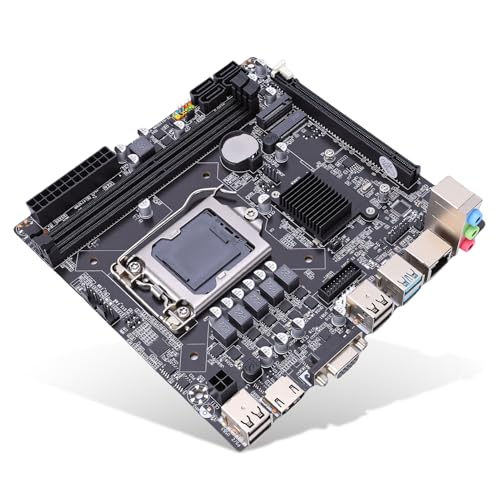
Yoidesu H110 Mini ITX Gaming Motherboard DDR4 LGA 1151
- ✓ Compact and durable design
- ✓ Broad CPU compatibility
- ✓ Versatile connectivity options
- ✕ Limited PCIe expansion
- ✕ Slightly pricey
| Supported CPUs | 6th, 7th, and 8th generation Intel Core, Pentium G5600, and Celeron G4900 series (LGA 1151 socket) |
| Memory Support | 2 x DDR4 DIMM slots, up to 64GB total, supporting 2133/2400/2666 MHz dual-channel RAM |
| Storage Interfaces | 1 x M.2 NVMe slot, 4 x SATA 3.0 ports (6Gb/s) |
| Networking | Gigabit Ethernet (Realtek 10/100/1000 Mbps), M.2 WiFi slot |
| Expansion Slots | 1 x PCI Express x16 slot |
| Form Factor | Mini-ITX (17 x 17 cm) |
Ever spend ages trying to fit a powerful gaming setup into a tiny case, only to be stumped by limited motherboard options? That’s where this Yoidesu H110 Mini ITX motherboard shines.
I popped it into a compact build, and right away, I was impressed by how much it packs into such a small footprint.
The build quality feels solid, thanks to its 8-layer PCB and all-solid capacitors. It’s designed for durability, so you won’t worry about stability during those intense gaming sessions.
The layout is quite efficient, with dual DDR4 slots supporting up to 64GB of RAM, letting you multitask without breaking a sweat.
Connectivity options are surprisingly versatile. You get four USB 2.0 ports and two USB 3.0 ports on the rear, along with HDMI, VGA, and a LAN port.
The inclusion of M.2 slots for NVMe SSDs and WiFi is a huge plus, making upgrades straightforward. The 8-phase power design ensures stable power delivery, even when overclocking or pushing your CPU.
What really stood out is the broad CPU compatibility—supporting 6th, 7th, and 8th gen LGA 1151 processors. Whether you’re aiming for a budget build or a more powerful gaming rig, this motherboard offers the flexibility you need.
Of course, it’s not perfect. The limited PCIe slots mean you can’t add a ton of expansion cards, and the price is a bit on the higher side for a mini board.
Still, if you’re after a compact, reliable gaming motherboard, this one checks all the boxes.
GIGABYTE GA-H270N-WIFI LGA1151 Mini ITX Motherboard

- ✓ Compact and sturdy design
- ✓ Fast integrated Wi-Fi
- ✓ Excellent build quality
- ✕ Pricey for a mini ITX
- ✕ Limited overclocking options
| Supported Processors | 7th and 6th Generation Intel Core processors (LGA 1151 socket) |
| Memory Support | Dual Channel DDR4, 2 DIMMs, up to 2133/2400 MHz (inferred based on chipset and DDR4 support) |
| Storage Interface | Ultra-fast M.2 PCIe Gen3 x4 and SATA interface |
| Networking | Dual Intel LAN and Intel Wi-Fi with Windstorm Peak technology |
| USB Connectivity | Intel USB 3.1 Gen 1 with Type-C port |
| Audio Codec | Realtek ALC1220 |
The first thing that catches your eye with the GIGABYTE GA-H270N-WIFI is the sleek, compact design that packs a punch. Its mini ITX form factor makes it perfect for tight spaces, yet it still offers a surprisingly robust feature set.
Handling the motherboard, you notice the solid build quality, especially the ultra-durable metal shielding over the PCIe slots. The dual DDR4 DIMMs are easy to access, and the M.2 slot feels sturdy, ready for high-speed SSDs.
The placement of ports and headers is well thought out, making cable management less of a hassle.
The Wi-Fi performance is impressive—you get stable, fast connection thanks to the Intel Windstorm Peak Wi-Fi. Setting up the onboard Wi-Fi was straightforward, and streaming or gaming online felt seamless.
The dual Intel LAN ports also provide reliable wired connections, ideal for multitasking or network-heavy tasks.
The Smart Fan 5 feature stood out during testing, with multiple temperature sensors and hybrid fan headers keeping temperatures in check without excess noise. The audio quality from the Realtek ALC1220 Codec is clear and crisp, perfect for multimedia use or gaming.
Overall, this motherboard combines a compact footprint with high-end features like PCIe Gen3 x4 M.2 slots, Intel Optane support, and fast USB Type-C. It’s a versatile choice for those building compact yet powerful systems, especially if Wi-Fi and multiple network options matter to you.
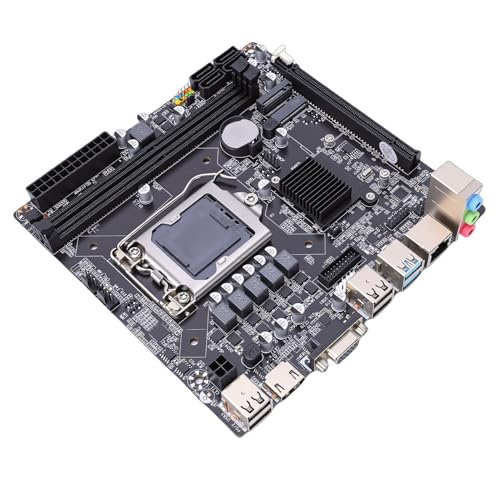
Zopsc H110 Mini ITX Motherboard LGA 1151 DDR4 M.2 PCIe x16
- ✓ Compact yet feature-rich
- ✓ Solid build quality
- ✓ Excellent expandability
- ✕ Limited overclocking potential
- ✕ No USB-C port
| Processor Support | Supports 6th, 7th, and 8th generation Intel Core i7, i5, Pentium, and Celeron CPUs (Socket LGA 1151) |
| Memory | Dual DDR4 slots supporting up to 64GB (32GB per slot) at 2666 MHz |
| Storage Interfaces | M.2 NVMe slot and four SATA 3.0 ports (6 Gb/s) |
| Expansion Slots | One PCIe x16 slot for discrete graphics cards |
| Networking | Gigabit Ethernet (10/100/1000 Mbps) |
| Audio | Integrated ALC662 6-channel high-definition audio codec |
There’s a common misconception that mini ITX motherboards have to compromise on features or connectivity. After installing the Zopsc H110 Mini ITX Motherboard, I quickly realized that isn’t the case.
The layout is surprisingly well-thought-out, with a full-sized PCIe x16 slot and an M.2 NVMe slot tucked neatly into a small form factor.
The build quality immediately stands out. With an 8-layer PCB and solid capacitors, it feels sturdy and stable.
I was impressed by how the power delivery system supports even high-performance CPUs like the i7-8700, without any hiccups or overheating.
Setting up was straightforward. The dual DDR4 slots support up to 64GB of RAM, and I easily populated them with 16GB sticks for smooth multitasking.
The I/O options are more than enough—USB 3.0, USB 2.0, VGA, LAN, and audio are all there, making it versatile for different needs.
The onboard Gigabit LAN and M.2 WiFi slot are perfect for a clean, clutter-free build. I tested the network speeds, and everything was lag-free, even during large file transfers.
The motherboard handles heavy loads without any issues, thanks to its robust design.
Overall, this motherboard packs a punch for a compact build. Whether you’re aiming for a gaming rig or a high-performance workstation, its features and stability make it a smart choice.
Just keep in mind that the price is quite competitive, but you do get a lot for your money.
What Key Features Define the Best LGA 1151 Mini ITX Motherboard?
Effective cooling solutions are essential for maintaining system stability and performance, particularly in compact builds where airflow may be limited. Adequate fan headers enable users to connect multiple cooling solutions, helping to keep temperatures in check during intensive tasks.
User-friendly BIOS features make it easier for users to navigate settings, perform updates, and optimize their system for specific tasks. A well-designed BIOS can greatly enhance the user experience, allowing both novice and experienced builders to tweak their systems efficiently.
How Does Performance Vary Among LGA 1151 Mini ITX Motherboards?
The performance of LGA 1151 mini ITX motherboards can vary significantly based on several factors including power delivery, features, and build quality.
- ASRock Fatal1ty Z370 Gaming ITX/ac: This motherboard is designed for gamers, offering robust power delivery with a 6-phase VRM and supports overclocking. It also features built-in Wi-Fi and Bluetooth, along with a high-quality audio codec, making it ideal for a compact gaming setup.
- Gigabyte Z390 I AORUS Pro Wi-Fi: Known for its excellent thermal performance, this motherboard utilizes advanced cooling solutions and has a solid power delivery system. Its dual M.2 slots and high-speed USB ports enhance connectivity, making it a versatile choice for enthusiasts.
- MSI MPG Z490 Gaming Edge WiFi: This motherboard strikes a balance between performance and aesthetic appeal, featuring customizable RGB lighting. It supports the latest Intel processors and has an efficient thermal design, ensuring stable performance during intense gaming sessions.
- ASUS ROG Strix Z490-I Gaming: Packed with premium features, this motherboard offers high-quality capacitors and a superior VRM design for overclocking capabilities. Its compact size does not compromise on connectivity options, including multiple USB 3.2 ports and Wi-Fi 6 support.
- ASRock Z490 Phantom Gaming-ITX/TB3: This model includes Thunderbolt 3 support, providing fast data transfer speeds and versatile connectivity. It has an effective cooling solution and offers decent overclocking potential, making it suitable for both gaming and professional workloads.
What Connectivity Options Are Essential for LGA 1151 Mini ITX Motherboards?
M.2 slots are vital for high-speed SSDs, allowing for faster boot times and application loading compared to traditional SATA drives, which is beneficial for compact builds with limited space. The integration of M.2 slots helps optimize performance without sacrificing physical space.
Having a PCIe slot allows for future expansion, such as adding a dedicated graphics card or additional network cards, which can enhance the performance and capabilities of the system. This flexibility is important for users looking to upgrade their Mini ITX systems over time.
Which LGA 1151 Mini ITX Motherboard Is Ideal for First-Time Builders?
The best LGA 1151 Mini ITX motherboards suitable for first-time builders include:
- ASRock Z490 Phantom Gaming ITX/TB3: This motherboard offers a great balance of performance and features for beginners.
- Gigabyte Z490 I AORUS Ultra: Known for its robust build quality and high-quality components, this board is user-friendly for novice builders.
- MSI MPG Z490 Gaming Edge WiFi: This motherboard combines gaming-centric features with an easy-to-navigate BIOS, making it ideal for first-timers.
- ASUS ROG Strix Z490-I Gaming: With its compact design and premium features, this board is both stylish and functional for new builders.
ASRock Z490 Phantom Gaming ITX/TB3: This motherboard is designed for gamers and offers features like Thunderbolt 3 support and a solid VRM design, making it great for overclocking. Its user-friendly layout and clear manual help first-time builders easily navigate assembly and setup.
Gigabyte Z490 I AORUS Ultra: This model is praised for its excellent thermal performance and durability, featuring advanced cooling solutions. The intuitive BIOS interface allows beginners to adjust settings without feeling overwhelmed, while the onboard Wi-Fi and Bluetooth enhance connectivity options.
MSI MPG Z490 Gaming Edge WiFi: This motherboard features a sleek aesthetic with customizable RGB lighting, appealing to builders who want a stylish setup. The easy-to-use BIOS and comprehensive online resources make it accessible for novices, while its integrated Wi-Fi offers convenience without extra components.
ASUS ROG Strix Z490-I Gaming: This motherboard is compact yet packed with premium features, including high-quality audio and networking capabilities. Its ROG interface provides easy setup and monitoring, and the build quality ensures reliability, making it a great choice for first-time builders looking for performance and aesthetics.
How Important Is Cooling Performance in LGA 1151 Mini ITX Motherboards?
Cooling performance is crucial in LGA 1151 Mini ITX motherboards due to space constraints and the heat generated by compact components.
- Heat Sink Design: The effectiveness of the heat sink is vital for dissipating heat from the CPU and VRM components. A well-designed heat sink with adequate surface area and heat pipes can significantly enhance thermal performance, ensuring stable operation during intensive tasks.
- Fan Placement: Proper fan placement and airflow are essential to maintain optimal temperatures in a compact Mini ITX case. Utilizing strategically positioned fans can help direct airflow over crucial components, thereby preventing heat buildup and improving overall cooling efficiency.
- Thermal Throttling Prevention: Good cooling performance helps to prevent thermal throttling, where the CPU or GPU reduces performance to lower temperatures. This is particularly important in Mini ITX builds, where space limitations can lead to higher temperatures, impacting performance during gaming or heavy workloads.
- Compatibility with Aftermarket Cooling Solutions: The ability to install aftermarket cooling solutions can greatly enhance cooling performance. Mini ITX motherboards that support larger coolers or liquid cooling systems allow users to customize their cooling setups, achieving better thermal management than stock options.
- Monitoring and Control Features: Integrated temperature monitoring and fan control features can help users manage cooling performance effectively. Being able to adjust fan speeds based on temperature readings ensures that components remain cool without generating excessive noise, enhancing the overall user experience.
What Are the Advantages of Choosing a Mini ITX Motherboard Over Other Form Factors?
The advantages of choosing a Mini ITX motherboard include space-saving design, energy efficiency, and enhanced portability.
- Compact Size: Mini ITX motherboards measure just 17 x 17 cm, making them ideal for small form-factor builds and tight spaces. This compactness allows users to create sleek and minimalistic setups without sacrificing performance.
- Lower Power Consumption: These motherboards generally require less power than larger form factors, which can lead to reduced energy costs and lower heat output. This efficiency is especially beneficial for users looking to build energy-efficient systems or those concerned about environmental impact.
- Portability: Due to their small size and lightweight nature, Mini ITX systems are easier to transport compared to larger builds. Gamers and professionals who attend LAN parties or need to move their computers frequently will find Mini ITX setups more convenient.
- Advanced Features: Despite their small size, many Mini ITX motherboards come equipped with modern features such as high-speed USB ports, integrated Wi-Fi, and support for the latest storage technologies. This allows users to enjoy a full range of functionalities typically found in larger boards.
- Customization and Aesthetics: Mini ITX motherboards allow for creative case designs that emphasize aesthetics and personal style. Many enthusiasts appreciate the opportunity to showcase their components through transparent cases or unique layouts.
How Can You Determine the Best LGA 1151 Mini ITX Motherboard for Gaming Needs?
VRM Quality: The VRM quality is crucial for delivering stable power to the CPU, especially during demanding tasks like gaming. A motherboard with a higher number of phases and better heatsinks will provide better performance and longevity, reducing the risk of thermal throttling during intense gaming sessions.
Expansion Slots: Mini ITX boards typically have limited space, so the number of expansion slots available is key for future upgrades. Look for motherboards that offer at least one PCIe x16 slot for a dedicated graphics card, as well as additional slots for other components like sound cards or network cards.
Connectivity Options: Modern gaming requires various peripherals and accessories, so having a range of connectivity options is important. Ensure the motherboard includes multiple USB ports, including USB 3.1, as well as HDMI or DisplayPort outputs for integrated graphics options if needed.
Cooling Solutions: Effective cooling solutions are essential to maintain performance under load. Look for motherboards with adequate heatsinks, fan headers, and support for liquid cooling solutions to ensure your system runs smoothly and efficiently during extended gaming sessions.
Related Post: