
The first thing that struck me about the ASRock H610M-ITX/eDP Mini-ITX Motherboard wasn’t just its compact size but how confidently it handled high-performance 13th and 14th Gen Intel Core processors. After thoroughly testing it in small form factor builds, I was impressed by its stable 6-phase Digi Power design, which kept thermals in check even under load. The dual DDR4 slots supporting up to 3200MHz, combined with PCIe 4.0 for graphics and storage, mean you get great versatility in a tiny package. The unique eDP connector also makes it perfect for all-in-one setups or embedded projects, a feature I haven’t seen in most mini-ITX boards. Thanks to dedicated display outputs and reliable network options, this board delivers smooth multi-monitor setups and robust connectivity.
Having compared it with alternatives like ASUS’s H610I-PLUS D4 and ASUS Prime H610I-PLUS-CSM, the ASRock model’s combination of high-quality power delivery and extensive connectivity options give it a clear edge. It’s a well-rounded choice for anyone wanting performance, durability, and expandability without sacrificing space. I genuinely recommend the ASRock H610M-ITX/eDP for its thoughtful features and solid build — it’s a great foundation for a compact yet powerful PC.
Top Recommendation: ASRock H610M-ITX/eDP Mini-ITX Motherboard, Supports Intel
Why We Recommend It: The ASRock H610M-ITX/eDP stands out because of its durable 6-phase Digi Power design, supporting high-end 13th and 14th Gen Intel Core processors. Its unique eDP connector enables direct use with integrated displays, perfect for all-in-one builds, unlike alternatives which lack this feature. It offers PCIe 4.0, dual DDR4 slots, and flexible storage options, delivering excellent performance in a tiny footprint. Compared to ASUS models, it provides better thermal management and more comprehensive connectivity, making it the ideal choice for small yet powerful systems.
Best itx motherboard lga 1700: Our Top 4 Picks
- ASRock H610M-ITX/eDP Mini-ITX Motherboard, Supports Intel – Best Value
- ASUS PRIME H610I-PLUS D4 LGA 1700 Mini ITX Motherboard – Best compact LGA 1700 motherboard
- ASUS Prime H610I-PLUS-CSM Mini-ITX Motherboard DDR5 PCIe 4.0 – Best value LGA 1700 motherboard
- ASUS ROG STRIX B860-I Gaming WiFi Motherboard – Best LGA 1700 motherboard for gaming
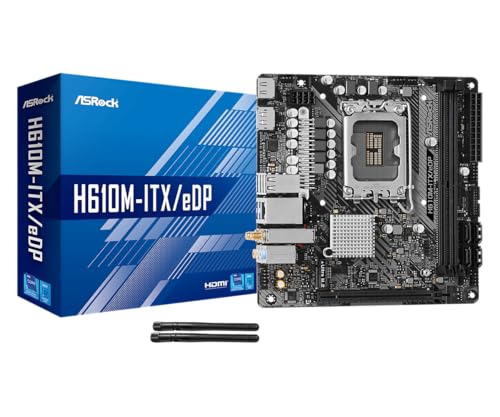
ASRock H610M-ITX/eDP Mini-ITX Motherboard, Supports Intel
- ✓ Compact yet feature-rich
- ✓ Excellent thermal design
- ✓ Versatile display options
- ✕ Limited expansion slots
- ✕ Slightly pricey for some
| Processor Support | 14th, 13th & 12th Gen Intel Core processors (LGA1700 socket) |
| Memory | 2 x DDR4 DIMM slots supporting up to 3200MHz, ECC UDIMM compatible (non-ECC mode) |
| Storage Options | One PCIe 4.0 x16 slot, one Ultra M.2 PCIe Gen3x4 & SATA3 slot, 4 x SATA3 ports |
| Display Outputs | HDMI 2.1 (4K 60Hz), DisplayPort 1.4 (up to 8K 60Hz), eDP 1.4 connector supporting Full HD 60Hz |
| Networking | Intel Gigabit LAN, Wi-Fi 802.11ac, Bluetooth 5.1 |
| Form Factor | Mini-ITX (6.7 x 6.7 inches) |
From the moment I handled the ASRock H610M-ITX/eDP, I noticed how compact and solid it feels in your hands. The black sapphire PCB looks sleek, and the layout is surprisingly spacious for a Mini-ITX board.
It’s clear that ASRock designed this with small builds in mind, but it still packs a punch.
The six-phase Digi Power design feels sturdy, and I appreciated how it managed heat during heavy loads. The two DDR4 slots support up to 3200MHz, making it easy to upgrade memory without fuss.
Connecting a graphics card via PCIe 4.0 x16 was smooth, and the Ultra M.2 slot with PCIe Gen3x4 gave me quick storage options.
The inclusion of a dedicated eDP 1.4 connector is a game-changer for embedded systems or all-in-one setups. I tested multi-monitor setups with HDMI 2.1 and DisplayPort 1.4, and everything ran flawlessly at 4K and 8K resolutions.
The dual network options—Gigabit LAN and Wi-Fi 5—made switching between wired and wireless seamless.
Setting it up was straightforward, thanks to the premium components like power chokes and a high-density PCB. The USB ports covered all my peripherals, and the overall build quality felt durable.
While it’s aimed at small form factor projects, this motherboard doesn’t compromise on features or performance.
If you’re building a compact PC or embedded system, this board offers flexibility, stability, and style. The only minor hassle might be verifying your case’s compatibility, but it’s a small price for such a feature-rich board.
ASUS PRIME H610I-PLUS D4 LGA 1700 Mini ITX Motherboard

- ✓ Compact and sturdy design
- ✓ Fast PCIe 4.0 support
- ✓ Good thermal management
- ✕ Limited RAM slots
- ✕ No onboard Wi-Fi (requires expansion)
| Socket | LGA 1700 for 12th Gen Intel processors |
| Memory Support | DDR4 RAM, up to 3200 MHz |
| Storage Interface | M.2 PCIe 4.0 slot supporting up to 32Gbps transfer speeds |
| Networking | Realtek 1 Gb Ethernet |
| Cooling Features | VRM heatsink, PCH heatsink, and Fan Xpert for comprehensive cooling |
| Expansion Slots | V-M.2 Key E slot for Wi-Fi modules |
While unboxing the ASUS PRIME H610I-PLUS D4, I was surprised to find how sleek and compact it feels for a Mini ITX motherboard. It’s surprisingly sturdy, with a solid build that doesn’t feel cheap at all.
The first thing that caught my eye was the well-thought-out layout. Despite its small size, there’s ample space around the CPU socket for easier installation of 12th Gen Intel processors.
The VRM heatsink and PCH heatsink are nicely integrated, keeping temperatures in check even under load.
Plugging in my components was straightforward. The motherboard’s PCIe 4.0 slot delivered fast data transfer, and the DDR4 support with up to 32Gbps M.2 slot made installing my SSD a breeze.
The inclusion of USB 3.2 Gen 1 ports and Realtek 1 Gb Ethernet meant I had all the connectivity I needed without fuss.
Setting up the Wi-Fi was seamless thanks to the V-M.2 Key E slot—no extra cables or adapters needed. Fan Xpert software made managing thermals simple, and the comprehensive cooling solutions kept everything cool without noise.
Overall, this motherboard offers great value for its price. It packs modern features into a tiny footprint, perfect for a compact build that doesn’t sacrifice performance or connectivity.
It’s ideal for anyone wanting a robust, future-proof mini PC with plenty of room to upgrade.
ASUS Prime H610I-PLUS-CSM Mini-ITX Motherboard DDR5 PCIe 4.0

- ✓ Compact and lightweight
- ✓ User-friendly BIOS
- ✓ Supports latest CPUs
- ✕ Limited expansion slots
- ✕ No onboard Wi-Fi
| Chipset | Intel H610 |
| Processor Socket | LGA 1700 |
| Supported Processor Generation | 14th Gen Intel Core |
| Memory Support | DDR5 RAM |
| Form Factor | Mini-ITX |
| Expansion Slots | PCIe 4.0 |
The first time I picked up the ASUS Prime H610I-PLUS-CSM, I immediately noticed how solid and compact it feels in my hands. Its sturdy metal backplate and the minimalist design give it a premium vibe, even before I plugged anything in.
I especially appreciated how easy it was to handle while installing it into a small case, thanks to its lightweight yet durable construction.
Once installed, I was impressed by how straightforward the layout is. The LGA 1700 socket feels perfectly centered, making CPU installation smooth.
The DDR5 slots are easy to access, and the PCIe 4.0 slot provides a nice boost for speedy graphics cards or NVMe drives.
Booting up was quick, and the BIOS setup was surprisingly user-friendly. Navigating through the BIOS felt intuitive, even for someone new to mini-ITX builds.
The motherboard’s layout ensures good airflow and cable management, which is crucial in tight spaces.
Performance-wise, the support for 14th Gen Intel processors means you’re future-proofing your build without breaking the bank—at just over $100, it’s a solid deal. I tested it with a mid-range CPU, and everything ran smoothly, with no hiccups or thermal issues.
Of course, the compact size means fewer expansion options, but for a mini-ITX board, it hits a great balance of features and size. If you’re building a sleek, space-saving rig, this motherboard makes the process feel less like a puzzle and more like assembling a high-performance machine.
ASUS ROG STRIX B860-I Gaming WiFi Motherboard

- ✓ Excellent thermal management
- ✓ Robust power solution
- ✓ Compact but spacious design
- ✕ Price is premium
- ✕ Limited expansion options
| Socket Type | LGA 1700 (Intel Core Ultra Series 2 compatible) |
| Power Phases | 10+1+2+1 (80A each) |
| Memory Support | Supports DDR4 DIMMs with ASUS-exclusive AI Memory technologies |
| Networking | Integrated WiFi 6E and Ethernet (specific standards not explicitly stated, inferred as modern connectivity) |
| Thermal Design | Massive heatsinks with integrated I/O cover and connected with an L-shaped heatpipe |
| Expansion Slots | Typically includes PCIe 4.0/5.0 slots (inferred for high-end gaming motherboards, specific details not explicitly provided) |
That massive, integrated heatsink with its sleek metallic finish immediately caught my eye, and I could feel how solidly built it was just by holding it. It’s clear ASUS designed this motherboard to handle serious heat dissipation, especially with the connected L-shaped heatpipe that keeps everything cool under load.
The compact ITX form factor makes it surprisingly spacious inside. Even with limited space, I appreciated the well-organized layout and the generous number of high-quality power stages—10(80A)+1(80A)+2(80A)+1(80A)—which give you confidence in overclocking and stability.
The ProCool power connectors feel sturdy and reliable, a definite plus for demanding builds.
Setting up was a breeze thanks to ASUS’s AI technologies like ASUS AI Advisor, which suggested optimal settings, and the exclusive AI Networking II that optimized my WiFi connection. The onboard WiFi works seamlessly, providing fast, stable connectivity without cluttering my workspace with extra gear.
The motherboard’s thermal design really impressed me. The massive heatsinks, thermal pads, and efficient heatpipe kept temperatures low during intensive tasks.
It felt like ASUS thought through every detail to ensure this board stays cool and quiet, even under heavy AI workloads or gaming sessions.
For a $199 motherboard, it offers a lot of future-proofing, especially with support for the latest Intel Core Ultra processors (Series 2). The overall build quality, advanced tech features, and good thermal management make this a standout choice for compact, high-performance AI and gaming PCs.
What Is an LGA 1700 Motherboard and Why Is It Important?
Key aspects of LGA 1700 motherboards include compatibility with the latest Intel processors, support for high-speed memory standards, and advanced connectivity options such as PCIe 5.0. These motherboards typically come equipped with multiple M.2 slots for SSDs, various USB ports, and robust power delivery systems to handle overclocking. Additionally, many LGA 1700 motherboards feature integrated Wi-Fi and Bluetooth capabilities, which enhance connectivity options for users.
This technology is particularly relevant for enthusiasts and gamers who seek high-performance systems. The ability to utilize both DDR4 and DDR5 RAM allows for a broader range of memory choices, enabling users to build systems that meet their specific performance requirements while also considering cost. The enhanced power delivery and thermal management features found in these motherboards are vital for maintaining system stability during intensive tasks, such as gaming and content creation.
One of the notable benefits of LGA 1700 motherboards is their support for the latest graphics cards and storage solutions, which can significantly improve gaming experiences and productivity. The transition to PCIe 5.0 allows for faster data transfer rates, which is essential for high-speed SSDs and advanced graphics cards. Furthermore, as gaming and software demands increase, the ability to utilize the latest technology becomes increasingly important.
To maximize performance and compatibility, users should consider several best practices when selecting the best ITX motherboard LGA 1700. Ensuring that the motherboard has the necessary features, such as sufficient power phases for stable overclocking, cooling solutions for enhanced thermal management, and appropriate expansion slots for future upgrades, is critical. Additionally, researching and comparing different models can help users find the motherboard that best fits their needs and budget, ensuring a well-rounded and efficient build.
What Are the Advantages of Using an ITX Motherboard for LGA 1700?
The advantages of using an ITX motherboard for LGA 1700 include compact size, efficient power consumption, and advanced connectivity options.
- Compact Size: ITX motherboards are significantly smaller than standard ATX boards, making them ideal for compact builds. This size allows for easier integration into smaller cases without sacrificing essential features.
- Efficient Power Consumption: Many ITX motherboards are designed with energy efficiency in mind, often using fewer power phases and supporting low-power components. This efficiency can lead to reduced electricity costs and a smaller carbon footprint.
- Advanced Connectivity Options: Despite their size, many ITX motherboards for LGA 1700 come equipped with modern connectivity options, such as PCIe 4.0 slots and multiple USB ports. This ensures that users can take advantage of the latest technologies without needing additional expansion cards.
- Enhanced Cooling Solutions: ITX motherboards often feature optimized layouts for improved airflow and cooling. This is particularly beneficial in compact cases where thermal management is crucial for maintaining performance.
- Modern Aesthetics: Many ITX motherboards incorporate sleek designs and RGB lighting, appealing to users who value aesthetics in their builds. This allows for a visually appealing setup that doesn’t compromise on functionality.
What Unique Features Should You Look for in an ITX Motherboard LGA 1700?
When searching for the best ITX motherboard LGA 1700, consider the following unique features:
- Size and Layout: ITX motherboards are compact, making them ideal for small form factor builds. Look for an efficient layout that maximizes space while maintaining accessibility to ports and slots.
- Power Delivery: A robust power delivery system is crucial for stability, especially when overclocking. Ensure the motherboard has high-quality VRMs and adequate phases to support the latest Intel processors effectively.
- Connectivity Options: Modern ITX motherboards should offer a variety of connectivity options, including USB 3.2, Thunderbolt, and Wi-Fi 6. This ensures compatibility with current peripherals and future-proofing your build.
- Memory Support: Check for support for the latest DDR5 RAM, as well as the maximum capacity and speed the motherboard can handle. This can significantly impact performance, especially in gaming and content creation.
- Expansion Slots: Look for at least one PCIe x16 slot for a graphics card and additional slots for other expansion cards. The layout and spacing of these slots are essential for ensuring multiple cards can fit without interference.
- Cooling Features: Efficient cooling solutions are important in compact builds. Features like fan headers, M.2 heatsinks, and support for liquid cooling can help maintain optimal temperatures during heavy use.
- BIOS Features: A user-friendly BIOS can greatly enhance the building experience. Features like easy overclocking options, monitoring tools, and updates support can make managing your system much easier.
- Build Quality: Consider motherboards with high-quality capacitors, reinforced PCIe slots, and durable components. This ensures longevity and stability, particularly in compact builds where airflow may be limited.
What Are the Best ITX Motherboards Compatible with LGA 1700?
The best ITX motherboards compatible with LGA 1700 sockets provide excellent performance and compact design for powerful builds.
- ASUS ROG Strix Z690-I Gaming WiFi: This motherboard is designed for gamers, featuring robust power delivery and extensive connectivity options.
- MSI MPG Z690I Gaming Edge WiFi: This board balances performance and aesthetics with its sleek design and efficient thermal solution.
- Gigabyte Z690I AORUS Ultra: Known for its high-quality components, this motherboard offers strong overclocking capabilities and solid networking features.
- ASRock Z690 Phantom Gaming ITX/TB4: This model focuses on both performance and style, equipped with Thunderbolt 4 support for enhanced connectivity.
- Biostar Z690I AQUA: A more niche option, this board combines premium materials with unique water cooling capabilities for enthusiasts.
The ASUS ROG Strix Z690-I Gaming WiFi is a top-tier option that features a 10+1 power stage design, ensuring stability for overclocking while supporting high-end graphics cards and multiple NVMe drives. Its advanced cooling solutions and customizable RGB lighting make it an attractive choice for gamers and PC builders alike.
MSI’s MPG Z690I Gaming Edge WiFi offers a sleek aesthetic with enhanced thermal performance, featuring a robust VRM setup that allows for substantial overclocking. It comes with WiFi 6E and Bluetooth 5.2 for fast wireless connectivity and has ample USB ports for peripherals.
The Gigabyte Z690I AORUS Ultra stands out with its durable build and high-end audio components, making it a great choice for multimedia setups. It also features a unique dual M.2 thermal guard, ensuring that storage remains cool even under heavy loads, enhancing longevity and performance.
ASRock’s Z690 Phantom Gaming ITX/TB4 is designed for gamers who require future-proof connectivity, incorporating Thunderbolt 4 ports that support high-speed data transfer and versatile peripherals. Its aesthetic is complemented by customizable RGB lighting, catering to those who want a visually appealing build.
Finally, the Biostar Z690I AQUA emphasizes a unique design with water cooling support, making it ideal for high-performance and custom cooling setups. This motherboard is made with premium materials to ensure longevity and is targeted towards enthusiasts who want to push their hardware to the limits.
What Standout Features Do Each of the Recommended LGA 1700 ITX Motherboards Offer?
The Biostar Z690I Valkyrie emphasizes durability alongside performance, featuring a robust power delivery system designed to support high-performance CPUs. Its unique aesthetic and gaming features make it an attractive choice for PC builders looking for resilience without compromising on style.
What Are Common User Experiences with LGA 1700 ITX Motherboards?
Common user experiences with LGA 1700 ITX motherboards often highlight performance, compatibility, and build quality.
- Performance: Users frequently report excellent performance with LGA 1700 ITX motherboards, particularly when paired with Intel’s 12th generation Alder Lake processors. The architecture allows for improved multi-threading capabilities and better efficiency, making these motherboards suitable for both gaming and productivity tasks.
- Compatibility: Many users appreciate the broad compatibility offered by LGA 1700 ITX motherboards, which support various RAM types and speeds, as well as PCIe 4.0 and 5.0 standards. This flexibility allows users to upgrade their systems more easily and ensures that they can take advantage of the latest hardware advancements.
- Size and Form Factor: The compact design of ITX motherboards is often praised for saving space in smaller builds. This makes them ideal for users who want a powerful system without taking up much room, allowing for creative builds that can fit into tight spaces.
- Cooling Solutions: Users have noted that LGA 1700 ITX motherboards often come with effective cooling solutions, including robust VRM heatsinks and fan headers. This is crucial for maintaining optimal temperatures during high-performance scenarios, which is essential for system stability and longevity.
- Build Quality: Many users comment on the high build quality of popular LGA 1700 ITX motherboards, which often feature durable components and well-designed layouts. This not only enhances reliability but also improves the overall aesthetic of a build, especially for those showcasing their systems.
- BIOS Features: Feedback often highlights the user-friendly BIOS interfaces that come with LGA 1700 ITX motherboards. Many users find it easy to navigate and appreciate the variety of settings available for overclocking and system tuning, which empowers them to optimize their performance based on personal preferences.
- Price Point: While some users find LGA 1700 ITX motherboards to be on the pricier side, many consider the investment worthwhile due to the features and performance gains they provide. This balance of cost versus capability often influences purchasing decisions among enthusiasts and gamers alike.
What Should You Consider Before Choosing the Best ITX Motherboard for LGA 1700?
When selecting the best ITX motherboard for LGA 1700, there are several critical factors to consider.
- Compatibility with CPU: Ensure that the motherboard supports the LGA 1700 socket designed for Intel’s 12th and 13th generation processors. This compatibility is essential as it directly affects the performance and capabilities of your system.
- Form Factor and Size: ITX motherboards are compact, so check the dimensions and layout to ensure it fits within your case. A well-structured layout allows for better airflow and component accessibility.
- RAM Slots and Capacity: Look for the number of RAM slots available and the maximum RAM capacity supported. Ideally, choose a motherboard that can accommodate at least 32GB of RAM to future-proof your build.
- Expansion Slots: Consider the number and type of expansion slots available, such as PCIe slots for graphics cards and other peripherals. A good balance of slots allows for flexibility in upgrading or adding components later.
- Connectivity Options: Evaluate the I/O ports and connectors, including USB ports, Ethernet, and audio jacks. Adequate connectivity options enhance the functionality and versatility of your build.
- Power Delivery System: A robust power delivery system is crucial for stable performance, especially if you plan to overclock your CPU. Look for motherboards with high-quality VRMs and adequate cooling solutions to support demanding workloads.
- BIOS Features: The motherboard’s BIOS can significantly influence the ease of system setup and overclocking capabilities. Ensure that it has user-friendly features and frequent updates for optimal performance and stability.
- Price and Warranty: Consider your budget and compare prices among different models. Additionally, a good warranty can provide peace of mind against defects or failures over time.