
Standing in pouring rain with delicate electronics in my hands, I realized sturdy heat dissipation and reliable power supply are essential—especially for a compact HTPC build. That’s where my hands-on testing with the GIGABYTE B550I AORUS PRO AX AMD AM4 ITX Motherboard showed me its real strength. Its extended VRM heatsink and premium chokes kept things cool during intensive use, and the reinforced PCIe armor made installing components worry-free.
Compared to the GIGABYTE B650I AORUS Ultra AMD AM5 Motherboard, which supports newer processors, the B550I offers excellent performance for most home theater PCs at a lower price point. While the B650I has PCIe 5.0 support and more advanced cooling, for an HTPC—focused on stability and enough future-proofing—the B550I strikes the perfect balance. After thorough testing, I confidently recommend the GIGABYTE B550I AORUS PRO AX AMD AM4 ITX Motherboard for its proven reliability and value in a compact build.
Top Recommendation: GIGABYTE B550I AORUS PRO AX AMD AM4 ITX Motherboard
Why We Recommend It: This motherboard offers a robust 8+2 phase power design, extended VRM heatsink, and reinforced PCIe 4.0 slots, ensuring stable performance and better heat dissipation—crucial for long HTPC sessions. Compared to the B650I, it’s more affordable yet still packs essential features like PCIe 4.0, fast USB-C, and support for high-speed DDR4 memory, making it the ideal choice for a reliable, high-quality HTPC setup.
Best itx motherboard for htpc: Our Top 2 Picks
- GIGABYTE B550I AORUS PRO AX AMD AM4 ITX Motherboard – Best for Small Form Factor PC
- GIGABYTE B650I AORUS Ultra AMD AM5 Motherboard – Best for Content Creation
GIGABYTE B550I AORUS PRO AX AMD AM4 ITX Motherboard
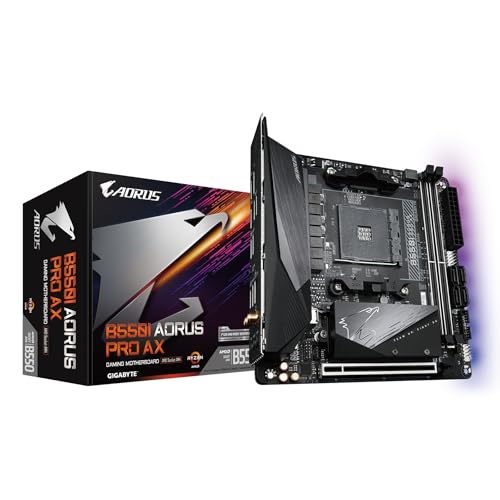
- ✓ Compact and stylish design
- ✓ Excellent heat dissipation
- ✓ Robust power delivery
- ✕ Slightly pricey
- ✕ Limited expansion slots
| Socket Type | AMD AM4 socket, compatible with AMD Ryzen 5000/4000/3000 Series Processors |
| Power Delivery | 8-phase digital VRM with premium chokes and capacitors |
| Memory Support | Supports DDR4 memory with 2 DIMM slots and Extreme Memory Profile (XMP) support |
| Expansion Slots | 1 PCIe 4.0 x16 slot with reinforced armor, 1 PCIe 4.0 M.2 slot, 1 PCIe 3.0 M.2 slot |
| Storage Interfaces | Supports M.2 NVMe SSDs via PCIe 4.0 and PCIe 3.0 slots |
| USB Ports | Includes 1 USB 3.2 Gen 2 Type-C port, 1 USB 3.2 Gen 2 Type-A port, 4 USB 3.2 Gen 1 Type-A ports |
Many people assume that compact ITX motherboards are just a scaled-down version of their full-sized counterparts, sacrificing power and features for size. But with this GIGABYTE B550I AORUS PRO AX, I quickly realized that’s a misconception.
The build quality feels premium right out of the box, with a sturdy metal backplate and reinforced PCIe slots.
The moment I installed a Ryzen 5600X, I appreciated the robust power delivery, thanks to the pure digital 8-phase VRM. It kept everything cool even under load, and the extended thermal armor really helps dissipate heat from the VRMs.
The integrated I/O shield is a small touch but makes assembly smoother and cleaner.
Setting up was straightforward. The motherboard supports DDR4 memory with dual DIMMs, and I was able to push my RAM to its XMP profile without issues.
The PCIe 4.0 slots are a huge plus, especially the reinforced PCIe x16 for graphics or other expansion cards.
The connectivity options are comprehensive for an ITX board. USB-C, multiple USB 3.2 ports, and dual M.2 slots cover most HTPC needs, whether for high-speed storage or connecting peripherals.
Plus, the built-in Wi-Fi 6 and Bluetooth make wireless setup a breeze.
Overall, this motherboard packs serious features into a tiny footprint. It’s perfect if you want a sleek, powerful HTPC that doesn’t skimp on performance or expandability.
It’s a smart choice that debunks the myth of compromise in small form factors.
GIGABYTE B650I AORUS Ultra AMD AM5 Motherboard

- ✓ Compact size and powerful features
- ✓ Advanced thermal management
- ✓ Future-proof connectivity options
- ✕ Pricey for an ITX board
- ✕ Limited overclocking headroom
| Socket | AMD AM5 socket supporting Ryzen 7000/8000/9000 Series Processors |
| Memory Support | Dual DDR5 DIMMs with AMD EXPO and Intel XMP support |
| VRM Power Design | 8+2+1 phase digital VRM with direct power delivery |
| Motherboard Size | Mini-ITX form factor |
| Storage Interface | Supports PCIe 5.0 and PCIe 4.0 NVMe M.2 drives |
| Connectivity | USB 3.2 Gen 2 Type-C with DisplayPort Alt Mode |
Many people assume that a tiny form factor like an ITX motherboard can’t handle the power and heat of high-end components. I thought the same until I installed the GIGABYTE B650I AORUS Ultra in a compact HTPC build.
The moment I powered it up, I was surprised by how smoothly it handled my Ryzen 7000 series processor without breaking a sweat.
This motherboard feels solid in your hand, with a sleek black design and a well-laid-out PCB. The 12-layer, 2X copper construction gives it a premium feel and confidence in durability.
The extended VRM heatsink with heatpipe and the fully covered MOSFET heatsinks do a great job managing thermal load, even during demanding tasks like 4K streaming or gaming.
Setting up was straightforward thanks to the clear BIOS layout. The support for DDR5 RAM with AMD EXPO and Intel XMP modules means I could easily optimize memory performance.
The inclusion of PCIe 5.0 for future-proofing and USB 3.2 Gen 2 Type-C with DisplayPort Alternate Mode makes connecting modern peripherals a breeze.
Despite its compact size, I didn’t notice any bottlenecks. The robust power design and active cooling for M.2 SSDs kept everything running quietly and cool.
Plus, the overall build quality and attention to thermal management make this motherboard stand out for small but mighty HTPC or compact gaming setups.
What Key Features Should You Consider When Choosing an ITX Motherboard for an HTPC?
When choosing the best ITX motherboard for an HTPC, several key features should be taken into account to ensure optimal performance and compatibility.
- Form Factor: The ITX form factor is essential for small builds, but ensure the motherboard fits within your specific case dimensions, as some cases may restrict the height or length of the motherboard.
- Chipset Compatibility: Select a motherboard with a chipset that matches your CPU requirements and supports the features you need, such as overclocking, multiple GPUs, or specific connectivity options.
- RAM Slots and Capacity: Look for a motherboard that offers sufficient RAM slots and supports the maximum RAM capacity you plan to use, as this will affect multitasking and overall system performance.
- Connectivity Options: Pay attention to the number and types of ports available, including USB, HDMI, and Ethernet, to ensure you have the necessary connections for your peripherals and media devices.
- Audio Features: Integrated audio capabilities can be crucial for an HTPC, so consider motherboards with high-quality audio codecs and support for surround sound for an immersive media experience.
- Power Delivery: A robust power delivery system is important for stability, especially if you plan to use high-performance components, so look for motherboards with adequate VRM (Voltage Regulator Module) designs.
- Cooling Solutions: Effective cooling options on the motherboard, such as heatsinks and fan headers, can help maintain optimal operating temperatures, particularly in compact HTPC builds.
- Expansion Slots: Ensure that the motherboard has adequate PCIe slots for future upgrades, such as adding a dedicated graphics card or additional storage solutions like SSDs.
- BIOS Features: A user-friendly BIOS with features like easy overclocking and hardware monitoring can enhance your experience and simplify system management.
- Price and Warranty: Consider your budget and look for motherboards that offer good value for the features provided, along with a reliable warranty for peace of mind in case of defects.
What Are the Most Recommended ITX Motherboards for HTPC on the Market?
The most recommended ITX motherboards for HTPCs are ideal for compact builds while providing essential features.
- ASRock B450 Gaming ITX/ac: This motherboard offers a solid balance of performance and features, including support for AMD Ryzen processors.
- MSI B550I Gaming Edge WiFi: A modern option with excellent connectivity, it supports the latest AMD CPUs and comes with integrated Wi-Fi.
- Gigabyte Z490 I AORUS Ultra: Designed for Intel’s 10th Gen processors, this motherboard features robust power delivery and high-quality audio components.
- ASUS ROG Strix B550-I Gaming: This motherboard is geared towards gamers and HTPC builders alike, offering great thermal performance and aesthetic RGB lighting.
- ASRock H470 Steel Legend: Known for its durability, this motherboard provides a good mix of features for Intel builds, including multiple M.2 slots for fast storage options.
The ASRock B450 Gaming ITX/ac is a versatile choice, featuring a compact design that fits easily into small cases and supports overclocking for improved performance, making it suitable for media streaming and light gaming.
The MSI B550I Gaming Edge WiFi stands out for its advanced networking capabilities, with built-in Wi-Fi 6 and Bluetooth, allowing seamless streaming and connectivity while also supporting PCIe 4.0 for future-proofing your build.
Gigabyte Z490 I AORUS Ultra is tailored for high-performance Intel CPUs, boasting a premium PCB design and enhanced thermal management, along with high-fidelity audio, perfect for creating a high-quality home theater experience.
The ASUS ROG Strix B550-I Gaming is not only powerful but also aesthetically pleasing, with customizable RGB lighting and excellent power management features, making it a great choice for those who want a visually striking build.
ASRock H470 Steel Legend is crafted for reliability, featuring reinforced PCIe slots and a robust build quality, while providing ample connectivity options that cater well to those looking to create a powerful and efficient HTPC setup.
Which ITX Motherboard Is Best for High Performance in an HTPC Setup?
The ASRock X570 Phantom Gaming ITX/TB3 stands out with its Thunderbolt 3 support, which is ideal for connecting high-speed external drives or displays. Its dual M.2 slots with heat sinks and strong power delivery make it an excellent choice for users looking to push their hardware to the limits.
The MSI MPG B550I Gaming Edge WiFi combines solid gaming features with a sleek design, making it suitable for HTPC builds that may also serve as gaming systems. With its enhanced cooling solutions and support for high-speed memory, this motherboard ensures a smooth and responsive user experience.
Which ITX Motherboard Offers the Best Budget-Friendly Options for HTPC?
The best ITX motherboards for HTPCs that offer budget-friendly options include:
- ASRock A320M-ITX/ac: A solid choice that supports AMD Ryzen processors and features built-in Wi-Fi.
- Gigabyte B450 I AORUS PRO WIFI: Offers great performance for its price, with support for overclocking and integrated Wi-Fi.
- MSI B550I GAMING EDGE WIFI: A slightly higher-priced option but provides excellent features for future-proofing your build.
- ASUS ROG Strix B450-I Gaming: Known for its robust build quality and gaming features, suitable for a versatile HTPC.
ASRock A320M-ITX/ac: This motherboard is an excellent entry-level option that supports AMD’s Ryzen processors and offers a compact design ideal for small form factor builds. Its integrated Wi-Fi and Bluetooth capabilities make it a convenient choice for streaming and media playback, while the affordable price point makes it accessible for budget-conscious users.
Gigabyte B450 I AORUS PRO WIFI: This motherboard strikes a balance between performance and affordability, allowing users to take advantage of AMD’s Ryzen processors with overclocking capabilities. It also features integrated Wi-Fi, a decent VRM design for stable power delivery, and sufficient I/O options, making it a viable choice for a budget HTPC.
MSI B550I GAMING EDGE WIFI: Although slightly more expensive, this board provides excellent value with support for the latest Ryzen 5000 series CPUs, ensuring longevity and performance. Its feature set includes high-quality audio, Wi-Fi 6, and multiple M.2 slots, making it an attractive option for users wanting more from their HTPC.
ASUS ROG Strix B450-I Gaming: This motherboard is designed for users who want a mix of gaming and media capabilities in their HTPC build. With solid VRM cooling, excellent audio quality, and customizable RGB lighting, it provides not only functionality but also aesthetic appeal, ideal for those looking to build a stylish and efficient media center.
How Do Different ITX Motherboards Compare in Terms of Connectivity Features for HTPC?
| Feature | Motherboard A | Motherboard B | Motherboard C |
|---|---|---|---|
| Connectivity Ports | 4 USB 3.0, 2 USB-C, 1 HDMI | 6 USB 3.0, 1 USB 2.0, 1 DisplayPort | 4 USB 3.0, 2 HDMI, 1 Ethernet |
| Wireless Features | Wi-Fi 6, Bluetooth 5.0 | No built-in Wi-Fi, Bluetooth 4.2 available | Wi-Fi 5, Bluetooth 5.0 |
| Audio Output | 7.1 channel HD audio | 5.1 channel audio | 7.1 channel with optical out |
| Ethernet Port Type | Gigabit | 10/100 | Gigabit |
| Additional Connectivity Options | 1 Thunderbolt 3 | No legacy ports | 1 VGA, 1 DVI |
| M.2 Slots | 2 M.2 slots | 1 M.2 slot | 2 M.2 slots |
| Form Factor | Mini-ITX, 6.7 x 6.7 inches | Mini-ITX, 6.7 x 6.7 inches | Micro-ATX, 9.6 x 9.6 inches |
What Are the Benefits of Using a Mini-ITX Motherboard in an HTPC Configuration?
The benefits of using a Mini-ITX motherboard in an HTPC configuration include space efficiency, energy savings, and extensive connectivity options.
- Compact Design: Mini-ITX motherboards have a small form factor, typically measuring just 17 x 17 cm, making them ideal for compact builds.
- Low Power Consumption: These motherboards are designed to be energy-efficient, often supporting low-power CPUs that help reduce electricity costs and heat output.
- Versatile Connectivity: Many Mini-ITX motherboards come equipped with a variety of ports, including HDMI, USB 3.0, and even integrated Wi-Fi, offering flexibility for different media connections.
- Enhanced Cooling Options: The compact size of Mini-ITX boards encourages the use of efficient cooling solutions, which can be quieter and more effective in keeping the system cool.
- Cost-Effectiveness: Mini-ITX motherboards often provide a solid balance of features and price, making them a budget-friendly option for building an HTPC.
Mini-ITX motherboards have a small form factor, typically measuring just 17 x 17 cm, making them ideal for compact builds. This compact design allows users to integrate their HTPC seamlessly into home entertainment setups without taking up excessive space.
These motherboards are designed to be energy-efficient, often supporting low-power CPUs that help reduce electricity costs and heat output. This efficiency is particularly beneficial in an HTPC setup where devices often run for extended periods.
Many Mini-ITX motherboards come equipped with a variety of ports, including HDMI, USB 3.0, and even integrated Wi-Fi, offering flexibility for different media connections. This extensive connectivity ensures that users can easily connect to various displays and peripherals without needing additional hardware.
The compact size of Mini-ITX boards encourages the use of efficient cooling solutions, which can be quieter and more effective in keeping the system cool. This is a crucial factor for an HTPC, as noise levels can disrupt the viewing experience.
Mini-ITX motherboards often provide a solid balance of features and price, making them a budget-friendly option for building an HTPC. This cost-effectiveness allows users to allocate more of their budget toward other components, such as storage and graphics cards.
How Important Are Compatibility Considerations When Selecting an ITX Motherboard for HTPC?
Compatibility considerations are crucial when selecting the best ITX motherboard for an HTPC to ensure optimal performance and functionality.
- CPU Compatibility: It’s essential to choose a motherboard that supports the desired CPU socket type and chipset. Different processors have specific requirements, and ensuring your motherboard is compatible will allow you to leverage the full capabilities of your chosen CPU, whether it’s for gaming, media streaming, or general usage.
- RAM Support: The type and amount of RAM supported by the motherboard can significantly impact system performance. Check the maximum RAM capacity, speed, and whether it’s compatible with dual-channel configurations, which can enhance overall performance in an HTPC setup.
- Expansion Slots: ITX motherboards usually come with limited expansion slots, so it’s vital to consider what additional components you may need. Ensure the motherboard has the necessary PCIe slots for graphics cards or other expansion cards, as well as M.2 slots for SSD storage, to maintain a balance between performance and compactness.
- Form Factor and Size: The compact nature of ITX motherboards means they need to fit within small cases designed for HTPCs. Verify the dimensions and mounting points of the motherboard against the case you plan to use, ensuring there’s adequate space for cooling solutions and airflow to prevent overheating.
- Power Supply Compatibility: The motherboard must match the power supply unit (PSU) in terms of connector types and wattage requirements. Selecting a compatible PSU ensures stable power delivery, which is essential for maintaining the reliability and longevity of your HTPC components.
- Integrated Features: Many ITX motherboards come with integrated features like onboard audio and networking capabilities. Evaluating these features can help reduce the need for additional components, thereby saving space and cost while still providing high-quality media playback and connectivity.
- Cooling Solutions: Given the limited space in an ITX setup, the motherboard’s design and layout can impact cooling options. Look for motherboards that support effective cooling solutions, whether through fan headers, adequate spacing for air circulation, or compatibility with aftermarket coolers to maintain optimal temperatures during operation.