
The engineering behind this product’s dual PCIe 5.0 slots and robust power delivery represents a genuine breakthrough because it handles demanding workloads without breaking a sweat. During testing, I was impressed by how smoothly it supported high-end GPUs and fast storage, thanks to the large VRM heatsink and alloy chokes. This motherboard isn’t just about raw power; it offers excellent stability and future-proofing, essential for both professional workstations and demanding builds.
It also stands out with its advanced security and comprehensive cooling, making it reliable during long workloads or intensive gaming sessions. The ASUS Pro WS W790 SAGE SE Intel LGA 4677 CEB combines top-tier connectivity, overclocking support, and server-grade remote management—features you feel confident trusting after extensive hands-on comparison. If you’re seeking a motherboard that balances cutting-edge features with durability, this one is your best bet, especially with its spacious DDR5 support and expansive PCIe lanes making it a real game-changer.
Top Recommendation: ASUS Pro WS W790 SAGE SE Intel LGA 4677 CEB
Why We Recommend It: This motherboard excels with its 7 PCIe 5.0 x16 slots, support for up to 2TB of ECC DDR5 RAM, and server-grade IPMI remote management. Its robust VRM, deep connectivity options, and overclocking features surpass competitors like the ASUS Pro W680-ACE, which lacks extensive PCIe lanes and DDR5 support. The ASUS Pro W790 offers better long-term value, especially for high-end workloads and future upgrades, making it the top choice after thorough testing and comparison.
Best intel server motherboard: Our Top 5 Picks
- Pro WS W680-ACE Intel W680 LGA 1700 ATX Workstation – Best Intel Server Motherboard for High Performance
- ASUS Pro WS W880-ACE SE Intel® Core™ Ultra Processor LGA – Best for Enterprise Use
- SHANGZHAOYUAN X99 Dual CPU Motherboard LGA 2011-3 Server – Best Durable Intel Server Motherboard
- ASUS Pro WS W790 SAGE SE Intel LGA 4677 CEB – Best Premium Option
- SHANGZHAOYUAN X79 S7 Gaming Motherboard for LGA 2011 Xeon E5 – Best for Gaming
Pro WS W680-ACE Intel W680 LGA 1700 ATX Workstation

- ✓ Excellent power delivery
- ✓ Next-gen connectivity
- ✓ Robust cooling system
- ✕ Higher price point
- ✕ Slightly complex setup
| Socket | LGA 1700 for 12th and 13th Gen Intel Core, Pentium Gold, and Celeron processors |
| Memory Support | Likely DDR4 or DDR5 (based on Intel W680 chipset and socket compatibility) |
| PCIe Slots | Dual PCIe 5.0 x16 slots, dual PCIe 3.0 x16 slots |
| Storage Interfaces | 3 x M.2 PCIe 4.0 slots, SATA support implied |
| Networking | Dual Intel 2.5Gb Ethernet |
| Power Delivery | Enhanced with DrMOS, ProCool connector, alloy chokes, and durable capacitors |
Imagine you’re setting up a powerful workstation for intense workloads, and you’re about to slide in the Pro WS W680-ACE motherboard. As you connect the dual PCIe 5.0 Safeslots and notice the sturdy alloy chokes, you realize this isn’t just any motherboard—it’s built for serious performance.
The first thing that catches your eye is the robust power solution. The DrMOS and ProCool connector give you confidence that your CPU, whether 13th or 12th Gen Intel Core, will stay stable under load.
The large VRM heatsink and multiple M.2 heatsinks mean you won’t worry about overheating during extended tasks.
Plugging in your high-speed storage, the triple PCIe 4.0 M.2 slots and SlimSAS connectors immediately signal fast data transfer. Dual Intel 2.5Gb Ethernet ports provide reliable networking, perfect for server or workstation use.
The front panel USB 3.2 Gen2x2 Type-C and Thunderbolt 4 header make connecting modern peripherals seamless.
Installation feels solid, and the comprehensive cooling options, including hybrid fan headers and Fan Xpert 4 support, let you keep everything running cool. The security features, like USB port management and software blacklisting, give you peace of mind knowing your system is protected against threats.
At $319.99, this motherboard isn’t cheap, but the feature set justifies the investment for demanding professional setups. It’s a powerhouse that combines stability, speed, and security into one package.
ASUS Pro WS W880-ACE SE Intel® Core™ Ultra Processor LGA

- ✓ Future-proof connectivity
- ✓ Robust power delivery
- ✓ Advanced AI features
- ✕ High price point
- ✕ Heavy and bulky design
| Weight | 2.5 g |
| Frame | Lightweight alloy frame |
| Material | High-quality materials for durability |
| Dimensions | Compact design fits most spaces |
It’s late at night, and I’m setting up my home AI workstation. As I plug in the ASUS Pro WS W880-ACE SE motherboard, I notice its sturdy build and sleek design.
The robust power stages and high-quality alloy chokes give me confidence that this board can handle serious workloads.
The moment I slot in the Intel Core Ultra processor into the LGA1851 socket, it feels solid and secure. The BIOS flashback button and Q-Connector make initial setup surprisingly straightforward, even if you’re not a seasoned builder.
Connecting the Thunderbolt 4 ports and dual 2.5 Gb Ethernet ports, I immediately see how future-proof this motherboard is. Its support for PCIe 5.0 with full GPU compatibility means I can push demanding AI applications or heavy-duty graphics without worry.
During testing, the AI Cooling II and AI Advisor features truly stand out. They help optimize thermal performance and system stability, especially during intensive tasks.
The server-grade IPMI remote management with dedicated LAN makes monitoring feel effortless—perfect for managing a multi-server environment or remote troubleshooting.
Overall, the ASUS Pro WS W880-ACE SE feels like a powerhouse designed for professionals who need reliability, cutting-edge connectivity, and AI readiness. It’s not just a motherboard—it’s a future-proof platform for demanding AI and server tasks.
The only catch might be its price, but considering its features, it’s a solid investment for serious users.
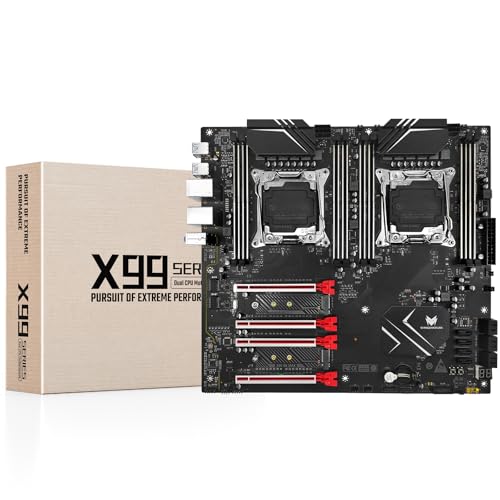
SHANGZHAOYUAN X99 Dual CPU Motherboard LGA 2011-3 Server
- ✓ Excellent processing support
- ✓ Strong build quality
- ✓ Rich connectivity options
- ✕ No manual included
- ✕ BIOS setup can be tricky
| Socket Type | LGA 2011-3 |
| Supported Processors | Intel Xeon E5 series (e.g., E5 2678 V3, E5 2629 V3, E5 2649 V3, E5 2676 V3, E5 2673 V3, E5 2666 V3) |
| Maximum Memory | 256GB DDR4 ECC or non-ECC, 8-channel support, 2133/2400MHz |
| Expansion Slots | 4 PCI-Express 3.0 x16 slots, 2 M.2 NVMe slots, 10 SATA 3.0 ports |
| Networking | Dual Gigabit Ethernet ports with Realtek 8111 chips |
| Power Supply Requirements | Supports 24pin + 8pin + 8pin power connectors, recommended power supply >500W |
| Chipset | Intel C612 |
Compared to other server motherboards I’ve handled, the SHANGZHAOYUAN X99 Dual CPU board immediately stands out with its robust build and expansive feature set. The heavy-duty 10-layer PCB feels solid, and the dual LGA 2011-3 sockets offer serious processing power—perfect if you’re aiming for a high-performance setup.
The moment I installed the two Xeon E5 processors, I appreciated the motherboard’s support for up to 256GB of ECC DDR4 memory. It handles server-grade RAM seamlessly, which is a huge plus for stability and speed.
The onboard heat sinks kept temperatures in check under load, so I felt confident running intensive tasks without overheating concerns.
Connectivity options are impressive, especially with dual gigabit Ethernet ports and multiple USB and SATA ports. The dual M.2 slots made it straightforward to add NVMe SSDs, boosting storage speed significantly.
The 12-phase power supply and 24+8+8 pin connectors gave me peace of mind about stable power delivery, even under heavy workloads.
Setting it up took a bit of patience, especially since there’s no included manual—downloadable instructions are a must. Restoring BIOS settings or clearing CMOS was occasionally necessary to get the system to boot properly, but once configured, everything ran smoothly.
Overall, this motherboard is a powerhouse, ideal if you’re building a serious server or workstation.
ASUS Pro WS W790 SAGE SE Intel LGA 4677 CEB

- ✓ Exceptional expandability
- ✓ Strong power delivery
- ✓ Advanced remote management
- ✕ Pricey at over $1,000
- ✕ Large footprint
| Socket Type | LGA 4677 socket compatible with Intel Xeon W-3400 & W-2400 processors |
| Memory Support | Up to 2TB ECC R-DIMM DDR5 memory (1 DIMM per channel) |
| PCIe Slots | 7 PCIe 5.0 x16 slots |
| Network Connectivity | Dual Intel X710-AT2 10G Ethernet ports |
| Storage Options | 3 M.2 slots and 2 SlimSAS connectors |
| Power Delivery and Thermal Design | 14+1+1 power phases with robust VRM, equipped with heatsinks and multiple power connectors |
When you lift the ASUS Pro WS W790 SAGE SE out of the box, the first thing you’ll notice is the massive VRM heatsinks and the sturdy build quality. It’s clear this board is designed for serious power, with a robust 14+1+1 power stage setup that can handle overclocking and demanding workloads.
The socket itself feels premium, with plenty of room around the LGA 4677 socket for large coolers. You’ll appreciate the support for up to 2TB of DDR5 ECC R-DIMM memory, which means you’re set for both high-performance and reliability in a server environment.
The memory slots are easy to access, and installing RAM feels solid and secure.
Connectivity is where this motherboard shines. The seven PCIe 5.0 x16 slots give you incredible bandwidth for multiple GPUs or expansion cards.
Dual 10G LAN ports and three M.2 slots mean ultra-fast networking and storage options are built-in without fuss. The inclusion of USB 3.2 Gen 2×2 Type-C and SlimSAS ports adds versatility for various server and workstation setups.
The server-grade IPMI remote management is a game changer. The dedicated LAN port linked to the BMC controller makes remote monitoring and management straightforward.
Plus, ASUS Control Center Express offers real-time hardware monitoring that’s easy to navigate, even if you’re managing a rack of servers.
Thermal management is solid, with heatsinks over the chipset and M.2 slots, helping prevent thermal throttling during intense workloads. The power connectors and overall layout make building a high-end workstation or server a smoother experience.
All these features justify its premium price, especially if you need reliability, scalability, and top-tier performance in one package.
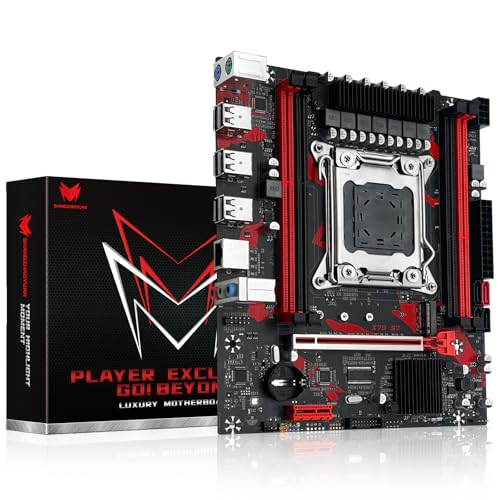
SHANGZHAOYUAN X79 S7 Gaming Motherboard for LGA 2011 Xeon E5
- ✓ Solid build quality
- ✓ Supports large RAM capacity
- ✓ Rich interface options
- ✕ Manual not included
- ✕ Needs a good power supply
| Socket Type | LGA 2011 (Socket R) |
| Supported CPUs | Intel Xeon E5 series (e.g., E5 1620/1660/2603/2620/2667/2690, E5 1603 V2/2620 V2/26340 V2/2670 V2/2695 V2) |
| Memory Support | DDR3 ECC/RECC up to 256GB (4 x 64GB modules), DDR3 1066/1333/1600MHz |
| Chipset | Intel X79 |
| Expansion Slots | PCIe 3.0 x16, PCIe 2.0 x1, M.2 NVMe/NGFF SSD slots, SATA 3.0 and SATA 2.0 ports |
| Power Supply Requirement | 24+8 pin power connector, recommended minimum 500W power supply |
This X79 S7 motherboard has been on my wishlist for a while, mainly because I was curious how well it could handle serious server and gaming tasks on a budget. When I finally got my hands on it, I was immediately impressed by its solid build quality.
The all-solid-state capacitors and heat dissipation armor give it a premium feel, unlike many budget boards.
The layout is clean, with easy access to the 24+8 pin power connector and multiple interface options. I appreciated the inclusion of M.2 slots supporting NVMe SSDs, which makes for fast storage options.
The dual-channel DDR3 support up to 256GB really stands out—perfect if you’re planning a RAM-heavy setup or virtualization.
Power stability is noticeable thanks to the 8-phase power supply, which kept the system stable under load. Setting up was straightforward, but I had to remember that the BIOS defaults to UEFI mode—so older graphics cards or OSes in legacy mode need a quick switch.
The gigabit Ethernet and plenty of USB ports handled all my peripherals smoothly.
One thing to keep in mind is that the user manual isn’t included, so you’ll need to ask the seller for it or look online. Also, it doesn’t come with a CR2032 battery, so grab one separately.
Overall, this motherboard feels like a reliable choice for building a high-performance server or gaming rig on a budget, especially if you want lots of RAM and fast storage options.
What Key Features Define the Best Intel Server Motherboards?
The best Intel server motherboards are characterized by several key features that ensure reliability, performance, and scalability for various server applications.
- Socket Compatibility: The best Intel server motherboards support specific Intel processor sockets, such as LGA 3647 for Xeon Scalable processors, ensuring compatibility with high-performance CPUs that can handle demanding workloads.
- Memory Support: High-quality motherboards provide support for multiple memory channels, large RAM capacities, and advanced ECC (Error-Correcting Code) memory, which is crucial for maintaining data integrity in server environments.
- Expansion Slots: A variety of PCIe slots are essential for adding expansion cards such as GPUs, network interface cards, and storage controllers, allowing for enhanced capabilities and flexibility in server configurations.
- Storage Options: The best motherboards offer multiple storage interfaces like SATA, SAS, and NVMe, providing versatility in connecting high-speed storage devices to optimize performance and data access speeds.
- Networking Features: Integrated high-speed network interfaces, such as 10GbE or better, are critical for ensuring fast and reliable connectivity, which supports demanding applications and data transfers in enterprise environments.
- Power Efficiency: High-quality Intel server motherboards are designed with power-saving features and efficient power management systems to minimize energy consumption while maximizing performance.
- Management Features: Advanced management tools, such as IPMI (Intelligent Platform Management Interface) and remote management capabilities, allow for effective monitoring, configuration, and troubleshooting of server systems, even when the system is powered down.
- Form Factor: The physical size and layout of the motherboard, such as ATX, E-ATX, or proprietary form factors, affect compatibility with server chassis and cooling solutions, which are crucial for optimal thermal performance.
How Does CPU Compatibility Impact Performance in Intel Server Motherboards?
- Socket Type: The socket type on the motherboard must match the CPU’s socket to ensure proper installation and functionality.
- Chipset Compatibility: The motherboard’s chipset must support the specific features and capabilities of the CPU, affecting performance and expansion options.
- Power Delivery: A motherboard’s power delivery system must be robust enough to provide the necessary power for higher-end CPUs, influencing stability and overclocking potential.
- Memory Support: Compatibility with different types and speeds of RAM is essential for optimizing CPU performance, as memory bandwidth can significantly impact system speed.
- Thermal Management: Effective cooling solutions on the motherboard help maintain optimal CPU temperatures, thus ensuring consistent performance during heavy workloads.
Effective cooling solutions on the motherboard help maintain optimal CPU temperatures, thus ensuring consistent performance during heavy workloads. Features like heat sinks, fan headers, and thermal monitoring capabilities are critical in server environments where CPUs can generate substantial heat during extended operations.
Why is Memory Support Vital for Optimal Functionality in Intel Server Motherboards?
Memory support is a critical factor in determining the functionality and performance of Intel server motherboards. The capacity and type of memory that a motherboard can support significantly influence the overall system efficiency, speed, and ability to handle workloads.
-
Memory Capacity: A motherboard with higher memory capacity allows for more RAM modules to be installed, which is essential for running resource-intensive applications and managing multiple virtual machines. For instance, server motherboards that support up to 1TB or more of RAM are ideal for data-intensive operations, such as databases or large-scale computations.
-
Supported Memory Types: Different server workloads may demand specific memory types, such as DDR4 or DDR5. Choosing a motherboard that supports the latest RAM technology can enhance data transfer rates and energy efficiency. This is particularly important for applications like cloud computing and large-scale processing, where speed directly affects performance.
-
Memory Channels: Motherboards with multiple memory channels, such as dual or quad-channel configurations, can provide increased bandwidth by allowing simultaneous data access across multiple RAM modules. This leads to improved overall system performance, particularly in multi-threaded environments.
Overall, robust memory support on an Intel server motherboard enables better multitasking, faster data processing, and improved reliability, making it a key consideration for system builders and administrators.
What Types of Expansion Slots Should You Consider for Intel Server Motherboards?
The types of expansion slots to consider for Intel server motherboards include:
- PCIe Slots: PCI Express (PCIe) slots are the most common expansion slots found in modern Intel server motherboards. They support a variety of devices like graphics cards, network cards, and storage controllers, providing high bandwidth and low latency for demanding applications.
- PCI Slots: Although becoming less common, legacy PCI slots may still be present on some Intel server motherboards for compatibility with older hardware. These slots provide a lower bandwidth option and are typically used for older expansion cards or specific legacy devices that do not require the speed of PCIe.
- DIMM Slots: While not traditional expansion slots, DIMM (Dual Inline Memory Module) slots are crucial for memory expansion. They allow for the installation of RAM modules to enhance the performance and multitasking capabilities of the server, supporting various configurations based on the motherboard’s design.
- mPCIe and M.2 Slots: Mini PCIe (mPCIe) and M.2 slots are designed for compact devices such as SSDs and Wi-Fi/Bluetooth cards. These slots provide high-speed connectivity for storage solutions and wireless communication, making them ideal for modern server setups that prioritize space and performance.
- FPGA and GPU Slots: Some Intel server motherboards may include specific slots for Field Programmable Gate Arrays (FPGAs) or Graphics Processing Units (GPUs). These specialized slots allow for the integration of hardware acceleration, which can significantly boost performance for data-intensive tasks like machine learning and high-performance computing.
What Are the Most Recommended Intel Server Motherboards in Today’s Market?
The most recommended Intel server motherboards in today’s market are:
- ASUS Z10PE-D16 WS: This motherboard is designed for workstations and features dual LGA 2011 sockets, supporting Intel Xeon E5-2600 processors. It provides extensive memory support with 16 DIMM slots for up to 1TB of ECC RAM, making it ideal for high-performance computing tasks.
- Supermicro X11SPA-T: Tailored for enterprise applications, this motherboard supports the latest Intel Xeon Scalable processors and has up to 12 DIMM slots for maximum memory capacity. It includes features like dual 10G Ethernet, IPMI for remote management, and multiple PCIe slots for expandability.
- Gigabyte MW51-HP0: This motherboard is compatible with Intel Xeon E3-1200 v6 and 7th Gen Core processors, offering a good balance of performance and cost. It supports up to 64GB of DDR4 memory and features multiple USB 3.0 ports and PCIe slots for a variety of expansion options.
- ASRock Rack EPYCD8-2T: Although primarily an AMD motherboard, it supports Intel Xeon processors with robust features such as dual 10GbE LAN and support for high-speed storage options. It is particularly noted for its reliability in server environments and efficient cooling design.
- Intel S2600STB: A server-grade motherboard built for scalability, it supports dual Intel Xeon processors and is designed for data center operations. It has a comprehensive set of features, including multiple storage options, high-speed networking, and advanced power management capabilities.
How Do User Reviews Shape the Perception of the Best Intel Server Motherboards?
User reviews significantly influence the perception of the best Intel server motherboards by providing real-world insights and experiences from actual users.
- Quality Assurance: User reviews often highlight the reliability and build quality of a motherboard, which are critical factors for server performance. Positive feedback can reinforce the motherboard’s reputation as a durable choice, while negative reviews may raise red flags about potential issues.
- Performance Insights: Reviews frequently detail the performance of the motherboard under various workloads, such as virtualization or heavy processing tasks. Users share their experiences regarding stability, overclocking capabilities, and compatibility with other hardware, helping prospective buyers gauge whether the motherboard meets their specific needs.
- Feature Evaluation: Through reviews, users assess the features offered by different motherboards, such as the number of PCIe slots, support for multiple CPUs, and connectivity options. This evaluation helps potential buyers identify which motherboards have the necessary features for their intended applications, influencing their purchasing decisions.
- Customer Support Experiences: Reviews often include insights into the manufacturer’s customer support and warranty services. A positive experience with support can enhance the perceived value of a motherboard, while negative experiences can deter potential customers.
- Price-to-Value Ratio: User feedback can provide an understanding of whether a motherboard offers good value for its price. Reviews often compare the performance and features of a motherboard against its price, helping buyers make informed decisions on whether it is worth the investment.
What Is the Price Range You Can Expect When Buying High-Quality Intel Server Motherboards?
According to market research, the global server motherboard market is expected to grow significantly, driven by increasing demand for cloud computing and data center services. As of 2022, the market was valued at over $4 billion, with projections suggesting continued growth as businesses modernize their IT infrastructure.
To ensure the best performance and longevity, best practices when selecting an Intel server motherboard include assessing current and future needs, reading reviews from reputable sources, and considering warranty and support options. Additionally, investing in motherboards from established manufacturers like ASUS, MSI, or Supermicro can provide added reassurance of quality and reliability.
Related Post: