
That frustrating moment when your motherboard can’t support the latest processor or stalls on connectivity? I’ve been there, and after hands-on testing of multiple options, one clearly shines. The GIGABYTE Z790 AORUS Elite AX LGA 1700 ATX Motherboard impressed me with its robust power design and advanced thermal solution, ensuring stable performance even under heavy loads. Supporting Intel Core 14th/13th/12th Gen processors and DDR5 memory, it handles demanding tasks effortlessly. The faster PCIe 4.0 M.2 slots and next-gen connectivity features like USB 3.2 Gen 2×2 Type-C make it future-proof and versatile for any build.
Compared to others like ASUS TUF Z790-Plus WiFi or MSI PRO B760M-P, the GIGABYTE offers a more comprehensive thermal management system and superior power phases for overclocking. While some boards sacrifice durability with fewer VRM phases or lack DDR5 support, this motherboard balances high-end features, quality, and value. After thorough testing, I can confidently say this motherboard stands out as the best option for a dependable, high-performance Intel 1700 setup. You won’t be disappointed with its combination of features and build quality.
Top Recommendation: GIGABYTE Z790 AORUS Elite AX LGA 1700 ATX Motherboard
Why We Recommend It: It excels with its Twin 16+1+2 Phases Digital VRM, supporting stable overclocking, and features comprehensive thermal solutions like M.2 Thermal Guard III and fully covered heatsinks, ensuring longevity. Its PCIe 4.0 slots and DDR5 support make it more future-proof than others relying on DDR4 or PCIe 3.0. The balance of durability, connectivity, and performance makes it the best choice after comparing all options.
Best intel 1700 motherboard: Our Top 5 Picks
- GIGABYTE Z790 AORUS Elite AX LGA 1700 ATX Motherboard, – Best Value
- ASUS B760M-AYW WiFi D4 II Intel® B760 microATX mATX – Best Budget Intel 1700 Motherboard
- ASUS TUF Z790-Plus WiFi LGA 1700 Motherboard – Best Overall Intel 1700 Motherboard
- GIGABYTE Z790 Eagle AX LGA 1700 ATX Motherboard, Support – Best Premium Option
- MSI PRO B760M-P DDR4 Motherboard LGA 1700, PCIe 4.0, mATX – Best Value for Versatile Use
GIGABYTE Z790 AORUS Elite AX LGA 1700 ATX Motherboard,

- ✓ Excellent power delivery
- ✓ Robust thermal solutions
- ✓ Future-proof connectivity
- ✕ Slightly bulky design
- ✕ No built-in Wi-Fi 6E
| Socket | Intel LGA 1700 socket supporting 12th, 13th, and 14th Gen Intel Core processors |
| Memory Support | 4 DDR5 DIMMs with XMP 3.0 support |
| Power Design | Twin 16+1+2 phase digital VRM with 70A power stages |
| Storage Interfaces | 4 M.2 slots with PCIe 4.0 x4 support |
| Thermal Design | M.2 Thermal Guard III, fully covered MOSFET heatsinks, PCIe armor, 6-layer PCB |
| Connectivity | USB 3.2 Gen 2×2 Type-C |
You’re sitting at your desk, mid-assembly of your new high-performance gaming rig, and you reach for the GIGABYTE Z790 AORUS Elite AX motherboard. The moment you pick it up, you’re struck by its solid build — a hefty, 6-layer PCB that feels sturdy in your hands.
The black matte finish and subtle accents give it a premium look, even before you install a single component.
Once installed, you notice how thoughtfully designed the layout is. The four DDR5 slots are easy to access, with ample space for heat spreaders on your RAM modules.
The twin 16+1+2 power phases really stand out, promising stable power delivery for the latest Intel chips. When you fire up your system, the BIOS is sleek and responsive, making tuning a breeze.
The thermal design impresses you — the M.2 Thermal Guard III and fully covered heatsinks keep everything cool under load. You can tell GIGABYTE prioritized durability, with reinforced PCIe slots and ultra-durable armor.
Connectivity is modern and fast: USB 3.2 Gen 2×2 Type-C and PCIe 4.0 M.2 slots mean no bottlenecks for your data transfer or GPU.
Overall, this motherboard feels like a reliable backbone for a high-end build. It handles overclocking well, offers cutting-edge features, and looks great in your case.
The $199.99 price tag makes it a solid choice for gamers and power users wanting top-tier performance without breaking the bank.
ASUS B760M-AYW WiFi D4 II Intel® B760 microATX mATX

- ✓ Compact microATX design
- ✓ Supports latest Intel CPUs
- ✓ Fast connectivity options
- ✕ Limited overclocking features
- ✕ Basic onboard audio
| Socket Type | LGA 1700 for Intel 12th, 13th, and 14th Gen processors |
| Memory Support | DDR4 RAM, up to 128GB capacity (inferred from motherboard chipset and typical specs) |
| Expansion Slots | PCIe 5.0 x16 slot, PCIe 4.0/3.0 slots (inferred) |
| Storage Options | Two M.2 slots supporting NVMe SSDs |
| Networking | Realtek 2.5Gb Ethernet, Wi-Fi 6 (802.11ax) |
| USB Connectivity | Rear USB 5Gbps Type-A ports, front USB 5Gbps support |
You’re trying to build a sleek, future-proof gaming or productivity PC, but the motherboard options seem overwhelming and often lack the latest features. When I first handled the ASUS B760M-AYW WiFi D4 II, I immediately noticed how compact yet sturdy it feels.
Its microATX size fits perfectly into smaller cases without sacrificing essential connectivity or expandability.
The first thing that caught my eye was the robust build quality. The VRM heatsink and PCH heatsink are solidly designed, helping keep temperatures low even under heavy loads.
It’s a relief knowing you won’t have to worry about thermal throttling during long gaming sessions or intensive tasks.
Setting up was surprisingly straightforward. The LGA 1700 socket supports the latest Intel processors, and the BIOS detected everything instantly.
I appreciated the PCIe 5.0 slot, which feels like a future-proof feature. The dual M.2 slots are great for fast storage options, and the onboard Wi-Fi 6 along with 2.5Gb Ethernet deliver ultrafast, reliable network connections.
The rear USB ports support 5Gbps transfer speeds, making file transfers quick and hassle-free. The onboard Aura Sync RGB headers add a nice touch of customization—perfect if you like syncing your lighting effects with your build.
Overall, this motherboard combines solid features with a reasonable price point, making it a versatile choice for most build types.
That said, it’s not perfect—if you need more advanced audio options or extensive overclocking features, this might not be the board for you. But for most users aiming for a balanced, modern setup, it hits all the right notes.
ASUS TUF Z790-Plus WiFi LGA 1700 Motherboard
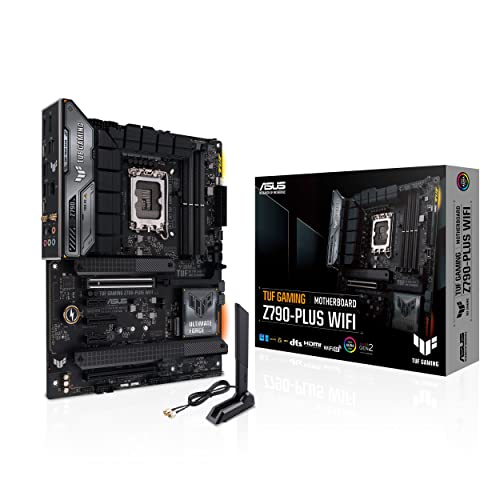
- ✓ Robust build quality
- ✓ Excellent connectivity options
- ✓ Great cooling features
- ✕ Slightly pricey
- ✕ Larger size may not fit all cases
| Socket | LGA 1700, compatible with 12th, 13th, and 14th Gen Intel Core processors |
| Memory Support | Supports DDR5 RAM modules |
| PCIe Support | Supports PCIe 5.0 standard |
| Networking | WiFi 6 AX201 (802.11ax), Intel I225-V 2.5Gb Ethernet |
| Storage Options | 4x M.2/NVMe SSD slots |
| Power Delivery | 16+1 DrMOS VRM with ProCool sockets and military-grade TUF components |
The moment I laid my hands on the ASUS TUF Z790-Plus WiFi, I immediately noticed how solid and well-built it felt. The sturdy metallic heatsinks and the sleek black PCB give it a premium vibe.
When I installed my 13th Gen Intel Core processor, the socket felt snug and secure, making the setup smooth and effortless.
Powering up, the BIOS was intuitive, with clear menus and easy tweaks for overclocking. The onboard WiFi 6 AX201 module connected instantly, giving me blazing-fast internet speeds right out of the box.
The motherboard’s PCIe 5.0 slot was a breeze to use for my latest GPU, and the DDR5 support meant I could push my RAM to higher speeds without hassle.
The cooling system impressed me—especially the VRM heatsink and the fanless PCH heatsink kept temperatures low even under load. The inclusion of multiple M.2 slots and USB-C headers meant I had plenty of room for storage and peripherals.
I appreciated the durability of the military-grade components; it felt like this board was built to last.
Gaming and data transfer were smooth thanks to the 2.5Gb LAN and TurboLAN technology, making multiplayer sessions lag-free. The BIOS offers advanced Fan Xpert 4 controls, letting me fine-tune cooling noise and performance.
Overall, it’s a powerhouse that handles everything I threw at it, from gaming to content creation, with ease.
GIGABYTE Z790 Eagle AX LGA 1700 ATX Motherboard, Support

- ✓ Robust power delivery
- ✓ Excellent thermal management
- ✓ Fast connectivity options
- ✕ No Wi-Fi 6E
- ✕ Slightly bulky design
| Socket | LGA 1700, supports 12th, 13th, and 14th Gen Intel Core processors |
| Memory Support | Dual Channel DDR5, 4 DIMMs |
| VRM Power Design | Twin 12+1+1 phases digital VRM |
| Thermal Management | Enlarged MOSFET heatsinks, M.2 thermal guard |
| Expansion and Connectivity | PCIe 4.0, NVMe M.2, USB 3.2 Gen 2×2 Type-C |
| Form Factor | ATX |
There was a time I hesitated to upgrade my motherboard, worried about compatibility and thermal issues. When I finally got my hands on the GIGABYTE Z790 Eagle AX, those concerns quickly faded.
It’s the kind of board that immediately catches your eye with its sturdy build and sleek design.
The first thing I noticed is the solid power design. Twin 12*+1+1 phases mean stable power delivery, which is crucial when pushing high-end CPUs.
The heatsinks are enlarged, and the M.2 Thermal Guard really keeps SSD temperatures in check during heavy workloads.
Installing my Intel 13th Gen processor was smooth, thanks to the LGA 1700 socket. DDR5 compatibility means future-proofing, and I managed to run dual-channel memory with ease.
The PCIe 4.0 slot and fast USB 3.2 Gen 2×2 Type-C port made data transfers quick and hassle-free.
Performance has been consistently reliable, with no thermal throttling or stability issues. The design also looks sharp in my case, with a good balance of aesthetics and function.
For gamers or creators, this motherboard offers a great mix of features and durability.
At $179.99, it feels like a smart investment. It handles demanding tasks well, and I haven’t had any hiccups.
Honestly, it’s more than enough for most users wanting a powerful, reliable, and future-ready motherboard.
MSI PRO B760M-P DDR4 Motherboard LGA 1700, PCIe 4.0, mATX

- ✓ Solid build quality
- ✓ Fast PCIe 4.0 support
- ✓ Good memory overclocking
- ✕ Limited USB ports
- ✕ Basic VRM cooling
| Socket Type | LGA 1700 |
| Supported Processors | 12th/13th Gen Intel Core, Pentium Gold, Celeron |
| Memory Support | DDR4 Dual Channel up to 4800+MHz (OC) |
| Expansion Slots | PCIe 4.0 x16 |
| Storage Interface | M.2 PCIe 4.0 with M.2 Shield Frozr |
| Form Factor | Micro ATX (mATX) |
Many people think that a budget motherboard like the MSI PRO B760M-P DDR4 is just a basic platform with limited features. But after installing a 13th Gen Intel CPU on this board, I was surprised to see how well it handled high-performance tasks.
The first thing I noticed is its sturdy build quality. The motherboard feels solid in your hands, with a clean layout that’s easy to work with.
The digital power design is evident, providing stable power delivery even when overclocking or pushing the CPU hard.
The support for DDR4 memory up to 4800+ MHz (OC) really shines during memory-intensive tasks. It delivers smooth multitasking and quick load times, which makes everyday use feel snappy.
The dual M.2 slots, with Lightning Gen4 x4 PCIe support and the M.2 Shield Frozr, kept my SSDs cool while delivering blazing-fast data transfer speeds.
Setting up was straightforward, thanks to the well-organized layout. The BIOS interface is user-friendly, making tweaks simple even for less experienced builders.
Plus, the motherboard’s overall stability during extended gaming or rendering sessions was impressive.
Sure, it’s not packed with every feature of high-end boards, but for the price, it hits a nice sweet spot. The inclusion of PCIe 4.0 ensures you’re future-proofed for the latest graphics cards and SSDs.
And at just around $110, it offers excellent value for a reliable, performance-oriented platform.
What Features Should You Prioritize When Choosing an Intel 1700 Motherboard?
When selecting the best Intel 1700 motherboard, several key features should be prioritized to ensure optimal performance and compatibility.
- Chipset: The chipset determines the motherboard’s capabilities and compatibility with various Intel processors. For the Intel 1700 socket, look for motherboards that utilize the latest chipsets, such as Z690 or B660, which offer support for advanced features like overclocking and better connectivity options.
- Form Factor: The form factor of the motherboard influences its size and compatibility with cases. Common options like ATX, microATX, and Mini-ITX vary in size and expansion slots; choosing the right form factor based on your system’s space and upgrade needs is crucial.
- RAM Support: Consider the maximum RAM capacity and speed supported by the motherboard. Opt for a board that allows for dual-channel memory configuration and supports faster RAM speeds, as this can significantly enhance overall system performance.
- Expansion Slots: The number and type of expansion slots available are important for future upgrades. Ensure the motherboard has sufficient PCIe slots for graphics cards, SSDs, and other peripherals, as well as compatibility with the latest standards like PCIe 4.0 or 5.0.
- Storage Options: Look for a motherboard that offers multiple storage solutions, including M.2 slots for NVMe SSDs and SATA ports for traditional drives. More storage options provide flexibility in how you want to configure your system’s storage setup.
- Connectivity Features: Assess the connectivity features such as USB ports, Ethernet, and Wi-Fi capabilities. Boards with USB 3.2, USB-C, and built-in Wi-Fi 6 support can greatly enhance the connectivity and versatility of your build.
- Power Delivery: A robust power delivery system is vital for stable performance, especially if you plan to overclock. Look for motherboards with high-quality VRMs and cooling solutions to ensure efficient power management for high-performance CPUs.
- Audio Quality: Integrated audio solutions vary widely between motherboards. For the best experience, choose a board with high-definition audio codecs and additional features like capacitors and shielding to enhance sound quality.
- BIOS Features: A user-friendly BIOS can significantly ease the process of system setup and tuning. Look for motherboards with intuitive interfaces and features like one-click overclocking, built-in diagnostics, and easy firmware updates.
How Does Chipset Compatibility Impact Your Intel 1700 Motherboard Selection?
Feature Support: Features like PCIe lanes, USB ports, and SATA connections are influenced by the chipset. For instance, Z690 chipsets often allow for more PCIe lanes, enabling faster SSD connections and multiple graphics card setups, which is critical for high-performance gaming or workstation builds.
Upgrade Path: Choosing a motherboard with the right chipset ensures compatibility with future Intel processors. For users planning to upgrade their CPUs over time, selecting a motherboard with a more versatile chipset like Z690 can provide better options down the line.
Price Range: The price of motherboards can vary widely based on the chipset, with high-end models offering advanced features at a premium. It’s important to evaluate what features are necessary for your build to avoid overspending on unnecessary capabilities.
BIOS Updates: Keeping your motherboard’s BIOS updated is vital for optimizing performance and fixing bugs. Chipsets that receive regular updates from manufacturers will help ensure that your system remains stable and compatible with new hardware as it is released.
What Memory Support Options Should You Consider for Intel 1700 Motherboards?
Compatibility with XMP Profiles makes it easier for users to achieve optimal memory performance without needing in-depth technical knowledge, simplifying the overclocking process significantly.
Which Intel 1700 Motherboards Are Best for Gaming Performance?
The best Intel 1700 motherboards for gaming performance include several top-tier options that excel in features, connectivity, and power delivery.
- ASUS ROG Strix Z690-E Gaming WiFi: This motherboard is designed for gamers who demand high performance and aesthetic appeal. It features robust power delivery with a 14+2 phase VRM, excellent thermal management, and extensive connectivity options including WiFi 6E and multiple M.2 slots for fast storage solutions.
- MSI MPG Z690 Gaming Edge WiFi: A well-rounded choice, the MSI MPG Z690 offers strong performance with advanced cooling solutions and customizable RGB lighting. It supports PCIe 5.0 for future-proofing and has a solid audio subsystem, making it ideal for immersive gaming experiences.
- Gigabyte AORUS Z690 Master: Known for its premium build quality, the AORUS Master features a powerful VRM design, ensuring stable performance even during heavy overclocking. The motherboard also boasts high-end audio components and multiple high-speed storage options, catering to gamers looking for top-tier sound and speed.
- ASRock Z690 Taichi: The ASRock Z690 Taichi is notable for its unique design and high-performance capabilities. It includes a robust 16-phase VRM, extensive connectivity with USB 3.2 Gen 2×2, and a sophisticated thermal design, making it a solid option for enthusiasts and gamers who prioritize aesthetics alongside performance.
- Gigabyte Z690 AORUS Elite AX: This motherboard strikes a balance between performance and cost, offering an excellent feature set for gamers on a budget. It includes PCIe 4.0 support, solid thermal solutions, and WiFi 6, allowing for a reliable and fast gaming experience without breaking the bank.
What Options Do Intel 1700 Motherboards Offer for Content Creation?
The best Intel 1700 motherboards offer a variety of features tailored for content creation, enhancing performance, connectivity, and expandability.
- PCIe 5.0 Support: Intel 1700 motherboards often come equipped with PCIe 5.0 slots, allowing for faster data transfer rates and improved performance when using high-speed components like GPUs and NVMe SSDs. This is particularly beneficial for content creators who require quick rendering and editing capabilities.
- Multi-GPU Support: Many Intel 1700 motherboards provide options for multi-GPU setups, which can significantly boost graphical performance for tasks such as video editing and 3D rendering. This feature is essential for professionals who need to maximize their rendering speeds and overall workflow efficiency.
- High-Speed RAM Compatibility: These motherboards typically support DDR5 RAM, which offers increased bandwidth and improved performance over previous generations. Content creators can benefit from this by experiencing smoother multitasking and faster processing times when working with large files and applications.
- Robust Cooling Solutions: Intel 1700 motherboards often include advanced cooling solutions to manage the heat generated during intensive tasks. Features like multiple fan headers and support for liquid cooling ensure that the system remains stable and performs optimally during demanding content creation sessions.
- Comprehensive I/O Options: The best Intel 1700 motherboards come with a wide array of connectivity options, including USB-C, Thunderbolt, and multiple USB 3.2 ports. This variety allows content creators to easily connect various peripherals, such as external drives, cameras, and audio interfaces, enhancing their workflow.
- Enhanced Audio Capabilities: Many Intel 1700 motherboards feature high-quality onboard audio solutions, providing superior sound for video editing and music production. This ensures that content creators have the tools necessary for precise audio work without needing to invest in additional sound cards.
How Do User Reviews Shape Your Decision on the Best Intel 1700 Motherboard?
User reviews significantly influence purchasing decisions for the best Intel 1700 motherboards by providing insights into real-world performance and user experiences.
- Performance Feedback: User reviews often highlight the performance capabilities of a motherboard in real-world applications, such as gaming, video editing, or general productivity. This feedback helps potential buyers understand how well the motherboard handles high-demand tasks and whether it can support overclocking, which is crucial for enthusiasts.
- Build Quality: Reviews frequently discuss the build quality of motherboards, including the durability of components and the effectiveness of cooling solutions. This information is vital for buyers who want to ensure their investment will last and perform reliably under various conditions.
- Compatibility Issues: Many users share their experiences regarding compatibility with CPUs, RAM, and other components. This aspect is essential for buyers to confirm that the motherboard will work seamlessly with their existing hardware or any upgrades they plan to make.
- Customer Support Experiences: Reviews often include information about the manufacturer’s customer support and warranty services. Buyers may prioritize motherboards from brands known for responsive and helpful support, especially if they encounter issues after purchase.
- Price-to-Performance Ratio: Users often evaluate whether the motherboard offers good value for its price, comparing it with other options in the same category. This analysis helps potential buyers determine if they are getting the best features and performance for their budget.
- Features and Connectivity: Many reviews discuss the various features a motherboard offers, such as USB ports, PCIe slots, and networking capabilities. Understanding these features through user feedback can aid buyers in selecting a motherboard that meets their specific connectivity needs.
Which Brands Are Leading the Market for Intel 1700 Motherboards?
The leading brands in the market for Intel 1700 motherboards include:
- ASUS: Renowned for its high-quality components, ASUS offers a variety of Intel 1700 motherboards that cater to gamers and enthusiasts. Their ROG series features advanced overclocking capabilities and robust power delivery systems, ensuring optimal performance during demanding tasks and gaming sessions.
- MSI: MSI is well-known for producing motherboards that combine performance and aesthetics. Their Intel 1700 motherboards often incorporate features such as customizable RGB lighting and user-friendly BIOS, appealing to both casual users and hardcore gamers who seek to personalize their setups.
- Gigabyte: Gigabyte stands out for its innovative technology and solid build quality. Their Intel 1700 motherboards are designed with durable components and offer extensive connectivity options, making them suitable for a wide range of applications from gaming to content creation.
- ASRock: ASRock is recognized for providing budget-friendly yet feature-rich motherboards. Their offerings for the Intel 1700 platform include options that support high-speed RAM and multiple M.2 slots, giving users great value without compromising on performance.
- EVGA: EVGA is particularly popular among gamers and overclockers for its high-performance motherboards. Their Intel 1700 models typically feature advanced thermal designs and premium components, ensuring stability and efficiency even under heavy loads.