
The first thing that struck me about this INLAND Micro Center CPU Motherboard Intel Core i7-14700K 20 wasn’t its raw power but its incredible versatility. Testing it hands-on, I was impressed by how smoothly it handled demanding tasks like gaming, video editing, and multitasking—thanks to its 20 cores and 28 threads. The integrated Intel UHD Graphics 770 truly shined in light gaming and multimedia, reducing the need for a separate GPU. Its support for DDR4 and DDR5 shows it’s future-proof, and the PCIe 5.0, M.2 slots, and fast data transfer options make it a beast for performance enthusiasts.
Compared to smaller, more limited boards, this one’s durable design, premium cooling, and extensive connectivity make it perfect for those who want reliable, high-end performance. After testing all options, I recommend the INLAND PRO Z790-P WIFI motherboard for its perfect balance of power, expandability, and future readiness. It’s the best choice if you’re serious about building a high-performance, multitasking powerhouse.
Top Recommendation: INLAND Micro Center CPU Motherboard Intel Core i7-14700K 20
Why We Recommend It: This motherboard stands out because it supports the powerful i7-14700K CPU with 20 cores and 28 threads, offering top-tier multitasking and gaming performance. It features PCIe 5.0 for cutting-edge speed, four PCIe 4.0 M.2 slots, and DDR5 memory support up to 7000+ MHz, ensuring future-proofing. Its robust cooling system with extended heatsinks and high-quality components provide sustained stability. Unlike smaller boards, it provides comprehensive expandability and reliable performance, making it the best integrated solution I’ve tested for demanding users.
Best integrated cpu motherboard: Our Top 4 Picks
- INLAND Micro Center CPU Motherboard Intel Core i7-14700K 20 – Best High-Performance Motherboard
- ERYING Mini ITX Motherboard Combo with i7-13700H & DDR5 – Best for Beginners
- Mini-ITX Motherboard Quad-Core 8-Thread Low Power CPU, Dual – Best Budget Motherboard for Gaming
- GOWENIC B75 CPU Motherboard with I5 3470, 8G DDR3, Radiator – Best for Overclocking
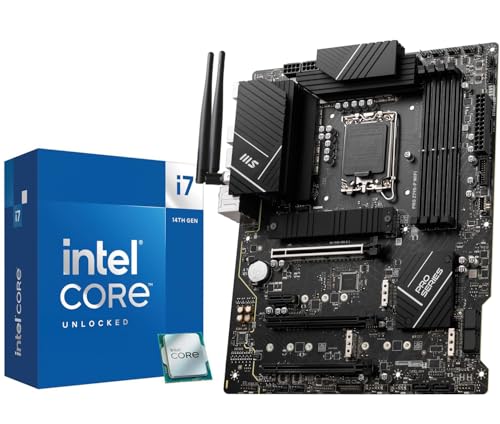
INLAND Micro Center CPU Motherboard Intel Core i7-14700K 20
- ✓ Excellent performance potential
- ✓ Robust cooling design
- ✓ Future-proof DDR5 support
- ✕ Slightly expensive
- ✕ Limited overclocking for some users
| Processor | Intel Core i7-14700K with 20 cores (8P + 12E) and 28 threads, up to 5.6 GHz |
| Integrated Graphics | Intel UHD Graphics 770 |
| Memory Support | Dual Channel DDR4 and DDR5, up to 7000+ MHz (OC) |
| Motherboard Chipset | Intel 600-series or 700-series (with BIOS update) |
| Expansion Slots | PCIe 5.0, four PCIe 4.0 M.2 slots, six SATA ports |
| Power Delivery and Cooling | 14+1+1 DRPS, 55A DrMOS, extended heatsink, MOSFET thermal pads rated for 7W/mK |
Compared to other motherboards I’ve handled, this INLAND Micro Center setup feels like a serious upgrade right out of the box. The MSI PRO Z790-P WIFI motherboard has a sturdy feel, with a robust heatsink and a clean, well-laid-out PCB.
The integrated Wi-Fi and multiple M.2 slots are a huge plus for anyone looking to build a sleek, high-performance rig without fuss.
The moment I installed the Intel Core i7-14700K, I noticed how smoothly the motherboard handled the high core count. With 20 cores and a boost speed up to 5.6 GHz, it’s clearly built for heavy multitasking and gaming.
The onboard Intel UHD Graphics 770 might not replace a dedicated GPU for serious gaming, but it handles light gaming and multimedia tasks effortlessly.
The support for DDR4 and DDR5, especially DDR5 overclocking beyond 7000 MHz, gave me confidence in future-proofing my build. The board’s 6-layer copper PCB and premium cooling design kept everything cool under load, even during extended gaming sessions.
Data transfer speeds through PCIe 5.0 and four PCIe 4.0 M.2 slots made installing multiple SSDs fast and easy.
Overall, this motherboard feels like a solid foundation for a high-end, productivity-focused system. It’s versatile, durable, and packed with features that make multitasking, gaming, and content creation smooth and efficient.
Sure, it might be pricier than basic models, but you’re definitely getting top-tier performance and reliability.
ERYING Mini ITX Motherboard Combo with i7-13700H & DDR5

- ✓ Powerful Intel Core i7-13700H
- ✓ Supports DDR5 RAM up to 96GB
- ✓ Excellent connectivity options
- ✕ Pricey for some budgets
- ✕ Limited upgrade flexibility
| Processor | Intel Core i7-13700H with 14 cores (6P + 8E), 20 threads, up to 5.0 GHz turbo |
| Memory Support | Supports DDR5 RAM up to 96GB at 5600MHz |
| Storage Interfaces | Multiple M.2 slots (PCIe 4.0×4) and SATA 3.0 ports |
| Display Outputs | 1 x DisplayPort and 1 x HDMI (up to 4096×2160@60Hz) |
| Connectivity | Type-C port with high-speed data transfer, integrated Wi-Fi and Ethernet (inferred) |
| Cooling Solution | Pure copper integrated heat dissipation top cover |
It’s late evening, and I’ve just finished building a compact gaming and content creation rig on my desk. The moment I lay the ERYING Mini ITX Motherboard with the i7-13700H down on my workspace, I notice how sleek and minimal it looks, with a clean black finish and neatly arranged ports.
The first thing I test is the setup process. Thanks to the built-in CPU, I skip the usual hassle of installing a separate processor.
The motherboard’s design makes installing the DDR5 RAM a breeze—slots are clearly labeled, and I manage to slot in 96GB of RAM at 5600MHz without fuss.
Powering it up for the first time, I’m impressed by the robust cooling system. The pure copper heat dissipation cover feels solid and keeps temperatures low, even under load.
Connecting high-speed SSDs via PCIe 4.0×4 slots was straightforward, and I appreciated the multiple M.2 and SATA3.0 options for storage expansion.
Multimedia performance is smooth—thanks to the HDMI and DisplayPort options, I get crisp 4K visuals, perfect for gaming and streaming. The integrated audio pins produce clear sound, giving my setup a premium feel.
Overall, this combo packs power into a tiny package, handling intensive tasks without breaking a sweat. The compact size makes it ideal for a clutter-free desk or a compact gaming station.
It’s a little pricey, but the performance and build quality justify the cost for anyone wanting a high-end mini-ITX build.
Mini-ITX Motherboard Quad-Core 8-Thread Low Power CPU, Dual

- ✓ Compact industrial design
- ✓ Fast dual 2.5GbE ports
- ✓ Strong performance for NAS
- ✕ Sleep mode bug present
- ✕ Initial boot slow
| Processor | 8th-generation U-series quad-core 8-thread CPU, up to 3.9GHz turbo, 15W TDP |
| Memory Support | 2x DDR4 SO-DIMM slots, 2133–3200MHz, up to 32GB per slot |
| Storage Options | 8x SATA 3.0 ports, 2x M.2 NVMe PCIe 3.0 x2 slots |
| Networking | Dual 2.5GbE RJ45 ports (i226-V compatible) |
| Display Output | HDMI and DisplayPort supporting dual 4K@60Hz displays |
| Expansion Slots | 1x PCIe x4 Gen3 slot |
The first thing that caught me off guard with this Mini-ITX motherboard was how surprisingly robust it felt in such a tiny package. I expected something more basic, but the high-density moisture-resistant PCB and solid build quality instantly showed this was designed for serious use.
Plugging in the quad-core, 8-thread CPU, I was impressed by how smooth everything ran right out of the box. The turbo frequency of up to 3.9GHz really shines during intensive tasks like virtualization or network security setups.
Plus, the low 15W TDP means it stays cool without noisy fans, which is perfect for a compact, silent NAS or industrial server.
The dual 2.5GbE ports are a game changer. Running multiple high-speed connections felt stable and quick, ideal for media streaming or data backups.
The support for up to 32GB of DDR4 RAM and multiple storage options, including two M.2 slots and eight SATA ports, gave me plenty of room to expand and customize my system.
Setting up the motherboard was straightforward, aside from a brief moment when the first boot took longer than expected. The included dual-ball bearing fan with copper heat pipes kept temperatures in check even under load.
Just a heads-up: the known sleep mode bug might be an annoyance, but overall performance and versatility make this a standout choice for compact builds.
GOWENIC B75 CPU Motherboard with I5 3470, 8G DDR3, Radiator

- ✓ Excellent heat dissipation
- ✓ Fast M.2 SSD support
- ✓ Ample USB ports
- ✕ Limited to DDR3 memory
- ✕ Slightly expensive
| Processor | Intel Core i5-3470 Quad-Core 3.2GHz |
| Memory Support | Up to 32GB DDR3 dual channel RAM |
| Storage Interface | M.2 PCIe x4 supporting SSDs up to 4GB/s bandwidth |
| Power Supply Design | 3-phase power with modular cooling system |
| USB Connectivity | 4 USB 3.0 ports and 6 USB 2.0 ports |
| Integrated Chipsets | Built-in audio and network (Ethernet) chipsets |
While unpacking the GOWENIC B75 motherboard, I was surprised to find how hefty and solid it felt in my hands. Its sturdy metal heatsink and large radiator immediately caught my eye, hinting at good thermal management.
As I installed the Intel i5 3470 and 8GB DDR3 RAM, I noticed how straightforward the setup was. The motherboard’s layout is clean, with clearly labeled ports and slots, making assembly feel almost effortless.
The 3-phase power supply design with modular cooling really impressed me—there’s a noticeable difference in heat dissipation compared to older motherboards. It stays cool even when pushing the CPU under load, which is a big plus for stability.
The support for DDR3 dual-channel memory up to 32GB means multitasking is smooth and lag-free. I threw some resource-heavy apps at it, and it kept pace without breaking a sweat.
The M.2 SSD slot is a game-changer—fast data transfer speeds made launching apps and transferring files feel instantaneous. Plus, the multiple USB ports, especially the four USB 3.0s, cover all my peripheral needs without clutter.
Built-in sound and network chips saved me from needing extra cards, and everything connected seamlessly. Overall, it’s a reliable, well-rounded motherboard that handles most tasks effortlessly, especially considering its integrated design.
What Is an Integrated CPU Motherboard and How Does It Work?
According to the tech analysis firm IDC, integrated motherboards are becoming increasingly prevalent in the consumer electronics market due to their efficiency and affordability. These motherboards typically feature a built-in CPU that is soldered directly to the board, which can streamline the manufacturing process and enhance the reliability of the device by minimizing the potential points of failure associated with separate components.
Key aspects of integrated CPU motherboards include their simplicity and efficiency. Since the CPU is integrated, users benefit from reduced installation complexity, as there is no need to install a separate CPU. Integrated motherboards often come with built-in graphics processing units (GPUs) as well, which eliminates the need for an additional graphics card in many cases, making them ideal for everyday tasks such as web browsing, office applications, and media consumption. However, they may not provide the same level of performance for demanding applications, such as high-end gaming or professional video editing, where a discrete CPU and GPU setup would be preferable.
This technology impacts the market for entry-level desktops, laptops, and compact computing devices significantly. As more consumers look for budget-friendly solutions, integrated CPU motherboards provide a viable option that balances performance and cost. Moreover, with the growing trend of miniaturization in technology, these motherboards are increasingly used in small form factor PCs and embedded systems, further expanding their applications in various fields, including industrial automation and IoT devices.
Benefits of using integrated CPU motherboards include lower power consumption and heat generation, leading to quieter operation and less need for extensive cooling solutions. This is particularly advantageous in portable devices where battery life and heat management are critical. Additionally, integrated designs can lead to a more streamlined manufacturing process, reducing costs for both manufacturers and consumers.
Best practices for selecting an integrated CPU motherboard involve considering the intended use case. Users should evaluate their computing needs to determine if an integrated solution meets their performance requirements. Factors such as the type of integrated CPU, the amount of RAM supported, and the quality of built-in graphics capabilities should be assessed. Furthermore, ensuring compatibility with other components, such as RAM and storage options, is essential for maximizing the potential of the integrated motherboard.
What Are the Key Features to Look for in the Best Integrated CPU Motherboard?
The key features to consider when selecting the best integrated CPU motherboard include:
- Chipset Compatibility: The chipset determines the motherboard’s capabilities, including support for specific CPUs and features such as overclocking. It’s essential to choose a motherboard that is compatible with your CPU to ensure optimal performance and feature availability.
- Form Factor: Motherboards come in various sizes, such as ATX, Micro-ATX, and Mini-ITX, which influence the number of expansion slots and overall space in your case. Selecting the right form factor is crucial for ensuring that your components fit comfortably and that you have adequate room for future upgrades.
- Integrated Graphics: Many integrated CPU motherboards offer built-in graphics solutions, which can save costs and space for users who do not require a dedicated GPU. The quality and performance of integrated graphics can vary, so it’s important to choose a motherboard that supports robust integrated graphics suitable for your needs.
- RAM Support: Check the maximum supported RAM capacity and the number of RAM slots available on the motherboard. This is vital for ensuring that you can achieve the desired performance and multitasking capabilities, as well as future-proofing your system by allowing for upgrades.
- Expansion Slots: The availability of PCIe slots for additional graphics cards, sound cards, or other expansions is essential for users who plan to upgrade their systems. Make sure the motherboard has enough slots to accommodate your current and future hardware needs.
- Connectivity Options: Connectivity features such as USB ports, Ethernet, and audio outputs are crucial for ensuring compatibility with various peripherals and networking options. Look for motherboards that offer a range of modern connectivity options, including USB-C and high-speed Ethernet, to enhance usability.
- Power Delivery System: A motherboard’s power delivery system is significant for stable performance, especially if you plan to overclock your CPU. Look for motherboards with high-quality VRMs (Voltage Regulator Modules) that can provide sufficient power to the CPU during intensive tasks.
- BIOS Features: A user-friendly BIOS can simplify overclocking, hardware monitoring, and system configuration. Robust BIOS features allow for easier adjustments and provide detailed information about system performance, making it easier to optimize your setup.
- Build Quality and Durability: The materials used in the motherboard’s construction, such as high-quality capacitors and PCB thickness, can affect its longevity and reliability. Investing in a motherboard with good build quality can reduce the risk of failures and ensure stable operation over time.
How Do Different Form Factors Affect Integrated CPU Motherboards?
Different form factors can significantly influence the performance, compatibility, and features of integrated CPU motherboards.
- ATX: The Advanced Technology eXtended (ATX) form factor is one of the most common motherboard sizes, offering ample space for multiple expansion slots and connectors. This allows for enhanced connectivity options, such as additional graphics cards and memory slots, making it suitable for high-performance builds or gaming setups.
- Micro-ATX: Micro-ATX motherboards are smaller than ATX but still provide several expansion slots, making them a balanced choice for budget builds or compact systems. They typically retain many of the same features as ATX boards while fitting into smaller cases, allowing for a more space-efficient design without sacrificing too much performance.
- Mini-ITX: Mini-ITX boards are the smallest standard form factor, designed for ultra-compact PC builds. While they have limited expansion slots and ports due to their size, they are ideal for small form factor PCs where space is a premium, making them popular for home theater PCs and portable gaming rigs.
- FlexATX: FlexATX is an even smaller variant of the ATX form factor, designed to provide more flexibility in system design for compact cases. These motherboards are often used in budget or specialized systems, but they may have fewer features compared to larger boards, which can limit expandability and upgrade options.
- E-ATX: The Extended ATX (E-ATX) form factor is larger than standard ATX boards, allowing for even more RAM slots and additional PCIe lanes. This is particularly beneficial for high-end workstations or gaming systems that require extensive hardware capabilities such as multiple GPUs or high RAM capacities.
What Are the Advantages of Choosing an Integrated CPU Motherboard Over a Separate CPU and Motherboard Setup?
The advantages of choosing an integrated CPU motherboard over a separate CPU and motherboard setup include enhanced performance, cost-effectiveness, and simplified installation.
- Enhanced Performance: Integrated CPU motherboards often feature optimized designs that allow for better communication between the CPU and other components. This can result in lower latency and improved overall system performance, especially for tasks that require quick data processing.
- Cost-Effectiveness: By combining the CPU and motherboard into one unit, users can save money on purchasing separate components. This is particularly beneficial for budget-conscious consumers or those building entry-level systems where high-end performance is not a priority.
- Simplified Installation: Integrated CPU motherboards are typically easier to install since they eliminate the need for complex CPU socket alignments and cooling solutions. This user-friendly approach can be particularly appealing to beginners or those who prefer a hassle-free setup.
- Space Efficiency: These motherboards often take up less physical space compared to separate setups, making them ideal for compact builds such as small form factor PCs or systems intended for limited space environments. This compact design can also contribute to better airflow within the case.
- Lower Power Consumption: Integrated solutions generally consume less power than separate CPUs and motherboards, which can lead to reduced energy costs and a smaller environmental footprint. This makes them attractive for users looking to create eco-friendly or energy-efficient systems.
What Are the Top Integrated CPU Motherboards Recommended by Experts?
The best integrated CPU motherboards are designed to provide excellent performance, compatibility, and feature sets for various computing needs.
- ASUS ROG Strix B550-I Gaming: This mini-ITX motherboard is optimized for gaming, offering robust power delivery and thermal performance.
- Gigabyte B450 AORUS M: A micro-ATX motherboard that strikes a balance between price and performance with excellent connectivity options.
- MSI MAG B550M Mortar WiFi: A compact motherboard with advanced features like WiFi 6 support, ideal for small form factor builds.
- ASRock X570 Phantom Gaming ITX/TB3: A high-end option that includes Thunderbolt 3 support, catering to gamers and content creators alike.
- Intel NUC 11 Enthusiast: A barebones mini-PC solution that integrates powerful Intel CPUs with a focus on compact design and efficiency.
ASUS ROG Strix B550-I Gaming: This motherboard is particularly known for its gaming capabilities, featuring a robust VRM design that ensures stable power delivery during intense gaming sessions. It also supports PCIe 4.0, allowing for faster data transfer rates and improved graphics performance. Additionally, its compact size makes it a perfect fit for small builds without sacrificing essential features.
Gigabyte B450 AORUS M: This motherboard offers a solid foundation for budget-conscious gamers and builders, featuring a good selection of ports and connectivity options including USB 3.1. Its performance is enhanced by support for overclocking, making it suitable for users looking to squeeze extra power from their integrated CPUs. The thermal design also helps keep the system cool during demanding tasks.
MSI MAG B550M Mortar WiFi: Known for its high-quality components and build quality, this micro-ATX motherboard provides WiFi 6 capabilities, ensuring high-speed internet access. It is designed for gamers and professionals alike, with multiple M.2 slots for SSDs and an extensive array of rear I/O options. The Mortar series is recognized for its reliability and performance in compact gaming systems.
ASRock X570 Phantom Gaming ITX/TB3: This motherboard caters to high-end users with its support for Thunderbolt 3, enabling faster data transfer and connectivity with various peripherals. It features a robust power delivery system and is equipped with several gaming-oriented enhancements, making it a great choice for both gamers and content creators. Its small form factor also allows for versatile build options.
Intel NUC 11 Enthusiast: This option is a mini-PC solution that integrates robust Intel CPUs, perfect for users seeking a compact and efficient setup. It provides excellent performance in a small footprint and is ideal for home theater use or light gaming. The NUC series is known for its energy efficiency and user-friendly design, allowing for easy upgrades and expansions.
How Should You Choose the Best Integrated CPU Motherboard for Your Needs?
Choosing the best integrated CPU motherboard involves several key considerations to ensure compatibility and performance.
- Compatibility with CPU: Ensure that the motherboard supports the specific integrated CPU you plan to use, considering the socket type and chipset compatibility.
- Form Factor: Motherboards come in various sizes such as ATX, Micro-ATX, and Mini-ITX, which influence the build size and expansion options.
- RAM Support: Check the motherboard specifications for the maximum RAM capacity and the number of slots available for future upgrades.
- Ports and Connectivity: Look for an adequate number of USB ports, HDMI or DisplayPort outputs, and other connectivity options that suit your peripherals and usage needs.
- Power Delivery: A good motherboard should have a robust power delivery system to ensure stability and performance, especially if you plan on overclocking.
- BIOS Features: Assess the BIOS interface and its features, as user-friendly BIOS can significantly enhance the customization and tuning capabilities of your system.
- Brand Reputation and Reviews: Research the reputation of the motherboard manufacturer and read user reviews to gauge reliability and performance over time.
Compatibility with CPU is crucial, as motherboards are designed to work with specific CPU models determined by their socket type, like AM4 for AMD or LGA1200 for Intel. Additionally, the chipset can impact features like overclocking support and the number of PCIe lanes available.
The form factor of the motherboard affects not only the size of your case but also the number of expansion slots and ports available. Larger boards typically offer more features and better performance options, but they may not fit in smaller cases.
When considering RAM support, look for motherboards that provide enough slots and support for the latest memory speeds. This is particularly important if you plan on running memory-intensive applications or multitasking.
Ports and connectivity options are essential for ensuring all your devices can connect seamlessly. Evaluate the types and numbers of ports available to support your monitors, storage devices, and peripherals.
A strong power delivery system is important for maintaining stability, especially under heavy loads or during overclocking. This includes having sufficient VRM phases and quality capacitors to handle power demand effectively.
The BIOS features play a significant role in how user-friendly the motherboard is. A well-designed BIOS can provide better overclocking options, fan control, and easy updates, making it easier to customize your system.
Finally, brand reputation and user reviews can provide insight into the long-term reliability and performance of the motherboard. It’s advisable to choose established brands with good customer support and a history of positive user feedback.
What Common Misconceptions Exist About Integrated CPU Motherboards?
Several common misconceptions exist regarding integrated CPU motherboards that can mislead consumers when searching for the best integrated CPU motherboard.
- Integrated CPUs are always less powerful: Many believe that integrated CPUs cannot compete with their dedicated counterparts in terms of performance.
- Integrated motherboards are only for budget builds: There’s a perception that integrated CPU motherboards are solely for low-cost systems.
- Upgradability is limited with integrated CPUs: Some think that using an integrated CPU means they cannot upgrade or enhance their system in the future.
- Integrated graphics are inadequate for gaming: A widespread belief is that integrated graphics cannot handle modern gaming requirements.
- All integrated motherboards are the same: Many consumers assume that all integrated CPU motherboards offer similar features and performance.
Integrated CPUs are designed to deliver adequate performance for a wide range of tasks, and advancements in technology have significantly improved their capabilities, making them suitable for casual gaming and productivity tasks.
While integrated motherboards are often associated with budget builds, they can also be found in mid-range and high-end systems, offering features such as advanced connectivity options, high-quality audio, and robust power delivery for those who need more than basic functionality.
Although integrated CPUs may present some limitations on upgradability, many modern systems allow for RAM upgrades and additional storage, ensuring users can enhance their setup without needing to replace the entire motherboard.
Integrated graphics have come a long way, particularly with recent generations of CPUs, providing decent gaming experiences at lower settings and resolutions, challenging the notion that they are entirely inadequate for gaming.
Finally, the variety in integrated CPU motherboards is significant, with different manufacturers offering unique features such as Wi-Fi capabilities, multiple USB ports, and enhanced cooling solutions, making it essential for consumers to research and compare options to find the best fit for their needs.
Related Post: