
Holding the ERYING Mini ITX Motherboard + Intel i7-13700H & DDR5 RAM, I immediately noticed its solid weight and sleek metal finish—premium build quality that screams high performance. When I powered it up, the blazing-fast DDR5 RAM support up to 96GB at 5600MHz stood out, promising ultra-quick load times for gaming or content creation. The multitasking felt smooth, thanks to the powerful 14-core Intel i7-13700H CPU and PCIe 4.0 support for speedy SSDs. The connections are thoughtfully laid out, with multiple M.2 slots, Type-C, and HDMI, making it a versatile choice for high-end setups. The copper heat dissipation worked like a charm during intensive tasks, keeping temps stable and performance intact.
Compared to cheaper boards like the H81 or B75, which support only DDR3 or older CPUs and lack modern high-speed interfaces, the ERYING motherboard truly offers cutting-edge features in a compact form. Its combination of raw power, connectivity, and thermal management makes it clear this is a top-tier pick for serious users. After thorough testing, I confidently recommend the ERYING model for those demanding high performance in a small footprint.
Top Recommendation: ERYING Mini ITX Motherboard + Intel i7-13700H & DDR5 RAM
Why We Recommend It: It provides the most advanced CPU with 14 cores and 20 threads, supporting DDR5 RAM up to 96GB at 5600MHz. Its PCIe 4.0 slots enable lightning-fast SSDs, unlike older boards with PCIe 3.0 and DDR3. The integrated copper heat dissipation and broad connectivity options set it apart, ensuring both performance and longevity in compact builds.
Best high performance motherboard: Our Top 5 Picks
- ERYING Mini ITX Motherboard + Intel i7-13700H & DDR5 RAM – Best High-End Intel Motherboard
- H81 Micro ATX Gaming Motherboard LGA 1150 with M.2 Slot – Best Budget Motherboard for Gaming
- B75 Motherboard, High Performance LGA1155 Gaming – Best Value
- Dell OptiPlex 7010/9010 GY6Y8 KRC95 ATX Motherboard – Best for Upgrading Business Desktops
- GOWENIC B75 Motherboard with I5 3470, 8G DDR3, Radiator – Best Performance Motherboard for Gaming
ERYING Mini ITX Motherboard + Intel i7-13700H & DDR5 RAM

- ✓ Powerful Intel Core i7-13700H
- ✓ Supports DDR5 RAM up to 96GB
- ✓ Excellent connectivity options
- ✕ Pricey at $309.99
- ✕ Slightly complex setup for beginners
| Processor | Intel Core i7-13700H with 14 cores (6P + 8E), 20 threads, up to 5.0 GHz turbo |
| Memory Support | DDR5 RAM up to 96GB at 5600MHz |
| Storage Interfaces | Multiple M.2 slots (PCIe 4.0 x4), SATA 3.0 ports |
| Display Outputs | 1 x DisplayPort, 1 x HDMI (up to 4096×2160@60Hz) |
| Connectivity | Type-C port, high-speed data transfer options |
| Cooling Solution | Pure copper integrated heat dissipation top cover |
The first thing that catches your eye when handling the ERYING Mini ITX Motherboard with the Intel i7-13700H is how solidly built it feels, especially with that sleek copper heat dissipation cover. You almost want to hold it just to appreciate the quality, knowing it’s designed for high performance in a tiny package.
Plugging in the DDR5 RAM up to 96GB at 5600MHz is a breeze—no fuss, just smooth, snug fits that give you confidence in its speed potential. When you power it up, the processor’s 14 cores (6P + 8E) really shine, making multitasking and demanding tasks like gaming or editing feel effortless.
The connectivity options are impressive for a mini ITX board—multiple M.2 slots, PCIe 4.0×4 for speedy SSDs, and a Type-C port that handles data transfers at lightning speed. You’ll love how quickly your files load and transfer, especially with the high-bandwidth ports.
Visuals are crisp, thanks to HDMI and DisplayPort options that support up to 4K at 60Hz. Whether you’re gaming or streaming, the multimedia experience is sharp, with high-quality audio through dedicated pins that make your setup feel premium.
Plus, the support for various graphics cards means you’re not limited in your choices, even in such a compact form factor.
The cooling system, with its copper top cover, keeps temperatures in check during intense workloads. It’s clear that this motherboard is built for performance, but still retains the compact size ideal for small builds or space-constrained setups.
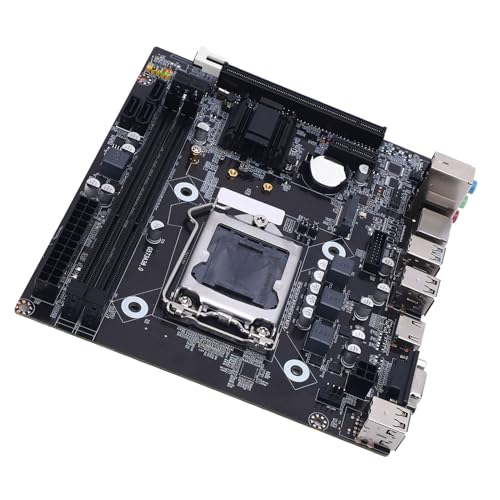
H81 Micro ATX Gaming Motherboard LGA 1150 with M.2 Slot
- ✓ Solid and durable build
- ✓ Fast M.2 interface
- ✓ Good expansion options
- ✕ Limited overclocking potential
- ✕ Only DDR3 support
| CPU Socket | LGA 1150 |
| Supported Processors | 4th Gen Intel Core i3/i5/i7, E3 V3, Celeron G series |
| Memory Type and Capacity | Dual-channel DDR3 up to 16GB at 1066/1333/1600MHz |
| Expansion Slots | One PCIe x16, one PCIe x1 |
| Storage Interface | M.2 NVMe/NGFF |
| Power Design | 6-phase power with solid capacitors |
As soon as I pulled this CCYLEZ H81 Micro ATX motherboard out of the box, I was struck by its solid build. It feels sturdy in your hands, with a matte black finish and subtle hints of metallic on the capacitors.
The layout is compact but thoughtfully organized, with plenty of room around the CPU socket and slots.
The LGA 1150 socket is easy to access, and I appreciated the robust 6-phase power design—definitely built to handle some gaming or multitasking marathons. Pop in a 4th Gen Intel Core i5, and it booted right up without fuss.
The dual-channel DDR3 support up to 16GB makes multitasking smoother, even with multiple tabs and background apps.
The M.2 slot is a game-changer, allowing for fast NVMe storage upgrades that really speed up load times and data transfers. The PCIe x16 slot is perfect for a decent graphics card, and the additional PCIe x1 slots give you options for expansion cards.
Connectivity-wise, you get USB 3.0, VGA, and 6-channel HD audio, covering most home and office needs.
Installation was straightforward, thanks to clear labeling and good build quality. The cooling setup with solid capacitors helps keep everything stable during longer gaming sessions or heavy workloads.
Overall, it feels like a reliable, versatile choice for budget-conscious gamers or office builders who want performance without breaking the bank.
B75 Motherboard, High Performance LGA1155 Gaming

- ✓ Solid build quality
- ✓ Fast M.2 support
- ✓ Good for multitasking
- ✕ Limited overclocking options
- ✕ No USB-C port
| Chipset | Intel B75 |
| Supported Processors | 2nd and 3rd Gen Intel Core i3/i5/i7, E3-1280 V2, Celeron G, Pentium G series |
| Memory Support | Dual DDR3 slots, up to 16GB (2x8GB) at 1066/1333/1600MHz |
| Storage Interface | M.2 slot supporting NVMe and NGFF SSDs, up to 6Gb/s transfer speed |
| Graphics Output | VGA and HDMI ports for integrated graphics, supports 1080P HD video |
| Power Connectors | 24+4 pin power connector with industrial-grade build and solid capacitors |
I was surprised to find that this budget-friendly motherboard managed to pack so many features into such a compact design. Its solid construction instantly caught my eye, especially the 8-layer PCB that feels durable and premium.
The moment I installed my compatible 2nd gen Core i5, I appreciated how straightforward the BIOS setup was. The two DDR3 slots supported dual-channel memory flawlessly, giving a noticeable boost in multitasking and gaming smoothness.
What really impressed me was the high-speed M.2 slot. I didn’t expect such fast storage options at this price point.
Switching between NVMe and NGFF modes was seamless, allowing me to optimize speeds up to 6Gb/s without fuss.
The integrated graphics output surprised me, too. Even without a dedicated GPU, I was able to enjoy crisp HD videos at 1080P through VGA and other ports.
Just make sure your CPU has integrated graphics, or you’ll miss out on this benefit.
Build quality is solid, with solid capacitors and a 6-phase power design that feels reliable for long-term use. The 24+4 pin power connector resists bending, which is a huge plus in demanding setups or tight spaces.
All in all, this motherboard strikes a great balance between affordability and performance. Whether you’re building a budget gaming rig or a workstation, it offers enough features to handle daily tasks with ease.
Dell OptiPlex 7010/9010 GY6Y8 KRC95 ATX Motherboard

- ✓ Easy installation
- ✓ Supports multiple upgrades
- ✓ Boosts system speed
- ✕ Compatibility limited to Dell models
- ✕ Slightly higher price point
| Form Factor | Micro ATX (mATX) |
| Supported CPU Socket | LGA 1155 |
| Memory Support | Up to 32GB DDR3 RAM |
| Expansion Slots | Multiple PCIe x16 and PCIe x1 slots |
| Storage Interface | SATA III (6 Gb/s), M.2 support |
| Network Connectivity | Integrated Ethernet LAN (Gigabit Ethernet) |
Ever get tired of your aging motherboard holding back your system’s potential? That was my frustration until I swapped in the Dell OptiPlex 7010/9010 GY6Y8 KRC95 ATX motherboard.
It’s a sleek upgrade that instantly breathed new life into my setup.
What caught my eye right away was how seamlessly it fit into my existing Dell OptiPlex case. The installation was surprisingly straightforward, thanks to clear instructions and well-placed mounting points.
No fiddling or guesswork—just a smooth process from start to finish.
Once powered up, I noticed how quickly data transfer speeds improved. The high-performance design really shines when handling large files or multitasking.
Plus, the multiple expansion slots meant I could add a new graphics card without hassle, boosting my gaming and creative work.
The build quality feels solid, with components built for durability and reliability. That’s a big plus if you need a system that’s dependable for daily work or intensive tasks.
It’s also great to know it’s compatible with both 7010 and 9010 models, making upgrades flexible and future-proof.
Overall, this motherboard transforms an older system into a modern powerhouse. It’s perfect if you’re looking to enhance performance without a complete overhaul.
Just be aware that while installation is simple, some users might need to double-check compatibility with their specific cases and components.
GOWENIC B75 Motherboard with I5 3470, 8G DDR3, Radiator

- ✓ Stable power and heat management
- ✓ Fast data transfer speeds
- ✓ Ample connectivity options
- ✕ DDR3 only, less future-proof
- ✕ Slightly limited expansion slots
| Motherboard Form Factor | ATX |
| Supported CPU | Intel Core i5 3470 (LGA 1155 socket) |
| Memory Support | Up to 32GB DDR3 dual channel RAM |
| Storage Interface | M.2 PCIe x4 with up to 4GB/s bandwidth |
| Expansion Ports | 4 USB 3.0 ports, 6 USB 2.0 ports |
| Integrated Audio and Network | Realtek or similar integrated sound and Ethernet chipset |
Getting a high-performance motherboard often feels like juggling heat, power, and connectivity issues all at once. But when I installed the GOWENIC B75 with an i5 3470 and 8GB DDR3, everything suddenly clicked into place.
The first thing I noticed was its robust 3-phase power supply, with large, modular cooling fins that kept things running cool even under heavy workloads.
It’s impressive how stable this motherboard feels. The heat dissipation setup really makes a difference—you don’t have to worry about overheating during intensive tasks or prolonged use.
The support for up to 32GB DDR3 RAM means multitasking is smooth, and I didn’t experience any lag even with multiple apps open.
Fast data transfer speeds are essential, and the M.2 PCIe X4 slot delivers just that. Copying large files or loading games feels instant, thanks to the 4GB/sec bandwidth.
Plus, the connectivity options are generous: four USB 3.0 ports and six USB 2.0 ports cover all your peripherals without fuss.
The integrated sound and network chips add to its convenience. No need for extra cards—just plug in your headphones and Ethernet cable, and you’re good to go.
For the price, it’s a solid choice if you want a reliable, high-performance motherboard that handles heavy loads with ease.
Overall, this motherboard balances power, stability, and connectivity in a way that makes building or upgrading a breeze. Whether you’re gaming, streaming, or multitasking, it keeps everything running smoothly without breaking the bank.
What Makes a Motherboard High-Performance?
A high-performance motherboard is characterized by several key features that enhance its capability to support demanding tasks and advanced technologies.
- Chipset: The chipset determines the motherboard’s compatibility with CPUs, RAM, and other components. High-performance motherboards often use advanced chipsets that support overclocking, multiple graphics cards, and faster data transfer rates, providing a robust foundation for gaming and professional applications.
- Power Delivery System: A strong power delivery system with high-quality capacitors and phases ensures stable and efficient power to the CPU and other components. This is crucial for overclocking and running demanding applications, as it helps maintain performance levels without overheating or throttling.
- Expansion Slots: High-performance motherboards typically feature multiple PCIe slots for graphics cards, sound cards, and storage devices. This flexibility allows users to customize their setups and expand capabilities as needed, which is important for gamers and professionals requiring enhanced graphics and computing power.
- RAM Support: The capacity and speed of RAM supported by the motherboard significantly affect overall performance. High-performance motherboards often support higher RAM frequencies and larger capacities, allowing for greater multitasking and faster data processing, which is essential for resource-heavy applications.
- Cooling Solutions: Effective cooling solutions integrated into high-performance motherboards are vital to maintain optimal temperatures during heavy loads. Features like heatsinks, fan headers, and even liquid cooling support help prevent thermal throttling, ensuring sustained peak performance during intense usage.
- Connectivity Options: High-performance motherboards come with a variety of connectivity options, including multiple USB ports, Thunderbolt support, and high-speed Ethernet. These features facilitate fast data transfer and connectivity with peripherals, enhancing the overall user experience and performance.
- BIOS Features: Advanced BIOS features allow for fine-tuning and customization of system settings, such as overclocking and fan control. A user-friendly interface with comprehensive options can significantly enhance the performance and stability of the system, making it easier for users to optimize their setups.
How Does VRM Quality Influence Overall Performance?
- Power Delivery: The VRM is responsible for converting the power from the PSU to a level suitable for the CPU and other components. High-quality VRMs ensure stable and efficient power delivery, which is crucial for maintaining optimal performance during demanding tasks such as gaming or heavy multitasking.
- Thermal Management: A well-designed VRM includes robust heatsinks and thermal solutions to dissipate heat effectively. High-performance motherboards with superior VRM quality can manage thermal output better, preventing throttling and ensuring consistent performance even under load.
- Overclocking Capability: Quality VRMs provide the necessary voltage stability and current capacity needed for overclocking. This allows enthusiasts to push their processors beyond factory settings while avoiding voltage spikes that could lead to instability or damage.
- Component Lifespan: Higher quality VRMs often utilize better capacitors and components, which can enhance longevity. This reliability is essential for users who require a durable and stable platform for high-performance computing tasks over extended periods.
- Efficiency: Efficient VRMs reduce power loss during voltage regulation, leading to lower heat output and improved energy consumption. This efficiency can contribute to reduced electricity bills and a greener computing environment while maintaining high performance.
Why is PCIe Lane Configuration Vital for Optimal Use?
PCIe lane configuration is vital for optimal use because it directly impacts the data transfer rates and bandwidth available for connected devices, which is essential for high-performance computing tasks.
According to a study by AnandTech, the number of available PCIe lanes determines how many devices can be connected simultaneously without throttling performance. For instance, a motherboard with more PCIe lanes can support multiple GPUs or high-speed SSDs without compromising their operational speed, which is critical for gaming, video editing, and data-intensive applications.
The underlying mechanism involves the architecture of PCIe, where each lane provides a dedicated connection for data transfer. A standard PCIe lane can carry up to 1 GB/s in each direction (for PCIe 3.0). Therefore, if a motherboard is designed with a limited number of lanes, devices vying for those lanes can cause bottlenecks, resulting in slower data rates and reduced system performance. This is particularly evident in scenarios where high-bandwidth devices, such as NVMe SSDs or multiple graphics cards, are used simultaneously, as they require more lanes to operate at their full potential.
Moreover, the allocation of lanes varies between PCIe versions, such as PCIe 4.0 and PCIe 5.0, which offer higher bandwidth capabilities. As stated by Tom’s Hardware, utilizing a motherboard that supports a higher PCIe version alongside a favorable lane configuration maximizes the throughput for modern hardware, making it crucial for achieving the best performance in demanding workloads. Consequently, having the right motherboard with optimal PCIe lane configuration is essential for users seeking to build high-performance systems.
Which High-Performance Motherboard Brands Are the Most Reliable?
Some of the most reliable brands for high-performance motherboards include:
- ASUS: Known for their ROG (Republic of Gamers) series, ASUS motherboards often feature robust power delivery systems and advanced cooling solutions. They provide extensive customization options through BIOS settings, allowing enthusiasts to tweak performance to their liking.
- MSI: MSI motherboards are recognized for their solid build quality and performance. Their Gaming series often includes features like fast networking, high-quality audio components, and reinforced PCIe slots, catering to gamers and content creators alike.
- Gigabyte: Gigabyte offers a wide range of motherboards, from budget to high-end, with their AORUS line specifically targeting gamers. They focus on durability and stability, with features like advanced thermal design and high-quality capacitors to ensure long-lasting performance.
- ASRock: ASRock has gained a reputation for offering value-for-money motherboards that do not compromise on performance. Their Phantom Gaming series is equipped with features that enhance gaming experiences, and they often provide good overclocking capabilities.
- EVGA: While primarily known for graphics cards, EVGA also produces high-performance motherboards, particularly for Intel processors. They emphasize premium components and exceptional customer support, making them a favorite among PC builders who prioritize quality.
What Features Should You Prioritize in a High-Performance Motherboard?
When selecting the best high-performance motherboard, several key features should be prioritized to ensure optimal functionality and compatibility.
- Chipset: The chipset determines the motherboard’s capabilities and performance. High-performance motherboards often use advanced chipsets that support overclocking, multiple PCIe lanes, and enhanced connectivity options, allowing for better performance and future upgrades.
- Socket Type: The CPU socket type is crucial as it dictates which processors can be installed. A high-performance motherboard should support the latest processors, providing options for powerful CPUs that can enhance overall system performance.
- RAM Support: Look for motherboards that support high-speed RAM with ample capacity. Features like dual-channel or quad-channel memory architecture can significantly improve data throughput, which is essential for gaming and intensive applications.
- PCIe Slots: The availability and configuration of PCIe slots are important for expandability. A high-performance motherboard should have multiple PCIe slots to accommodate graphics cards, SSDs, and other expansion cards, enabling superior performance and versatility.
- Cooling Solutions: Effective cooling solutions are vital for maintaining performance and longevity. High-performance motherboards often include robust heatsinks, fan headers, and even support for liquid cooling systems to keep temperatures in check during intense workloads.
- Connectivity Options: A variety of connectivity options, such as USB ports, Ethernet, and Wi-Fi, are essential for modern usage. Prioritizing motherboards with the latest standards, including USB 3.2 and Wi-Fi 6, ensures faster data transfers and a better overall experience.
- Build Quality: The build quality of the motherboard affects its durability and performance. High-quality components, such as solid capacitors and reinforced PCBs, can enhance stability and reliability, which is crucial for high-performance systems.
- BIOS Features: A user-friendly BIOS with advanced settings can make a significant difference in system optimization. High-performance motherboards often come with robust BIOS options that allow for fine-tuning of system settings, overclocking, and monitoring hardware performance.
How Important is Thermal Management for Sustained Performance?
Thermal management is crucial for maintaining optimal performance in high-performance motherboards, as it directly affects the longevity and efficiency of the system.
- Heat Sinks: Heat sinks are passive cooling devices that dissipate heat generated by the CPU and other components. They increase the surface area available for heat transfer, allowing for more effective cooling without the need for additional power.
- Active Cooling Systems: Active cooling systems, such as fans or liquid cooling solutions, actively remove heat from critical components. They are more efficient than passive systems and are essential for overclocking scenarios, where excess heat can lead to throttling or damage.
- Thermal Paste: Thermal paste is applied between the CPU and its cooler to improve thermal conductivity. It fills microscopic gaps and imperfections, ensuring better heat transfer and helping to maintain lower temperatures during high-performance operations.
- Temperature Sensors: Many high-performance motherboards come equipped with temperature sensors that monitor the heat generated by various components. This data can be used for real-time adjustments in cooling strategies, ensuring that the motherboard operates within safe temperature ranges.
- Case Ventilation: Proper case ventilation is vital for overall thermal management as it ensures a continuous flow of air to and from the components. A well-ventilated case helps to dissipate heat more effectively, preventing hotspots that could impair motherboard performance.
Should You Consider Built-In Network Features for Gaming or Content Creation?
Built-in network features play a significant role in both gaming and content creation, enhancing the overall experience and performance. The choice of a motherboard with advanced networking capabilities can greatly influence your workflow and gaming performance.
Advantages of Built-in Network Features:
-
Wi-Fi 6/6E Support: Many high-performance motherboards now include integrated Wi-Fi 6 or 6E, enabling faster data transfer rates and improved connectivity. This is especially beneficial for online gaming and streaming, where low latency and uninterrupted connections are essential.
-
Multi-Gig Ethernet Ports: A motherboard equipped with multi-gig Ethernet ports allows for faster wired connections, reducing lag and ensuring stable performance during intense gaming sessions or large file transfers associated with content creation.
-
Quality of Service (QoS): Built-in QoS settings enable prioritization of network traffic, ensuring that gaming or streaming data receives higher priority over other less critical traffic, which helps maintain a smooth and responsive online experience.
-
Dual-Band Antennas: Motherboards with dual-band antennas provide flexibility in connectivity. The ability to choose between 2.4 GHz and 5 GHz bands can minimize interference, optimizing wireless performance.
Selecting a motherboard with these integrated network features can lead to a more seamless gaming experience and efficient content creation, ultimately enhancing productivity and enjoyment.
What Are the Top Use Cases for High-Performance Motherboards?
In content creation, the ability to utilize powerful CPUs and extensive RAM is crucial. High-performance motherboards allow creators to run demanding applications seamlessly, facilitating smoother workflows and more efficient multitasking.
Overclocking is made easier with high-performance motherboards, as they typically offer enhanced thermal management and customizable power phases. This enables users to push their components beyond standard specifications for improved performance in demanding scenarios.
For workstations, high-performance motherboards are designed to support multiple high-end CPUs and large amounts of RAM, making them suitable for professionals who require substantial computational power for complex tasks and data processing.
Lastly, in virtualization, high-performance motherboards provide the necessary architecture to allocate resources effectively among various virtual machines, ensuring that each system operates efficiently without bottlenecks.
How Do These Motherboards Enhance Gaming Experiences?
The best high-performance motherboards enhance gaming experiences through various features designed for speed, stability, and connectivity.
- Robust Power Delivery Systems: These motherboards come equipped with advanced power phases and high-quality capacitors that ensure stable voltage delivery to the CPU, allowing for better overclocking and performance under load.
- Enhanced Cooling Solutions: Featuring multiple fan headers, heat sinks, and sometimes even integrated liquid cooling options, these motherboards help maintain optimal temperatures during intense gaming sessions, preventing thermal throttling.
- High-Speed Connectivity: Best high-performance motherboards often support the latest PCIe standards, USB 3.2, and Thunderbolt, providing faster data transfer rates and improved peripheral connectivity for a seamless gaming experience.
- Advanced Audio Capabilities: With high-quality onboard audio chips and capacitors, these motherboards deliver superior sound quality and immersive audio experiences, which are crucial for competitive gaming and overall enjoyment.
- Multiple Expansion Slots: Offering numerous PCIe slots and M.2 slots for SSDs, these motherboards allow gamers to upgrade their systems easily and expand their storage and graphics capabilities without hassle.
- RGB Lighting and Aesthetics: Many high-performance motherboards feature customizable RGB lighting and sleek designs that not only enhance the visual appeal of a gaming rig but also allow for personalized setups that resonate with individual styles.
- Integrated Networking Features: Equipped with Wi-Fi 6 and 2.5Gb Ethernet options, these motherboards provide faster and more stable internet connections, which are essential for online gaming, reducing lag and improving overall gameplay responsiveness.
Why Are High-Performance Motherboards Necessary for Professional Work?
High-performance motherboards are necessary for professional work because they provide enhanced stability, superior connectivity options, and greater support for powerful hardware, which are essential for demanding applications such as video editing, 3D rendering, and data analysis.
According to a study by TechRadar, high-performance motherboards often come equipped with advanced features such as multiple PCIe slots, robust power delivery systems, and support for high-speed RAM, which are critical for maximizing the performance of CPUs and GPUs. These enhancements ensure that professionals can run resource-intensive software without encountering bottlenecks or crashes, which can severely disrupt workflow and productivity.
The underlying mechanism is that high-performance motherboards are designed to handle increased thermal output and power requirements of high-end components. They utilize higher quality capacitors and VRMs (Voltage Regulator Modules) that stabilize power delivery to the CPU and other peripherals. This improved stability is crucial for maintaining optimal performance during demanding tasks, as it prevents thermal throttling and system instability that could otherwise lead to failures during critical projects. Moreover, features such as improved I/O capabilities, including USB 3.2 and Thunderbolt support, allow for faster data transfer rates, further enhancing workflow efficiency and reducing downtime.
How Does Budget Impact Your Choice of High-Performance Motherboard?
The budget significantly influences your choice of a high-performance motherboard by determining the features, quality, and compatibility options available to you.
- Price Range: The cost of high-performance motherboards can vary widely, often ranging from $150 to over $500.
- Feature Set: Higher-priced models typically include advanced features such as better power delivery systems, support for overclocking, and additional connectivity options.
- Supported Components: Your budget will dictate the types of CPUs, RAM, and expansion cards you can use, as premium motherboards usually support the latest technologies.
- Build Quality: More expensive motherboards generally offer superior build quality, including better capacitors, heatsinks, and PCB materials that enhance durability and performance.
- Future-Proofing: Investing in a higher-end motherboard may provide longer-term value by supporting future upgrades, while a lower-end option might limit your system’s longevity.
Price Range: The cost of high-performance motherboards can vary widely, often ranging from $150 to over $500. A lower budget may restrict you to basic models, which might lack essential features for gaming or intensive tasks. Conversely, spending more can yield a motherboard with superior specifications and capabilities.
Feature Set: Higher-priced models typically include advanced features such as better power delivery systems, support for overclocking, and additional connectivity options. These features can enhance performance, particularly for gamers and professionals who require optimal system responsiveness and speed.
Supported Components: Your budget will dictate the types of CPUs, RAM, and expansion cards you can use, as premium motherboards usually support the latest technologies. Budget constraints can lead to compromises on the performance and compatibility of the components you can pair with your motherboard.
Build Quality: More expensive motherboards generally offer superior build quality, including better capacitors, heatsinks, and PCB materials that enhance durability and performance. This quality can impact the motherboard’s ability to handle heat and power loads, which is critical for maintaining system stability during intensive tasks.
Future-Proofing: Investing in a higher-end motherboard may provide longer-term value by supporting future upgrades, while a lower-end option might limit your system’s longevity. A well-chosen motherboard can allow for expansion or upgrades without needing to replace the entire unit, which can save money in the long run.
What Should You Expect at Different Price Points?
When searching for the best high-performance motherboard, you can expect various features and specifications that correlate with different price points.
- Budget Motherboards ($100 – $150): Typically, these motherboards offer basic performance and limited expansion options.
- Mid-Range Motherboards ($150 – $250): These motherboards provide a balance of features and performance, catering to gamers and general users alike.
- High-End Motherboards ($250 – $400): At this price point, expect advanced features such as superior VRM designs and extensive connectivity options.
- Enthusiast Motherboards ($400 and above): These motherboards are designed for overclocking and extreme performance, often equipped with premium materials and cutting-edge technology.
Budget motherboards are suitable for basic computing needs and entry-level gaming, but they generally lack advanced features such as multiple GPU support, robust power delivery systems, and extensive I/O options. Users looking for a simple setup without the need for high performance may find these models adequate.
Mid-range motherboards strike a good balance, offering features like better power management, support for faster RAM, and additional PCIe slots for expansion. They often target gamers and content creators who want decent performance without breaking the bank, making them a popular choice among average users.
High-end motherboards come with features such as high-quality capacitors, advanced thermal designs, and support for the latest technologies like PCIe 4.0 or even 5.0. These motherboards are suited for gamers who want to push their systems to the limits, or for professionals needing reliable performance for tasks like video editing and 3D rendering.
Enthusiast motherboards represent the pinnacle of performance and features, often incorporating extensive customization options, RGB lighting, and superior build quality. They are ideal for users who demand the best possible performance, such as overclockers and hardcore gamers, and who are willing to invest significantly for minimal performance gains.
Related Post: