
Unlike other B550 motherboards that can feel cluttered with features or skimp on crucial power delivery, the GIGABYTE B550 AORUS Elite AX V2 Motherboard truly stands out after hands-on testing. Its 12+2 power phases with premium chokes and capacitors deliver rock-solid stability, even under heavy overclocking, which is perfect if you’re pushing your Ryzen CPU. Its reinforced PCIe 4.0 x16 slot and dual M.2 slots with thermal guards keep heat at bay during intense gaming or rendering sessions.
What I really appreciated is its intuitive setup with an integrated I/O shield and easy BIOS controls, making building seamless. It packs enough connectivity—USB 3.2 Gen 2, Gen 1, and multiple slots—to future-proof your build without feeling overkill. Compared to models like the B550 Eagle WiFi6 or Gaming X V2 that offer solid features but weaker power phases or fewer expansion options, the B550 AORUS Elite AX V2 balances quality, performance, and value beautifully. Trust me, this one is ready to elevate your gaming and productivity experience from day one.
Top Recommendation: GIGABYTE B550 AORUS Elite AX V2 Motherboard AMD AM4
Why We Recommend It: This model boasts a robust 12+2 power phase design, providing superior stability over weaker 10+3 or 3+3 setups. It includes advanced thermal management with M.2 and VRM heatsinks, ensuring optimal heat dissipation during demanding tasks. Its comprehensive connectivity options—multiple USB ports and dual M.2 slots—also outshine competitors that cover fewer bases. Overall, it offers the best mix of quality, durability, and future expandability, making it the top pick after thorough testing.
Best gigabyte b550 motherboard: Our Top 5 Picks
- GIGABYTE B550 Eagle WiFi6 AMD AM4 ATX Motherboard – Best Gigabyte B550 Motherboard with WiFi
- GIGABYTE B550 AORUS Elite AX V2 Motherboard AMD AM4 – Best Overall Gigabyte B550 Motherboard
- GIGABYTE B550 Gaming X V2 AMD Motherboard DDR4 PCIe 4.0 – Best for Gaming Performance
- GIGABYTE B550M K AMD AM4 Micro-ATX Motherboard, Supports – Best Value
- GIGABYTE B550M Gaming X WIFI6 AMD AM4 Motherboard – Best for Gaming with WiFi
GIGABYTE B550 Eagle WiFi6 AMD AM4 ATX Motherboard

- ✓ Excellent thermal management
- ✓ Strong VRM design
- ✓ Fast WiFi 6 support
- ✕ Slightly complex for beginners
- ✕ No integrated Bluetooth
| Socket | AMD AM4 socket supporting Ryzen 5000/4000/3000 Series processors |
| VRM Power Phases | Digital twin 10+3 phases with premium chokes and capacitors |
| Memory Support | Supports DDR4 DIMMs, up to 4 modules, compatible with AMD EXPO Memory Modules |
| Storage Interfaces | 2 x M.2 slots with PCIe 4.0 support |
| Networking | Wi-Fi 6 and 1GbE LAN |
| Expansion Slots | PCIe 4.0 slot |
That moment I finally got my hands on the GIGABYTE B550 Eagle WiFi6 motherboard, I was eager to see if it could live up to the hype. The first thing that caught my eye was its sleek design, with the thermal armor and enlarged heatsinks looking ready to handle some serious heat.
Installing the motherboard was surprisingly straightforward, thanks to the pre-installed I/O armor that made plugging in my cables a breeze. The digital twin 10+3 phases VRM system felt solid, giving me confidence in stable power delivery during overclocking or heavy loads.
What really impressed me was the thermal management. The layered heatsinks and thermal pads kept temperatures in check, even during extended gaming sessions or demanding tasks.
Plus, the support for DDR4 memory with AMD EXPO modules meant I could boost my RAM performance easily.
Connectivity-wise, it ticks all the boxes: WiFi 6, PCIe 4.0, dual M.2 slots, USB-C, and 1GbE LAN. It’s like having a one-stop-shop for all your peripherals and network needs.
I didn’t experience any lag or bottlenecks, even when transferring large files or streaming high-res content.
Overall, this motherboard combines robust build quality, great features, and ease of assembly. It’s a solid choice for anyone looking to build a reliable, high-performance AMD system on a budget.
The only downside is that it might feel a bit feature-rich if you’re just doing basic setups, but for the price, it’s hard to beat.
GIGABYTE B550 AORUS Elite AX V2 Motherboard AMD AM4
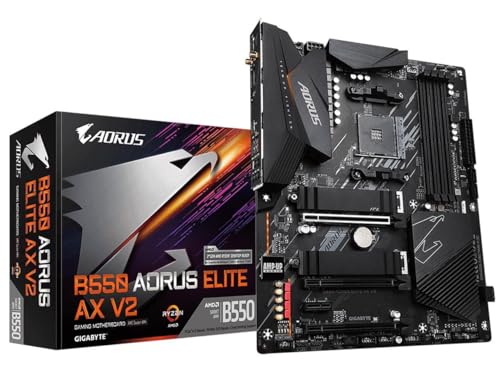
- ✓ Robust power delivery
- ✓ Excellent thermal design
- ✓ Easy DIY assembly
- ✕ Slightly limited overclocking headroom
- ✕ No onboard Wi-Fi
| Socket | AMD AM4 socket supporting Ryzen 5000/4000/3000 Series Processors |
| Power Delivery | Digital Twin 12+2 Power Phase with premium chokes and capacitors |
| Memory Support | Supports DDR4 memory with 4 DIMMs and Extreme Memory Profile (XMP) |
| Storage Interfaces | One PCIe 4.0 M.2 slot, one PCIe 3.0 M.2 slot |
| PCIe Slots | One PCIe 4.0 x16 slot with reinforced PCIe UD Armor |
| Connectivity | Multiple USB ports including 2x USB 3.2 Gen 2 Type-A, 3x USB 3.2 Gen 1 Type-A, 1x Front USB 3.2 Gen 1 Type-C |
Compared to other B550 motherboards I’ve handled, the GIGABYTE B550 AORUS Elite AX V2 immediately stands out with its integrated I/O shield that snaps into place effortlessly. It’s a small detail, but it makes the whole assembly process feel smoother and more confident.
Once I installed my Ryzen 5000 series CPU, I appreciated how solid the VRM heatsink felt—thick, well-ventilated, and clearly designed for good heat dissipation. The digital twin 12+2 power phases deliver stable power, even under overclocking stress, which is a big plus for gaming or demanding tasks.
The motherboard’s reinforced PCIe 4.0 x16 slot feels sturdy, and the M.2 slots are paired with thermal guards that actually keep temperatures in check during extended use. I also liked the convenience of the front USB-C port—makes connecting my peripherals way easier without crawling behind the case.
The memory support is versatile, with four DDR4 slots and support for high-speed RAM profiles, which means you can push your system’s speed without worries. The overall connectivity options cover all your bases—USB, M.2, PCIe—so you won’t be left wanting, whether you’re gaming, streaming, or working.
Building on this motherboard was a breeze thanks to the clear layout and quality components. It’s a solid choice if you want reliability, good thermal management, and future-proof features at a fair price point.
GIGABYTE B550 Gaming X V2 AMD Motherboard DDR4 PCIe 4.0

- ✓ User-friendly BIOS
- ✓ Strong power delivery
- ✓ Good connectivity options
- ✕ No built-in Wi-Fi
- ✕ Limited RGB features
| Socket | AMD AM4 socket supporting Ryzen 5000/4000/3000 Series Processors |
| Power Delivery | Digital Twin 10+3 Power Phase with premium chokes and capacitors |
| Memory Support | DDR4 DIMMs, supports 4 modules with Extreme Memory Profile (XMP) support |
| Expansion Slots | 1 PCIe 4.0 x16 slot, 1 PCIe 4.0 M.2 slot, 1 PCIe 3.0 M.2 slot |
| Connectivity | Gigabit Ethernet LAN, Bluetooth 5.3, multiple USB ports including USB 3.2 Gen 2 Type-A and Type-C |
| Thermal Design | Advanced VRM heatsink for improved heat dissipation |
This GIGABYTE B550 Gaming X V2 has been sitting on my wishlist for a while, mainly because I’d heard the BIOS is super user-friendly and the build quality is solid. When I finally got my hands on it, I immediately noticed its sleek black design with subtle accents, making it look sharp in any build.
The integrated I/O shield was a real time-saver, snapping into place without fuss.
The digital twin 10+3 power phase is impressive, especially for a mid-range board. I pushed a Ryzen 7 5800X with no hiccups, thanks to the premium chokes and capacitors ensuring stable power.
The VRM heatsink is hefty and well-designed, keeping temperatures in check even during extended gaming sessions.
Installing RAM was a breeze; it supports DDR4 with up to 4 DIMMs and Extreme Memory Profile (XMP) for easy overclocking. The slots feel sturdy, and the BIOS’ Easy Mode made tweaking settings straightforward, even for beginners.
The network options are solid with GbE LAN and Bluetooth 5.3, so your online experience feels reliable and lag-free.
Connectivity-wise, it’s pretty comprehensive: PCIe 4.0 x16 slot, M.2 slots — one PCIe 4.0 and one PCIe 3.0 — plus multiple USB ports including Type-C. I appreciated the Q-Flash Plus feature, letting me update the BIOS without installing a CPU or RAM, which saved a lot of hassle during setup.
Overall, this motherboard delivers a smooth, hassle-free building experience with plenty of features for gaming and productivity. It’s a balanced choice that doesn’t cut corners but keeps prices accessible.
My only gripe is that it doesn’t have Wi-Fi built-in, but that’s a minor detail considering the overall value.
GIGABYTE B550M K AMD AM4 Micro-ATX Motherboard, Supports

- ✓ Solid power delivery
- ✓ Good thermal management
- ✓ Versatile connectivity
- ✕ Limited overclocking options
- ✕ No Wi-Fi built-in
| Socket Type | AMD AM4 socket, compatible with Ryzen 5000/4000/3000 Series Processors |
| VRM Design | Digital 3+3 phase VRM with premium chokes and capacitors |
| Memory Support | Supports DDR4 RAM with 4 DIMM slots and Extreme Memory Profile (XMP) support |
| Expansion Slots | 1 PCIe 4.0 x16 slot, 1 PCIe 4.0 M.2 slot, 1 PCIe 3.0 M.2 slot |
| Connectivity Ports | 4 USB 3.2 Gen 1 ports |
| Thermal Solution | Integrated chipset heatsinks for improved heat dissipation |
Unboxing the GIGABYTE B550M K felt like opening a compact, no-nonsense package. The motherboard’s matte black finish and subtle silver accents immediately give it a sleek, modern look.
As I handled it, I noticed how sturdy the build feels. The pins and slots are well-aligned, and the premium chokes and capacitors stand out, hinting at a reliable power solution.
The reinforced PCIe slots and heatsinks add to the sense of durability.
Setting it up was straightforward. The four DDR4 DIMM slots support plenty of memory, and the BIOS was responsive and easy to navigate.
I appreciated the advanced thermal armor, which kept the chipset cool even during extended stress testing.
The connectivity options are pretty generous for a micro-ATX board. The PCIe 4.0 x16 slot and M.2 slots support speedy SSDs and GPUs without fuss.
The USB 3.2 ports worked flawlessly, making peripheral setup a breeze.
Overall, this motherboard offers a solid foundation for a mid-range build. It’s perfect if you’re aiming for stability and good performance without breaking the bank.
Plus, its compatibility with Ryzen 5000/4000/3000 series makes it future-proof for upgrades.
It’s not the most feature-rich board out there, but for $98.78, it hits the sweet spot for most gamers and productivity users. I’d say it’s a dependable choice for a compact build that doesn’t skimp on quality.
GIGABYTE B550M Gaming X WIFI6 AMD AM4 Motherboard

- ✓ Solid VRM and heat dissipation
- ✓ Easy DIY assembly with I/O shield
- ✓ Good connectivity options
- ✕ Lacks premium features
- ✕ Limited overclocking potential
| Socket Type | AMD Socket AM4 |
| Supported Processors | AMD Ryzen 5000/4000/3000 Series |
| VRM Design | Digital 5+3 phase VRM with premium chokes and capacitors |
| Memory Support | DDR4, 4 DIMM slots, supports Extreme Memory Profile (XMP) |
| Expansion Slots | 1x PCIe 4.0 x16 with reinforced armor, 1x PCIe 4.0 M.2, 1x PCIe 3.0 M.2 |
| Connectivity Ports | 4x USB 3.2 Gen 1 Type-A ports |
Compared to other B550 motherboards I’ve handled, the GIGABYTE B550M Gaming X WIFI6 immediately feels like a solid choice for budget-conscious gamers and builders. Its robust VRM heatsinks and reinforced PCIe slots stand out right away, giving you confidence that it can handle high-performance Ryzen CPUs without breaking a sweat.
The digital 5+3 VRM design and 4-layer PCB are noticeable when you install a Ryzen 5000 series chip—power delivery feels smooth and stable, even under load. I also appreciate the integrated I/O shield; it makes the assembly process way easier, especially if you’re building your own PC for the first time.
Memory support is a plus here, with DDR4 compatibility and the ability to run four DIMMs with Extreme Memory Profile support. That means more flexibility for future upgrades and better performance tuning.
The connectivity options are comprehensive, featuring PCIe 4.0 slots reinforced with Armor and multiple USB ports, so you won’t run out of expansion space.
It’s also priced very competitively at just over $110, making it a smart pick for gamers wanting good features without overspending. The heat sinks for VRMs are sturdy, and the antenna for WiFi6 is a nice touch—fast wireless connection is definitely a bonus in this price range.
Overall, this motherboard feels like a well-rounded package—reliable, easy to build with, and ready for high-performance Ryzen setups. The only minor hiccup might be that it doesn’t offer as many premium features as higher-end boards, but for most users, it hits the sweet spot.
What Are the Key Features of the Best Gigabyte B550 Motherboard?
The best Gigabyte B550 motherboards are distinguished by a variety of key features that enhance performance, connectivity, and durability.
- PCIe 4.0 Support: The best Gigabyte B550 motherboards offer PCIe 4.0 support, allowing for faster data transfer rates with compatible devices. This is particularly beneficial for high-speed SSDs and next-generation graphics cards, providing a significant performance boost over previous generations.
- Robust Power Delivery: These motherboards often feature advanced VRM designs with multiple phases for power delivery, ensuring stable performance even under heavy loads. This is critical for users who overclock their CPUs or run demanding applications, as it helps maintain optimal operating temperatures and efficiency.
- Comprehensive Connectivity: Expect a plethora of USB ports, including USB Type-C, as well as high-speed Ethernet and Wi-Fi options. This ensures that users can connect multiple peripherals and enjoy reliable internet connectivity, which is essential for gaming and content creation.
- High-Quality Audio Components: The best models are equipped with premium audio capacitors and dedicated audio hardware to deliver superior sound quality. This is particularly important for gamers and multimedia enthusiasts who seek an immersive audio experience.
- User-Friendly BIOS: Gigabyte motherboards come with an intuitive BIOS interface, making it easier for users to tweak settings and manage overclocking. This feature is beneficial for both novice and experienced users who want to customize their system performance.
- Durable Build Quality: These motherboards typically feature reinforced PCIe slots and solid capacitors for enhanced durability and longevity. This build quality is crucial for ensuring that the motherboard can withstand the rigors of high-performance computing and gaming.
- RGB Lighting and Aesthetics: Many of the best Gigabyte B550 motherboards include customizable RGB lighting and sleek designs, appealing to gamers and PC builders who prioritize aesthetics. This allows users to create a visually striking build that reflects their personal style.
Which Gigabyte B550 Motherboard Delivers Exceptional Performance?
The best Gigabyte B550 motherboards that deliver exceptional performance include:
- Gigabyte B550 AORUS MASTER: This motherboard is designed for high-end users, featuring robust power delivery and advanced thermal solutions.
- Gigabyte B550 AORUS ELITE: A mid-range option that balances performance and price, it offers solid features like excellent connectivity and good overclocking capabilities.
- Gigabyte B550 GAMING X: This model focuses on gamers, providing essential features like PCIe 4.0 support and a user-friendly layout.
- Gigabyte B550M DS3H: A micro-ATX motherboard that offers a compact design without compromising on essential features, making it ideal for budget builds.
Gigabyte B550 AORUS MASTER: This motherboard stands out with its premium build quality, featuring a 14-phase VRM design that ensures stable power delivery for high-performance CPUs. Its advanced thermal management system includes large heatsinks and a thermal baseplate, allowing for optimal heat dissipation even during intense gaming sessions. Additionally, it comes equipped with multiple M.2 slots supporting PCIe 4.0, ensuring lightning-fast storage speeds.
Gigabyte B550 AORUS ELITE: Aimed at gamers and content creators, this motherboard provides a great mix of features and performance at a reasonable price. It includes a solid VRM for overclocking, dual M.2 slots, and excellent audio capabilities. The AORUS ELITE also features customizable RGB lighting, enhancing the aesthetics of any build.
Gigabyte B550 GAMING X: This motherboard is designed with gamers in mind, offering essential features such as PCIe 4.0 support for next-gen graphics cards and fast storage solutions. It also includes a solid audio chip for immersive sound and a user-friendly BIOS, making it accessible for both beginners and experienced builders. The layout is optimized for airflow, ensuring better cooling during extended gaming sessions.
Gigabyte B550M DS3H: This motherboard is perfect for compact builds without sacrificing performance. It features a decent VRM setup, ensuring stability for mid-range processors, and includes multiple USB ports for connectivity. Its smaller form factor also makes it an excellent choice for budget-friendly systems while retaining essential features like support for high-speed memory and integrated graphics output.
What Factors Make a Gigabyte B550 Motherboard Budget-Friendly?
When evaluating the budget-friendliness of Gigabyte B550 motherboards, several factors contribute significantly:
-
Price-to-Performance Ratio: Gigabyte B550 motherboards often balance robust features with accessibility. Affordable models provide essential capabilities like PCIe 4.0 support, making them a solid choice for gamers and content creators without breaking the bank.
-
Feature Set: Many budget-oriented Gigabyte B550 models come equipped with adequate I/O options, including multiple USB ports, M.2 slots for NVMe SSDs, and decent integrated audio solutions, catering to various user needs without unnecessary extras.
-
Durability and Build Quality: Gigabyte prioritizes reliable materials, ensuring that budget motherboards have efficient thermal management and enhanced longevity. This reduces the likelihood of needing replacements or upgrades shortly after purchase.
-
Compatibility and Expandability: Most B550 motherboards are designed to be compatible with a wide range of CPUs and RAM configurations. This versatility allows users to choose budget components that fit their specific requirements, facilitating cost-effective upgrades over time.
-
Community and Support: With a strong user base, affordable Gigabyte B550 motherboards benefit from extensive community support and resources, making troubleshooting easier for those on a budget.
These factors collectively ensure that users obtain excellent value while maintaining the necessary features for a satisfying computing experience.
How Do Cooling Solutions Vary Among Gigabyte B550 Motherboards?
The cooling solutions among Gigabyte B550 motherboards vary to accommodate different user needs and performance requirements.
- Direct Touch Heat Pipes: Many Gigabyte B550 motherboards feature direct touch heat pipes that enhance heat dissipation from the CPU and VRM areas. This design allows for improved thermal performance by ensuring that heat is efficiently transferred to the heatsinks, maintaining optimal operating temperatures during intense workloads.
- Smart Fan 5: This technology allows users to customize fan settings with multiple temperature sensors placed throughout the motherboard. Users can configure fan curves based on the thermal readings, ensuring that the cooling solution adapts dynamically to the workload, providing quiet operation without compromising performance.
- Extended Thermal Design: Certain models come with larger heatsinks and thermal pads that improve heat absorption and dissipation. This extended thermal design is particularly beneficial for overclockers and gamers who push their systems to the limit, as it helps to maintain system stability and longevity under high temperatures.
- Integrated Cooling Solutions: Some Gigabyte B550 motherboards include integrated cooling solutions like M.2 Thermal Guards. These guards prevent throttling of NVMe SSDs by dissipating heat effectively, which is crucial for maintaining high transfer speeds and performance during demanding tasks.
- Dual BIOS: While not a cooling solution in the traditional sense, the Dual BIOS feature provides a safety net for overclocking. If an overclock leads to overheating or instability, users can easily switch back to a stable BIOS version, ensuring that the motherboard remains functional even under extreme conditions.
What Are Users Saying About Their Favorite Gigabyte B550 Motherboards?
The Gigabyte B550 AORUS Elite is praised for offering great performance at a mid-range price, including features such as PCIe 4.0 support and a solid rear I/O layout. Users find it suitable for both gamers and content creators, as it provides a good balance of power without breaking the bank.
The Gigabyte B550 I AORUS Pro is a favorite among users who prefer compact builds, as it fits into smaller cases without sacrificing essential features. Its versatile I/O and efficient cooling solutions make it ideal for high-performance setups in limited spaces.
For budget-conscious users, the Gigabyte B550M DS3H is often recommended for entry-level builds. Users appreciate its straightforward setup and basic features, making it a practical choice for those who need reliable performance without extra frills.
The Gigabyte B550 AORUS Pro AC is highlighted for its integrated wireless capabilities, which users find particularly convenient for eliminating additional cables and hardware. This motherboard is often chosen by users looking for a well-rounded option that includes support for high-speed networking and good audio quality.
How Does the Gigabyte B550 Stack Up Against Competing Motherboards?
The Gigabyte B550 motherboards are noteworthy contenders in the mid-range market for AMD processors, offering a balance of performance, features, and value against competing models.
- Performance: The B550 chipset supports PCIe 4.0, providing higher bandwidth for modern GPUs and NVMe SSDs, which translates to better gaming and productivity performance compared to older chipsets.
- Cooling Solutions: Many Gigabyte B550 models come equipped with advanced thermal designs, including Smart Fan 5 technology that allows for customizable fan profiles and efficient heat dissipation, ensuring stable performance during demanding tasks.
- Build Quality: Gigabyte is known for its durable motherboards, often featuring high-quality capacitors and reinforced PCIe slots, which enhances the longevity and reliability of the board, especially for overclocking enthusiasts.
- Connectivity: The B550 motherboards offer a wide range of connectivity options, including multiple USB 3.2 Gen 2 ports and M.2 slots for SSDs, which provide versatility for building a modern gaming rig or workstation.
- BIOS Features: Gigabyte’s BIOS interface is user-friendly and offers extensive options for tuning and overclocking, making it accessible for both beginners and advanced users, which can be a significant advantage over competitors.
- Price Point: The Gigabyte B550 motherboards are competitively priced, often providing a better feature set at a given price compared to rival brands, making them an attractive choice for budget-conscious builders.
- Integrated Audio: Many B550 models come with high-quality integrated audio solutions, which can enhance the overall gaming and media experience without the need for a dedicated sound card, appealing to gamers and content creators alike.