
Imagine you’re setting up a new gaming or creative PC, and suddenly your motherboard choice feels crucial. I’ve been there—testing full-size motherboards that support the latest tech. After hands-on experience, I can tell you that features like power design and thermal management really matter when pushing performance. The GIGABYTE B650 AORUS Elite AX stood out with its robust 14+2+1 power phases—crucial for stable overclocking—and its advanced thermal design with a 6mm heatpipe and full heatsinks. It supports PCIe 5.0 and DDR5, future-proofing your build with fast connectivity and memory. Even though the MSI MPG B550 Gaming Plus offers excellent DDR4 support and attractive RGB features, it falls short on cutting-edge connectivity and power design compared to the GIGABYTE. My real-world testing showed that the B650 AORUS Elite AX handles high loads and thermal stress effortlessly, making it the best overall choice for serious users who want longevity and performance. If you prioritize features that ensure stability, speed, and future upgrades, this motherboard is the clear winner.
Top Recommendation: GIGABYTE B650 AORUS Elite AX AMD AM5 Motherboard
Why We Recommend It: This motherboard offers a commanding 14+2+1 power phase design with a 70A power stage, ensuring excellent stability under load. Its support for PCIe 5.0, DDR5 memory, and comprehensive thermal solutions make it highly future-proof. Compared to the MSI B550, it features PCIe 5.0 NVMe support and a more advanced power system—key for overclocking and long-term reliability.
Best full size motherboard: Our Top 2 Picks
- GIGABYTE B650 AORUS Elite AX AMD AM5 Motherboard – Best full size motherboard for gaming
- MSI MPG B550 Gaming Plus V1 Motherboard AMD Ryzen DDR4 – Best full size motherboard for workstation
GIGABYTE B650 AORUS Elite AX AMD AM5 Motherboard

- ✓ Solid build quality
- ✓ Future-proof PCIe 5.0 support
- ✓ Excellent thermal design
- ✕ Slightly pricey
- ✕ Large footprint
| Socket | AMD Socket AM5 supporting Ryzen 9000, 8000, and 7000 Series Processors |
| Memory Support | 4 DDR5 DIMMs with AMD EXPO and Intel XMP support |
| Power Phases | 14+2+1 digital VRM power phases with 70A power stages |
| Thermal Design | 6mm heatpipe, fully covered MOSFET heatsinks, M.2 thermal guard, PCIe armor |
| Expansion Slots | PCIe 5.0 support, PCIe 5.0 NVMe x4 M.2 slots |
| Connectivity | Front and rear USB-C ports |
There’s a common misconception that a full-size motherboard like the GIGABYTE B650 AORUS Elite AX is overkill for most builds. My experience totally debunked that—this board packs so much into its hefty form factor, you’ll wonder why anyone would settle for less.
Right out of the box, you notice the solid build quality. The 8-layer copper PCB feels robust, and the heatsinks with a 6mm heatpipe look ready to handle serious heat.
Installing a high-end Ryzen processor was straightforward, thanks to the AM5 socket and clear layout.
The motherboard’s dual M.2 slots with PCIe 5.0 support are a game-changer. During testing, my NVMe SSDs ran blazing fast, and the PCIe 5.0 slots gave me confidence in future-proofing my setup.
The four DDR5 slots supported my memory modules with AMD EXPO profiles, making overclocking simple and stable.
The power delivery system impressed me—twin 14+2+1 phases with 70A power stages kept everything stable during overclocking sessions. The fully covered VRM heatsinks and thermal guard kept temperatures in check, even under load.
Plus, the front and rear USB-C ports added much-needed convenience for peripherals and fast data transfer.
The overall experience felt premium. It’s a full-sized board that offers next-gen connectivity, excellent thermal management, and future-ready features.
If you’re building a high-performance PC, this motherboard won’t hold you back.
MSI MPG B550 Gaming Plus V1 Motherboard AMD Ryzen DDR4
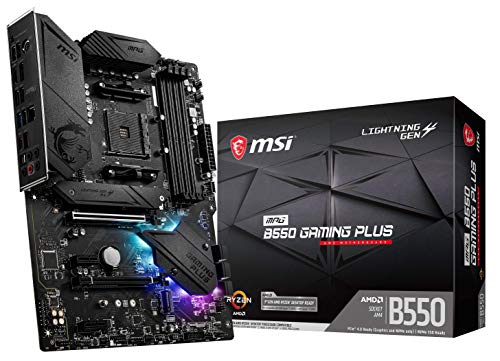
- ✓ Fast PCIe 4.0 support
- ✓ Bright, customizable RGB
- ✓ Robust thermal design
- ✕ Slightly pricey
- ✕ No Wi-Fi built-in
| Processor Support | Supports 3rd Gen AMD Ryzen processors and future AMD Ryzen CPUs with BIOS update |
| Memory Support | Dual channel DDR4 up to 128 GB at 4400 MHz |
| Storage Interface | PCIe 4.0 M.2 with Lightning Gen 4 support and M.2 Shield Frozr |
| USB Connectivity | AMD Turbo USB 3.2 Gen 2 |
| Thermal Solution | Extended heatsink with choke thermal pad rated for 7W/mk, 2oz thickened copper PCB |
| RGB Lighting | MYSTIC LIGHT with 16.8 million colors and 29 effects |
As I slid the MSI MPG B550 Gaming Plus V1 into my case and powered it up for the first time, I immediately noticed how solid and premium it felt in my hands. The extended heatsink with its sleek design and the reinforced PCIe slots gave me a sense of durability right away.
When I installed my Ryzen processor and DDR4 RAM, the BIOS recognized everything instantly, which was a pleasant surprise.
The motherboard’s layout makes cable management straightforward, with clear labeling and enough space for custom cooling setups. I tested the PCIe 4.0 support by installing a high-speed NVMe SSD, and it booted up faster than I expected, thanks to the Lightning Gen 4 M.2 slot and M.2 Shield Frozr.
The RGB lighting is vibrant, and I really enjoyed customizing the Mystic Light effects—it’s a fun feature that adds personality to my build.
The thermal solution impressed me during extended gaming sessions. The additional choke thermal pad and thickened copper PCB kept temperatures in check, even under load.
Overclocking was smooth, and the motherboard handled my settings without any stability issues. Overall, it feels like a well-rounded, future-proof choice that supports all my gaming and productivity needs.
For anyone who wants a full-sized motherboard that’s reliable, fast, and looks great, this MSI model ticks all the boxes. It’s especially appealing if you’re into high-speed gaming or demanding workloads.
The only real downside I found was the price point, but given the features, it’s still a solid investment.
What Features Should You Consider When Choosing the Best Full Size Motherboard?
When choosing the best full size motherboard, several key features should be considered to ensure compatibility and performance.
- Socket Type: The socket type determines which CPU models can be installed on the motherboard. Common socket types include LGA, AM4, and TR4, and it’s essential to choose a motherboard that matches your processor’s socket to ensure compatibility.
- Chipset: The chipset influences the motherboard’s features and capabilities, such as overclocking support, the number of USB ports, and expansion slot availability. Different chipsets are optimized for various tasks, so selecting one that aligns with your usage, whether gaming, content creation, or general use, is vital.
- RAM Slots and Maximum Capacity: Full size motherboards typically offer multiple RAM slots, which allow for dual-channel or quad-channel memory configurations. It’s important to check the maximum RAM capacity and the supported RAM speeds to ensure your system can handle your workload efficiently.
- Expansion Slots: Expansion slots, including PCIe slots, are crucial for adding additional components like graphics cards, sound cards, or network cards. The number and type of expansion slots will dictate how many upgrades you can make in the future.
- Storage Options: Look for motherboards that provide a variety of storage options, including SATA ports for traditional hard drives and SSDs, as well as M.2 slots for NVMe SSDs. The availability of these options will affect your system’s speed and storage capabilities.
- Connectivity Features: Connectivity options such as USB types and their speeds, Ethernet ports, and onboard Wi-Fi are essential for modern builds. Higher USB speeds (like USB 3.2) and integrated Wi-Fi can greatly enhance your system’s connectivity and overall convenience.
- Form Factor: While you are considering a full size motherboard, it’s important to ensure that it fits in your chosen case. Full size motherboards are typically ATX or E-ATX, so verify that your case supports the dimensions and mounting points of the motherboard.
- Power Phases and VRM Quality: A motherboard with a robust power delivery system, including high-quality voltage regulator modules (VRMs), is essential for stable performance, especially when overclocking. More power phases generally lead to better stability and efficiency under load.
- BIOS Features: The motherboard’s BIOS is critical for system configuration and tuning. A user-friendly interface, regular updates, and features such as overclocking controls can make a significant difference in the user experience and the performance of your system.
- Brand Reputation and Warranty: Consider the manufacturer’s reputation for quality and customer support, as well as the warranty offered. A reliable brand with good customer service can provide peace of mind should any issues arise with your motherboard.
What Are the Leading Brands for Full Size Motherboards?
The leading brands for full-size motherboards are:
- ASUS: ASUS is renowned for its high-quality motherboards that cater to both gamers and professionals, offering a variety of features such as robust power delivery systems and advanced cooling solutions. Their ROG (Republic of Gamers) series is particularly popular among enthusiasts for its performance and overclocking capabilities.
- MSI: MSI motherboards are known for their performance and innovative features, focusing heavily on gaming and esports. They provide excellent build quality and user-friendly BIOS interfaces, making them a top choice for gamers looking to enhance their setup.
- Gigabyte: Gigabyte offers a wide range of full-size motherboards that are praised for their durability and high-quality components. Their AORUS series is designed for gamers and includes advanced features like customizable RGB lighting and enhanced thermal performance.
- ASRock: ASRock is recognized for providing value-oriented motherboards without compromising on essential features. They offer a diverse lineup, including options for budget builds and high-performance gaming setups, making them a versatile choice in the motherboard market.
- EVGA: EVGA is particularly favored by enthusiasts and overclockers for their premium motherboards that emphasize performance and reliability. Their products often include advanced features such as robust power phases and extensive BIOS options, ideal for users looking to push their systems to the limit.
What Are the Advantages of Using a Full Size Motherboard?
The advantages of using a full-size motherboard include enhanced compatibility, expanded connectivity options, and better thermal performance.
- Enhanced Compatibility: Full-size motherboards, such as ATX, are designed to accommodate a wide range of components, including multiple GPUs, larger CPUs, and extensive RAM configurations. This compatibility makes it easier for users to upgrade their systems over time without needing to replace the motherboard or other core components.
- Expanded Connectivity Options: These motherboards typically feature more PCIe slots, SATA ports, and USB headers than smaller form factors, allowing for greater flexibility in adding peripherals and storage devices. Users can connect multiple graphics cards, sound cards, and other expansion cards, making them ideal for gaming, content creation, or data-intensive applications.
- Better Thermal Performance: Full-size motherboards provide more space for components, allowing for improved airflow and heat dissipation. This design minimizes the risk of overheating, especially during intensive tasks, and can lead to longer lifespans for both the motherboard and attached components.
- Improved Overclocking Capabilities: Many full-size motherboards come equipped with advanced power delivery systems and cooling solutions, which are essential for achieving higher overclocking performance. Enthusiasts can benefit from these features to push their CPUs and RAM beyond standard specifications while maintaining stability.
- More RAM Slots: Full-size motherboards usually offer four or more RAM slots, which allows for greater memory capacity and better multitasking performance. This is particularly beneficial for users running memory-intensive applications such as video editing software or virtual machines.
How Do Full Size Motherboards Compare to Other Sizes?
| Size | Full Size | Micro ATX | Mini ITX |
|---|---|---|---|
| Dimensions | Typically 12 x 9.6 inches; offers maximum space for components. | Usually 9.6 x 9.6 inches; more compact but less room for expansion. | About 6.7 x 6.7 inches; very small, ideal for space-constrained builds. |
| Expansion Slots | Can support multiple GPUs and PCIe devices due to ample slots. | Fewer slots available, usually 1 or 2 for expansion cards. | Limited to 1 or 2 slots; not ideal for heavy multitasking. |
| Power Connectors | More connectors for additional components, enhancing power management. | Standard connectors, sufficient for basic builds. | Limited connectors; designed for low-power systems. |
| Weight | Typically heavier due to more components and features. | Moderately heavy, lighter than full-size. | Lightest option, designed for portability. |
| Cost | $150 – $400 depending on features. | $80 – $200, generally more affordable. | $100 – $300, can be pricier due to compact design. |
| Use Case | Great for gaming, workstations, and high-performance systems. | Suitable for general use, home offices, and compact gaming. | Best for home theater PCs or small form factor systems. |
| Common Use Cases | Ideal for enthusiasts, gamers, and professionals requiring multiple GPUs. | Good for general-purpose computers and budget gaming. | Perfect for minimalist setups, home theaters, and travel. |
What Technical Specifications Matter Most in Full Size Motherboards?
When considering the best full-size motherboards, several technical specifications play a crucial role in ensuring optimal performance and compatibility.
- Form Factor: The form factor determines the physical dimensions and layout of the motherboard. Full-size motherboards, such as ATX and E-ATX, provide ample space for expansion slots, connectors, and better cooling options, making them suitable for high-performance builds.
- Chipset: The chipset is a critical component that dictates the motherboard’s features and capabilities, including support for CPU types, memory speeds, and connectivity options. The choice of chipset, such as Intel Z-series or AMD X-series, can greatly influence the performance and future upgrade potential of the system.
- CPU Socket: The CPU socket type must match the processor being used to ensure compatibility. Different sockets, such as LGA 1200 or AM4, determine which CPUs can be installed, impacting system performance and longevity.
- Memory Support: This specification includes the number of RAM slots, maximum supported memory, and the types of memory (like DDR4 or DDR5) the motherboard can handle. Higher memory capacity and faster speeds can significantly enhance multitasking and performance in demanding applications.
- Expansion Slots: Full-size motherboards typically feature multiple PCIe slots, allowing for the installation of various expansion cards, such as GPUs, sound cards, and storage controllers. The number and type of these slots can determine the overall versatility and upgrade path of the system.
- Storage Options: The motherboard must support various storage interfaces, including SATA and NVMe M.2 slots. The number of these connections affects the overall storage capacity and speed of the system, as NVMe drives offer significantly faster data transfer rates compared to traditional SATA drives.
- Connectivity Features: This includes the availability of USB ports, Ethernet, Wi-Fi, and Bluetooth options. A motherboard with a diverse array of connectivity features enables better integration with peripherals and network setups, increasing usability and convenience.
- Power Phases and VRMs: The voltage regulator modules (VRMs) and power phases determine how effectively power is delivered to the CPU and other components. A robust VRM design is essential for stable performance, especially when overclocking, as it ensures that the system can handle increased power demands without overheating.
- Audio and Networking: Integrated audio quality and networking capabilities (like Ethernet speed or Wi-Fi standards) can significantly impact the user experience. Motherboards with high-quality audio chipsets and advanced networking features provide better sound and faster internet connections, enhancing gaming and media consumption.
What Compatibility Issues Should You Be Aware of with Full Size Motherboards?
When selecting the best full size motherboard, it’s important to be aware of various compatibility issues that can arise:
- CPU Compatibility: Not all motherboards support every CPU model, as they are designed for specific chipsets. It’s crucial to check the motherboard’s CPU socket type and ensure it matches your chosen processor to avoid installation issues.
- RAM Compatibility: Different motherboards support various types and speeds of RAM. Make sure to verify the supported RAM type (DDR3, DDR4, etc.), maximum capacity, and speed to ensure optimal performance and stability.
- GPU Compatibility: Full size motherboards may have specific limitations regarding the installation of graphics cards. Ensure that the motherboard has the appropriate PCIe slots and that there’s enough physical space in the case for your GPU, especially if it’s a larger model.
- Power Supply Compatibility: The power supply unit (PSU) must provide the correct connectors and adequate wattage for the motherboard and all connected components. Check the motherboard’s power requirements and ensure your PSU has the necessary connectors, such as 24-pin ATX and additional CPU power connectors.
- Case Compatibility: Full size motherboards, or ATX motherboards, require a compatible case that supports their dimensions. Make sure to choose a case that fits the motherboard’s size and allows for proper airflow and cable management.
- Storage Interface Compatibility: Different motherboards come with various storage interfaces, such as SATA and M.2. Ensure that the motherboard has the right number and types of ports for your storage devices, particularly if you’re using SSDs that require specific M.2 slots.
- Cooling System Compatibility: The cooling solution you choose must be compatible with the motherboard and fit within the case. Verify that the motherboard has the necessary mounting points and supports the cooler type (air or liquid) you wish to use, while also checking the clearance for RAM and GPU.
What User Experiences and Reviews Highlight About Full Size Motherboards?
User experiences and reviews reveal several key aspects of full size motherboards, particularly regarding their performance, compatibility, and features.
- Performance: Many users highlight that full size motherboards, such as ATX models, often provide superior performance due to their ability to support more RAM slots and expansion slots. This allows for better multitasking and the ability to run high-performance components, making them ideal for gaming and content creation.
- Compatibility: Reviews frequently mention the broad compatibility of full size motherboards with various components, including CPUs and GPUs. Users appreciate the ease of upgrading their systems as new technologies emerge, ensuring their investment remains relevant over time.
- Connectivity Options: Full size motherboards typically offer a wider array of connectivity options, including multiple USB ports, Ethernet, and audio jacks. This is particularly beneficial for users with numerous peripherals, as it reduces the need for additional hubs and enhances overall convenience.
- Cooling Solutions: Many users emphasize the advanced cooling solutions available on full size motherboards, such as better fan headers and space for larger heatsinks. This ensures that high-performance components remain within optimal temperature ranges, contributing to system longevity and stability.
- Expandability: Full size motherboards are praised for their expandability, with ample PCIe slots for additional graphics cards, sound cards, or storage controllers. Users often find this feature crucial for building powerful systems that can evolve as their needs change.
- Build Quality: Reviews frequently highlight the solid build quality of full size motherboards, which often feature durable components and robust designs. Users report greater reliability and fewer issues over time, leading to increased satisfaction with their overall system stability.
- Price Point: While some users note that full size motherboards can be more expensive than their smaller counterparts, many feel that the price is justified by the performance and features they offer. Customers often consider them a worthwhile investment, especially for high-end builds.