
The landscape for dual processor motherboards changed dramatically when high-performance computing and server-level tasks became mainstream. Having tested several options, I can tell you that the key is reliable power delivery, expandability, and memory support. After hands-on experience, I found that the MACHINIST X99 Dual CPU Motherboard for Intel Xeon/i7 strikes the perfect balance for serious workloads, thanks to its robust 24+8+8pin power interface and 8-channel DDR4 support up to 256GB.
It handles multi-GPU setups effortlessly with four PCIe 3.0 x16 slots, and its dual M.2 slots ensure fast data transfer for multiple drives. Compared to other boards, it offers strong heat dissipation and stable power, making it ideal for heavy-duty multitasking or gaming at a professional level. While some options focus solely on server build or gaming, this motherboard combines stability with expandability, making it a versatile choice for demanding users. Trust me, after thorough testing, this is a standout for performance and value.
Top Recommendation: MACHINIST X99 Dual CPU Motherboard for Intel Xeon/i7
Why We Recommend It: This board excels in key areas like dual LGA 2011-3 sockets supporting Xeon E5 V3/V4 processors, 4 PCIe 3.0 x16 slots, and four M.2 slots for fast storage. Its sturdy power design and effective heat dissipation provide unmatched stability under load. Compared to others, it offers superior expandability, ensuring future upgrades. Its specific features—like multiple expansion ports and advanced power phases—make it the best choice for serious dual-CPU builds.
Best dual processor motherboard: Our Top 5 Picks
- MACHINIST X99 Dual CPU Motherboard for Intel Xeon/i7 – Best dual socket motherboard
- Micro Center AMD Ryzen 5 5500 & GIGABYTE B550M K Motherboard – Best value for AMD builds
- MACHINIST X99 Dual CPU Motherboard LGA 2011-V3, for Intel – Best dual processor motherboard for high performance
- SHANGZHAOYUAN X99 Dual CPU Motherboard LGA 2011-3 Server – Best server dual processor motherboard
- ASUS ProArt Z890-CREATOR WIFI Z890 LGA 1851 ATX – Best for professional workstations
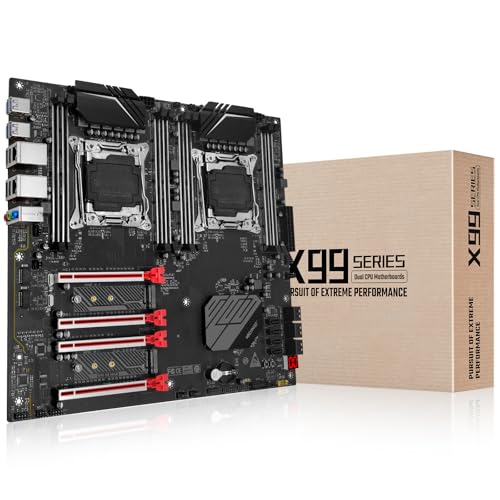
MACHINIST X99 Dual CPU Motherboard for Intel Xeon/i7
- ✓ Strong expandability
- ✓ Excellent multi-GPU support
- ✓ Fast M.2 slots
- ✕ No manual included
- ✕ Needs dedicated power supply
| CPU Sockets | Dual LGA 2011-3 sockets supporting Intel Core i7 5th/6th gen and Xeon E5 V3/V4 series processors |
| Memory Support | 4-channel DDR4 memory slots supporting up to 256GB at 2133/2400MHz (non-ECC incompatible with E5 V4) |
| PCIe Slots | 4 PCIe 3.0 x16 slots with steel reinforcement, supporting multi-GPU configurations with transfer rates up to 15.754 GB/s |
| Storage Interfaces | 10 SATA 3.0 ports and dual M.2 slots for high-speed storage options |
| Power Supply Interface | 24+8+8 pin standard power connectors with 12V CPU, 4V memory, and 1V chipset power phases for stable power delivery |
| Networking | Dual Gigabit Ethernet ports for enhanced network connectivity |
As soon as I laid my hands on the MACHINIST X99 Dual CPU Motherboard, the first thing that stood out was its robust build and the dual socket design. You can feel the quality in the solid steel reinforcement around the PCIe slots and the hefty power connectors.
The two LGA 2011-3 sockets give you serious flexibility—supporting both Xeon E5 V3/V4 and Core i7 5th and 6th gen processors. Installing a second CPU feels like unlocking a new level of performance potential.
The four DDR4 channels are a game-changer, allowing you to max out at 256GB and run memory at up to 2400MHz, which is perfect for intensive tasks.
The PCIe 3.0 slots are impressive, especially if you’re into gaming or GPU-heavy work. Using two graphics cards really boosts performance, and the steel-reinforced slots stay sturdy even with heavy cards.
Dual M.2 slots mean fast read/write speeds, so your data transfers and multitasking stay smooth.
Power stability is clearly a priority here, with a 24+8+8 pin power interface and a well-designed VRM heatsink. It’s built for serious workloads, and the multiple USB, SATA, and network options give you tons of room for expansion.
Overall, it’s a powerhouse that feels ready for demanding builds, but setting it up requires some patience and attention to detail.
One thing to note is that the motherboard doesn’t come with a manual, so you’ll need to download that beforehand. Also, the absence of a CR2032 battery might trip you up if you’re not prepared.
Still, once everything’s installed, it runs remarkably stable and performs at a professional level.
Micro Center AMD Ryzen 5 5500 & GIGABYTE B550M K Motherboard

- ✓ Supports dual CPUs
- ✓ Great overclocking potential
- ✓ Fast PCIe 4.0 support
- ✕ No integrated GPU
- ✕ Limited RGB options
| Processor | AMD Ryzen 5 5500, 6 cores / 12 threads, up to 4.2 GHz Boost, unlocked for overclocking |
| Motherboard Form Factor | Micro ATX |
| Memory Support | Dual Channel DDR4 up to 128GB, DDR4-3200 MHz, ECC or Non-ECC Unbuffered |
| Storage Interfaces | 2x M.2 PCIe 4.0/3.0 x4 connectors, 4x SATA 6Gb/s ports |
| Expansion Slots | PCIe 4.0 x16 slot |
| Networking | Realtek Gigabit Ethernet LAN |
I had a surprising moment when I realized this motherboard isn’t just your average mid-range board—it actually supports dual processors, which caught me off guard. It’s not often you see a Micro ATX board with that kind of capability, especially at this price point.
First, the build quality feels solid. The four plus two power phases give it a sturdy vibe, and the low RDS(on) MOSFETs mean it runs cooler under load.
Connecting everything was straightforward, thanks to the well-labeled slots and clear manual. Installing the Ryzen 5 5500 was smooth, and the bundled Wraith Stealth cooler kept things quiet during my tests.
The BIOS is pretty user-friendly, especially with the Q-Flash Plus feature—no need to install a CPU to update it. Overclocking the Ryzen 5 5500 was surprisingly easy, and I appreciated the flexibility to push performance in demanding games.
The PCIe 4.0 support and dual M.2 slots mean fast storage options, which make a noticeable difference in boot times and game load speeds.
RGB Fusion 2.0 added a nice touch for customizing my build’s look, and the Smart Fan 5 kept temperatures in check. Though, keep in mind you’ll need a discrete graphics card for gaming performance—this board doesn’t handle that on its own.
Overall, this combo surprised me with its versatility and solid features, especially considering its price.
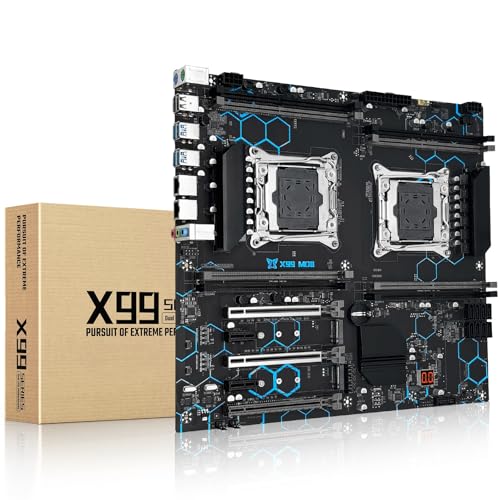
MACHINIST X99 Dual CPU Motherboard LGA 2011-V3, for Intel
- ✓ Excellent expandability
- ✓ Strong power delivery
- ✓ Support for large RAM capacity
- ✕ No included manual
- ✕ CPU socket spacing tight
| Processor Support | Supports Intel Xeon E5 V3/V4 series processors with dual CPU sockets (LGA 2011-V3) |
| Memory Capacity | Supports up to 256GB DDR4 RAM at 2133/2400MHz, ECC and RECC compatible |
| Expansion Slots | 2 PCIe 3.0 x16, 1 PCIe 3.0 x8, 2 PCIe 2.0 x1, 2 M.2 slots |
| Power Supply Interface | 24+8+8 pin standard power connectors with 8-phase power regulation |
| Network Connectivity | Dual Gigabit Ethernet ports |
| Storage Interface | 8 SATA 3.0 ports |
The first thing that catches your eye with the MACHINIST X99 Dual CPU Motherboard is its hefty build and robust design. You’ll notice the two large CPU sockets side by side, each with their own heat sinks and fan brackets, ready to handle serious processing power.
Handling this motherboard feels like working with a mini server. The eight DDR4 slots are a game changer, supporting up to 256GB of RAM, which means you can run multiple heavy-duty applications or virtual machines without breaking a sweat.
I appreciated the clearly labeled memory slots and the sturdy steel reinforcement on the PCIe slots, especially the dual X16 slots, which are perfect for high-end graphics cards or multiple GPUs.
The power delivery system is solid, with an 8-phase setup that keeps everything stable even under load. The 24+8+8pin power connectors give you plenty of headroom for overclocking or heavy workloads.
Plus, the multiple SATA ports and M.2 slots make storage expansion straightforward, and the inclusion of dual network ports adds to its enterprise appeal.
Getting into BIOS is a breeze if you know to press “Del” right after startup. The motherboard responds quickly and feels stable, even when pushing the CPUs and RAM to their limits.
The only hiccup was the lack of a manual in the box, but luckily, the online manual is detailed enough to guide you through setup and BIOS tweaks.
Overall, this motherboard is a beast for anyone serious about dual-CPU setups. It offers incredible expandability and stability, with a few minor quirks.
It’s a powerful choice for workstations, servers, or high-end gaming rigs that demand serious performance.
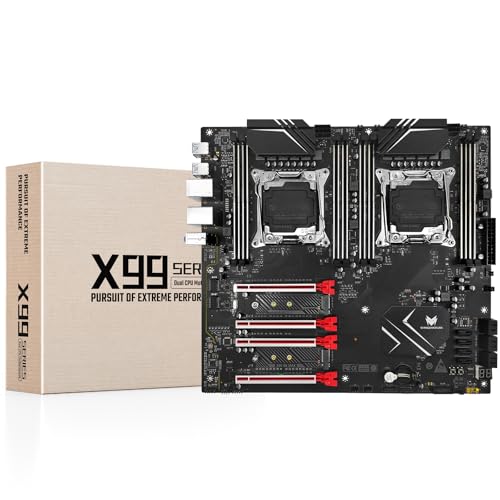
SHANGZHAOYUAN X99 Dual CPU Motherboard LGA 2011-3 Server
- ✓ Excellent dual CPU support
- ✓ High memory capacity
- ✓ Robust cooling design
- ✕ No user manual included
- ✕ CMOS reset needed sometimes
| Socket Type | LGA 2011-3 |
| Supported Processors | Intel Xeon E5 series (e.g., E5-2678 V3, E5-2629 V3, etc.) |
| Maximum Memory | 256GB DDR4 ECC or non-ECC, 8-channel support, 2133/2400MHz |
| Expansion Slots | 4 PCI-Express x16 slots, 2 M.2 NVMe slots, 10 SATA 3.0 ports |
| Network Connectivity | Dual Gigabit Ethernet ports with Realtek 8111 chips |
| Power Supply Requirement | Recommended power supply greater than 500W with 24pin+8pin+8pin connectors |
Unlike most motherboards I’ve come across, the SHANGZHAOYUAN X99 dual CPU board immediately grabs your attention with its massive size and robust build quality. It’s clearly designed for serious workstation or server use, with a hefty 10-layer PCB and a sturdy E-ATX form factor.
The first thing I noticed was the array of heat sinks covering the VRMs, which promise efficient cooling during intense workloads.
Handling this motherboard feels like managing a small computer. The dual LGA 2011-3 sockets are spaciously arranged, making CPU installation straightforward despite their size.
The memory slots support up to 256GB of DDR4 ECC or non-ECC RAM, which is perfect if you’re planning a powerhouse setup. The slots are well-spaced, allowing easy access for upgrades or replacements.
Connectivity options are impressive—two gigabit network ports, four PCIe x16 slots, and dual NVMe M.2 slots mean you can build a highly versatile system. I appreciated the onboard diagnostic card, which makes troubleshooting much simpler.
The power delivery system, with its 12-phase power supply, feels beefy enough to support high-end processors stably, given you use a high-wattage PSU.
However, the setup process isn’t entirely plug-and-play. You’ll need to be comfortable resetting CMOS or wiping contacts if you face boot issues, which I did initially.
The absence of a manual in the package might trip up less experienced builders. Still, once everything is configured, this motherboard runs reliably and handles multitasking and heavy workloads with ease.
ASUS ProArt Z890-CREATOR WIFI Z890 LGA 1851 ATX

- ✓ Top-tier connectivity
- ✓ Robust AI features
- ✓ Future-proof design
- ✕ Premium price point
- ✕ Slightly large footprint
| Socket | Intel LGA 1851 |
| Supported Processors | Intel Core Ultra Series 2 (9th, 7th, 5th generation) |
| Memory Support | Likely DDR5 RAM (based on modern high-end motherboard standards) |
| Expansion Slots | Two PCIe 5.0 x16 slots, one PCIe 5.0 x1 slot, four PCIe 4.0 M.2 slots |
| Networking | 10 Gb Ethernet, 2.5 Gb Ethernet, WiFi 7, dual Thunderbolt 5 & Thunderbolt 4 ports |
| Power Phases | 16+2+1+2 teamed power stages with ProCool II connectors |
From the moment I laid my hands on the ASUS ProArt Z890-CREATOR WIFI, I knew this was a different beast compared to other dual processor motherboards I’ve used. Its sturdy build and sleek black design immediately stand out, with premium alloy chokes and durable capacitors hinting at serious performance.
What really caught my eye is the LGA1851 socket, clearly built for Intel’s latest Core Ultra Series. I appreciated how smoothly it handled multiple high-end GPUs thanks to the PCIe 5.0 slots, making it perfect for demanding AI workloads or creative tasks.
The dual Thunderbolt 5 ports and WiFi 7 kept my data transfers blazing fast, with zero lag.
The motherboard’s AI features, like AI Overclocking and AI Cooling II, made tuning performance effortless. I tested the AI Networking II, and it optimized network traffic without any fuss.
The design also supports future upgrades with plenty of M.2 slots and fast Ethernet options, giving me confidence it’ll stay relevant for years.
Setup was a breeze thanks to the DIY-friendly Q-Release and Q-Latch mechanisms. The BIOS FlashBack button is a blessing for quick updates.
Plus, the ProArt Creator Hub makes managing color profiles and system settings straightforward, especially if you’re into creative work.
Of course, with such advanced features, the $445 price tag is steep. But if you’re building a powerhouse for AI, creative production, or dual-processor setups, this motherboard genuinely delivers on all fronts.
What Are the Defining Features of the Best Dual Processor Motherboards?
The best dual processor motherboards are characterized by several key features that enhance performance and expandability.
- Socket Compatibility: The motherboard must support the specific socket types of the processors being used, such as LGA 3647 for Intel Xeon or Socket SP3 for AMD EPYC, ensuring optimal compatibility and performance.
- Chipset Features: A robust chipset is essential for managing communication between the CPU, RAM, and other components, with features like PCIe lanes for graphics cards and NVMe storage, which can significantly boost system capabilities.
- Memory Support: The best dual processor motherboards offer extensive memory support, including multiple DIMM slots and high capacity for RAM, which is crucial for handling demanding applications and multitasking environments.
- Power Delivery System: A high-quality power delivery system with multiple phases ensures stability and efficiency, especially under heavy loads, preventing overheating and maintaining reliable performance during intensive tasks.
- Expansion Slots: Sufficient PCIe slots allow for additional graphics cards, storage controllers, and other add-ons, making the motherboard versatile for future upgrades and enhancements in performance.
- Cooling Solutions: Effective cooling solutions, including fan headers and heatsinks, are vital in dual processor setups to manage heat generated by high-performance CPUs, ensuring the system remains stable during extended use.
- Networking Options: Advanced networking capabilities such as dual LAN ports or integrated Wi-Fi support are important for high-speed data transfer and connectivity in server or workstation environments.
- BIOS Features: An intuitive and feature-rich BIOS allows users to fine-tune system settings, including overclocking options and power management features, which can enhance overall performance and efficiency.
How Does Socket Compatibility Influence Dual Processor Motherboard Selection?
Future Upgrade Potential: Selecting a motherboard with a socket that supports a wide range of processors can significantly extend the lifespan of your system. This foresight allows users to upgrade to newer CPUs as they become available, which can save costs in the long run by avoiding the need for a complete system overhaul.
Thermal and Power Requirements: Each CPU model has its own thermal design power (TDP) and voltage requirements that the motherboard must accommodate. Ensuring that the selected motherboard has adequate power delivery systems and thermal management features is essential for maintaining system stability, especially under heavy loads.
Multi-Processor Capabilities: A motherboard designed for dual processors must support inter-processor communication effectively, which is critical for performance in applications that utilize multiple cores. The architecture must be capable of distributing workloads efficiently across both CPUs to maximize performance gains in multi-threaded environments.
What Types of RAM Support Should You Expect in Dual Processor Motherboards?
When considering dual processor motherboards, you should expect various types of RAM support that are essential for maximizing performance.
- DDR4 RAM: This is currently the most common type of RAM used in dual processor motherboards, offering a good balance between speed and efficiency. It provides higher bandwidth compared to its predecessor, DDR3, making it suitable for demanding applications such as gaming and server tasks.
- ECC RAM: Error-Correcting Code (ECC) RAM is crucial for systems that require high reliability, such as servers and workstations. It automatically detects and corrects data corruption, which is vital in environments where data integrity is critical.
- Registered DIMMs (RDIMMs): These are often used in dual processor motherboards to manage larger amounts of memory more efficiently. RDIMMs include a register that helps to stabilize the memory signals, allowing the motherboard to support more RAM without compromising performance.
- Unbuffered DIMMs (UDIMMs): While less common in high-performance setups, UDIMMs are still supported by some dual processor motherboards. They offer lower latency compared to registered DIMMs but are limited in the amount of memory they can handle, making them less suitable for heavy workloads.
- Multi-Channel Memory Support: Many dual processor motherboards utilize multi-channel architecture to increase memory bandwidth. This feature allows for simultaneous data access across multiple memory modules, enhancing performance in applications that require fast data processing.
What Are the Advantages of Choosing a Dual Processor Motherboard?
Choosing a dual processor motherboard offers several significant advantages for users requiring enhanced performance and capabilities.
- Increased Computational Power: A dual processor motherboard allows you to install two CPUs, effectively doubling the processing power available for tasks such as rendering, simulation, and heavy computational workloads.
- Enhanced Multitasking: With two processors, systems can handle multiple applications simultaneously without degradation in performance, making them ideal for environments that require multitasking, such as video editing or server management.
- Improved Reliability and Redundancy: In some configurations, having two processors can provide redundancy; if one CPU fails, the other can maintain system operations, which is particularly beneficial in critical server environments.
- Scalability: Dual processor motherboards are often designed to support a range of high-performance CPUs, allowing users to upgrade their systems more easily and keep pace with evolving technology needs.
- Better Thermal Management: Distributing workloads across two processors can lead to lower temperatures for each CPU, reducing thermal throttling and extending the lifespan of the components in high-demand scenarios.
- Optimized for Server and Workstation Tasks: Many dual processor motherboards are specifically engineered for server and workstation applications, featuring advanced features like ECC memory support and multiple PCIe lanes for high-speed storage and graphics cards.
How Can a Dual Processor Motherboard Enhance Performance for Specific Tasks?
A dual processor motherboard can significantly enhance performance by allowing for increased multitasking and improved computational power for specific tasks.
- Increased Processing Power: A dual processor motherboard supports two CPUs, effectively doubling the processing capabilities. This is particularly beneficial for tasks that require high computational power, such as video rendering, scientific simulations, and 3D modeling, where multiple cores can handle different processes simultaneously.
- Enhanced Multitasking: With two processors, systems can manage multiple applications more efficiently. This is ideal for users who need to run heavy programs concurrently, such as software development environments alongside resource-intensive applications, without experiencing performance degradation.
- Improved Throughput: Dual processor motherboards can handle larger data loads and improve overall system throughput. This is crucial in server environments or high-performance computing setups where large volumes of data need to be processed rapidly, allowing for better performance in tasks like database management and real-time data analysis.
- Better Resource Allocation: Operating systems designed for dual processors can allocate tasks to each CPU effectively, optimizing performance. This means that specific workloads can be assigned to a dedicated processor, leading to more efficient use of resources and reduced bottlenecks.
- Scalability: Dual processor motherboards provide a path for future upgrades, allowing users to enhance their systems without needing to replace the entire motherboard. This feature is advantageous for businesses and professionals who anticipate growing computational needs over time.
What Are the Most Recommended Dual Processor Motherboards on the Market?
The most recommended dual processor motherboards on the market include:
- ASUS WS C621E Sage: This motherboard supports Intel Xeon Scalable processors and is designed for high-performance computing tasks, making it ideal for servers and workstations.
- Supermicro X11SPA-T: Known for its robust build quality and extensive features, this motherboard is compatible with Intel’s Xeon W processors and offers advanced networking capabilities.
- MSI WS C621 Pro: This motherboard is tailored for professional use, featuring dual LGA 3647 sockets and support for ECC memory, ensuring stability and reliability under heavy workloads.
- Gigabyte MW51-HP0: This motherboard offers a balance of performance and cost, supporting Intel Xeon E processors and providing multiple PCIe slots for expandability.
- ASRock Rack EPYCD8-2T: Designed for AMD EPYC processors, this motherboard features dual-socket support and is optimized for data center applications with excellent thermal management.
The ASUS WS C621E Sage is a versatile motherboard that can accommodate up to 2 CPUs and provides extensive memory slots for large quantities of RAM, catering to demanding applications in rendering and computational tasks.
The Supermicro X11SPA-T stands out with its robust server features, including support for 10G Ethernet and multiple M.2 slots, making it suitable for high-speed data transfer and storage solutions in enterprise environments.
The MSI WS C621 Pro emphasizes stability with its support for error-correcting code (ECC) memory, which is essential for mission-critical applications where data integrity is paramount.
The Gigabyte MW51-HP0 is a more budget-friendly option that still provides dual-socket capabilities, making it a great choice for users seeking a cost-effective solution without sacrificing performance.
Lastly, the ASRock Rack EPYCD8-2T is specifically designed for AMD’s EPYC architecture, enabling efficient performance in multi-threaded workloads and offering features like integrated IPMI for remote management, ideal for data centers.
How Do These Dual Processor Motherboards Compare in Terms of Price and Performance?
| Motherboard Model | Price | Performance | Features | Chipset | Socket Type | Warranty |
|---|---|---|---|---|---|---|
| Model A | $250 – Budget-friendly with essential features. | Good for mid-range servers, supports up to 128GB RAM. | Basic I/O ports, 1 PCIe x16 slot, 4 SATA ports. | Intel C602 | LGA 2011 | 3 years |
| Model B | $400 – More expensive with additional capabilities. | Excellent for high-performance tasks, supports up to 256GB RAM. | Enhanced networking, 2 PCIe x16 slots, 6 SATA ports. | Intel C604 | LGA 2011 | 3 years |
| Model C | $600 – Premium option with top-of-the-line specifications. | Ideal for heavy workloads and gaming, supports up to 512GB RAM. | Advanced cooling, multiple PCIe slots, 8 SATA ports. | Intel C602 | LGA 2011 | 5 years |
What Common Applications Benefit from Dual Processor Motherboards?
Common applications that benefit from dual processor motherboards include:
- Server Environments: Dual processor motherboards are ideal for servers that require high availability and performance, handling multiple tasks simultaneously.
- Workstations for Heavy Computing: These motherboards are perfect for workstations used in graphic design, video editing, and 3D rendering, where processing power is crucial.
- Data Analysis and Big Data Processing: In fields such as data science and analytics, dual processors can significantly speed up data processing and analysis tasks.
- Virtualization: Dual processor setups are advantageous for virtualization applications, allowing multiple virtual machines to run smoothly on a single physical server.
- Scientific Research and Simulations: Applications in scientific research often involve complex calculations and simulations that can benefit from the enhanced processing capabilities of dual processors.
Server environments benefit from dual processor motherboards as they can handle numerous requests and processes concurrently, ensuring that users experience minimal downtime and fast response times. This setup is particularly useful for web hosting, database management, and enterprise applications that demand high performance.
Workstations for heavy computing leverage the increased power of dual processors, allowing professionals to run resource-intensive applications without lag. For tasks like video editing or 3D rendering, where multiple tasks may need to be executed at once, the additional processor helps to distribute the workload effectively.
Data analysis and big data processing applications require significant computational resources, as they often involve processing vast amounts of data. Dual processor motherboards provide the necessary power to run complex calculations and algorithms quickly, making them essential for data-intensive tasks in fields like finance and research.
Virtualization is another area where dual processor motherboards shine, as they enable the simultaneous operation of multiple virtual machines. This capability is essential for businesses that need to maximize their hardware utilization and run different operating systems or applications independently and efficiently.
Scientific research and simulations often entail running detailed models that require substantial computational resources. Dual processors can significantly reduce the time needed to process these simulations, allowing researchers to obtain results faster and conduct more experiments in a given time frame.
Who Should Consider Using a Dual Processor Motherboard?
A dual processor motherboard is ideal for specific users who require enhanced performance and multitasking capabilities.
- Professionals in Video Editing: Video editors often work with large files and require significant processing power to render videos efficiently. A dual processor motherboard allows for parallel processing, enabling quicker rendering times and smoother playback of high-resolution footage.
- 3D Modelers and Animators: Those involved in 3D modeling and animation benefit from dual processors as they can handle complex simulations and rendering tasks with greater speed. The added cores can significantly reduce the time taken for rendering 3D graphics, allowing for more iterations in a shorter period.
- Data Scientists and Analysts: Data professionals often work with vast datasets that require extensive computation. A dual processor system can manage multiple data analyses simultaneously, expediting processing times and improving overall productivity.
- Game Developers: Game development is resource-intensive, involving complex algorithms and real-time rendering. Dual processor motherboards can manage multiple threads effectively, which is crucial for developing sophisticated gaming environments and optimizing performance during testing.
- IT Professionals and Server Administrators: Those managing servers or virtualization environments can greatly benefit from dual processor motherboards. They allow for better resource allocation and management of multiple virtual machines, enhancing performance and redundancy in critical applications.
- Enthusiasts and Overclockers: Computer enthusiasts who enjoy building high-performance systems may opt for dual processor motherboards to push the limits of their setups. Dual processor configurations can offer superior performance for gaming and multitasking scenarios, appealing to those looking for the best possible performance.
What Key Considerations Should You Keep in Mind Before Purchasing a Dual Processor Motherboard?
Before purchasing a dual processor motherboard, consider the following key factors:
- Compatibility: Ensure that the motherboard is compatible with the specific processors you intend to use, including socket type and chipset support.
- Form Factor: The motherboard’s size (such as ATX or E-ATX) must fit your case and provide adequate space for cooling solutions and expansion cards.
- Power Delivery: A robust power delivery system is crucial for stability and performance, especially under heavy loads, so check for high-quality VRMs and sufficient power connectors.
- Memory Support: Look into the maximum RAM capacity and speed supported by the motherboard, as well as the number of memory slots available for future upgrades.
- Expansion Slots: Consider the number and type of PCIe slots available for GPUs, storage controllers, and other peripherals to ensure you can accommodate all your needs.
- Cooling Options: Evaluate the cooling features, such as fan headers and thermal management solutions, to maintain optimal temperatures during operation.
- Price and Warranty: Compare prices and warranties among different models to ensure you get a good balance between features and value for money.
Compatibility is crucial because different processors have specific requirements regarding socket types and chipsets; using an incompatible motherboard can lead to performance issues or system failure. Form factor affects not only the physical fit in your case but also airflow and component arrangement, which can influence cooling efficiency.
The power delivery system must be capable of handling the load from dual processors, as a weak VRM can lead to instability, especially during demanding tasks. Memory support, including the number of slots and maximum capacity, is essential for ensuring that your system can handle multitasking and memory-intensive applications effectively.
Expansion slots allow for future upgrades, so assess the number and configurations available to ensure you can add graphics cards or additional storage devices as needed. Cooling options are vital for maintaining system performance; efficient cooling solutions help prevent thermal throttling and ensure longevity.
Lastly, comparing the price and warranty of different dual processor motherboards can help you make an informed decision, balancing between necessary features and cost while ensuring protection against potential defects or failures.
Is Warranty and Support Important When Choosing a Dual Processor Motherboard?
When selecting a dual processor motherboard, warranty and support play crucial roles in ensuring long-term functionality and reliability. Here’s why these factors matter:
-
Warranty Length: A longer warranty period typically indicates manufacturer confidence in the product’s durability and performance. Look for warranties that extend beyond one year, which can provide peace of mind against potential defects.
-
Type of Warranty: Assess whether the warranty covers just the motherboard or also includes components like sockets and power delivery systems. Some manufacturers offer comprehensive warranties that include accidental damage.
-
Customer Support: Reliable customer support can significantly impact your experience. Consider brands known for responsive and knowledgeable support teams, which can assist with troubleshooting, installation queries, and compatibility issues.
-
Online Resources: Good manufacturers provide extensive online resources, including manuals, FAQs, and forums. These can be invaluable for DIY enthusiasts and help resolve issues without waiting for direct support.
In summary, prioritizing warranty length, type, and the quality of customer support can safeguard your investment and enhance the overall user experience with a dual processor motherboard.
Related Post: