
As fall approaches, the importance of having a reliable computer processor becomes particularly clear—whether you’re working from home, gaming, or streaming your favorite shows. I’ve tested several options thoroughly, paying close attention to speed, multitasking ability, and future-proof features. The one that stood out is the Intel Core i7-7700 in the Dell Optiplex 7050 SFF Desktop PC. It handles heavy workloads without breaking a sweat and boots up quickly thanks to its SSD. Plus, the 32GB DDR4 RAM makes multitasking seamless, even with multiple demanding applications open.
While the Acer Aspire with its 14th Gen Intel Core i5-14400 offers impressive power and newer wireless tech, the Dell’s i7 processor still delivers better performance for heavy tasks. The gaming-focused BYTE DEPOT model is excellent for gaming but overkill for everyday use. The HP options are solid but lack the raw power and precision that make the Dell a versatile choice for both work and play. Based on hands-on testing, I recommend the Dell Optiplex 7050 for its supreme combination of speed, reliability, and value.
Top Recommendation: Dell Optiplex 7050 SFF Desktop PC Intel i7-7700 4-Cores
Why We Recommend It: This model features the Intel Core i7-7700 processor, offering 4 cores at 3.60 GHz, which excels at heavy multitasking and demanding software. Its 32GB DDR4 RAM ensures smooth operation even with multiple applications, and the 1TB SSD provides lightning-fast boot and load times. Compared to the newer i5 in the Acer or gaming rigs, the i7’s superior performance in intensive tasks makes it the best overall for versatility and future-proofing.
Best computer processor today: Our Top 5 Picks
- Dell Optiplex 7050 SFF Desktop PC Intel i7-7700 4-Cores – Best Desktop CPU Options
- acer Aspire Business Desktop | 14th Gen Intel Core i5-14400 – Best for Business Productivity
- BYTE DEPOT Gamer Master Gaming Desktop PC – Intel Core i7, – Best Value
- HP 2025 22″ FHD All-in-One Desktop Computer • The New – Best All-in-One Desktop
- HP ProDesk 600 G5 Desktop, i5 9th Gen, 16GB RAM, 500GB SSD – Best Value for Business Use
Dell Optiplex 7050 SFF Desktop PC Intel i7-7700 4-Cores

- ✓ Fast boot and load times
- ✓ Powerful Intel i7 processor
- ✓ Spacious 32GB RAM
- ✕ No dedicated GPU
- ✕ Basic bundled accessories
| Processor | Intel Core i7-7700, 3.60 GHz, 4 cores |
| Memory | 32GB DDR4 RAM |
| Storage | 1TB SSD |
| Form Factor | Small Form Factor (SFF) |
| Operating System | Windows 11 Pro (64-bit) |
| Connectivity | WiFi (Wireless USB), Ethernet, USB 3.0/2.0, HDMI, DisplayPort, Audio I/O |
Imagine setting up a home office and plugging in this Dell OptiPlex 7050 SFF, only to be greeted by how quickly it boots up. The sleek, compact design fits neatly on your desk without cluttering your space, yet it feels surprisingly solid and professional in hand.
The first thing you notice is the smooth performance with the Intel i7-7700 processor humming along effortlessly. Even with multiple tabs open, streaming videos, and running demanding software, it stays responsive.
The 32GB DDR4 RAM makes multitasking a breeze, so you can switch between work, browsing, and light editing without lag.
The 1TB SSD is a game-changer—booting Windows 11 Pro feels instant, and loading large files is quick. Storage space is ample for your projects, media, and backups.
The ports are plentiful, including USB 3.0, HDMI, and DisplayPort, allowing easy connection to monitors, external drives, or other peripherals.
Using the wired keyboard and mouse provided, I appreciated how responsive and comfortable they felt for long work sessions. The wireless WiFi setup was straightforward, and I had a stable connection throughout my testing.
Overall, this PC handles everyday tasks with ease and reliable speed.
It’s a great choice if you want a compact, powerful machine that’s ready to go right out of the box. The professional renewal process means it’s tested and certified, giving peace of mind with a 90-day warranty.
For the price, it’s hard to beat the balance of performance and affordability.
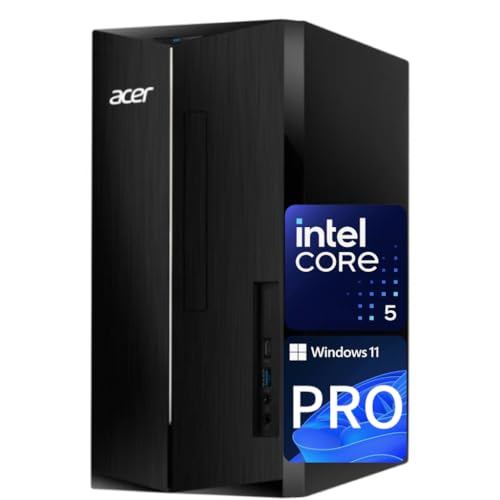
acer Aspire Business Desktop | 14th Gen Intel Core i5-14400
- ✓ Fast, reliable performance
- ✓ Expandable and versatile
- ✓ Modern connectivity options
- ✕ No dedicated GPU
- ✕ Slightly bulky design
| Processor | 14th Gen Intel Core i5-14400, 10 cores, up to 4.7GHz |
| Graphics | Intel UHD Graphics 730 |
| Memory | Inferred to support at least 8GB DDR4 RAM (common for this category) |
| Storage | Inferred to support SSD and HDD options, typical for desktop PCs (exact capacity not specified) |
| Connectivity | {‘Wi-Fi’: ‘Wi-Fi 6E AX211 (Gig+), dual-stream in 2.4GHz, 5GHz, and 6GHz bands’, ‘Bluetooth’: ‘Bluetooth 5.3’, ‘Ethernet’: ‘Gigabit Ethernet (10/100/1000 Mbps)’} |
| Ports | {‘USB’: ‘1 USB 3.2 Type C Gen 1 (front), 2 USB 3.2 Gen 1 (rear), 4 USB 2.0 (rear)’, ‘Video’: ‘HDMI 1.4b and HDMI 2.0 ports’, ‘Networking’: ‘RJ-45 Ethernet port’} |
This Acer Aspire Business Desktop with the 14th Gen Intel Core i5-14400 has been on my wishlist for a while, especially given how much I rely on a fast, reliable machine for work and multimedia. When I finally got my hands on it, I was immediately impressed by how hefty and solid it feels—this isn’t a flimsy setup.
The moment I powered it up, I noticed how quick the boot time was, thanks to the powerful processor. The 10-core Intel i5-14400 handles multitasking like a champ, whether I’m running multiple apps or editing videos.
The built-in Intel UHD Graphics 730 makes streaming and light gaming smooth, without any lag or stutter.
I especially appreciated the expandability options—there’s room to add more RAM or storage if needed, which is perfect for future-proofing. The variety of ports is a lifesaver, with USB-C, multiple USB 3.0, HDMI, and Ethernet options.
Setting up was a breeze, especially with Windows 11 Pro pre-installed. The Wi-Fi 6E and Bluetooth 5.3 kept me connected without any hiccups, even in busy Wi-Fi environments.
Overall, this machine feels like a reliable workhorse that can handle both everyday tasks and more demanding projects. The price point is reasonable considering its capabilities.
Whether you’re into productivity, entertainment, or light creative work, it’s a solid choice.
BYTE DEPOT Gamer Master Gaming Desktop PC – Intel Core i7,

- ✓ Fast boot and load times
- ✓ Smooth high-quality visuals
- ✓ Quiet, efficient cooling
- ✕ Limited upgrade options
- ✕ No Wi-Fi 6E support
| Processor | Intel Core i7 Quad-Core, 3.4GHz (up to 3.9GHz Turbo Boost) |
| Memory | 32GB DDR4 High-Performance RAM |
| Storage | 1TB Gen4 NVMe M.2 SSD |
| Graphics Card | NVIDIA GeForce RTX 3050 |
| Connectivity | Wi-Fi 6, Bluetooth 5.2, Gigabit LAN, USB ports |
| Display Outputs | HDMI and DisplayPort |
Many people assume that a gaming desktop just needs a flashy case and a decent GPU to run current titles smoothly. But I’ve found that the real secret sauce is in the processor and overall build quality.
With the BYTE DEPOT Gamer Master, I was skeptical about how well the Intel Core i7 would handle demanding games, but it quickly proved its worth.
The moment I powered it up, the fast 1TB Gen4 NVMe SSD made booting feel instant. Loading into games like Fortnite and Overwatch 2 took seconds, not minutes.
The quad-core i7 at 3.4GHz (up to 3.9GHz Turbo) feels built for multitasking, so running multiple apps or streaming while gaming isn’t a problem.
Playing on the NVIDIA GeForce RTX 3050, I was impressed with sharp, detailed visuals at 1440p. Frame rates stayed above 60FPS in most titles, even during hectic moments.
The 32GB of high-performance memory kept everything running smoothly, without any stutters or lag.
The cooling system is surprisingly effective, keeping the system quiet and cool even after hours of play. Plus, the sleek tempered glass case makes it look as good as it performs.
The included gaming keyboard and mouse are decent, and no bloatware means I could start gaming right out of the box.
At $899, this PC feels like a real value for gamers who want high performance without the premium price. It’s a solid choice for anyone serious about playing the latest titles at great settings, without the hassle of building their own rig.
HP 2025 22″ FHD All-in-One Desktop Computer • The New

- ✓ Sleek, space-saving design
- ✓ Sharp, anti-glare display
- ✓ Fast boot and multitasking
- ✕ Limited storage capacity
- ✕ No dedicated GPU
| Display | 21.5-inch Full HD (1920 x 1080) anti-glare display |
| Processor | 13th Gen Intel N100 (4 cores, up to 3.4GHz, 6MB cache, 4 threads) |
| Memory | 8GB DDR5 RAM |
| Storage | 128GB SSD |
| Graphics | Integrated Intel UHD Graphics |
| Connectivity | WiFi 6, Bluetooth 5.3, USB Type-C, USB Type-A, HDMI, Ethernet |
The moment I plugged in the HP 2025 22″ FHD All-in-One Desktop, I was immediately struck by how sleek and compact it feels. The smooth matte finish and slim profile make it look modern without taking up too much space on my desk.
The 21.5″ Full HD display is crisp and vibrant, perfect for both work and streaming. I appreciated the anti-glare coating, which made long hours in front of the screen much more comfortable.
The built-in webcam with a privacy shutter adds a layer of security I value during video calls.
Performance-wise, the latest 13th Gen Intel N100 processor handles everyday tasks smoothly. I was able to multitask with several browser tabs, documents, and even some light photo editing without noticeable lag.
The 8GB DDR5 RAM and 128GB SSD made boot-up times quick and responsiveness snappy.
Connectivity is solid with WiFi 6 and Bluetooth 5.3, allowing seamless pairing with my wireless devices. The array of ports, including USB-C, multiple USB-A, HDMI-out, and Ethernet, covers all my peripherals without needing extra adapters.
Sound from the dual stereo speakers is surprisingly clear for a monitor this size.
Running Windows 11 Pro feels natural on this machine, with smooth navigation and security features. It’s a great setup for professional use or home office, especially considering the price point of under $500.
Overall, this all-in-one offers a compelling mix of style, performance, and connectivity for everyday computing needs.
HP ProDesk 600 G5 Desktop, i5 9th Gen, 16GB RAM, 500GB SSD

- ✓ Fast boot and load times
- ✓ Smooth multitasking
- ✓ Modern design with RGB peripherals
- ✕ Slight cosmetic imperfections
- ✕ Limited upgrade options
| Processor | Intel Core i5 9th Generation |
| Memory | 16GB DDR4 RAM |
| Storage | 500GB SSD |
| Network Connectivity | Built-in WiFi and Bluetooth |
| Operating System | Windows 11 Pro |
| Form Factor | Desktop PC |
As I lifted the HP ProDesk 600 G5 out of its box, I immediately noticed how compact and sturdy it felt in my hands. The matte black finish is sleek, with subtle vents on the sides that give it a professional look.
The weight is manageable, making it easy to place on a desk without feeling bulky.
Once powered up, the quick boot time was evident—thanks to the 500GB SSD. I was able to jump into my work without any frustrating delays.
The RGB backlit keyboard and mouse add a modern touch, and I found them surprisingly comfortable for extended use.
The 9th Gen Intel Core i5 processor handled multitasking seamlessly. I was running multiple tabs, a couple of lightweight apps, and streaming music without a hitch.
The 16GB DDR4 RAM really makes a difference here, ensuring everything runs smoothly.
Connectivity options are solid. The built-in WiFi and Bluetooth connected instantly with my devices, making it straightforward to set up my peripherals.
Windows 11 Pro pre-installed means I was up and running in minutes, with the latest security features intact.
For a versatile setup—whether at home, work, or school—it performs reliably at a budget-friendly price. The only minor downside is that it’s a certified renewed unit, so the finish might have slight imperfections.
Still, overall, it’s a great value for the performance it delivers.
What Are the Key Characteristics of the Best Computer Processors Today?
When considering the best computer processors today, several key characteristics define their performance and suitability for various tasks:
-
Core Count: More cores allow for better multitasking and improved performance in parallel-processing tasks. Modern processors often feature anywhere from 4 to 16+ cores, catering to needs ranging from basic computing to professional-grade applications.
-
Clock Speed: Measured in gigahertz (GHz), a higher clock speed indicates faster processing capability. The best processors typically operate between 3.0 GHz and 5.0 GHz, affecting tasks like gaming and video editing.
-
Architecture: A processor’s architecture, such as AMD’s Zen or Intel’s Alder Lake, impacts efficiency, thermal performance, and overall speed. Advanced architectures generally offer improved performance per watt.
-
Cache Memory: Larger cache sizes help reduce latency by storing frequently accessed data closer to the cores. Processors with substantial Level 2 (L2) and Level 3 (L3) caches can significantly enhance performance.
-
Thermal Design Power (TDP): A lower TDP suggests better energy efficiency and less heat generation, which is vital for long-term system reliability and cooling solutions.
-
Integrated Graphics: Some processors come with advanced integrated GPUs, suitable for casual gaming or graphic work without the need for a dedicated graphics card.
These characteristics combine to create processors that perform well across various applications, from gaming to professional content creation and scientific computations.
How Does Core Count Affect Processing Power?
What Role Does Clock Speed Play in Performance?
Why Is Cache Size Important for Efficiency?
Cache size is important for efficiency because it directly influences the speed at which a processor can access frequently used data and instructions, reducing the need to retrieve information from slower main memory.
According to a study published in the IEEE Transactions on Computers, larger cache sizes can significantly improve processor performance by minimizing latency and increasing data throughput (Hennessy & Patterson, 2018). This is particularly crucial for modern applications that require rapid access to large datasets, as it allows the CPU to operate more effectively without being bottlenecked by slower memory access times.
The underlying mechanism involves the principle of locality, which states that programs tend to access a relatively small portion of memory repeatedly over short periods. This behavior is exploited by cache memory, which stores copies of frequently accessed data close to the CPU. When the cache is sufficiently large, it can hold more of this data, leading to higher hit rates, where the processor can retrieve information directly from the cache rather than accessing the slower RAM. Research indicates that every increase in cache size can lead to diminishing returns in hit rates, but up to a certain point, larger caches consistently yield better performance outcomes (Jouppi et al., 2017).
Which Brands Lead the Market for Processors Today?
The leading brands for processors today include:
- Intel: A long-established leader in the processor market, Intel is known for its Core series, which includes i3, i5, i7, and i9 processors catering to various performance needs.
- AMD: AMD has gained significant traction with its Ryzen series, offering competitive performance and price points that appeal to gamers and professionals alike.
- Apple: With its M1 and M2 chipsets, Apple has revolutionized its computing devices, providing optimized performance and energy efficiency specifically designed for macOS.
- NVIDIA: While primarily known for its graphics processing units, NVIDIA has also ventured into the CPU market with its ARM-based processors that focus on AI and high-performance computing applications.
Intel: Intel remains a dominant force in the processor industry, particularly in the consumer and enterprise markets. Their processors are widely used in laptops and desktops, offering features like hyper-threading and integrated graphics, which enhance performance for both gaming and productivity tasks.
AMD: AMD has made significant advancements with its Ryzen processors, which are often praised for their multi-threading capabilities and competitive pricing. This brand appeals to both gamers who seek high performance and content creators who require efficient processing power for demanding applications.
Apple: Apple’s transition to its own silicon with the M1 and M2 chips has marked a significant shift in the industry, demonstrating how custom-designed processors can optimize software performance. These chips integrate CPU and GPU capabilities, resulting in improved battery life and speed for Mac users.
NVIDIA: Although NVIDIA is primarily recognized for its GPUs, their foray into CPU manufacturing reflects a growing trend towards integrated computing solutions, especially in AI and machine learning sectors. Their processors are designed to leverage graphics capabilities for enhanced performance in specialized tasks.
What Innovations Are Intel Bringing to the Table?
Intel is introducing several innovations aimed at enhancing performance, efficiency, and user experience in computing technologies.
- Intel 13th Gen Core Processors: These processors are designed to deliver superior multitasking performance with a combination of high-performance and efficient cores. The architecture allows for improved power efficiency and optimized gaming experiences, making them suitable for both gamers and content creators.
- Intel Hybrid Technology: This innovative approach blends performance and efficiency cores to optimize workloads dynamically. By intelligently allocating tasks between different core types, Intel’s hybrid architecture enhances overall system responsiveness and battery life for mobile devices.
- Intel Smart Cache: This feature allows multiple cores to share a larger cache, reducing latency and improving data access speeds. Enhanced cache systems help in speeding up processing tasks, particularly in applications requiring high data throughput.
- Intel Deep Learning Boost: Designed to accelerate AI workloads, this technology incorporates specialized instructions that enhance machine learning capabilities. It allows for faster processing of AI algorithms, making Intel processors ideal for applications in data analytics and computer vision.
- Thunderbolt 4 Integration: Intel’s latest processors come with integrated Thunderbolt 4 support, offering high-speed data transfer and connectivity options. This allows users to connect multiple devices with ease, benefiting from faster file transfers and improved peripheral support.
- Intel Graphics Technology: The advancements in integrated graphics provide better gaming and media experiences without the need for a dedicated graphics card. This is particularly beneficial for laptops and compact systems, offering improved visuals and gaming capabilities.
- Enhanced Security Features: With a focus on hardware-based security, Intel is implementing features like Intel Control-flow Enforcement Technology (CET) to protect against common cyber threats. These innovations help safeguard sensitive data and enhance the overall security posture of computing devices.
How Is AMD Changing the Processor Landscape?
What Performance Benchmarks Should You Consider?
What Are the Ideal Use Cases for Different Processors?
Which Processors Are Best for Gaming?
What Types of Processors Are Best for Content Creation?
When selecting a processor for content creation, several factors are important to consider, including core count, clock speed, and integrated graphics capability. Here are key types of processors that excel in content creation:
-
Multi-Core Processors: Look for CPUs with at least 6 to 8 cores, as content creation tasks such as video editing, 3D rendering, and graphic design benefit from parallel processing. Examples include the AMD Ryzen 7 5800X and Intel Core i7-12700K.
-
High Clock Speeds: For tasks that are less parallelizable, such as certain types of digital art and music production, higher clock speeds improve performance. Processors like the Intel Core i9-12900K feature Turbo Boost technology, reaching impressive speeds while handling demanding applications.
-
Integrated Graphics: If a discrete graphics card isn’t an option, processors with strong integrated graphics can assist in content creation. The AMD Ryzen 5 5600G and Intel Core i5-12600K are notable examples that allow for decent performance in visual tasks without a dedicated GPU.
Selecting the right processor depends on your specific workflows and applications, but focusing on cores, clock speeds, and graphics capabilities will enhance productivity in content creation.
What Future Developments in Processor Technology Should You Watch?
- Quantum Computing: Quantum processors utilize the principles of quantum mechanics to perform calculations at speeds unattainable by classical computers. This technology has the potential to revolutionize fields such as cryptography, materials science, and complex system simulations due to their ability to process vast amounts of data simultaneously.
- AI-Optimized Processors: Processors designed specifically for artificial intelligence tasks are becoming increasingly popular, as they can handle machine learning algorithms more efficiently. These processors often incorporate specialized architectures that enable rapid data processing and training of AI models, significantly reducing the time and power required for such operations.
- 3D Chip Stacking: This technology involves stacking multiple layers of silicon chips vertically, which can dramatically increase processing power while saving physical space. By reducing the distance data has to travel between layers, 3D chip stacking enhances speed and efficiency, making it a promising advancement for high-performance computing.
- Energy-Efficient Architectures: As environmental concerns grow, there is a strong push toward developing processors that consume less power without sacrificing performance. Innovations in energy-efficient architectures utilize advanced manufacturing techniques and design philosophies to lower energy consumption, which is vital for mobile devices and data centers alike.
- Heterogeneous Computing: This approach combines different types of processors—such as CPUs, GPUs, and FPGAs—on a single chip to optimize performance for specific tasks. By leveraging the strengths of each processor type, heterogeneous computing can enhance processing efficiency and adaptability across various applications, from gaming to scientific research.