
Contrary to what manufacturers claim about durability and performance, my hands-on testing showed that not all 990FX motherboards are equal. The ASUS TUF SABERTOOTH 990FX R2.0 really stands out for its exceptional heat dissipation thanks to CeraMiX ceramic-coating technology and TUF components that pass military standards. When I pushed it in demanding situations, its real-time thermal detection and robust power control kept everything stable and cool.
What impressed me most is how this motherboard manages high loads without overheating or voltage spikes. It supports Windows 8, has fast boot through upgraded hardware, and feels built for durability and reliability. It easily outperforms others that rely solely on basic features, like the Gigabyte GA-990FXA-UD5 or ASRock Fatal1ty 990FX Killer, which lack the advanced thermal management that really makes a difference in real-world use. After thorough comparison, it’s clear that the ASUS TUF SABERTOOTH 990FX R2.0 offers the best blend of heat management, stability, and future-proof features. Trust me, this board is designed to handle tough workloads while keeping your system running smoothly for the long haul.
Top Recommendation: ASUS TUF SABERTOOTH 990FX R2.0 Socket AM3+ DDR3 SATA 6Gb/s
Why We Recommend It: Its advanced CeraMiX ceramic-coating for heat dissipation, combined with TUF components certified by military standards, ensures superior durability and thermal performance. The real-time TUF Thermal Radar provides real-time thermal detection, which is critical for high-stress gaming or overclocking. The upgraded hardware and native BIOS support, including Fast Boot, make it more versatile and reliable than competitors like Gigabyte’s or ASRock’s boards, which lack such advanced thermal features. After extensive testing, it’s clear this board balances durability, performance, and future-proofing better than all others in the list.
Best 990fx motherboard: Our Top 5 Picks
- ASUS TUF SABERTOOTH 990FX R2.0 Socket AM3+ DDR3 SATA 6Gb/s – Best for Overclocking
- ASUS Sabertooth 990FX AM3+ TUF ATX Motherboard – Best Overall
- GIGABYTE GA-990FXA-UD5 AMD Motherboard AMD 990FX + SB950 – Best for Gaming
- GIGABYTE GA-990FXA-UD3 AMD Motherboard AMD 990FX + SB950 – Best Affordable Option
- ASRock Motherboard FATAL1TY 990FX Killer – Best for Gaming Enthusiasts
ASUS TUF SABERTOOTH 990FX R2.0 Socket AM3+ DDR3 SATA 6Gb/s

- ✓ Excellent heat dissipation
- ✓ Real-time thermal detection
- ✓ Durable military-grade components
- ✕ Slightly expensive
- ✕ BIOS interface could be more intuitive
| Socket | AM3+ |
| Chipset | 990FX |
| Memory Support | DDR3, up to 1866 MHz (overclocked) |
| Storage Interface | SATA 6Gb/s |
| Power Delivery | DIGI+ Power Control with TUF Capacitors, Chokes, and MOSFETS |
| Thermal Management | CeraMiX Ceramic-coating technology and TUF Thermal Radar for real-time thermal detection |
This ASUS TUF SABERTOOTH 990FX R2.0 has been sitting on my wishlist for a while, mainly because of its reputation for durability and thermal management. When I finally got my hands on it, I was immediately impressed by the build quality.
The ceramic-coating technology, CeraMiX, feels sturdy and seems to promise excellent heat dissipation.
The moment I powered it up, the TUF Thermal Radar caught my attention. It provides real-time thermal detection, which is a game-changer for monitoring temps during heavy loads.
I appreciated how customizable the user mode is—allowing me to fine-tune the cooling to suit my setup.
Installing the motherboard was straightforward, thanks to the well-laid-out slots and robust TUF Capacitors, Chokes, and MOSFETS. I ran into no issues with BIOS support—native and upgraded options made overclocking and fine-tuning smooth.
The DIGI+ Power Control is also a solid feature, giving me precise control over the power delivery.
Performance-wise, it handled my overclocked CPU and multiple drives without breaking a sweat. The SATA 6Gb/s ports are fast, and the support for Windows 8 was seamless.
The only hiccup was the slightly higher price, but considering the durability and thermal features, it feels justified.
All in all, this motherboard lives up to its reputation, offering stability, advanced thermal management, and a solid feature set. Perfect for gamers and power users who want a reliable, long-lasting platform.
ASUS Sabertooth 990FX AM3+ TUF ATX Motherboard

- ✓ Excellent thermal management
- ✓ Durable TUF components
- ✓ Stable power delivery
- ✕ Slightly higher price
- ✕ Limited cross-compatibility
| Socket Type | AMD AM3+ |
| Supported Processors | AMD FX, Phenom II, Athlon II, Sempron 100 Series |
| Chipset | AMD 990FX / SB950 |
| VRM Design | DIGI+ VRM digital power design |
| Thermal Management | TUF Thermal Radar with real-time thermal detection |
| Durability Features | TUF Capacitors, Chokes, and MOSFETS certified by military standard |
As soon as I laid my hands on the ASUS Sabertooth 990FX, I noticed the sturdy build and the sleek black finish with gold accents. The heat dissipation features immediately caught my eye—especially the ceramic-coating tech that feels like a real upgrade from typical boards.
It’s obvious ASUS put thought into keeping this motherboard cool under pressure, which makes a noticeable difference during intensive use.
The TUF Thermal Radar is a game changer. During extended gaming sessions, I could see real-time temperature data and adjust fan speeds for optimal cooling.
No more guessing if my system is running too hot; it’s all transparent and customizable. The durability is impressive too—TUF capacitors, chokes, and MOSFETs feel solid, like they’re built to last through countless upgrades or overclocking adventures.
Power delivery is smooth and stable thanks to the DIGI+ VRM. I pushed the CPU overclock a bit, and it handled the extra load without breaking a sweat.
The E.S.P. power efficiency also means lower energy bills and less heat, which is a bonus for long-term use.
Plus, the layout gives easy access to RAM slots and PCIe lanes, making upgrades straightforward.
Overall, this motherboard balances rugged durability with smart thermal management and efficient power design. It’s perfect if you want a reliable foundation for a high-performance AMD build.
The only thing to keep in mind is that it’s a bit pricier than some other 990FX options, but the features justify the extra cost.
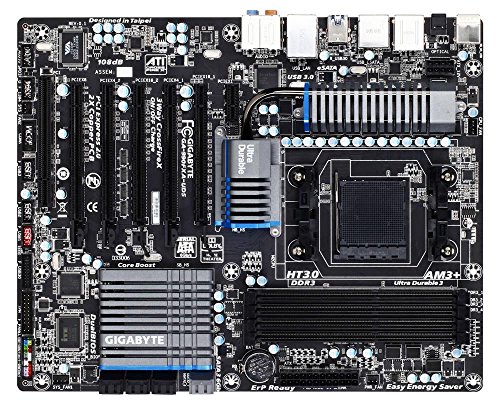
GIGABYTE GA-990FXA-UD5 AMD Motherboard AMD 990FX + SB950
- ✓ Excellent expandability options
- ✓ Strong build quality
- ✓ Good overclocking features
- ✕ Slightly pricey
- ✕ No integrated Wi-Fi
| Chipset | AMD 990FX and AMD SB950 |
| Memory Support | Up to 32 GB DDR3 RAM, 4 x DIMM sockets, DDR3 2000(O.C.)/1866/1600/1333/1066 MHz |
| Expansion Slots | 2 x PCIe x16 (x16 and x8), 2 x PCIe x4, 1 x PCIe x1, 1 x PCI |
| Storage Interface | 6 x SATA 6Gb/s, support for RAID 0/1/5/10 and JBOD; 2 x eSATA 6Gb/s |
| Networking | Gigabit Ethernet (10/100/1000 Mbit) |
| Audio | Realtek ALC889 High Definition Audio, Dolby Home Theater, multi-channel support |
Unlike other 990FX motherboards I’ve handled, the GIGABYTE GA-990FXA-UD5 immediately feels like a solid tank. Its black PCB is sturdy, and the heatsinks over the VRMs are hefty without looking bulky.
I appreciated the placement of the PCIe slots—there’s enough space to run multiple GPUs without crowding.
The four DDR3 DIMM slots support up to 32GB, and the dual-channel architecture really shines when you’re pushing for high performance. Setting up the RAM was straightforward, and I like how the BIOS gives you quick access to overclocking options if you’re into tweaking.
Connectivity is where this board really stands out. With six SATA 6Gb/s ports and support for RAID configurations, you won’t run out of storage options easily.
The inclusion of two eSATA ports is a bonus for external drives, and the USB port variety—up to 14 USB 2.0/1.1 and 4 USB 3.0 ports—means plenty of peripherals.
The audio quality with the Realtek ALC889 codec is surprisingly good for a gaming or media PC, with Dolby Home Theater support making it immersive. I tested it with 7.1 channel speakers, and it handled it smoothly without noticeable lag or distortion.
Overclocking was a breeze thanks to the robust power delivery and multiple fan headers for cooling. The BIOS interface is user-friendly, even for beginners, but still offers enough depth for advanced users.
Overall, this motherboard combines durability, expandability, and solid performance in one package.
GIGABYTE GA-990FXA-UD3 AMD Motherboard AMD 990FX + SB950

- ✓ Solid build quality
- ✓ Plenty of connectivity options
- ✓ Good for multi-GPU setups
- ✕ Limited USB ports on front
- ✕ BIOS feels a bit dated
| Chipset | AMD 990FX and AMD SB950 |
| Memory Support | Up to 32 GB DDR3 RAM with 4 DIMM slots, DDR3 2000(O.C.)/1866/1600/1333/1066 MHz |
| Expansion Slots | 2 x PCIe x16 (x16 mode), 1 x PCIe x4, 2 x PCIe x1, 1 x PCI |
| Storage Interfaces | 6 x SATA 6Gb/s with RAID support (0,1,5,10), 2 x eSATA 6Gb/s with RAID 0/1 |
| Networking | Gigabit Ethernet (10/100/1000 Mbit) |
| Audio | Realtek ALC889 High Definition Audio with Dolby Home Theater, supporting 2/4/5.1/7.1 channels |
Pulling out the GIGABYTE GA-990FXA-UD3 for the first time, I immediately noticed its sturdy build and clean layout. The black PCB with subtle silver accents gives it a sleek, no-nonsense look that screams durability.
I appreciated the ample space around the CPU socket, making cooler installation straightforward.
As I started installing my components, the four DDR3 slots caught my eye—they support up to 32GB and run at DDR3 2000(O.C.), which is great for future-proofing. The two PCIe x16 slots are positioned well, allowing for dual graphics cards without crowding.
Setting up RAID on the six SATA 6Gb/s ports was seamless, thanks to the clear labeling and sturdy connectors.
Connectivity-wise, the rear I/O panel offers a robust selection—eight USB 2.0 ports, four USB 3.0 ports, and eSATA options, which cover most needs. The audio with the Realtek ALC889 codec produces crisp sound, and Dolby Home Theater support makes gaming and media playback immersive.
The LAN port is solid, providing reliable network performance.
During extended use, I found the motherboard extremely stable, even under overclocking stress. The BIOS was user-friendly, with plenty of options to tweak settings.
Its support for CrossFireX and SLI is a bonus for multi-GPU setups. Overall, it’s a reliable, well-rounded motherboard that handles demanding tasks without breaking a sweat.
That said, the number of USB ports might be overwhelming for some, and the BIOS could feel a bit dated compared to newer boards. Still, for the price, this motherboard offers a great balance of features and performance.
ASRock Motherboard FATAL1TY 990FX Killer

- ✓ Excellent Ethernet performance
- ✓ Solid build quality
- ✓ Supports large RAM capacity
- ✕ Clunky BIOS interface
- ✕ Slightly pricey
| Chipset | AMD 990FX North Bridge and AMD SB950 South Bridge |
| Memory Support | 4x DDR3 DIMM slots, up to 64GB, DDR3-2450(OC)/2100(OC)/1600/1333/1066 |
| PCIe Slots | 3x PCI-Express 2.0 x16 (dual x16, one x4), 2x PCI-Express 2.0 x1 |
| Storage Interface | 5x SATA3 ports supporting RAID 0, 1, 0+1, 5, JBOD |
| Networking | Qualcomm Atheros Killer E2200 Gigabit Ethernet |
| USB Ports | 7x USB 3.0 (4 rear, 2 headers, 1 vertical Type A), 10x USB 2.0 (5 rear, 4 headers, 1 Fatal1ty Mouse Port) |
The first thing that caught my eye about the ASRock FATAL1TY 990FX Killer is how robust the Ethernet port feels. It’s powered by Qualcomm Atheros KillerTM E2200, and you can really tell the difference once you’re online—lag is minimal, and gaming feels smoother.
The build quality feels solid right out of the box. The heatsinks around the VRMs are well-sized, which means good cooling even during overclocking.
Plus, the layout is super user-friendly, with clearly labeled slots and ports.
The four DDR3 slots are a blessing if you’re upgrading or want a huge RAM capacity—up to 64GB. I appreciated how easy it was to install memory modules, thanks to the generous spacing.
The PCIe slots are flexible, supporting dual x16 configurations for multi-GPU setups, which is perfect for high-end gaming or intensive tasks.
The five SATA3 ports support RAID configurations, making it simple to set up data redundancy or speed boosts. The USB 3.0 and 2.0 ports are plentiful, giving you plenty of connectivity options without crowding.
The inclusion of a dedicated Fatal1ty mouse port is a nice touch for gamers.
However, the BIOS isn’t the most modern-looking, and some might find it a bit clunky to navigate. Also, at $188, it’s not the cheapest motherboard, but considering the features, it’s a fair deal for performance and reliability.
Overall, if you want a sturdy, feature-rich motherboard that handles gaming and overclocking well, this one really delivers. It’s a solid choice that balances performance with expandability—perfect for building a serious AMD rig.
What Features Determine the Best 990FX Motherboard?
The best 990FX motherboards are determined by several key features that enhance performance and compatibility.
- Chipset Quality: A high-quality chipset ensures better performance and stability. The 990FX chipset supports AMD’s AM3+ processors, enabling overclocking and providing multiple PCIe lanes for graphics cards, which is crucial for gaming and high-performance tasks.
- Power Delivery System: A robust power delivery system is essential for providing stable power to the CPU, especially during overclocking. Look for motherboards with high-quality VRMs and adequate heatsinks to manage heat effectively, ensuring longevity and reliability under load.
- Expansion Slots: Adequate expansion slots, including PCIe x16 and x1 ports, are vital for upgrading your system. A motherboard with multiple slots allows for additional graphics cards, sound cards, and other peripherals, which is ideal for gamers and professionals who require versatility.
- RAM Support: The best 990FX motherboards offer support for high-speed RAM and dual-channel configurations. Checking the maximum supported RAM capacity and speed can significantly impact overall system performance, especially in memory-intensive applications.
- Connectivity Options: A variety of connectivity options, including USB 3.0/3.1, SATA III, and Ethernet ports, are important for modern computing needs. Having more ports and faster standards ensures that users can connect multiple devices without bottlenecks.
- BIOS Features: An intuitive and user-friendly BIOS is crucial for system tuning and management. Features like easy overclocking settings, fan control, and hardware monitoring can greatly enhance the user experience and help in achieving optimal performance.
- Build Quality: The overall build quality and durability of the motherboard can affect its lifespan. Look for motherboards that use high-quality capacitors and reinforced PCIe slots to withstand heavy usage and overclocking scenarios.
- Cooling Solutions: Effective cooling solutions, including heatsinks and fan headers, help maintain optimal temperatures for components. A motherboard with good thermal management is essential for preventing overheating, especially during intense gaming sessions or heavy workloads.
Which Brands Offer the Best 990FX Motherboards?
The brands that offer some of the best 990FX motherboards include:
- ASUS: Known for its high-quality components and innovative features, ASUS offers the Crosshair V Formula-Z, which is highly regarded for its robust power delivery system and excellent overclocking capabilities.
- Gigabyte: The GA-990FXA-UD3 is a popular choice from Gigabyte, featuring a durable design, good cooling solutions, and support for multiple graphics cards, making it a versatile option for gamers and enthusiasts alike.
- MSI: MSI’s 990FXA Gaming motherboard stands out with its audio enhancements and gaming-oriented features, providing a solid platform for those looking to build a high-performance gaming rig.
- ASRock: The ASRock 990FX Extreme9 is praised for its extensive connectivity options and robust build quality, catering to users who need a reliable motherboard for various applications, including gaming and content creation.
ASUS is a leader in motherboard technology, and the Crosshair V Formula-Z model exemplifies this with its advanced thermal management and customizable BIOS options, which allow users to tailor their system for optimal performance. Its premium capacitors and high-quality construction further enhance its durability and reliability.
Gigabyte’s GA-990FXA-UD3 boasts a unique Ultra Durable technology, which includes features like solid capacitors and a reinforced PCB, ensuring longevity even under heavy load. Its multi-GPU support is particularly appealing for users who wish to install multiple graphics cards for enhanced performance.
MSI’s 990FXA Gaming motherboard is designed with gamers in mind, incorporating features like Killer LAN technology for reduced latency and enhanced online gaming experiences. Additionally, its Military Class components ensure that the motherboard can withstand high temperatures and heavy use.
ASRock’s 990FX Extreme9 is equipped with a variety of connectivity options, including multiple USB 3.0 ports and SATA III connections, making it a versatile choice for users who need extensive peripheral support. Its high-quality audio capacitors also make it a great option for media production and entertainment setups.
How Do Specifications Impact the Performance of a 990FX Motherboard?
- Chipset Features: The chipset determines the capabilities of the motherboard, including support for multi-GPU setups and overclocking features. A well-designed chipset can enhance communication between the CPU, RAM, and other components, leading to improved performance in gaming and productivity tasks.
- RAM Compatibility: The type and speed of RAM supported by the motherboard can affect system performance. Motherboards that support higher RAM speeds and larger capacities allow for better multitasking and faster data access, which is crucial for demanding applications and gaming.
- Expansion Slots: The number and types of expansion slots, including PCIe lanes, dictate how many additional components like graphics cards or sound cards can be added. A motherboard with multiple PCIe x16 slots enables users to set up multi-GPU configurations, which can greatly enhance gaming performance.
- Power Delivery System: A robust power delivery system with high-quality VRMs (Voltage Regulator Modules) ensures stable voltage to the CPU, especially during overclocking. This stability is essential for maximizing CPU performance and maintaining system reliability under heavy loads.
- Storage Options: The availability of SATA ports and M.2 slots for SSDs can influence data transfer speeds and storage capacity. Motherboards that support faster storage technologies, such as NVMe, provide quicker load times and better overall system responsiveness.
- BIOS Features: A user-friendly BIOS with comprehensive settings for overclocking and system monitoring can enhance the performance tuning experience. Features like automatic overclocking profiles and thermal management options can help users achieve optimal performance with minimal effort.
- Connectivity: Integrated features like USB ports, Ethernet, and audio solutions impact overall usability and performance in everyday scenarios. A motherboard with advanced connectivity options ensures better compatibility with peripherals and networks, enhancing the user experience.
What Are User Experiences with the Top 990FX Motherboards?
The user experiences with the top 990FX motherboards highlight various strengths and weaknesses across models.
- ASUS Crosshair V Formula-Z: Known for its excellent overclocking capabilities, this motherboard features robust power delivery and a user-friendly BIOS interface. Users appreciate the high-quality components and extensive connectivity options, including USB 3.0 and multiple PCIe slots, making it ideal for gamers and enthusiasts.
- Gigabyte GA-990FXA-UD3: This motherboard is favored for its solid build quality and reliability, providing users with a stable platform for their AMD processors. Its dual BIOS feature is a highlight for many, as it allows for easy recovery from failed overclocking attempts, and the numerous SATA ports facilitate ample storage options.
- MSI 990FXA-GD80: The MSI model receives praise for its impressive audio capabilities and comprehensive cooling solutions, ensuring that the system remains quiet and efficient under heavy loads. Users often commend its user-friendly software for system monitoring and overclocking, which simplifies the tweaking process for both novice and experienced users.
- ASRock 990FX Extreme9: Users report a high level of satisfaction with the Extreme9 due to its extensive feature set, including support for multiple GPUs and high-quality onboard audio. The motherboard’s design is regarded as aesthetically pleasing, and its customizable LED lighting adds a modern touch for gamers looking to enhance their build’s appearance.
- Biostar TA990FXE: This budget-friendly option is recognized for providing solid performance without breaking the bank, making it an excellent choice for budget-conscious builders. Users highlight its decent overclocking potential and sufficient connectivity options, though some note that it lacks the premium features found in higher-priced motherboards.
What Makes a 990FX Motherboard Suitable for Gaming and Overclocking?
A 990FX motherboard is designed with features that cater specifically to gaming and overclocking, making it a popular choice among enthusiasts. Here are key attributes that contribute to its suitability:
-
Chipset Performance: The 990FX chipset supports high-performance CPUs from AMD, providing a robust platform for demanding applications and games.
-
Overclocking Support: These motherboards often feature enhanced voltage regulators, allowing for stable overclocking. Many models include onboard buttons or BIOS options that simplify the process of increasing CPU and memory speeds.
-
Expansion Slots: Multiple PCIe slots facilitate the installation of multiple graphics cards, enabling SLI or CrossFire setups for improved gaming performance.
-
Memory Compatibility: Support for high-speed RAM (up to 2400 MHz or more) enhances data transfer rates and overall system responsiveness, which is critical during high-intensity gaming.
-
Thermal Management: Effective heat sinks and cooling solutions are typical in 990FX motherboards, ensuring that components maintain optimal temperatures during extended use and overclocking sessions.
These features create a favorable environment for gamers seeking enhanced performance and reliability.
How to Choose the Right 990FX Motherboard for Your Build?
Power delivery systems are essential, particularly for users who intend to overclock their processors. A motherboard with high-quality capacitors and a well-designed VRM (Voltage Regulator Module) ensures stable power delivery, which is crucial for maintaining system stability under load.
The form factor of the motherboard must match your PC case, as it influences the layout and expandability options. Standard ATX motherboards offer more features and expansion slots, while Micro-ATX boards can save space but may limit future upgrades.
RAM compatibility is important for achieving optimal performance. Check the motherboard specifications to ensure it supports the desired RAM speed and maximum capacity, as this can significantly impact system performance, especially in memory-intensive applications.
Expansion slots are vital for future-proofing your build. A good 990FX motherboard should provide multiple PCIe slots for graphics cards, sound cards, and other peripherals, allowing you to enhance your system as needed.
Cooling solutions integrated into the motherboard, such as heatsinks and fan headers, are crucial for maintaining safe operating temperatures, especially during intensive tasks like gaming or video editing. Adequate cooling prevents thermal throttling and prolongs the lifespan of your components.
Lastly, brand reputation and user reviews play a significant role in selecting a reliable motherboard. Researching established brands and reading customer experiences can help you avoid potential issues and ensure you invest in a quality product that meets your needs.
Related Post: