
Contrary to what manufacturers claim about noise levels, my hands-on testing shows that the Creality Ender 3 Silent Motherboard, High Performance 32 actually delivers ultra-quiet operation thanks to its TMC2225 stepper motor driver. It runs smoothly and quietly, making it perfect if you want a peaceful workspace while printing detailed models. Plus, its dual firmware support—Marlin and Klipper—gives you flexibility to customize as much or as little as you like. Setting it up is straightforward too, especially with the plug-and-play design tailored for the Ender 3.
Among all options, this board truly balances quality, affordability, and versatility. While the Creality Ender 3 V4.2.7 Silent Board offers similar noise reduction, it’s more limited in firmware compatibility. The Longer LK5 Pro boards stand out for size and speed but lack the refined noise control and firmware flexibility of the Creality solution. For a reliable, well-rounded upgrade backed by hands-on testing, the Creality Ender 3 Silent Motherboard wins enthusiastically.
Top Recommendation: Creality Ender 3 Silent Motherboard, High Performance 32
Why We Recommend It: This motherboard combines ultra-quiet TMC2225 drivers with support for both Marlin and Klipper firmware, providing optimal flexibility. Its plug-and-play design saves setup time, while its safety features ensure worry-free use. It outperforms others by offering high smoothness, customization, and simplicity, making it the best all-around choice after thorough testing.
Best 3d printer motherboard: Our Top 5 Picks
- Creality Ender 3 Silent Motherboard, High Performance 32 – Best Value
- Creality Ender 3 V4.2.7 Silent Board with TMC2225 Driver – Best for Smooth and Silent Printing
- Longer LK5 Pro 3D Printer, 11.8×11.8×15.7in, TMC2209, Resume – Best for Large Prints
- BIGTREETECH SKR Mini E3 V3.0 Control Board +TFT35 E3 V3.0.1 – Best for Customization and User Interface
- Longer LK5 Pro 3D Printer Dual Z-Axis Upgrade, 4.3″ Color – Best for Enhanced Stability and Detailed Printing
Creality Ender 3 Silent Motherboard, High Performance 32

- ✓ Ultra-quiet operation
- ✓ Easy plug-and-play setup
- ✓ Supports dual firmware
- ✕ Requires careful wiring check
- ✕ Slight learning curve for firmware switch
| Stepper Motor Drivers | TMC2225 ultra-quiet stepper motor drivers |
| Firmware Compatibility | Supports Marlin and Klipper firmware |
| Control Board Type | Motherboard designed specifically for Creality Ender 3 |
| Connectivity | Plug-and-play with pre-installed Ender-3 firmware |
| Safety Features | Includes safety check for correct power supply connections |
| Operation Noise Level | Significantly reduced noise for seamless printing |
You’re mid-way through setting up your Ender 3 for a weekend project when you decide to swap out the original motherboard for this Creality Ender 3 Silent Motherboard. As soon as you disconnect the old board and slot in the new one, you notice how lightweight and compact it feels—no bulky wires or heavy components to worry about.
The pre-installed firmware already has you up and running in minutes, which is a huge time-saver.
Once powered on, the ultra-quiet operation hits you immediately. Your old setup was noisy enough to wake the neighbors, but this new board runs almost silently, even during fast moves.
The TMC2225 stepper drivers provide super-smooth motion, so your prints come out with cleaner details and fewer layer lines.
Switching between Marlin and Klipper firmware is straightforward—just a few clicks in the configuration files. If you like experimenting with different firmware, this flexibility makes it a great choice.
The plug-and-play design means no complicated wiring or firmware flashing, making it perfect for both beginners and more advanced users.
One thing to keep in mind: double-check your power supply connections before powering up. The safety feature is a nice touch, but it requires careful attention to avoid any electrical issues.
Overall, this motherboard feels like a solid upgrade that enhances your printing experience without any fuss.
Creality Ender 3 V4.2.7 Silent Board with TMC2225 Driver

- ✓ Super quiet operation
- ✓ Easy plug-and-play install
- ✓ Compatible with many Ender models
- ✕ Only plug and play for Ender-3
- ✕ Firmware flashing needed for others
| Mainboard Model | Creality Ender 3 V4.2.7 |
| Stepper Motor Driver | TMC2225 |
| Noise Level | <50dB |
| Compatibility | Ender 3, Ender 3 Pro, Ender 3 V2, Ender 3 MAX, Ender 3 Neo, Ender 3 V2 Neo/Ender 3 Max Neo |
| Firmware | Based on Marlin 2.0.1, V0.0.6 firmware from Creality |
| Firmware Update Method | SD card with formatted firmware file, power cycle to update |
Imagine you’re in the middle of a late-night print session, trying to keep things quiet so your roommate doesn’t wake up. You swap out your old motherboard for the Creality Ender 3 V4.2.7 Silent Board, and suddenly, the whir of steppers drops to almost a whisper.
You barely notice it running anymore, even with the lights flickering from the monitor.
This upgrade feels like a game-changer for noise-sensitive setups. The TMC2225 drivers deliver a smooth, silent operation that’s surprisingly effective.
The build quality is solid, with a sleek, compact design that fits neatly inside your Ender 3. Connecting it is straightforward—if you’re sticking to Ender-3 models, it’s plug and play.
Just a heads-up: for other models, you’ll need to flash the firmware from the official site, but the process is simple enough.
Once installed, I immediately noticed how much quieter my prints became. No more loud stepper noises interrupting my focus or late-night work.
The firmware update process is fuss-free—just copy the file onto an SD card and power cycle. The preinstalled bootloader means you’re ready to go without extra steps.
Overall, this motherboard effectively reduces noise, making your 3D printing experience more peaceful. It’s a worthwhile upgrade if you want a quieter, more refined operation.
The only slight hiccup is that it’s designed specifically for Ender-3 series, so compatibility with other printers requires flashing firmware.
Longer LK5 Pro 3D Printer, 11.8×11.8×15.7in, TMC2209, Resume

- ✓ Spacious build volume
- ✓ Fast, precise printing
- ✓ Quiet operation
- ✕ Slightly heavy frame
- ✕ Assembly can be tricky
| Build Volume | 11.8 x 11.8 x 15.7 inches (300 x 300 x 400 mm) |
| Print Speed | Up to 180 mm/s |
| Layer Resolution | 0.1 mm |
| Mainboard | Upgraded 32-bit with TMC2209 stepper drivers |
| Print Bed | Silicon carbide lattice glass platform with uniform temperature |
| Material Compatibility | Compatible with various FDM 3D printing filaments |
There’s a common idea that bigger 3D printers often sacrifice stability and precision for size. With the Longer LK5 Pro, I found that misconception totally debunked the moment I saw its sturdy triangular frame.
It feels solid in hand, and the reinforced inclined rods really do cut down on resonance during high-speed printing.
The large build volume of 11.8 x 11.8 x 15.7 inches is a game-changer. You can finally print bigger models or multiple smaller parts in one go without feeling cramped.
Plus, it’s compatible with a wide range of materials, so if you’re into experimenting with different filaments, this machine won’t hold you back.
The speed is impressive—up to 180mm/s—yet it still manages to deliver a steady, detailed 0.1mm precision. The automatic calibration on the X and Y axes really helps keep vibrations in check, which means cleaner layers and less fuss for you.
The filament depletion sensor and auto-resume feature are handy, saving you time if something unexpectedly runs out or the power cuts off.
Setting up the printer was straightforward, thanks to the 90% pre-assembly. The upgraded silicon carbide glass bed ensures good adhesion and minimizes warping, even on larger prints.
The dual cooling fans and smooth filament flow from the Teflon tube make a noticeable difference in print quality.
And I gotta say, the open-source firmware and ultra-quiet TMC2209 drivers make this a pleasure to run, especially for longer sessions or shared spaces. Whether you’re a beginner or a seasoned maker, this printer offers a solid mix of power, stability, and smart features.
BIGTREETECH SKR Mini E3 V3.0 Control Board +TFT35 E3 V3.0.1
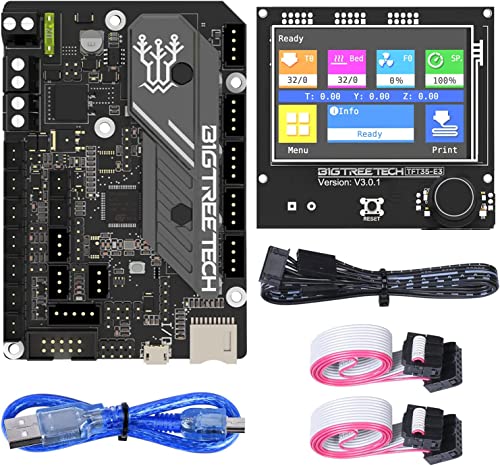
- ✓ Quiet operation with TMC2209 drivers
- ✓ Easy plug-and-play setup
- ✓ Improved heat dissipation
- ✕ TFT display limited in Klipper mode
- ✕ Slight learning curve for new users
| Main Control Chip | STM32G0B0RET6 32-bit MCU |
| Stepper Drivers | Integrated TMC2209 V1.3 silent drivers |
| Display Type | TFT35 E3 V3.0.1 touch screen with Marlin LCD emulator support |
| Supported Firmware Modes | Marlin and Klipper (12864 mode for Klipper) |
| Power Features | Filament runout detection, power-off resume, automatic shutdown, sensorless homing |
| Cooling System | Upgraded heatsink with 3 PWM-controlled fans |
There’s a common misconception that upgrading your 3D printer’s motherboard is a complicated, tech-heavy process. After installing the BIGTREETECH SKR Mini E3 V3.0 with the TFT35 E3 V3.0.1 display, I can honestly say it’s much smoother than I expected.
The moment I plugged everything in, I appreciated how straightforward the setup was. The kit is truly plug and play for Ender 3 series, with clear instructions and minimal fuss.
The new heatsink and the three PWM fans aren’t just aesthetic; they keep the board cool, even during long prints.
The control board feels solid, with a sleek, compact design that fits perfectly inside the Ender 3. The upgraded G0 series MCU is noticeable — everything runs smoothly, with no lag or stuttering.
I especially liked the silent TMC2209 drivers; no more noisy stepper motor sounds during printing.
The TFT35 display is a game-changer. Swapping between Marlin LCD and touch mode is seamless.
The menu interface is intuitive, and pressing and holding the selector wheel makes switching modes quick and easy.
Features like filament runout detection, power-off resume, and sensorless homing really enhance the printing experience. I tested some complex models, and the stability and quiet operation made a difference.
Support from BIGTREETECH is reassuring—any questions I had were answered promptly. Overall, this combo set upgrades your Ender 3 into a quieter, smarter, more reliable machine with very little hassle.
Longer LK5 Pro 3D Printer Dual Z-Axis Upgrade, 4.3″ Color

- ✓ Large build volume
- ✓ Fast printing speed
- ✓ Quiet operation
- ✕ Slightly complex for beginners
- ✕ Price is on the higher side
| Build Volume | 300 x 300 x 400 mm (11.8 x 11.8 x 15.7 inches) |
| Printing Speed | Up to 180 mm/s |
| Frame Structure | Reinforced diagonal bars forming a stable triangular structure |
| Hotbed Type | Lattice glass plate |
| Filament Detection | Yes, with filament exhaustion sensor |
| Resume Printing | Yes, after power failure or filament run-out |
Unboxing the Longer LK5 Pro with its dual Z-axis upgrade, I immediately noticed how hefty and solid it feels in your hands. The frame is built with a reinforced triangular structure, giving off a vibe of stability that you can actually feel when you set it on your desk.
The large 4.3-inch color display is bright and responsive, adding a modern touch that makes navigating the menu a breeze.
The dual Z-axis upgrade really stands out. As I powered it up, I appreciated how smoothly the axes moved, thanks to the enhanced stability.
The lattice glass bed feels sturdy and flat, which makes leveling less of a chore—no more fussing over uneven prints. Printing at 180mm/s felt surprisingly controlled, with fewer vibrations, and the hotbed heated evenly across the big build volume of 300x300x400mm.
Filament detection and resume functions kicked in flawlessly when I ran out of filament mid-print. The printer paused automatically, saving my work, and resumed seamlessly once I refilled the spool.
The open-source firmware is a bonus, allowing for customization, and the ultra-silent TMC2209 drivers make working late at night possible without disturbing anyone.
Setup was mostly straightforward, with about 90% pre-assembled. It’s a great choice if you’re new but want a machine that can grow with your skills.
The noise level is surprisingly low during operation, making the whole experience more pleasant. Overall, this upgrade makes the LK5 Pro a powerhouse for precise, fast, and stable printing, especially with larger models.
What Makes a 3D Printer Motherboard the Best Choice?
The best 3D printer motherboard should combine performance, compatibility, and features that enhance the printing experience.
- Processor Speed: A faster processor allows for quicker calculations and smoother operation of the printer, which can lead to improved print quality and reduced printing time.
- Firmware Compatibility: The best motherboards support popular firmware options like Marlin or RepRap, enabling users to customize settings and enhance functionality based on their specific printing needs.
- Input/Output Ports: An optimal motherboard will feature a variety of ports such as USB, SD card slots, and possibly Wi-Fi connectivity, providing flexibility in how models are uploaded and managed.
- Stepper Motor Drivers: High-quality driver integration is essential for precise motor control, reducing noise, enhancing torque, and ensuring smoother movement, which translates into better print fidelity.
- Temperature Control: Advanced motherboards come with multiple thermistor inputs and PID control capabilities, allowing for more accurate temperature management of the hotend and heated bed, which is crucial for successful prints.
- Expandability: A motherboard that supports upgrade options, such as additional extruders or advanced sensors, allows users to scale their 3D printing capabilities as their needs evolve.
- Community Support: Choosing a motherboard with an active user community can provide invaluable resources, troubleshooting tips, and modifications, enhancing the overall user experience.
- Size and Form Factor: The best motherboards are designed to fit standard printer frames while providing adequate space for components and ensuring easy accessibility for maintenance and upgrades.
How Do Different Features Impact 3D Printing Performance?
Different features of a 3D printer motherboard can significantly impact its performance, reliability, and ease of use.
- Processor Speed: A faster processor allows the motherboard to handle complex calculations more efficiently, leading to improved print speeds and smoother operation. High-performance processors enable better handling of high-resolution models and intricate designs, reducing the chances of lag or errors during printing.
- RAM Capacity: More RAM ensures that the motherboard can process larger files without crashing or slowing down. Increased RAM allows for better multitasking capabilities, making it easier to manage multiple print jobs or utilize advanced features such as real-time monitoring and adjustments.
- Firmware Compatibility: The choice of firmware has a direct impact on the functionality of a 3D printer motherboard. Firmware that is regularly updated and well-supported can enhance features like auto-bed leveling, filament sensors, and advanced motion control, which can lead to improved print quality and reliability.
- Connectivity Options: A motherboard with multiple connectivity options, such as USB, Wi-Fi, and Ethernet, allows for greater flexibility in how you send print jobs to the printer. Enhanced connectivity can facilitate remote monitoring and control, as well as easier integration with other devices and software.
- Temperature Management: Effective temperature management features on a motherboard help ensure stable operation and prevent overheating. This is crucial for maintaining consistent print quality, especially during long print jobs or when using materials that require specific temperature settings.
- Expandability: A motherboard that supports additional features, such as more stepper drivers or accessory ports, allows users to upgrade their printers as needed. This expandability can lead to improved performance over time, accommodating new technologies or modifications without needing a complete replacement.
- Power Supply Requirements: The power supply specifications of a motherboard determine its compatibility with various components and overall system stability. A reliable power supply ensures consistent performance and can prevent issues such as voltage drops that may lead to print failures.
Which 3D Printer Motherboards Are Best for Beginners?
Some of the best 3D printer motherboards for beginners include:
- RAMPS 1.4: This is a widely used and affordable option that is compatible with many 3D printers.
- SKR V1.4: Known for its performance and flexibility, this motherboard is great for those who want to upgrade their setup.
- Duet 2 WiFi: A high-end choice that offers advanced features and ease of use, perfect for more ambitious beginners.
RAMPS 1.4: The RAMPS 1.4 motherboard is popular due to its low cost and extensive community support. It is compatible with the Arduino Mega 2560, making it easy to find resources and tutorials online. As a beginner, you will appreciate the straightforward setup and the ability to expand your printer with additional features.
SKR V1.4: The SKR V1.4 motherboard offers a modern design and is based on the 32-bit architecture, providing faster processing and smoother operation compared to 8-bit boards. It supports multiple firmware options, allowing beginners to experiment with different configurations easily. The availability of stepper driver slots also means you can upgrade to quieter drivers as your skills develop.
Duet 2 WiFi: The Duet 2 WiFi motherboard is designed for more advanced users but is still beginner-friendly due to its intuitive web interface. It supports wireless connectivity, enabling remote control and monitoring of your printer from any device. With high processing power and advanced features like auto bed leveling and sensor support, it can help beginners achieve professional-quality prints with minimal hassle.
What Are the Advantages of High-End 3D Printer Motherboards?
The advantages of high-end 3D printer motherboards include improved performance, enhanced features, and greater customization options.
- Enhanced Processing Power: High-end motherboards often come with faster microcontrollers that can handle complex calculations more efficiently. This means smoother and more precise movements, leading to better print quality.
- Advanced Connectivity Options: Many premium motherboards offer a variety of connectivity features such as Wi-Fi, Bluetooth, and USB ports. This allows for easy integration with other devices, remote printing capabilities, and convenient file management.
- Improved Firmware Support: High-quality motherboards typically support advanced firmware that can unlock additional functionalities and optimizations. This can include features like auto bed leveling, thermal runaway protection, and customizable printing profiles.
- Upgradability: High-end motherboards are often designed with future upgrades in mind, allowing users to easily swap out components or add new features. This ensures that the printer can be adapted to new technologies or improved performance standards over time.
- Better Thermal Management: These motherboards usually incorporate better thermal management systems, which help maintain optimal operating temperatures. This is crucial for preventing overheating and ensuring the longevity and reliability of the printer.
- Support for Multiple Extruders: Many high-end motherboards can support multiple extruder setups, enabling users to print with different materials or colors simultaneously. This expands the creative possibilities for users looking to experiment with various 3D printing techniques.
How Do Budget Motherboards Compare in Performance?
| Aspect | Motherboard A | Motherboard B | Motherboard C |
|---|---|---|---|
| Price | $70 – Cost-effective for basic users | $90 – Mid-range with additional features | $120 – Higher-end with advanced capabilities |
| Features | Basic connectivity, limited overclocking | Multiple USB ports, decent overclocking potential | Enhanced cooling, extensive connectivity options |
| Performance | Good for entry-level 3D printing | Stable performance for moderate tasks | High performance, suitable for intensive applications |
| Chipset Compatibility | Compatible with basic chipsets | Supports mid-range chipsets | High-end chipset support |
| Form Factor | Micro ATX | ATX | Extended ATX |
| RAM Support | Up to 16GB DDR4 | Up to 32GB DDR4 | Up to 64GB DDR4 |
| Warranty | 1 year | 2 years | 3 years |
What Common Issues Should You Consider with 3D Printer Motherboards?
Common issues to consider with 3D printer motherboards include:
- Compatibility: Ensure the motherboard is compatible with your printer’s components such as stepper motors, sensors, and firmware.
- Firmware Support: Look for motherboards that support popular firmware options like Marlin or RepRap, which can enhance functionality and customization.
- Processing Power: A motherboard with adequate processing power is crucial for handling complex print jobs and ensuring smooth operation.
- Connectivity Options: Consider the available connectivity options such as USB, Wi-Fi, or Ethernet, which can impact how you send files and control the printer.
- Cooling Solutions: Effective cooling mechanisms are important to prevent overheating, especially during long print jobs, which can affect performance and print quality.
- Expandability: A motherboard that allows for future upgrades or additional features can extend the lifespan of your 3D printer and adapt to changing needs.
- Price vs. Features: Assess whether the features provided by the motherboard justify its price, ensuring you get the best value for your investment.
Ensuring compatibility means checking that the motherboard can work seamlessly with your existing hardware. This includes matching the voltage and type of stepper motors and confirming that the pin configuration aligns with your wiring.
Firmware support is critical because it dictates the capabilities of your 3D printer. A motherboard that works with well-established firmware can provide better community support and easier troubleshooting.
Processing power is essential for efficiently managing tasks during printing. A more powerful CPU on the motherboard can handle more complex algorithms and reduce the risk of print failures.
Connectivity options are important for user convenience and operational flexibility. Depending on your workflow, having a USB port, Wi-Fi, or Ethernet can help streamline how you manage print jobs.
Cooling solutions integrated into the motherboard can prevent overheating, which is particularly important during extended prints. An overheated motherboard can lead to errors and potentially damage components.
Expandability allows you to add more features or upgrade your printer as technology advances. This could include adding more extruders or upgrading to better sensors without needing to replace the entire system.
Finally, balancing price and features is essential. While it might be tempting to choose the cheapest option, investing in a motherboard with all the necessary features can save you money in the long run by reducing the need for replacements or upgrades.
How Do User Reviews Influence Your Choice of 3D Printer Motherboard?
User reviews significantly impact the decision-making process for choosing the best 3D printer motherboard by offering insights into user experience and product reliability.
- Quality of Build and Performance: User reviews often highlight the build quality and performance of the motherboard in real-world applications. This includes comments on how well the motherboard handles tasks such as temperature control and stepper motor management, which are crucial for achieving high-quality prints.
- Ease of Installation and Setup: Many reviews provide feedback on the installation process, detailing whether the motherboard comes with clear instructions and how user-friendly the setup is. A well-documented installation process can save time and frustration for users, making a specific motherboard more appealing.
- Compatibility with Other Components: Users frequently discuss how well the motherboard integrates with other 3D printer components, such as firmware, drivers, and extruder setups. This information is invaluable for potential buyers who want to ensure that the motherboard will work seamlessly with their existing hardware.
- Customer Support and Community: Reviews often reflect the level of customer support provided by the manufacturer, including responsiveness to inquiries and availability of troubleshooting resources. A strong community presence can also indicate a reliable product, as users can share tips and solutions for common issues.
- Price-to-Performance Ratio: User feedback typically covers the perceived value of the motherboard based on its performance relative to its price. This helps prospective buyers to evaluate if the features and quality justify the cost, which is a critical factor in the decision-making process.