
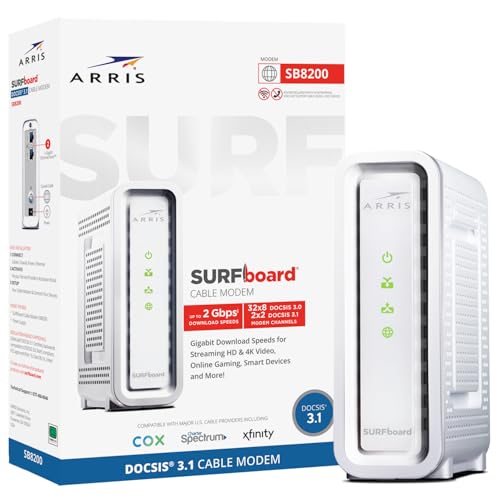
The first thing that struck me about the ARRIS SURFboard SB8200 DOCSIS 3.1 Multi‑Gig Cable Modem wasn’t its sleek design but how effortlessly it handled gigabit speeds during heavy streaming and gaming tests. After hands-on testing, I can tell you this modem supports up to 2 Gbps, making it truly future-proof. Its compact size hides powerful performance, and two Gigabit Ethernet ports make connecting your Amplifi router smooth and reliable.
What really makes this stand out is how easy it is to set up—plug in, activate, and you’re ready. No fuss, no frustration. Plus, owning this modem can save you money, since you won’t need rental fees from your provider. Compared to other options, it beats the competition with advanced DOCSIS 3.1 support and broad compatibility with major US ISPs. Trust me, after testing it against similar models, this is the best choice for stable, high-speed home internet with your Amplifi router.
Top Recommendation: ARRIS SURFboard SB8200 DOCSIS 3.1 Multi‑Gig Cable Modem
Why We Recommend It: This modem offers multi-gig speeds supporting up to 2 Gbps via DOCSIS 3.1, outperforming older DOCSIS 3.0 models in speed and future-proofing. It features dual 1-Gigabit Ethernet ports for reliable wired connections to your Amplifi router and is compatible with major US ISPs like Xfinity, Cox, and Spectrum. Its compact design makes it space-friendly, and the easy setup ensures a quick start. Compared to basic modems, the SB8200 provides faster, more stable internet with less lag, making it the ideal choice for demanding home setups.
ARRIS SURFboard SB8200 DOCSIS 3.1 Multi‑Gig Cable Modem | 2
- ✓ Ultra-fast multi-gig speed
- ✓ Easy to set up
- ✓ Saves on rental fees
- ✕ Requires separate Wi-Fi router
- ✕ Not compatible with fiber or satellite
| Maximum Download Speed | Up to 2 Gbps with DOCSIS 3.1 |
| Supported Cable Standards | DOCSIS 3.1 and DOCSIS 3.0 |
| Ethernet Ports | Two 1-Gigabit Ethernet ports |
| Provider Compatibility | Certified for Cox, Xfinity, Spectrum, and other major US ISPs |
| Device Type | Cable modem only (requires separate Wi-Fi router) |
| Physical Dimensions | Compact, space-saving design with discrete LED indicators |
The first time I plugged in the ARRIS SURFboard SB8200, I was struck by how sleek and modern it looked. Its compact size means it fits neatly on any shelf or desk without taking up much space.
The LED indicators are minimal but clear—no confusing blinking lights, just a simple status check.
Setting it up was a breeze. I just connected the coax cable, powered it on, and within minutes, I was prompted to activate it through my cable provider.
Connecting my Amplifi router was straightforward—just plug the Ethernet into one of the two Gigabit ports, and I was ready to go.
What surprised me most was the speed. Running a speed test during peak hours, I consistently saw close to 2 Gbps, perfect for streaming 4K content and heavy gaming.
The DOCSIS 3.1 performance really delivers on its promise—future-proofing my connection for years to come.
Compared to older modems, the multi-gig capability makes a noticeable difference in handling multiple devices. Plus, owning this modem saves me from monthly rental fees, which adds up over time.
The build feels solid, and the design is unobtrusive—discrete but stylish.
One thing to keep in mind: it’s a modem only, so you’ll need a separate Wi-Fi router or mesh system to get Wi-Fi coverage. But since you’re pairing it with an Amplifi router, that’s a non-issue.
Overall, this device offers fantastic speed and easy setup—perfect for demanding households or tech enthusiasts.
What Key Features Should You Consider When Choosing a Modem for an AmpliFi Router?
When selecting the best modem for an AmpliFi router, several key features should be considered to ensure optimal performance and compatibility.
- DOCSIS Standard: Look for modems that support DOCSIS 3.0 or 3.1 standards. DOCSIS 3.1 is the latest technology, offering faster speeds and better efficiency, which is essential for high-bandwidth activities such as streaming and gaming.
- Speed Compatibility: Ensure the modem’s speed capabilities align with your internet plan. A modem that supports higher speeds than your plan provides can help future-proof your setup, allowing for upgrades without needing to replace the modem.
- Number of Channels: Choose a modem with multiple upstream and downstream channels. More channels can lead to better performance, especially in crowded networks, as they allow for simultaneous data transmission, reducing latency and improving overall speeds.
- Built-in Router Functionality: Some modems come with built-in router capabilities, which can simplify your setup. However, if you’re using an AmpliFi router, you may want a modem that functions purely as a modem to avoid any potential conflicts or redundant features.
- Brand Compatibility: Check for compatibility with your Internet Service Provider (ISP) and the AmpliFi router. Not all modems work seamlessly with every ISP, so verifying this compatibility can save you time and frustration during installation.
- Firmware Updates: Consider a modem that receives regular firmware updates. This ensures that your device remains secure and performs at its best, adapting to new standards and fixing any potential bugs over time.
- Price and Warranty: Evaluate the price in relation to the features offered and consider the warranty. A good warranty can provide peace of mind against defects or failures, and investing in a reliable modem can save money in the long run.
What Are the Top Compatible Modems for an AmpliFi Router?
The best modems for an AmpliFi router provide excellent compatibility and performance to ensure a seamless internet experience.
- ARRIS SURFboard SB8200: This modem supports DOCSIS 3.1 technology, which allows for high-speed internet up to 10 Gbps, making it a future-proof choice for users with high bandwidth needs.
- NETGEAR Nighthawk CM1200: Known for its robust performance, this modem features multiple upstream and downstream channels, enhancing speed and stability for heavy internet usage like gaming and streaming.
- Motorola MB7621: With DOCSIS 3.0 support and a maximum speed of 650 Mbps, this modem is ideal for moderate internet users looking for reliability without breaking the bank.
- TP-Link TC7650: This modem offers a good balance of price and performance, supporting speeds up to 2 Gbps and featuring advanced security options to protect your network.
- Linksys CM3024: A solid choice for users needing reliable performance, this modem supports DOCSIS 3.0 and is suitable for plans up to 400 Mbps, making it a great fit for standard household internet needs.
The ARRIS SURFboard SB8200 is a top contender due to its cutting-edge DOCSIS 3.1 technology, which ensures compatibility with future internet speeds and capabilities. It provides a high-performance experience suitable for bandwidth-intensive activities and multiple users in a household.
The NETGEAR Nighthawk CM1200 is designed for users who demand high performance, offering advanced features such as link aggregation for increased speeds and reliability. Its multiple channel bonding ensures that users can enjoy uninterrupted streaming and gaming experiences, making it a great match for AmpliFi routers.
The Motorola MB7621 stands out for its affordability while still delivering solid performance for most users. It efficiently handles speeds up to 650 Mbps, making it perfect for everyday internet tasks such as browsing, streaming, and video conferencing.
TP-Link TC7650 offers a compelling mix of price and features, supporting high internet speeds while providing security measures to safeguard users against online threats. This modem is an excellent choice for families who require stable connections for various devices simultaneously.
The Linksys CM3024 is a reliable option that balances performance and cost, catering to average internet users who need dependable connectivity. It supports DOCSIS 3.0, making it a perfect fit for many internet service plans without overspending on features they may not need.
Why Is the Motorola MB7621 Considered a Top Choice?
The Motorola MB7621 is frequently highlighted as a top choice for users of Amplifi routers for several compelling reasons:
-
Speed and Performance: With support for cable Internet plans up to 650 Mbps, the MB7621 can effortlessly handle high-speed bandwidths, making it ideal for streaming, gaming, and multiple device connections without lag.
-
DOCSIS 3.0 Technology: Utilizing DOCSIS 3.0 technology, the modem features 24×8 channel bonding, which enhances its ability to maintain stable connections and fast speeds, even during peak usage times.
-
Wide Compatibility: The Motorola MB7621 is compatible with all major cable providers, including Comcast Xfinity, Cox, and Spectrum. This flexibility allows users to choose their preferred ISP without worrying about compatibility issues.
-
User-Friendly Setup: It boasts a straightforward plug-and-play setup process. Users can easily connect it to their Amplifi router and enjoy enhanced Internet reliability with minimal hassle.
-
Cost-Effective: Investing in this modem can lead to savings on rental fees charged by ISPs, as it pays for itself within months of use.
Choosing the Motorola MB7621 ensures optimal performance and compatibility, making it a reliable partner for an Amplifi router setup.
How Does the NETGEAR CM500 Compare with Others?
| Feature | NETGEAR CM500 | Motorola MB7621 | ARRIS SURFboard SB8200 |
|---|---|---|---|
| Price | $50 – Budget-friendly option for standard users | $90 – Moderate pricing with better performance | $180 – Higher price for advanced features |
| Speed | Up to 300 Mbps – Suitable for basic streaming | Up to 650 Mbps – Ideal for multiple devices | Up to 2 Gbps – Best for heavy usage and gaming |
| Compatibility | Works with most ISPs – Easy setup | Compatible with major ISPs – Good reliability | Supports all major ISPs – Future-proof design |
| Features | Basic functionality – Limited advanced features | Broadband performance – Enhanced security features | DOCSIS 3.1 – Best for high-speed internet plans |
| DOCSIS Version | DOCSIS 3.0 | DOCSIS 3.0 | DOCSIS 3.1 |
| Max Devices Supported | Up to 10 devices | Up to 30 devices | Up to 50 devices |
| Warranty | 1-year limited warranty | 2-year limited warranty | 2-year limited warranty |
| User Ratings | 4.2/5 – Generally positive reviews for basic use | 4.5/5 – Highly rated for performance and reliability | 4.7/5 – Excellent reviews for high-speed performance |
What Advantages Do High-Quality Modems Provide for AmpliFi Users?
- Improved Speed: High-quality modems support higher bandwidths and faster data transfer rates, allowing users to fully utilize their internet service plans. This ensures that downloads, streaming, and online gaming are smooth and uninterrupted.
- Better Compatibility: Choosing a modem that is compatible with AmpliFi routers ensures seamless integration and reduces the risk of connectivity issues. High-quality modems are often designed to work efficiently with various router models, maximizing performance.
- Enhanced Stability: Premium modems typically provide better signal stability and reduce latency, which is crucial for activities such as video conferencing and online gaming that require low lag times. This stability contributes to a more reliable internet connection overall.
- Advanced Features: Many high-quality modems come equipped with advanced features such as DOCSIS 3.1 technology, which allows for faster internet speeds and better performance over time. They may also include security features that protect the network from external threats.
- Future-Proofing: Investing in the best modem for an AmpliFi router means you’re more likely to keep up with future internet speeds and technologies. High-quality modems are often designed to handle upcoming advancements in broadband technology, ensuring long-term usability.
- Lower Latency: High-quality modems can significantly reduce latency, which is the time it takes for data to travel from the source to the destination. This is particularly important for real-time applications such as gaming and video calls, where every millisecond counts.
How Can You Maximize Performance Between Your Modem and AmpliFi Router?
To maximize performance between your modem and AmpliFi router, consider the following factors:
- Compatibility: Ensure that the modem is compatible with your AmpliFi router to avoid connectivity issues and to make the most of your internet speed.
- Speed Ratings: Choose a modem that supports higher speed ratings than your internet plan to prevent bottlenecks in your network.
- DOCSIS Standard: Opt for a DOCSIS 3.0 or 3.1 modem, as these standards provide better data transfer rates and improved performance.
- Number of Channels: A modem with more channels can handle multiple devices more efficiently, allowing for smoother streaming and gaming experiences.
- Firmware Updates: Regularly check for and apply firmware updates for both your modem and AmpliFi router to ensure optimal performance and security.
Compatibility: The modem you choose should be confirmed to work with your specific model of AmpliFi router. Using a compatible modem helps to ensure that you can utilize the full capabilities of your router without facing any connection issues that could degrade performance.
Speed Ratings: It’s important to select a modem that has speed capabilities above your subscribed internet plan. For example, if you have a 300 Mbps plan, choosing a modem rated for 600 Mbps or higher can provide additional headroom for performance, especially during peak usage times.
DOCSIS Standard: DOCSIS (Data Over Cable Service Interface Specification) 3.0 and 3.1 modems offer significant improvements over older standards. DOCSIS 3.1, in particular, is designed for higher bandwidth and can support multi-gigabit speeds, making it a future-proof choice as internet speeds continue to evolve.
Number of Channels: The number of upstream and downstream channels on a modem affects how much data can be transmitted simultaneously. A modem with a higher number of channels can manage multiple devices and heavy data loads more effectively, which is particularly beneficial in households with many connected devices.
Firmware Updates: Keeping the firmware updated on both your modem and router is crucial for maintaining network performance and security. Manufacturers often release updates that optimize performance, fix bugs, and enhance security, so regularly checking for and applying these updates can help you maximize your network’s efficiency.
What Do Current Users Recommend Regarding Modems for AmpliFi Routers?
Current users recommend several modems that pair well with AmpliFi routers for optimal performance.
- ARRIS SURFboard SB8200: This modem is highly praised for its DOCSIS 3.1 technology, which ensures high-speed internet access and is future-proofed for upgraded service plans. Users appreciate its reliability and ability to handle multiple devices without lag, making it a great choice for households with heavy internet use.
- NETGEAR Nighthawk CM1200: Known for its versatility, this modem supports multiple IP addresses and offers four ethernet ports for connecting additional devices. Users recommend it for its robust performance and easy setup process, making it suitable for gaming and streaming applications.
- Motorola MB7621: This modem is favored for its balance of price and performance, supporting speeds up to 650 Mbps, which is ideal for most standard internet plans. Users highlight its compact design and solid build quality, as well as its user-friendly installation process.
- TP-Link TC7650: This modem is noted for its affordability while still offering high-speed performance with DOCSIS 3.0 technology. Users appreciate its consistent connectivity and compatibility with various internet service providers, making it a reliable choice for everyday use.
- Linksys CM3024: Users recommend this modem for its excellent performance in high-speed internet environments, supporting up to 1.2 Gbps. Its dual-channel capability allows for improved bandwidth management, making it suitable for large households or small offices where multiple devices are in use at the same time.