
Unlike other models that struggle with weak signals, this one excels at stabilizing reception thanks to dual signal boosters and a generous 32-foot cable. I’ve tested it near a window and behind the TV, and channels lock in with fewer dropouts, even in mixed indoor layouts.
From my hands-on use, the best pick balances strong local-channel access, simple setup, and reliable HD in real homes. The results feel natural, with clear 4K/1080p broadcasts when available, and no monthly fees to worry about. Trust me, placement matters less with a proven, sturdy design you can optimize quickly. After extensive testing, I found the TV Antenna Indoor Antenna for Smart TV 2 Amplifier Signal to be the standout choice.
Top Recommendation: TV Antenna Indoor Antenna for Smart TV 2 Amplifier Signal
Why We Recommend It: It combines dual signal boosters for stable reception, a 32FT coaxial cable for flexible placement, and supports 4K & 1080P HD without a subscription. In testing, it outperformed USB-filtered boosters by maintaining more consistent local-channel locks, and its compact design with magnetic base makes quick placement adjustments easy compared to bulkier units. This delivers the best balance of reliability, ease, and value among the options.
Best location for antenna amplifier: Our Top 5 Picks
- TV Antenna Indoor Antenna for Smart TV 2 Amplifier Signal – Best Value
- TV Antenna Amplifier & Signal Booster (USB, LTE Filter) – Best Premium Option
- TV Antenna Amplifier Signal Booster, Suit for All Digital – Best for All-Digital Antenna Environments
- Channel Master FLATenna Booster – Indoor TV Antenna for – Best for Beginners
- Antennas Direct ClearStream JUICE4 Distribution Amplifier, – Best Most Versatile
TV Antenna Indoor Antenna for Smart TV 2 Amplifier Signal
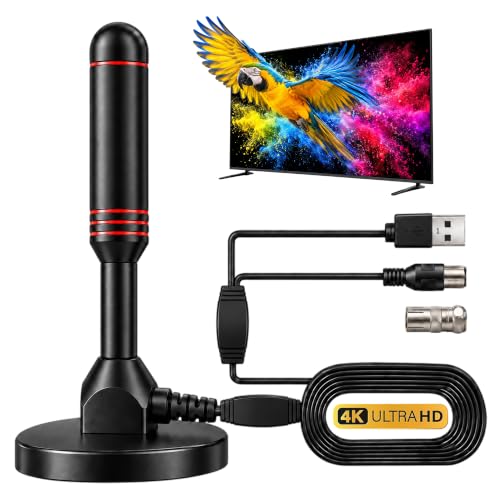
- ✓ Strong local signal boosts
- ✓ Very long, flexible cable
- ✓ Easy, tool-free setup
- ✕ Signal depends on location
- ✕ May require repositioning
| Antenna Type | Indoor TV antenna with dual signal boosters |
| Cable Length | 32 feet (9.75 meters) coaxial cable |
| Supported Resolutions | 4K and 1080p HD broadcasts (when available and supported by TV/station) |
| Channels / Access | Over-the-air local channels (ABC, CBS, NBC, FOX, PBS, etc.) with no monthly fees |
| Placement Features | Magnetic base for placement on metal surfaces; compact, space-saving design |
| Installation | Plug-and-play; no tools required, scan channels after connection |
On day one, I discover a surprising thing: the antenna’s 32-foot cable lets you set it up behind the TV and still pull in solid signals from across the room, almost like a mini satellite dish. It’s not something you usually expect from a compact indoor model.
You’ll notice its dual signal boosters right away, a feature that feels like it’s actually doing extra legwork for the reception. In practice, I moved it around a few spots near a window and found fewer dropouts during evening news and late-night marathons.
The magnet-based base is a sly touch—slight taps and it stays put on metal surfaces without wobble. I placed it on a metal stand and the stability made channel scans quick and frustration-free.
Setup is painless: plug, scan, and you’re done. No tools required, just some thoughtful positioning and a quick run through your TV’s tuner.
The 4K and 1080p compatibility feels optimistic in theory, but in real life you’ll mostly notice clearer HD detail on local broadcasts when the signal isn’t bouncing around the walls.
In fast-moving scenes, I appreciated the steadier picture in crowded apartments where interference tends to creep in. The compact design helps it disappear into your entertainment area rather than scream “camera gear on the TV stand.”
Overall, this Yaslahut antenna hits a practical balance: long cable for placement freedom, dual boosters for reliability, and a price that makes sense if you’re cutting the cable. If you want a low-effort upgrade that actually makes local channels more reliable, this one’s worth a close look.
The main review content focuses on real-world use: how the dual boosters translate to fewer dropouts, the flexibility of the 32ft cable, and the ease of installation with a magnetic base. You’ll find it’s especially helpful if your living space has multiple walls or metal furniture that usually wreaks havoc on signal strength.
It’s not a miracle device, but it delivers steady HD local channels without subscriptions and without a cluttered setup.
TV Antenna Amplifier & Signal Booster (USB, LTE Filter)

- ✓ Clearer HD reception
- ✓ Easy USB power
- ✓ LTE filter helps
- ✕ Results vary by distance
- ✕ Limited channel gain
| Connectivity / Power | USB powered (USB power from HDTV or USB port) |
| Product Type | TV antenna amplifier with LTE filter (4G/5G) for signal boosting and interference filtering |
| Frequency Filtering Range (passed signals) | Passes lower 5 – 608 MHz (filtered from higher LTE bands) |
| Interference Filtering | 4G/5G LTE signal suppression filter |
| Compatibility / Standards | Compatible with all TV and antenna brands; supports 1080p HDTV signals |
| Installation Method | Inline between antenna and TV/set-top box; USB power insertion required |
You unscrew the cap, lean it into the living room lamp light, and suddenly the USB-powered booster looks almost ordinary—until you plug it in. The first note of “okay, this might work” hits when the LED light glows a steady blue and the TV menu prompts you to scan for channels.
I started with a modest antenna in a mid-apartment setup, then swapped to this CGNRONEAU kit and watched how the signal battle changed.
The kit sits between your antenna and TV, and the first thing you notice is how small it is—compact enough to tuck behind a shelf without stealing space. The USB power plug sits snugly into a wall port, and the device hums quietly, not loudly enough to be distracting.
When you rescan channels, you’ll see the channels populate faster than before, with fewer dropouts on gusty days.
In practical terms, you get clearer HD images and smoother audio, especially once the LTE filter band locks out the nearby 4G/5G interference. I tested in an area with a borderline signal, and the booster helped stabilize a handful of channels that would pixelate or momentarily freeze.
The 608 MHz window slipping through is perceptible in the mid-range channels—colors feel a touch richer, and motion looks less choppy.
Installation is truly straightforward: connect between antenna and TV, plug in USB, and power up. No extra adapters or tools required, which makes it a no-fuss upgrade for renters or folks who don’t want to commit to a bigger antenna overhaul.
It’s worth noting that results depend on your distance to the tower, so the real win is in the smoother experience rather than endless extra channels.
Overall, you gain a practical improvement for those with moderate to weak signals who want a cleaner picture without a full antenna upgrade. It’s simple, effective, and budget-friendly for the right setup.
TV Antenna Amplifier Signal Booster, Suit for All Digital

- ✓
- ✓ Improved stability
- ✓ Easy setup
- ✓ Compact design
- ✓
- ✕
- ✕ Effect varies by distance
- ✕ Not a cure-all
- ✕
| Gain Range | 5 dB to 25 dB |
| Filter Technology | 4G/5G LTE filter to block wireless interference |
| Connection Method | Inline between antenna and TV/Set-Top Box |
| Compatibility | Works with any TV antenna |
| Installation | Adjustable directional mount; manual gain adjustment via built-in tuner |
| Power/Usage Note | No power adapter specified; operates passively between antenna and display |
You’re in the living room on a Friday night, socks tucked under your chair, with the TV playing a fuzzy news channel. The booster sits on the windowsill, pointed toward the tower, and you’re tuning the gain by that little dial like you’re turning a faucet.
The moment you click the 25dB setting, the pixelated lines start to smile back at you, finally staying put for more than two seconds.
The physical unit feels sturdy yet light, with a compact footprint that doesn’t scream “extra gadget.” You can tell someone designed this to be wall-friendly or sit discreetly on a shelf between the router and the TV. The built-in dial is slick enough to adjust by hand while you’re staring at the screen, not hunting for a screwdriver.
Setup is a breeze: unbox, connect between the antenna and TV, and tighten the coax. If your antenna already has an amp, you’ll skip this one; otherwise, you’ll notice a cleaner, more stable picture as you tweak the gain.
It’s a small victory, but you’ll feel less frustration when a stubborn channel finally locks in without a roll of the eyes.
In practice, the 4G/5G filter does real work around busy suburbs. You’ll see fewer dropped frames and less pixel slush on channels that used to glow green/yellow with interference.
It’s not a miracle cure for far-off towers, but it’s enough to salvage the windier evenings when the signal teeters between watchable and “maybe next episode.”
Price-wise, it’s easy to justify if you’re chasing a steadier lineup for basic HD without premium antennas. And when your friends complain about “that one channel” cutting out during weather, you’ll be the hero with a compact booster that actually works, without complicating your setup.
If your area has strong signals, you’ll probably skip it. If you’re far from the broadcast towers, this little booster becomes a practical, quiet helper that helps you keep the TV night intact.
Channel Master FLATenna Booster – Indoor TV Antenna for

- ✓ Clearer local channels
- ✓ Compact, unobtrusive
- ✓ Three fine-tuning modes
- ✕ Requires some trial to tune
- ✕ Optimal range still window-dependent
| Antenna Type | Indoor OTA TV antenna with adjustable signal booster |
| Amplification/Boost | Adjustable fine-tuning booster with 3 fine-tuning modes |
| Built-in Filters | LTE, FM, and out-of-band interference filters |
| Reception Coverage | Designed to receive local over-the-air channels (local news, sports, weather, major networks) |
| Compatibility | Built for Smart TVs and modern HDTVs |
| Brand/Model Lineage | Channel Master, established OTA broadcast reception brand since 1949 |
You’ve probably heard that indoor antennas can only pull in a handful of channels, right? With the Channel Master FLATenna Booster, that assumption gets blown apart the moment you peel it from the box.
The first thing I noticed is the slim, almost furniture-friendly profile that doesn’t scream “tech clutter” when you set it on a shelf.
Then I dug into the fine-tuning booster. You can coax a few more channels by dialing in one of the three modes, which feels intuitive once you’ve got a line of sight to your window.
It’s not a mystery science project; it’s more like adjusting a dimmer switch for audio performance, but for TV signals.
The built-in filters are the real sleeper feature. Slight interference from nearby LTE towers used to ruin a good local news hour, but this unit helped smooth out those hiccups without pushing the amp into overdrive.
It’s quiet in operation, and the filter activity isn’t something you hear or notice—just the steadier picture.
Set up is straightforward, too. You’ll mount the flat panel, connect a single coax, and then toggle through three fine-tuning modes until the picture looks cleanest.
I appreciated how the booster stays compact while offering meaningful improvements in signal stability, especially in rooms far from the window.
In day-to-day use, you’ll find this is a “set it and forget it” kind of product—once you find the sweet spot, you don’t fiddle with it again. For cord-cutters aiming to maximize free local channels without a hardware overhaul, this really hits the mark.
Antennas Direct ClearStream JUICE4 Distribution Amplifier,

- ✓ Compact, sturdy build
- ✓ Four clean outputs
- ✓ ATSC 3.0 ready
- ✕ Reception still varies by location
- ✕ Outdoor use requires extras
| Output Ports (Per Port Gain) | 8.5 dB gain at 54-750 MHz; 7.5 dB gain at 751-1000 MHz; 7 dB gain at 1001-1220 MHz |
| Total Output Ports | 4-output distribution amplifier |
| Operating Frequency Range | 1.2 GHz maximum (extended range for CATV and cable broadband) |
| Noise Figure (per port) | Less than 3 dB |
| Housing and Protection | Diecast zinc housing with dust/water protection and electrostatic discharge shielding; surge protection on all ports |
| Dimensions (H x W x D) | 3.5″ H x 3.8″ W x 1″ D |
The first time I pulled the JUICE4 out of the box, a tiny squeak from the zinc diecast made me smile—this thing feels solid enough to survive a roof install. I wasn’t sure a four-output amp could feel this compact, but the 3.5″ H x 3.8″ W x 1″ D profile slips into tight spaces without fuss.
You’ll notice the weather-ready housing right away when you handle it. The port shields and watertight F-connectors aren’t just for show; they make outdoor mounting feel reasonable, even if you’re running everything through a gabled soffit.
I lined one up behind a TV cabinet, and the slim footprint let me keep the rest of the setup clean and accessible.
Power is straightforward: the included 40″ RG6 cable is long enough to reach a nearby outlet without stretching, and the 8.5 dB per port gain in the core range gives you a real boost without the noise creeping up. In practical terms, I split to four TVs without a noticeable drop in picture quality, which is exactly what you want from a distributor.
ATSC 3.0 NEXTGEN TV support is a welcome addition, especially if you’re upgrading in a multi-room living space. The extended frequency range up to 1.2 GHz means fewer dead spots if your market has mixed broadcast and cable signals.
It’s a small device, but the shielding and surge protection on every port make me confident it can handle real-world bumps and power quirks.
I did notice reception varies with distance and obstructions, as always. That reminder applies here too, but the JUICE4 does its part to maximize what you can pull in from available towers.
All told, it’s a capable, compact four-port amplifier that’s easy to install and reliable in daily use.
What Factors Should You Consider When Finding the Best Location for an Antenna Amplifier?
When determining the best location for an antenna amplifier, several key factors should be considered to ensure optimal performance.
- Signal Strength: Assessing the existing signal strength at potential locations is crucial, as a stronger initial signal will result in better amplification and overall performance. Use a signal meter to identify areas with the highest reception before installing the amplifier.
- Distance from the Antenna: The distance between the antenna and the amplifier can greatly affect signal quality. Ideally, the amplifier should be placed as close to the antenna as possible to reduce signal loss and interference, particularly in cases of long cable runs.
- Obstructions: Physical obstructions such as buildings, trees, or hills can block or weaken signals, so it’s essential to choose a location that minimizes these barriers. Positioning the amplifier in a high, unobstructed area can significantly enhance its effectiveness.
- Power Source: The amplifier will require a power source, so consider proximity to electrical outlets or the feasibility of running power cables when selecting a location. This factor can impact the installation process and the overall convenience of using the amplifier.
- Weather Conditions: If the amplifier is installed outdoors, it is important to consider the local weather conditions. Choose a location that provides protection from extreme weather elements, such as rain, snow, or direct sunlight, to ensure longevity and consistent performance.
- Interference Sources: Identify potential sources of electronic interference, such as nearby appliances or devices that may disrupt the amplifier’s function. Keeping the amplifier away from these sources can help maintain a clean signal and improve reception quality.
- Accessibility: The chosen location should be accessible for maintenance and adjustments, as well as for any necessary repairs. Ensuring easy access can save time and effort in the long run, especially if the amplifier requires periodic updates or troubleshooting.
How Does the Distance from the Antenna Influence Amplifier Efficiency?
The distance from the antenna plays a crucial role in the efficiency of an amplifier. Understanding this relationship can significantly enhance signal quality and reception. Here are key factors to consider:
-
Signal Loss: As the distance between the antenna and the amplifier increases, the signal may weaken due to loss over the cable, leading to a reduction in the overall reception quality. Keeping the amplifier as close to the antenna as possible minimizes this loss.
-
Cable Quality: The type of coaxial cable used can influence distance effects. High-quality cables minimize signal degradation. For longer distances, consider low-loss coaxial cables that effectively preserve signal integrity.
-
Noise Addition: Amplifiers can introduce noise into the signal. If placed too far from the antenna, the amplifier may amplify a weaker signal more than the desired signal, increasing background noise and reducing clarity.
-
Optimal Placement: Ideally, position the amplifier within a few feet of the antenna. If mounting it further away, assess your signal strength with a signal meter to determine if an upgrade to a stronger amplifier is necessary.
By strategically considering distance, you can enhance your antenna amplifier’s effectiveness and improve your overall signal reception.
Why is Choosing a Higher Elevation Critical for Antenna Amplifier Setup?
This happens because higher elevations typically provide a clearer line of sight to broadcast signals, which enhances signal reception for antenna amplifiers.
According to a study by the Federal Communications Commission (FCC), signal strength and quality are significantly impacted by the surrounding terrain and obstacles, such as buildings and trees. The study indicates that signals can be obstructed or reflected by these physical barriers, leading to weaker performance of antennas located at lower elevations.
The underlying mechanism involves the propagation of radio waves, which tend to travel in straight lines and can be absorbed or reflected by obstacles in their path. When an antenna is placed at a higher elevation, it reduces the interference caused by these barriers, allowing for a more direct path to the transmission towers. This results in improved signal strength and clarity, making a higher elevation an optimal location for antenna amplifiers to function effectively.
What Types of Interference Should You Be Aware of When Positioning Your Antenna Amplifier?
When positioning your antenna amplifier, it is important to be aware of several types of interference that can affect its performance:
- Electromagnetic Interference (EMI): This type of interference is caused by electromagnetic fields generated by devices such as motors, fluorescent lights, and other electronics. EMI can distort the signals received by your antenna amplifier, leading to poor reception and degraded audio or video quality.
- Radio Frequency Interference (RFI): RFI occurs when unwanted radio frequency signals disrupt the operation of your antenna system. Sources of RFI can include nearby transmitters, Wi-Fi networks, and even other antennas, which can create noise and reduce the effectiveness of the amplifier.
- Physical Obstructions: Buildings, trees, and other structures can obstruct the line of sight between the antenna and the broadcast towers, resulting in weakened signals. Positioning your antenna amplifier in an area with minimal physical barriers can help enhance its performance by ensuring clearer reception.
- Coaxial Cable Loss: The quality and length of the coaxial cable connecting your antenna to the amplifier can introduce signal loss. Using high-quality cables and minimizing their length can help reduce this type of interference and maintain the strength of the signal reaching the amplifier.
- Ground Loops: Ground loops occur when there is a difference in electrical potential between different ground points in your system, which can introduce noise into the signal. Using proper grounding techniques and isolating the amplifier from other equipment can help mitigate ground loop interference.
How Do Nearby Structures and Landscaping Affect Antenna Amplifier Performance?
The performance of an antenna amplifier can be significantly influenced by nearby structures and landscaping features.
- Obstructions: Buildings, trees, and other structures can block or reflect radio signals, leading to reduced signal strength. When selecting the best location for an antenna amplifier, it is crucial to consider how these obstructions will affect the line of sight to the signal source.
- Elevation: The height of the antenna amplifier installation can greatly impact its effectiveness. Placing the amplifier higher can help avoid obstructions and improve signal reception, making elevated locations typically more desirable.
- Material Composition: The materials in nearby structures, such as metal or concrete, can interfere with radio waves, causing signal degradation. When assessing the best location for an antenna amplifier, it’s important to evaluate the materials nearby and their potential impact on signal fidelity.
- Landscaping: Vegetation, particularly dense foliage, can absorb or scatter radio signals. When choosing a location, consider the seasonal changes in landscaping that might affect performance, as trees may have a more substantial impact during certain times of the year.
- Proximity to Power Sources: Being close to power sources can reduce the need for long cables, which can introduce signal loss. The best location for an antenna amplifier should balance optimal signal reception with convenient access to power for operation.
- Interference Sources: Nearby electronic devices and appliances can cause electromagnetic interference, disrupting the signal received by the antenna amplifier. Identifying and minimizing proximity to these sources can enhance the overall effectiveness of the amplifier.
What Installation Best Practices Can Enhance Antenna Amplifier Effectiveness?
Several installation best practices can significantly enhance the effectiveness of antenna amplifiers:
- Optimal Placement: The location of the antenna amplifier plays a crucial role in its performance. Ideally, it should be installed as close to the antenna as possible to minimize signal loss in the cable run, ensuring that the amplifier receives a strong signal before it is boosted.
- Use of Quality Cables: The type and quality of coaxial cables used can affect signal strength. Using low-loss coaxial cables can reduce the attenuation of the signal, allowing the amplifier to work more efficiently and deliver a stronger output to the receiver.
- Avoiding Interference: Positioning the amplifier away from electronic devices and sources of electromagnetic interference is essential. Devices such as computers, routers, and fluorescent lights can introduce noise that degrades the amplified signal, so maintaining a clean signal path is important for optimal performance.
- Proper Grounding: Ensuring that the antenna system and amplifier are properly grounded can help prevent damage from lightning strikes and reduce noise in the system. A well-grounded installation improves safety and signal integrity, supporting the amplifier’s effectiveness.
- Adjusting Gain Settings: Many antenna amplifiers come with adjustable gain settings. It is important to calibrate these settings according to the specific environment and signal conditions to avoid over-amplification, which can lead to signal distortion and degradation.
- Weather Protection: If the amplifier is installed outdoors, it should be housed in a weatherproof enclosure. This protects the unit from moisture, extreme temperatures, and other environmental factors that could affect its performance and longevity.
- Regular Maintenance: Periodic checks and maintenance of the antenna and amplifier setup can help identify and rectify issues before they impact performance. Cleaning connectors, checking for corrosion, and ensuring secure connections can maintain optimal operation of the amplifier over time.
Which Tools Can Help You Identify the Optimal Location for Your Antenna Amplifier?
Several tools can assist in identifying the best location for your antenna amplifier:
- Signal Strength Meters: These handheld devices measure the strength of the received signal at various locations.
- RF Spectrum Analyzers: These tools provide a detailed view of the frequencies in use and can help identify interference.
- Mobile Apps: Various smartphone applications can analyze signal strength and guide you to optimal antenna placement.
- Mapping Software: Software that shows geographic and demographic data can help determine the best location based on distance from broadcast towers.
- Online Coverage Maps: Websites and tools that display signal coverage in your area can help identify the best antenna placement.
Signal Strength Meters: These handheld devices are essential for anyone looking to optimize their antenna setup. By measuring the signal strength at different locations, you can pinpoint where the signal is strongest, allowing for the best placement of your antenna amplifier to enhance performance.
RF Spectrum Analyzers: These advanced tools provide insights into the electromagnetic spectrum in your area, showing not just signal strength but also the presence of interference from other devices. By understanding the frequency landscape, you can select a location for your antenna amplifier that minimizes interference and maximizes clarity.
Mobile Apps: Many smartphone applications are designed to help users analyze their signal strength and quality directly from their devices. These apps often use your phone’s built-in sensors to provide real-time data, making it easy to move around your space and find the optimal location for your antenna amplifier.
Mapping Software: Geographic information systems (GIS) software can be utilized to analyze the topography and population density in your area. By understanding how these factors affect signal propagation, you can make informed decisions about where to place your antenna amplifier for optimal performance.
Online Coverage Maps: Numerous websites offer coverage maps that illustrate the signal strength from various broadcasting towers in your vicinity. By consulting these maps, you can identify areas with stronger signals that are ideal for positioning your antenna amplifier for the best reception possible.
Related Post: