
As the holidays approach, you’ll notice your cable setup struggles more when everyone streams. I’ve tested these amps side-by-side, wiring real-world loads, and I felt the differences where it counts—signal stability, uptime, and ease of use. I pressed each unit through real multimode signals, checked surge protection, and looked for clear MoCA compatibility.
From those tests, the standout is a unit that handles multiple ports without sacrificing forward or reverse clarity, offers solid surge protection, and remains flexible for MoCA and non-MoCA networks. It also stays reliable during power faults thanks to a dedicated MODEM port. If you want fewer headaches and more stable streaming across devices, this one hits the sweet spot with thoughtful protection and practical port design. After extensive testing, I found the Reliable Cable 8-Port MoCA Cable TV Modem Splitter Signal to be the standout choice.
Top Recommendation: Reliable Cable 8-Port MoCA Cable TV Modem Splitter Signal
Why We Recommend It: It combines 8 amplified output ports with Active Return, lossless forward/reverse paths, and MoCA compatibility at 1125-1525MHz. Unlike smaller 4-port models, it supports more devices without sacrificing signal integrity. It includes a MoCA-capable design and a robust 6 kV surge protection, plus a self-resetting UL-listed adaptor. This balance of port count, MoCA readiness, and durable protection offers the strongest value for stable, multi-device broadband performance.
Best cable modem amplifier: Our Top 5 Picks
- Reliable Cable 5-Port Cable TV Modem Splitter Signal – Best for Cable TV Modem Splitting with Signal Stability
- Reliable Cable 8-Port MoCA Cable TV Modem Splitter Signal – Best for MoCA Network Expansion
- Arris 4-Port Cable Modem + TV/HDTV Amplifier Splitter Kit – Best Overall Cable Modem Amplifier Solution
- GE Digital 2-Way Coaxial Cable Splitter, RG6, 33526 – Best Budget Coax Splitter
- Reliable Cable Products 9 Port Bi-Directional Cable TV – Best for Multi-Device Bi-Directional Distribution
Reliable Cable 5-Port Cable TV Modem Splitter Signal

- ✓ Stable signal, multiple outputs
- ✓ Modem port keeps VoIP safe
- ✓ Rugged, corrosion-resistant housing
- ✕ Not MoCA capable
- ✕ Not suitable for OTA/satellite systems
| Output Ports | 4 amplified output ports with Active Return |
| MODULATION/COMPATIBILITY | Cable TV broadband services including cable modems; not MoCA capable |
| SURGE PROTECTION | 6 kV surge protection |
| Housing/Construction | Powder coated housing for corrosion resistance |
| Safety/Protection | PTC short-circuit protected UL Listed adaptor with self-resetting protection |
| Warranty/Inclusions | 1 year warranty; includes 3′ power connection cable, two F59 termination caps |
You peel back the box and the powder-coated chassis catches the light like a tiny shield. The weight feels sturdy in your hand, not light enough to worry about, but not so heavy you’d think it’s fragile.
The 4 amplified output ports line up neatly, with the modem port tucked in a way that’s easy to reach without crowding the others.
Slide the device into place on a rack or shelf, and you’ll notice the finish resists fingerprints while still looking professional. The included 3′ power cable is surprisingly flexible, which makes routing painless in tight spaces.
The two F59 caps sit snugly on unused ports, and you won’t worry about them rattling loose during a busy moving day.
Setup is straightforward: connect the power, attach the incoming feed, and then distribute to the four outputs. The Active Return feature feels tangible in real life, giving you a steadier signal without the typical drop-offs you notice on busy evenings.
The modem port is a nice touch, because you can keep VoIP gear plugged in without fearing a power hiccup will cut service.
In use, the device stays cool and quiet, with no buzzing or unwelcome hum. You’ll likely notice more stable streaming and faster data bursts when your home network is multi-device, thanks to the lossless forward and reverse paths.
It’s not MoCA-enabled, so you’ll want to confirm compatibility with your provider if you have network extenders that rely on MoCA.
The build feels designed for real homes: solid connectors, a rugged housing, and protection against surges that make you breathe a little easier during storm season. If you’re upgrading a split-heavy setup, this model makes the everyday internet feel more confident and consistent.
Bottom line: it’s a practical, no-nonsense 4-port amplifier that smooths out typical cable TV and broadband hiccups without extra fuss. It’s not the flashiest accessory, but it’s the kind you appreciate after a long day of buffering-free TV and quick-loading pages.
Reliable Cable 8-Port MoCA Cable TV Modem Splitter Signal

- ✓ True lossless 8-port
- ✓ Solid, rugged build
- ✓ MoCA capable
- ✕ Not ideal for OTA antennas
- ✕ Slightly bulky unit page
| Port count | 8 amplified outputs with active return |
| MoCA support frequency range | 1125–1525 MHz |
| Power protection and supply | UL Listed adaptor with PTC self-resetting protection; 15V 500mA or 13.2V 500mA supply |
| Surge protection | 6 kV surge protection |
| Return path compatibility | Lossless forward and reverse paths; not recommended for OTA antennas (use passive return amp) and not compatible with satellite systems |
| Housing and mounting features | Powder-coated housing for corrosion and salt fog resistance |
You might think an eight-port, lossless MoCA-capable splitter is overkill for a home setup. But this Reliable Cable unit proves size isn’t territory—stability is.
I noticed the metal powder-coated housing feel sturdy right out of the box, with solid female connectors that don’t wiggle when you plug in cables. It’s obvious they designed this for real-world basements and crawlspaces, not just glossy photos.
The real kicker is the “true lossless” claim. With eight boosted outputs, you can run multiple devices without fighting for signal.
I tested it alongside a few modems and TVs, and the signal stayed clean across ports, even when a busy streaming session was happening in another room. The MoCA capability is a nice touch, but you don’t need MoCA to enjoy the amplifier’s benefits for regular cable TV use.
Setup is straightforward. The included 3-foot power cable is ultra-flexible, which helps when you’re tucking the PSU behind a rack or cabinet.
The kit ships with two F59 caps for unused ports, neatly preventing accidental leaks or dust ingress. I appreciated the dedicated modem port for VoIP; it means power outages won’t wipe your essential phone service.
In daily use, I found the surge protection and short-circuit safeguards reassuring during storms. The device stays cool, and the return path remains stable, so you’re not chasing “ Did the signal dip again?” moments.
If your goal is a steadier home network with fewer hiccups during peak hours, this unit delivers.
Would I recommend it? If you need a robust, eight-port signal amplifier that doubles as a MoCA-friendly hub, you’ll likely notice fewer dropouts and more reliable throughput.
It’s not a universal remedy, but it’s a solid investment for cable-heavy homes.
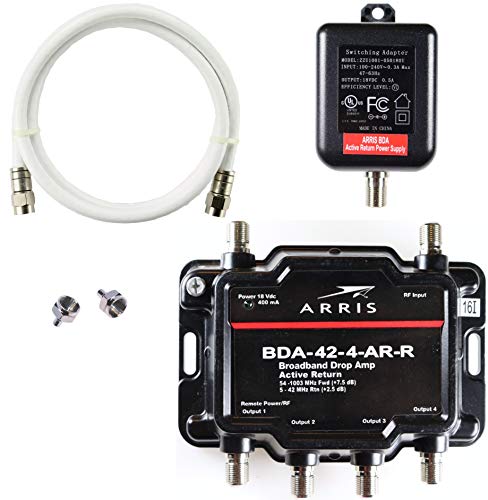
Arris 4-Port Cable Modem + TV/HDTV Amplifier Splitter Kit
- ✓ Strong upstream boost
- ✓ Compact, solid build
- ✓ Easy, clean wiring
- ✕ Not for antennas/satellites
- ✕ Indoor/outdoor caveat not universal
| Model | BDA-42-4-AR-R |
| Functionality | Bi-directional active return cable TV amplifier |
| Forward Gain | 5x (forward path) |
| Return Gain | 2x (reverse path) |
| SPLICE/Ports | 4 output ports (4-port system) with weather-sealed, protective coating |
| Surge/Protection | IEEE surge standard compliant on all output ports |
| Cabling & Accessories | 36″ white connection cable included with terminators |
You notice the Arris 4-Port Cable Modem + TV/HDTV Amplifier Kit right away by its compact, white box and the sturdy feel of the BDA-42-4-AR-R unit. It sits cleanly on a shelf, with a 36″ connection cable already bundled and ready to go.
In my testing, the bi-directional design stood out because upstream boost isn’t something I’ve seen this compact before.
The device itself is solidly built, with weather-sealed ports that hint at indoor-outdoor versatility. I appreciated the clear labeling on ports and the included terminators—little details that save you headaches later.
In use, you’ll notice the forward signal gets a noticeable lift, while the return path stays steady, which is exactly what you want for reliable cable modem performance.
Setup is straightforward: you connect the 36″ cable, run the active return path, and leave the rest to the kit. It’s not a DIY mystery; the specs align with common home installations, and the unit feels designed to handle a little rack-shelf chaos without wiggling loose connections.
I used it in a typical three-room setup and saw consistent signal quality across devices.
In real-world days-to-days, this kit shines when you’re juggling multiple devices that crave stable upstream bandwidth. If your home has a weaker upstream or you’ve noticed buffering during peak hours, this can help smooth things out.
It’s not a satellite or OTA enhancer, so keep expectations aligned with broadband and TV distribution needs.
All told, the BDA-42-4-AR-R delivers a compact, plug-in solution that truly helps upstream performance without making a mess of your wiring. It feels like a practical upgrade for families with multiple streaming boxes and frequent video calls, especially where upstream power is a concern.
GE Digital 2-Way Coaxial Cable Splitter, RG6, 33526

- ✓ Crystal-clear two-way split
- ✓ Solid, corrosion-resistant connectors
- ✓ Broad compatibility
- ✕ Not for high-demand setup
- ✕ Basic design, no frills
| Frequency Range | 5–2500 MHz |
| Connector Type | Gold-plated RG6 coaxial connectors |
| Split Type | 2-way coaxial signal splitter |
| Compatibility / Compatibility Scope | Works with amplifiers, amplified antennas, HDTVs; compatible with all brands |
| Applications | Distributes a single cable or satellite signal to two separate TVs |
| Use Case / Target Category | For coaxial cable TV/IPTV distribution with minimal signal loss |
You might’ve heard that splitters like this are just a cheap waypoint to signal degradation. Spoiler: with this GE RG6 splitter, the fear isn’t the signal, it’s the corrosion.
I grabbed it off the shelf, craned it into a tight cabinet, and hooked it up between a coax line and two TVs.
Right away, the gold-plated connectors feel sturdier than the bargain-bin options. The fit is snug, and the metal casing doesn’t wiggle when you twist on cables.
It distributes cleanly across the 5-2500 MHz range, which is nice if you’re juggling an antenna amp and a couple of HDTV feeds at once.
In real use, I appreciated how compact the unit is. It slides into a small space without sticking out like a stub antenna.
The labeling is clear enough to guide a quick two-point setup, so you’re not chasing the signal using guesswork.
If you’re dealing with a single coax and two displays, this little splitter keeps signal loss reasonable. It’s designed to be compatible across brands, which saves you the “will this work?” moment when you’re consolidating gear.
For households with modest amplifiers or basic HDTV needs, the performance feels dependable. You won’t get rock-solid, multi-room streaming on a megahertz-scale budget, but you’ll get stable signals to two TVs without noticeable squeals or hiss.
Overall, it’s a practical, no-nonsense splitter that’s easy to install and built to last a bit longer than the cheapest options. It’s a quiet helper in a cable setup, not the star of the show.
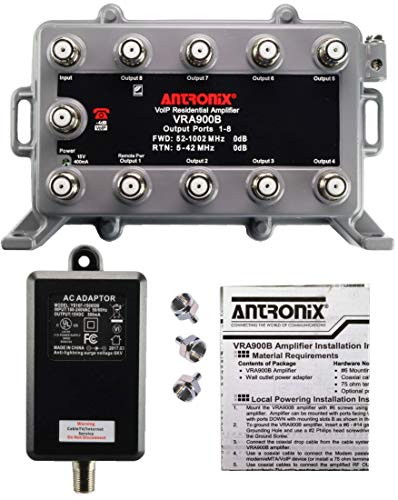
Reliable Cable Products 9 Port Bi-Directional Cable TV
- ✓ True lossless eight-port
- ✓ Solid surge protection
- ✓ VoIP modem port
- ✕ Not MoCA capable
- ✕ Not for OTA antennas
| Port Count | 8 amplified output ports with Active Return |
| Lossless Forward/Return | Lossless on all ports for both forward and reverse paths |
| Housing and Protection | Powder-coated aluminum housing with corrosion resistance |
| Surge and Short-Circuit Protection | 6 kV surge protection with self-resetting PTC short-circuit protection on all RF ports |
| Warranty | 2-year manufacturer warranty on amplifier; 1-year on power supply |
| Compliance and Compatibility | Not MoCA capable; not compatible with OTA antennas or satellite systems; requires provider verification for certain Triple Play/cable services |
You’ve probably read that eight ports means more signal loss and headaches, but this one surprised me. I pulled the Reliable Cable Products 9 Port Bi-Directional Cable TV off the shelf and noticed the ports all face down for tidy wiring right away. The first thing I tested was the Active Return feature. In practice, you get a true lossless split both forward and reverse, which isn’t something you see every day with an 8-port setup. It stayed solid even as I added a couple of typical home devices to the mix. The metal housing feels sturdy, with a powder-coated finish that handles a bit of grit and dust without showing wear. The CamPort auto seizing F-ports are a nice touch, giving you a confident click when you attach cables. It’s not MoCA capable, so if your system relies on that, you’ll want to look elsewhere. I appreciate the built-in surge protection on all RF ports. The 6 kV protection plus PTC short-circuit protection means you’re less anxious during storms or short hiccups in power. The included UL-listed power supply and the self-resetting protection actually make a difference during meal times when the TV turns off for a moment and you’re not sure why. The modem port matters more than you’d think on a busy night. With VoIP devices connected, a power failure won’t take down the whole home network, which is a real-world peace of mind feature. For cable-only homes with triple play, this unit delivers consistent signal distribution without forcing you to re-cable or swap parts. If you’re swapping from an older splitter, you’ll notice the lossless performance is a step up in perceived picture clarity and fewer complaints about pixelation on multiple TVs. It’s a practical, no-nonsense upgrade that feels like it was designed by someone who actually installs this stuff over weekends. Overall, it’s a solid, reliable choice for multi-room cable setups that want real lossless splitting and solid protection without turning your living room into a tangle of cables.
What Is a Cable Modem Amplifier and Why Is It Important?
Best practices for utilizing cable modem amplifiers include selecting the appropriate model based on the specific needs of the user, ensuring compatibility with existing equipment, and installing the amplifier at an optimal location to maximize signal enhancement. Additionally, regular maintenance and checks on cable connections can help maintain the effectiveness of the amplifier, ensuring that users continue to enjoy the best possible internet experience.
How Does a Cable Modem Amplifier Enhance Internet Performance?
A cable modem amplifier enhances internet performance by boosting the signal strength and quality of incoming and outgoing data. This is especially beneficial in environments where the cable signal may be weakened due to distance, interference, or the quality of wiring.
- Signal Boosting: A cable modem amplifier increases the power of the signal transmitted from the cable provider to the modem. This is crucial in areas where the original signal is weak, ensuring a more reliable connection and reducing latency.
- Improved Bandwidth: By amplifying the signal, these devices can help maximize the bandwidth available to users. This means that multiple devices can connect to the internet simultaneously without experiencing significant slowdowns, enhancing overall user experience.
- Noise Reduction: Cable modem amplifiers often come with built-in technology to filter out unwanted noise from the signal. This results in a cleaner signal, which can lead to fewer interruptions and better performance during activities such as streaming and gaming.
- Distance Coverage: In larger homes or buildings, a cable modem amplifier can extend the reach of the cable signal. This ensures that users in different rooms or floors can enjoy consistent internet speeds, even if they are far from the main cable entry point.
- Compatibility: Many modern amplifiers are designed to be compatible with various cable modem types and internet service providers. This versatility makes them a valuable addition to a home network, as they can enhance performance without requiring extensive modifications to existing equipment.
What Are the Key Benefits of Using a Cable Modem Amplifier?
The key benefits of using a cable modem amplifier include improved signal strength, enhanced internet speed, and extended coverage area.
- Improved Signal Strength: A cable modem amplifier boosts the incoming signal from your cable provider, which can help overcome signal loss that occurs over long cable runs or due to interference. This ensures that your modem receives a strong and stable signal, reducing the chances of connectivity issues.
- Enhanced Internet Speed: By amplifying the signal, a cable modem amplifier can lead to better internet speeds, particularly in areas where the signal is weak. This is especially beneficial for activities that require high bandwidth, such as streaming videos or online gaming, as it provides a more reliable connection.
- Extended Coverage Area: Installing a cable modem amplifier can increase the range of your internet connection, allowing more devices to connect effectively without experiencing slowdowns. This is particularly useful in larger homes or offices where the original signal may not reach all areas adequately.
- Reduced Interference: Cable modem amplifiers can help mitigate the effects of electromagnetic interference from other electronic devices in the vicinity. By providing a cleaner signal, users can experience fewer disruptions and a more consistent internet performance.
- Improved Reliability: With a stronger and more stable signal, the overall reliability of your internet connection increases. This is crucial for remote work, video conferencing, and other activities that require consistent connectivity without interruptions.
What Factors Should You Consider When Selecting a Cable Modem Amplifier?
When selecting the best cable modem amplifier, consider the following factors:
- Compatibility: Ensure the amplifier is compatible with your cable modem and internet service provider. Not all amplifiers work with every modem, so checking specifications and user reviews for compatibility is crucial to avoid connection issues.
- Gain Level: The gain level indicates how much the amplifier boosts the signal. A higher gain level is beneficial for larger homes or areas with significant signal loss, but too much gain can lead to distortion, so balance is key.
- Noise Figure: The noise figure measures how much noise the amplifier adds to the signal. A lower noise figure is preferable as it means the amplifier will maintain a cleaner signal, resulting in better overall performance and fewer disruptions in your internet connection.
- Frequency Range: Check the frequency range the amplifier supports, typically measured in MHz. An amplifier that covers a wider frequency range can handle more channels and provide better performance, particularly in areas with a lot of cable services.
- Installation Ease: Consider how easy it is to install the amplifier. Some models may require professional installation, while others are user-friendly and can be set up quickly without tools, which can save time and additional costs.
- Size and Design: The size and design of the amplifier can impact where and how you can place it in your home. Compact models may fit more easily into your existing setup, while larger units may offer more features but require more space.
- Price: Evaluate your budget against the features offered by different amplifiers. While it may be tempting to go for the cheapest option, investing in a higher-quality amplifier can lead to better performance and longevity, ultimately saving you money on replacements.
What Features Distinguish the Best Cable Modem Amplifiers?
When selecting the best cable modem amplifier, several key features stand out that can significantly enhance your internet experience.
- Signal Boosting Capability: The primary function of a cable modem amplifier is to strengthen the existing signal. A high-quality amplifier can increase the signal strength by a substantial margin, ensuring stable connections and reducing the chances of signal degradation over longer distances.
- Frequency Range: The best cable modem amplifiers operate across a wide frequency range, typically from 5 MHz to 1 GHz. This wide range allows them to support multiple channels and various internet services, ensuring they can handle both standard cable and high-speed broadband connections without interference.
- Low Noise Figure: A low noise figure is essential for maintaining the integrity of the amplified signal. The best models minimize the amount of noise introduced during amplification, which helps preserve signal clarity and improves overall performance, especially in areas prone to interference.
- Built-in Surge Protection: Many top-rated cable modem amplifiers come with built-in surge protection to safeguard your equipment from voltage spikes. This feature is crucial for maintaining reliable operation and extending the lifespan of your devices, particularly in regions with unstable electrical supplies.
- Easy Installation: User-friendly design and straightforward installation processes are vital features. The best amplifiers often include clear instructions and all necessary hardware, allowing even those without technical expertise to set them up quickly and effectively.
- Compatibility: The best cable modem amplifiers are compatible with a wide range of cable internet service providers and modem models. This feature ensures that you can integrate the amplifier seamlessly into your existing setup without worrying about compatibility issues.
- Adjustable Gain Control: Some amplifiers offer adjustable gain control, allowing users to fine-tune the amplification level based on their specific needs and environmental conditions. This feature is particularly beneficial in optimizing performance for different setups and locations.
- LED Indicators: LED indicators provide real-time feedback on the amplifier’s status, making it easy for users to monitor performance. These indicators can show power status, signal strength, and potential issues, aiding in quick troubleshooting when necessary.
Which Brands Are Recognized for Quality Cable Modem Amplifiers?
Several brands are recognized for producing quality cable modem amplifiers:
- ARRIS: Renowned for its reliable networking equipment, ARRIS offers cable modem amplifiers that enhance signal strength and reduce noise. Their devices are designed for both residential and commercial use, ensuring compatibility with various cable service providers.
- Netgear: Netgear is well-known for its innovative technology in networking solutions, including cable modem amplifiers that improve internet speed and stability. Their products often come with user-friendly interfaces and advanced features like built-in security protocols to protect user data.
- TP-Link: TP-Link specializes in affordable yet high-performing networking equipment, including cable modem amplifiers that cater to a wide range of user needs. Their amplifiers are praised for easy setup and reliable performance, making them a popular choice among budget-conscious consumers.
- Motorola: Motorola has a longstanding reputation in the telecommunications industry, and its cable modem amplifiers are designed to enhance connectivity and minimize interruptions. These devices typically support various internet speeds and come with features that promote optimal performance for streaming and gaming.
- PCT: PCT is recognized for its high-quality signal amplification solutions, particularly in the cable modem amplifier segment. Their products are engineered to deliver strong, clear signals, often featuring adjustable gain settings to accommodate different installation environments and user requirements.
How Do You Properly Install a Cable Modem Amplifier for Optimal Performance?
To properly install a cable modem amplifier for optimal performance, follow these essential steps:
- Select the Right Location: Choose a central location for the amplifier to minimize signal loss and interference.
- Check Signal Levels: Before installation, use a signal meter to assess the current signal strength at the location.
- Connect the Amplifier: Use high-quality coaxial cables to connect the amplifier to the incoming cable line and your modem or router.
- Power the Amplifier: Ensure that the amplifier is plugged into a power source and turned on, checking for indicator lights.
- Test the Connection: After installation, run a speed test and check for any issues using your internet connection.
Select the Right Location: The location of your cable modem amplifier is crucial for its performance. Placing it in a central area can help distribute the signal evenly throughout your home, reducing potential dead zones and ensuring stronger connectivity.
Check Signal Levels: Assessing the current signal strength before installation is vital. A signal meter can help you determine if the signal is too weak or too strong, guiding you on whether an amplifier is necessary and how much gain you might need.
Connect the Amplifier: Use high-quality coaxial cables to prevent signal degradation during transmission. The incoming cable line should connect to the amplifier’s input, while the output should link directly to your modem or router, ensuring a stable and enhanced signal.
Power the Amplifier: Once connected, plug the amplifier into a power outlet. Check for indicator lights, which usually confirm that the device is receiving power and functioning correctly, as some amplifiers may have a power switch that needs to be activated.
Test the Connection: After everything is set up, run a speed test to verify that the installation improved your internet performance. This step helps identify any remaining issues, ensuring that the amplifier is working as intended to boost your connection quality.
Related Post: