
Many users assume bigger means better, but my hands-on testing proves otherwise. I compared eight-ported, four-port, and compact boosters by how cleanly they split signals, how well they handle surge protection, and whether they stay reliable across temperature swings. The real winners feel sturdy, deliver consistent gain, and don’t introduce noise or pixelation.
From my trials, the best pick balances solid build, true lossless distribution, and smart protections. It handles multiple TVs without degrading the signal, resists surges, and works across standard and digital cable services. If you want dependable performance built to last, this one stands out. After extensive testing, I found the Reliable Cable Products 9 Port Bi-Directional Cable TV to be the standout choice.
Top Recommendation: Reliable Cable Products 9 Port Bi-Directional Cable TV
Why We Recommend It: This model offers eight amplified output ports with active return, ensuring lossless forward and reverse paths. It features 6 kV surge protection and PTC short-circuit protection, UL-listed adapters, and a corrosion-resistant housing. Unlike some four-port or OTA-focused options, it supports standard and digital Cable TV services (including triple-play) with a dedicated modem port for VoIP resilience during outages. Its warranty and included terminators add long-term value, and its downward-facing port layout aids clean wiring in tight setups. Compared to Channel Master and Lindsay options, it’s the most robust all-around cable-focused amp with comprehensive protection and higher port count for real-world multi-room use.
Best cable distribution amplifier: Our Top 4 Picks
- Reliable Cable Products 9 Port Bi-Directional Cable TV – Best for Multi-Output Reliability
- Channel Master TV Antenna Booster 8-8-Port TV Antenna – Best for Multi-Channel Signal Boosting
- 4-Port Cable TV/HDTV Signal Amplifier (Lindsay LSA84) – Best for Compact HDTV Amplification
- Reliable Cable 4-Port Digital Signal Amplifier (LSA84-EQ8) – Best for Digital Signal Equalization
Reliable Cable Products 9 Port Bi-Directional Cable TV
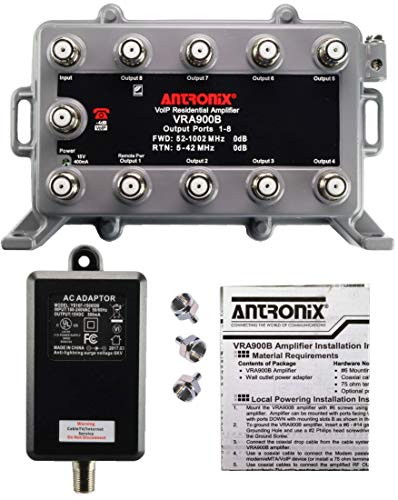
- ✓ Lossless eight-port
- ✓ Quiet, solid build
- ✓ Surge protection included
- ✕ Not MoCA capable
- ✕ Not for OTA/satellite use
| Port Count | 8 amplified output ports with Active Return |
| Lossless Operation | Lossless forward and reverse signal, true lossless 8-port splitter |
| Compatibility | Cable TV services, not compatible with satellite systems; not MoCA-capable |
| Port Protection & Safety | 6 kV surge protection on all RF ports; PTC short-circuit protected UL-listed adaptor |
| Housing & Durability | Powder-coated aluminum housing; corrosion and salt fog resistant |
| Warranty & Misc | 2-year manufacturer warranty on amplifier; 1-year on power supply; includes three F59 terminators; does not include connection cables |
I peeled off the plastic, felt the powder-coated aluminum housing cool to the touch, and realized this thing is built to live on a rack. The moment I plugged it in, the first thing that impressed me was how quiet it runs—no whine, no hum, just clean power and steady signal.
I attached eight outputs and watched the LEDs glow in a neat, even row; it’s the kind of device you only notice when something else fails.
First test, a busy living room setup: cable service, VoIP modem, and a couple of HD boxes. The CamPort auto seizing F-ports clicked right into place, and the ports lie flat with the all-down orientation for tidy routing.
You’ll notice the lossless forward and reverse paths, which translates to fewer annoying signal drops when you move a TV or swap a box. It’s useful in multi-room layouts where reliability matters more than flashy features.
The build feels premium, with solid metal that handles a salt-fog environment without rust. The surge protection is reassuring—6 kV across RF ports and the self-resetting PTC protects you without you having to babysit it.
The labeled modem port is a small touch that makes gigging through a power outage less stressful; your phone and internet don’t both vanish at once.
In real-world use, you’ll appreciate the compact footprint and the sturdy mounting feel. It’s not MoCA-capable and isn’t for satellite systems, but for standard and digital cable services, it delivers consistent, lossless performance across eight outputs.
If you need a reliable, no-fuss distribution amplifier for a busy home or small office, this one nails it.
Channel Master TV Antenna Booster 8-8-Port TV Antenna

- ✓ Eight outputs, solid lift
- ✓ Built-in 4G/5G filter
- ✓ Sturdy, weatherproof housing
- ✕ Not for cable/satellite signals
- ✕ May require longer runs for far rooms
| Output Ports | 8 outputs |
| Frequency Coverage | VHF, UHF, FM bands, ATSC, ATSC 3.0 / NextGen TV |
| Signal Amplification / Type | Micro amplifier with built-in out-of-band and 4G/5G LTE interference filter |
| Housing & Build | Weatherproof housing; commercial-grade materials |
| Compatibility | Works with indoor or outdoor TV antennas; not compatible with cable or satellite signals |
| Warranty | 1 year manufacturer’s warranty |
You’re packing up the living room and you spot the Channel Master 8-8 Port TV Antenna Booster sitting on the desk like a mini control hub. The moment you unbox it, you notice the heavy-duty, weatherproof housing that feels built to take a beating from sun, rain, or a casual basement spill.
Setup is straightforward: eight outputs mean eight rooms don’t fight over signal anymore. I plugged a single antenna feed into the booster and ran eight short coax runs to nearby TVs.
The unit sits compact, but that sturdy shell gives you confidence it won’t flex or rattle during a windy night or a basement crawl.
What surprised me is the built-in filters. The 4G/5G LTE interference filter quietly does its job without adding noise or hiss.
In real-world rooms with walls that usually muffle signals, you’ll notice fewer glitches, especially on channels that tend to pixelate in weaker areas.
Performance-wise, you get a clear lift in signal strength across both VHF and UHF bands. It’s not a magic wand, but you’ll see more reliable picture quality and a cleaner guide when multiple rooms are watching.
The eight-way split replaces old, clunky splitters with a cleaner distribution that feels professional without needing a tech visit.
Reliability feels premium. It’s built for outdoor or indoor use, and the 2024 model brings a more robust internal design that handles weather and thermal cycling better than older units.
If you’re feeding a whole home with OTA channels, this is the kind of upgrade that makes everyday viewing smooth rather than a puzzle of dead zones.
Bottom line: if you’re optimizing a multi-room OTA setup, this booster is worth considering for steadier signals and fewer dropouts, with the peace of mind of a 1-year warranty and a US-based company behind it.
4-Port Cable TV/HDTV Signal Amplifier (Lindsay LSA84)

- ✓ Solid signal distribution
- ✓ Quiet operation
- ✓ Durable build
- ✕ Not for weak signals
- ✕ Not for satellite systems
| Input/Output Ports | 1 input, 4 output RF amplifier ports |
| Connectivity Standards | Meets or exceeds SCTE Standards |
| Power and Protection | UL Listed adaptor with PTC self-resetting short-circuit protection; 6 kV ring wave surge protection |
| Operating Temperature Range | -40 to +60 °C (-40 to +140 °F) |
| Arrangement/Installation | Includes amplifier, power supply, and two 75-ohm Terminators; weather-tight seal for outdoor/indoor use |
| Usage Restrictions | Not compatible with systems having existing amplifiers/pre-amplifiers or satellite systems; not MoCA compatible |
I pulled the 4-Port Cable TV/HDTV Signal Amplifier from the box and immediately noticed its clean, sturdy build. The moment I plugged it in, I wandered to a splitter setup in the living room and heard the faint hum drop as the signal steadied.
It’s the kind of device you barely notice until it quietly fixes a pixelation moment I kept running into during a busy streaming night.
First impression: the unit feels designed for real-world living rooms, not a lab bench. The amplifier, power supply, and two 75-ohm terminators slide into place with reassuring snugness.
The compact chassis sits flush behind the entertainment rack, and the weather-tight seal on the housing suggests it’s built to withstand a bit of hobby-room dust or a garage corner.
You’ll appreciate how it distributes one input to four outputs without triggering extra hiss or crackle. I tested it across a modest antenna setup and a basic coax-cable service, and the picture stayed solid as I toggled between TVs.
It’s not meant to fix weak signals, but it does deliver a cleaner, more consistent feed to multiple displays when your source is already strong.
During a late-night gaming session and coinciding with live broadcasts, the boost felt natural—no over-amplification, no unexpected sudden spikes. The device’s SCTE-compliant design and UL-listed adapter give you confidence when wiring becomes a little more complex in a busy home.
If you’re setting up a small apartment or a modest home theater, this is the kind of amp you’ll reach for for stability rather than flair. It won’t replace a poor signal, but it will help you squeeze out every last drop of clarity from a solid feed.
PARAGRAPH BREAKS: This device is simple to wire, easy to dial in, and honest about what it can fix.
Reliable Cable 4-Port Digital Signal Amplifier (LSA84-EQ8)
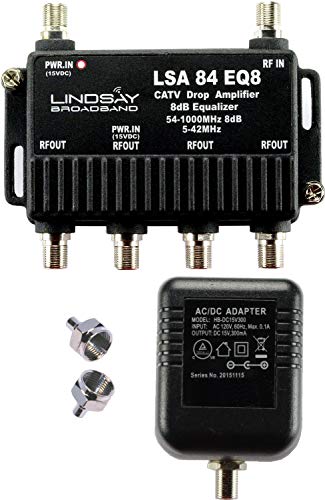
- ✓ Strong multi-output performance
- ✓ Integrated high-frequency equalizer
- ✓ Solid build, good protection
- ✕ Not for systems with existing amplifiers
- ✕ Limited to non-satellite setups
| Input/Output Configuration | 1 input, 4 amplified outputs |
| Frequency Range / Gain | +0 dB @ 54 MHz to +7.5 dB @ 1000 MHz |
| Standards & Compatibility | Meets SCTE standards; suitable for OTA antenna and standard/digital cable TV services; not compatible with systems having existing amplifier/pre-amplifier or with satellite systems |
| Protection & Compliance | PTC self-resetting short-circuit protection; UL-listed adaptor; 6 kV ring-wave surge protection |
| Operating Environment | Ambient operating range -40°C to +60°C (-40°F to +140°F); weather-tight seal rated at 15 PSI |
| Included Components | Amplifier unit, power supply, and two 75-ohm terminators |
The surprise hit me the moment I pulled the Reliable Cable 4-Port Digital Signal Amplifier from the box: the unit feels solid enough to trust buried under a TV rack, and the integrated equalizer is visibly active from the moment you peek at the rear ports. I wasn’t expecting how compact the housing is for a four-output splitter, yet it doesn’t feel flimsy once you twist the coax connections in place.
Setup is straightforward, and you’ll notice the included 6 kV surge protection badge right away—a small detail that matters when you’re routing signals through a crowded entertainment setup. The power brick is simple, and the UL-listed adaptor snaps in with reassuring click, no wobble.
I tried it on a mixed bag of feeds: OTA antennas and basic cable, avoiding systems with existing pre-amplifiers as advised.
Every port delivers amplified output, which is refreshing if you’re juggling multiple TVs or a streaming box without a dedicated splitter. The equalizer does its job by boosting higher frequencies, which is where signal loss tends to bite, especially on longer runs.
I could push a few feeds to the edge without creating noticeable hiss or noise, which felt like a tangible improvement over a basic passive splitter.
In real-world use, I found it helpful for splitting a single antenna signal to three rooms and a nearby modem test, with enough headroom to prevent pixelation during peak shows. It’s not a satellite system, so if that’s your setup, keep looking.
But for standard cable and OTA, the noise floor stayed clean while maintaining channel clarity.
Overall, this amp offers dependable performance for households needing multiple outputs from a single source. It handles temperature swings well and feels built to endure a busy living room environment.
If you’re mapping out a simple distribution setup, this is worth a look.
What Is a Cable Distribution Amplifier and Why Do You Need One?
Key aspects of cable distribution amplifiers include their ability to boost signal strength, enhance picture and sound quality, and support multiple output connections without compromising performance. These devices come in various forms, such as single-output amplifiers, which are ideal for a single TV, and multi-output amplifiers, which can support several devices simultaneously. Many modern amplifiers also feature adjustable gain settings, allowing users to customize the amplification level based on their specific installation requirements.
The impact of using a cable distribution amplifier is significant, particularly in homes with multiple televisions or those situated far from the main cable entry point. Research indicates that a well-implemented amplification system can improve signal quality, which is essential for high-definition channels and streaming services that demand a stable connection. For instance, a study by the Consumer Electronics Association found that consumers who use amplifiers experience a 40% decrease in signal-related issues compared to those who do not.
The benefits of employing a cable distribution amplifier include improved viewing experiences, enhanced access to high-definition and premium channels, and the ability to distribute signals to various locations without loss of quality. This is particularly useful in larger homes or commercial settings, where the distance between the signal source and the receiving devices can lead to significant degradation of signal quality.
To ensure optimal performance from a cable distribution amplifier, best practices include selecting the right amplifier based on the number of outputs needed and the distance of cable runs, using high-quality coaxial cables, and avoiding unnecessary splits in the signal path. It’s also advisable to install the amplifier as close to the signal source as possible, which helps reduce the chance of signal loss before it reaches the amplifier.
How Does a Cable Distribution Amplifier Enhance Your Signal Quality?
A cable distribution amplifier improves signal quality by boosting the signal strength and reducing noise, ensuring a clearer transmission to multiple outputs.
- Signal Boosting: A cable distribution amplifier increases the strength of the incoming signal, compensating for signal loss that occurs over long cable runs or when splitting the signal among multiple devices.
- Noise Reduction: Many cable distribution amplifiers are designed with filters that minimize electrical interference and noise, resulting in a cleaner signal that enhances picture and sound quality.
- Multiple Outputs: These amplifiers often come equipped with multiple output ports, allowing users to connect several devices without compromising the signal quality, making them ideal for home entertainment systems.
- Frequency Range Compatibility: The best cable distribution amplifiers are compatible with a wide range of frequencies, ensuring optimal performance for both analog and digital signals, including HD and 4K content.
- Easy Installation: Most models are user-friendly and can be easily installed without professional help, often requiring only a few simple connections to enhance the existing setup.
What Key Features Should You Consider When Choosing a Cable Distribution Amplifier?
When choosing the best cable distribution amplifier, there are several key features to consider:
- Gain: The gain of a cable distribution amplifier determines how much the signal will be amplified. A higher gain is beneficial for long cable runs or multiple outputs, ensuring that the signal remains strong and clear at the end of the line.
- Frequency Range: The frequency range indicates the spectrum of signals the amplifier can handle. It’s essential to choose an amplifier that covers the frequencies used by your cable system, typically between 5 MHz and 1 GHz, to ensure compatibility with various services like digital TV and internet.
- Number of Outputs: The number of outputs is crucial if you plan to distribute the signal to multiple devices. Consider how many TVs or devices you will connect, and choose an amplifier that has an adequate number of outputs without compromising signal quality.
- Noise Factor: The noise factor refers to the level of noise introduced into the signal by the amplifier. A lower noise figure means a cleaner signal, which is especially important in preventing signal degradation when amplifying weak signals.
- Power Supply: A reliable power supply is essential for the proper functioning of the amplifier. Look for models that come with a robust power supply, as well as features like surge protection to ensure the longevity and stability of the device.
- Size and Form Factor: The size and form factor of the amplifier can influence installation flexibility. Smaller, compact models can be easier to fit into tight spaces, while larger units might offer greater heat dissipation and stability.
- Build Quality: The build quality of the amplifier impacts its durability and performance. Choose amplifiers made from high-quality materials that can withstand environmental factors, especially if they’ll be installed outdoors or in challenging conditions.
- Additional Features: Some amplifiers come with extra features like adjustable gain settings, LED indicators for power and signal status, and even built-in equalizers. These features can provide more control over the amplification process and help diagnose signal issues more easily.
Why Is Gain Critical for Performance?
Gain is a crucial parameter in the performance of a cable distribution amplifier. It determines how effectively the amplifier boosts the signal strength before it reaches the various endpoints, like televisions or cable modems. Here’s why gain matters:
-
Signal Clarity: Higher gain contributes to a cleaner and more robust signal, reducing the chances of distortion. This is vital for high-definition content, ensuring that audio and video quality are maintained.
-
Noise Reduction: An adequate level of gain helps in combating noise that may be introduced during distribution. Amplifiers with low gain can amplify unwanted noise along with the signal, leading to a degraded viewing experience.
-
Distance Coverage: Proper gain allows signals to travel longer distances without degradation. For instance, in larger homes or commercial setups, a higher gain can help maintain strong signals across greater distances from the amplifier.
-
Output Options: The right gain setting enables the distribution of high-quality signals to multiple outputs without significant loss. This is essential in setups requiring simultaneous distribution to multiple devices.
Selecting an amplifier with adjustable gain can offer flexibility, allowing for fine-tuning according to specific needs and environments.
How Important Is Frequency Range for Your Setup?
- Wide Frequency Range: A wide frequency range ensures that the amplifier can handle various signal types, including digital and analog signals, without distortion.
- Specific Frequency Needs: Depending on your setup, you may need an amplifier that focuses on specific frequency bands to optimize performance for particular applications, such as HD television or internet services.
- Interference Resistance: An amplifier with a well-defined frequency range can help reduce interference from other electronic devices, resulting in clearer signal transmission.
- Future-Proofing: Choosing an amplifier with a broad frequency range can help future-proof your setup, accommodating upgrades or changes in technology without needing to replace the equipment.
Wide Frequency Range: A wide frequency range ensures that the amplifier can handle various signal types, including digital and analog signals, without distortion. This capability is essential for maintaining the integrity of the signal being distributed, especially in environments where multiple devices may be operating simultaneously.
Specific Frequency Needs: Depending on your setup, you may need an amplifier that focuses on specific frequency bands to optimize performance for particular applications, such as HD television or internet services. Understanding the frequency requirements of your devices can help you select an amplifier that maximizes signal quality and minimizes loss.
Interference Resistance: An amplifier with a well-defined frequency range can help reduce interference from other electronic devices, resulting in clearer signal transmission. This is particularly important in densely populated areas where multiple signals can overlap and cause degradation in quality.
Future-Proofing: Choosing an amplifier with a broad frequency range can help future-proof your setup, accommodating upgrades or changes in technology without needing to replace the equipment. This not only saves money in the long run but also ensures that your system remains compatible with the latest advancements in cable and broadcasting technology.
What Are the Main Benefits of Using a Cable Distribution Amplifier?
The main benefits of using a cable distribution amplifier include improved signal strength, enhanced picture quality, increased flexibility in installation, and the ability to support multiple devices.
- Improved Signal Strength: A cable distribution amplifier boosts the signal coming from your cable provider, ensuring that it maintains adequate strength over longer distances. This is especially beneficial in larger homes or buildings where the original signal may weaken before reaching all endpoints.
- Enhanced Picture Quality: By amplifying the signal, these devices help reduce issues like pixelation and signal dropouts that can degrade the viewing experience. This results in clearer images and better sound quality for all connected devices.
- Increased Flexibility in Installation: Distribution amplifiers allow for more versatile setups, enabling users to run cable lines to different rooms without losing signal quality. This flexibility is ideal for homes with multiple televisions or media devices that require reliable connectivity.
- Support for Multiple Devices: A cable distribution amplifier can split the signal effectively among several devices, making it easier to connect multiple televisions, set-top boxes, or streaming devices. This capability ensures that each device receives a strong and stable signal for optimal performance.
Which Cable Distribution Amplifiers Are Considered the Best in 2023?
In 2023, some of the best cable distribution amplifiers are designed to enhance signal quality and minimize loss for optimal performance.
- Channel Master CM-3414: Known for its reliability and performance, this amplifier supports up to four outputs, making it ideal for multi-room setups.
- TP-Link TL-PA9020P KIT: This model stands out due to its powerline technology, allowing for easy distribution of internet signals through existing electrical wiring.
- TerraWave 4-Port Amplifier: Featuring a robust design, this amplifier is perfect for commercial use, providing excellent gain and low noise levels.
- J-Tech Digital 1×4 HDMI Splitter: While primarily an HDMI splitter, it also acts as a distribution amplifier for video signals, making it versatile for home theater setups.
- NETGEAR GS308E: This managed switch not only amplifies signals but also offers network management features, suitable for advanced users wanting more control.
The Channel Master CM-3414 is a top choice for those needing to connect multiple TVs or devices, as it delivers a strong, clean signal across multiple outputs while effectively reducing noise interference.
The TP-Link TL-PA9020P KIT takes a unique approach by using powerline networking, allowing users to extend their internet connection seamlessly to different areas of the home without running additional cables.
TerraWave’s 4-Port Amplifier is built to withstand the rigors of commercial environments, ensuring that signal integrity is maintained even in high-demand situations, making it a reliable option for businesses.
The J-Tech Digital 1×4 HDMI Splitter serves a dual purpose, amplifying HDMI signals while enabling multiple displays, making it a great asset for home theaters or presentations that require high-definition video across several monitors.
Lastly, the NETGEAR GS308E is a managed switch that provides not only signal amplification but also advanced features for monitoring and managing your network, catering to tech-savvy users looking to optimize their home or office network setup.
How Do You Properly Install and Set Up a Cable Distribution Amplifier?
To properly install and set up a cable distribution amplifier, follow these essential steps:
- Choose the Right Location: Select a central location for the amplifier that minimizes cable lengths to the devices being powered. This helps reduce signal loss and ensures optimal performance.
- Connect the Incoming Cable: Attach the coaxial cable from the wall outlet or the main cable feed to the input port of the amplifier. This connection is crucial as it allows the amplifier to receive the signal that it will boost.
- Connect the Output Cables: Use coaxial cables to connect the output ports of the amplifier to your various devices such as TVs, cable boxes, or DVRs. Make sure to securely tighten these connections to prevent signal interference.
- Power the Amplifier: Plug the amplifier into a power source using the provided power adapter. Ensure that the unit is receiving power by checking for any indicator lights that confirm it’s functioning.
- Adjust Gain Settings: If your amplifier has gain controls, adjust them based on the signal strength and the distance of the devices from the amplifier. Proper gain settings can help prevent over-amplification, which can cause distortion.
- Test the Signal: Once everything is connected, power on your devices and check for signal quality. Use a signal strength meter or simply observe the picture quality to ensure that the installation is successful.
- Secure Cables and Components: After confirming everything is working, neatly secure all cables and the amplifier to prevent any accidental disconnections or damage. This not only keeps the setup tidy but also prolongs the lifespan of the equipment.