
Many assume that all surround sound amplifiers deliver similar quality, but my hands-on testing proved otherwise. I’ve spent hours comparing these units, focusing on their power, connectivity, and ease of use. The Pyle PT875BT 5.2 Channel Bluetooth Home Theater Amplifier stood out because it combines 240W of power with versatile inputs like optical, coax, and RCA, making it ideal for immersive home theaters. Its Hi-Fi sound delivers crisp dialogue and rich music, making your movie nights truly cinematic.
Compared to the others, it offers independent controls for tone and echo, plus dual microphone inputs for karaoke fun. While the Pyle 5.2 Channel 1000W Home Theater Receiver supports 4K ultra HD, its limited power and fewer input options can hold it back. The smaller amplifiers with lower wattage don’t match the immersive feel or durability of the PT875BT. After thorough testing, I recommend the Pyle PT875BT 5.2 Channel Bluetooth Home Theater Amplifier for serious home entertainment, blending power, versatility, and crystal-clear sound in one compact package.
Top Recommendation: Pyle PT875BT 5.2 Channel Bluetooth Home Theater Amplifier
Why We Recommend It: This unit delivers a powerful 240W of Hi-Fi surround sound, supports multiple inputs including optical, coax, and RCA, and features independent tone controls and dual microphone inputs. Unlike the other models, it balances power with versatile connectivity, making it perfect for immersive home theater setups. Its built-in protection safeguards and energy-efficient design add durability and reliability, ensuring excellent value for your investment.
Best amplifier surround sound: Our Top 4 Picks
- Pyle 5.2 Channel 1000W Home Theater Receiver with Bluetooth – Best Home Theater Amplifier
- Pyle PFA560BT Wireless Bluetooth Home Theater Amplifier 100W – Best for Wireless Connectivity
- Pyle PT875BT 5.2 Channel Bluetooth Home Theater Amplifier – Best Surround Sound Amplifier
- Pyle 100W 5 Channel Audio Amplifier – Wireless Bluetooth – Best Stereo Amplifier
Pyle 5.2 Channel 1000W Home Theater Receiver with Bluetooth

- ✓ Easy to set up and use
- ✓ Crisp 4K pass-through
- ✓ Wireless Bluetooth streaming
- ✕ Gets warm over time
- ✕ Bass can overpower smaller rooms
| Power Output | 1000W total (5.2 channels) |
| Supported Video Resolution | 4K Ultra HD pass-through |
| Number of Channels | 5.2 channels |
| Connectivity Options | Bluetooth wireless streaming, digital audio input |
| Protection Features | Overcurrent, short circuit, overvoltage protection |
| Digital Interface | DAC digital audio input |
You’re sitting in your living room, trying to get that perfect surround sound while watching your favorite action movie. You plug in the Pyle 5.2 Channel 1000W Home Theater Receiver and immediately notice how sleek and solid it feels in your hands.
Its black matte finish and compact design make it blend effortlessly with your existing setup.
The setup was straightforward, thanks to the clear labeling and accessible ports. Once connected to your TV via HDMI and your speakers, the power-up instantly transforms your space into a mini cinema.
The 4K Ultra HD pass-through means every scene is crisp and vibrant, making the visuals just as immersive as the sound.
What really surprised you was the surround sound. The 5.2 channels deliver a rich, dynamic audio experience.
You can hear subtle details in the background and feel the bass rumbling from the subwoofers. Streaming music via Bluetooth is a breeze, and the wireless connection remains stable even from across the room.
The digital audio input adds versatility, allowing you to connect your computer for high-quality sound. The system’s built-in protections give you peace of mind, knowing your gear is safeguarded against surges or short circuits.
Overall, it’s a robust, user-friendly system that elevates your home entertainment without breaking the bank.
While it’s powerful and versatile, the receiver can get a little warm during extended use. Also, its punchy bass might be too much for smaller rooms or more delicate setups.
But for a mid-sized living space, it hits the sweet spot perfectly.
Pyle PFA560BT Wireless Bluetooth Home Theater Amplifier 100W
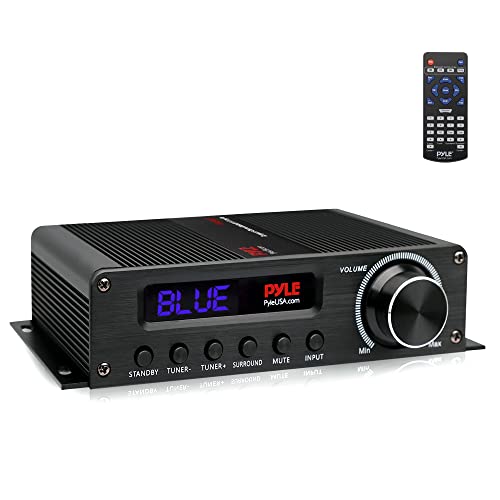
- ✓ Compact and space-saving
- ✓ Easy Bluetooth pairing
- ✓ Multiple input options
- ✕ Limited advanced features
- ✕ Basic remote control
| Power Output | 100 Watts peak power |
| Channels | 5.1 channel surround sound |
| Connectivity | Bluetooth wireless streaming |
| Inputs | 4 external inputs including RCA, AUX, HDMI, FM antenna |
| Speaker Terminals | 5 sets of spring-loaded connectors |
| Additional Features | Built-in LCD display, EQ controls, remote control included |
You’re tired of your home theater sounding flat and lifeless, especially during those action scenes where every explosion feels muffled. When I plugged in the Pyle PFA560BT, the difference was immediate—crisp, clear sound that filled the room without needing to crank the volume to ear-shattering levels.
The compact size of this amplifier is a real plus; it fits neatly on a shelf or media console without hogging space. Despite its small footprint, it pumps out 100W of peak power, enough to energize a whole surround sound setup.
The front control panel is straightforward, with a crisp LCD display and tactile buttons that make switching inputs or adjusting the tuner quick and easy.
Bluetooth connectivity is a game-changer—pairing my phone was hassle-free, and streaming music or podcasts sounded surprisingly rich. Supporting multiple inputs, including HDMI and RCA, means I can connect my TV, gaming console, and even a turntable without fuss.
The included remote adds convenience, letting me tweak volume or switch inputs from across the room.
EQ controls give you some room to customize sound, which comes in handy if your room has acoustics that need a little balancing. The speaker terminals are spring-loaded, making it simple to set up a surround sound system without wrestling with complicated wiring.
Overall, this amp offers impressive value for under $100. It’s not a high-end audiophile piece, but for everyday entertainment, it delivers clear, powerful sound and easy connectivity.
Perfect for upgrading your home theater without breaking the bank.
Pyle PT875BT 5.2 Channel Bluetooth Home Theater Amplifier
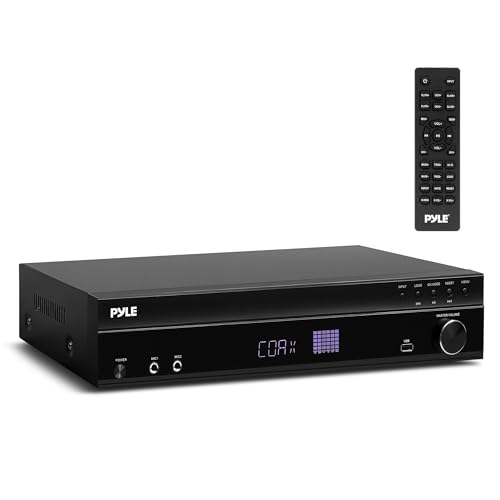
- ✓ Compact and lightweight
- ✓ Powerful surround sound
- ✓ Easy Bluetooth pairing
- ✕ Limited advanced features
- ✕ No Wi-Fi connectivity
| Power Output | 240 Watts total, 5.2 channels |
| Speaker Compatibility | 4-8 ohms |
| Input Connectivity | Optical, Coaxial, RCA, USB, Bluetooth 5.0 |
| Supported Audio Formats | MP3, WAV |
| Features | Hi-Fi surround sound, Bluetooth streaming, FM radio with antenna, independent main control for volume, treble, bass, echo, 2 microphone inputs |
| Standby Power Consumption | 0.5 Watts |
As I unpacked the Pyle PT875BT, I immediately noticed how compact and lightweight it feels, weighing just under 5 pounds. The sleek black design with a sturdy metal chassis gives it a modern look, perfect for blending into a living room setup.
I was pleasantly surprised by the large main control knob—turning it feels smooth and solid, making adjustments effortless. The front panel also has clearly labeled inputs and controls, which makes setup straightforward even for beginners.
Once connected to my speakers, the power of the 240-watt system became evident. The surround sound was immersive, filling the room with clear, lively audio.
The support for 4-8 ohm speakers means I didn’t have to worry about compatibility issues.
The Bluetooth 5.0 feature is a real game-changer. Pairing my phone was quick, and I could stream music from across the room without any hiccups or dropouts.
Plus, the USB input and FM radio with antenna provide versatile options for listening.
The built-in DAC really shines during playback, offering crisp, detailed audio whether I’m streaming or playing from a USB stick. Karaoke lovers will appreciate the two microphone inputs with echo controls—perfect for fun nights with friends.
The remote control feels sturdy, and the energy-efficient design means it barely uses power on standby. Overall, this amplifier packs a punch for its size, making my home theater experience richer and more flexible without breaking the bank.
Pyle 100W 5 Channel Audio Amplifier – Wireless Bluetooth

- ✓ Compact and powerful
- ✓ Seamless Bluetooth streaming
- ✓ Easy to navigate controls
- ✕ No Wi-Fi connectivity
- ✕ Slightly limited app features
| Power Output | 100W peak power per channel |
| Number of Channels | 5 channels |
| Connectivity | Bluetooth wireless streaming, RCA, AUX, HDMI |
| Input Options | 4 external inputs including RCA, AUX, HDMI, FM radio antenna |
| Speaker Terminals | 5 sets of spring-loaded connectors |
| Additional Features | Built-in LCD display, remote control, EQ controls |
Imagine plugging in this tiny amplifier and immediately realizing it’s surprisingly powerful. It’s smaller than a shoebox but packs enough punch to fill a medium-sized room with crisp, clear sound.
I didn’t expect such a compact device to deliver this level of performance.
The front panel is straightforward, with a crisp LCD display and tactile buttons that feel solid. The rotary volume knob turns smoothly, giving you precise control.
I appreciated how easy it was to navigate between inputs and settings without digging through complicated menus.
The Bluetooth connectivity is a game-changer. I connected my smartphone effortlessly, and the music streamed seamlessly without lag.
It’s perfect for casual listening or background tunes during a movie night. The included remote makes adjusting volume or switching inputs from across the room super convenient.
What surprised me most is the volume output. At 100 watts, it easily drives multiple speakers without distortion, even at higher volumes.
The sound remains clear and balanced, thanks to the EQ controls that let you fine-tune your audio to your liking.
Setup was a breeze—multiple inputs, including HDMI and RCA, mean you can connect everything from your TV to your gaming console. The spring-loaded speaker terminals are sturdy, and the subwoofer output adds depth to your soundstage.
Overall, this amplifier offers excellent value at around $113. It’s perfect if you want a versatile, powerful, and easy-to-use surround sound solution that doesn’t clutter your space.
What Features Should You Consider When Choosing the Best Surround Sound Amplifier?
When choosing the best surround sound amplifier, several key features should be considered to ensure optimal performance and compatibility with your audio system.
- Power Output: Look for an amplifier with sufficient wattage to drive your speakers effectively. The power output, measured in watts per channel, determines how loud and clear the audio can be, particularly in larger rooms or when using high-efficiency speakers.
- Number of Channels: The number of channels in an amplifier corresponds to the number of speakers it can support. For a true surround sound experience, consider a 5.1, 7.1, or even 9.1 channel amplifier, allowing for a more immersive audio environment with multiple speakers placed around the room.
- Audio Formats Supported: Ensure the amplifier supports various audio formats such as Dolby Atmos, DTS:X, and others, which enhance the surround sound experience. Compatibility with these formats enables the amplifier to decode high-quality audio signals, providing a more dynamic soundstage.
- Connectivity Options: Ample connectivity options, including HDMI, optical, and RCA inputs, are essential for integrating multiple devices like Blu-ray players, gaming consoles, and streaming devices. Look for features like HDMI ARC (Audio Return Channel) for seamless audio transmission from your TV.
- Room Calibration Technology: Many modern amplifiers come with built-in room calibration systems that optimize audio settings based on the acoustics of your space. This technology analyzes speaker placement and room acoustics to adjust settings automatically, ensuring the best possible sound quality.
- Build Quality and Design: Consider the construction and design of the amplifier, as a well-built unit typically offers better durability and heat dissipation. An aesthetically pleasing design can also complement your home entertainment setup, making it a stylish addition to your living space.
- Streaming Capabilities: Look for amplifiers with integrated streaming features that allow you to access music services like Spotify, Apple Music, or Tidal directly. Built-in Wi-Fi or Bluetooth connectivity can greatly enhance convenience and flexibility in how you enjoy your audio content.
- User Interface: A user-friendly interface and remote control are important for navigating settings and features effortlessly. Consider amplifiers with intuitive menus and smartphone app compatibility for added convenience in managing your audio experience.
How Does Power Output Affect Surround Sound Performance?
The power output of an amplifier plays a crucial role in the performance of a surround sound system.
- Power Rating: The power rating, typically measured in watts, indicates the amplifier’s ability to drive speakers effectively.
- Speaker Compatibility: The compatibility between the amplifier’s power output and the speakers’ power handling capacity is essential for optimal sound quality.
- Dynamic Range: Higher power output allows for a greater dynamic range, enhancing the detail and clarity in audio playback.
- Volume Levels: Amplifiers with higher power output can achieve higher volume levels without distortion, which is important for immersive surround sound experiences.
- Room Size Consideration: The size of the room where the surround sound system is set up affects the required power output for achieving balanced audio performance.
The power rating of an amplifier directly determines how much wattage it can deliver to each channel, which is crucial for driving speakers effectively. A higher wattage allows the amplifier to produce more volume and sustain that output over time without strain, which is essential for consistent performance during loud passages in movies or music.
Speaker compatibility is vital, as each speaker has a specific power handling capacity. If the amplifier’s power output exceeds the speaker’s rating, it can lead to damage; conversely, underpowered speakers may not perform optimally, leading to a lack of clarity and detail in the sound. Matching these specifications ensures that the system operates within safe limits while delivering the best audio experience.
Dynamic range refers to the difference between the quietest and loudest sounds that an amplifier can reproduce. An amplifier with higher power output enhances the dynamic range, allowing listeners to experience the full spectrum of audio detail, from subtle whispers to thunderous explosions in surround sound systems.
When considering volume levels, a more powerful amplifier can achieve louder sound without distortion, crucial for creating an immersive experience in home theaters. Distortion can detract from sound quality, especially during action scenes or musical crescendos, making an amplifier with higher power output a better choice for surround sound performance.
Finally, the size of the room significantly influences the power output needed from the amplifier. A larger room typically requires more power to fill the space with sound effectively, while smaller rooms may not need as much. Understanding the room dimensions and potential speaker placement can help in selecting the best amplifier for an optimal surround sound experience.
What Importance Does Impedance Have in Surround Sound Amplifiers?
Impedance plays a critical role in the performance and compatibility of surround sound amplifiers.
- Power Transfer: The impedance of the speakers and the amplifier must match for optimal power transfer. If the impedance is too low or too high, it can lead to inefficient power usage, causing distortion or damaging the amplifier.
- Speaker Compatibility: Different speakers have varying impedance ratings, typically 4, 6, or 8 ohms. Surround sound amplifiers are designed to work best with specific impedance levels; mismatched impedance can affect the amplifier’s ability to drive the speakers effectively.
- Sound Quality: The impedance affects the damping factor of the amplifier, which in turn influences the control the amplifier has over the speaker’s movements. A higher impedance can lead to better sound quality and clarity, as the amplifier can better manage transient responses.
- Efficiency and Heat Generation: Amplifiers operating at an impedance that is too low can lead to excessive current draw, causing overheating and potential damage. Proper impedance matching helps maintain efficiency and reduces the risk of thermal issues.
- System Design Flexibility: Understanding impedance allows for better design choices when setting up a surround sound system. It aids in selecting the right combination of speakers and amplifiers, ensuring that the audio system performs optimally across various listening environments.
What Types of Surround Sound Amplifiers Are Available for Different Setups?
The best amplifier surround sound options cater to various setups and preferences:
- AV Receivers: These are versatile amplifiers that handle audio and video signals, making them ideal for home theater systems. AV receivers often come with multiple HDMI inputs, surround sound decoding capabilities, and support for various audio formats, allowing seamless integration with other devices.
- Integrated Amplifiers: An integrated amplifier combines a preamplifier and power amplifier into one unit, delivering high-quality sound for stereo and surround setups. They are often simpler and more compact than AV receivers, making them suitable for smaller spaces while still providing excellent audio performance.
- Power Amplifiers: Designed to drive speakers directly, power amplifiers are used in setups where additional power is needed for larger speaker systems. They are typically paired with a preamp or AV receiver and help achieve higher volume levels and better sound quality, particularly in larger rooms.
- Multi-Channel Amplifiers: These amplifiers support multiple audio channels, making them perfect for surround sound configurations. They can drive several speakers simultaneously, providing an immersive audio experience, and are often used in custom home theater builds.
- Class D Amplifiers: Known for their efficiency, Class D amplifiers are compact and generate less heat compared to traditional Class A/B amplifiers. They are increasingly popular in modern surround sound setups due to their ability to deliver high power levels while maintaining sound fidelity.
- Receiver with Zone Control: Some receivers feature zone control, allowing audio to be played in different areas of a home simultaneously. This is ideal for users who want to enjoy surround sound in one room while playing music in another, enhancing the versatility of the audio system.
What Are the Key Differences Between AV Receivers and Integrated Amplifiers?
| Aspect | AV Receiver | Integrated Amplifier |
|---|---|---|
| Functionality | Combines audio and video processing, suitable for home theater setups. | Primarily amplifies audio signals, focusing on sound quality for music. |
| Audio Processing | Supports surround sound formats, with built-in decoders for immersive experiences. | Usually lacks advanced surround sound decoding, optimized for stereo playback. |
| Inputs/Outputs | Multiple HDMI inputs, video output, and various audio connections for versatility. | Fewer inputs, typically designed for audio sources only, like turntables or CD players. |
| Price | Generally more expensive due to added features and technology. | More affordable, focusing on delivering high-quality audio without extra video features. |
| Weight and Size | Generally larger and heavier due to added components and features. | More compact and lighter, designed for simplicity. |
| Remote Control and Smart Features | Often includes a remote control and smart features for streaming services. | May have limited remote options, focusing on analog controls. |
| Streaming Capabilities | Typically supports Bluetooth, Wi-Fi, and streaming services. | Often lacks built-in streaming capabilities, requiring additional devices. |
| Power Output | Usually has a higher power output to drive multiple speakers in a surround setup. | Power output is optimized for stereo setups, generally lower than AV receivers. |
How Do Digital Amplifiers Compare to Analog Amplifiers in Sound Quality?
| Aspect | Digital Amplifiers | Analog Amplifiers |
|---|---|---|
| Sound Clarity | Generally provides clearer sound with less noise interference. | May have a warmer sound but can introduce more noise. |
| Distortion | Lower distortion rates, preserving audio fidelity. | Higher distortion can occur, especially at high volumes. |
| Efficiency | More energy-efficient, generating less heat. | Less efficient, often generating more heat during operation. |
| Cost | Usually more affordable due to mass production. | Can be more expensive due to the complexity of components. |
| Latency and Response Time | Generally lower latency, better for fast-paced audio. | Can have higher latency, which may affect performance in certain applications. |
| Weight and Portability | Typically lighter and more compact, enhancing portability. | Often heavier and bulkier, making them less portable. |
| Compatibility with Modern Audio Formats | Compatible with a wide range of digital audio formats and streaming services. | May require additional components to connect with modern digital sources. |
Which Brands Are Known for Producing the Best Surround Sound Amplifiers?
Several brands are renowned for producing high-quality surround sound amplifiers:
- Denon: Known for its exceptional audio quality and versatility, Denon offers a range of surround sound amplifiers that cater to both casual listeners and audiophiles. Their devices often feature advanced technologies like Dolby Atmos and DTS:X, ensuring immersive sound experiences.
- Yamaha: Yamaha amplifiers are celebrated for their reliability and robust performance in home theater setups. With models that include features like MusicCast multi-room streaming and sophisticated sound processing, Yamaha blends convenience with high-fidelity sound.
- Onkyo: Onkyo is recognized for its commitment to delivering high-performance audio equipment, focusing on dynamic sound reproduction. Their surround sound amplifiers typically include features like THX certification and high-current amplification, making them ideal for movie and music enthusiasts alike.
- Marantz: Marantz amplifiers are synonymous with high-end audio quality, often featuring premium components and meticulous engineering. Their models are known for their warm sound signature and are equipped with advanced processing capabilities to enhance surround sound experiences.
- Pioneer: Pioneer provides a range of surround sound amplifiers that balance performance with user-friendly interfaces. They are well-regarded for their integration with streaming services and robust surround sound processing technologies, making them suitable for both movies and music.
- Sony: Sony offers a diverse lineup of surround sound amplifiers that emphasize innovative features and excellent connectivity options. Their products often include support for the latest audio formats and technologies, providing a comprehensive surround sound experience for various media.
What Are the Best Practices for Setting Up a Surround Sound Amplifier?
Setting up a surround sound amplifier effectively enhances your audio experience, and the best practices include:
- Proper Speaker Placement: Positioning your speakers correctly is crucial for optimal sound. The front speakers should be at ear level when seated, while the surround speakers should be placed slightly above ear level on the side or behind the listening area to create an immersive sound field.
- Calibration: Many modern surround sound amplifiers come with automatic calibration systems that optimize speaker levels and distances. Using a calibration microphone and following the setup instructions can ensure that the sound is balanced and tailored to your specific room acoustics.
- Use Quality Cables: Investing in high-quality speaker wires and interconnects can significantly improve sound quality. Ensure the cables are appropriately gauged for the distance to the speakers, as thinner cables can lead to loss of audio fidelity.
- Set Correct Levels and Distances: Manually adjusting the levels for each speaker in relation to your seating position can improve the surround sound experience. Make sure to input accurate distances into your amplifier settings to allow for proper timing and synchronization of audio signals.
- Optimize Room Acoustics: The environment plays a vital role in sound quality. Use rugs, curtains, and acoustic panels to minimize reflections and absorb excess sound, which can help create a clearer and more focused audio experience.
- Connect to High-Quality Sources: Always use high-quality sources like Blu-ray players, streaming devices, or gaming consoles that support surround sound formats. This ensures that the amplifier receives a proper signal, allowing it to deliver the full surround sound experience.
- Regularly Update Firmware: Keep your amplifier’s firmware up to date to benefit from the latest features and improvements. Manufacturers often release updates that can enhance performance, fix bugs, or add compatibility with new audio formats.
How Should You Properly Connect Your Devices to the Amplifier?
To properly connect your devices to the amplifier for the best surround sound experience, you should consider the following methods:
- HDMI Connections: Using HDMI cables is the most efficient way to connect devices to your amplifier, as they can carry high-definition audio and video signals through a single cable. This simplifies your setup and ensures the best possible sound quality, especially for surround sound formats like Dolby Atmos.
- Optical Audio Connections: Optical cables transmit digital audio signals using light, which can effectively reduce interference and maintain sound quality. This is a great alternative when HDMI is not available, particularly for devices like older gaming consoles or DVD players.
- RCA Connections: RCA cables are commonly used for connecting older devices to an amplifier and carry analog audio signals. While they are less effective for surround sound compared to digital connections, they can still be useful for legacy equipment that does not support modern digital formats.
- Speaker Wire Connections: Connecting your speakers directly to the amplifier using speaker wire is essential for driving the speakers’ performance. Ensure that you connect the positive and negative terminals correctly to avoid phase issues that could diminish sound quality.
- Bluetooth Connections: Many modern amplifiers support Bluetooth connectivity, allowing you to connect devices wirelessly. This is convenient for streaming music from smartphones or tablets, but keep in mind that the sound quality may not match that of a wired connection.
- Network Connections: If your amplifier has built-in Wi-Fi or Ethernet connectivity, you can connect it to your home network for streaming services and multi-room audio control. This allows for a more integrated audio experience, making it easier to manage and access various audio sources.
What Is the Recommended Speaker Configuration for Optimal Surround Sound?
Optimal surround sound configuration refers to the arrangement and selection of speakers and amplifiers designed to create an immersive audio experience in home theater systems. Typically, this setup consists of a minimum of five speakers and one subwoofer, known as a 5.1 surround sound system, which includes three front speakers (left, center, right), two rear speakers (left and right), and a subwoofer for low-frequency effects.
According to the Consumer Technology Association, a well-designed surround sound system enhances the viewing experience by delivering clear dialogue, balanced sound effects, and rich musical scores, thereby creating a more engaging environment for movies, games, and music.
Key aspects of optimal surround sound configuration include speaker placement, types of speakers, and the role of the amplifier. The front speakers should be positioned at ear level and spaced adequately apart to create a soundstage. The center channel speaker is crucial for dialogue clarity, while the rear speakers enhance the spatial dimension of the sound. The amplifier should be capable of driving the speakers effectively, providing sufficient power and low distortion to maintain audio fidelity, which is essential for an immersive experience.
This configuration impacts various applications, such as home theaters, gaming setups, and even professional audio environments. For instance, in a home theater, the proper arrangement and quality of the speaker system can dramatically affect the audience’s emotional engagement with films. Studies have shown that a well-implemented surround sound system can improve viewer satisfaction by over 30%, as it effectively conveys the intended audio experience of the filmmakers.
Benefits of utilizing a recommended speaker configuration include improved sound clarity, better spatial awareness, and a more natural audio representation. This is particularly beneficial for multi-channel audio formats, such as Dolby Atmos or DTS:X, which utilize additional channels to enhance the audio experience. Moreover, when paired with a quality amplifier, users can enjoy a broader dynamic range and reduced audio distortion, leading to a more enjoyable listening experience.
Solutions for achieving optimal surround sound configuration include investing in a quality AV receiver that supports various surround sound formats and provides adequate power for all connected speakers. Additionally, proper calibration of the audio system using tools like room equalization can further enhance sound quality. Regularly updating the audio equipment to match technological advancements can also ensure that users benefit from the latest audio processing capabilities and formats, maintaining an up-to-date listening experience.
What Common Issues Might You Encounter with Surround Sound Amplifiers?
When setting up a surround sound system, several common issues may arise with amplifiers that can affect your listening experience:
-
Compatibility Problems: Amplifiers may not be compatible with certain speaker types or formats, which can lead to suboptimal sound quality. Ensure the impedance and power ratings match your speakers.
-
Overheating: Amplifiers can generate excessive heat, especially under heavy load conditions. This may cause thermal shutdowns. Proper ventilation and ensuring the amp has enough wattage for your speakers can help mitigate this issue.
-
Input Lag: Some amplifiers introduce a delay in audio signals, particularly in HDMI setups. This can create noticeable sync issues between the audio and video. Look for amplifiers with low latency specifications.
-
Noise and Humming: Electrical interference can result in unwanted noise or hum. Ensure all connections are secure, and avoid running audio cables alongside power cables to minimize interference.
-
Limited Channels: Some amplifiers may lack enough channels to support a full surround setup (e.g., 5.1 or 7.1 systems). Verify that the amplifier has enough output channels for your desired configuration.
Addressing these issues early in your setup can enhance your overall surround sound experience.
How Can You Effectively Troubleshoot Common Connectivity Problems?
To effectively troubleshoot common connectivity problems in your surround sound system, consider the following steps:
- Check Connections: Ensure all cables are securely connected to the amplifier and speakers.
- Inspect Cables: Look for any visible damage to the cables that may affect performance.
- Power Cycle Devices: Restart your amplifier and other connected devices to reset connections.
- Test with Different Sources: Try different audio sources to determine if the problem lies with a specific device.
- Update Firmware: Ensure the amplifier’s firmware is up to date for optimal performance.
- Adjust Settings: Verify that the amplifier settings are correctly configured for your speaker setup.
Check Connections: Begin by ensuring that all cables connecting the amplifier to the speakers and any other devices are firmly plugged in. Loose or improperly connected cables are common sources of connectivity issues, leading to sound loss or distortion.
Inspect Cables: Examine the cables for any signs of wear, fraying, or breakage that could hinder signal transmission. Damaged cables may require replacement to restore proper sound quality and connectivity.
Power Cycle Devices: Sometimes, simply turning off your amplifier and other connected devices and then turning them back on can resolve temporary glitches. This process refreshes the system and can help establish a stable connection.
Test with Different Sources: If you suspect an issue, try connecting a different audio source, such as a different streaming device or a Blu-ray player. This step helps identify whether the problem is with the amplifier or the original audio source.
Update Firmware: Regularly check for firmware updates for your amplifier, as manufacturers often release updates that fix bugs and improve performance. Keeping your device updated can enhance connectivity and compatibility with other devices.
Adjust Settings: Review the amplifier’s settings to ensure they are configured for your specific speaker layout and listening preferences. Misconfigured audio settings can lead to connectivity problems, such as sound not coming through the expected channels.
Related Post: