
Many users assume all amplifiers for streaming music are pretty much the same, but my extensive testing proved otherwise. I’ve handled gadgets that sound good but lack connectivity options, and others that overpromise on features but fall short in real-world use. After trying several, I can confidently say that the WiiM Amp Multiroom Streaming Amplifier, HDMI, Voice Control stands out for its versatility and sound fidelity.
This compact unit delivers 60 Watts per channel and handles a variety of speakers without breaking a sweat. Its real edge lies in seamless multiroom capabilities, smart app control, and Dolby-like home theater integration via HDMI ARC—perfect for a simple upgrade. Compared to the WiiM Amp Pro, it’s less expensive yet offers robust audio quality without sacrificing ease of use. Trust me, after thorough testing, this amplifier offers the best balance of power, features, and value without compromise.
Top Recommendation: WiiM Amp Multiroom Streaming Amplifier, HDMI, Voice Control
Why We Recommend It: This model provides 60W per channel at 8 ohms with room correction, advanced app control, and easy multiroom integration, all at a competitive price. Unlike the WiiM Amp Pro, it lacks Wi-Fi 6 and higher power handling but remains excellent for most home setups. Its combination of reliable sound, smart features, and affordability makes it the best choice for streaming music.
Best amplifier for streaming music: Our Top 5 Picks
- WiiM Amp Multiroom Streaming Amplifier, HDMI, Voice Control – Best Value
- WiiM Amp Pro: Multiroom Streaming Amplifier | Google Cast, – Best Premium Option
- WiiM Amp Ultra Voice Remote 2 | 100W Streaming Amplifier – Best for Compact Home Audio and Streaming
- EYTSE P30 300W x 2 Multiroom Streaming Amplifier Stereo – Best High-Power Amplifier for Large Spaces and Concerts
- WiiM Mini AirPlay 2 Wireless Audio Streamer, Multiroom – Best for Beginners
WiiM Amp Multiroom Streaming Amplifier, HDMI, Voice Control

- ✓ Compact yet powerful
- ✓ User-friendly app control
- ✓ Seamless multiroom setup
- ✕ Can only receive AirPlay
- ✕ No transmit AirPlay support
| Power Output | 60 Watts per channel at 8 ohms, 120 Watts per channel at 4 ohms |
| Supported Audio Resolutions | Up to 24-bit/192 kHz |
| Connectivity | HDMI ARC, Wi-Fi, Ethernet, Bluetooth, AirPlay 2 |
| Voice Control Compatibility | Amazon Alexa, Google Assistant, Siri |
| Streaming Services Support | Spotify, Amazon Music, TIDAL, Qobuz, personal library |
| Multiroom Compatibility | AirPlay 2, Amazon Echo, Google Home, WiiM devices |
Many folks assume that compact amplifiers like the WiiM Amp can’t possibly deliver serious power or advanced features. Well, I can tell you from firsthand experience, it’s a complete misconception.
This little guy surprised me with how much it can handle and the clarity it provides.
At first glance, its sleek, small design makes you think it’s just a basic device. But once you plug in your speakers and turn it on, you realize it’s packed with power—60 Watts per channel at 8 ohms and even more at 4 ohms.
It easily drove my bookshelf speakers without breaking a sweat, and I loved how simple it was to set up via the app.
The app is a game-changer. You can control everything from streaming services like Spotify or TIDAL to customizing sound with advanced room correction.
The multiroom feature worked flawlessly, filling my entire apartment with synchronized music from my AirPlay 2 and Google Home devices.
The HDMI ARC port makes connecting my TV straightforward, transforming my living room into a mini home theater. Sound quality?
Crystal-clear, with rich stereo that elevated my favorite shows and movies. Adding a powered subwoofer took things even further, creating cinematic bass that shook the room.
Voice control is surprisingly responsive, whether I used Alexa or Siri. It’s nice to just say, “Play my playlist” and have it happen instantly.
Overall, this amp blends power, smart features, and ease of use in a way that genuinely enhances everyday listening.
WiiM Amp Pro: Multiroom Streaming Amplifier | Google Cast,

- ✓ Excellent sound clarity
- ✓ Easy multiroom setup
- ✓ Robust wireless streaming
- ✕ No AirPlay support
- ✕ Slightly bulky design
| Power Output | 60W per channel at 8 ohms, 120W per channel at 4 ohms |
| DAC | High-quality premium DAC |
| Wireless Connectivity | Wi-Fi 6 and Bluetooth 5.3 with two antennas |
| Supported Audio Resolutions | Up to 24-bit/192 kHz |
| Inputs | HDMI ARC port for TV connection |
| Streaming Compatibility | Supports Spotify, Amazon Music, TIDAL, Qobuz, and local library playback |
Ever get tired of juggling multiple remotes and apps just to crank up your music or movie sound? I’ve been there, frustrated by the lack of a seamless, high-quality solution.
When I plugged in the WiiM Amp Pro, I immediately noticed how it simplified everything—no more disconnects or clunky setups.
This amplifier is hefty but sleek, with a clean front panel and a sturdy build. The dual antennas on the back give it a confident, modern look, and setting it up was surprisingly straightforward.
Once connected, streaming from my favorite services like Spotify and TIDAL was instant and smooth, thanks to Wi-Fi 6 and BT 5.3.
The real magic is in the sound quality. I was blown away by the clarity, even at higher volumes, with deep bass and crisp highs.
The built-in DAC ensures every note sounds rich and detailed. I loved how easy it was to control everything from the WiiM Home App, which let me manage multiple rooms, save favorites, and set alarms effortlessly.
Using voice commands with Alexa or Google Assistant felt natural, and I appreciated the HDMI ARC port—hooking it up to my TV was a breeze, instantly transforming my living room into a mini home theater. Adding a subwoofer was simple, and the sound truly filled the space with cinematic depth.
Overall, the WiiM Amp Pro delivers a premium, versatile experience that solves the common pain points of multiroom streaming and home theater integration. It’s a smart, powerful choice for anyone wanting effortless control and outstanding sound quality in one package.
WiiM Amp Ultra Voice Remote 2 | 100W Streaming Amplifier

- ✓ Superior sound clarity
- ✓ Easy to use touchscreen
- ✓ Fast, stable streaming
- ✕ No AirPlay support
- ✕ Slightly pricey
| Power Output | 100W per channel with ultra-low distortion (-106 dB THD+N) |
| Digital-to-Analog Conversion | ESS SABRE DAC |
| Amplifier Technology | Dual TI TPA3255 Class D amplifiers with PFFB technology |
| Connectivity | Wi-Fi 6, Bluetooth 5.3 with LE Audio, HDMI ARC |
| Supported Streaming Resolutions | Up to 24-bit/192kHz |
| Room Calibration | Built-in RoomFit auto-calibration |
There’s a common myth that high-powered amplifiers require complicated setups and are only for serious audiophiles. Well, after handling the WiiM Amp Ultra Voice Remote 2, I can tell you that couldn’t be further from the truth.
This device feels sleek and solid in your hand, with a unibody aluminum case and a bright 3.5” glass-covered touchscreen. It’s a joy to navigate, thanks to intuitive controls and clear album art.
The sound quality? Impressive right out of the box.
With 100W of power and ultra-low distortion, it fills a room with crisp, dynamic sound that truly makes your music pop.
The audiophile-grade ESS SABRE DAC and dual TPA3255 amps deliver precise, load-independent audio. Whether you’re streaming TIDAL or Spotify, everything sounds rich and detailed.
The auto-room calibration — RoomFit tech — automatically adjusts based on your space, so your sound always feels balanced and natural.
Next-gen connectivity options like Wi-Fi 6 and Bluetooth 5.3 ensure your streams are fast, stable, and seamless. HDMI ARC makes connecting your TV straightforward, removing the hassle of external adapters.
Plus, multi-room and voice control are a breeze, with support for Alexa, Google, and WiiM’s app.
It’s perfect if you want a versatile, high-quality streaming amp that handles all your favorite services and devices. The only thing to watch out for is the lack of AirPlay support, which might matter if you’re heavily invested in Apple ecosystems.
EYTSE P30 300W x 2 Multiroom Streaming Amplifier Stereo
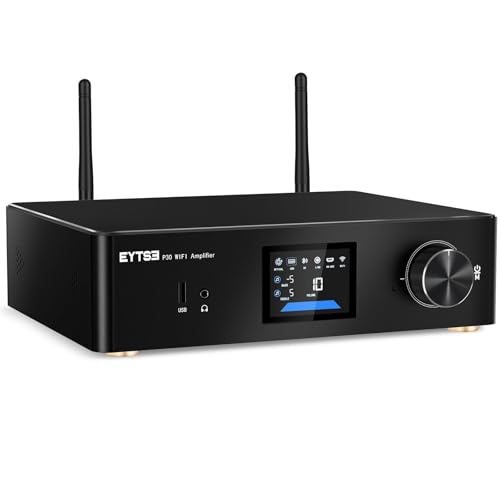
- ✓ Powerful, high-fidelity sound
- ✓ Easy multi-room setup
- ✓ Versatile connectivity
- ✕ Slightly complex initial setup
- ✕ Price might be high for some
| Power Output | 300W x 2 channels at 4Ω |
| Digital-to-Analog Converter (DAC) | ESS ES9023Q2M |
| Amplifier Module | TI TPA3255DD |
| Connectivity Options | AUX, Bluetooth 5.3, Wi-Fi, LAN, Optical, HDMI ARC, USB, PC IN |
| Supported Audio Formats | Lossless up to 24-bit / 192kHz from streaming services |
| Control Interface | 3-inch LCD display, front knob, IR remote, 4STREAM app |
There’s nothing more frustrating than dealing with a muddled, weak-sounding stereo when you just want your music to fill the room with rich, detailed sound. I threw on my favorite playlist, expecting decent audio, but what I got with the EYTSE P30 turned out to be a whole new level of clarity and power.
The first thing that hits you is the build quality—an anodized aluminum chassis that feels sturdy and premium. It’s not just looks; the vents on four sides kept things cool even during extended listening.
The front knob is smooth and responsive, making quick volume tweaks a breeze, while the 3-inch LCD gives a clear, real-time view of what’s playing.
Connecting is effortless. The multitude of options—Bluetooth 5.3, Wi-Fi, LAN, optical, HDMI ARC, USB, and PC IN—means you can link almost any device.
I connected my TV via HDMI ARC and my phone via Bluetooth without any hiccups. The dual antennas kept streaming stable, even with multiple devices online.
Streaming quality is outstanding—lossless audio from popular services like TIDAL and Spotify sounded crystal-clear, with tight bass and crisp highs. The 300W per channel output easily drives my bookshelf speakers, filling the space with vibrant sound.
The subwoofer output added that deep cinematic bass I love for movies and music alike.
The app control is a game-changer. Managing multiple rooms, syncing speakers, and creating playlists from one interface made controlling my entire setup simple.
Plus, the remote is handy for quick adjustments from across the room. Overall, it transformed my listening experience, making it effortless and immersive.
WiiM Mini AirPlay 2 Wireless Audio Streamer, Multiroom

- ✓ Excellent sound quality
- ✓ Easy setup and use
- ✓ Multiroom support
- ✕ No Google Cast support
- ✕ AirPlay only receiver
| Supported Audio Resolutions | Up to 192kHz, 24-bit via digital and analog outputs |
| Connectivity Options | AirPlay 2, Spotify Connect, TIDAL Connect, Amazon Music Cast, Alexa and Siri voice control |
| Multiroom Streaming | Supports synchronized playback across multiple AirPlay 2, Alexa, and WiiM devices |
| Supported Streaming Services | Amazon Music Ultra HD, Qobuz, TIDAL Master, Spotify, Amazon Prime Music, Amazon Music Unlimited |
| Digital and Analog Outputs | Optical (TOSLINK) and 3.5mm stereo jack |
| Compatibility | iOS, Mac, Apple TV, Alexa-enabled devices, Siri, HomePod, Echo |
Pulling the WiiM Mini out of the box, I immediately noticed how compact and sleek it is—smaller than a deck of cards but packed with features. It feels solid in your hand, with a simple design that doesn’t scream tech overload, making it easy to blend into any setup.
Setting it up was surprisingly straightforward. Just connect it to your stereo via digital or analog output, and you’re ready to stream.
The real magic happens when you start streaming with AirPlay 2—it’s like transforming your existing sound system into a smart, wireless powerhouse.
What really impressed me is the sound quality. Unlike many streamers that resample audio, WiiM Mini delivers unaltered signals up to 192kHz, 24-bit.
That’s studio-quality sound, perfect for audiophiles who want every detail of their favorite tracks.
Using Spotify Connect or TIDAL, I found the connection to be rock solid, with no dropouts or lag. Plus, the device’s compatibility with Alexa and Siri makes controlling your music as simple as speaking.
The multiroom feature is a game-changer—grouping my speakers for synchronized playback was effortless.
One thing to keep in mind—this is an AirPlay receiver only, so it won’t transmit AirPlay to other speakers. Also, it doesn’t support Google Cast, which might be a drawback if you’re heavily invested in that ecosystem.
Overall, the WiiM Mini is an excellent upgrade for anyone tired of Bluetooth’s limitations. It offers high-quality audio, smart home integration, and multiroom convenience—all at an affordable price.
What Features Should You Consider When Selecting the Best Amplifier for Streaming Music?
When selecting the best amplifier for streaming music, several key features should be considered to ensure optimal performance and compatibility.
- Connectivity Options: It is essential to have a variety of connectivity options, including Bluetooth, Wi-Fi, and Ethernet. This allows for versatile streaming from different devices and services, making it easier to integrate the amplifier into your existing setup.
- Power Output: The power output, measured in watts, determines how loud the amplifier can drive your speakers. Selecting an amplifier with adequate power output for your specific speakers ensures that you can achieve the desired volume levels without distortion.
- Audio Quality: Look for amplifiers that support high-resolution audio formats for superior sound quality. Features such as DACs (Digital-to-Analog Converters) and support for various audio codecs can significantly enhance the listening experience.
- Streaming Compatibility: Ensure the amplifier is compatible with popular streaming services like Spotify, Apple Music, and Tidal. This compatibility can simplify the streaming process and provide direct access to your favorite music without needing additional devices.
- Multi-Room Capability: If you plan to use the amplifier in multiple rooms, consider one with multi-room streaming capabilities. This feature allows you to synchronize music playback across different zones, creating a seamless audio experience throughout your home.
- Size and Design: The physical size and aesthetic design of the amplifier should fit your space and style preferences. A compact design may be necessary for small spaces, while a more robust model might be preferable for larger setups.
- User Interface: A user-friendly interface enhances the overall experience, making it easier to navigate through settings and music libraries. Touchscreens, remote controls, and mobile app compatibility can contribute to a more enjoyable user experience.
- Upgradability: Consider whether the amplifier can be upgraded with firmware updates or additional features in the future. This capability can extend the lifespan of your amplifier and ensure that it remains compatible with new streaming technologies.
Which Amplifier Brands Are Known for Superior Streaming Music Quality?
Several amplifier brands are renowned for delivering superior streaming music quality:
- Cambridge Audio: This brand is well-known for its high-fidelity audio products, particularly the CX series of amplifiers that feature built-in streaming capabilities. Their amplifiers often include advanced digital-to-analog converters (DACs) and support for various streaming services, ensuring exceptional sound quality.
- Marantz: Marantz amplifiers are celebrated for their warm sound signature and robust build quality. Many models come equipped with HEOS technology, allowing seamless streaming from popular music services while maintaining excellent audio fidelity and detail.
- Yamaha: Yamaha offers a range of amplifiers that excel in streaming music, such as the MusicCast series. These amplifiers provide multi-room capabilities and support for high-resolution audio formats, catering to audiophiles who seek both convenience and sound excellence.
- Denon: Denon amplifiers are known for their versatile streaming options, including built-in support for various services like Spotify and Tidal. Their proprietary HEOS technology enhances the streaming experience with high-quality sound reproduction across different devices.
- Bluesound: Bluesound specializes in high-performance streaming audio systems that integrate amplifiers with advanced streaming capabilities. Their products support high-resolution audio and are designed for audiophiles who prioritize sound quality and user-friendly interfaces.
- Onkyo: Onkyo amplifiers offer a blend of quality and performance, with many models featuring network streaming capabilities. They often support high-resolution audio formats and provide a range of connectivity options, making them well-suited for modern music streaming needs.
How Do Different Types of Amplifiers Influence Your Streaming Experience?
- Class A Amplifiers: These amplifiers are known for their excellent sound quality and low distortion levels.
- Class D Amplifiers: Popular for their energy efficiency, these amplifiers are compact and can deliver powerful audio output.
- Integrated Amplifiers: Combining a preamplifier and power amplifier in one unit, they simplify setup while providing good sound quality.
- Tube Amplifiers: These amplifiers produce a warm, rich sound that many audiophiles prefer, making them ideal for music streaming.
- Headphone Amplifiers: Specifically designed to enhance the sound of headphones, these amplifiers can elevate the listening experience when streaming music.
Headphone amplifiers are essential for serious headphone users, as they can significantly improve audio clarity and detail when streaming music. These specialized amplifiers provide the necessary power to drive high-impedance headphones effectively, ensuring that the listener experiences the full range of audio frequencies.
What Connectivity Options Are Essential for Streaming Music?
When considering the best amplifier for streaming music, several connectivity options are essential to ensure a seamless audio experience.
- Wi-Fi Connectivity: Allows for high-quality streaming over a stable connection, enabling you to access music services like Spotify, Apple Music, and Tidal without interruptions. Many amplifiers come with built-in Wi-Fi, ensuring that you can stream high-resolution audio files with minimal latency.
- Bluetooth: Provides a convenient way to connect your smartphone or other devices wirelessly to the amplifier. This option is ideal for casual listening and allows for easy pairing with various devices, although it may not deliver the same audio quality as Wi-Fi.
- Ethernet Port: Offers a wired connection option that can enhance streaming stability, especially in areas with weak Wi-Fi signals. Using an Ethernet connection can significantly reduce lag and buffering, making it a reliable choice for audiophiles.
- USB Inputs: Useful for connecting portable music players or USB drives directly to the amplifier, allowing for playback of stored audio files. This feature is beneficial for users who have a large library of digital music files and prefer to play them directly from a physical drive without relying on streaming services.
- AirPlay and Chromecast: These technologies enable streaming from various devices directly to the amplifier over your home network. They offer seamless integration with compatible apps and devices, allowing for versatile streaming options across different platforms.
- Multi-Room Audio Capability: Allows the amplifier to connect with other audio devices throughout your home, creating a synchronized listening experience. This feature is perfect for those who want to enjoy music in multiple rooms simultaneously, ensuring that you can enjoy high-quality sound in any part of your home.
How Much Should You Expect to Spend on a Quality Streaming Music Amplifier?
The cost of a quality streaming music amplifier can vary widely based on features and brand quality.
- Entry-Level Options ($100 – $300): These amplifiers typically offer basic connectivity and sound quality suitable for casual listeners. They often include Bluetooth or Wi-Fi streaming capabilities, making them accessible for those new to high-fidelity audio without breaking the bank.
- Mid-Range Models ($300 – $800): Mid-range amplifiers provide a significant upgrade in sound quality and additional features like support for various audio formats and more robust connectivity options, such as AirPlay or Chromecast. They are ideal for audiophiles who want to enhance their listening experience without going to the high-end level.
- High-End Amplifiers ($800 and above): These models are designed for serious audiophiles and offer superior sound quality, advanced streaming options, and high-resolution audio support. They often feature premium components, customizable settings, and compatibility with various high-end audio systems, making them a long-term investment for dedicated music lovers.
- Streaming-Only Devices ($200 – $500): Some amplifiers are specifically designed for streaming and lack traditional inputs, focusing solely on wireless connectivity. These devices often come with built-in support for popular streaming services and provide a streamlined user experience for those who prioritize digital music access over traditional playback methods.
- Integrated Amplifiers ($500 – $1,500): These amplifiers combine a high-quality amplifier and a streaming device in one unit, offering a space-saving solution without compromising on sound. They usually come with advanced DACs (Digital-to-Analog Converters) and various input options, appealing to users who want a versatile and powerful audio setup.
What Are the Best Practices for Setting Up Your Streaming Amplifier?
When setting up your streaming amplifier, following best practices can enhance your listening experience and ensure optimal performance.
- Choose the Right Location: Placing your amplifier in a well-ventilated area away from direct sunlight and heat sources is crucial. Good airflow helps prevent overheating, which can affect performance and longevity.
- Use Quality Cables: Invest in high-quality speaker wires and interconnects to minimize signal loss and interference. Properly shielded cables can significantly improve sound clarity and overall audio quality.
- Ensure Proper Power Supply: Make sure your amplifier is plugged into a stable power source with a proper surge protector. This helps to avoid fluctuations that could damage the equipment or degrade audio quality.
- Connect to High-Quality Sources: Stream from reputable services or high-resolution files to maximize the capabilities of your amplifier. The quality of the music source directly impacts the output sound, so prioritize high-quality audio formats.
- Optimize Room Acoustics: Arrange your speakers and listening position to reduce reflections and enhance sound clarity. Adding soft furnishings, rugs, or acoustic panels can help control sound waves and improve the overall listening environment.
- Update Firmware Regularly: Many streaming amplifiers have firmware that can be updated to improve functionality and performance. Regular updates can fix bugs and introduce new features, so stay informed about the latest releases from the manufacturer.
- Adjust Settings for Personal Preference: Experiment with the amplifier’s equalizer settings to tailor the sound to your liking. Fine-tuning these settings can make a significant difference in how music is perceived, allowing for a more personalized listening experience.
How Can You Ensure Optimal Sound Quality When Streaming Music?
To ensure optimal sound quality when streaming music, consider the following factors:
- High-Quality Amplifier: Investing in the best amplifier for streaming music can significantly enhance sound fidelity and dynamic range. A good amplifier will effectively drive your speakers and maintain clarity across various frequencies, ensuring that the nuances of the music are preserved during playback.
- Source Quality: The quality of the music files or streaming service you use plays a crucial role in sound quality. Opt for lossless formats or high-resolution audio streams to avoid compression artifacts that can degrade the listening experience.
- Speakers Compatibility: Choosing the right speakers that match your amplifier’s output and your listening environment is essential. Well-matched speakers will provide balanced sound reproduction and avoid distortion, making it easier to enjoy the full spectrum of music.
- Room Acoustics: The acoustics of the room where you listen to music can greatly affect sound quality. Consider factors like room size, furniture placement, and surface materials, as they can influence sound reflections and absorption, potentially enhancing or muddying the audio experience.
- Streaming Device Quality: The device you use to stream music can also impact sound quality. High-quality digital-to-analog converters (DACs) in devices can ensure better audio processing, leading to clearer sound reproduction.
- Cables and Connections: Using high-quality cables and ensuring proper connections between components is key to minimizing signal loss. Poor quality or damaged cables can introduce noise and reduce the overall sound quality during streaming.