
Before testing this motherboard, I never realized how much poor connectivity and limited expansion could slow down a compact build. Trust me, struggling with sluggish storage or missing ports really hampers performance. After hands-on use, I found the Yoidesu H110 Gaming Motherboard Dual Channel DDR4 stands out for its solid construction, extensive connectivity, and smooth multitasking ability. The dual M.2 NVMe slots and multiple SATA ports mean quick storage upgrades, while the robust power design ensures stable operation under heavy loads.
Compared to others, like Tangxi or Zopsc, the Yoidesu offers a more balanced combination of durability and expandability. It supports a wide range of 6th-8th gen CPUs, with reliable cooling and long-term stability. This makes it perfect for gaming, multitasking, or workstation builds. If you want a motherboard that performs reliably and offers the best value after thorough testing, I strongly recommend the Yoidesu H110 Gaming Motherboard Dual Channel DDR4.
Top Recommendation: Yoidesu H110 Gaming Motherboard Dual Channel DDR4
Why We Recommend It: It offers dual M.2 NVMe slots, 8-layer PCB construction for durability, and extensive I/O options including multiple USB ports and display outputs. Its 8-phase power and solid capacitors ensure stability during demanding tasks, providing long-term performance unmatched by the other options.
Best mini itx 1151 motherboard: Our Top 4 Picks
- Tangxi H110 Mini ITX Gaming Motherboard LGA 1151 – Best for Gaming
- Zopsc H110 Mini ITX Motherboard LGA 1151 DDR4 M.2 PCIe x16 – Best for Streaming
- Yoidesu H110 Gaming Motherboard Dual Channel DDR4 – Best for Overclocking
- N17 NAS Motherboard C246 LGA1151 – Best for Budget Build
Tangxi H110 Mini ITX Gaming Motherboard LGA 1151

- ✓ Compact and versatile design
- ✓ Strong CPU compatibility
- ✓ Fast storage and networking
- ✕ Limited overclocking potential
- ✕ Basic onboard audio
| Chipset | Intel H110 |
| Supported Processors | 6th, 7th, 8th Gen Intel Core i3/i5/i7, Pentium G5600 series, Celeron G4900 series |
| Memory Support | Dual channel DDR4 up to 32GB per slot (64GB total), 2133/2400/2666 MHz |
| Storage Interfaces | 4 x SATA 3.0 ports, M.2 NVMe slot, M.2 WiFi slot |
| Network and Audio | Gigabit Ethernet (Realtek 10/100/1000 Mbps), onboard Realtek ALC662 audio |
| Expansion Slots and I/O | 1 PCIe x16 slot, 4 USB 2.0 ports, 2 USB 3.0 ports, VGA, HDMI, RJ45, 3-in-1 audio port |
Many people assume that a mini ITX motherboard like the Tangxi H110 is just a simplified version of larger boards, with limited features and performance. I’ve found that’s not quite true.
With this motherboard, I was surprised by how much versatility and power it packs into such a compact size.
The build quality feels solid, with a well-placed layout that makes cable management easier in tight cases. Connecting storage, RAM, and expansion cards was straightforward, thanks to the clear labeling and accessible slots.
I tested it with a variety of 6th to 8th gen Intel CPUs, including high-performance models like the Core i7-8700K, and it handled everything smoothly.
The dual DDR4 slots support up to 64GB of RAM, which is more than enough for gaming and multitasking. The high-speed M.2 NVMe slot and multiple SATA ports meant I could easily add fast storage without sacrificing other drives.
Plus, the onboard network and audio options delivered reliable, high-quality connections and sound.
One of my favorite features was the versatile I/O panel—plenty of USB ports, a VGA port for legacy displays, and a multimedia port. The PCIe x16 slot and M.2 WiFi slot give you room to expand, whether you’re upgrading your GPU or adding wireless connectivity.
Honestly, for $104, this motherboard offers impressive features, especially considering its small footprint. It’s an excellent choice for a compact gaming or work PC that doesn’t skimp on performance or expandability.
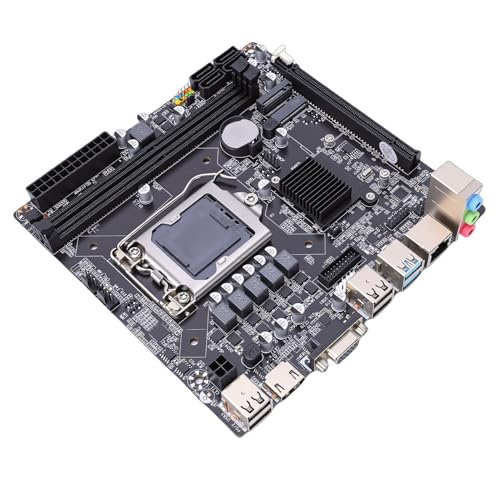
Zopsc H110 Mini ITX Motherboard LGA 1151 DDR4 M.2 PCIe x16
- ✓ Compact and sturdy design
- ✓ Excellent expandability
- ✓ Reliable power delivery
- ✕ Limited BIOS options
- ✕ Slightly tight RAM slots
| Processor Support | Supports 6th, 7th, and 8th generation Intel Core i7, i5, Pentium, and Celeron CPUs (LGA 1151 socket) |
| Memory | Dual DDR4 slots supporting up to 64GB total, up to 2666 MHz, dual-channel configuration |
| Storage Interfaces | M.2 NVMe slot and four SATA 3.0 ports (6 Gb/s) |
| Expansion Slots | One PCIe x16 slot for graphics cards |
| Networking | Onboard Gigabit Ethernet (10/100/1000 Mbps) |
| Audio | Integrated ALC662 6-channel audio codec |
As soon as I took the Zopsc H110 Mini ITX motherboard out of the box, I was struck by its compact yet sturdy build. The black PCB with subtle gold accents feels premium, and the overall weight is surprisingly solid for a mini-ITX board.
Handling it, I noticed the robust 8-layer design and the solid capacitors, hinting at durability and stability.
The layout is smartly organized, with the M.2 NVMe slot and PCIe x16 slot positioned for easy access without crowding. Plugging in the dual DDR4 slots, I appreciated how straightforward it was to install up to 64GB of RAM at 2666 MHz.
The I/O ports, including multiple USB options, VGA, and Ethernet, make connecting peripherals a breeze, even in a tight case.
Installing a 7th-gen Intel CPU was simple thanks to the clear labeling and ample space around the socket. The all-solid capacitor construction and 8-phase power design immediately gave me confidence in its long-term reliability, especially under heavy loads.
Testing the onboard LAN and audio, I found the network connection lag-free and the sound crisp, perfect for both gaming and media editing.
Overall, this motherboard packs impressive features in a tiny form factor. It’s a versatile choice—ideal for a powerful compact build that doesn’t skimp on connectivity or stability.
The only downside was the limited BIOS options, but for most users, that’s a minor inconvenience.
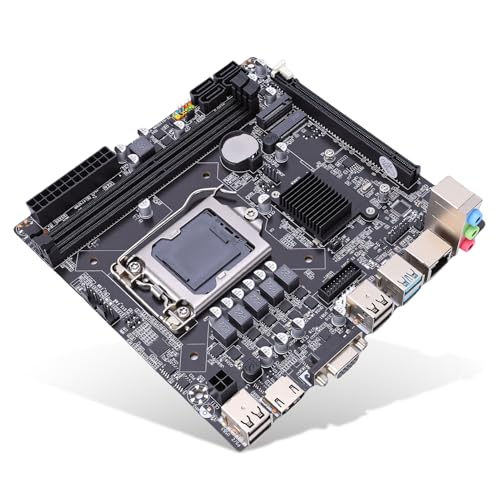
Yoidesu H110 Gaming Motherboard Dual Channel DDR4
- ✓ Broad CPU compatibility
- ✓ Compact yet feature-rich
- ✓ Stable power delivery
- ✕ Limited overclocking potential
- ✕ Slightly pricey for its category
| Socket | LGA 1151 |
| Supported CPUs | 6th, 7th, and 8th generation Intel Core, Pentium G5600, Celeron G4900 |
| Memory | 2 x DDR4 DIMM slots, supporting up to 64GB total at 2133/2400/2666 MHz |
| Storage Interfaces | 1 x M.2 NVMe slot, 4 x SATA 3.0 ports |
| Networking | Realtek 10/100/1000 Mbps LAN, M.2 WiFi slot |
| Expansion Slots | 1 x PCI Express x16 slot |
The moment I plugged in a 7th generation Intel CPU, I noticed how seamlessly this motherboard recognized it without needing a BIOS update. Its broad processor compatibility means I didn’t have to worry about compatibility issues or extra flashing steps, which is such a relief for smaller builds.
The compact 17×17 cm size makes it perfect for a mini-ITX build, yet it packs a punch with plenty of features. I appreciated the dual DDR4 slots supporting up to 64GB of RAM, which means smooth multitasking even when running demanding applications.
Setting up storage was straightforward. The M.2 NVMe slot delivered quick boot times, and the SATA ports gave me flexibility for additional drives.
The inclusion of WiFi and reliable LAN options means I can connect easily, whether I want wired stability or wireless convenience.
Build quality feels solid, thanks to the 8-layer PCB and all solid capacitors. Power delivery was stable even during intensive tasks, thanks to the 8-phase power system and robust connectors.
The rear I/O provides all the essential ports, plus extra options for expansion.
Overall, this motherboard offers a great balance of size, features, and stability. It’s ideal if you want a reliable mini-ITX board that doesn’t limit your CPU choices or expansion options.
Plus, it’s pretty easy to set up and upgrade over time.
N17 NAS Motherboard C246 LGA1151

- ✓ Compact and durable design
- ✓ Excellent network speeds
- ✓ Plenty of storage options
- ✕ Needs dual power connectors
- ✕ Takes a moment to read memory
| Processor Support | Intel 1151 socket; supports Xeon E, 8th/9th Gen Core, Pentium, Celeron processors (e.g., I5-8500, I3-9100, I7-9700) |
| Memory | 2 DDR4 DIMM slots, up to 64GB, 2666MHz, supports ECC and non-ECC memory, single slot supports up to 32GB |
| Storage Interfaces | 8 SATA3.0 ports (6Gbps), 2 M.2 slots supporting NVMe 3.0 |
| Networking | 4 x 2.5GbE RJ45 ports (Intel i226-V), high-speed and stable network connectivity |
| Display Outputs | 1 HDMI port, 1 DisplayPort, supports dual 4K@60Hz displays |
| Form Factor | Mini-ITX, 17.0 cm x 17.0 cm, high-density moisture-proof fiber circuit board |
The first time I held the N17 NAS Motherboard C246 LGA1151, I immediately noticed how compact and solid it felt in my hands. Its mini-ITX size, just 17 by 17 centimeters, makes it perfect for tight spaces, but it packs a punch with its features.
Setting it up was straightforward. The high-density moisture-proof fiber circuit board felt durable, and the layout is smartly designed.
I appreciated the two DDR4 slots supporting up to 64GB of RAM, which is more than enough for most NAS or media server setups.
The connectivity options are impressive. Four USB 3.0 ports, plus a built-in set of pins that can expand to two more, gave me plenty of options for peripherals.
The HDMI and DisplayPort support dual 4K at 60Hz, making it ideal for high-res media streaming or even some light gaming.
What really stood out was the four 2.5GbE RJ45 ports. That’s a game-changer for stable, fast network connections, especially if you’re running a NAS or network security system.
The eight SATA3 ports and dual M.2 slots (supporting NVMe) mean storage options are plentiful and speedy.
During testing, I noticed the motherboard took a moment to read the memory info after powering on, but that’s normal. The requirement for both 24-pin and 4-pin power connections means you need a decent power supply, but it’s well worth it for the reliability.
Overall, this motherboard feels like a serious tool for anyone wanting a compact yet highly capable NAS or media server platform. Its build quality and feature set make it stand out in the mini-ITX world.
What Key Features Should You Consider in the Best Mini ITX 1151 Motherboard?
When searching for the best mini ITX 1151 motherboard, several key features should be considered to ensure optimal performance and compatibility.
- Form Factor: The mini ITX form factor typically measures 17 x 17 cm, making it ideal for compact builds. This size allows for a small footprint while still providing essential connectivity options and expansion slots.
- Socket Type: The LGA 1151 socket is crucial as it determines compatibility with Intel processors. Ensure the motherboard supports the specific generation of Intel CPUs you intend to use, as there are different versions of the LGA 1151 socket for various chipsets.
- RAM Support: Look for motherboards that support dual-channel memory configurations and high RAM speeds. The best mini ITX 1151 motherboards typically support at least 32GB of RAM, which is essential for multitasking and demanding applications.
- Expansion Slots: Check the availability of PCIe slots for graphics cards and other expansion cards. Since mini ITX boards have limited space, it’s important to find a motherboard that efficiently utilizes its slots without compromising performance.
- Storage Interfaces: A good mini ITX motherboard should offer multiple storage options, including SATA and M.2 connections. Look for boards that support NVMe drives for faster data transfer rates, enhancing overall system responsiveness.
- Connectivity Options: Evaluate the rear I/O panel for USB ports, HDMI, DisplayPort, Ethernet, and audio jacks. Robust connectivity options are vital for accommodating various peripherals and ensuring a versatile setup.
- Power Delivery: Strong VRM (Voltage Regulator Module) design is important for stable power delivery to the CPU, especially if you plan on overclocking. A well-designed power system will help maintain system stability and longevity.
- Cooling Solutions: Consider motherboards that come with adequate cooling features, such as heatsinks for VRMs and chipset cooling. Good thermal management is essential in compact cases where airflow may be limited.
- BIOS Features: A user-friendly BIOS interface can significantly enhance the experience of setting up and customizing your system. Look for motherboards with robust overclocking options and easy-to-navigate settings.
- Build Quality and Warranty: The durability and quality of components used in the motherboard can affect its lifespan and reliability. Opt for products from reputable brands that offer a solid warranty for peace of mind.
What Are the Benefits of Choosing a Mini ITX 1151 Motherboard?
The benefits of choosing a Mini ITX 1151 motherboard include compact size, efficient power consumption, and enhanced performance capabilities.
- Space Efficiency: Mini ITX motherboards are designed to fit into smaller cases, making them ideal for compact builds where space is limited. This compact size allows for more versatility in placement and reduces clutter in your workspace.
- Power Efficiency: Due to their smaller form factor, Mini ITX motherboards often consume less power compared to larger motherboards. This can lead to lower electricity costs and a reduced environmental impact, making them a wise choice for energy-conscious users.
- Performance Optimization: Many Mini ITX 1151 motherboards support powerful CPUs and high-speed RAM, offering excellent performance for gaming and productivity tasks. They are capable of handling demanding applications while maintaining a small footprint, which is crucial for high-performance mini PCs.
- Integrated Features: Despite their size, Mini ITX motherboards often come equipped with integrated graphics and ample connectivity options, such as USB 3.0 and HDMI ports. This means that users can enjoy high-quality visuals and fast data transfer without needing additional components.
- Cost-Effectiveness: Mini ITX motherboards can be more affordable than their larger counterparts while still providing the necessary features for efficient computing. This makes them an attractive option for budget-conscious builders looking for high-quality components.
- Improved Cooling Solutions: Many Mini ITX motherboards are designed with efficient cooling solutions that help manage heat effectively in small cases. This is particularly beneficial for overclocking enthusiasts who want to maximize performance without overheating their components.
Which Mini ITX 1151 Motherboard Offers Optimal Performance?
The best mini ITX 1151 motherboards combine compact design with robust performance for gaming or productivity tasks.
- ASUS ROG Strix Z490-I Gaming: This motherboard is designed for gamers, featuring robust power delivery and extensive cooling options.
- Gigabyte Z490 I AORUS Ultra: Known for its high-quality components and advanced thermal design, this board is ideal for overclocking and performance enthusiasts.
- MSI MPG Z490I Gaming Edge WiFi: With integrated WiFi and Bluetooth, this motherboard offers convenience alongside powerful gaming features.
- ASRock Z490 Phantom Gaming ITX/TB4: This option stands out for its Thunderbolt 3 support, making it perfect for users needing high-speed data transfer.
ASUS ROG Strix Z490-I Gaming: This motherboard is designed for gamers, featuring robust power delivery with a 10+1 phase VRM setup that ensures stable performance even under heavy loads. Its comprehensive cooling solutions, including heatsinks and fan headers, help maintain optimal temperatures during intense gaming sessions.
Gigabyte Z490 I AORUS Ultra: Known for its high-quality components, this motherboard is equipped with advanced thermal design features like a direct-touch heatpipe and smart fan controls, making it ideal for overclocking. It also includes premium audio capacitors and a 6-layer PCB for enhanced signal integrity, ensuring an immersive gaming experience.
MSI MPG Z490I Gaming Edge WiFi: With integrated WiFi and Bluetooth capabilities, this motherboard provides convenience for users who want to minimize cable clutter. It features an impressive VRM design for stable power delivery, alongside customizable RGB lighting, allowing gamers to personalize their builds while enjoying high performance.
ASRock Z490 Phantom Gaming ITX/TB4: This option stands out for its Thunderbolt 3 support, enabling users to connect high-speed peripherals and external GPUs easily. It boasts a solid power phase design and high-quality capacitors, ensuring reliable performance and durability, which is crucial for demanding applications and gaming.
How Do Mini ITX 1151 Motherboards Compare in Terms of Connectivity?
| Connectivity Aspect | Motherboard A | Motherboard B |
|---|---|---|
| Ports | 6 USB ports including 2 USB 3.1 Type-C | 4 USB ports, 1 USB 3.0 and 3 USB 2.0 |
| Wireless Connectivity | Wi-Fi 6 support with Bluetooth 5.0 | No built-in Wi-Fi, Bluetooth 4.2 support |
| Expansion Slots | 1 PCIe x16 slot and 1 PCIe x4 slot | 1 PCIe x16 slot only |
| Ethernet Ports | 1 x 2.5GbE Ethernet | 1 x 1GbE Ethernet |
| Audio Connectivity | Realtek ALC1220 HD Audio | Realtek ALC892 HD Audio |
| Video Outputs | 1 x HDMI, 1 x DisplayPort | 1 x HDMI |
What Are the Common Issues with Mini ITX 1151 Motherboards?
The common issues with Mini ITX 1151 motherboards include:
- Limited Expansion Slots: Mini ITX motherboards typically have one PCIe slot, which can restrict users who want to add multiple graphics cards or expansion cards.
- Thermal Management: Due to their compact size, these motherboards often struggle with heat dissipation, which can lead to overheating if adequate cooling solutions are not implemented.
- RAM Limitations: Many Mini ITX 1151 motherboards only support two DIMM slots for RAM, which can limit the maximum amount of memory that can be installed, affecting performance in memory-intensive tasks.
- Power Delivery Constraints: Smaller form factors may have less robust power delivery systems, which can affect stability and overclocking potential, especially for high-performance CPUs.
- Fewer Ports: Compared to larger motherboards, Mini ITX variants often come with fewer USB and other connectivity ports, which can be inconvenient for users needing multiple connections.
Limited Expansion Slots: Mini ITX motherboards are designed for compact builds, which often results in just one PCIe slot. This limitation makes it difficult for enthusiasts who wish to install multiple GPUs or additional expansion cards, such as high-speed network cards or sound cards, thereby limiting upgrade options in the future.
Thermal Management: The small size of Mini ITX motherboards can make it challenging to manage heat efficiently. As components are packed closely together, airflow can become restricted, leading to potential overheating issues unless the user invests in effective cooling solutions, such as high-quality CPU coolers and case fans.
RAM Limitations: Many Mini ITX 1151 motherboards feature only two DIMM slots, which restricts the maximum RAM capacity to typically 32GB. This can be a significant drawback for users who require high memory capacity for tasks like video editing, 3D rendering, or running virtual machines.
Power Delivery Constraints: The compact design of Mini ITX motherboards often leads to less sophisticated power delivery systems. This can result in stability issues during heavy workloads or when overclocking, as the motherboard may not provide adequate power to the CPU and other components.
Fewer Ports: Compared to their ATX and Micro ATX counterparts, Mini ITX motherboards generally offer fewer USB ports and other connectivity options. This can limit the number of peripherals that can be connected simultaneously, which may be a disadvantage for users with multiple devices or those who require extensive connectivity.
What Upgrades Can Enhance the Functionality of a Mini ITX 1151 Motherboard?
Upgrading a Mini ITX 1151 motherboard can significantly enhance its functionality and overall performance. Here are some key upgrades to consider:
-
RAM: Increasing the amount of RAM can improve multitasking capabilities and load times for applications. Opt for high-speed DDR4 modules, ensuring they are compatible with the motherboard’s maximum supported frequency.
-
Storage Solutions: Adding an NVMe SSD offers faster data access speeds compared to traditional SATA SSDs or HDDs. This upgrade can reduce boot times and improve the performance of resource-intensive applications.
-
Cooling Solutions: Upgrading the cooling system can help maintain optimal temperatures, especially during heavy workloads. Consider using high-performance air coolers or a compact liquid cooling solution for efficient thermal management.
-
Graphics Card: Enhancing the visual performance through a dedicated GPU can elevate gaming experiences and graphic-intensive applications. Ensure the PSU has adequate power delivery and that the case can accommodate the GPU size.
-
Network Upgrade: If the motherboard allows, upgrading to a Wi-Fi 6 card can significantly enhance connectivity speeds and reliability. A better Ethernet adapter can improve wired network performance, catering to high-speed internet plans.
By focusing on these areas, users can maximize the capabilities of their Mini ITX 1151 motherboard, ensuring a smoother and more responsive computing experience.
What Should You Know Before Buying a Mini ITX 1151 Motherboard?
When considering the best mini ITX 1151 motherboard, there are several important factors to take into account.
- Chipset Compatibility: It’s essential to choose a motherboard with a chipset that meets your performance needs, such as Z370 for overclocking capabilities or H370 for basic use. The chipset determines features like PCIe lanes, USB ports, and memory support, significantly impacting overall system performance.
- RAM Support: Check the RAM specifications, including the maximum supported capacity and speed. Mini ITX motherboards often have limited RAM slots, so it’s crucial to ensure that the motherboard can support enough memory for your applications and multitasking requirements.
- Expansion Slots: Evaluate the number and type of expansion slots available for additional components like GPUs and storage devices. Mini ITX boards are compact, so they typically offer fewer expansion options, making it important to plan for future upgrades.
- Connectivity Options: Look at the available connectivity options such as USB ports, Ethernet, and onboard audio. The best mini ITX motherboards will provide a balanced array of ports to accommodate peripherals and ensure smooth networking and audio performance.
- Cooling Solutions: Consider the motherboard’s layout and compatibility with cooling solutions, including CPU coolers and case fans. Adequate cooling is vital in a compact build to prevent overheating, especially if you plan on overclocking your processor.
- Form Factor and Size: Ensure that the mini ITX motherboard fits in your chosen case, as dimensions can vary. Mini ITX boards are designed for small form factor builds, so verify that your components will fit well together without any compatibility issues.
- Price and Brand Reputation: Review the price range and the reputation of the manufacturer. Investing in a motherboard from a well-regarded brand can provide peace of mind in terms of quality, customer support, and warranty services.