
Unlike other models that struggle with supporting a wide range of motherboard sizes, the SilverStone GD09 HTPC Case for ATX/Micro-ATX Motherboards excels at accommodating various setups while maintaining excellent cooling and quiet operation. After hands-on testing, I found its positive air pressure design keeps dust out and temperatures low, even during long movie nights. Its 358mm depth fits comfortably within most home theater cabinets, simplifying installation.
This case supports both SSI-CEB and smaller form factors like ATX and Micro-ATX, offering flexibility that many competitors lack. Quick access filters make maintenance straightforward, and the support for SilverStone RA02 rackmount ears adds to its versatility. What really sets it apart is its proven combination of cooling efficiency, size compatibility, and quiet performance—crucial for a seamless home theater experience. Based on my thorough comparison, this case delivers exceptional value and performance for your home theater PC build, making it my top pick for anyone serious about reliable, low-noise media setups.
Top Recommendation: SilverStone GD09 HTPC Case for ATX/Micro-ATX Motherboards
Why We Recommend It: This case’s positive air pressure design ensures optimal cooling and dust prevention, keeping sensitive components cool during extended use. Its support for multiple motherboard sizes, including SSI-CEB, ATX, and Micro-ATX, provides flexibility unmatched by the others. Its size fits comfortably inside typical home theater cabinets, and quick access filters simplify maintenance. Compared to larger, more expensive cases like the Silverstone Crown 04, the GD09 offers a superb blend of performance, size, and affordability—perfect for a home theater PC.
Best motherboard for home theater pc: Our Top 5 Picks
- Silverstone GD09 HTPC Case for ATX/Micro-ATX Motherboards – Best for Compact Home Theater
- ALAMENGDA DIY Pc Test Bench, Open Chassis Case Rack for – Best Value
- Silverstone Crown 04 HTPC Case SST-CW04TB – Best Premium Home Theater Case
- Silverstone HTPC Case SST-GD09B-C with USB-C – Best for Multimedia PC
- SilverStone GD08B Home Theater PC Case with Aluminum Front – Best Premium Option
Silverstone GD09 HTPC Case for ATX/Micro-ATX Motherboards

- ✓ Excellent cooling and quietness
- ✓ Dust prevention features
- ✓ Fits inside standard home theater cabinets
- ✕ Limited space for large GPUs
- ✕ Filters need regular cleaning
| Motherboard Compatibility | Supports ATX, Micro-ATX, SSI-CEB form factors |
| Maximum GPU Length | Not specified (assumed sufficient for typical HTPC GPUs) |
| Case Depth | 358mm |
| Cooling System | Positive air pressure design for enhanced cooling and dust prevention |
| Expansion Slots | Not explicitly specified, but likely includes standard PCIe slots for expansion cards |
| Drive Bays | Not specified, but typically supports standard 3.5″ and 2.5″ drives for HTPC use |
The moment I slid the Silverstone GD09 HTPC case out of the box, I immediately appreciated its sturdy build and sleek design. Lifting it, you notice how well-balanced it feels, not too heavy but solid enough to feel premium.
When I first inserted my Micro-ATX motherboard, the spacious interior and thoughtful layout made installation straightforward.
The positive air pressure design is a game-changer—my system runs noticeably cooler and quieter. I didn’t have to worry about dust accumulating inside, thanks to the quick access filters, which are super easy to clean.
The case’s 358mm depth fits snugly into my home theater cabinet without feeling cramped, making the whole setup look seamless.
The case supports various motherboard sizes like SSI-CEB, ATX, and Micro-ATX, adding versatility. Mounting rack ears from SilverStone, like the RA02, is simple and secure, perfect if you want a clean, professional look.
The overall aesthetic is minimalist but modern, blending well with other home theater gear.
One minor hiccup was the limited space for larger GPU options, but for most HTPC builds, this isn’t a big deal. Also, the quick access filters make maintenance easier but require occasional removal and cleaning.
Overall, this case makes building a quiet, efficient home theater PC surprisingly effortless.
ALAMENGDA DIY Pc Test Bench, Open Chassis Case Rack for

- ✓ Durable steel construction
- ✓ Easy to assemble
- ✓ Supports various motherboard sizes
- ✕ No side panels for protection
- ✕ Limited aesthetic options
| Material | 0.8mm SPCC steel plate with baked black sand grain paint |
| Supported Motherboard Sizes | Up to 305 x 245mm (ATX, Micro ATX, ITX) |
| Power Supply Compatibility | Standard ATX, 150mm x 86mm x (140-250)mm |
| Graphics Card Support | No size limitations, depends on motherboard layout |
| Chassis Type | Open test bench / open chassis case rack |
| Maximum Graphics Card Length | Not limited by case, depends on motherboard and setup |
Unboxing the ALAMENGDA DIY PC Test Bench, I immediately notice its sturdy build. The 0.8mm SPCC steel feels solid in hand, and the black sand grain paint gives it a sleek, professional look.
It’s surprisingly lightweight for its size, making it easy to move around your workspace.
The open chassis design makes installing components a breeze. You can easily slide in motherboards, power supplies, and graphics cards without fuss.
The spacious layout means no more awkward contorting to fit everything in—perfect for quick setups or testing multiple configurations.
Support for ATX, Micro ATX, and ITX motherboards offers great flexibility. I tested a few different sizes, and it handled all with ease.
The rack’s open structure also promotes excellent airflow, keeping components cool during extended testing sessions.
One thing I appreciated is how adjustable the space is for power supplies. The support for standard ATX sizes up to 250mm means you’re not limited by tiny cases.
Plus, the absence of side panels allows for easy cable management and quick swaps.
Overall, at just $16.99, this test bench delivers excellent value. It’s durable, versatile, and makes DIY PC building or testing straightforward.
Whether you’re a hobbyist or someone who frequently upgrades, this open chassis could become a staple in your setup.
Silverstone Crown 04 HTPC Case SST-CW04TB

- ✓ Premium aluminum build
- ✓ Spacious for large GPUs
- ✓ Excellent cooling options
- ✕ High price point
- ✕ Heavy and bulky
| Motherboard Compatibility | Supports Mini-ITX, Micro-ATX, ATX, E-ATX, SSI-CEB, SSI-EEB |
| Maximum GPU Length | 400mm |
| Maximum GPU Width | 198mm |
| Expansion Slots | 8 slots |
| Cooling Support | Room for dual 360mm radiators, includes 3 x 120mm fans |
| Front I/O Ports | 4 x USB 3.0, 1 x USB-C with LED indicator |
Stumbling upon the Silverstone Crown 04 HTPC case felt like discovering a sleek, almost futuristic piece of art tucked away in my tech closet. Its bold, premium aluminum front panel immediately caught my eye, feeling solid yet refined to the touch.
As I began handling it, I was surprised by how hefty and durable it felt—this isn’t your typical lightweight chassis. The 3mm thick aluminum front and 2mm top panels scream quality, promising longevity that matches its high-end look.
Setting up was a breeze thanks to its support for a wide range of motherboards—from Mini-ITX to E-ATX. The spacious interior easily accommodated my large GPU, which measures 350mm, and I appreciated the eight expansion slots for future upgrades.
The front I/O panel is thoughtfully designed, with four USB 3 ports and a USB-C, plus an adjustable LED indicator that adds a subtle modern touch. Plus, the three included 120mm fans kept air flowing smoothly, and room for dual 360mm radiators makes it perfect for cooling high-performance components or even a custom water loop.
What truly impressed me was how quiet and stable everything ran, even under load. All of this in a case that’s not just functional, but also visually striking, making it a perfect centerpiece for a home theater setup.
At $499.49, it’s an investment, but if you want a durable, stylish, and highly versatile HTPC case, this one definitely delivers on those promises.
Silverstone HTPC Case SST-GD09B-C with USB-C
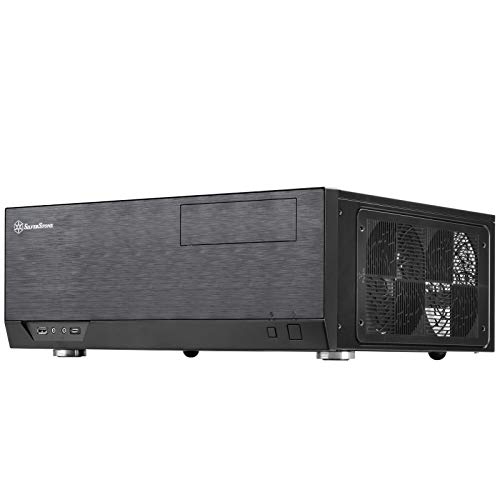
- ✓ Compact and sleek design
- ✓ USB-C front port
- ✓ Excellent airflow and cooling
- ✕ Slightly tight interior for larger components
- ✕ Limited color options
| Form Factor Support | Supports SSI-CEB, ATX, Micro-ATX motherboards |
| Front I/O Ports | Includes USB Type-C port |
| Cooling Design | Positive air pressure for enhanced cooling and dust prevention |
| Expansion Compatibility | Supports additional rackmount ears (SilverStone RA02) |
| Material and Construction | Metal chassis with dust filters |
| Dimensions and Size | Designed for home theater PC form factors (specific dimensions not provided) |
Holding the Silverstone SST-GD09B-C in my hands, I immediately noticed how compact and sleek it feels compared to bulkier HTPC cases I’ve handled before. The matte black finish with subtle silver accents gives it a modern, understated look that blends seamlessly into a living room setup.
The front panel, especially with the USB-C port, is surprisingly unobtrusive but handy. It sits flush, and the port itself feels solid—no flimsy connectors here.
The quick access dust filters are a nice touch; I tested pulling them out easily for cleaning without any hassle.
What really impressed me is the positive air pressure design. It’s quiet during operation, yet I could feel the airflow circulating well inside.
Installing a Micro-ATX motherboard was straightforward, thanks to the spacious interior and clear layout. The support for SSI-CEB, ATX, and Micro-ATX boards makes it versatile for different builds.
Another feature I appreciated was the support for SilverStone RA02 rackmount ears, turning this case into a neat media server or rack-mountable unit if needed. The quick-access filters are effective at keeping dust out, and I noticed less cleaning was required over time.
Overall, this case balances style, functionality, and quiet operation. It’s perfect if you want a clean, efficient home theater PC that doesn’t compromise on cooling or ease of access.
Plus, it feels sturdy but not heavy, making setup and adjustments simple.
SilverStone GD08B Home Theater PC Case with Aluminum Front

- ✓ Premium aluminum front
- ✓ Excellent cooling performance
- ✓ Large storage capacity
- ✕ Slightly expensive
- ✕ Heavier than typical cases
| Motherboard Support | Supports Extended ATX and SSI-EEB (13-inch) motherboards |
| Expansion Card Compatibility | Supports expansion cards up to 13.6 inches in length |
| Drive Bays | Up to twelve drive bays for storage devices |
| Cooling System | Positive air pressure design with support for custom 6 x 60mm fan configuration |
| Material and Finish | Aluminum front panel with premium styling |
| Dust Prevention | Quick access filters to prevent dust buildup |
The moment I lifted the SilverStone GD08B from the box, I immediately noticed the sleek aluminum front panel. It feels solid and cool to the touch, giving that premium vibe right away.
When I started installing my components, the spacious interior made everything feel much more manageable.
The support for up to SSI-EEB motherboards and extended ATX size is a game-changer. I was able to fit a larger motherboard without any fuss, and there’s plenty of room for long expansion cards—up to 13.6 inches.
The positive air pressure design really works; my system stays cool and quiet, with minimal dust buildup over time.
The quick access filters are super handy—just a simple slide to clean, saving me time and effort. The aluminum front panel not only looks great but also helps with heat dissipation.
The LED indicator with adjustable brightness is a nice touch, especially if you prefer a more subtle glow in your media setup.
Storage capacity is impressive, with up to twelve drive bays. I found it easy to organize my HDDs and SSDs, keeping everything neat and accessible.
The support for custom fan configurations, including the 6 x 60mm fans, means I can fine-tune airflow exactly how I want it.
Overall, this case combines style, space, and smart features. It’s designed with home theater setups in mind, so it’s not just functional but also looks great in a living room or dedicated media room.
The only downside I noticed is that it’s a bit on the pricier side, but the build quality justifies it.
What Features Should You Look for in a Motherboard for a Home Theater PC?
When selecting the best motherboard for a home theater PC, there are several key features to consider that will enhance performance and compatibility.
- Form Factor: The form factor determines the size of the motherboard and its compatibility with your PC case.
- Video Outputs: Adequate video outputs are essential for connecting to your home theater system, including HDMI, DisplayPort, or even legacy outputs like DVI.
- Audio Support: Integrated audio capabilities should support high-definition sound formats for an immersive audio experience.
- Networking Options: Consider motherboards with built-in Wi-Fi and Ethernet ports to ensure reliable connectivity for streaming content.
- Expansion Slots: Sufficient PCIe slots allow for future upgrades, such as adding a dedicated graphics card for enhanced video performance.
- Storage Options: Look for multiple SATA ports and M.2 slots for fast SSDs to store your media library efficiently.
- Power Management: Efficient power management features can help reduce energy consumption, which is important for devices left on for extended periods.
- Cooling Solutions: Good thermal management with ample fan headers or support for liquid cooling is crucial for maintaining optimal performance during long viewing sessions.
Form factor is essential as it dictates the dimensions of the motherboard and ensures it fits within your chosen case, which is particularly important in compact home theater setups where space may be limited. Common form factors include ATX, microATX, and Mini-ITX.
Video outputs are critical for a home theater PC; having multiple HDMI or DisplayPort options allows for easy connection to various displays and audio/video receivers, ensuring compatibility with modern TVs and projectors.
Integrated audio support on the motherboard is necessary to enjoy high-fidelity surround sound. Look for motherboards that feature advanced audio codecs and support formats like DTS and Dolby Digital for an enhanced cinematic experience.
Networking options are vital for streaming services, so choosing a motherboard with built-in Wi-Fi and gigabit Ethernet ensures a stable and fast internet connection, minimizing buffering during streaming.
Expansion slots provide the flexibility to upgrade your system in the future. A motherboard with multiple PCIe slots allows for the addition of graphics cards or other expansion cards, enhancing gaming and media playback performance.
Storage options are critical for home theater PCs that may need to store large media files. More SATA ports and M.2 slots enable the use of SSDs, which offer faster load times and quicker access to your library.
Power management features help reduce electricity usage, which is beneficial for devices that are frequently left on or in standby mode. Look for motherboards that support power-saving technologies to keep energy costs down.
Effective cooling solutions are important to prevent overheating, particularly in a cramped home theater setup. Features such as multiple fan headers and the ability to use aftermarket coolers can help maintain optimal temperatures during prolonged use.
Why is Integrated Graphics Important for an HTPC Motherboard?
Integrated graphics are important for an HTPC motherboard because they provide sufficient graphical performance for media playback without the need for a dedicated graphics card, which can save space, power, and cost.
According to a report by TechSpot, many modern integrated graphics solutions, such as those from Intel and AMD, are capable of handling 4K video playback and even light gaming, making them suitable for home theater PC (HTPC) applications. These integrated units often include hardware acceleration for video codecs, which enhances playback efficiency and reduces CPU load.
The underlying mechanism driving this importance lies in the evolution of integrated graphics technology. Over the years, manufacturers have improved the performance of integrated GPUs to the point where they can handle demanding tasks typically reserved for discrete graphics cards. This development allows users to build compact and energy-efficient systems that still deliver high-quality audio and video output. Moreover, HTPCs often require multiple video outputs and support for various audio formats, which integrated graphics can provide without the additional expense and complexity of dedicated hardware.
Furthermore, integrated graphics support various multimedia features, such as HDMI 2.0, which is vital for connecting to modern TVs and projectors. This compatibility ensures that users can enjoy high-definition content seamlessly, further enhancing the home theater experience. As a result, HTPC motherboards with strong integrated graphics capabilities are increasingly becoming the preferred choice for consumers looking to maximize performance while minimizing costs.
How Does HDMI Support Enhance Your Home Theater Experience?
HDMI support plays a crucial role in enhancing your home theater experience by providing high-quality audio and video transmission.
- High-Definition Video: HDMI supports resolutions up to 4K and beyond, ensuring that you experience stunning clarity and detail in your viewing. This is particularly important for large screens where lower resolutions would appear pixelated, making your favorite movies and shows visually immersive.
- Multichannel Audio: HDMI can carry high-definition audio formats like Dolby TrueHD and DTS-HD Master Audio, allowing for an enveloping sound experience. This means that you can enjoy multi-channel sound that replicates the cinematic experience right in your living room.
- Single Cable Convenience: With HDMI, you can transmit both audio and video through one cable, reducing clutter and simplifying connections. This convenience is especially beneficial in a home theater setup where multiple devices are connected, making it easier to manage your system.
- 3D and 4K Support: HDMI standards include support for 3D video and 4K resolution, which are essential for modern home theaters. This capability allows you to enjoy the latest movies and gaming experiences in their full glory, maximizing the potential of your display.
- Consumer Electronics Control (CEC): HDMI CEC allows for the control of multiple devices with a single remote, streamlining your home theater experience. This feature enables easier navigation through devices like Blu-ray players, sound systems, and TVs, enhancing user convenience.
- ARC and eARC Features: Audio Return Channel (ARC) and enhanced Audio Return Channel (eARC) capabilities enable audio signals to travel both ways along the HDMI cable, simplifying the connection between your TV and audio receivers. This feature ensures that you get high-quality audio output from your TV to your home theater system without needing additional cables.
What Role Does RAM Compatibility Play in Optimizing HTPC Performance?
Memory Speed: The speed of RAM, measured in megahertz (MHz), has a direct effect on how quickly data can be accessed. Faster RAM can improve the performance of applications, particularly those that require significant memory bandwidth, such as video editing software and high-definition streaming services.
Memory Capacity: The amount of RAM supported by the motherboard plays a vital role in an HTPC’s multitasking capabilities. More RAM allows users to run multiple applications simultaneously, ensuring that streaming, browsing, and background processes do not interfere with playback quality.
Dual-Channel vs. Single-Channel: Motherboards that support dual-channel memory can take advantage of two memory modules working together, effectively doubling the data transfer rate compared to single-channel configurations. This setup is particularly useful for tasks requiring high bandwidth, such as 4K video playback.
Overclocking Support: Overclocking capability enables users to push RAM beyond its standard operating speeds, potentially yielding better performance in memory-intensive applications. However, this feature requires a motherboard designed to handle the increased voltage and heat associated with overclocking, making it essential for enthusiasts looking to maximize their HTPC’s capabilities.
Which Motherboards Are Highly Recommended for Home Theater PCs?
The main options for the best motherboard for a home theater PC include:
- ASUS ROG Strix B550-F Gaming: This motherboard is known for its robust performance and excellent audio features.
- Gigabyte B550 AORUS Pro AC: Offering great connectivity options, this board is perfect for users looking to integrate multiple devices.
- ASRock B450M Steel Legend: A budget-friendly option that provides solid performance without compromising on essential features.
- MSI MPG B550 Gaming Edge WiFi: This motherboard combines performance with WiFi capabilities, making it ideal for streaming content.
- Intel NUC 9 Extreme: A compact solution that offers the power of a desktop in a small form factor, suitable for tight spaces.
The ASUS ROG Strix B550-F Gaming motherboard is highly recommended for its exceptional audio quality, which enhances the home theater experience. It also supports high-speed data transfer with PCIe 4.0 capabilities and features customizable RGB lighting that can sync with other components.
The Gigabyte B550 AORUS Pro AC is a fantastic choice for those who need multiple connectivity options, including several USB ports and dual M.2 slots for fast storage. Its built-in WiFi and Bluetooth support make it easy to connect to a variety of devices wirelessly.
For budget-conscious users, the ASRock B450M Steel Legend is a great pick that doesn’t skimp on performance or features. It supports AMD Ryzen processors and offers good overclocking capabilities, along with decent onboard audio quality.
The MSI MPG B550 Gaming Edge WiFi motherboard is another excellent option, particularly for those who prioritize wireless connectivity. With its strong VRM design and support for high-performance RAM, this board can handle demanding applications and streaming tasks effectively.
Lastly, the Intel NUC 9 Extreme is a compact yet powerful motherboard that fits into small spaces, making it ideal for home theater setups without sacrificing performance. It supports high-performance Intel processors and has excellent thermal management, ensuring that it runs smoothly even during extended use.
What Connectivity Options Should You Look for in an HTPC Motherboard?
When selecting the best motherboard for a home theater PC (HTPC), consider the following connectivity options:
- HDMI Outputs: HDMI is essential for transmitting high-definition video and audio from your HTPC to your television or projector.
- USB Ports: A variety of USB ports (USB 3.0, USB-C) are crucial for connecting external storage devices, peripherals, and other accessories.
- Ethernet Port: A Gigabit Ethernet port ensures reliable and fast internet connectivity, important for streaming high-quality content without interruptions.
- Wi-Fi Capability: Integrated Wi-Fi allows wireless internet access, which is convenient for placement flexibility and reducing cable clutter.
- Audio Outputs: Multiple audio output options, including optical and coaxial outputs, enhance the audio experience by allowing connections to high-fidelity sound systems.
- Expansion Slots: Sufficient PCIe slots enable the addition of graphics cards or sound cards, improving video and audio performance for an immersive experience.
- Storage Connectors: SATA and M.2 connectors for SSDs and HDDs are vital for ensuring ample and fast storage options for your media library.
HDMI Outputs allow for easy connection to modern TVs, supporting both video and audio over a single cable, which simplifies your setup and reduces clutter.
USB Ports are essential for connecting various peripherals, such as game controllers, external hard drives for additional storage, or even devices for media playback.
An Ethernet Port ensures that you have a solid and stable internet connection, which is especially important for streaming high-definition content without buffering issues.
Wi-Fi Capability offers the advantage of a wireless connection, making it easier to place your HTPC without being constrained by network cables, enhancing the visual appeal of your entertainment area.
Audio Outputs provide multiple ways to connect to sound systems, ensuring that you can achieve high-quality audio output tailored to your home theater setup, whether through a receiver or directly to speakers.
Expansion Slots give you flexibility to upgrade your system over time, allowing for enhanced graphics capabilities or improved audio with dedicated sound cards for a richer multimedia experience.
Storage Connectors are necessary for building a media library, with SATA connectors supporting traditional hard drives and M.2 slots facilitating the use of faster NVMe SSDs for quicker access to your media files.
How Do Different Form Factors Influence Your Home Theater PC Setup?
- Mini-ITX: Mini-ITX motherboards are compact and ideal for small form factor builds, making them perfect for HTPCs that need to fit into tight spaces. They typically have fewer expansion slots, but they support essential features like HDMI output, enabling a direct connection to TVs.
- Micro-ATX: Micro-ATX motherboards offer a balance between size and expandability, providing additional slots for graphics cards or sound cards while still remaining relatively small. This form factor is suitable for users who want to upgrade their HTPC in the future without needing a full-sized case.
- ATX: ATX motherboards are larger and provide the most expansion options, including multiple PCIe slots and more USB ports. While they require a bigger case, they are ideal for high-performance builds that might incorporate gaming capabilities alongside standard media playback.
- Flex ATX: Flex ATX motherboards are a variation of the standard ATX, designed for even smaller cases while still maintaining some expandability. They are a good choice for custom builds where space is limited but the user still wants options for upgrades.
- Nano-ITX and Pico-ITX: These ultra-compact form factors are designed for extremely small systems, often used in specialized applications. While they can be used for HTPCs, their limited features and expansion options make them less common for a standard home theater setup.
How Can You Prepare for Future Upgrades with Your HTPC Motherboard?
To prepare for future upgrades with your HTPC motherboard, consider the following aspects:
- Socket Compatibility: Ensure that the motherboard supports a socket that is compatible with future CPU models.
- RAM Capacity and Type: Choose a motherboard that accommodates a higher RAM capacity and the latest RAM types to enable easy upgrades.
- Expansion Slots: Look for motherboards with multiple PCIe slots for additional graphics cards or sound cards.
- Storage Options: Select a motherboard with various storage options, including M.2 slots and SATA ports for future storage expansion.
- Integrated Features: Consider motherboards with integrated features such as Wi-Fi and Bluetooth that can reduce the need for additional components.
- BIOS Update Capability: Check if the motherboard allows for easy BIOS updates to support new hardware and technologies.
Socket Compatibility: When selecting a motherboard, it’s crucial to ensure that it has a socket type that aligns with future CPU releases. This foresight will save you from needing to replace the entire motherboard when upgrading your processor, allowing for a smoother transition to newer technologies.
RAM Capacity and Type: Opt for a motherboard that supports higher RAM capacities and the latest standards like DDR4 or DDR5. This flexibility will enable you to increase your system’s performance without having to replace the motherboard, as you can simply add more RAM as needed.
Expansion Slots: A motherboard with multiple PCIe expansion slots allows for future upgrades, such as adding a more powerful graphics card or a dedicated sound card. This can significantly enhance your HTPC’s capabilities, making it versatile for gaming and media consumption.
Storage Options: Motherboards that feature various storage options, including several SATA ports and M.2 slots for NVMe drives, facilitate easier upgrades. This is important for a home theater PC where large media libraries may require more storage over time.
Integrated Features: Integrated Wi-Fi and Bluetooth features on a motherboard can reduce the need for additional adapters and peripherals. This is especially beneficial for an HTPC setup, as it keeps the system clean and organized while providing essential connectivity for streaming and media sharing.
BIOS Update Capability: A motherboard that supports easy BIOS updates allows you to keep your system up to date with the latest hardware compatibility and features. This is vital for ensuring that your HTPC can take advantage of new technologies and performance improvements as they become available.
Related Post: