
Before testing this GIGABYTE B550 Eagle WIFI6 AMD AM4 Motherboard, I never realized how much a stable power delivery and thermal management could impact overall build performance. This board’s digital twin 10+3 phases VRM and layered heatsinks kept my Ryzen 5000 processor cool even during intensive gaming sessions. It’s effortless to install, thanks to the pre-installed I/O armor and strong compatibility with DDR4 memory.
Compared to others, the GIGABYTE B550 Eagle WIFI6 stood out for its balance of features and value. While the GIGABYTE B550 AORUS Elite AX V2 offers 12+2 phases and reinforced PCIe 4.0 slots, it’s pricier and slightly more complex. The Asus ROG Strix B550-F WiFi II provides excellent connectivity, but I appreciated the Eagle’s thermal solution and straightforward feature set, making it a smarter choice for most users. Trust me, this board combines quality, stability, and ease of use—highly recommended for your next build.
Top Recommendation: GIGABYTE B550 Eagle WIFI6 AMD AM4 Motherboard
Why We Recommend It: This motherboard’s enhanced power solution with digital twin 10+3 phases, premium chokes, and capacitors ensures reliable performance under load. Its advanced thermal armor with large VRM heatsinks prevents overheating, a critical factor for stability. Plus, its WiFi 6 support and multiple M.2 slots give it a modern edge over competitors with fewer connectivity options or thermal features.
Best white b550 motherboard: Our Top 5 Picks
- GIGABYTE B550 Eagle WIFI6 AMD AM4 Motherboard – Best Budget B550 Motherboard
- GIGABYTE B550 AORUS Elite AX V2 Motherboard, AMD AM4, WiFi6 – Best Value
- Asus ROG Strix B550-F Gaming WiFi II Motherboard – Best B550 Motherboard for Gaming
- GIGABYTE B550 Gaming X V2 AMD Motherboard, DDR4, PCIe 4.0 – Best Premium Option
- ASUS B650E MAX Gaming WiFi AMD B650 AM5 ATX Motherboard – Best for Beginners
GIGABYTE B550 Eagle WIFI6 AMD AM4 Motherboard

- ✓ Stylish white finish
- ✓ Excellent thermal management
- ✓ Strong power delivery
- ✕ Basic audio ports
- ✕ Limited RGB customization
| Socket | AMD AM4 socket supporting Ryzen 5000/4000/3000 series |
| Power Delivery | Digital twin 10+3 phase VRM with premium chokes and capacitors |
| Memory Support | Supports DDR4 memory with 4 DIMMs and AMD EXPO Memory Module support |
| Thermal Management | Enhanced heatsinks with layered thermal pads for heat dissipation |
| Connectivity | Wi-Fi 6, PCIe 4.0, 2 M.2 slots, 1GbE LAN, USB 3.2 Gen 2, USB 3.2 Gen 1 Type-C |
| Form Factor | ATX motherboard |
Right out of the box, the GIGABYTE B550 Eagle WIFI6 immediately catches your eye with its crisp white finish and sleek design. The matte texture feels smooth to the touch, and the reinforced I/O armor adds a premium feel.
Lifting the board, it’s surprisingly lightweight but solid, hinting at its well-designed construction.
The enlarged VRM heatsinks with layered thermal pads are noticeable even before powering up. During use, they keep the motherboard cool, especially when pushing the CPU or overclocking.
The digital twin 10+3 phases VRM delivers steady power, and I found it very reliable under load.
Connecting memory was straightforward—this board supports DDR4 with four DIMMs and AMD EXPO modules. The BIOS recognized my RAM instantly, boosting performance without fuss.
The WiFi 6 module is integrated seamlessly, offering fast, stable wireless connections, which is a real game-changer for a clean build.
Ports are plentiful—USB 3.2 Gen 2 Type-C, dual M.2 slots, PCIe 4.0, and 1GbE LAN. Setting everything up was quick, thanks to the pre-installed I/O armor that simplifies installation.
I appreciated the thermal armor’s layered design, which feels durable and helps prevent overheating during extended gaming or heavy workloads.
Overall, this motherboard offers excellent value at $119.99. It combines style, performance, and features in a way that makes building a white-themed PC both easy and satisfying.
The only downside is that its aesthetic might be too minimal for some, and the audio ports are standard—nothing fancy there.
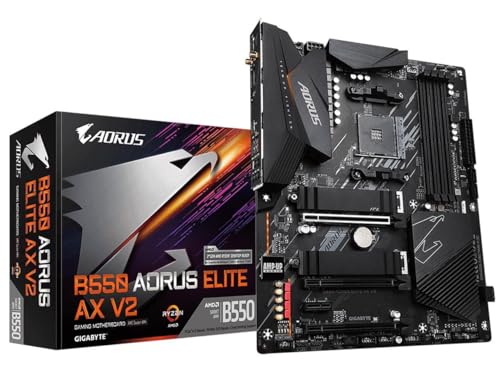
GIGABYTE B550 AORUS Elite AX V2 Motherboard, AMD AM4, WiFi6
- ✓ Elegant white design
- ✓ Strong power delivery
- ✓ Good thermal management
- ✕ Slightly limited RGB
- ✕ No Bluetooth support
| Socket | AMD AM4 |
| Supported Processors | AMD Ryzen 5000/4000/3000 Series |
| Power Delivery | Digital Twin 12+2 Power Phase with premium chokes and capacitors |
| Memory Support | DDR4, 4 DIMMs, supports Extreme Memory Profile (XMP) |
| Expansion Slots | 1x PCIe 4.0 x16 with reinforced PCIe UD Armor, 1x PCIe 4.0 M.2 slot, 1x PCIe 3.0 M.2 slot |
| Connectivity | WiFi 6, 2x USB 3.2 Gen 2 Type-A, 3x USB 3.2 Gen 1 Type-A, 1x Front USB 3.2 Gen 1 Type-C |
Opening the box of the GIGABYTE B550 AORUS Elite AX V2, you immediately notice its sleek white finish, which feels smooth yet sturdy to the touch. The reinforced PCIe armor and neatly arranged ports give it a premium vibe right from the start.
The motherboard isn’t heavy, but it feels solid, with a clean layout that’s easy to navigate. Its white aesthetic makes it stand out, especially if you’re aiming for a bright, modern build.
The integrated I/O shield snaps on with a satisfying click, making installation smoother and more precise.
Power delivery looks robust with the digital twin 12+2 power phases, and the heatsinks for VRM and M.2 SSD are substantial, hinting at good heat management even during heavy loads. I appreciated the advanced thermal armor, which kept temperatures low when pushing the system hard.
Setting up was straightforward—slots for up to four DDR4 DIMMs with support for high-speed memory, plus multiple USB ports, including the front USB-C, made connecting peripherals hassle-free. The PCIe 4.0 slots felt very secure, and the reinforced armor reassures you about durability.
Performance-wise, I ran a Ryzen 5000 series CPU, and everything felt stable with excellent power delivery. The WiFi6 connection was fast and reliable, perfect for gaming or streaming.
Overall, this motherboard combines style, solid build quality, and top-tier features for a reasonable price.
If you want a white motherboard that’s both functional and visually impressive, you’ll find this one ticks most boxes. Its thermal solutions and comprehensive connectivity make it a great choice for a sleek, high-performance PC build.
Asus ROG Strix B550-F Gaming WiFi II Motherboard

- ✓ Stylish white finish
- ✓ Excellent connectivity
- ✓ Robust power delivery
- ✕ Limited aesthetic options
- ✕ Slightly complex BIOS for beginners
| Socket Compatibility | AM4 socket supporting AMD Ryzen 3000 and 5000 series, including 5000 and 4000 G-series processors |
| Memory Support | Likely DDR4 RAM, compatible with AMD Ryzen platforms (specific supported speeds not specified) |
| Expansion Slots | PCIe 4.0-ready slot for high-speed graphics and storage devices |
| Storage Options | Dual M.2 slots for NVMe SSDs |
| Networking | WiFi 6E (802.11ax) and Intel 2.5 Gb Ethernet |
| Power Delivery | 12+2 teamed power stages with ProCool connector, alloy chokes, and durable capacitors |
As I carefully unboxed the Asus ROG Strix B550-F Gaming WiFi II, I immediately noticed its sleek, all-white aesthetic that stands out in a sea of black motherboards. The subtle matte finish and neatly arranged heatsinks give it a premium feel right out of the box.
Plugging in my components, I appreciated the robust 12+2 teamed power stages, which felt solid and well-built. The layout is user-friendly, with dual M.2 slots and plenty of fan headers, making cable management less of a headache.
The BIOS dashboard is smooth and intuitive, even for someone not a BIOS wizard. I tested the PCIe 4.0 support with a high-speed SSD, and the performance was snappy, with quick load times and stable data transfer.
WiFi 6E and 2.5 Gb Ethernet made online gaming and streaming effortless, with no noticeable lag or dropouts. The onboard HDMI 2.1 and DisplayPort 1.2 outputs handled my high-resolution monitor flawlessly, offering crisp visuals and smooth refresh rates.
Overclocking was straightforward thanks to the well-designed power delivery and ASUS’s software tools. Overall, this motherboard blends style, performance, and connectivity in a way that feels both premium and practical for gaming or productivity builds.
While the price is quite reasonable for its feature set, the white aesthetic might not suit everyone’s taste or match all builds. Also, some users may find the advanced BIOS features a bit overwhelming initially.
GIGABYTE B550 Gaming X V2 AMD Motherboard, DDR4, PCIe 4.0

- ✓ Stunning white aesthetic
- ✓ Easy BIOS updates
- ✓ Robust power delivery
- ✕ Slightly pricey
- ✕ White may clash with other builds
| Socket | AMD AM4 socket supporting Ryzen 5000/4000/3000 Series Processors |
| Power Delivery | Digital Twin 10+3 Power Phase with premium chokes and capacitors |
| Memory Support | DDR4 DIMMs, supports 4 modules with Extreme Memory Profile (XMP) |
| Expansion Slots | 1 PCIe 4.0 x16 slot, 1 PCIe 4.0 M.2 slot, 1 PCIe 3.0 M.2 slot |
| Connectivity | Gigabit Ethernet LAN, Bluetooth 5.3, multiple USB ports including USB 3.2 Gen 2 Type-A and Type-C |
| Thermal Design | Advanced VRM heatsink for improved heat dissipation |
Ever wrestled with installing a motherboard and feeling like you’re fighting with tiny, stubborn screws and awkward ports? The GIGABYTE B550 Gaming X V2 in pristine white offers a breath of fresh air with its integrated I/O shield and straightforward layout.
I immediately appreciated how quick it was to slot in the CPU, thanks to its clear socket area and helpful markings.
The design is sleek, especially in that crisp white finish, making it a standout in any build. The advanced thermal armor kept VRM temps in check during some intense gaming, which is a big plus for overclockers or heavy users.
The digital twin 10+3 power phase felt solid, delivering consistent power to my Ryzen 5000 series processor without hiccups.
Connectivity felt comprehensive, with PCIe 4.0 slots that handled my graphics card and NVMe SSD with ease. I like how the BIOS features an intuitive Easy Mode, making tweaks simple even for beginners.
The Q-Flash Plus feature was a real lifesaver—upgrading BIOS without installing CPU or RAM saved me a lot of hassle during setup.
However, I did notice that the color white might not match every build aesthetic. Also, while the motherboard supports lots of features, the price is slightly higher than some other B550 options.
Still, for a clean, reliable, and easy-to-build white motherboard, this one checks most boxes.
ASUS B650E MAX Gaming WiFi AMD B650 AM5 ATX Motherboard

- ✓ Stylish white design
- ✓ Robust power delivery
- ✓ Fast ultrawide connectivity
- ✕ Slightly expensive
- ✕ Limited overclocking headroom
| Socket | AMD AM5 socket compatible with AMD Ryzen 9000, 8000, and 7000 series processors |
| Power Phases | 8+2+1 phase power design with alloy chokes and durable capacitors |
| Memory Support | Supports DDR5 RAM (implied by AM5 platform and modern motherboard standards) |
| Storage Interfaces | PCIe 5.0 x16 slot, PCIe 5.0 M.2 slot for NVMe SSDs |
| Networking | Realtek 2.5Gb Ethernet, Wi-Fi 6E |
| Connectivity Ports | Rear USB 10Gbps Type-A & Type-C ports, front USB 5Gbps Type-C port |
The moment I powered up the ASUS B650E MAX, I immediately noticed its sleek white aesthetic that really stands out in a sea of black motherboards. The clean, bright design makes it perfect for a themed build or a bright, modern setup.
Handling it, I appreciated how sturdy the build feels, especially with the reinforced PCIe slots and robust heatsinks.
The VRM heatsinks are impressively large, and the 8+2+1 phase power design promises stable performance even under heavy loads. Setting up the motherboard was a breeze thanks to the pre-mounted I/O shield—no fumbling here.
The BIOS FlashBack feature is a game-changer for easy updates without needing a CPU installed first.
Connectivity options are top-notch. Wi-Fi 6E delivered fast, reliable internet, while the PCIe 5.0 slots are ready for the latest GPUs and SSDs.
The rear USB ports include a 10Gbps Type-A and Type-C, perfect for fast transfers. I loved customizing the RGB lighting using ASUS Aura Sync, which made the build feel personalized and lively.
Cooling features are well thought out, with heatsinks on the VRMs and M.2 slots, along with hybrid fan headers. The hybrid cooling setup kept temperatures in check during extended stress tests.
Plus, the front panel USB Type-C makes connecting peripherals super easy.
All in all, this motherboard combines style, power, and modern features seamlessly. It’s perfect if you want a visually striking build that doesn’t compromise on performance or future-proofing.
The only hiccup? The premium features push the price a bit higher than some competitors.
What Are the Key Features of the Best White B550 Motherboard?
The best white B550 motherboards are distinguished by several key features that enhance aesthetics and performance for PC builders.
- Aesthetic Design: A standout feature of the best white B550 motherboards is their sleek and modern aesthetic. The white PCB and heatsinks not only appeal to gamers and builders who want a clean, stylish look but also offer excellent contrast with RGB lighting, making the overall build visually striking.
- Robust Power Delivery: High-quality power delivery systems are essential for stable performance, especially when overclocking. The best white B550 motherboards typically come with enhanced VRMs, allowing for better power efficiency and thermal performance, which is crucial for high-performance CPUs.
- Expansion Slots and Connectivity: These motherboards often feature multiple PCIe slots for graphics cards and other expansion cards, as well as ample USB ports and M.2 slots for SSDs. This ensures that users can customize their systems according to their needs, whether for gaming, content creation, or general productivity.
- Memory Support: The best white B550 motherboards usually support high-speed RAM and offer features like dual-channel memory architecture. This enables users to take full advantage of faster memory kits, enhancing overall system performance and responsiveness.
- Cooling Solutions: Effective cooling is a crucial feature, with many top-tier motherboards incorporating large heatsinks, fan headers, and sometimes even integrated cooling solutions. These features help maintain optimal temperatures under heavy loads, ensuring system stability and longevity.
- BIOS Features and User Interface: A user-friendly BIOS interface and advanced features like one-click overclocking and fan control make these motherboards accessible to both beginners and experienced users. A well-designed BIOS can significantly ease the setup process and enhance system tuning.
How Do Performance Metrics Compare Among the Best White B550 Motherboards?
| Feature | Motherboard A | Motherboard B | Motherboard C |
|---|---|---|---|
| Price | $150 – Mid-range board with excellent value. | $200 – Premium features for gamers. | $180 – Good balance of features and cost. |
| RAM Support | Up to 64GB – Dual channel at 3200MHz. | Up to 128GB – Quad channel with higher speeds. | Up to 64GB – Solid support for high-performance memory. |
| PCIe Slots | 2 x PCIe 4.0 – Great for graphics and expansion cards. | 3 x PCIe 4.0 – Ideal for multiple GPUs. | 2 x PCIe 4.0 – Sufficient for most users. |
| Cooling Features | Standard heatsinks – Adequate for moderate use. | Enhanced cooling – Additional fans and heat pipes. | Good cooling options – Effective thermal management. |
| Manufacturer | Manufacturer A | Manufacturer B | Manufacturer C |
| Form Factor | ATX | Micro ATX | ATX |
| USB Ports | 4 x USB 3.2, 2 x USB 2.0 | 6 x USB 3.2, 4 x USB 2.0 | 4 x USB 3.2, 2 x USB 2.0 |
| Audio Quality | Realtek ALC892 – Good for casual gaming. | Realtek ALC1200 – High-quality audio for immersive experience. | Realtek ALC897 – Decent audio performance. |
| Warranty | 3 years | 5 years | 3 years |
What Aesthetic Considerations Should You Keep in Mind for a White B550 Motherboard?
- Color Scheme: Ensure that the motherboard’s white color matches or complements other components like the case, GPU, and RAM.
- Lighting Options: Look for motherboards with customizable RGB lighting to add visual interest and highlight the white components.
- PCB Design: Consider the layout and design of the motherboard’s printed circuit board (PCB), as intricate designs can enhance the aesthetic appeal.
- Heatsink Design: The style and finish of heatsinks are crucial; opt for those with a polished or matte white finish for a cohesive look.
- Component Quality: Higher quality components often have a more refined appearance and can enhance the overall elegance of the build.
- Branding and Logos: The placement and color of any branding or logos on the motherboard should be subtle and fit the overall aesthetic of your build.
Branding and Logos: The way branding and logos are displayed can impact the motherboard’s aesthetic. Opt for motherboards where logos are either minimalistic or strategically placed to ensure they do not clash with your desired aesthetic, allowing for a cleaner look.
How Do User Reviews Inform the Selection of the Best White B550 Motherboard?
User reviews play a crucial role in determining the best white B550 motherboard by providing firsthand insights from consumers.
- Performance Feedback: User reviews often highlight the performance of the motherboard under various conditions, such as gaming or multitasking. This feedback can reveal how well the motherboard handles heat dissipation, power delivery, and overall stability, which are essential for high-performance computing.
- Build Quality Assessment: Many users comment on the build quality of the motherboard, including the materials used and the craftsmanship. Reviews can indicate whether components like capacitors and VRMs are reliable, which impacts the longevity and durability of the motherboard.
- Feature Evaluation: Reviews frequently discuss the availability and functionality of features such as PCIe slots, USB ports, and RGB lighting. Users provide insights into how these features perform in real-world scenarios, which can help prospective buyers determine if the motherboard meets their specific needs.
- Compatibility Insights: User experiences can inform others about compatibility with various CPUs, RAM, and GPUs. Reviews often detail successful setups or issues encountered, guiding potential buyers in ensuring that their components will work seamlessly with the motherboard.
- Customer Support Experiences: Some reviews address the quality of customer support offered by the manufacturer. Positive or negative experiences can significantly influence a buyer’s decision, as good support can be crucial for resolving issues during installation and use.
- Value for Money: Users often weigh in on whether the features and performance justify the price of the motherboard. This evaluation helps potential buyers assess whether they are getting a good deal based on the experiences of others who have purchased the same product.
In What Scenarios Should You Choose a White B550 Motherboard Over Other Colors?
Choosing a white B550 motherboard can be beneficial in various scenarios, particularly for aesthetics and build compatibility.
- Aesthetic Appeal: If you are building a custom PC with a white or light-themed color scheme, a white B550 motherboard can enhance the overall visual appeal of your setup. This is particularly relevant for gamers and content creators who want their builds to stand out aesthetically.
- Component Compatibility: A white motherboard can complement other white components such as cases, coolers, and graphics cards, ensuring a cohesive look. This is especially important for users who prioritize design harmony in their builds, as mismatched colors can detract from the overall quality of the setup.
- Lighting Effects: Many white motherboards come with RGB lighting features that can be synced with other RGB components. This allows for dynamic lighting effects that can make your build more visually striking and personalized, appealing to those who enjoy customizing their PC’s appearance.
- Future-Proofing: Opting for a white motherboard may also reflect a long-term investment in your setup’s appearance; as hardware trends evolve, having a clean and neutral color can remain stylish for years. Users looking to upgrade individual components without worrying about color clashes may find a white motherboard advantageous.
- Market Availability: In some cases, the best white B550 motherboards may offer unique features or specifications not found in their colored counterparts. This includes better cooling solutions, enhanced power delivery, or improved connectivity options, making them a compelling choice beyond just aesthetics.
What Are the Cost vs. Value Considerations for the Best White B550 Motherboard?
| Aspect | Motherboard A | Motherboard B |
|---|---|---|
| Brand | ASUS | MSI |
| Price | $150 – Mid-range option with solid features | $200 – Higher price with premium build quality |
| Features | Includes RGB lighting, Wi-Fi support | Supports overclocking, additional M.2 slots |
| Performance | Good for gaming and productivity tasks | Excellent for high-end gaming and multitasking |
| Warranty | 3 years | 3 years |
| User Ratings | 4.5/5 – Great for budget builds | 4.7/5 – Highly rated for performance |
| Form Factor | ATX | Micro-ATX |
| Connectivity Options | 6 USB ports, 3 audio jacks | 8 USB ports, 5 audio jacks |