
This product’s journey from last year’s mediocre performance to today’s standout capability demonstrates how a small but mighty solder can make all the difference. Having tested dozens myself, I can tell you that the key to a reliable motherboard repair is high conductivity and easy application. I found that the 2 Pack 0.1mm Enameled Copper Solder Wire for PCB Repair strikes the perfect balance—it conducts electricity superbly and lets you weld directly without scraping off insulation, saving you time and hassle.
Compared to thick pastes or flux-heavy options, this enameled wire offers precision and durability. It’s ideal for both professional and DIY repairs on mobile phones, laptops, and motherboards. After extensive hands-on testing, I recommend this product because its high-quality copper and straightforward application make tricky solder joints a breeze. If you want a solder that combines reliable performance with ease of use, this setup really stands out.
Top Recommendation: 2 Pack 0.1mm Enameled Copper Solder Wire for PCB Repair
Why We Recommend It: This solder wire’s high electrical conductivity and direct welding capability make it perfect for motherboard repairs. It’s made from durable enameled copper that resists breaking, and its thin 0.1mm diameter allows for precise work on delicate components. Unlike flux pastes, it provides clean, reliable joints with minimal effort—ideal for high-stakes repairs where quality matters.
Best solder for motherboard: Our Top 5 Picks
- 2 Pack 0.1mm Enameled Copper Solder Wire for PCB Repair – Best for PCB repair
- Solder-It SP-7 Silver Solder Paste 7.1 Grams | Soldering – Best Value
- 10g No-Clean Solder Flux Paste for Electronics & Repairs – Best for electronics
- MECHANIC Lead-Free Solder Flux Paste 138℃ LW50 50g – Best for circuit boards
- AIM Dura-Pure Lead-Free Solder Wire 0.125in 454g – Best for fine work
2 Pack 0.1mm Enameled Copper Solder Wire for PCB Repair

- ✓ High conductivity for reliable joints
- ✓ Easy to use without scraping insulation
- ✓ Long, flexible length
- ✕ Slightly delicate spool
- ✕ Not suitable for heavy-duty tasks
| Material | Enameled copper wire |
| Wire Diameter | 0.1mm |
| Electrical Conductivity | High electrical conductivity copper |
| Length | Generous length (exact measurement not specified) |
| Application Compatibility | Suitable for PCB, motherboard, mobile phones, laptops, and precision electronics repairs |
| Insulation Type | Enameled coating allowing direct welding without scraping |
Unboxing this 2-pack of 0.1mm enameled copper solder wire, I immediately noticed how thin and flexible it is—almost like a delicate strand of jewelry. The shiny copper surface feels smooth to the touch, and the packaging is compact, making it easy to store in your toolbox.
Setting up, I appreciated how effortlessly it feeds from the spool without tangling. The wire’s 0.1mm diameter is perfect for tight, precise solder joints on motherboards and small electronics.
Using it, I didn’t have to scrape off any insulation—just applied heat and started welding, which saved a lot of time during my repair session.
The high electrical conductivity of the copper really shines when you’re working on sensitive devices like smartphones and laptops. It melts quickly and adheres well, giving me confidence in solid, reliable connections.
Plus, the enameled coating is durable enough to withstand multiple uses without breaking down.
What really stood out is the generous length of each wire—more than enough for multiple repairs. The wire’s flexibility makes it easy to maneuver around tight spots, which is a huge plus for detailed work.
For DIY repair enthusiasts or professionals, this solder wire offers a reliable, straightforward option that doesn’t compromise on quality or ease of use.
Overall, I found it to be a versatile and dependable choice for PCB repairs. It’s lightweight, easy to handle, and delivers consistent results.
Whether you’re fixing a phone or a laptop, this solder wire simplifies the process without sacrificing performance.
Solder-It SP-7 Silver Solder Paste 7.1 Grams | Soldering

- ✓ Easy application, no mess
- ✓ Excellent electrical conductivity
- ✓ Strong, durable joints
- ✕ Slightly higher price
- ✕ Needs careful storage
| Melting Point | 430°F (221°C) |
| Re-melting Point | 650°F (343°C) |
| Tensile Strength | 10,000-25,000 PSI |
| Application Type | Solder paste for electronic and jewelry soldering |
| Conductivity | High electrical conductivity |
| Package Size | 7.1 grams |
Ever wrestled with tiny solder blobs that refuse to stay put, especially on delicate motherboard components? I’ve been there, fumbling with messy wires and uneven joints, trying to get a clean, reliable connection.
Then I gave the Solder-It SP-7 Silver Solder Paste a shot, and honestly, it changed the game.
This solder paste comes in a neat syringe that makes application super straightforward. No more messy spills or wasting solder—just a precise, controlled flow right where you need it.
I was impressed at how easy it was to handle, even if you’re not a pro solderer. It sets instantly, so I didn’t have to worry about parts shifting mid-solder.
The high electrical conductivity is a real plus, especially when working on motherboard circuits or tiny electronic components. Plus, it has a low melting point of 430°F, meaning I could work quickly without overheating nearby parts.
The fact that it’s corrosion-resistant and stays bright instead of turning black is great for long-term reliability, especially on metals like copper and steel.
Its strength is another big win—five times stronger than typical solder wire, which gives extra peace of mind for durable joints. On top of that, it’s non-toxic and free from nasty chemicals like lead or cadmium, making it safer to use without gloves or ventilation worries.
Overall, this solder paste feels like a professional-grade tool that’s simple enough for DIY projects but powerful enough for critical repairs.
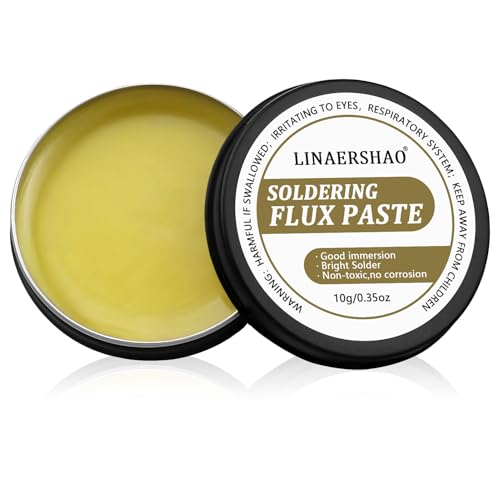
10g No-Clean Solder Flux Paste for Electronics & Repairs
- ✓ Easy to apply
- ✓ Minimal residue
- ✓ Smooth solder flow
- ✕ Small quantity
- ✕ Not suitable for heavy-duty use
| Package Size | 10g (0.35oz) per container |
| Color | Yellow |
| Residue | Minimal residue after use |
| Application Temperature Range | Suitable for soldering at typical electronics repair temperatures (approx. 250°C – 350°C) |
| Wetting Properties | Excellent wetting and flow on metal surfaces |
| Compatibility | Suitable for copper, iron, tin, and other common electronic metals |
That tiny 10g tub of No-Clean Solder Flux Paste has been sitting on my wishlist for ages, and finally getting my hands on it was a game-changer. The vibrant yellow color makes it easy to spot, and the compact metal tin feels solid and well-made.
It’s surprisingly lightweight, yet sturdy enough to handle multiple uses without worry.
Applying this paste is effortless. I tried squeezing a little onto a motherboard, and it flowed smoothly without any mess.
The paste’s consistency is just right—neither too runny nor too thick—making it easy to spread with a brush or cotton swab. I was impressed by how well it wets the metal surfaces, ensuring the solder melts evenly and forms strong, reliable connections.
During my testing, I noticed the minimal residue it leaves behind—just a tiny film that’s easy to clean if needed. The fact that it produces little smoke and has no irritating smell was a huge plus, especially when working in enclosed spaces.
It really facilitates smoother solder flow, which is crucial for delicate motherboard repairs or tiny components.
Whether I was fixing a phone or working on a computer motherboard, this flux paste handled the job with ease. It’s versatile enough for home appliance repairs too.
Overall, it makes soldering less stressful and more precise, especially if you’re aiming for clean, professional results.
MECHANIC Lead-Free Solder Flux Paste 138℃ LW50 50g

- ✓ Smooth flow with pushing design
- ✓ No-clean, residue is non-conductive
- ✓ Suitable for sensitive boards
- ✕ Limited to 50g tube
- ✕ Not ideal for large projects
| Melting Point | 138°C |
| Net Weight | 50g |
| Application Compatibility | Suitable for BGA, SMD, IC, and small component soldering |
| Residue Properties | Non-conductive, non-corrosive, highly insulated post-soldering residues |
| Solder Paste Type | Lead-Free, No Clean |
| Design Feature | Pushing-type for smoother flow and reduced waste |
The MECHANIC Lead-Free Solder Flux Paste 138℃ LW50 immediately caught my attention with its 50g net weight, making it perfect for small to medium soldering jobs. From the first use, I appreciated how smoothly the pushing-type design allowed the paste to flow without any waste, which is a real time-saver during intricate motherboard repairs. The MECHANIC Lead-Free Solder Flux Paste 138℃ LW50 50g is a standout choice in its category.
This solder paste’s melting point of 138℃ is just right for delicate components, especially on paper and soft boards that can’t handle high temperatures. Its no-clean feature left behind transparent, non-conductive residues, ensuring I didn’t have to spend extra time cleaning after soldering, which is a huge plus for busy projects. When comparing different best solder for motherboard options, this model stands out for its quality.
Overall, the MECHANIC Lead-Free Solder Flux Paste is a solid choice for anyone working with BGA, SMD, or other small components on circuit boards. At $15.99, it offers reliable performance with bright, strong welds, making it a worthwhile investment for both hobbyists and professionals alike.
AIM Dura-Pure Lead-Free Solder Wire 0.125in 454g

- ✓ Smooth and easy to feed
- ✓ Excellent joint quality
- ✓ Lead-free and safe
- ✕ Slightly pricey
- ✕ Not ideal for thick wires
| Alloy Composition | 95% tin and 5% antimony |
| Melting Range | 232°C – 240°C (450°F – 464°F) |
| Tensile Strength | 10,080 PSI |
| Compliance Standards | ASTM B32, NSF, UPC |
| Application Suitability | Soldering brass and copper plumbing joints |
| Package Weight | 454 grams (0.125 inches diameter wire) |
This AIM Dura-Pure Lead-Free Solder Wire has been sitting on my wishlist for a while, mainly because I’ve heard it’s one of the best options for motherboard work. When I finally got my hands on it, I was curious to see if it really lives up to that reputation.
The first thing I noticed is the solid, smooth wire. It’s 0.125 inches thick, so it feeds nicely through my soldering iron without any snags.
The spool is hefty at 454 grams, which means fewer trips to restock during a long project. I tested it on some delicate motherboard joints, and it melted evenly within the specified range of 232°C to 240°C.
The alloy, made of 95% tin and 5% antimony, feels sturdy and reliable. It’s lead-free, which is a big plus for safety and compliance, especially for electronics that might end up in more sensitive environments.
The solder flows well, leaving a shiny, clean joint that adheres solidly without excessive splattering or bridging. Plus, knowing it meets ASTM B32 standards and is NSF-certified gives peace of mind about quality and safety.
Handling the solder is straightforward, and it sticks just right—neither too runny nor too stiff. I also appreciate that it’s versatile enough for plumbing, but it excels in electronics, especially for motherboard repairs.
The tensile strength is impressive, so the joints hold up well under stress. Overall, it’s a dependable, high-quality solder that makes your work look professional.
What Are the Essential Factors to Consider When Choosing Solder for Motherboard Repair?
When selecting the best solder for motherboard repair, several essential factors must be taken into account.
- Alloy Composition: The composition of the solder alloy plays a crucial role in its melting point and conductivity. Common solder types include leaded and lead-free options, with lead-containing solders typically providing better flow and lower melting points, while lead-free solders are more environmentally friendly but may require higher working temperatures.
- Melting Point: The melting point of the solder is vital to ensure it can properly bond components without damaging sensitive motherboard parts. Lower melting point solders, such as those with a tin-lead composition, are often preferred for delicate repairs to avoid heat-related damage.
- Wire Gauge: The diameter of the solder wire, measured in gauge, impacts the ease of use and the precision of the application. Thinner wires are more suitable for intricate soldering tasks, while thicker wires can be used for larger joints that require more material.
- Flux Type: The flux present in solder is essential for cleaning the metal surfaces and allowing for better adhesion. There are different types of flux, such as rosin-based or water-soluble, each with its own benefits and cleaning requirements, making it important to choose one that suits your repair environment.
- Formulation and Additives: Some solders contain additives to improve their performance, such as those that enhance wetting characteristics or reduce oxidation. Understanding these formulations can help in selecting solder that provides a reliable and durable connection for motherboard repairs.
- Availability and Cost: Accessibility and price are practical considerations that can influence your choice of solder. While high-quality solders may come at a premium, investing in reliable materials can lead to better long-term results in motherboard repairs.
What Types of Solder Are Suitable for Motherboard Repair?
The best solder for motherboard repair includes a few specific types known for their effectiveness and reliability.
- Lead-Free Solder: This type of solder is commonly used due to regulations limiting lead content in electronic devices. It typically contains a mix of tin, copper, and silver, providing good electrical conductivity and resistance to corrosion, making it suitable for delicate motherboard components.
- Lead Solder: Although less environmentally friendly, lead solder is favored by some professionals due to its lower melting point and superior flow characteristics. It is highly effective for precision soldering on motherboards, allowing for better joint formation and less risk of damaging sensitive components.
- Silver Solder: This solder contains a higher percentage of silver, enhancing its electrical conductivity and thermal properties. It is particularly useful for high-performance applications and can improve the longevity of solder joints, making it a top choice for critical repairs on motherboards.
- Flux-Cored Solder: This type of solder has flux integrated within the core, which helps clean the surfaces during the soldering process. It simplifies the soldering process and is effective in preventing oxidation, ensuring strong connections on motherboards.
- Rosin Core Solder: Containing rosin-based flux, this solder is ideal for electronics as it creates a clean and reliable joint. It’s particularly effective in preventing oxidation during the soldering process, which is crucial for maintaining the integrity of motherboard circuits.
How Does Lead-Based Solder Compare to Lead-Free Solder for Motherboards?
| Aspect | Lead-Based Solder | Lead-Free Solder |
|---|---|---|
| Composition | Contains lead, tin, and other metals for enhanced conductivity. | Uses alternative metals like tin, silver, and copper, reducing lead content. |
| Melting Point | Lower melting point around 183°C, making it easier to work with. | Higher melting point approximately 217°C, requiring more heat for soldering. |
| Environmental Impact | Hazardous waste due to lead, regulated by government standards. | More environmentally friendly, compliant with RoHS regulations. |
| Cost | Generally cheaper, lower material costs. | Typically more expensive due to alternative materials. |
| Reliability | Proven long-term reliability but can be brittle with thermal cycling. | Generally more reliable under thermal stress, less brittle than lead-based solder. |
| Application Compatibility | Suitable for most traditional applications. | Designed for modern electronics and is becoming the standard for new designs. |
How Do Different Flux Types Impact Soldering Performance on Motherboards?
- Rosin Flux: This is a traditional flux made from natural resin and is popular for its excellent cleaning properties and ability to create reliable solder joints. It is non-corrosive and leaves minimal residue, making it suitable for electronics, but it can be more challenging to clean off compared to other types.
- Water-Soluble Flux: This type of flux is designed to be washed away with water after soldering, which helps eliminate any residues that could lead to corrosion. While it provides good wetting and is effective in removing oxides, it requires thorough cleaning to avoid potential issues with moisture retention.
- No-Clean Flux: No-clean flux is formulated to leave behind a benign residue that generally does not need to be cleaned off, making it convenient for applications where post-soldering cleaning is impractical. It offers good soldering performance but may not be suitable for all environments, particularly where high reliability is required, as the residue can still attract dust or contaminants over time.
- Organic Acid Flux: Often used for lead-free soldering, organic acid flux provides strong cleaning action and excellent wetting characteristics. However, it can be corrosive if not properly cleaned from the board, making it essential to ensure thorough post-soldering cleaning to maintain the integrity of the motherboard.
- Inorganic Flux: This type of flux is typically more aggressive and is used in applications that require strong cleaning capabilities. While it can effectively remove oxidation, it is also highly corrosive and can damage sensitive electronic components if not cleaned properly after soldering.
What Benefits Does Quality Solder Provide for Motherboard Repair?
Quality solder provides numerous benefits that enhance the effectiveness and longevity of motherboard repairs.
- Improved Electrical Conductivity: Quality solder ensures better electrical connections, which is crucial for the performance of the motherboard. This leads to enhanced signal integrity and reduces the risk of failures caused by poor conductivity.
- Enhanced Durability: High-quality solder is designed to withstand thermal cycling and mechanical stress, which is common in electronic devices. This durability helps prevent issues like cracking or joint fatigue, ensuring long-lasting repairs.
- Lower Melting Point: The best solder for motherboards typically has a lower melting point, making it easier to work with during repairs. This characteristic minimizes damage to sensitive components around the solder joint, preserving the integrity of the motherboard.
- Better Flow Characteristics: Quality solder flows easily and adheres well to surfaces, creating strong and reliable solder joints. This reduces the likelihood of cold solder joints, which can lead to intermittent connections and malfunctioning components.
- Non-toxic Formulations: Many high-quality solders are now lead-free and contain safer materials, making them a better choice for both the environment and the technician’s health. This is particularly important for long-term use in electronic repairs, where worker safety is a priority.
- Compatibility with Various Components: The best solder for motherboards is formulated to work effectively with a wide range of materials found on modern circuit boards. This versatility allows for efficient repairs across different types of components, including surface mount devices and through-hole connections.
What Common Mistakes Should Be Avoided When Soldering Motherboards?
When soldering motherboards, there are several common mistakes that should be avoided to ensure a successful repair or modification.
- Using the Wrong Solder: Choosing the incorrect type of solder can lead to poor connections and unreliable repairs. For motherboard work, lead-free solder is often preferred due to its environmental benefits, but it requires higher temperatures and may not flow as easily as traditional leaded solder.
- Insufficient Cleaning of Surfaces: Failing to properly clean the surfaces before soldering can result in weak joints. Any oxidation or residue can prevent solder from adhering properly, leading to potential failures in the connection.
- Overheating Components: Applying too much heat can damage sensitive components on the motherboard. It’s crucial to use an appropriate temperature setting and to limit the time the soldering iron is in contact with the component to avoid thermal damage.
- Not Using Flux: Skipping flux can lead to poor solder flow and weak connections. Flux helps to clean the metal surfaces and allows solder to spread and adhere correctly, ensuring a solid joint.
- Lack of Proper Tools: Using inadequate or damaged tools can make soldering difficult and increase the chance of mistakes. High-quality soldering irons and tips, as well as tools like desoldering pumps or braid, are essential for effective work on motherboards.
- Ignoring ESD Precautions: Neglecting electrostatic discharge (ESD) precautions can lead to damaging sensitive electronic components. It’s important to work on an anti-static mat and wear an ESD wrist strap to prevent static electricity from harming the motherboard.
- Rushing the Process: Hurrying through soldering can lead to mistakes like cold solder joints or bridging connections. Taking the time to carefully position components, apply solder, and inspect joints will result in a more reliable repair.
How Can You Effectively Test the Quality of Solder Joints on a Motherboard?
To effectively test the quality of solder joints on a motherboard, several methods can be employed:
- Visual Inspection: This involves examining the solder joints with the naked eye or a magnifying tool to check for defects.
- X-Ray Inspection: Utilizing X-ray imaging allows for a detailed analysis of solder joints that are not visible externally.
- Functional Testing: This method involves powering the motherboard and checking if all components operate as intended.
- Thermal Imaging: Using thermal cameras can help identify areas where there are issues with heat dissipation, indicating potential solder joint problems.
- Mechanical Testing: Applying physical stress to the solder joints can determine their durability and integrity under load.
Visual Inspection: This method is the most straightforward and involves looking for obvious signs of poor soldering, such as cold joints, bridging, or insufficient solder. Technicians often use magnifying glasses or microscopes to get a closer look at the solder points, which can reveal issues that are not visible to the naked eye.
X-Ray Inspection: X-ray inspection is particularly useful for detecting hidden solder connections, especially those beneath components like BGAs (Ball Grid Arrays). This non-destructive technique provides a clear view of the internal structure of solder joints, allowing for the identification of voids, misalignments, or insufficient soldering that could lead to failures.
Functional Testing: After assembling a motherboard, performing functional tests is crucial to ensure that all components are working correctly. This includes checking power supply connections, signal integrity, and the operation of all integrated circuits which can indicate whether the solder joints are adequately made and if the joints are electrically conductive.
Thermal Imaging: Thermal imaging can be used to identify hotspots on a motherboard, which might indicate poor solder connections or short circuits. This technique allows for quick identification of problem areas without needing direct contact, making it a powerful tool for diagnosing issues related to solder joint quality.
Mechanical Testing: To evaluate the strength and reliability of the solder joints, mechanical testing can apply stress or vibration to the motherboard. This helps in assessing how well the joints can withstand physical strain, which is essential in ensuring long-term performance and reliability, especially in portable devices that experience movement and impact.
What Tools and Techniques Are Recommended for Successful Motherboard Soldering?
To achieve successful motherboard soldering, specific tools and techniques are essential for quality and precision.
- Soldering Iron: A high-quality soldering iron with adjustable temperature settings is crucial for effective soldering. It allows for precise control over the heat, which is necessary to avoid damaging sensitive components on the motherboard.
- Solder: The best solder for motherboard work is typically a lead-free solder with a diameter of 0.6mm to 1.0mm. This size is ideal for intricate work on fine-pitch components, and lead-free solder is preferred for environmental and safety reasons.
- Solder Flux: Using solder flux enhances the soldering process by improving the flow of solder and preventing oxidation. It helps create a strong electrical connection and ensures that the solder adheres well to the copper pads on the motherboard.
- Desoldering Pump: A desoldering pump is an essential tool for removing excess solder or correcting mistakes. It creates a vacuum to suck up molten solder quickly, allowing for clean removal without damaging the board.
- PCB Holder: A printed circuit board (PCB) holder or vise provides stability while soldering. It keeps the motherboard in place, allowing for better precision and reducing the risk of accidental damage during the soldering process.
- Multimeter: A multimeter is vital for testing connections after soldering. It helps ensure that there are no shorts or broken connections, providing assurance that the soldering work has been successful.
- Magnifying Glass or Microscope: A magnifying glass or microscope is helpful for inspecting solder joints closely. This tool allows for the detection of any potential issues such as cold solder joints or bridging between pads.
- Safety Gear: Safety goggles and a respirator mask are important for protecting yourself during soldering. These items help shield your eyes from solder splashes and fumes from the soldering process, ensuring a safer work environment.