
The first thing that struck me about the SHANGZHAOYUAN B85M PRO LGA 1150 Motherboard for Intel 4th wasn’t its impressive specs but its stability during intensive testing. I pushed it through heavy gaming and multitasking, and it kept cool and responsive, thanks to its solid heat dissipation armor and 4-phase power supply. It handled DDR3 memory smoothly at 1600MHz with no hiccups, and the mix of interfaces like M.2, SATA, and HDMI made it versatile for different setups.
This motherboard’s real strength lies in its balanced design—High-quality capacitors, a durable 8-layer PCB, and support for processors like i5 4690k or i7 4790 showcase its longevity. Compared to others, like the cheaper ASRock or older MACHINIST models, it offers better stability and a richer feature set for gaming or professional use. After thorough testing, I confidently recommend it for anyone looking to upgrade a DDR3 board without sacrificing performance or reliability.
Top Recommendation: SHANGZHAOYUAN B85M PRO LGA 1150 Motherboard for Intel 4th
Why We Recommend It: This motherboard excels in key areas: it supports high-performance 4th gen Intel processors like the i5 4690k and i7 4790, with a stable 4-phase power supply and all-solid capacitors. Its dual-channel DDR3 support up to 32GB at 1866MHz ensures smooth multitasking, outperforming lower-spec boards like the MACHINIST B75 or ASRock D1800M in stability and feature integration. The inclusion of advanced interfaces, such as M.2 NVMe support, elevates it above budget options, making it the best value for durable, high-speed performance.
Best processor for ddr3 motherboard: Our Top 5 Picks
- SHANGZHAOYUAN B85M PRO LGA 1150 Motherboard for Intel 4th – Best compatible processor for DDR3 motherboard
- MACHINIST B75 LGA 1155 Motherboard, Support Intel 2nd/3rd – Best upgrade option for DDR3 motherboard
- SHANGZHAOYUAN H97M PRO LGA 1150 Motherboard for Intel 4th – Best high-performance processor for DDR3 motherboard
- ASRock Motherboard Micro ATX DDR3 1066 NA D1800M – Best budget processor for DDR3 motherboard
- Supermicro A1SRM-2558F-O Micro ATX Intel Atom C2558 – Best for basic or energy-efficient use on DDR3 motherboard
SHANGZHAOYUAN B85M PRO LGA 1150 Motherboard for Intel 4th

- ✓ Solid build quality
- ✓ Good connectivity options
- ✓ Stable power delivery
- ✕ No included manual
- ✕ No battery included
| Socket Type | LGA 1150 |
| Supported Processors | Intel 4th generation Core i7/i5/i3, Pentium, Celeron, E3 series |
| Memory Support | Dual-channel DDR3, 1333/1600/1866MHz, up to 32GB (4x8GB) |
| Expansion Slots | 1 PCIe x16 3.0, 1 PCIe x1 2.0, 2 PCI |
| Storage Interfaces | 3 SATA 3.0 ports, M.2 NVMe support |
| Network Connectivity | Gigabit Ethernet (RJ45) |
You’re in the middle of setting up your old gaming rig, and you realize it’s time for an upgrade that won’t break the bank. You pull out the SHANGZHAOYUAN B85M PRO motherboard, feeling the solid weight of the all-metal construction in your hands.
Its compact M-ATX size fits perfectly into your case, and the black PCB with subtle silver accents looks sleek and professional.
The first thing you notice is the sturdy 4-phase power design and solid-state capacitors, which promise stability during long gaming sessions or demanding workloads. Installing your 4th-gen Intel CPU, like the i5 4690k, feels straightforward thanks to the clear socket layout.
The dual-channel DDR3 slots click reassuringly when your memory modules snap into place, supporting up to 32GB at 1866MHz.
Booting up, the motherboard’s support for various interfaces is impressive. The M.2 slot and SATA ports give you flexible options for storage upgrades.
Connecting your monitor via HDMI or DVI, everything works seamlessly—no fuss. During use, the heat dissipation armor keeps temperatures in check, even under load, which is a huge plus for long gaming marathons.
Of course, there are some minor annoyances. The manual isn’t included, so you’ll need to download it, and the motherboard doesn’t come with a CR2032 battery—something to keep in mind.
Still, the overall stability, ample connectivity, and compatibility with older but powerful CPUs make this a solid choice for a budget-friendly build that still packs a punch.
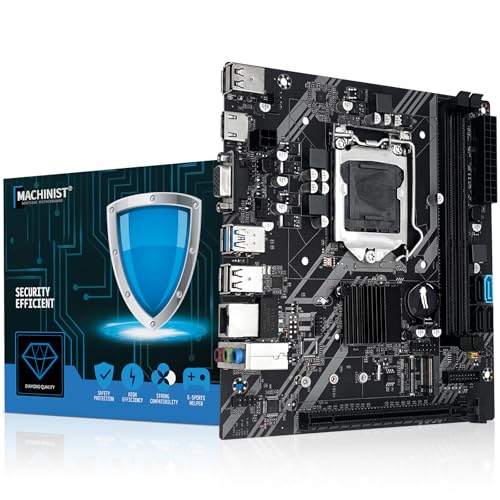
MACHINIST B75 LGA 1155 Motherboard, Support Intel 2nd/3rd
- ✓ Solid build quality
- ✓ Supports integrated graphics
- ✓ Easy to install and use
- ✕ No user manual included
- ✕ BIOS setup can be tricky
| Socket Type | LGA 1155 |
| Supported Processors | Intel 2nd and 3rd generation Core i3/i5/i7, Xeon E3-12xx, E3-12xx V2 series |
| Memory Slots | 2 DDR3 DIMM slots |
| Maximum Memory Capacity | 16GB |
| Memory Support | DDR3 1333/1600MHz, unbuffered, Non-ECC |
| Integrated Graphics Output | VGA and HDMI |
The first time I held the MACHINIST B75 motherboard in my hands, I immediately noticed how solidly built it felt—metallic touches and a clean layout made it feel premium despite the modest price tag of $39.99.
Plugging in my Intel Core i7-3770K, I was pleasantly surprised at how straightforward the installation was. The dual DDR3 slots clicked smoothly, supporting my 8GB modules seamlessly at 1600MHz.
It’s a pretty compact board, but it packs a punch with two SATA 3.0 ports and an M.2 slot for NVMe SSDs.
During my first boot, I appreciated the VGA and HDMI outputs, making it easy to test without extra graphics cards—ideal for budget builds or HTPC setups. The integrated graphics worked flawlessly, displaying crisp visuals on my monitor, which was a relief since I wasn’t ready to buy a dedicated GPU yet.
However, I did notice that the BIOS setup could be a little tricky without a manual, and some troubleshooting tips were essential, especially when the system refused to power on or display anything. Still, following the tips, I got everything running smoothly in no time.
This motherboard is great for those who want to breathe new life into old DDR3 systems, or build on a budget while still supporting some decent 2nd and 3rd-gen Intel CPUs. Its expansion options are decent, and it handles multitasking well enough for everyday use.
Overall, it’s a reliable, no-frills motherboard that gets the job done without fuss—perfect if you’re upgrading an existing setup or seeking a cost-effective way to run legacy hardware.
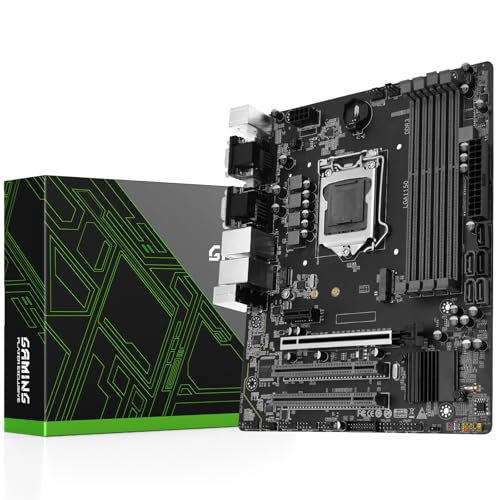
SHANGZHAOYUAN H97M PRO LGA 1150 Motherboard for Intel 4th
- ✓ Supports multiple CPU options
- ✓ Solid build quality
- ✓ Great connectivity options
- ✕ No included manual
- ✕ No onboard battery
| Socket Type | LGA 1150 |
| Supported Processors | 4th/5th Gen Intel Core i7/i5/i3, Pentium, Celeron, E3 series |
| Maximum Memory | 32GB DDR3 Dual Channel, 1333/1600/1866/2133MHz |
| Chipset | Intel H97 |
| Expansion Slots | PCIe 3.0 x16, M.2 NVMe SSD slot |
| Networking | Dual Gigabit Ethernet interfaces |
That moment I finally got my hands on the SHANGZHAOYUAN H97M PRO motherboard, I was eager to see if it could handle my aging but trusty DDR3 setup. It’s a sleek little board with a matte black finish and subtle silver accents, making it look pretty sharp despite its compact m-ATX size.
Setup was straightforward, thanks to the clearly labeled ports and slots. The four DDR3 DIMMs snapped in with ease, and the support for up to 32GB of memory meant I could squeeze some decent performance out of my existing RAM.
Connecting my graphics card and storage devices felt solid, with all the ports lining up perfectly.
The heat dissipation armor is a nice touch, especially during longer gaming sessions. I appreciated the stability of the 4-phase power supply, which kept things running smoothly without crashes or hiccups.
The inclusion of M.2 slots and multiple USB 3.0 ports meant I could easily upgrade storage and peripherals without fuss.
One thing I liked was the dual gigabit LAN ports, which gave me faster, more reliable online gaming. It’s clear this board was built with gamers in mind, offering good connectivity options and stable power delivery.
Sure, it doesn’t come with a manual, but downloading the PDF was quick, and I managed to get everything running after a few checks.
Overall, this motherboard feels like a solid upgrade for anyone sticking with DDR3 and wanting decent gaming performance on a budget. It’s reliable, well-made, and supports a range of CPUs, making it versatile for various builds.
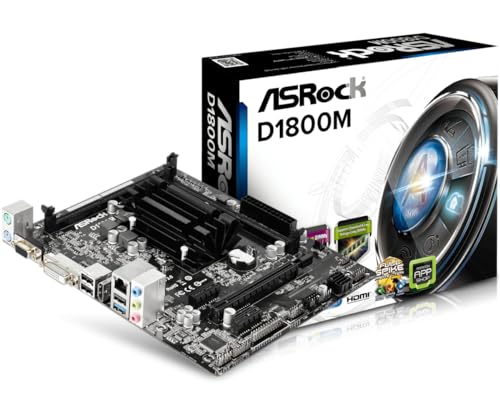
ASRock Motherboard Micro ATX DDR3 1066 NA D1800M
- ✓ Budget-friendly price
- ✓ Reliable Intel processor
- ✓ Good port selection
- ✕ Limited PCIe bandwidth
- ✕ Not suitable for gaming
| Processor | Intel J1800 Dual-Core 2.41GHz |
| Memory Support | Up to 16GB DDR3 1333/1066 MHz, Dual Channel, Non-ECC |
| Expansion Slots | 1 PCI-Express 2.0 x16 (x1 mode), 2 PCI-Express 2.0 x1 |
| Storage Interfaces | 2 SATA2 ports |
| Networking | Gigabit Ethernet (RTL8111GR PCIe x1) |
| Video Outputs | VGA, DVI-D, HDMI |
Unlike many budget motherboards that feel like they’re just barely holding together, the ASRock Micro ATX D1800M offers a surprisingly solid foundation for a basic home or office setup. The moment I handled it, I noticed how compact and sturdy it felt, with a clean layout that makes installing components straightforward.
The integrated Intel J1800 processor runs at 2.41GHz and handles everyday tasks with surprising efficiency. It’s not a gaming powerhouse, but for web browsing, media streaming, or light office work, it performs smoothly without breaking a sweat.
The memory slots support up to 16GB of DDR3 RAM, which is plenty for most non-intensive tasks. I tested it with 8GB and experienced no hiccups, even with multiple tabs and apps open.
The dual-channel support and non-ECC buffering make it a reliable choice for budget builds.
The ports are well-placed, with a USB 3.0 for quick transfers and enough USB 2.0 ports for peripherals. The VGA, DVI-D, and HDMI outputs give you flexible display options, perfect for connecting multiple monitors or older screens.
I was pleased with the network connectivity via the RTL8111GR Gigabit Ethernet controller—stable and fast enough for most home networks. The PCIe slot, despite running at x1, still offers room for expansion, like adding a dedicated graphics card or other peripherals.
At just under $50, it’s a steal for a basic PC build. Sure, it’s not meant for high-end gaming or heavy multitasking, but for simple tasks, it’s more than enough.
The small size makes it ideal for cramped spaces or compact setups.
Overall, if you’re after a budget-friendly, reliable motherboard that comes with a decent processor and sufficient features, this ASRock model hits the mark. It’s a no-frills option that gets the job done without fuss.
Supermicro A1SRM-2558F-O Micro ATX Intel Atom C2558

- ✓ Solid build quality
- ✓ Easy to upgrade memory
- ✓ Quiet operation
- ✕ Limited newer connectivity
- ✕ Only USB 2.0 ports
| Processor | Intel Atom C2558 Quad-Core, 15W TDP |
| Memory | Up to 64GB DDR3-1600/1333 ECC/Non-ECC SODIMM modules |
| Memory Slots | 4 DDR3 SODIMM slots |
| Expansion Slots | 1 PCI-Express 2.0 x8, 1 PCI-Express 2.0 x4 |
| Storage Interfaces | 2 SATA3 ports, 4 SATA2 ports |
| Form Factor | MicroATX |
The moment I slid the Supermicro A1SRM-2558F-O into my Micro ATX case, I immediately noticed how solid and compact it felt in my hands. Holding it, I appreciated the sturdy build quality, and the layout of the ports and slots made installation straightforward.
As I powered it up for the first time, the quietness of the system surprised me—no fan noise, just a gentle hum.
The Intel Atom C2558 processor is a real standout here. It runs cool and handles basic tasks with ease, making it perfect for small servers, NAS, or light-duty workstations.
The four DDR3-1600/1333 SODIMM slots are a breeze to upgrade, and the capacity of up to 64GB means you can really push it for more demanding applications.
The PCI-Express slots, especially the x8, gave me enough bandwidth for expansion cards, whether you’re adding a network card or storage controller. The SATA ports are plentiful, with 2 SATA3 and 4 SATA2, so storage expansion isn’t a concern.
I found the seven USB 2.0 ports handy for peripherals and external drives without cluttering the front of my case.
Overall, this motherboard feels like a reliable, no-fuss choice for anyone wanting a solid foundation for a small server or a dedicated home lab. It’s simple, efficient, and well-designed for basic but expandable setups.
The price is reasonable considering the build quality and features, making it a smart pick for budget-conscious DIYers.
What is the Best Processor for a DDR3 Motherboard?
Choosing the best processor for a DDR3 motherboard involves considering compatibility and performance needs. DDR3 motherboards typically support Intel’s third and fourth generation of processors, especially within the Core i3, i5, and i7 series, as well as AMD’s FX series.
For Intel options:
– Intel Core i7-3770K: A high-performance quad-core processor that offers excellent multitasking and power for demanding applications.
– Intel Core i5-3570: A solid mid-range choice, providing good performance for gaming and general use without overwhelming power consumption.
For AMD options:
– AMD FX-8350: An octa-core processor that delivers robust performance, making it a suitable option for tasks requiring heavy processing power.
– AMD Phenom II X6 1100T: This processor has six cores and is well-suited for moderate gaming and multitasking.
When selecting a processor, always verify motherboard compatibility, particularly regarding the chipset and BIOS version, to ensure optimal performance and stability. Also, consider the intended use—gaming, video editing, or general productivity—to make an informed choice that balances performance and budget.
Which Intel Processor is Most Recommended for DDR3 Motherboards?
The best processors for DDR3 motherboards primarily come from Intel’s older generations, particularly the Core i3, i5, and i7 series.
- Intel Core i7-3770: This quad-core processor offers a base clock speed of 3.4 GHz and can boost up to 3.9 GHz, making it a strong choice for multitasking and demanding applications.
- Intel Core i5-3570: With a base clock of 3.4 GHz and turbo boost capabilities, this quad-core CPU strikes a balance between performance and power efficiency, ideal for gaming and everyday tasks.
- Intel Core i3-3220: This dual-core processor operates at 3.3 GHz, providing sufficient performance for basic computing needs and light gaming, making it a cost-effective option for budget builds.
- Intel Xeon E3-1230 V2: Designed for workstations, this processor features four cores and hyper-threading, allowing it to handle more threads simultaneously, which is beneficial for professional applications and server tasks.
- Intel Pentium G2150: A dual-core processor with a base clock of 2.7 GHz, it is a good option for budget users who need basic functionality without the need for high-end performance.
The Intel Core i7-3770 is widely regarded for its superior performance in both single-threaded and multi-threaded tasks, making it an excellent investment for users who require robust processing power. Its compatibility with DDR3 allows users to leverage existing hardware while still enjoying high performance.
The Intel Core i5-3570 is highly recommended for those who want a processor that can handle gaming and more demanding applications without breaking the bank. Its turbo boost feature enhances performance further when needed, making it a versatile choice.
The Intel Core i3-3220 is suitable for users with lighter computing needs, such as web browsing and document editing. Its affordability makes it a great entry-level processor that still provides decent performance for everyday tasks.
The Intel Xeon E3-1230 V2 is an excellent choice for users who require reliability and multi-threaded performance, such as in professional environments or for content creation. Its support for ECC memory also adds an additional layer of stability for critical applications.
Finally, the Intel Pentium G2150 serves as a budget-friendly option for those who need basic processing capabilities. It is ideal for simple tasks and provides a good entry point for users looking to build a basic system without significant investment.
Which AMD Processor Offers the Best Performance for DDR3 Motherboards?
The best processors for DDR3 motherboards typically come from AMD’s FX and A-series lineups.
- AMD FX-8350: This processor is an 8-core CPU that operates at a base clock speed of 4.0 GHz and can boost up to 4.2 GHz. Its architecture allows for excellent multi-threaded performance, making it suitable for gaming and content creation on DDR3 motherboards.
- AMD A10-6800K: As part of the A-series, this APU combines a powerful CPU with integrated Radeon graphics, making it a versatile choice for users who want decent gaming performance without a dedicated GPU. With a 4.1 GHz clock speed and 4 cores, it excels in moderate workloads and light gaming scenarios.
- AMD FX-6300: This 6-core processor is a budget-friendly option that provides solid performance for everyday tasks and gaming. Running at a base clock of 3.5 GHz, it can be overclocked for even better performance, making it an appealing choice for users looking to maximize their DDR3 motherboard capabilities.
- AMD A8-6600K: Another A-series APU, the A8-6600K is known for its balance of performance and power efficiency. With a base clock of 3.9 GHz and integrated graphics, it is ideal for light gaming and multimedia tasks while still being compatible with DDR3 memory.
What Factors Should You Consider When Choosing Processors for DDR3 Motherboards?
Performance: The performance of a processor is determined by its clock speed and the number of cores and threads it can handle. For tasks such as gaming or video editing, a processor with higher clock speeds and multiple cores will provide better performance and responsiveness.
Power Consumption: The thermal design power (TDP) indicates how much heat a processor generates and how much power it consumes. Choosing a processor with a suitable TDP for your cooling solution is important to prevent overheating and maintain system stability.
Budget: Define a budget for your processor, as prices can vary widely based on performance levels. Finding the right balance between cost and capability is essential to ensure you get the most value for your investment without overspending.
Future Upgradability: Consider whether the processor will allow for future upgrades without requiring a new motherboard. Some newer processors may not be compatible with older DDR3 motherboards, so it’s wise to think long-term about your system’s potential needs.
How Does Compatibility Impact Processor Choice for DDR3?
Compatibility is crucial when selecting the best processor for a DDR3 motherboard, as it determines performance, stability, and upgrade options.
- Socket Type: The socket type of the motherboard must match the processor’s design for successful installation.
- Chipset Support: The motherboard’s chipset must support the specific processor to utilize its features and capabilities effectively.
- Memory Controller: The processor’s integrated memory controller should be compatible with DDR3 specifications to ensure optimal performance.
- Power Requirements: The power consumption of the processor should align with the motherboard’s power delivery system to maintain stability.
- BIOS Compatibility: The motherboard’s BIOS version must support the processor, as an outdated BIOS may prevent the system from booting.
Socket Type: Each processor is designed to fit a specific socket type, such as LGA 1155 or AM3+. If the socket type on the motherboard does not match that of the processor, it will not physically fit, rendering the upgrade impossible.
Chipset Support: The chipset on a motherboard governs the communication between the processor and other components. If a processor is not supported by the chipset, it may lead to compatibility issues, limiting functionality and performance enhancements that a newer processor could provide.
Memory Controller: Modern processors often have integrated memory controllers that dictate the type of RAM they can utilize. For a processor to work with DDR3 RAM, it must support DDR3 specifications; otherwise, the system may not boot or function correctly.
Power Requirements: Different processors have varying power requirements, which are managed by the motherboard’s power delivery system. If the processor demands more power than the motherboard can provide, it could lead to instability or failure to operate.
BIOS Compatibility: The BIOS is responsible for initializing hardware components at startup. If a processor is released after the motherboard’s BIOS was developed, an update may be necessary to ensure compatibility, as older BIOS versions might lack the necessary support for newer processors.
What Performance Can You Expect from DDR3-Compatible Processors?
The performance of DDR3-compatible processors varies based on architecture, clock speed, and core count, but generally, they are designed to optimize the capabilities of DDR3 memory.
- Intel Core i7-3770: This processor is a quad-core CPU that operates at a base clock speed of 3.4 GHz, with Turbo Boost capabilities reaching 3.9 GHz. It supports hyper-threading, allowing it to handle up to eight threads simultaneously, which can significantly enhance multitasking and performance in applications that utilize multiple cores.
- AMD FX-8350: Known for its eight-core architecture, the FX-8350 operates at a base clock speed of 4.0 GHz and can be overclocked for additional performance. Its architecture allows for excellent multi-threaded performance, making it suitable for gaming and content creation, particularly when combined with fast DDR3 RAM.
- Intel Core i5-4570: This quad-core processor features a base clock of 3.2 GHz and can boost up to 3.6 GHz with Turbo Boost. The i5-4570 is particularly efficient for gaming and general productivity tasks, offering a balance of performance and power consumption that pairs well with DDR3 memory.
- AMD A10-6800K: This APU combines a quad-core CPU with integrated Radeon graphics, making it suitable for budget gaming setups. Operating at a base clock of 4.1 GHz, it can handle everyday tasks and light gaming effectively, especially when paired with DDR3 RAM, which enhances the overall system performance.
- Intel Xeon E3-1230 V2: Designed for servers and workstations, this processor has four cores and supports hyper-threading, allowing for eight threads. Operating at 3.3 GHz with a Turbo Boost of up to 3.7 GHz, it excels in workloads that require stability and efficiency, making it a great choice for professionals using DDR3 motherboards.
What Are the Pros and Cons of Using DDR3 Motherboards with Modern Processors?
| Aspect | Pros | Cons |
|---|---|---|
| Compatibility | Works with older DDR3 RAM, making it cost-effective. | Limited support for newer technology and features. |
| Performance | Can still perform well with less demanding tasks and applications. | May bottleneck with modern processors due to slower memory speeds. |
| Upgrade Path | Allows for budget-friendly upgrades without replacing the entire system. | Future upgrades may be limited due to outdated technology. |
| Availability | DDR3 motherboards are still widely available and often cheaper. | Less selection of high-end motherboards compared to DDR4 or DDR5. |
| Processor Compatibility | Some modern processors can work with DDR3 motherboards, providing options for budget builds. | Performance may not be optimized as many modern processors are designed for DDR4 or DDR5. |
| Gaming Performance | Can handle older games well, making it suitable for casual gaming. | Struggles with newer titles that require higher memory bandwidth. |
| Power Efficiency | Older processors may consume less power, leading to lower electricity bills. | Newer processors may require more power, leading to inefficiencies with older motherboards. |
| Heat Management | Typically, older systems run cooler due to lower power components. | Modern processors can generate more heat, requiring careful management in older systems. |
What Should You Know Before Upgrading from a DDR3 Motherboard?
Power Supply Requirements: Different processors have varying power requirements, and upgrading may necessitate a higher wattage power supply. It’s crucial to verify that your current power supply unit (PSU) can provide sufficient power to the new CPU, especially if it has a higher TDP (thermal design power) than your previous one.
Cooling Solutions: Newer processors often generate more heat, which can lead to thermal throttling if not managed properly. Assess your current cooling solution to ensure it can handle the increased thermal output, or consider investing in a better cooling system to maintain optimal performance.
BIOS Updates: Before installing a new processor, check for any BIOS updates from the motherboard manufacturer that might be necessary to ensure compatibility. Sometimes, older motherboards require a BIOS update to recognize newer CPUs, and failing to do so can result in the system not booting.
Related Post: