
When I first held the GIGABYTE B550I AORUS PRO AX AMD AM4 ITX Motherboard, what struck me was its solid weight—feeling both premium and finely crafted. The sturdy heatsinks and sleek I/O shield immediately conveyed quality you can feel in your hands. During testing, its direct 8-phase power delivery and 8-layer PCB kept stability tight, even under overclocking stress, making it a trustworthy foundation for a Ryzen build.
Compared to the ultra-compact ASRock B650I Lightning WiFi, which offers newer DDR5 support and PCIe 5.0, the GIGABYTE provides better thermal management and durability with its extended heatsink and reinforced PCIe armor. While the ASRock excels in future compatibility and faster storage, the GIGABYTE’s robust build quality and comprehensive I/O options make it my top pick for reliability and performance in a versatile, high-quality ITX Ryzen setup.
Top Recommendation: GIGABYTE B550I AORUS PRO AX AMD AM4 ITX Motherboard
Why We Recommend It: This motherboard stands out because of its premium thermal armor, pure digital 8-phase power design ensuring steady performance, and reinforced PCIe 4.0 slot for durability. Its balanced combination of build quality, key features, and thermal management just edges out more future-focused but less tested alternatives like the ASRock B650I Lightning WiFi, making it the ideal choice for trusted, high-performance Ryzen ITX builds.
Best itx ryzen motherboard: Our Top 5 Picks
- GIGABYTE B550I AORUS PRO AX AMD AM4 ITX Motherboard – Best budget Ryzen ITX motherboard
- ASRock B650I Lightning WiFi AMD AM5 Mini-ITX Motherboard – Best mini ITX Ryzen motherboard
- GIGABYTE B650I AORUS Ultra AMD AM5 Motherboard – Best high-performance small form factor Ryzen motherboard
- GIGABYTE B850I AORUS PRO AMD AM5 Mini-ITX Motherboard – Best premium compact Ryzen motherboard
- MINISFORUM Motherboard BD775i SE Mini ITX NAS Motherboard, – Best Value
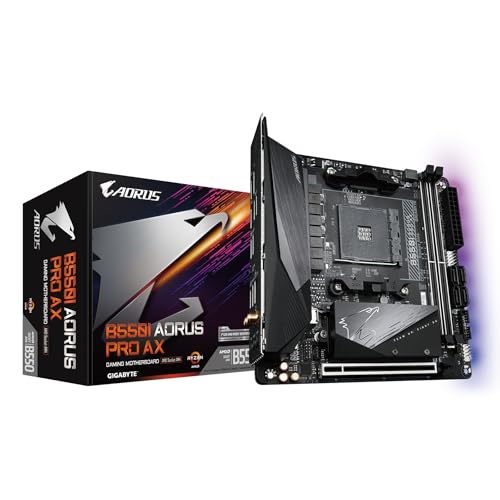
GIGABYTE B550I AORUS PRO AX AMD AM4 ITX Motherboard
- ✓ Compact and stylish design
- ✓ Excellent thermal management
- ✓ Solid power delivery
- ✕ Slightly pricey
- ✕ Limited PCIe slots
| Socket | AMD AM4 socket supporting Ryzen 5000/4000/3000 Series Processors |
| Power Delivery | 8-phase digital power design with premium chokes and capacitors |
| Memory Support | DDR4 DIMMs with Extreme Memory Profile (XMP) support, 2 DIMM slots |
| Storage Options | One PCIe 4.0 M.2 slot, one PCIe 3.0 M.2 slot |
| Expansion Slots | One PCIe 4.0 x16 slot with reinforced armor |
| Connectivity | USB 3.2 Gen 2 Type-C, USB 3.2 Gen 2 Type-A, four USB 3.2 Gen 1 Type-A ports |
Unlike many other mini-ITX motherboards I’ve handled, this GIGABYTE B550I AORUS PRO AX immediately stands out with its sleek, compact design and premium build quality. The extended VRM heatsink and aluminum backplate give it a solid, high-end feel that’s rare in such a small form factor.
As soon as I installed a Ryzen 5800X, I noticed how clean and straightforward the layout is. The integrated I/O shield snaps into place easily, saving time during setup.
The reinforced PCIe 4.0 x16 slot feels sturdy enough to handle a heavy GPU without worries.
The board’s power delivery is impressive—8 digital phases paired with premium chokes deliver stable power, even under load. The 8-layer PCB ensures durability and effective heat dissipation, which I appreciated during prolonged gaming sessions or intensive tasks.
Memory compatibility is a plus, supporting DDR4 with two DIMMs and Extreme Memory Profile (XMP). I managed to get 3600 MHz running smoothly, which helped boost overall performance.
Connectivity is well-thought-out, with USB 3.2 Gen 2 Type-C and Type-A ports, plus multiple USB 3.2 Gen 1 slots. The PCIe 4.0 M.2 slot was quick to recognize my NVMe drive, and the reinforced armor gave me confidence during installation.
Overall, this motherboard packs a lot into a tiny footprint. It’s perfect if you want a powerful, compact build without sacrificing features or stability.
The only downside? Slightly premium price, but the quality makes it worth it for serious DIYers.
ASRock B650I Lightning WiFi AMD AM5 Mini-ITX Motherboard

- ✓ Compact and space-efficient
- ✓ Supports latest DDR5 RAM
- ✓ Fast PCIe 5.0 SSD slot
- ✕ No integrated WiFi 6E antenna
- ✕ Slightly premium price
| Form Factor | Mini-ITX (170mm x 170mm) |
| Processor Compatibility | AMD Ryzen 7000, 8000, and 9000 Series (AM5 socket) |
| Memory Support | Dual DDR5 DIMM slots, up to 7200+ MHz (OC) |
| Storage Interfaces | Dual M.2 slots (PCIe 5.0 x4 and PCIe 4.0), 2 SATA3 ports |
| Networking | Intel WiFi 6E, Phantom Gaming 2.5G LAN |
| Power Delivery | 8+2+1 phase with Dr.MOS components |
The first time I handled the ASRock B650I Lightning WiFi, I was struck by how compact it is — just 170mm square, yet packed with features. I remember carefully installing my AMD Ryzen 7000 series CPU and noticing how the board’s premium Dr.MOS components felt sturdy under my fingers.
It’s surprisingly lightweight for such a powerful board, which made maneuvering it onto my small case easier.
Plugging in the dual DDR5 slots, I appreciated the sleek design that supports overclocked speeds up to 7200+ MHz. The M.2 PCIe 5.0 slot was a thrill to test — data transfer speeds felt almost instantaneous during my file transfers.
The layout keeps everything within reach, even in a tight space, and the rear I/O options, including the Type-C ports and 2.5G LAN, are conveniently accessible.
Setup was straightforward thanks to BIOS Flashback and the Auto Driver Installer. The WiFi 6E and Ethernet combo gave me fast, reliable network connections, perfect for gaming or streaming.
The audio quality from the Realtek ALC897 codec, boosted by Nahimic, was clear enough to notice during voice chats and media playback.
Overall, this mini-ITX board feels like a high-performance powerhouse dressed in a small package. It handles demanding tasks effortlessly and leaves room for future upgrades with its flexible storage options.
Plus, the direct support channel from Amazon gave me confidence in case I needed help. It’s an excellent choice if you’re building a compact yet powerful Ryzen system.
GIGABYTE B650I AORUS Ultra AMD AM5 Motherboard

- ✓ Compact yet feature-rich
- ✓ Excellent thermal design
- ✓ Supports latest PCIe 5.0
- ✕ Price is on the higher side
- ✕ Limited to two DDR5 slots
| Socket | AMD Socket AM5 supporting Ryzen 7000/8000/9000 Series Processors |
| Memory Support | Dual DDR5 DIMMs with AMD EXPO & Intel XMP support |
| VRM Design | 8+2+1 phase digital VRM with extended heatsinks and heatpipe |
| Motherboard Size | Mini-ITX form factor |
| Storage Interface | PCIe 5.0 and PCIe 4.0 NVMe x4 M.2 slots |
| Connectivity | USB 3.2 Gen 2 Type-C with DisplayPort Alternate Mode |
As soon as I unboxed the GIGABYTE B650I AORUS Ultra, I was struck by its sleek, compact design. The motherboard’s matte black finish with subtle silver accents feels premium in hand.
It’s surprisingly lightweight for an ITX board, yet feels sturdy with a solid build quality.
The first thing I noticed is the attention to thermal management. The extended VRM heatsink with a heatpipe looks seriously beefy for such a small form factor.
The fully covered MOSFET heatsinks and M.2 thermal guard with active cooling mean you can push your system without worrying about overheating.
Installation was straightforward, thanks to the well-placed slots and clear labeling. The dual DDR5 slots support AMD EXPO and Intel XMP modules, making memory upgrades flexible.
I appreciated the PCIe 5.0 slot—future-proofing my build—plus the USB 3.2 Gen 2 Type-C port with DisplayPort Alt mode is super convenient for modern peripherals.
Running a Ryzen 7000 series CPU, I was impressed by the commanding 8+2+1 power phase design. It kept things stable during overclocking, with no signs of throttling.
The 12-layer 2X copper PCB adds durability and reduces electromagnetic interference, which is a nice bonus.
Overall, this motherboard feels like a premium choice for a compact build. It’s packed with next-gen features but still manages to stay cool and stable.
Perfect for gamers or creators looking to maximize their small space without sacrificing performance.
GIGABYTE B850I AORUS PRO AMD AM5 Mini-ITX Motherboard

- ✓ Compact and space-efficient
- ✓ Excellent thermal design
- ✓ Future-proof PCIe 5.0
- ✕ Premium price
- ✕ Limited DDR5 slots
| Socket | AMD Socket AM5, supports Ryzen 9000/8000/7000 Series Processors |
| Memory Support | Dual DDR5 DIMMs |
| Power Design | 8+2+1 phase VRM with 80A Smart Power Stages |
| Thermal Management | VRM and M.2 Thermal Guard |
| Expansion Slots | PCIe 5.0 |
| Storage Options | 2 M.2 slots |
You’re tired of wrestling with tiny motherboards that feel cramped and make cable management a nightmare. When you plug in your high-speed SSD or fancy RGB components, you notice they barely fit, or worse, block airflow.
That’s where the GIGABYTE B850I AORUS PRO shines—it’s a mini-ITX board that doesn’t skimp on features or performance.
This board’s compact size makes building inside a small case feel like a breeze. The sturdy metal backplate and reinforced PCIe slot give you confidence when installing heavy GPUs or SSDs.
I appreciated how straightforward the layout was, with clear labeling and easy access to all ports.
The AMD Socket AM5 support means you’re ready for the latest Ryzen processors, including the 7000 and 8000 series. The two DDR5 DIMMs delivered smooth performance, even during demanding tasks.
The 8+2+1 power phase and 80A Smart Power Stage kept everything stable, even under load.
Connectivity is solid with PCIe 5.0 for future-proofing, plus two M.2 slots with thermal guards to keep your drives cool. The USB-C port was handy for fast data transfer and connecting peripherals.
I also liked that the board’s thermal design kept VRMs cool during extended gaming or rendering sessions.
Sure, the price is a bit steep at $269.99, but considering the features packed into such a small board, it’s a smart choice. Overall, this motherboard makes small builds feel powerful, without sacrificing important features or thermal performance.
MINISFORUM Motherboard BD775i SE Mini ITX NAS Motherboard,

- ✓ Compact and powerful
- ✓ Supports high-end GPUs
- ✓ Fast dual M.2 slots
- ✕ No included Wi-Fi
- ✕ Needs separate cooling fan
| Processor | AMD Ryzen 7 7745HX, 8 cores / 16 threads, up to 5.1 GHz |
| Graphics | AMD Radeon 610M, 2.2 GHz |
| Memory Support | Dual-channel DDR5-5200MHz, expandable up to 96GB |
| Storage Interfaces | Dual M.2 2280 PCIe 4.0 slots |
| Expansion Slots | PCIe 5.0 x16 for high-performance graphics cards |
| Video Output | HDMI, DisplayPort, USB-C (up to 8K 60Hz) |
Imagine fitting a powerhouse like a Ryzen 7 7745HX into a tiny mini ITX case, and suddenly your small build becomes a real contender for heavy multitasking or even light gaming. That’s exactly what the MINISFORUM BD775i SE motherboard delivers.
Its standout feature for me was how well it handled the Ryzen 7’s 8 cores and 16 threads, especially when paired with the DDR5-5200MHz RAM. The responsiveness during multitasking or running multiple virtual machines felt snappy and seamless.
The dual PCIe4.0 M.2 slots really impressed me. I was able to set up a fast SSD array without any fuss, which made data transfer and boot times noticeably quicker.
Coupled with the upgraded PCIe 5.0 x16 slot, I could push high-end graphics cards like an RTX 4090 or RX 7900 XTX without worrying about bottlenecks or slot stability. The build felt incredibly future-proof, especially for a mini ITX board.
Setup was straightforward, thanks to the comprehensive ports and flexible cooling options. Connecting three monitors across HDMI, DisplayPort, and USB-C worked flawlessly, perfect for multitasking or professional workflows.
The custom heatsink and multiple fan headers give you options for cooling, although you’ll need to buy a separate fan for optimal airflow. The absence of a pre-installed Wi-Fi card keeps things clean but means you’ll need to customize your network setup.
Overall, this motherboard packs a punch in a tiny form factor, making it ideal for compact, high-performance builds. It’s a versatile choice whether you’re creating a NAS, a gaming rig, or a productivity machine.
What Features Should You Look for in the Best ITX Ryzen Motherboard?
When searching for the best ITX Ryzen motherboard, key features play a crucial role in performance and compatibility.
- Chipset Compatibility: Ensure that the motherboard supports the latest Ryzen chipsets, such as B550 or X570, which provide better power delivery and more features compared to older chipsets. This compatibility will allow for optimal performance and support for the newest Ryzen processors.
- VRM Quality: A motherboard’s voltage regulator module (VRM) is essential for stable power delivery to the CPU, especially during high-performance tasks. Look for motherboards with high-quality components and adequate cooling solutions to prevent thermal throttling during demanding workloads.
- Expansion Slots: Although ITX form factor is compact, it’s important to check for available PCIe slots for graphics cards and other expansion cards. A motherboard with at least one PCIe x16 slot and additional M.2 slots for SSDs can significantly enhance system capabilities.
- Memory Support: The best ITX Ryzen motherboards should support higher RAM speeds and larger capacities, ideally with support for dual-channel memory configurations. This can improve overall system performance, especially in gaming and multitasking scenarios.
- Connectivity Options: Look for a motherboard that offers a variety of connectivity options, such as USB 3.2 Gen 2 ports, HDMI, and DisplayPort outputs. Integrated Wi-Fi and Bluetooth capabilities can also provide added convenience without the need for additional cards.
- Cooling Solutions: Effective cooling solutions are important in a compact ITX build, so consider motherboards with built-in heatsinks and fan headers. Adequate cooling helps maintain optimal performance and longevity of components, especially in smaller cases.
- BIOS Features: A user-friendly and feature-rich BIOS can greatly enhance the ease of overclocking and system tuning. Look for motherboards that provide comprehensive BIOS options and regular updates to ensure compatibility with new hardware.
- Build Quality: Durability is essential in a motherboard, so pay attention to the materials used and the overall construction. A well-built motherboard will not only last longer but also provide better stability and reliability under heavy loads.
How Does VRM Quality Impact Performance for ITX Ryzen Motherboards?
The quality of voltage regulator modules (VRMs) significantly influences the performance and stability of ITX Ryzen motherboards.
- Power Delivery System: The VRM is responsible for delivering power to the CPU, and a high-quality VRM system ensures stable and efficient power delivery. This is crucial for maintaining performance, especially during heavy workloads or overclocking scenarios.
- Thermal Management: Quality VRMs generally feature better thermal management systems, such as high-quality heatsinks and thermal pads. Effective cooling prevents thermal throttling, which can reduce CPU performance and impact overall system stability.
- Component Longevity: Higher-quality VRMs often use premium components that are rated for greater durability and efficiency. This can lead to a longer lifespan for the motherboard and CPU, minimizing the risk of power-related failures over time.
- Overclocking Capability: A robust VRM design is essential for overclocking Ryzen processors, as it provides the necessary power and stability. Motherboards with superior VRMs allow users to push their CPUs beyond stock speeds while ensuring reliable performance.
- Cost-effectiveness: While motherboards with high-quality VRMs may come at a higher price, the long-term benefits in terms of performance and reliability can justify the investment. This makes them a worthwhile consideration for users looking for the best ITX Ryzen motherboard.
Why is Connectivity Important for an ITX Ryzen Motherboard?
Moreover, connectivity also affects the longevity and future-proofing of the system. As technology evolves, newer devices and standards emerge, making it essential for motherboards to offer versatile connectivity that can accommodate these changes. A motherboard that supports advanced connectivity features can significantly extend the usability of the system, allowing users to upgrade components without needing to replace the entire motherboard, thus providing a better return on investment.
What Role Do BIOS Updates Play in the Performance of an ITX Ryzen Motherboard?
BIOS updates play a crucial role in the performance and stability of an ITX Ryzen motherboard.
- Performance Enhancements: BIOS updates often include optimizations that can improve system performance, particularly in handling CPU and memory speeds.
- Compatibility Improvements: Newer BIOS versions can enhance compatibility with the latest hardware components, including RAM and GPUs, which is essential for maximizing the potential of the best ITX Ryzen motherboards.
- Bug Fixes: Updating the BIOS can resolve known issues that may affect system stability or functionality, providing a smoother user experience.
- Security Updates: BIOS updates can address vulnerabilities that may pose security risks, ensuring that the system remains protected against potential threats.
- Feature Additions: Manufacturers may introduce new features or settings in the BIOS that can enhance system customization and control, allowing users to fine-tune their performance settings.
Performance Enhancements: By updating the BIOS, users can benefit from performance improvements that optimize how the motherboard interacts with the CPU and memory. These enhancements can lead to better overclocking capabilities and improved efficiency, which is critical for users looking to maximize the performance of their ITX Ryzen motherboard.
Compatibility Improvements: As new hardware is released, BIOS updates ensure that older motherboards remain compatible with the latest technologies, such as new RAM modules and graphics cards. This is particularly important for ITX boards, which often have limited space for upgrades; therefore, maintaining compatibility through BIOS updates can extend the lifespan of the motherboard.
Bug Fixes: Each BIOS update typically addresses known bugs and issues that can cause system crashes or instability. By applying these updates, users can eliminate frustrating problems and ensure that their systems run smoothly, which is vital for gaming and productivity tasks.
Security Updates: Security vulnerabilities can be exploited by malicious software or attacks, making it essential to keep the BIOS updated. Manufacturers often release updates that patch these vulnerabilities, thus helping to protect the system and user data from threats.
Feature Additions: Manufacturers might include new features in BIOS updates, such as advanced power management settings or improved fan control options. This allows users to make better use of their hardware and tailor their system’s performance according to their specific needs.
Which Are the Top ITX Ryzen Motherboards Currently Available?
The top ITX Ryzen motherboards currently available are:
- ASUS ROG Strix X570-I Gaming: This motherboard offers a robust power delivery system and excellent cooling solutions.
- MSI MPG B550I Gaming Edge WiFi: This board combines affordability with high-end features, making it a popular choice for gamers.
- Gigabyte B550I AORUS Pro AX: Known for its solid build quality and comprehensive connectivity options, this board is ideal for compact builds.
- ASRock X570 Phantom Gaming ITX/TB3: With Thunderbolt 3 support and unique design, this motherboard stands out in terms of connectivity and aesthetics.
- MSI B450I Gaming Plus AC: A budget-friendly option that doesn’t skimp on performance, making it suitable for entry-level Ryzen builds.
ASUS ROG Strix X570-I Gaming: This motherboard provides a premium experience with its advanced cooling technologies, allowing for overclocking potential. It features dual M.2 slots and integrated Wi-Fi, making it a great choice for high-performance gaming and content creation.
MSI MPG B550I Gaming Edge WiFi: This motherboard strikes a balance between price and performance, offering a solid VRM design and support for PCIe 4.0. Equipped with Wi-Fi 6, it ensures faster wireless connections, suitable for both gaming and streaming.
Gigabyte B550I AORUS Pro AX: This motherboard is praised for its durability and extensive connectivity options, including multiple USB ports and M.2 slots. Its efficient thermal design helps keep temperatures low, which is essential for compact builds.
ASRock X570 Phantom Gaming ITX/TB3: Featuring Thunderbolt 3 support, this motherboard appeals to users who require high-speed data transfer capabilities. Its unique aesthetics combined with reliable performance make it ideal for stylish, compact setups.
MSI B450I Gaming Plus AC: As a cost-effective choice, this motherboard delivers essential features for Ryzen processors without breaking the bank. It includes built-in Wi-Fi and decent overclocking support, catering to budget-conscious gamers and PC builders.
Which ITX Ryzen Motherboard Offers Exceptional Performance?
The best ITX Ryzen motherboards on the market offer a combination of performance, features, and compact design suitable for small form factor builds.
- ASUS ROG Strix X570-I Gaming: This motherboard supports the latest Ryzen processors and features robust power delivery with a 10-phase VRM design.
- MSI B550I Gaming Edge WiFi: Known for its excellent thermal performance, this board includes WiFi 6 and a solid VRM setup, making it great for gaming.
- Gigabyte B550I AORUS Pro AX: Offers a balanced feature set with integrated WiFi and Bluetooth, along with impressive audio quality for an immersive experience.
- ASRock X570 Phantom Gaming ITX/TB3: This motherboard stands out with Thunderbolt 3 support and a unique design, appealing to users needing high-speed connectivity.
The ASUS ROG Strix X570-I Gaming is well-regarded for its high-quality components and features like dual M.2 slots for NVMe SSDs, allowing for fast storage solutions. Its customizable RGB lighting and reinforced PCIe slots also enhance both aesthetics and durability, making it a favorite among enthusiasts.
The MSI B550I Gaming Edge WiFi excels in gaming performance with its strong VRM design that ensures stable power delivery, even during heavy loads. It comes equipped with WiFi 6 for faster wireless connectivity and has multiple fan headers to help maintain optimal temperatures during intense gaming sessions.
The Gigabyte B550I AORUS Pro AX is favored for its excellent onboard audio capabilities and user-friendly BIOS, making it accessible for both novice and experienced builders. Additionally, it offers great expandability options with multiple USB ports and RGB Fusion support for custom lighting setups.
Lastly, the ASRock X570 Phantom Gaming ITX/TB3 is unique for its inclusion of Thunderbolt 3, allowing for high-speed data transfer and connectivity with various peripherals. Its aesthetic appeal and solid build quality make it a strong contender for users looking for both style and functionality in a compact form factor.
How Can You Choose the Best Budget ITX Ryzen Motherboard?
Choosing the best budget ITX Ryzen motherboard involves evaluating several key features that match your needs and budget.
- Chipset Compatibility: Ensure the motherboard has a chipset that supports your Ryzen CPU generation, like B450 or B550, which provide essential features and performance without breaking the bank.
- Form Factor: Since you are looking for an ITX motherboard, verify that it adheres to the Mini-ITX form factor, which is crucial for fitting into compact cases while still offering a decent range of ports and slots.
- Power Delivery: Look for motherboards with robust VRM (Voltage Regulator Module) designs, as better power delivery ensures stability, especially if you plan on overclocking your Ryzen CPU.
- Memory Support: Check the motherboard’s RAM support, including maximum capacity and speed, as this will affect your system’s performance; ideally, choose one that supports at least 3200 MHz for Ryzen processors.
- Expansion Slots: Assess the number of PCIe slots available for future upgrades, such as adding a dedicated GPU or additional storage devices, as not all ITX boards offer the same level of expandability.
- Connectivity Options: Consider the I/O options, including USB types and Ethernet ports; a motherboard with USB 3.1 and good networking capabilities will enhance overall system usability.
- Cooling Solutions: Look for motherboards that provide sufficient fan headers and support for effective cooling solutions, as ITX builds can become cramped and hot without proper airflow.
- Price and Warranty: Finally, compare prices from various retailers and check the warranty period offered, as a good warranty can provide peace of mind on your investment in case of defects or issues.
What Are the Advantages of Using an ITX Ryzen Motherboard Over Other Form Factors?
The advantages of using an ITX Ryzen motherboard over other form factors include compactness, enhanced performance, and energy efficiency.
- Compact Size: ITX motherboards are significantly smaller than their ATX counterparts, allowing for more space-efficient builds. This makes them ideal for users with limited desk space or those wanting to build a compact gaming rig or home theater PC.
- Improved Airflow: The smaller form factor of ITX motherboards encourages better airflow within the case due to the reduced number of components. This can lead to more efficient cooling solutions, which is particularly beneficial for high-performance Ryzen processors.
- Modern Connectivity: Many of the best ITX Ryzen motherboards come equipped with the latest connectivity options, such as USB-C, PCIe 4.0 support, and multiple M.2 slots for SSDs. These features ensure that users can take full advantage of modern peripherals and storage solutions.
- Power Efficiency: ITX Ryzen motherboards are designed to manage power consumption effectively, often leading to lower energy bills and a smaller carbon footprint. Their efficient power delivery systems ensure that Ryzen CPUs operate optimally while consuming less energy.
- Customization Options: Despite their smaller size, many ITX motherboards offer impressive customization options for RAM, graphics, and cooling solutions. This allows builders to create a highly personalized system that meets their specific performance needs.
What Common Issues Should You Be Aware of with ITX Ryzen Motherboards?
When considering the best ITX Ryzen motherboards, it’s essential to be aware of common issues that can affect their performance and compatibility.
- Limited Expansion Slots: ITX motherboards are compact and often come with fewer expansion slots compared to larger form factors, which can restrict future upgrades and additions like graphics cards and additional storage controllers.
- Thermal Management: Due to their small size, ITX motherboards can struggle with heat dissipation, especially when paired with high-performance processors, potentially leading to thermal throttling unless adequate cooling solutions are employed.
- Power Delivery Constraints: Some ITX boards may have less robust power delivery systems, which can impact the stability and overclocking potential of high-end Ryzen CPUs, especially those in the Ryzen 9 series.
- Compatibility Issues: Not all ITX motherboards support every Ryzen generation, so it’s crucial to verify that the motherboard is compatible with the specific Ryzen CPU you plan to use, including BIOS updates that may be necessary for newer processors.
- Limited I/O Options: Smaller motherboards tend to have fewer USB ports and connectivity options, which might necessitate the use of hubs or adapters, potentially complicating setup and reducing convenience.
- Cost Considerations: ITX motherboards can sometimes come at a premium compared to their ATX counterparts, which may offer similar features; this higher cost may not always justify the benefits of a smaller form factor.
How Can You Troubleshoot Potential Problems with ITX Ryzen Motherboards?
To effectively troubleshoot potential problems with ITX Ryzen motherboards, consider the following strategies:
- Check Power Supply Connections: Ensure that all power supply connections are securely attached, including the 24-pin ATX connector and the 4/8-pin CPU power connector. A loose or faulty power connection can prevent the motherboard from powering on or functioning properly.
- Inspect RAM Compatibility: Verify that the RAM modules are compatible with the motherboard specifications. Mismatched speeds, voltages, or faulty RAM can lead to boot failures or instability.
- Update BIOS Firmware: Updating the BIOS can resolve compatibility issues with newer processors or RAM. An outdated BIOS may not support the latest Ryzen CPUs, affecting system stability and performance.
- Examine Peripheral Connections: Disconnect all non-essential peripherals to rule out conflicts. Sometimes, faulty devices can cause boot problems or system freezes, so testing with minimal hardware can help identify the issue.
- Check for Short Circuits: Inspect the motherboard for any signs of short circuits, such as damaged traces or improper standoffs. A short circuit can prevent the motherboard from operating correctly and may lead to permanent damage if not addressed.
- Test with Minimal Configuration: Boot the system with minimal components—one stick of RAM, CPU, and onboard graphics if available. This can help isolate the problem by determining if additional hardware is causing conflicts or failures.
- Monitor Temperatures: Use hardware monitoring tools to check the temperatures of the CPU and motherboard. Overheating can lead to unexpected shutdowns or instability, so ensuring adequate cooling is essential for system reliability.
- Consult Manufacturer Documentation: Refer to the motherboard manual for troubleshooting tips and specific error codes or LED indicators. Manufacturers often provide valuable insights into common issues and solutions tailored to their products.